
NC-SSA400 - Thermoflasque PANASONIC - Free user manual and instructions
Find the device manual for free NC-SSA400 PANASONIC in PDF.


| Product Type | Electric Thermo Pot (Household Use) |
| Model | NC-SSA400 |
| Power Supply | 220 V ~ 50-60 Hz |
| Power Consumption | 875 W |
| Keep-Warm Power Consumption (per hour, approx.) | 98°C: 19 Wh, 90°C: 16 Wh, 80°C: 13 Wh |
| Rated Capacity | 4.0 L |
| Dimensions (approx.) | 24.7 cm (W) x 34.5 cm (D) x 33.9 cm (H) |
| Mass (approx.) | 3.5 kg |
| Boiling Time (full water, approx.) | 31 minutes |
| Cleaning Time with Citric Acid (approx.) | 46 minutes |
| Dispensing Method | 4-speed dispenser (4段智能出水) with cordless option |
| Keep-Warm Temperature Settings | 98°C, 90°C, 80°C (adjustable) |
| Special Functions | Energy Saving Timer, Long Boil (Chlorine Reduction), Healthy Tea mode |
| Filter System | Ceramic filter (replaceable) + Mesh filter (replaceable) |
| Gasket | Replaceable rubber gasket set |
| Safety Features | Overheating protection, automatic lock, auto shut-off, thermal fuse |
| Display | LCD screen with temperature and timer indication |
| Rotation | 360° rotating base |
| Cleaning | Citric acid cleaning cycle for descaling |
Frequently Asked Questions - NC-SSA400 PANASONIC
User questions about NC-SSA400 PANASONIC
0 question about this device. Answer the ones you know or ask your own.
Ask a new question about this device
Download the instructions for your Thermoflasque in PDF format for free! Find your manual NC-SSA400 - PANASONIC and take your electronic device back in hand. On this page are published all the documents necessary for the use of your device. NC-SSA400 by PANASONIC.
USER MANUAL NC-SSA400 PANASONIC
natural_image
Line drawing of a rice cooker with control panel and digital display (no text or symbols)Panasonic®
Operating Instructions
使用说明书
使用說明書
取扱説明書
Electric Thermo Pot Household Use
电热净水瓶 | 家庭用
電熱淨水瓶 | 家庭用
浄水ジャーポット 家庭用
Model No. NC-SSA400
Thank you for purchasing the Panasonic product.
• This product is intended for household use only.
- Please read these instructions carefully to use the product correctly and safely.
- Before using this product please give your special attention to "Safety Precautions" (P. EN2-EN4).
- Please keep this Operating Instructions and the warranty for future use.
感谢您购买Panasonic产品。
Part Names and Handling Instructions ...... EN5
How to use ...... EN7
Care & Cleaning...... EN11
Troubleshooting...... EN13
Replacement of Parts...... EN16
Specifications...... EN17
目次
安全注意事项 .... SC2
部件名称和操作说明.....SC5
怎样使用.....SC7
保养和清洁 .... SC11
故障排除....SC13
更换部件.....SC16
技术规格.....SC17
目錄
安全注意事項 ....TC2
各部分名稱和操作方法 TC5
使用方法....TC7
保養和清洗....TC11
故障排除....TC13
更换易耗品....TC16
規格....TC17
もくじ
安全上のご注意 JP2
各部の名前と扱い方 JP5
使い方 JP7
お手入れJP11
故障かな?JP13
消耗部品の交換・購入はJP16
仕様 JP17
Safety Precautions
Please take these precautions strictly
For safety and in order to prevent property damage and the hazards to users and others, please read the following instructions strictly.
■ The signals indicate harm and damage when the product is used wrongly.

WARNING
Indicating “it may cause severe injuries and death”.

CAUTION
Indicating “the user may get injured or the product may cause property damage”.
■ The symbols indicate specified items that must be followed.

This symbol indicates prohibition. This
sy p indicates mandatory.

WARNING
To Prevent Burns

- This appliance is not intended for use by persons (including children) with reduced physical, sensory or mental capabilities, or lack of experience and knowledge, unless they have been given supervision or instruction concerning use of the appliance by a person responsible for their safety. Children should be supervised to ensure that they do not play with the appliance.
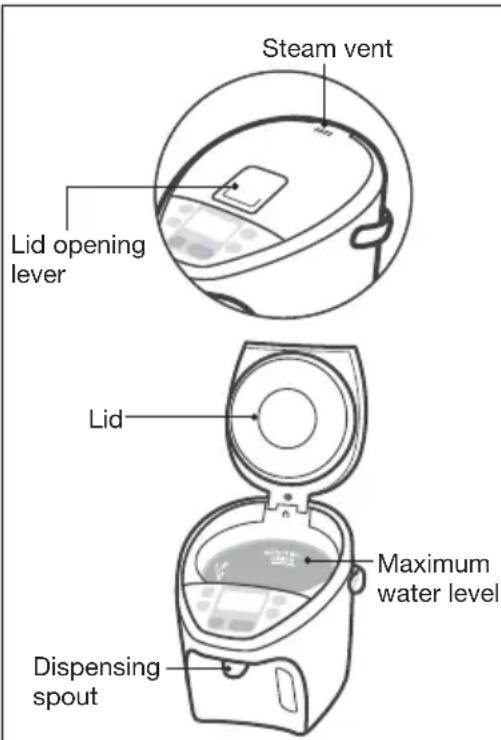
- Do not let the unit fall over. Do not lift, tilt or shake the unit or carry it by the lid. Even when the dispenser key is locked, hot water may leak through the dispensing spout and the steam vent, causing burns if the unit falls over or is tilted.
- Do not pour in water above the maximum water level indication line. If the appliance is overfilled, boiling water may be ejected.
- Do not close the lid by force. Hot water can spill causing burns.
- Do not boil anything other than water. Do not heat tea bags, tea leaves, milk, alcohol or anything other than water which may cause it to spurt out hot liquid or steam and cause burns. The water tube may also get clogged, the inner container may burn or corrode, and the fluororesin insulating coating may peel off.
- Do not block the steam vent. Hot water can overflow causing burns.
- Do not throw away the remaining hot water while the lid is attached. If the lid comes off, hot water may splash causing burns.
- Do not touch the steam vent. This may cause burns. Take special care to prevent infants from touching the steam vent.
- Close the lid securely. If the unit topples, hot water may spill out causing burns.


WARNING
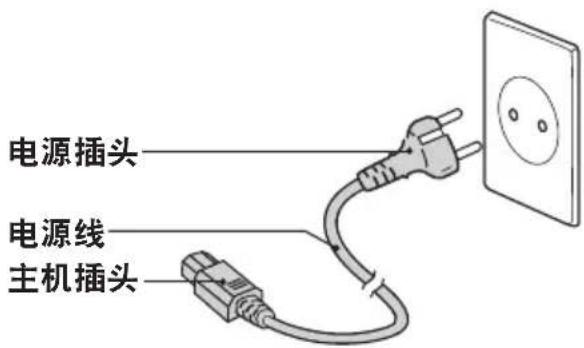
Power Cord

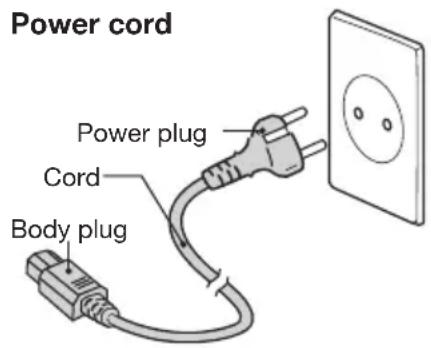
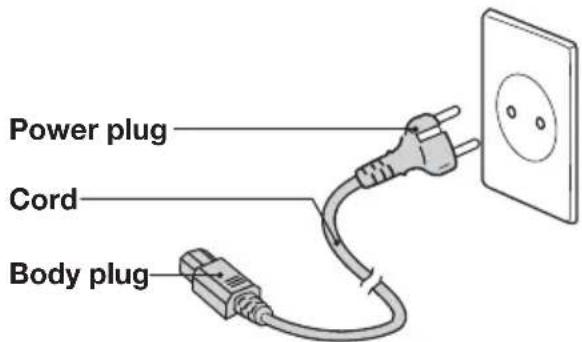
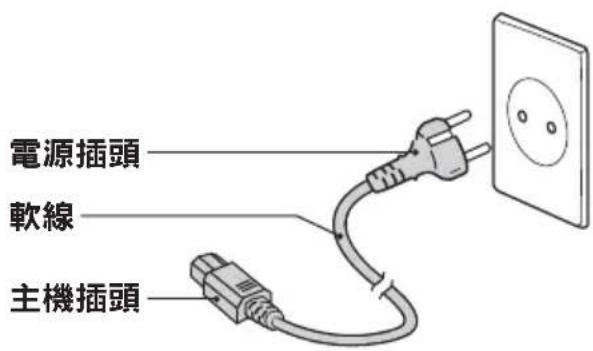
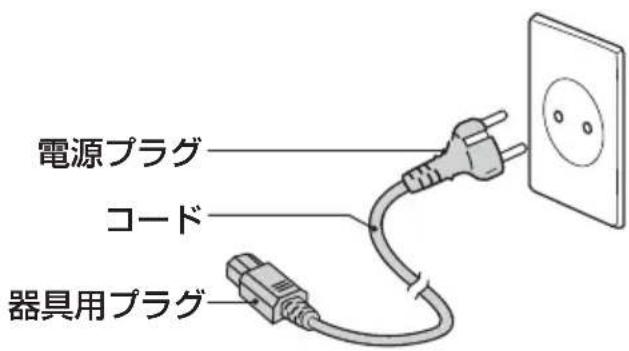
- Never do anything that might cause damage to the cord, power plug or body plug.
Do not damage them, modify them, place hot objects near to them, bend them, twist them, stretch them, place heavy objects on them, or bundle them together. If the unit is used when damaged, electrical short circuit or fire may cause.
→ If the supply cord is damaged, it must be replaced by a special cord available from the manufacturer or an authorized service center (as described in the warranty).
- Do not connect or disconnect the power plug or the body plug with wet hands.
This may cause electric shock.
- Do not allow infants access to the body plug.
You must pay special attention to prevent infants from putting the body plug into their mouths. This may cause electric shock or injury.
- Do not place small metal parts on the body plug.
This may cause electric shock, electrical short circuit or fire.

- Make sure the power plug is correctly inserted into the wall outlet.
If the power plug is inserted improperly it may cause electric shock or generate heat causing fire.
→ Do not use a damaged power plug or a connection in a loose outlet.
- Dust off the power plug or the body plug regularly.
A build-up of dust on the plugs will attracts humidity, which could cause cable damage and the deterioration of insulation causing fire.
→ Remove the plugs and clean them with a dry cloth.
- Use a single outlet that matches the power rating of the unit.
Plugging multiple appliances into one outlet may generate heat and cause fire.
During use

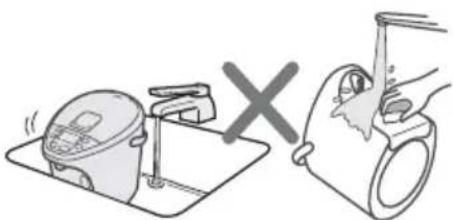
- Do not immerse the unit in water or splash water over it.
- Do not supply water directly from the tap or place the unit in a sink where the bottom may get wet.
- Do not turn the unit upside down when the bottom is wet.
This may cause a short circuit and electric shock due to water enters the electrical parts in the main unit.
- Never disassemble, repair or modify the unit.
Any attempt to do so may cause the unit to operate abnormally and may cause fire or injury.
→ Please contact an authorized service center (as described in the warranty) for a check or repair.
- Do not use to store ice.
Condensation will occur, creating a potential source of electric shock and malfunction.

- Discontinue using the appliance immediately when steam is ejecting over 15 minutes and it does not switch to keep-warm function.
This may cause burns.
→ Unplug the appliance immediately and contact an authorized service center (as described in the warranty) for a check or repair.
- Use a power outlet which is grounded.
- The power plug of this appliance is designed for a grounded outlet.
(Use of ungrounded power may cause a malfunction or electric shock due to electrical leakage.)

CAUTION
To Prevent Burns

- Do not place the unit on unstable surfaces. The appliance may topple over causing burns.
- Do not open the lid or dispense hot water while boiling. Splashing hot water or steam may cause burns.
- Do not rotate the unit while dispensing hot water. Splashing hot water may cause burns.
- Do not touch the hot parts of the unit during use or shortly after use.
- Do not touch the lid opening lever when carrying the unit. The lid may open causing burns and other injury.

- When opening or closing the lid, keep hands away from the steam.
- Wait until the unit is cooled down before cleaning.
A hot appliance may cause burns.
→ When disposing hot water, be careful not to get burned.
Power Cord

- Do not use a different power cord and do not use this power cord with any other device. (Do not use a power cord other than the one designed specifically for the unit.) It may cause malfunction or fire.

- When the unit is not in use, unplug the power plug from the wall outlet. Deteriorating insulation may cause electric shock and/or fire.
- When unplugging the unit, pull by the power plug - not the cord. Electric shock and short circuit may cause fire.
During use

- Do not use the unit on surfaces that can be affected by heat for a long time. The unit may get discolored or break up.
- Do not place near walls or furniture. Steam and heat could damage walls and furniture, causing a change in color and shape.
- Do not let water spill on the plugs of the power cord. This may cause electric shock.

- Replace gasket if it discolors whitish. (→. EN16) Otherwise it may cause hot water to spill out when it is leaned or knocked down accidentally.
Part Names and Handling Instructions
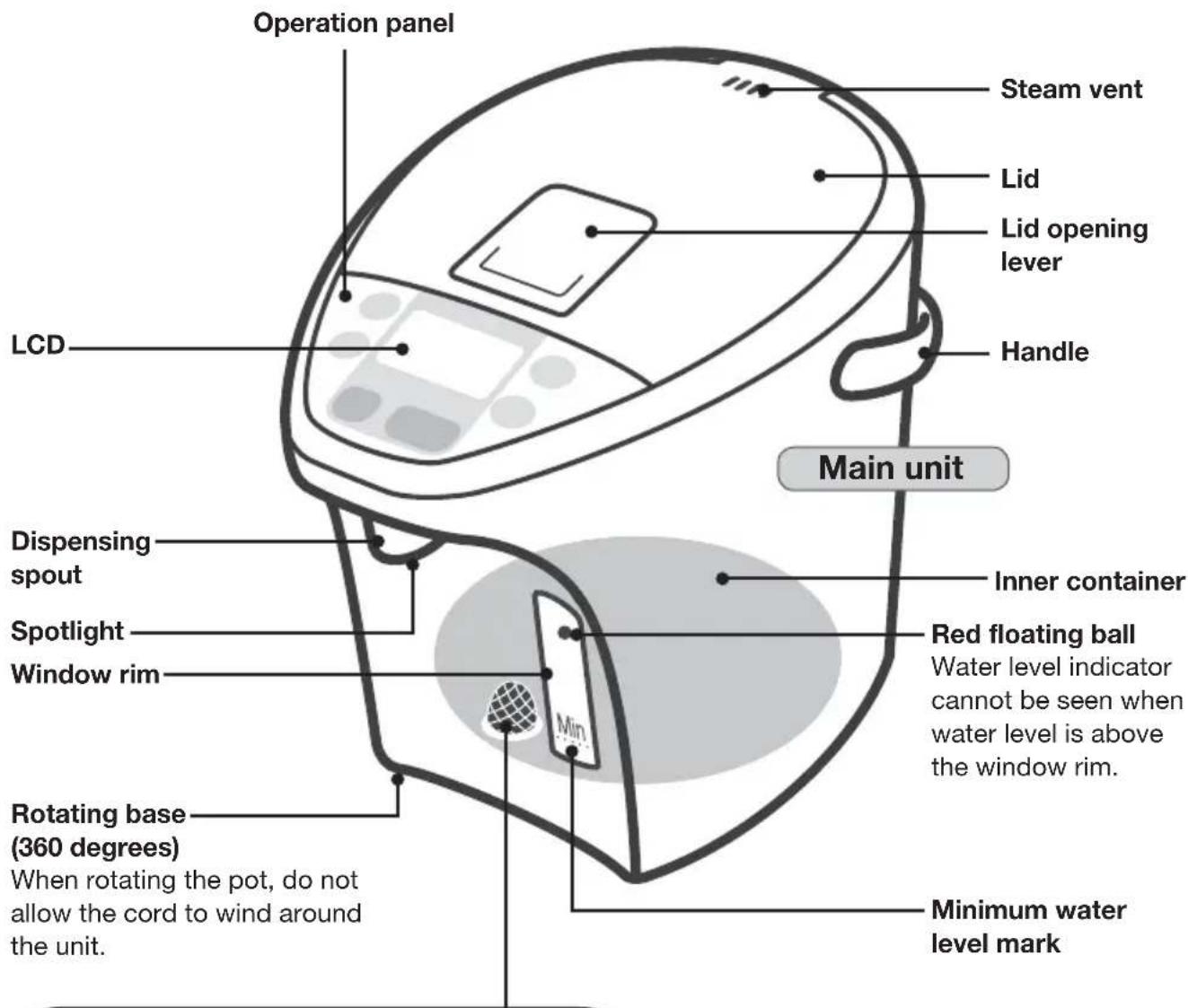
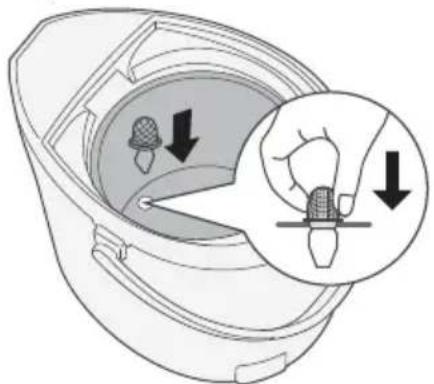
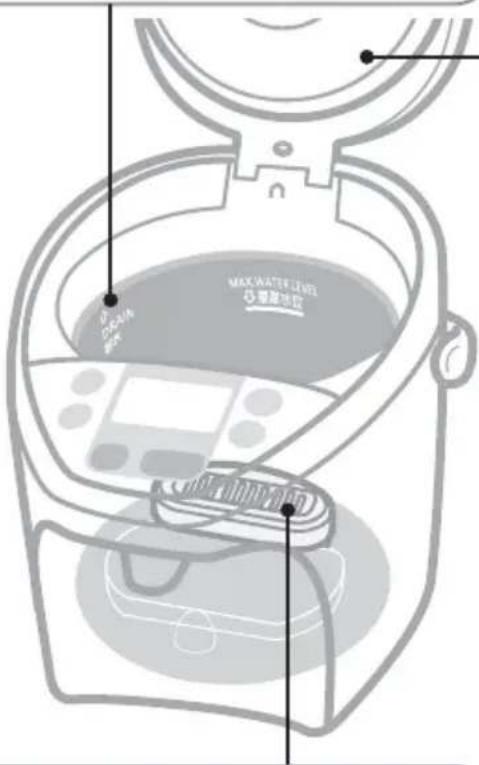
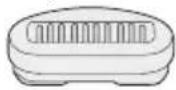
Mesh filter
(Replaceable part)
It may have come off from the bottom of the inner container.
Push it completely into the correct position.
(→. EN16)
Power cord
Before you use this pot for the first time
Boil water and dispense it to clean the inner container and water flow pipe as below steps. (EN7)
1 Boil some water.
2 Dispense the hot water.
3 Empty the inner container via DRAIN mark.
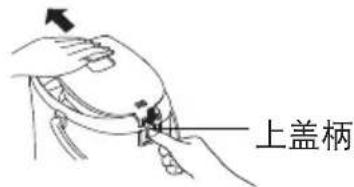
How to Remove the Lid
① Press and lift the lid opening lever to open the lid.
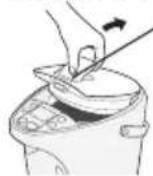
How to close : Push until "click" sound.
② Pull it up slantwise while pressing the lid lever.
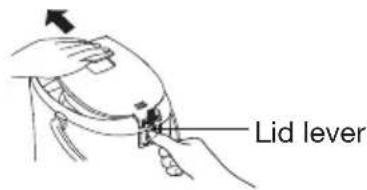
How to set : Insert the lid slantwise.
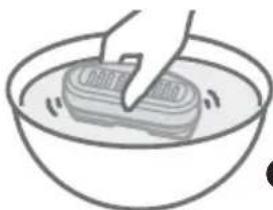
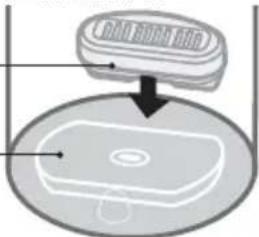
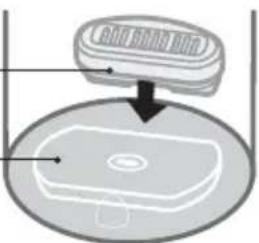
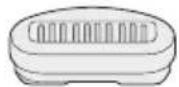
How to set the ceramic filter
① Shake in water.
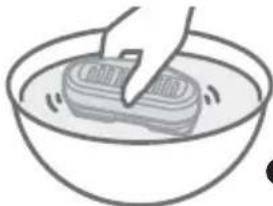
natural_image
Simple line drawing of a hand washing a rectangular object in a bowl (no text or symbols)② Set it at the back.
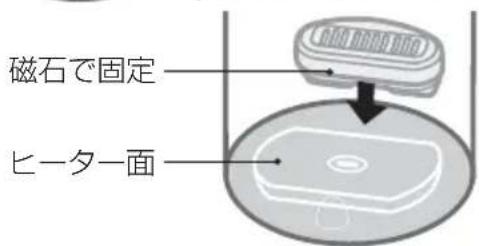
Fix with magnet
Heater surface
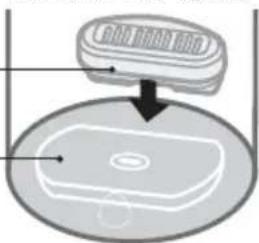
natural_image
Diagram of a device with a lid and base plate, showing internal components (no text or symbols)Handling
- Do not wash with detergent. (It causes remaining odor)
- Do not attach on heater surface. (It causes malfunction)
- Do not put it close to objects sensitive to magnetic force such as credit card.
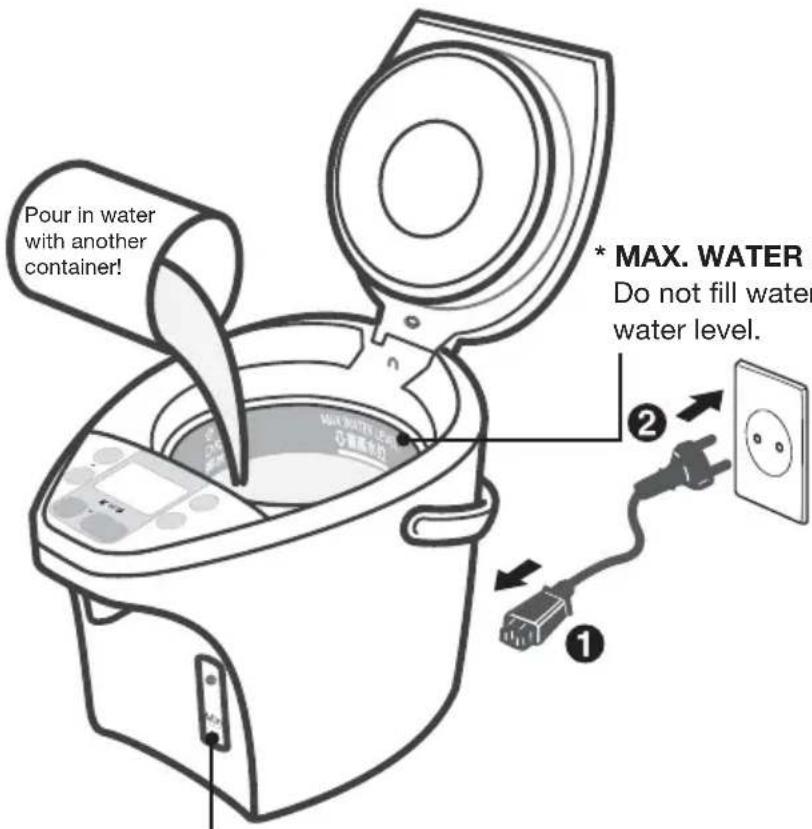
* Minimum water level
Fill the water higher than the minimum water level.
To reduce the chlorine in the water (Long Boil)
Press
除氯
key (Light flash)
(Press one time while water is being boiled, or press twice while water is being kept warm. Extends the boiling time by about 7 minutes to reduce the chlorine by approximately 85 % in the water.
- Press
除氯
再沸腾
key again to return
to normal boil.
After adding water
In case it does not start boiling automatically.
除氯
再沸腾
Long Boil
Reboil
Press the button and the light will be on.
When the unit is not in use
Unplug, and remove the lid. Pour out any remaining hot water slowly via the DRAIN mark.
Lid release part
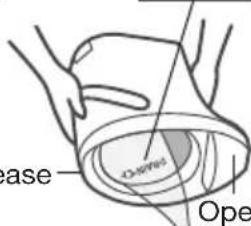
Operation panel
Requests
- Do not pour out water too swiftly. (If water splashes over lid release part or operation panel, it may cause a malfunction.)
- Do not leave water in the inner container. ( It may cause the inner container to corrode or smell. )
Connect the power plug after filling the water and closing the lid. (→.EN7)
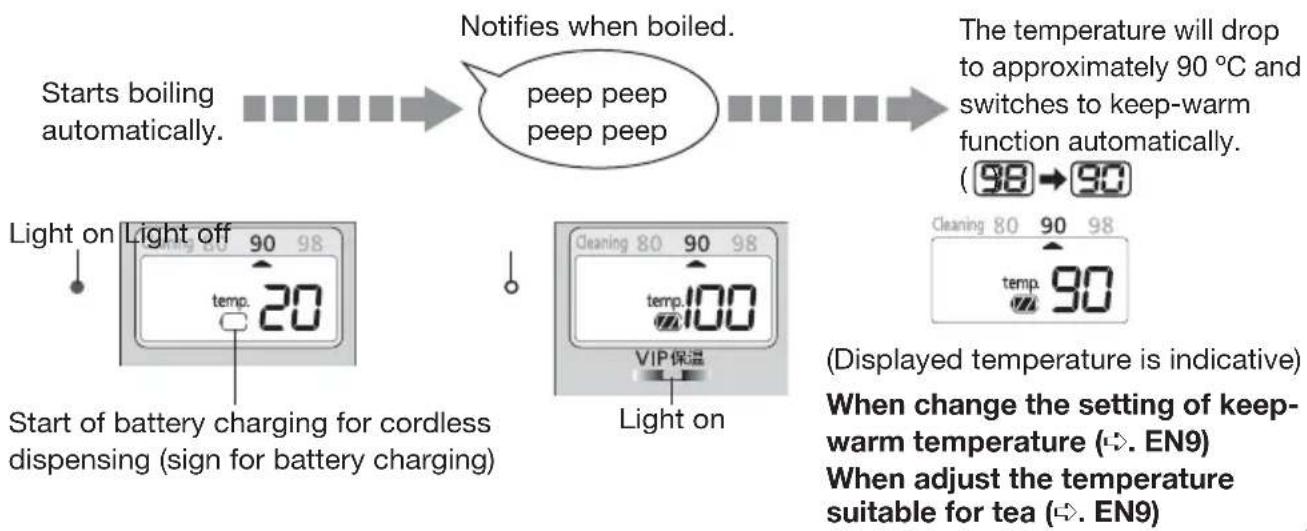
flowchart
graph LR
    A["Starts boiling automatically"] --> B["Notifies when boiled."]
    B --> C["peep peep peep"]
    C --> D["The temperature will drop to approximately 90 °C and switches to keep-warm function automatically. (98→90)"]
    E["Light on Light off 90 98 temp. 20"] --> F["Start of battery charging for cordless dispensing (sign for battery charging)"]
    G["Light on"] --> H["Light on"]
    I["Cleaning 80 90 98 temp.100 VIP 保温"] --> J["(Displayed temperature is indicative) When change the setting of keep-warm temperature (↔. EN9) When adjust the temperature suitable for tea (↔. EN9)"]
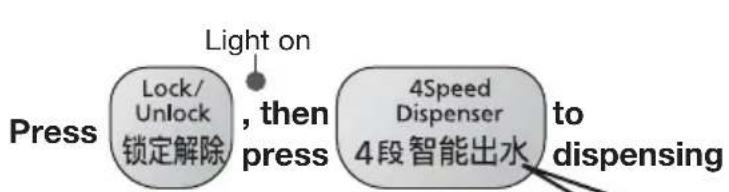
flowchart
graph LR
    A["Press"] --> B["Lock/Unlock 锁定解除"]
    B --> C{, then press}
    C --> D["4Speed Dispenser 4段智能出水 to dispensing"]
    D --> E["Light on"]
Automatically locked in 10 seconds after dispensing is finished.
When dispensing while cord is removed. (Cordless dispensing)
Guideline for dispensing volume
| Battery charge volume | Dispensing volume |
| Approx. 3 L or more *1 | |
| 1.5 L or less |
Volume of water dispensed varies depending on degree of pressing and dispensing time.
| Dispensing period (Amount of time press continuously) | |||
| Less than 5 seconds | From 5 to 12 seconds | More than 12 seconds | |
| Press slightly | |||
| Press strongly | |||
* Be careful for splash of hot water when press strongly.
When cordless dispensing
| LEVEL | LEVOnly |
*1 Full water volume may not be indicated if frequently dispensed.
- Indication light turns off and cannot dispense hot water after 8-10 hours even not dispensed.
Water temperature drops to approximately 90 °C in 3 hours after boiling at room temperature 20 °C. * Temperature falls quicker if water volume is smaller.
Press 再沸腾 key to reboil water that is being kept warm.


After a few minutes, water will be boiled.
- The keep-warm temperature setting is left unchanged.
Time required for the reboil procedure
From 98 keep-warm : approx. 4.5 min.
From 90 keep-warm: approx. 6.5 min.
From 80 keep-warm : approx. 10.5 min.
(Amount of water: Maximum Room temperature: 20 °C)
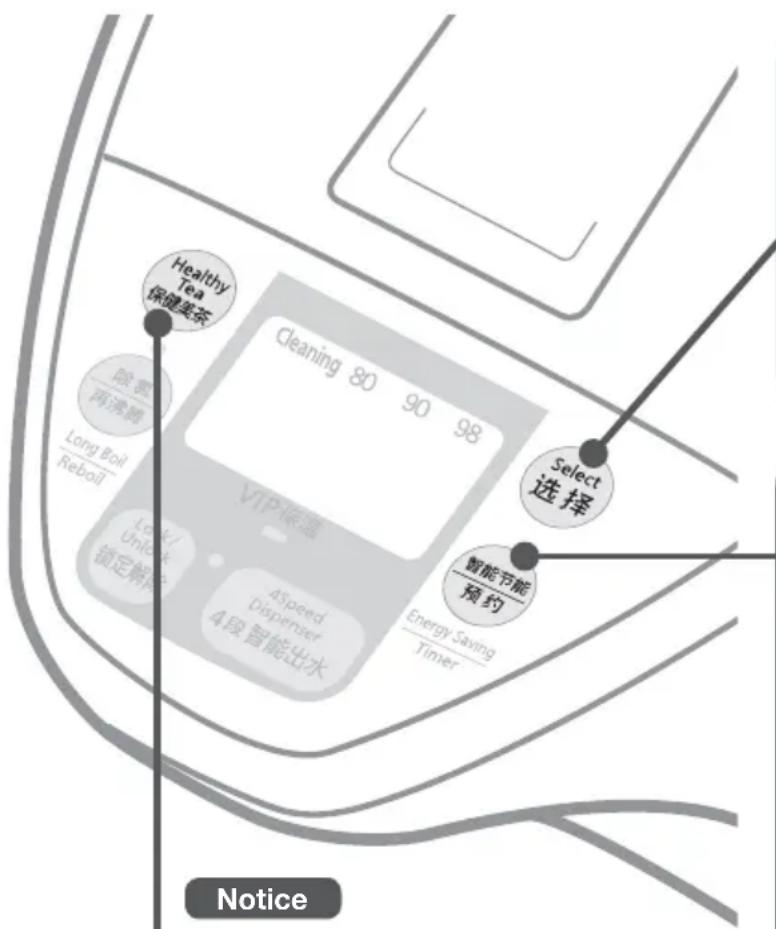
Notice
- The keep-warm temperature or the timer can be set while the water is being boiled or being kept warm.
- After power is restored in the event of a power and LCD failure, the keep-warm temperature will be automatically set to "90", even if the timer or the "98" or "80" keep-warm function was previously selected.
Keep-warm Function
- Energy can be saved if keep-warm temperature is lower.
- Approximately 80 °C of water is the suitable for natural leaf tea.
When the unit will not be used for a short time, such as when you go out for a day...
Setting the timer
- While setting the timer, the electrification of heater stops.
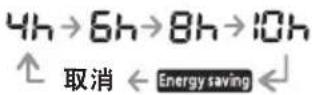
Setting the energy saving
- Control the heater according to the usage. Heater is on at the time interval when it is reached dispensing time and it will be turned off automatically to save the energy on keep-warm function.
- This is recommended when dispense time is regularly fixed.
Make the water suitable for brewing tea.
(Healthy Tea)
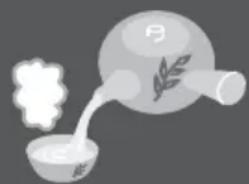
natural_image
Illustration of a steaming bowl with a sprout and a conical flask containing a leafy grain (no text or symbols)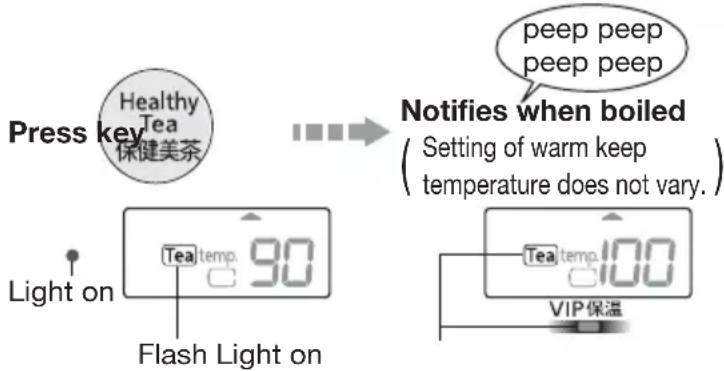
Notice
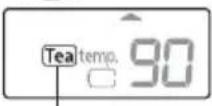
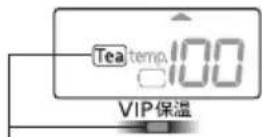
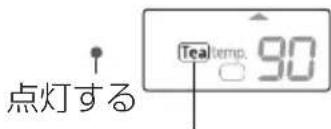
Setting is released when water is added while Tea
lights on. (Thights off)
Setting will be released when
buttons are pressed while Tflashes.


Each time

pressed, “▲” mark will shift to the next choice and change the keep-warm temperature.
Cleaning
80 90 98

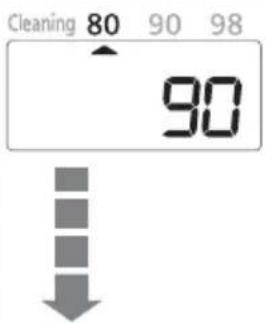
Time required to reach the settled preset temperature
90→80 keep-warm: approx. 4.5 hours
98→90 keep-warm:approx.3 hours
(Amount of water: Maximum Room temperature: 20 °C Initial keep-warm setting: 90)
After a short time, water will be kept warm at approximately 80 °C.
When the water will start boiling 8 hours later
8h
Remaining time will be indicated on 1 hour base.
When cancel the timer, press (智能节能预约) key again
Each time

pressed, the light will shift to the next choice.


( It will return to the temperature indication )
8 hours later, timer will turn off and water starts boiling
When the water reaches the boiling temperature, keep-warm function starts at the settled temperature.
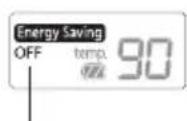
If set up "Energy saving"
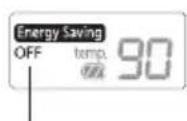

Boiling started before dispensing time and kept at preset temperature.
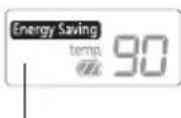
"OFF" is displayed when not dispensed. "OFF" lights off.
Caution
While Energy Saving is set, boiling starts automatically at dispensing time.
Circuit breaker may be tripped if used together with other equipment in a same line.
Time for boiling up
After filled water : approx. 41 min.
From 98 keep-warm: approx. 14.5 min.
From 90 keep-warm: approx. 16.5 min.
From 80 keep-warm: approx. 20.5 min.
(Amount of water: Maximum Room temperature: 20 °C)
Caution
A lot of steam may occasionally come up.
- Once start using, it will record the time interval when hot water is dispensed.
- After using for a week, it will automatically increase the keep-warm temperature according to the record of the week before.
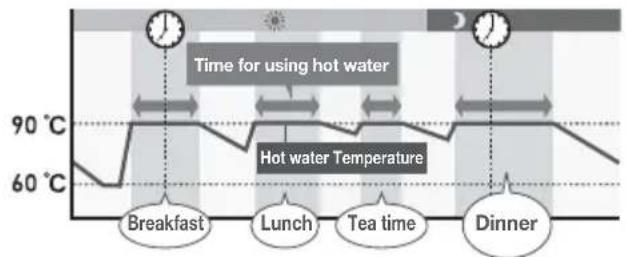
(Water temperature of approximately 60 °C is maintained as the lowest.)
Care & Cleaning
Daily Maintenance
Clean with Citric Acid
(Before cleaning, be sure to disconnect the power plug from outlet, dispense water and cool down the unit.)
Main unit and lid
Clean with a damp, well-wrung cloth.
- Do not wet or soak the main unit in water.
If water enters the main unit from the bottom or from the dispensing spout, it can also get into the electrical components in the main unit and may cause a malfunction.
natural_image
Illustration showing a kitchen appliance and a hand holding a cup, both without any text or symbols- Do not use detergents. (They may leave an odor.)
- Do not use benzine or thinner. (They may damage the surface.)
Inner container
Clean with a wet soft sponge.
- Do not use polishing powder, a scrub brush or a nylon brush.
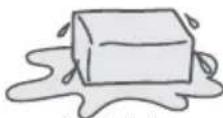
They may damage the fluororesin finish of the inner container.
About "Scale"
While you are using this unit, minerals contained in the water (like calcium) can get stuck on the inner container or on the mesh filter. This is called “scale”, and it is harmless.
- Milky-white gritty surface (caused by calcium)
- White or glittering floating material (crystals of minerals)
- Discoloration in the finish like dark brown, gray, or green areas (metallic ion made on the fluororesin covering)
These are not discoloration or corrosion of the inner container itself, nor are they flakes from the fluororesin covering.

Clean the inner container using citric acid. (→. EN12)
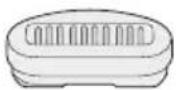
Ceramic filter
Shake in water roughly every few months, and scrub the surface with soft sponges.
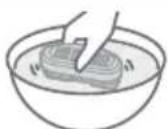
- Do not wash with detergent. (It causes odor remain)
- Do not use dishwasher with dryer or dish dryer. (It causes deformation)
Mesh filter
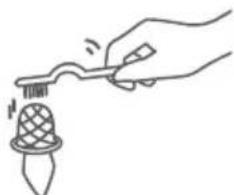
Clean the filter with a brush. When filter is clogged, water does not flow smoothly.
* After cleaning the filter, be sure to reattach it to the inner container.
natural_image
Line drawing of a hand using a tool to apply a decorative item (no text or symbols)When storing the unit
- Dry it thoroughly.
- Put it into a plastic bag and seal the bag to keep insects from getting in.
Once every two or three months to clear scale.
How to clean with citric acid
1 Make sure that the mesh filter is attached to the inner container.
2 Put citric acid in the inner container.
- Amount of citric acid to be used at one time: 80 g (two packages) or seven level tablespoons.
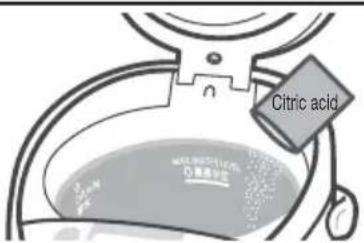
For citric acid, please contact an authorized service center (as described in the warranty). (Model No: SAN-80N)
* Follow the directions for cleaning printed on the citric acid package.
* Since the citric acid used for cleaning is a food additive, it is harmless to humans.
3 Add water to the maximum water level mark, and mix the citric acid and water well. Close the lid.
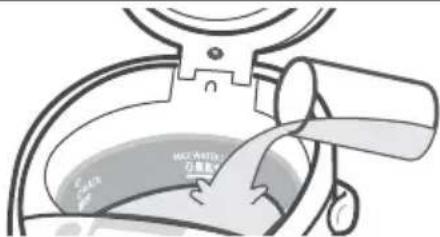
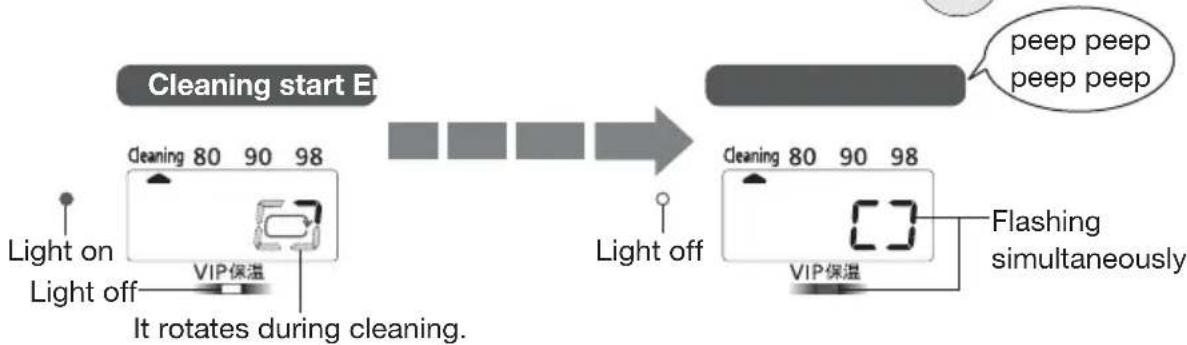
4 Connect the power plug, and choose "Cleaning" by pressing
Select 选择
flowchart
graph LR
    A["Light on Light off"] --> B["Light off"]
    B --> C["VIP保温"]
    C --> D["It rotates during cleaning."]
    D --> E["Light off"]
    E --> F["VIP保温"]
    F --> G["Flashing simultaneously"]
    G --> H["peep peep peep peep"]
    I["Cleaning start E"] --> J["Green Screen"]
    K["Green Screen"] --> L["Green Screen"]
    M["Green Screen"] --> N["Green Screen"]
    O["Green Screen"] --> P["Green Screen"]
5 Dispense some water, then unplug, remove the lid and drain away the hot water via the DRAIN mark. (EN7)
6 Refill with water and boil it to remove the smell of the citric acid. Then throw the hot water away in the same way as step 5.
- To remove any discoloration from the area above the maximum water level, rub the inside lightly with a wet soft sponge.
- If the discoloration cannot be removed by rubbing, clean the inner container several times using citric acid.
- When washed without removing ceramic filter, wash the ceramic filter under running water and fix it in the inner container. Boil water and drain away.
Requests
- Make sure only use citric acid for thermo pot washing.
- Do not fill water above maximum water level.
- Fill the inner container only with tap water (do not fill with hot water). Hot water may spout out causing burns.
Troubleshooting
Before calling a service supplier, please check the following possible causes.
| If... Possible ca | e How to fix | See page | |
| White or glittering flakes floating in the hot water. | The cause of this is “scale”. It is not flakes of fluororesin.* Water with a large content of minerals is more likely to cause a scale.e.g.Mineral waterLonized water | Clean the inner container with citric acid.If scale still remains after cleaning with citric acid a few times, plastic part of the lid may be damaged.Replace the plastic part. | EN11EN12 |
| Rough milky white substances are adhered to inner container. | |||
| Boiling sounds become louder. | When “scale” adhered, boiling sounds become louder. | ||
| Hot water has odors of chlorine. | Odors of chlorine remain depending on the amount of chlorine in tap water. | Press to reduce the chlorine. | EN7 |
| Hot water has an unpleasant odor. | When the unit is new, resin used in the manufacturing may give off a mild odor. This will disappear with use.If the unit is placed on surfaces such as a vinyl sheet, the odor may be carried over into the water.The ceramic filter has been used over a year. | EN11 | |
| Hot water comes out by itself. | Water has been added above maximum water level. | Lower the water level. | - |
| Hot water does not flow out smoothly. | The mesh filter may be clogged with “scale”.When scale is accumulated in the inner container and remaining hot water is low, hot water does not flow out smoothly.Immediately after boiling, hot water may not flow out smoothly. | Clean the inner container with citric acid.If the “scale” cannot be removed, replace the filter. | EN11 |
| Hot water does not dispense. | Is the unit locked automatically? | Press Lock/ Unlock锁定解除 | EN7 |
| Is the sign for battery charging turned off (☐) when using the unit without plugged in? | Plug in to charge the battery. | EN7 | |
| Plastic part of the lid is damaged. | Plastic parts that come into contact with heat or steam, it may be damage upon frequency of use. When it is getting roughness on the plastic part, replace it. | - | |
| If... Possible ca | e How to fix | See page | ||
| Energy saving function | Temperature of hot water is low. | The keep-warm temperature will drop when the energy saving function by turning off the heater. (It drops to a minimum of 60 °C.) | Reboil again.  | EN7 |
| The temperature indication goes up and down itself. | When the dispensing time is getting close, it starts boiling automatically.When the time is changed to use the hot water, the unit update the new time and it makes boiling time change. (The boiling time is updated based on the new memory.) | EN9 | ||
| The energy saving function is not activated or canceled. | When the unit is plugged in initial use, this function is not activating without having memory.Over 10 hours later after unplug, memory will lose. | - | ||
| The unit start boiling suddenly. | Is the energy saving function set? | Release the energy saving function. | EN9 | |
| The unit looks like power is off. | ||||
| The healthy tea function is canceled. | When tis flashing, other button is pressed.When lights on, water is added. | Press Healthy button. | EN9 | |
| Lamp flashes while buzzer sounds (Power supply stops) | Overheating protectionTo prevent overheating, this is activated when it boils without water.Is water filled higher than minimum water level mark?Is the lid left opened when water is filled ? | Fill the water higher than minimum water level mark, close the lid and press除氯再沸器 | - | |
| Flashes alternatively | It may light on:when hot water is filled. depending on method of filling water.Is citric acid settled at the bottom of inner container while citric acid washing ? | Press除氯再沸器 | - | |
| Once disconnect the power plug, mix with chopsticks and wash after citric acid is distributed. | EN12 | |||
Boiling without water will cause odor and change the color of fluorine resin.
Troubleshooting
Before calling a service supplier, please check the following possible causes.
| If... Possible can be How to fix | |||||||||||||||||||||||||||||||||||||||||||||||||||||||||||||||||||||||||||||||||||||||||||||||||||||||||||||||||||||||||||||||||||||||||||||||||||||||||||||||||||||
 | [H260] |  |  | [04C8] |  |  | [3DT0] |  |  |  | [BHT8] |  |  |  |  |  |  | ||||||||||||||||||||||||||||||||||||||||||||||||||||||||||||||||||||||||||||||||||||||||||||||||||||||||||||||||||||||||||||||||||||||||||||||||||||
| The temperature indication goes up and down greatly. | |||||||||||||||||||||||||||||||||||||||||||||||||||||||||||||||||||||||||||||||||||||||||||||||||||||||||||||||||||||||||||||||||||||||||||||||||||||||||||||||||||||
| The temperature indication is still on when it is unplugged. | |||||||||||||||||||||||||||||||||||||||||||||||||||||||||||||||||||||||||||||||||||||||||||||||||||||||||||||||||||||||||||||||||||||||||||||||||||||||||||||||||||||
- If it cannot be recovered or feel something strange, disconnect the power plug, reconnect after 30 seconds and operate it again.
- Inside lid may turn yellow, but no harm for operation.
- “Clickety-clack” sound caused when open and close the lid is the sound caused by the valve swing to prevent the hot water run off when the unit fall over in accident.
- Outside body becomes approximately 45 °C while keep-warm when the room temperature is high.
The indicator lights flash alternately and displayed H1, H2.


Replacement of Parts
Rubber gasket set Mesh filter
Replace gaskets if they crack, lose their pliancy or, for any other reasons which allow steam to escape from between the inner container and the lid.
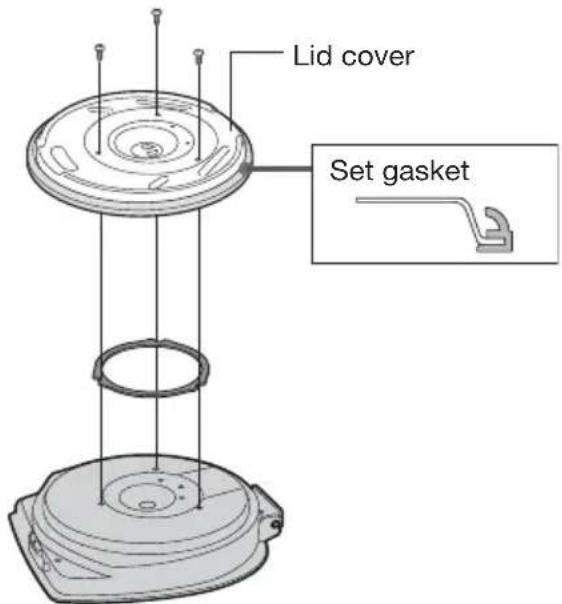
Remove lid, unscrew 3 tapping screws and remove the lid cover.
Exchange the gaskets and then place the lid cover back and secure with the tapping screws.
Replace the filter, when foreign matter which clog the filter cannot be removed, even after you scrub with a cleaning brush, etc.
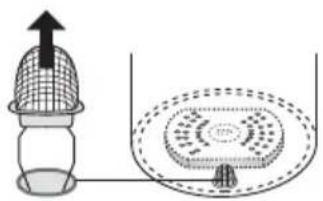
natural_image
Diagram showing a netting device with an upward arrow and a circular component inside, connected to a container (no text or symbols)Ceramic filter
Rough replacement period : 1 year
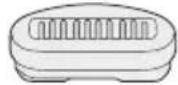
For replacement parts, please contact an authorized service center (as described in the warranty).
| Part name Part No. |
| Rubber gasket set APH65-61300S |
| Mesh filter APB97-48000U |
| Ceramic filter APC58H667-0U |
Specifications
| Model No. NC-SSA400 | ||
| Power 220 V ~ 50 - 60 Hz | ||
| Power consumption 875 W | ||
| Power consumption while keeping warm *1 (per hour) (approx.) | 98 keep-warm 19 | Wh |
| 90 keep-warm 16 | Wh | |
| 80 keep-warm 13 | Wh | |
| Dimensions (approx.) (where handle is turned.) | Width 24.7 cm | |
| Depth 34.5 cm | ||
| Height 33.9 cm | ||
| Mass (approx.) | 3.5 kg | |
| Rated capacity 4.0 L | ||
| Overheating prevention unit Thermal fuse | ||
| Boiling time *2 (approx.) 31 min. | ||
| Cleaning time with citric acid *2 (approx.) 46 min. | ||
*1 : Full of water, where room temperature is 23 °C.
*2 : Full of water, where room and water temperature are 20 °C.
- Prescribed performance may not be maintained in particular areas such as highland or extremely cold region.
- Drain water if not used such as during winter. Remaining water may freeze and damage parts.
- Power consumption while keeping warm will be changed by following user environment.
- This product is not suitable for use in countries or regions of differing mains frequency or voltage. Moreover, service is not available.
| Checks | Check your well-used electric thermo pot! | |
 | Have you noticed any of the following?●The power plug and the power cord become abnormally hot.●The power cord is damaged or power failure when is touched.●The main body is deformed or abnormally hot.●Steam is ejecting over 15 minutes and the thermo pot does not switch to keep-warm function. | Stop using the thermo potTo prevent accidents, stop using the thermo pot, remove the power plug, and ask an authorized service center (as described in the warranty) to perform a check. |
安全注意事项
务必遵守
电源线
natural_image
Illustration of a hand pouring liquid into a container with a tool (no text or symbols)怎样关紧:向下按,直到听见“咔哒”声。
② 按上盖柄时斜着向上拉。
如何安装:斜着插入上盖。
如何安装陶瓷过滤器
① 在水中摇晃。
natural_image
Simple line drawing of a hand placing a rectangular object into a bowl (no text or symbols)② 在背后安装它。
用磁铁固定
加热器表面
natural_image
Diagram of a device with a lid and base plate, showing internal components (no text or symbols)处理
natural_image
Illustration of a steaming bowl with a leaf inside, emitting vapor (no text or symbols)按

按钮

煮开时发出
(保温温度设置不变。)

点亮
闪烁 点亮
注

灯点亮时加水,设置释放。(Te灯熄灭)

闪烁时,如果按下 丑,设置将释放。


每次按下

达到固定的预设温度需要的时间
90→80 保温:约4.5小时
98→90 保温:约3小时
( 水量: 最大 室温: 20^ 初始保温设置: 90 )
不久之后,水温将保持在约80℃左右。
当8小时以后开始煮水时
8h
将以1小时为基数指示剩下的时间。
取消定时器时,再按一次

按钮
8小时后,定时器关闭,开始煮水
水煮开时,保温功能按固定温度启动。
每次按下

此灯会平移到下一个选择。
(将返回温度指示)
如果设置了“智能节能”模式

natural_image
Illustration showing a kitchen appliance and a hand washing a cup (no text or symbols)内胆
用湿海绵清洁。
natural_image
Hand holding a tool interacting with a decorative object (no text or symbols visible)储藏热水瓶时,
natural_image
Diagram showing a container with a mesh lid and a submerged circular object inside, connected by a pipe (no text or symbols)陶瓷过滤器
大致更换周期:1年
電源軟線
natural_image
Simple line drawing of a hand pressing down on a bowl containing a rectangular object (no text or symbols)② 設至後部。
用磁鐵固定位置
加熱器表面
natural_image
Diagram showing a device with a lid and base plate, no text or symbols present處理
natural_image
Illustration of a steaming bowl with a leaf symbol inside, connected to a conical flask (no text or symbols)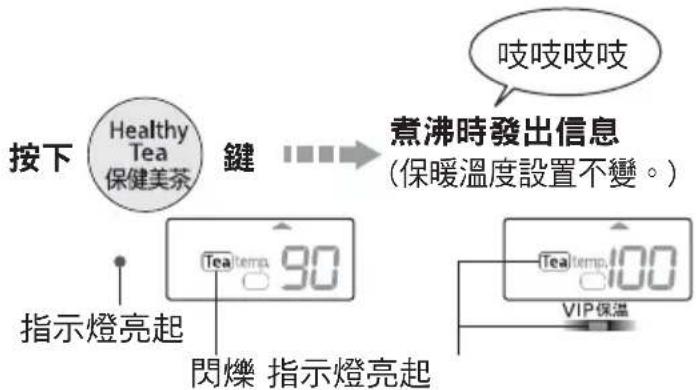
注意
降至所設定的保溫溫度時所需的時間
90→80 保溫:約4.5小時
98→90 保溫:約3小時
natural_image
Illustration showing a kitchen appliance and a hand holding a mug, both without any text or symbols内瓶
使用濕的軟海綿清洗。
natural_image
Hand holding a tool interacting with a small object (no text or symbols visible)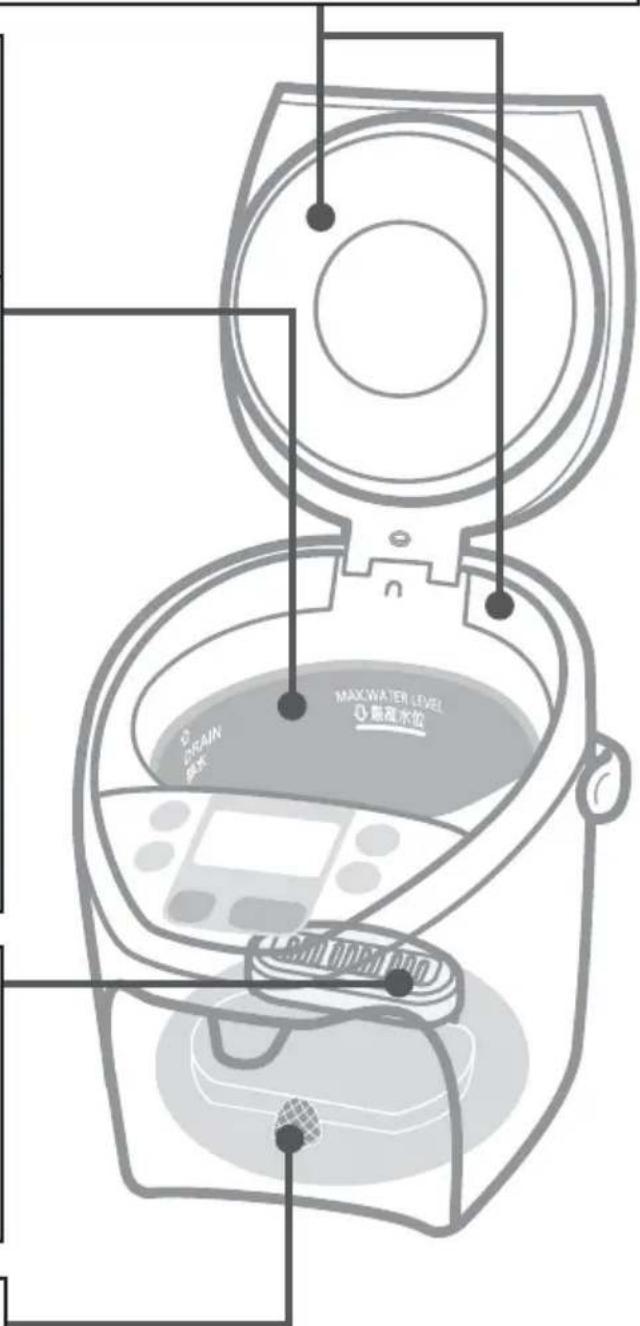
natural_image
Diagram of a mechanical device with a handle and base, showing no visible text or symbolsnatural_image
Diagram showing a container with an upward arrow and a circular container with internal patterns (no text or symbols)陶瓷濾器
大致更換時間:1年
電源コード
natural_image
Simple line drawing of a hand cleaning a bowl with a lid (no text or symbols)② 奥側に取り付ける
natural_image
Illustration of a steaming bowl pouring liquid from a conical flask with a leaf symbol (no text or labels)
を押す
沸き上がったらお知らせ
(保温温度の設定は 変わりません。)
湯温が設定温度になるまで
90→80 保温:約4.5時間
98→90 保温:約3時間
natural_image
Illustration showing a rice cooker and a hand holding a mug, both without any text or symbols内容器
ぬれたやわらかい
スポンジでこする
磨き粉・たわし・ナイロン
たわしは使わない。
(フッ素樹脂が傷つく原因)
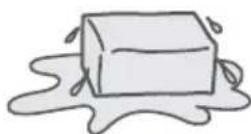
湯あかが付着してきます!
natural_image
Diagram showing a device emitting heat or airflow from a top panel to a bottom panel, with no visible text or symbols.セラミックフィルター
交換の目安:約1年
natural_image
Simple line drawing of a heart shape with a small plug icon inside (no text or symbols)長年ご使用の浄水ジャーポットの点検を!
こんな症状はありませんか
The Ground Truth image displays a single, solid horizontal line. According to Rule 2 (UNDERSCORE & LINE RULES), this is a stylistic or background line, not a placeholder underscore. Therefore, the OCR result must ignore it and output nothing or only meaningful text. The provided OCR content is "____", which consists of four underscores. This is an incorrect interpretation of the line as a placeholder, violating the rule that stylistic lines must be ignored. The OCR has hallucinated placeholder underscores where none exist in the GT. Hence, the OCR result is inconsistent with the Ground Truth.
[Non-Text]
[Non-Text]
The following table provides the results of the 2018 and 2019 annual earnings per share (EPS) for the first three quarters of 2017, including 2018 and 2019. The EPS values are estimated based on the present year's actual EPS estimate.
[EMPTY]
[Non-Text]
[Non-Text]
[Non-Text]
The Ground Truth image displays a single, solid horizontal line. According to Rule 2 (UNDERSCORE & LINE RULES), this is a stylistic or background line, not a placeholder underscore. Therefore, the OCR result must ignore it and output nothing or only meaningful text. The provided OCR content is "____", which consists of four underscores. This is an incorrect interpretation of the line as a placeholder, violating the rule that stylistic lines must be ignored. The OCR has hallucinated placeholder underscores where none should exist in the GT. Hence, the OCR result is inconsistent with the Ground Truth.
......
The Ground Truth image displays a single, solid horizontal line, which is a stylistic or background element (like a rule line on paper). According to Rule 2, such lines must be ignored by the OCR result. The OCR content provided is "", which consists of no characters. Since the OCR output correctly ignores the stylistic line, it complies with Rule 2. Therefore, the OCR result is consistent with the Ground Truth.
The Ground Truth image displays a single, solid horizontal line, which is a stylistic or background element (like a rule line on paper). According to Rule 2, such lines must be ignored by the OCR result. The provided OCR content is "____", which consists of underscores. Underscores are not equivalent to a solid line and are not permitted under the “Stylistic/Background Lines (Ignore)” rule. Outputting underscores for a solid line constitutes an error, as it misrepresents the visual element and violates the instruction to ignore stylistic lines. Therefore, the OCR result is inconsistent with the Ground Truth.
[Non-Text]
The Ground Truth image displays a single, solid horizontal line. According to Rule 2 (UNDERSCORE & LINE RULES), this is a stylistic or background line, not a placeholder underscore. Therefore, the OCR result must ignore it and output nothing or only meaningful text. The provided OCR content is "____", which consists of four underscores. This is an incorrect interpretation of the line as a placeholder, violating the rule that stylistic lines must be ignored. The OCR has hallucinated placeholder underscores where none should exist in the GT. Hence, the OCR result is inconsistent with the Ground Truth.
[Non-Text]
The Ground Truth image displays a single, solid horizontal line. According to Rule 2 (UNDERSCORE & LINE RULES), this is a stylistic or background line, not a placeholder underscore. Therefore, the OCR result must ignore it and output nothing or only meaningful text. The provided OCR content is "____", which consists of four underscores. This is an incorrect interpretation of the line as a placeholder, violating the rule that stylistic lines must be ignored. The OCR has hallucinated placeholder underscores where none should exist in the GT. Hence, the OCR result is inconsistent with the Ground Truth.
The Ground Truth image displays a long, solid horizontal line, which is a stylistic or background element (like a rule line on paper). According to Rule 2, such lines must be ignored by the OCR result. The OCR content provided is "", which consists of no characters. Since the GT contains no actual text and only a stylistic line, outputting underscores is an error. Therefore, the OCR result is consistent with the Ground Truth.
[Non-Text]
[EMPTY]
Panasonic Corporation
Web site: http://www.panasonic.com
© Panasonic Corporation 2015
PZ05Y698
S0615S0
Printed in Japan
- Panasonic®
- Operating Instructions
- 使用说明书
- 使用說明書
- 取扱説明書
- 目次
- 目錄
- もくじ
- Safety Precautions
- WARNING
- CAUTION
- To Prevent Burns
- Power Cord
- During use
- Part Names and Handling Instructions
- Mesh filter
- (Replaceable part)
- Before you use this pot for the first time
- How to Remove the Lid
- How to set the ceramic filter
- Handling
- To reduce the chlorine in the water (Long Boil)
- Press
- After adding water
- In case it does not start boiling automatically.
- When the unit is not in use
- Unplug, and remove the lid. Pour out any remaining hot water slowly via the DRAIN mark.
- Requests
- Time required for the reboil procedure
- Notice
- Keep-warm Function
- Setting the timer
- Setting the energy saving
- Make the water suitable for brewing tea.
- Each time
- When the water will start boiling 8 hours later
- Time for boiling up
- Care & Cleaning
- Daily Maintenance
- Clean with Citric Acid
- Main unit and lid
- Clean with a damp, well-wrung cloth.
- Inner container
- Clean with a wet soft sponge.
- About "Scale"
- Ceramic filter
- Shake in water roughly every few months, and scrub the surface with soft sponges.
- Clean the filter with a brush. When filter is clogged, water does not flow smoothly.
- When storing the unit
- Once every two or three months to clear scale.
- How to clean with citric acid
- Make sure that the mesh filter is attached to the inner container.
- Put citric acid in the inner container.
- Add water to the maximum water level mark, and mix the citric acid and water well. Close the lid.
- Connect the power plug, and choose "Cleaning" by pressing
- Dispense some water, then unplug, remove the lid and drain away the hot water via the DRAIN mark. (EN7)
- Refill with water and boil it to remove the smell of the citric acid. Then throw the hot water away in the same way as step 5.
- Troubleshooting
- Replacement of Parts
- Rubber gasket set Mesh filter
- Specifications
- 安全注意事项
- 务必遵守
- 电源线
- 如何安装陶瓷过滤器
- 处理
- 按
- 按钮
- 煮开时发出
- 点亮
- 注
- 每次按下
- 达到固定的预设温度需要的时间
- 当8小时以后开始煮水时
- 内胆
- 用湿海绵清洁。
- 储藏热水瓶时,
- 陶瓷过滤器
- 電源軟線
- 處理
- 注意
- 内瓶
- 使用濕的軟海綿清洗。
- 陶瓷濾器
- 電源コード
- を押す
- 内容器
- ぬれたやわらかい
- スポンジでこする
- 湯あかが付着してきます!
- セラミックフィルター
- こんな症状はありませんか
Brand : PANASONIC
Model : NC-SSA400
Category : Thermoflasque