
AV Bridge Mini - Encodeur audio/vidéo Vaddio - Free user manual and instructions
Find the device manual for free AV Bridge Mini Vaddio in PDF.


| Product Type | HD Audio/Video Encoder |
| Model Number | AV Bridge Mini |
| Part Numbers | 999-8240-000 (NA), 999-8240-001 (EU/UK), 999-8240-009 (AU/NZ) |
| Input Video Resolution (Max) | 2160p/30 (HDMI) |
| Output Video Resolution | IP stream up to 1080p/30; USB stream up to 1080p/60 |
| Audio Inputs | 2x MIC/LINE (selectable, with phantom power), 1x HDMI embedded audio |
| Audio Outputs | 2x LINE out, USB 3.0 (PCM audio), IP stream |
| Streaming Protocols | RTSP, RTMP |
| Connectivity | HDMI IN, USB 3.0 (Type B), RS-232, Network/PoE (RJ-45) |
| Power | PoE+ (Power over Ethernet) via included injector |
| Power Consumption | PoE+ (approximately 15W, typical) |
| Mounting | Half-rack mount included; optional dual half-rack and under-table mounts |
| Operating Temperature | 0°C to 40°C (32°F to 104°F) |
| Storage Temperature | 0°C to 40°C (32°F to 104°F) |
| Humidity | Avoid high humidity, condensing environments |
| Regulatory Compliance | FCC Part 15 Class A, ICES-003 Class A, European EMC Directive Class A, IEC/EN 60950-1 Safety |
| Warranty | 2 years limited (parts and labor) |
| Included Accessories | PoE+ power injector with AC cord set(s), half-rack mounting kit, 3-position Phoenix-style connectors (qty 4), Cat-5 cable (6 ft), USB 3.0 cable (6 ft), Quick Start Guide |
| Dimensions | Not specified in manual; typical half-rack width, 1.75" (1U) height |
| Weight | Not specified in manual; approximately 1-2 lbs (estimation) |
| Care and Cleaning | Wipe with a clean, soft cloth; do not use abrasive chemicals |
| User-Serviceable Parts | None; do not attempt to open the device |
Frequently Asked Questions - AV Bridge Mini Vaddio
User questions about AV Bridge Mini Vaddio
0 question about this device. Answer the ones you know or ask your own.
Ask a new question about this device
Download the instructions for your Encodeur audio/vidéo in PDF format for free! Find your manual AV Bridge Mini - Vaddio and take your electronic device back in hand. On this page are published all the documents necessary for the use of your device. AV Bridge Mini by Vaddio.
USER MANUAL AV Bridge Mini Vaddio
Installation Guide for the
AV Bridge Mini
HD Audio/Video Encoder
Document 411-0029-31 Rev C January 2019
Contents
Overview 1.
About this Guide.1....
Features .1.
Unpacking the AV Bridge Mini.2....
A Quick Look at the AV Bridge. Mini. 3.
Connector Panel.3....
Installation 4.
Don't Void Your Warranty! 4
Cabling Notes. 4....
Basic Connections.5....
RS-232 Serial Communication Settings and Port Pin-outs.... 6
Powering Up....6
Next Steps.... 6
Troubleshooting and Care....7
Operation, Storage, and Care....7
Compliance Statements and Declarations of Conformity 8
FCC Part 15 Compliance....8
ICES-003 Compliance 8
European Compliance 9
Warranty and Return Policy.... 10
Photo Credits....14
Index 15
Overview
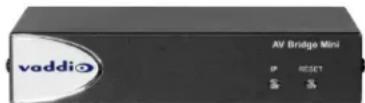
This guide provides information about the AV Bridge Mini HD audio/video encoder:
■ 999-8240-000 AV Bridge Mini, North America
■ 999-8240-001 AV Bridge Mini, Europe/UK
■ 999-8240-009 AV Bridge Mini, Australia/New Zealand
About this Guide
This guide covers:
■ Unpacking the HD audio/video encoder
■ Tips for a successful installation
■ Connection diagram
■ Equipment power-on
Complete product information is available in the Complete Manual for the AV Bridge Mini HD Audio/Video Encoder.
Features
■ Bridges two audio sources and one HDMI camera or other video source into a soft-client conferencing or IP streaming environment (RTSP or RTMP)
■ Simultaneous USB 3.0 and IP streaming, video and audio
■ Delivers IP stream resolution up to 1080p/30 and USB stream resolution up to 1080p/60
■ Accepts up to 2160p/30 from the camera or other video source
■ Audio mixer
■ Phantom power to microphones
■ Power over Ethernet (PoE)
Unpacking the AV Bridge Mini
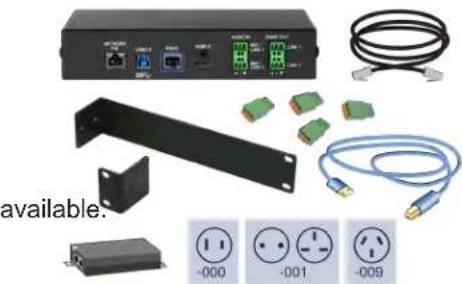
Make sure you received all the items you expected. Here is the packing list for the AV Bridge Mini.
North America: AV Bridge Mini, part number 999-8240-000
Europe and UK: AV Bridge Mini, part number 999-8240-001
Australia and New Zealand: AV Bridge Mini, part number 999-8240-009
■ AV Bridge Mini
■ PoE+ power injector with AC cord set(s)
■ Half-rack mounting kit
■ 3-position Phoenix-style connectors (qty. 4)
■ Cat-5 cable, 6 ft (1.8 m)
■ USB 3.0 cable, type A to type B, 6 ft (1.8 m)
■ Quick Start Guide
Optional dual half-rack and under-table mounts are also available.
Contact us if you can't find the mount you need.
natural_image
Product photo of a network equipment setup including a server, connectors, and cable (no visible text or symbols)A Quick Look at the AV Bridge Mini
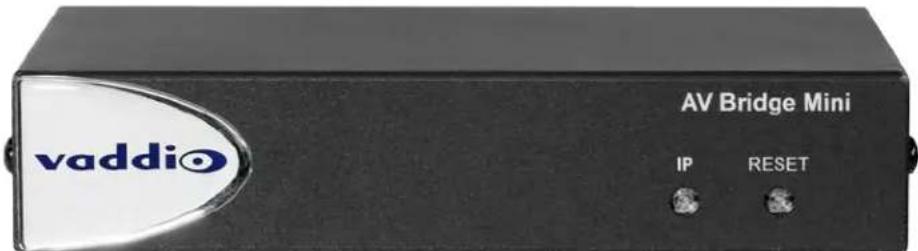
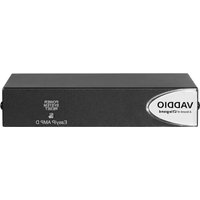
■ IP Address button and indicator light:
- Press to display the device's IP address in the USB stream. Press again to dismiss the IP address information.
- Illuminated: Streams are displaying the IP address.
- Off: Normal display.
■ Power/Reset button and indicator light:
- Press to reboot the device.
- Illuminated: Normal operation.
- Off: No power to the device.
Blinking: Error.
■ Dimensionally enhanced puffy badge: We have spared no expense to provide a lovely, dimensionally enhanced logo badge to elevate your visual experience. It's quite shiny. We hope you'll enjoy it.
Connector Panel
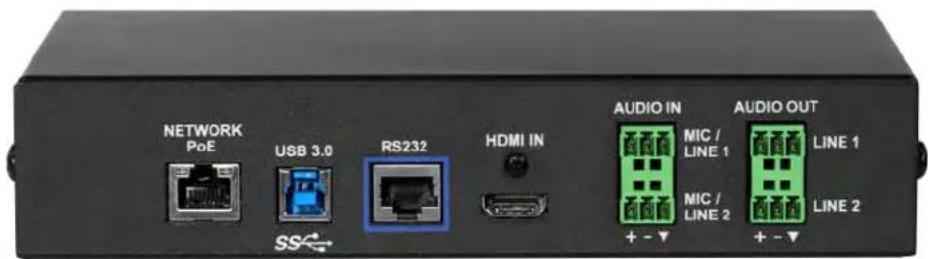
■ Network/PoE – This port provides access to the web interface and powers the AV Bridge Mini.
■ USB 3.0 – Uncompressed video output with PCM audio for conferencing applications.
■ Audio I/O Line Out 1 and Line Out 2 – Far-end audio from conferencing application or as configured in the audio matrix.
- Audio I/O Mic/Line In 1 and Mic/Line In 2 – Microphone or other audio inputs. Can be configured to supply phantom power.
■ HDMI – Video (and audio, if available) from the connected camera or other HDMI source.
■ RS-232 – Connect to an optional third-party control system.
Installation
This section covers how to install and connect the product. It also provides safety information and other guidance related to installing the product.
Note
This product is intended for installation and use only in environments where all RS-232 and PoE connections originate within the building.
Or in UL's preferred phrasing...
PoE-type networks connected to this equipment are for intra-building use only and should not be connected to lines that run outside the building in which this product is located.
Don't Void Your Warranty!
Caution
This product is for indoor use. Do not install it outdoors or in a humid environment without the protective enclosure. Do not allow it to come into contact with any liquid.
Do not install or operate this product if it has been dropped, damaged, or exposed to liquids. It is things happen, return it to Vaddio for safety and functional testing.
Cabling Notes
Use Cat-5e or better cable and standard RJ-45 connectors (568B termination). We recommend using high-quality connectors and a high-quality crimping tool.
Note
Do not use pass-through RJ-45 connectors. If they are crimped incorrectly, they can damage the connectors on the product, cause intermittent connections, and degrade signal quality. Physical damage the connectors may void your warranty.
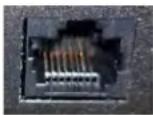
Intact – will make reliable contact with cable connector
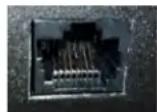
Damaged – Bent contact fingers will NOT make reliable contact with cable connector
Use Cat-5e or better cable. We recommend using high-quality connectors and a high-quality crimping tool. We recommend shielded cabling if the cables will be coiled, run tightly with other cables, or placed close to sources of electromagnetic interference such as power lines.
Caution
Check your cables. Connecting a cable to the wrong port or using the wrong pin-out can result damage and will void the warranty

Pro Tip
To prevent tragic mishaps, label both ends of every cable.
Basic Connections
This diagram shows a basic installation.
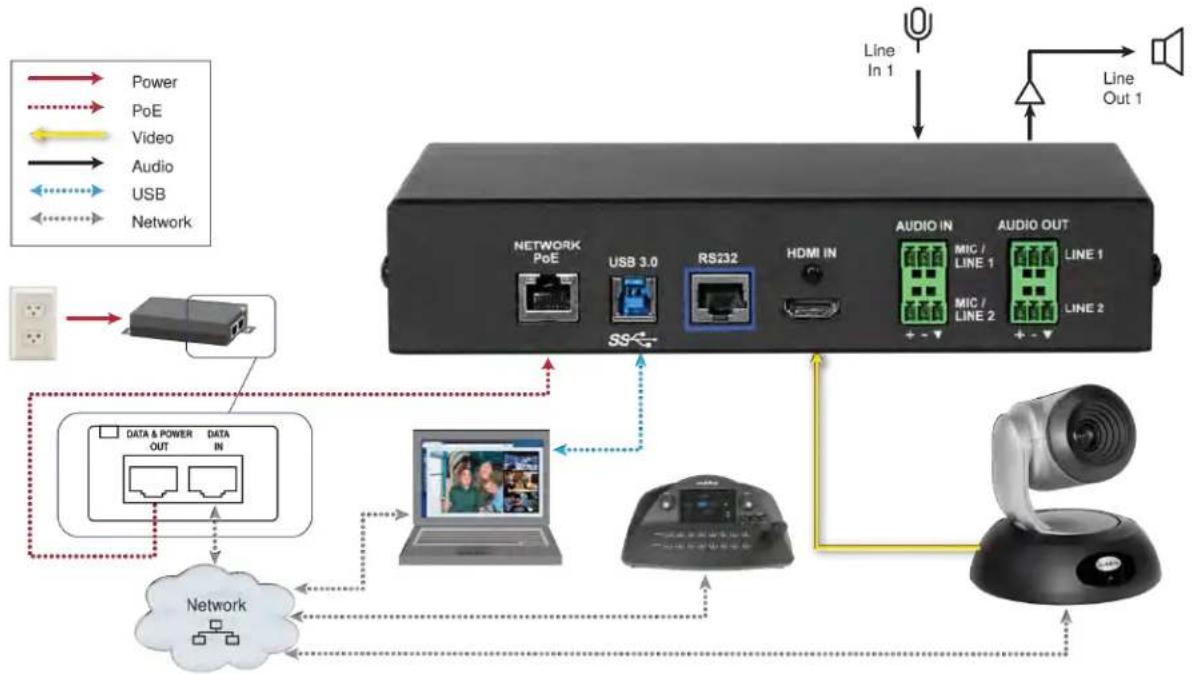
flowchart
graph TD
    A["Power"] --> B["Network"]
    C["PoE"] --> B
    D["Video"] --> B
    E["Audio"] --> B
    F["USB"] --> B
    G["Network"] --> B
    B --> H["Network PoE"]
    H --> I["USB 3.0"]
    I --> J["RS232"]
    J --> K["HDMI IN"]
    K --> L["AUDIO IN"]
    L --> M["MIC / LINE 1"]
    L --> N["MIC / LINE 2"]
    L --> O["AUDIO OUT"]
    O --> P["LINE 1"]
    O --> Q["LINE 2"]
    R["Line In 1"] --> S["Speaker"]
    T["Line Out 1"] --> U["Speaker"]
RS-232 Serial Communication Settings and Port Pin-outs
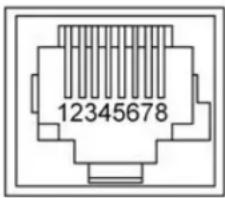
The RS-232 serial port (color-coded blue) on the back panel connects to a third-party controller.
RS-232 connector pin-out:
■ Pin 1: Not used
■ Pin 2: Not used
■ Pin 3: Not used
■ Pin 4: Not used
■ Pin 5: Not used
■ Pin 6: GND
■ Pin 7: TXD (to RXD of camera)
■ Pin 8: RXD (from TXD of camera)
Communication parameters:
| Parameter Value | |
| Communication Speed 38400 bps | |
| Start bits 1 | |
| Stop bits 1 | |
| Data bits 8 | |
| Parity None | |
| Flow control None | |
Caution
Check your cables. Connecting a cable to the wrong port or using the wrong pin-out can result damage and will void the warranty
Depending on the equipment connected to the RS-232 port, you may need a null-modem (crossover) cable.
Powering Up
Power up the AV Bridge Mini and the connected equipment at the same time, or power up the connected equipment before you power up the AV Bridge Mini.
Next Steps
The AV Bridge Mini is now ready to configure. This includes setting up its address book to manage cameras via the IP network. Until the product is fully configured, its full functionality is not available. This information is available in the Complete Manual for the AV Bridge Mini HD Audio/Video Encoder.
Download manuals, dimensional drawings, and other information from www.vaddio.com/support.
Troubleshooting and Care
If the equipment does not power up as expected, use this table to determine whether to call Vaddio Technical Support.
Note
If the equipment behaves in a way that suggests even a remote possibility of a bad cable, ple known good cable with the same pin-out. Factory-made cables can be defective. Cables can appe good but only work part of the time. A cable may pass a standard continuity check but be ur enough power to the connected device.
Crimping tools can crimp unevenly, contacts can break internally, and individual conductors in the can break inside the jacketing material. Any of these can result in a cable that passes a conti but does not work reliably.
(The author would like to confess having made more than a few almost-good cables. It happens.)
| What is it doing? Possible causes Check and correct | ||
Nothing. The buttons do not light up.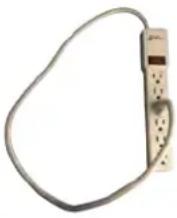 | Power is not connected. Check the connections from the wall outlet to the PoE+ power injector at from the power injector to the device | |
| The wall outlet is not active (Check by finding out if it powers something else, such as a laptop or phone charger.) | Use a different outlet. | |
| The device or its power injection is bad. | Contact your reseller or Vaddio Technical Support. | |
Operation, Storage, and Care
For smears or smudges on the product, wipe with a clean, soft cloth. Do not use any abrasive chemicals. Keep this device away from food and liquids.
Do not operate or store the device under any of the following conditions:
■ Temperatures above 40^ C ( 104^ F) or below 0^ C ( 32^ F)
■ High humidity, condensing or wet environments
■ Inclement weather
■ Severe vibration
■ Dry environments with an excess of static discharge
■ While exiting, pursued by a bear
Do not attempt to take this product apart. There are no user-serviceable components inside
Compliance Statements and Declarations of Conformity
Compliance testing was performed to the following regulations:
| FCC Part 15 (15.107, 15.109), Subpart B Class A | |
| ICES-003, Issue 54: 2012 Class A | |
| EMC Directive 2014/30/EU Class A | |
| EN 55032: 2015 Class A | |
| EN 55024: November 2010 Class A | |
| KN24 2008 (CISPR 24: 1997 + A1: 2000 + A2: 2002) Class A | |
| IEC 60950-1:2005 (2nd Edition); Am 1: 2009 + Am 2: 2013 Safety | |
| EN 60950-1: 2006 + A11: 2009 + A1: 2010 + A12: 2011 + A2: 2013 Safety |
FCC Part 15 Compliance
This equipment has been tested and found to comply with the limits for a Class A digital device, pursuant to Part 15, Subpart B, of the FCC Rules. These limits are designed to provide reasonable protection against harmful interference when the equipment is operated in a commercial environment. This equipment generates, uses, and can radiate radio frequency energy and, if not installed and used in accordance with the instruction manual, may cause harmful interference to radio communications. Operation of this equipment in a residential area is likely to cause harmful interference in which case the user will be required to correct the interference at his/her own expense.
Operation is subject to the following two conditions: (1) This device may not cause interference, and (2) This device must accept any interference including interference may cause undesired operation of the device.

Changes or modifications not expressly approved by Vaddio can affect emission compliance and could void the user's authority to operate this equipment.
ICES-003 Compliance
This digital apparatus does not exceed the Class A limits for radio noise emissions from digital apparatus set out in the Radio Interference Regulations of the Canadian Department of Communications.
This product has been evaluated for Electromagnetic Compatibility under the EMC Directive for Emissions and Immunity and meets the requirements for a Class A digital device. In a domestic environment this product may cause radio interference in which case the user may be required to take adequate measures.
Standard(s) To Which Conformity Is Declared:

EMC Directive 2014/30/EU
EN 55032: 2015 Conducted and Radiated Emissions
EN 55024: November 2010 Immunity
EN 61000-4-2: 1995 + Amendments A1: 1998 + A2: 2001 Electrostatic Discharge
EN 61000-4-3: 2006 + A1: 2008 Radiated Immunity
EN 61000-4-4: 2004 + Corrigendum 2006 Electrical Fast Transients
EN 61000-4-5: 2006 Surge Immunity
EN 61000-4-6: 2009 Conducted Immunity
EN 61000-4-8: 2010 Power Frequency Magnetic Field
EN 61000-4-11: 2004
Voltage Dips, Interrupts and Fluctuations
KN24 2008 (CISPR 24: 1997 + A1: 2000 + A2: 2002) IT Immunity Characteristics
EN 61000-4-2 Electrostatic Discharge
EN 61000-4-3 Radiated Immunity
EN 61000-4-4 Electrical Fast Transients
EN 61000-4-5 Surge Immunity
EN 61000-4-6 Conducted Immunity
EN 61000-4-8 Power Frequency Magnetic Field
EN 61000-4-11
Voltage Dips, Interrupts and Fluctuations
IEC 60950-1: 2005 (2nd Edition); Am 1: 2009 + Am 2: 2013 Safety
EN 60950-1: 2006 + A11: 2009 + A1: 2010 + A12: 2011 + A2: 2013
Warranty and Return Policy
Hardware warranty: Two (2) year limited warranty on all parts and labor for Vaddio manufactured products.
Vaddio warrants its manufactured products against defects in materials and workmanship for a period of two years from the day of purchase, to the original purchaser, if Vaddio receives notice of such defects during the warranty. Vaddio, at its option, will repair or replace products that prove to be defective. Vaddio manufactures its hardware products from parts and components that are new or equivalent to new in accordance with industry standard practices.
Exclusions: The above warranty shall not apply to defects resulting from improper or inadequate maintenance by the customer, customers applied software or interfacing, unauthorized modifications or misuse, mishandling, operation outside the normal environmental specifications for the product, use of the incorrect power supply, modified power supply or improper site operation and maintenance. OEM and special order products manufactured by other companies are excluded and are covered by the manufacturer's warranty.
Vaddio Customer Service: Vaddio will test, repair, or replace the product or products without charge if the unit is under warranty. If the product is out of warranty, Vaddio will test then repair the product or products. The cost of parts and labor charge will be estimated by a technician and confirmed by the customer prior to repair. All components must be returned for testing as a complete unit. Vaddio will not accept responsibility for shipment after it has left the premises.
Vaddio Technical Support: Vaddio technicians will determine and discuss with the customer the criteria for repair costs and/or replacement. Vaddio Technical Support can be contacted by email at support@vaddio.com or by phone at one of the phone numbers listed on support.vaddio.com.
Return Material Authorization (RMA) number: Before returning a product for repair or replacement
request an RMA from Vaddio's technical support. Provide the technician with a return phone number, e-mail address, shipping address, product serial numbers and original purchase order number. Describe the reason for repairs or returns as well as the date of purchase. See the General RMA Terms and Procedures section for more information. RMAs are valid for 30 days and will be issued to Vaddio dealers only. End users must return products through Vaddio dealers. Include the assigned RMA number in all correspondence with Vaddio. Write the assigned RMA number clearly on the shipping label of the box when returning the product. All products returned for credit are subject to a restocking charge without exception. Special order products are not returnable.
Voided warranty: The warranty does not apply if the original serial number has been removed or if the product has been disassembled or damaged through misuse, accident, modifications, use of incorrect power supply, use of a modified power supply or unauthorized repair.
Shipping and handling: Vaddio will not pay for inbound shipping transportation or insurance charges or accept any responsibility for laws and ordinances from inbound transit. Vaddio will pay for outbound shipping, transportation, and insurance charges for all items under warranty but will not assume responsibility for loss and/or damage by the outbound freight carrier. If the return shipment appears damaged, retain the original boxes and packing material for inspection by the carrier. Contact your carrier immediately.
Products not under warranty: Payment arrangements are required before outbound shipment for all out of warranty products.
General RMA Terms and Procedures: RMAs are valid for 30 days and will be issued to Vaddio dealers only.
■ End users must return products through Vaddio dealers.
■ Before a defective product can be authorized to send in for repair, it must first go through the troubleshooting process with a member of the Vaddio Technical Support team.
■ Products authorized for repair must have a valid RMA (Return Material Authorization) number.
- Vaddio RMA Team will issue the RMA number.
- An RMA number is to be included in all correspondence with Vaddio.
- The RMA number must appear clearly on the shipping label (not the box) when the product is returned.
- A packing slip must be included on the inside of the box with the RMA number listed and reason for RMA return.
■ Products received at Vaddio that do not have a valid RMA number clearly marked on the outside of the shipping container may be refused and returned to sender.
- Boxes showing external damage will be refused and sent back to the sender regardless of the clearly marked RMA number and will remain the responsibility of the sender.
RMA Charges (Restocking): All qualified returns must be made in unopened, original packaging with all original materials.
■ Initial shipments of equipment that are refused upon attempted delivery, for any reason, are subject to restocking charges.
■ The Dealer has up to 60 days from the date of purchase to return Vaddio product for credit for future purchases of Vaddio product only.
■ The Dealer has 61 to 90 days from the date of purchase to return Vaddio product with a 15% restocking fee or \$50.00 fee, whichever amount is greater
- The Dealer has up to 30 days from the date of purchase to return OEM and other manufacturer's products with a 15% restocking fee or \$50.00 fee, whichever amount is greater.
■ NOTE: Special Order products from other manufacturers (identified in the Vaddio Price Guide as noncancelable, nonreturnable and not refundable) are not eligible for advance replacement from Vaddio.
Advance Replacement Policies: For Vaddio manufactured products, advance replacement will be provided for up to one (1) year after the initial shipment of products.
NOTE: OEM and other manufacturer's products are excluded from the Vaddio advance replacement policy. Advance replacement will be provided for up to 30 days after initial shipment of OEM products. Thereafter, a return to Vaddio and factory repair is offered during the other manufacturer's warranty period. Vaddio will determine if the returned product is qualified for the OEM warranty.
■ NOTE: Special Order products from other manufacturers (identified in the Vaddio Price Guide as noncancelable, nonreturnable and not refundable) are not eligible for advance replacement from Vaddio.
Advance Replacement Procedures: The Vaddio Dealer must submit a non-revocable purchase order for advance replacement equipment at normal dealer pricing. Credit shall be issued upon complete product return (including all accessories) for dealers with Net 30 terms. For credit card accounts, charges will be assessed to the credit card for the replacement and credited back upon complete product return.
■ Returns must be made in the original Vaddio packaging with all original materials if at all possible.
Vaddio products with missing original materials will be billed to the dealer at dealer price.
■ NOTE: OEM products must be returned in the original packaging with all materials and the RMA
number written on the shipping label only and not on the OEM box. If the return is incomplete and/or the OEM box is defaced, the product shall be returned to the dealer and the RMA will not be credited.
■ Equipment returned with "No Trouble Found" after advanced replacement will be assessed a full 15% or
\$50.00 restocking fee (whichever is greater) for each item and may also be assessed for additional charges to compensate for wear, damages and reconditioning.
■ All returns must be accompanied by RMA # as stated above.
■ All Advanced Replacement products are sent via 2-day service in the continental USA. If the product is
requested to be sent via priority or overnight shipping, the Dealer shall pay shipping costs. The dealer can elect to supply their preferred shipping account number.
■ International customers are responsible for all freight charges for equipment returned to Vaddio,
including international shipping, taxes, and duties, insurance and all other associated logistic charges.
Warranty Repair Terms and Procedures: Vaddio will repair any product free of charge, including parts
and labor, within the terms outlined in the warranty agreement for that product.
- Customers must provide proof of the product's purchase date.
■ Product that is within the warranty period will be repaired under the non-warranty terms if:
The equipment has been damaged by negligence, accident, act of God, mishandling, used with the incorrect, modified or extended power supply or has not been operated in accordance with the procedures described in the operating and technical instructions.
The equipment has been altered or repaired by other than the Manufacturer or an authorized service representative.
Adaptations or accessories other than those manufactured or provided by the Manufacturer have been made or attached to the equipment, which in the determination of the Manufacturer, shall have affected the performance, safety of reliability of the equipment; or the equipment's original serial number has been modified or removed.
■ Customer is responsible for shipping charges to send defective product under warranty to Vaddio.
Vaddio will pay ground service return shipping charges during the 2nd year of the warranty period.
■ Standard return shipping method for products under warranty, but out of the advance replacement
warranty period, is ground shipment. Extra charges associated with priority shipping, when requested, will be the responsibility of the customer.
Non-Warranty Repair Terms: Vaddio will repair any non-obsolete product that does not meet the terms of the warranty. Non-warranty repair terms are as follows:
■ The customer is responsible for, and agrees to pay, all parts and labor costs associated with the repair.
Standard non-warranty repair charges are outlined below.
■ Customers must provide payment method and one of the following, prior to receiving an RMA:
- Hard copy of a PO, for dealers with Net 30 terms and in good standing with Vaddio.
- Valid credit card number - Credit card will be charged upon shipping repaired product back to customer.
■ Request for COD: Customers will be notified of COD charges prior to shipping repaired unit.
- Customer is responsible for all shipping charges both to and from Vaddio, and may use their own carrier.
■ Customers will receive a courtesy call notifying them of total repair charges prior to return shipping.
Non-Warranty Repair Charges: Total repair charges (per unit) for a non-warranty repair consist of the following:
■ Cost of any replacement parts needed to repair the defect.
■ Labor costs billed per hour after minimum charges/time.
■ Labor charges include troubleshooting and repair time only.
■ Burn-in time and final test time is not included in the labor charges.
■ Labor time is rounded to the nearest quarter hour.
■ Labor charges are billed at the prevailing rate for the category of equipment repaired, after minimum charges/time. For prevailing labor rates, please contact the Vaddio technical support.
■ All shipping and handling costs are the responsibility of the customer for non-warranty repairs.
Minimum Labor Charges: All non-warranty repairs are subject to a minimum evaluation/repair labor charge even if there is no problem found. Please contact Vaddio technical support for the current applicable rate.
Repair Charge Estimates: Estimates on repair charges for a specific problem will not be given before an RMA is issued and the actual product has been evaluated by a Vaddio technician. Repair estimates will be given after the repair department receives and evaluates the unit.
■ Customers requesting an estimate on repair charges must do so up front when they call in for an RMA.
The RMA team will call or email with the estimate after evaluating the unit and before proceeding with the repair.
■ Any product evaluated for a repair estimate is still subject to the minimum labor charges even if the customer decides not to proceed with the repair.
■ Vaddio does not guarantee estimates given on repair charges. Actual repair costs may exceed the estimate.
- Customer is responsible for actual repair charges, regardless of estimate.
Repair Policy Notes:
■ Duration of Repair: Products are repaired on a first come first serve basis. The turn-a-round time of a particular repair is dependent upon circumstances such as product type, the nature of the problem and current repair volumes. Requests for expedited repair service will be considered on a case-by-case basis.
■ Repair Warranty: Vaddio guarantees all of its repair work, performed on non-warranty items, for 90 days from the day the repaired product is shipped back to the customer. If the original problem described was not resolved or reoccurs within the 90-day period, Vaddio will repair the unit free of labor charges. However additional material charges may apply unless the parts used to affect the repair are again deemed defective.
Photo Credits
This guide may include some or all of these photos.
European Space Agency (ESA) astronaut Samantha Cristoforetti, a Flight Engineer with Expedition 42, photographs the Earth through a window in the Cupola on the International Space Station
By NASA - https://blogs.nasa.gov/ISS_Science_Blog/2015/03/06/women-in-space-part-two-whats-gender-got-to-do-with-it/, Public Domain, https://commons.wikimedia.org/w/index.php?curid=38834990
Carl Sagan, Bruce Murray, Louis Friedman (founders) and Harry Ashmore (advisor), on the occasion of signing the papers formally incorporating The Planetary Society
By credit NASA JPL - JPL, Public Domain, https://commons.wikimedia.org/w/index.php?curid=1180927
Main Control Room / Mission Control Room of ESA at the European Space Operations Centre (ESOC) in Darmstadt, Germany
By European Space Agency - ESOC flickr, Credit: ESA - Jürgen Mai, CC BY-SA 3.0-igo, https://commons.wikimedia.org/w/index.php?curid=36743173
Expedition 42 on orbit crew portrait, International Space Station, Mar. 7, 2015 – Barry Wilmore
(Commander) Top, Upside down, to the right cosmonaut Elena Serova, & ESA European Space Agency Samantha Cristoforetti. Bottom center US astronaut Terry Virts, top left cosmonauts Alexander Samokutyaev and Anton Shkaplerov.
By NASA - https://www.flickr.com/photos/nasa2explore/16166230844/, Public Domain, https://commons.wikimedia.org/w/index.php?curid=38931301
European Space Agency astronaut Luca Parmitano, Expedition 36 flight engineer, outside the International Space Station
By NASA - http://spaceflight.nasa.gov/gallery/images/station/crew-36/html/iss036e016704.html, Public Domain, https://commons.wikimedia.org/w/index.php?curid=27263573
Chris Cassidy, Luca Parmitano, and Karen Nyberg, ISS, 2013. Photo Credit: NASA
Nicolas Altobelli, Rosetta Scientist at ESA's European Space Astronomy Centre, Villanueva de la Cañada, Madrid, Spain
By European Space Agency - Nicolas Altobelli talks to the media, CC BY-SA 3.0-igo, https://commons.wikimedia.org/w/index.php?curid=36743144
Andrea Accomazzo, ESA Rosetta Spacecraft Operations Manager, providing a live update from the Main Control Room at ESA's European Space Operations Centre, Darmstadt, Germany during the Rosetta wake-up day.
By European Space Agency - Live update from the Main Control Room, CC BY-SA 3.0-igo, https://commons.wikimedia.org/w/index.php?curid=36743150
Index
A
accessories 2
audio 3
ports 3
C
cable 4, 6-7
connectors 4
length, maximum 4
please test them (PLEASE) 7
RS-232 pin-out 6
capabilities 1
cleaning 7
connection diagram 5
connector panel 3
D
damage, preventing 4, 6
diagnosing problems 7
diagram, connection 5
F
fault isolation 7
front panel 3
controls 3
H
HDMI input 3
|
indicator lights 3
IP address 3
discovering 3
M
maximum cable lengths 4
N
Network/PoE port 3
0
operating environment 4, 7
other information resources 6
P
packing list 2
part numbers 2
pin-out, RS-232 6
power up order 6
product capabilities 1
product returns and repairs 10
puffy logo badge 3
R
rebooting 3
regulatory compliance 8
RJ-45 connectors 4
RS-232 3,6
cable pin-out 6
communication settings 6
port 3
S
safety information 4, 7
solving problems 7
storage environment 7
T
temperature, operating and storage 7
troubleshooting 7
U
USB 3
port 3
V
voilà, a small cat 7
W
warranty 4, 10
what's in the box 2
Vaddio is a brand of Legrand AV Inc. · www.legrandav.com · Phone 800.572.2011 / +1.763.971.4400 · Fax +1.763.971.4464 · Email av.vaddio.support@legrand.com
Visit us at support.vaddio.com for firmware updates, specifications, drawings, manuals, technical support information, and more.
Vaddio and the Vaddio logo are trademarks or registered trademarks of Legrand AV Inc. The term HDMI and the HDMI logo are trademarks or registered trademarks of HDMI Licensing LLC in the United States and other countries. All other brand names or marks are used for identification purposes and are trademarks of their respective owners.
©2019 Legrand AV Inc.
A brand of legrand®
Commercial AV Brands Chief | Da-Lite | Middle Atlantic | Projecta | Vaddio
vaddio®
- AV Bridge Mini
- Contents
- Overview
- About this Guide
- This guide covers:
- Features
- Unpacking the AV Bridge Mini
- A Quick Look at the AV Bridge Mini
- Connector Panel
- Installation
- Note
- Don't Void Your Warranty!
- Caution
- Cabling Notes
- Pro Tip
- Basic Connections
- RS-232 Serial Communication Settings and Port Pin-outs
- RS-232 connector pin-out:
- Powering Up
- Next Steps
- Troubleshooting and Care
- Operation, Storage, and Care
- Compliance Statements and Declarations of Conformity
- FCC Part 15 Compliance
- ICES-003 Compliance
- Warranty and Return Policy
- Repair Policy Notes:
- Photo Credits
- Index
- A
- C
- D
- F
- H
- |
- M
- N
- 0
- P
- R
- S
- T
- U
- V
- W
- A brand of legrand®
Brand : Vaddio
Model : AV Bridge Mini
Category : Encodeur audio/vidéo