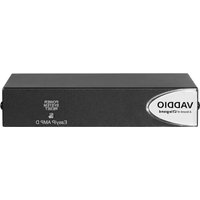
EasyIP AMP D - Audio Amplifier Vaddio - Free user manual and instructions
Find the device manual for free EasyIP AMP D Vaddio in PDF.


Pick your language and provide your email: we'll send you a specifically translated version.
| Product Type | Audio Amplifier with IP Streaming |
| Brand | Vaddio |
| Model | EasyIP AMP D |
| Dimensions (HxWxD) | 1.72 x 17.0 x 10.5 in (4.4 x 43.2 x 26.7 cm) |
| Weight | 5.5 lb (2.5 kg) |
| Power Supply | PoE+ (IEEE 802.3at) or 24V DC, 2.5A |
| Power Consumption | 25 W typical |
| Audio Channels | 2 balanced analog inputs, 2 amplified outputs (up to 30W per channel) |
| Network Connectivity | 1x Gigabit Ethernet (RJ45) with PoE |
| Audio Codecs | G.722, G.711, AAC-LD |
| Control Interfaces | Web GUI, RS-232, GPIO |
| Mounting | Rack-mountable (1U) or surface mount |
| Operating Temperature | 32°F to 104°F (0°C to 40°C) |
| Certifications | FCC, CE, UL |
| Maintenance | Clean with a soft, dry cloth; avoid liquids |
| Safety Instructions | Do not expose to moisture or heat sources; use only supplied power adapter |
| Spare Parts & Repairability | Contact Vaddio support for replacement parts; no user-serviceable components |
| General Information | Product manual includes setup, configuration, and troubleshooting guidance |
Frequently Asked Questions - EasyIP AMP D Vaddio
How do I connect the EasyIP AMP D to my network?
Connect the Ethernet port to your network switch using a Cat5e or better cable. The device supports PoE+ for both power and data. Ensure your switch provides PoE+ or use the included 24V DC power adapter.
What audio sources can I connect to the amplifier?
The EasyIP AMP D has two balanced analog audio inputs on 3-pin terminal blocks. You can connect microphones, line-level sources, or mixers. Inputs accept balanced signals for reduced noise.
How do I configure the device settings?
Access the built-in web GUI by entering the device's IP address in a browser. Default credentials are on the device label. Configure audio levels, network settings, and streaming parameters.
Can I use the amplifier without a network?
Yes, it can operate in standalone mode for basic audio amplification. For advanced features like streaming or remote control, a network connection is required.
What is the maximum output power per channel?
Each of the two amplified outputs can deliver up to 30W RMS into 4 ohms. For 8 ohm speakers, output is approximately 15W per channel.
How do I reset the device to factory defaults?
Press and hold the reset button on the rear panel for 10 seconds using a paperclip. The device will reboot with default settings.
What LED indicators are on the front panel?
Power LED (blue) indicates device is on. Network LED (green) shows link activity. Audio signal LEDs (green/red) indicate input and output levels.
Is the device compatible with Dante?
No, the EasyIP AMP D uses proprietary IP streaming protocols. It is not Dante-compatible. Check Vaddio's specifications for supported audio networking.
How do I update the firmware?
Download the latest firmware from Vaddio's support website. In the web GUI, navigate to Administration > Firmware Upgrade and upload the file. Do not power off during update.
Can I mount the device under a desk?
Yes, the unit includes mounting brackets for surface mount. Ensure adequate ventilation around the device to prevent overheating.
User questions about EasyIP AMP D Vaddio
0 question about this device. Answer the ones you know or ask your own.
Ask a new question about this device
No questions yet. Be the first to ask one.
Download the instructions for your Audio Amplifier in PDF format for free! Find your manual EasyIP AMP D - Vaddio and take your electronic device back in hand. On this page are published all the documents necessary for the use of your device. EasyIP AMP D by Vaddio.
USER MANUAL EasyIP AMP D Vaddio

Manual assistant
Powered by Anthropic
Waiting for your message
Product information
Brand : Vaddio
Model : EasyIP AMP D
Category : Audio Amplifier