
PAR StageLight - Machine à effets lumineux MONOPRICE - Free user manual and instructions
Find the device manual for free PAR StageLight MONOPRICE in PDF.


User questions about PAR StageLight MONOPRICE
0 question about this device. Answer the ones you know or ask your own.
Ask a new question about this device
Download the instructions for your Machine à effets lumineux in PDF format for free! Find your manual PAR StageLight - MONOPRICE and take your electronic device back in hand. On this page are published all the documents necessary for the use of your device. PAR StageLight by MONOPRICE.
USER MANUAL PAR StageLight MONOPRICE
Super-Bright, 12-watt x 7 LED
PAR StageLight (RGBAW-UV)
natural_image
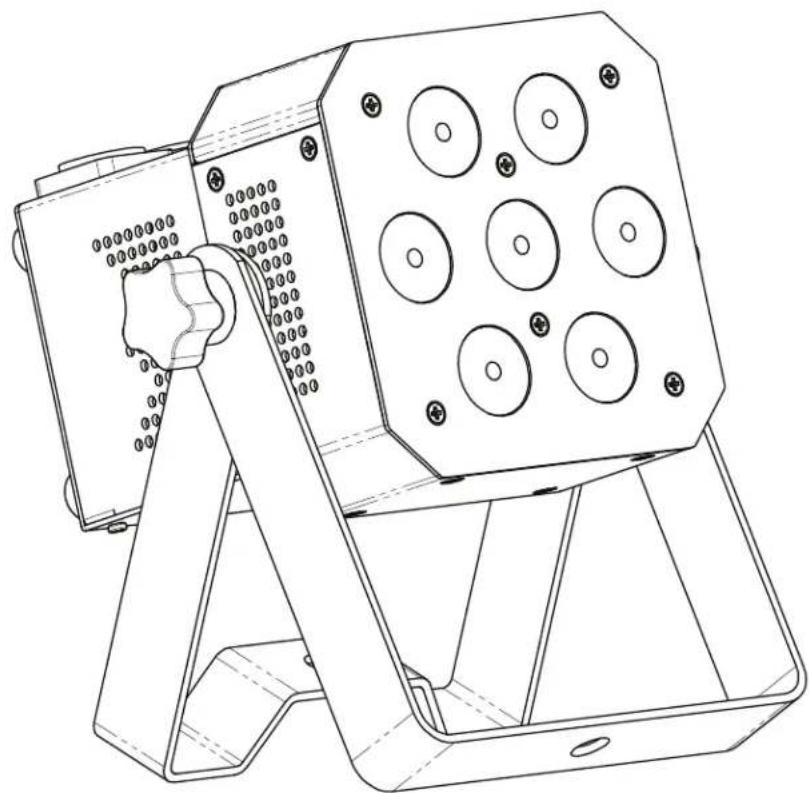
Technical line drawing of a mechanical device with circular components and a handle (no text or symbols)612745
User's Manual
Table of Contents
SAFETY WARNINGS AND GUIDELINES....3
INTRODUCTION 4
PACKAGE CONTENTS 4
FEATURES....4
MENU SYSTEM 5
WHITE BALANCE 6
NODE 7
MASTER/SLAVE MODE 7
DMX CONTROL....7
3CH Mode....7
6CH Mode....8
8CH Mode....8
10CH Mode....9
11CH Mode....10
PRESETS....11
DMX TERMINATION....12
SAMPLE WIRING DIAGRAM 12
TECHNICAL SUPPORT....12
TROUBLESHOOTING 14
BRIGHTNESS 14
SPECIFICATIONS 15
SAFETY WARNINGS AND GUIDELINES
Do not expose this device to water or moisture of any kind. Do not place drinks or other containers with moisture on or near the device. If moisture does get in or on the device, immediately unplug it from the power outlet.
This device is intended for indoor use only.
This device uses a grounded power cord and requires a ground connection for safe operation. Ensure that the power source has a proper ground connection. Do not modify the plug or use a "cheater" plug to bypass the ground connection.
Ensure that the power outlet used to connect this device does not exceed the rated maximum voltage, listed on the back panel of the device.
Ensure that power is turned off and disconnected before making any electrical connections.
Disconnect from the power source during lightning storms or when not in use.
Take care to prevent damage to the power cord. Do not allow it to become crimpled, pinched, walked on, or become tangled with other cords.
When disconnecting the power cord do not pull on the cord itself. Instead, grasp the plug connector head to disconnect it from the power socket.
The power cord uses the US standard color coding with green for ground.
This device has no user serviceable parts. Do not attempt to open, service, or modify this device.
Do not use chemical cleaners or solvents to clean the cabinet. Use only a soft dry cloth. For stubborn dirt, moisten the cloth with warm water.
This device ventilates excessive heat through the slots and openings in the case. Do not block or cover these openings. Ensure that the device is in an open area where it can get sufficient airflow to keep from overheating.
INTRODUCTION
Thank you for purchasing the Monoprice 612745 Super-Bright 12-watt x 7 LED PAR StageLight! Please read this manual before attempting to operate the light.
This light accepts 110 \~ 240 VAC and features a NAC3 power pass-through connector, so you can install multiple lights on a single circuit. It features a sound activation mode, so it can automatically respond to musical content, as well as flashing, fading, and color changing programs. It uses 3, 6, 8, 10, and 11-channel DMX modes.
PACKAGE CONTENTS
After receiving the product, please inventory the contents to ensure you have all the proper parts, as listed below. If anything is missing or damaged, please contact Monoprice Customer Service for a replacement.
1x Super-Bright 12-watt x 7 LED PAR StageLight
1x AC power cable (NAC3F to NEMA 5-15)
1x User's manual
FEATURES
• Seven 12-watt RGBAWU LEDs
• 3, 6, 8, 10, or 11-channel DMX modes
• 68 built-in presets/programs
- Includes pass-through power and DMX connectors
• Uses locking NAC3 power connectors for added safety
MENU SYSTEM
Use the four buttons under the LED display on the back to set the mode in which the light will operate. The buttons perform the following functions:
MENU: Accesses the menu system or backs out of editing an entry.
UP: Selects the previous mode or increases the value of the selected mode.
DOWN: Selects the next mode or decreases the value of the selected mode.
ENTER: Selects the currently displayed mode for editing or accepts the edited value.
The following table shows the eight menu options, their possible values, and what they mean.
| Entry | Values | Remarks |
| Addr | d001-d255 | DMX address |
| UtSt | White Balance | See the White Balance section for details |
| UErn | UE2.0 | Displays the software version number |
| nodE | nod0-nod4 | Speed limiter (see Node section for details) |
| LED | on/off | LED display on/auto off (after about 2 minutes) |
| SoUA | So.UA | Sound activation mode on/off |
| UL-- | U.000-U.255 | Ultraviolet (UV) dimming |
| AL-- | A.000-A.255 | White dimming |
| JL-- | J.000-J.255 | Amber dimming |
| bL-- | b.000-b.255 | Blue dimming |
| GL-- | G.000-G.255 | Green dimming |
| rL-- | r.000-r.255 | Red dimming |
| FLAS | FL00-FL15 | Strobe mode (fast-slow) |
| FAdE | FA00-FA15 | Color fade (fast-slow) |
| Pr-- | Pr00-Pr67 | Preset selection (see Presets section for details) |
| SP-- | SP00-SP15 | Program speed (fast-slow) |
| SLAU | SL.AU | Slave mode |
| CHnd | 3, 6, 8, 10, 11CH | DMX channel selection |
WHITE BALANCE
The White Balance function allows you to adjust the overall tint of the light produced by having all LED colors on. You can adjust how much of each individual color element is allowed to be displayed.
Note that when White Balance is active, it effects the overall light output. For example, if in the White Balance function you set the Red light brightness value to 000 (no brightness), you will not see any red in any of the light produced by this fixture, even if using a preset program or directly accessing the red color.
Editing the white balance involves sequentially setting the following values:
| r.000 - r.255 | Red brightness |
| G.000 - G.255 | Green brightness |
| b.000 - b.255 | Blue brightness |
| J.000 - J.255 | Amber brightness |
| A.000 - A.255 | White brightness |
| U.000 - U.255 | Ultraviolet brightness |
| USon/USoF | White balance on/off |
| SEon/SEoF | Send white balance values on/off |
| rEt | Save and exit |
Notes:
USon = White balance is on
USoF = White balance if off
SEon = The white balance values will be sent to other lights in this universe.
SEoF = The local white balance values will NOT be sent to other lights.
rEt = Press the Enter button with this displayed to save the settings and exit. If you don't want to save the changes, press the Menu button to back out of this entry.
NODE
The Node function serves as a speed limiter for manual dims and fades. When set to nod0, any manual dims or fades will be in real time, meaning that light will dim or fade as fast as you move the slider on the controller. The other Node values (1-4) are progressively slower than real time.
Note that this functionality is expanded in channel 11 of the 11-channel DMX control mode.
MASTER/SLAVE MODE
Whenever the light is set to a mode other than a DMX address or Slave mode, it is considered to be in Master mode. For example, when set to the Sound Activated operation, it is in a Master mode.
When the light is the Master, it will send DMX instructions to other connected lights. Those other lights must be set to Slave mode (SLAU) to receive and execute the instructions sent by the Master light.
Note: Only one light in any DMX Universe can be the Master. All other lights in the chain must be set to Slave mode (SL.AU).
DMX CONTROL
When the light is set to a DMX address it will respond to signals from a DMX controller. The number and complexity of the signals it can respond to correspond directly to the number of channels selected. The following tables show the functions and values for each channel in the four different channel modes (3, 6, 8, 10, or 11).
3CH Mode
| Channel | DMX Value | Function | Priority | Remarks |
| 1 | 0-255 | RGB color mixing | ||
| 2 | 0-255 | UV dimming 0-100% | ||
| 3 0-255 | General dimming 0-100% | |||
6CH Mode
| Channel | DMX Value | Function | Priority | Remarks |
| 1 | 0-255 | Red dimming 0-100% | ||
| 2 | 0-255 | Green dimming 0-100% | ||
| 3 | 0-255 | Blue dimming 0-100% | ||
| 4 | 0-255 | Amber dimming 0-100% | ||
| 5 | 0-255 | White dimming 0-100% | ||
| 6 | 0-255 | UV dimming 0-100% |
8CH Mode
| Channel | DMX Value | Function | Priority | Remarks |
| 1 0-255 | General dimming 0-100% | |||
| 2 | 0-255 | Red dimming 0-100% | ||
| 3 | 0-255 | Green dimming 0-100% | ||
| 4 | 0-255 | Blue dimming 0-100% | ||
| 5 | 0-255 | Amber dimming 0-100% | ||
| 6 | 0-255 | White dimming 0-100% | ||
| 7 | 0-255 | UV dimming 0-100% | ||
| 8 | 0-255 | Strobe (fast-slow) |
10CH Mode
| Channel | DMX Value | Function | Priority | Remarks |
| 1 | 0-255 | General dimming 0-100% | 1 | |
| 2 | 0-255 | Red dimming 0-100% | ||
| 3 | 0-255 | Green dimming 0-100% | ||
| 4 | 0-255 | Blue dimming 0-100% | ||
| 5 | 0-255 | Amber dimming 0-100% | ||
| 6 | 0-255 | White dimming 0-100% | ||
| 7 | 0-255 | UV dimming 0-100% | ||
| 8 | 0-14 | Note used | 2 | |
| 15-255 | Strobe (fast-slow) | |||
| 9 | 0-31 | Not used | 3 | Must use channels 1-6 to get light. Channel 10 is speed adjustment. |
| 32-63 | Dark-bright | |||
| 64-95 | Bright-dark | |||
| 96-127 | Dark-bright-dark | |||
| 128-159 | Fade | |||
| 160-191 | Dark-bright-dark (auto run) | |||
| 192-223 | Color flash change | |||
| 224-255 | Sound activated | |||
| 10 | 0-255 | Speed adjustment | Slow-fast |
11CH Mode
| Channel | DMX Value | Function | Priority | Remarks |
| 1 0-255 | General dimming 0-100% | 1 | ||
| 2 | 0-255 | Red dimming 0-100% | ||
| 3 | 0-255 | Green dimming 0-100% | ||
| 4 | 0-255 | Blue dimming 0-100% | ||
| 5 | 0-255 | Amber dimming 0-100% | ||
| 6 | 0-255 | White dimming 0-100% | ||
| 7 | 0-255 | UV dimming 0-100% | ||
| 8 | 0-14 | Dimming | 2 | |
| 15-255 | Strobe speed | |||
| 9 | 0-31 | Not used | 3 | |
| 32-63 | Dark-bright | Must use channels 1-6 to get light. Channel 10 is speed adjustment. | ||
| 64-95 | Bright-dark | |||
| 96-127 | Dark-bright-dark | |||
| 128-164 | Fade | |||
| 165-191 | Dark-bright-dark (auto run) | |||
| 192-223 | Color flash change | |||
| 224-255 | Sound activated | |||
| 10 | 0-255 | Speed adjustment | Slow-fast | |
| 11 | 0-5 | Uses the nodE setting | ||
| 6-55 | DIMMER0 | Similar to the nodE setting, but with variable speed control. DIMMER0 has the fastest range, DIMMER4 the slowest. Dependent on use of channels 1-7. | ||
| 56-105 | DIMMER1 | |||
| 106-155 | DIMMER2 | |||
| 156-205 | DIMMER3 | |||
| 206-255 | DIMMER4 | |||
PRESETS
The following table describes in basic terms each of the 68 program presets built into the fixture. The SP-- value determines the speed of any color cycling, flashing, or fading.
| Pr-- | Result | Pr- - | Result | Pr- - | Result |
| 00 | R | 23 | G+B+A | 46 | R+G+A+UV |
| 01 | G | 24 | R+G+W | 47 | R+B+A+UV |
| 02 | B | 25 | R+B+W | 48 | G+B+A+UV |
| 03 | A | 26 | G+B+W | 49 | R+G+W+UV |
| 04 | W | 27 | R+A+W | 50 | R+B+W+UV |
| 05 | UV | 28 | G+A+W | 51 | G+B+W+UV |
| 06 | R+B | 29 | R+G+UV | 52 | R+A+W+UV |
| 07 | G+B | 30 | R+B+UV | 53 | G+A+W+UV |
| 08 | R+A | 31 | G+B+UV | 54 | B+A+W+UV |
| 09 | G+A | 32 | R+A+Uv | 55 | R+G+B+A+W |
| 10 | B+A | 33 | G+A+UV | 56 | R+G+B+A+UV |
| 11 | R+W | 34 | B+A+UV | 57 | R+G+B+W+UV |
| 12 | G+W | 35 | R+W+UV | 58 | R+G+A+W+UV |
| 13 | B+W | 36 | G+W+UV | 59 | R+B+A+W+UV |
| 14 | A+W | 37 | B+W+UV | 60 | G+B+A+W+UV |
| 15 | R+UV | 38 | A+W+UV | 61 | R+G+B+A+W+UV |
| 16 | G+UV | 39 | R+G+B+A | 62 | R+G |
| 17 | B+UV | 40 | R+G+B+W | 63 | All On |
| 18 | A+UV | 41 | R+G+A+W | 64 | 6 color flash change |
| 19 | W+UV | 42 | G+B+W | 65 | 6 color flash change + strobe |
| 20 | R+G+B | 43 | R+B+A+W | 66 | multicolor flash change |
| 21 | R+G+A | 44 | G+B+A+W | 67 | multicolor flash change + strobe |
| 22 | R+B+A | 45 | R+G+B+UV |
DMX TERMINATION
As with all DMX devices, the last unit in any chain must have a DMX terminator connected to the DMX output. If using just a single light, connect a DMX terminator to the DMX output.
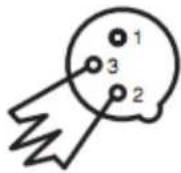
A DMX terminator is a DMX plug with a 120-ohm, 1/4-watt resistor soldered between pins 2 and 3.
SAMPLE WIRING DIAGRAM
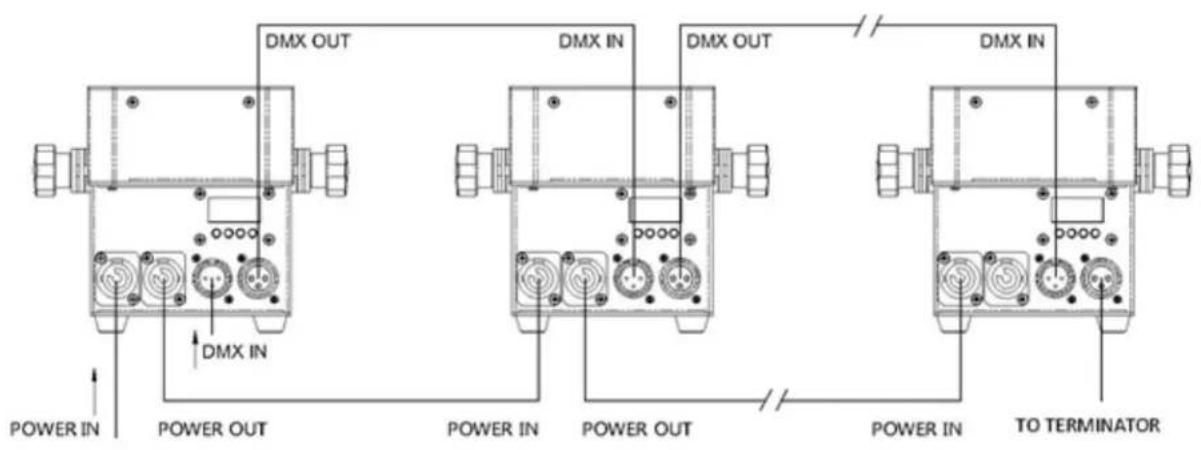
The following diagram shows a sample wiring chain using multiple lights. Note that as with all DMX chains, the last unit must have a DMX terminator connected to the DMX output.
text_image
DMX OUT DMX IN DMX OUT DMX IN POWER IN POWER OUT POWER IN POWER OUT POWER IN TO TERMINATORTECHNICAL SUPPORT
Monoprice is pleased to provide free, live, online technical support to assist you with any questions you may have about installation, setup, troubleshooting, or product recommendations. If you ever need assistance with your new product, please come online to talk to one of our friendly and knowledgeable Tech Support Associates. Technical support is available through the online chat button on our website www.monoprice.com during regular business hours, 7 days a week.
You can also get assistance through email by sending a message to tech@monoprice.com
TROUBLESHOOTING
Following are some sample problems and potential solutions to those problems.
Q1: The light does not turn on and the menu will not display.
A1: Check the power cable to ensure it is properly plugged in. Check the source power outlet by plugging in a different device.
Q2: The light will not turn on, but the menu does display.
A2: Using the menu, ensure that the color dimmers are not all set to 000.
Q3: The light does not respond to DMX commands.
A3: Ensure that the light is set to DMX mode with a valid DMX address. Check for address conflicts with other devices. Check the cabling to ensure that there is continuity between the light and the DMX controller. Verify that there is a terminator at the end of the chain. Verify that the DMX controller is operating properly with another DMX device.
BRIGHTNESS
The following table shows the brightness levels (in lux) of each color at various distances (in meters) from the light:
| Distance (meters) | Lux Values for Each Color at Distance | ||||||
| R | G | B | A | W | UV | ALL | |
| 1 | 2030 | 2485 | 1050 | 1223 | 3406 | 620 | 11400 |
| 3 | 210 | 265 | 120 | 135 | 384 | 64 | 1520 |
| 5 | 82 | 96 | 50 | 53 | 145 | 26 | 510 |
| 7 | 42 | 50 | 25 | 26 | 73 | 12 | 270 |
| 10 | 23 | 28 | 15 | 14 | 42 | 8 | 150 |
SPECIFICATIONS
| Model | 612745 |
| LEDs | 7x R+G+B+A+W+UV 6-in-1 12-watt LEDs |
| Control Signal | DMX512, Master/Slave, Auto-run |
| Control Modes | Stand-alone, DMX, Master/Slave, Sound Activated |
| # of DMX Channels | 3, 6, 8, 10, or 11 |
| Beam Angle | 25°, 45° |
| Refresh Rate 1.5 kHz | |
| Built-in Presets | 68 presets |
| Cooling Mode | Fan cooling |
| Life Expectancy | 50000 ~ 100000 hours |
| Ingress Protection | IP20 |
| Input Voltage | 100 ~ 264 VAC, 47 ~ 63 Hz |
| Power Consumption | 84 watts maximum |
| Anti-Electricity Intension | 1.5 kV |
| Insulation Resistance | >2 megohms |
| Dimensions | 6.9" x 4.7" x 7.4" (176 x 120 x 188 mm) |
| Weight | 5.1 lbs. (2.3kg) |