
13347 - Audio/video converter MONOPRICE - Free user manual and instructions
Find the device manual for free 13347 MONOPRICE in PDF.


| Product Type | Audio/Video Converter |
| Brand | Monoprice |
| Model | 13347 |
| Dimensions (approx.) | 10.5 x 6.0 x 2.0 cm |
| Weight (approx.) | 180 g |
| Power Supply | USB powered (5V DC, 500mA) |
| Input Interface | HDMI (Type A) or VGA with audio |
| Output Interface | VGA (DB15) + 3.5mm audio jack |
| Supported Video Resolutions | Up to 1920x1080@60Hz |
| Audio Support | Stereo analog audio extraction |
| Compliance | HDCP 1.4 compatible |
| Operating Temperature | 0°C to 45°C |
| Storage Temperature | -20°C to 60°C |
| Maintenance | Clean with a soft, dry cloth; avoid liquids |
| Safety Precautions | Do not expose to moisture or extreme temperatures; unplug when not in use |
| Repairability | No user-serviceable parts; contact Monoprice support for issues |
Frequently Asked Questions - 13347 MONOPRICE
User questions about 13347 MONOPRICE
0 question about this device. Answer the ones you know or ask your own.
Ask a new question about this device
Download the instructions for your Audio/video converter in PDF format for free! Find your manual 13347 - MONOPRICE and take your electronic device back in hand. On this page are published all the documents necessary for the use of your device. 13347 by MONOPRICE.
USER MANUAL 13347 MONOPRICE
Computers & Networking
TV Wall Mounts
Audio & Video
Mobile
Camera & Security
Pro Audio & Instruments
Gadgets
www.monoprice.com
Blackbird™
4K Series HDMI® Audio Inserter
13347
- Product pictures are for reference only.
- Specifications described herein are subject to change without prior notification.
a. All trademarks are the sole property of their respective companies, of which is 100% (except for the rights reserved).
- Copyright © 2018 Monopedia, Inc. All rights reserved.
User's Manual
SAFETY WARNINGS AND GUIDELINES
- This device is intended for indoor use only.
- Do not expose this device to water or moisture of any kind. Do not place drinks or other containers with moisture on or near the device. If moisture does get in or on the device, immediately unplug it from the power source and allow it to fully dry before reapplying power.
- Do not touch the device, the power cord, or any other connected cables with wet hands.
- Do not expose this device to excessively high temperatures. Do not place it in, on, or near heat sources, such as a fireplace, stove, radiator, etc. Do not leave it in direct sunlight.
- Prior to operation, check the unit and power cord for physical damage. Do not use if physical damage has occurred.
- Unplug this device from the power source when not in use.
- Take care to prevent damage to the power cord. Do not allow it to become crimped, pinched, walked on, or become tangled with other cords. Ensure that the power cord does not present a tripping hazard.
- Never unplug the unit by pulling on the power cord. Always grasp the connector head or adapter body.
- Ensure that power is turned off and disconnected before making any electrical connections.
- Clean using a soft, dry cloth only. Do not use chemical cleaners, solvents, or detergents. For stubborn deposits, moisten the cloth with warm water.
- This device has no user serviceable parts. Do not attempt to open, service, or modify this device.
INTRODUCTION
Thank you for purchasing this HDMI® Audio Inserter!
This device combines an HDMI video signal with audio from a digital optical (Toslink) or 3.5mm TRS stereo input. This makes it ideal for use with DVI or VGA video sources, which lack embedded audio. It has a bandwidth of 10.2Gbps and therefore supports all High Speed HDMI features, including 4K (3840x2160p) video resolution and 3D video.
FEATURES
- Compliant with HDMI®, HDCP 1.2, and DVI 1.0 standards
• Supports HDMI audio sampling rates up to 192 kHz
• Supports Digital Optical S/PDIF audio sampling rates up to 192 kHz
• Supports external Digital Optical or Analog audio replacement for HDMI audio signal
• HDMI supports High-Bit-Rate (HBR) audio - Supports DVI conversion with DVI to HDMI adapter
• Supports CEC pass-through
• Supports 4K resolution and 3D video signals
CUSTOMER SERVICE
The Monoprice Customer Service department is dedicated to ensuring that your ordering, purchasing, and delivery experience is second to none. If you have any problem with your order, please give us an opportunity to make it right. You can contact a Monoprice Customer Service representative through the Live Chat link on our website www.monoprice.com during normal business hours (Mon-Fri: 5am-7pm PT, Sat-Sun: 9am-6pm PT) or via email at support@monoprice.com
PACKAGE CONTENTS
Please take an inventory of the package contents to ensure you have all the items listed below. If anything is missing or damaged, please contact Monoprice Customer Service for a replacement.
- 1x HDMI® audio inserter
- 1x AC power adapter
- 1x User's manual
PRODUCT OVERVIEW
Front Panel
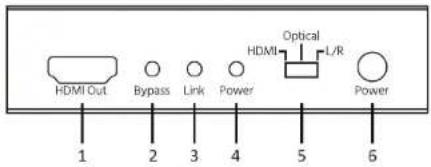
1 (HDMI Out): HDMI ^® audio/video output jack.
2 (Bypass): This LED illuminates when the audio selection switch is set to the HDMI position.
3 (Link): This LED illuminates whenever external optical or analog audio is synced with the HDMI video.
4 (Power): This LED illuminates whenever power is applied.
5 (HDMI / Optical / L / R): Use this Audio Source Selection switch to select the audio source. When set to the HDMI position, the audio from the original HDMI video signal is used.
6 (Power): Depress the Power switch to turn power on or off.
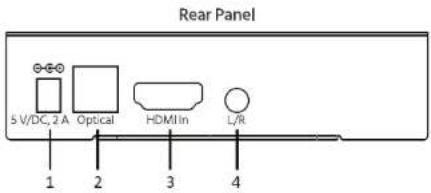
1 (5 V/DC, 2 A): DC power jack for use with the included AC power adapter.
2 (Optical): Digital optical S/PDIF (Toslink®) audio input.
3 (HDMI In): HDMI® audio/video input.
4 (L/R): 3.5mm TRS analog stereo audio input.
INSTALLATION
Perform the following steps to install this inserter into your home theater system.
- Power off and unplug all devices that will be connected to this device.
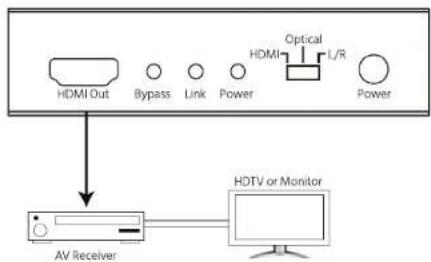
- Using a High Speed HDMI® Cable (not included), plug one end into the Input on your HDMI-equipped display, then plug the other end into the HDMI Out port on the front panel.
flowchart
graph TD
    A["HDMI Out"] --> D["AV Receiver"]
    B["Bypass"] --> D
    C["Link"] --> D
    E["Power"] --> D
    F["Optical"] --> G["L/R"]
    H["Power"] --> G
    D --> I["HDTV or Monitor"]
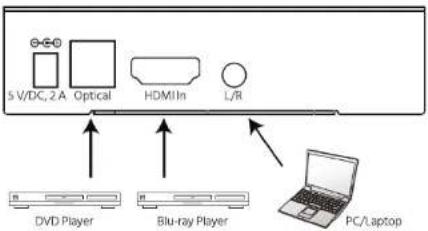
- Using a High Speed HDMI® Cable (not included), plug one end into the HDMI In port on the rear panel, then plug the other end into the Output port on your Blu-ray Disc™ player, computer, or other video source device.
Note: You can use a DVI to HDMI cable to use a DVI video source or a VGA to HDMI converter to use a VGA video source. - (Optional) Using a Digital Optical (Toslink®) cable (not included), plug one end into the Optical In port on the rear panel, then plug the other end into the Digital Optical (Toslink) output on your DVD player, CD player, or other digital audio source device.
- (Optional) Using a 3.5mm TRS audio cable (not included), plug one end into the L/R port on the rear panel, then plug the other end into the 3.5mm TRS output on your computer, mp3 player, or other analog audio source device.
flowchart
graph TD
    A["5 V/DC, 2A Optical"] --> B["DVI"]
    C["HDMI In"] --> B
    D["L/R"] --> E["Blu-ray Player"]
    F["PC/Laptop"] --> E
    B --> G["DVD Player"]
    E --> H["Blu-ray Player"]
- Plug the DC barrel connector on the included AC power adapter into the 5 V/DC, 2 A jack on the rear panel.
- Plug in and power on all connected equipment. Start audio playback from the Toslink and Analog audio sources and video playback from the HDMI source.
- Depress the Power switch on the front panel to power the Inserter on.
- Slide the audio source selection switch to the HDMI position. Verify that you are watching the HDMI video with the original HDMI audio, if applicable.
- Slide the audio source selection switch on the front panel to the Optical position. Verify that the audio from the Toslink source is combined with the HDMI video.
- Slide the audio source selection switch on the front panel to the L/R position. Verify that the audio from the analog source is combined with the HDMI video.
Congratulations, your HDMI Audio Inserter is properly installed and is ready for use!
TROUBLESHOOTING
Q1: There is no audio or video on the output display, regardless of audio source selection.
A1: Verify that the correct video input is selected and that the display is powered on. Check the Power LED to verify that the Inserter is powered on. Try swapping out the HDMI® output cable with a known good one.
Q2: There is audio from the original HDMI source and from one of the two external audio sources, but not from the other.
A2: Verify that the source without audio is powered on and producing an audio output. Try swapping out the audio input cable from the audio source device with a known good one.
Q3: There is audio from both external audio sources, but not from the original HDMI source.
A3: Verify that the HDMI source video contains audio. Verify that the video source interface supports embedded audio (DVI and VGA do not support audio). Try swapping out the HDMI cable from the HDMI source with a known good one.
Q4: There is audio from all audio sources, but no video on the output display.
A4: Verify that the output resolution on the video source device does not exceed the resolution capabilities of the display, such as a 1080p video source connected to a display limited to 720p. Try swapping out the HDMI cable from the HDMI source with a known good one.
TECHNICAL SUPPORT
Monoprice is pleased to provide free, live, online technical support to assist you with any questions you may have about installation, setup, troubleshooting, or product recommendations. If you ever need assistance with your new product, please come online to talk to one of our friendly and knowledgeable Tech Support Associates. Technical support is available through the online chat button on our website www.monoprice.com during regular business hours, 7 days a week. You can also get assistance through email by sending a message to tech@monoprice.com
SPECIFICATIONS
| Model | 13347 |
| Video Input | HDMI® |
| Audio Inputs | HDMI, Digital optical S/PDIF (Toslink), Analog stereo 3.5mm TRS |
| Output | HDMI |
| Video Bandwidth | 340Mbps per channel (10.2Gbps total) |
| HDMI Audio Sampling Rate | Up to 192kHz |
| Digital Optical S/PDIF Audio Sampling Rate | Up to 192kHz |
| HDMI Audio Formats | 2/5.1/7.1 channel LPCM, 2~5.1 channel DTS®, Dolby TrueHDTM, DTS-HD Master AudioTM |
| Digital Optical S/PDIF Audio Formats | 2-channel LPCM, 2~5.1 channel DTS |
| Analog Audio Format | 2-channel analog |
| Power Source | 5 VDC, 2A |
| Operating Temperature | +32 ~ +104°F (0 ~ +40°C) |
| Storage Temperature | -4 ~ +140°F (-20 ~ +60°C) |
| Dimensions | 3.7" x 3.3" x 0.9" (95 x 83 x 24 mm) |
REGULATORY COMPLIANCE
Notice for FCC

This device complies with Part 15 of the FCC rules. Operation is subject to the following two conditions: (1) this device may not cause harmful interference, and (2) this device must accept any interference received, including interference that may cause undesired operation.
Modifying the equipment without Monoprice's authorization may result in the equipment no longer complying with FCC requirements for Class B digital devices. In that event, your right to use the equipment may be limited by FCC regulations, and you may be required to correct any interference to radio or television communications at your own expense.
This equipment has been tested and found to comply with the limits for a Class B digital device, pursuant to Part 15 of the FCC Rules. These limits are designed to provide reasonable protection against harmful interference in a residential installation. This equipment generates, uses and can radiate radio frequency energy and, if not installed and used in accordance with the instructions, may cause harmful interference to radio communications. However, there is no guarantee that interference will not occur in a particular installation. If this equipment does cause harmful interference to radio or television reception, which can be determined by turning the equipment off and on, the user is encouraged to try to correct the interference by one or more of the following measures:
- Reorient or relocate the receiving antenna.
- Increase the separation between the equipment and receiver.
- Connect the equipment into an outlet on a circuit different from that to which the receiver is connected.
- Consult the dealer or an experienced radio/TV technician for help.
Notice for Industry Canada
This Class B digital apparatus complies with Canadian ICES-003.
HDMI®, the HDMI Logo, and High-Definition Multimedia Interface® are trademarks or registered trademarks of HDMI Licensing LLC in the United States and other countries.
Blu-ray™ and Blu-ray Disc™ are trademarks of the Blu-ray Disc Association.
Toslink® is a registered trademark of Toshiba Corporation.
Dolby® and the double-D symbol are registered trademarks of Dolby Laboratories.
DTS* is a registered trademark and the DTS logos, Symbol, DTS-HD™ and DTS-HD Master Audio™ are trademarks of DTS, Inc.
Brand : MONOPRICE
Model : 13347
Category : Audio/video converter