MPG-4084 - Mp3 player DENVER - Free user manual and instructions
Find the device manual for free MPG-4084 DENVER in PDF.


User questions about MPG-4084 DENVER
0 question about this device. Answer the ones you know or ask your own.
Ask a new question about this device
Download the instructions for your Mp3 player in PDF format for free! Find your manual MPG-4084 - DENVER and take your electronic device back in hand. On this page are published all the documents necessary for the use of your device. MPG-4084 by DENVER.
USER MANUAL MPG-4084 DENVER
natural_image
Simple diagram of a device with a square top and three labeled ports (M, V, H) at the bottom, no text or symbols present.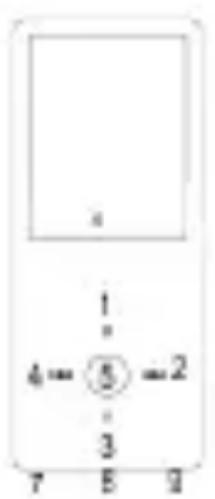
text_image
1 4 = ⑤ = 2 3 7 8 9
text_image
10 ON OFF- M: Previous menu, Sub menu
2.>>:Forward
3.V:Volum control
4.<<:Backward - ▶: Enter, Play, Pause, Power on/off
- LCD display
- USB port
8.Main power on/off switch - Earphone jack
- Micro SD slot
Basic operations
Turn on device
When Main Power Switch is turned off, slide button to turn on device
When Main Power Switch is turned on, long press [▶] to turn on device.
Turn off device
When device is turned on, long press [▶] to turn off device.
If device functions abnormally, slide Main Power Switch button to forcefully turn off device. Due to possible data loss, it is recommended to turn off device by long pressing [▶] button.
Key function
[Backward/Forward] : move up/down or right/left.
[M]: short press to go back to previous menu and long press to show sub-menu option.
[▶]: short press to enter into menu, play or pause and long press to turn off device.
[V]: press to show volume control and use [Backward/Forward] key to adjust volume.
Adding/Removing files/Folders
- Use device as a removable USB storage
-
Connect device to computer using provided USB cable.
-
Select "USB Disk" and Add files/folders into it by dragging or copying and pasting them.
-
Delete files from the removable USB storage (use the "Delete" command).
Disconnecting device from PC
- Follow the steps to avoid damaging device or losing data.
-
Left click mouse on the icon that is on the taskbar at the bottom right corner of the desktop.
-
Click "Safely remove USB Mass storage Device".
-
Disconnect the player from your computer.
Connecting to Bluetooth speaker/headphone
This device can connect to Bluetooth speaker and headphone that supports A2DP, AVRCP profiles.
Turn on/off Bluetooth
Select "Setting" on main menu. Press [▶] to enter, select "Bluetooth" and press [▶].
Select "Bluetooth status" and press [▶] to show on/off menu.
Press [Backward/Forward] to select On/Off and press [▶] to turn on or off.
Pairing device
Set "Pairing mode" of Bluetooth speaker or headphone.
Go to “Device search” and press [▶] to show “Please wait” message. Wait until this message disappears.
(Time for searching device depends on number of devices nearby and it can take up to 1\~3 minutes depending on the environment).
Connecting/Disconnecting/Unpairing device
Go to "device list" and press[▶]to see list of devices.
Select desired device and press [▶] to show pop-up menu shown below.
Connecting device : select "Bluetooth connecting" and press [▶] to connect.
Once connected a sound will be played through the speaker or headphone.
Unpairing device : select "Bluetooth unpairing" and press [▶] to unpair.
Disconnecting device : select connected device and press [ ▶]to show pop-up menu and select "Bluetooth disconnected" to disconnect.
Music
Select "Music" on main menu and press [▶] to enter.
Press 【Forward/Backward】 to select music files and press [▶] to playback and pause.
Music Playback Submenu
On music playback mode, short press 【M】 to enter submenu and short press
【Forward/Backward】 to select your desired mode.
Now playing : Enter into music playback mode of currently playing music
All Music : show all music from internal memory
Artist : show music sorted by artist
Album : show music sorted by album
Genre : show music sorted by genre
My Music list : show playlist chosen by user
Dir list : show file/folder of internal or external memory
Record list, My rating, Tag list: show recorded files, rating files and tag list
Setting
On music playback mode, long press 【M】 to enter pop-up menu and adjust device's function according to user's preference.
Photo
Select "Photo" on main menu and press [▶] to enter.
File browsing
Dir List : browse image files from external or internal memory
Photo viewing
Play/Pause slide show : On viewing photo, press [▶] to play/pause slide show.
View next/previous photo : On viewing photo, 【Forward/Backward】 to view next/previous photo
Setting
Scan mode : Select viewing mode.
Slide effect : Select slide effect.
Slide interval : Select slide interval.
Recorder
Select "Recorder" on main menu and press [▶] to enter.
Sound recording
Start/pause recording : Press [▶] to start recording and press it again to pause.
Save recording file: while recording, long press 【M】 to save file.
Return to Main Menu: while recording is paused, press 【M】 to return to Main Menu
Browser
Select "Browser" on main menu and press [▶] to enter.
Browse image files from external or internal memory and choose your desired files including video files, music files, photo files, recorded files, etc.
Setting
Select file/folder, long press 【M】 to enter pop-up menu and select move, copy or delete according to user's preference.
Setting
Select "Setting" on main menu and press [▶] to enter.
Display : Adjust brightness and Backlight time
Power saving : Adjust idle time and sleep time
Date & Time : Adjust date and time
Language : Select menu language
Advanced : View device information, adjust Effect Setting, Select Key tone, Format memory, etc
ALL RIGHTS RESERVED, COPYRIGHT DENVER ELECTRONICS A/S
DENVER
www.denver-electronics.com

text_image
CE ×Electric and electronic equipment and included batteries contains materials, components and substances that can be hazardous to your health and the environment, if the waste material (discarded electric and electronic equipment and batteries) is not handled correctly.
Electric and electronic equipment and batteries is marked with the crossed out trash can symbol, seen below. This symbol signifies that electric and electronic equipment and batteries should not be disposed of with other household waste, but should be disposed of separately.
As the end user it is important that you submit your used batteries to the appropriate and designated facility. In this manner you make sure that the batteries are recycled in accordance with legislature and will not harm the environment.
All cities have established collection points, where electric and electronic equipment and batteries can either be submitted free of charge at recycling stations and other collection sites, or be collected from the households. Additional information is available at the technical department of your city.
Imported by:
DENVER ELECTRONICS A/S
Omega 5A, Soeften
DK-8382 Hinnerup
Denmark
www.facebook.com/denverelectronics
Hereby, Inter Sales A/S, declares that this model DENVER (MPG-4084CBT) is in compliance with the essential requirements and other relevant provisions of Directive 2014/53/EU.
A copy of the Declaration of Conformity may be obtained at
Inter Sales A/S
Omega 5A, Soeften
DK-8382 Hinnerup
Denmark
DENVER®
www.denver-electronics.com
Importer:
DENVER ELECTRONICS A/S
Omega 5A, Soeften
DK-8382 Hinnerup
Denmark