
EL-2607R - Calculator SHARP - Free user manual and instructions
Find the device manual for free EL-2607R SHARP in PDF.


User questions about EL-2607R SHARP
0 question about this device. Answer the ones you know or ask your own.
Ask a new question about this device
Download the instructions for your Calculator in PDF format for free! Find your manual EL-2607R - SHARP and take your electronic device back in hand. On this page are published all the documents necessary for the use of your device. EL-2607R by SHARP.
USER MANUAL EL-2607R SHARP
The socket outlet shall be installed near the equipment and shall be easily accessible.
Vorsicht!
Thank you for your purchase of the SHARP electronic calculator, model EL-2607R. Your SHARP calculator is specially designed to save work and increase efficiency in all business applications and general office calculations. Careful reading of this manual will enable you to use your new SHARP calculator to its fullest capability.
OPERATIONAL NOTES
To insure trouble-free operation of your SHARP calculator, we recommend the following:
- The calculator should be kept in areas free from extreme temperature changes, moisture, and dust.
- A soft, dry cloth should be used to clean the calculator. Do not use solvents or a wet cloth.
- If you are not going to use the calculator for a time period, please pull out the power cord to cut electricity completely.
- If service should be required, use only a SHARP servicing dealer, a SHARP approved service facility or SHARP repair service.
- Do not wind the AC cord around the body or otherwise forcibly bend or twist it.
- Since this product is not waterproof, do not use it or store it where fluids, for example water, can splash onto it. Raindrops, water spray, juice, coffee, steam, perspiration, etc. will also cause malfunction.
SHARP will not be liable nor responsible for any incidental or consequential economic or property damage caused by misuse and/or malfunctions of this product and its peripherals, unless such liability is acknowledged by law.
WARNING
THE VOLTAGE USED MUST BE THE SAME AS SPECIFIED ON THIS CALCULATOR. USING THIS CALCULATOR WITH A HIGHER VOLTAGE THAN THAT WHICH IS SPECIFIED IS DANGEROUS AND MAY RESULT IN A FIRE OR OTHER TYPE OF ACCIDENT CAUSING DAMAGE. WE ARE NOT RESPONSIBLE FOR ANY DAMAGE RESULTING FROM USE OF THIS CALCULATOR WITH A VOLTAGE OTHER THAN THAT WHICH IS SPECIFIED.
CONTENTS
Page
OPERATING CONTROLS 3
- INK ROLLER REPLACEMENT 7
PAPER ROLL REPLACEMENT 8
- ERRORS 9
SPECIFICATIONS 9
CALCULATION EXAMPLES 34
OPERATING CONTROLS
① OFF ON
POWER SWITCH
P·P1C ②
PRINT/ITEM COUNT MODE SELECTOR:
"P" (Print mode): The calculator functions as a print/display calculator.
"●" (Neutral): The calculator functions as a display calculator. (Non-print mode)
"P·IC": The calculator functions as a print/display calculator with an item counter. The counter will count the number of times that ± has been pressed in addition.
Note: Each time = is used in subtraction, 1 will be subtracted from the count.
- The count is printed when the calculated result is obtained.
- Pressing of / * , × or ÷ clears the counter.
- The counter has the capacity of a maximum of 3 digits (up to ± 999 ). If the count exceeds the maximum, the counter will recount from zero.
③
CONSTANT/ADD MODE SELECTOR:
"K": The following constant functions will be performed:
Multiplication: The calculator will automatically remember the first number entered (the multiplicand) and × instruction.
Division: The calculator will automatically remember the second number entered (the divisor) and ÷ instruction
“·”: Neutral
"A": Use of the Add mode permits addition and subtraction of numbers without an entry of the decimal point. When the Add mode is activated,
the decimal point is automatically positioned according to the decimal selector setting.
Use of , × , and ÷ will automatically override the Add mode and decimally correct answers will be printed at the preset decimal position.
4 54 ROUNDED SELECTOR:
An answer is rounded up.
"5/4": An answer is rounded off.
An answer is rounded down.
Example: Set Decimal Selector to 2.
$$ 4 \div 9 = 0. 4 4 4 \dots , 5 \div 9 = 0. 5 5 5 \dots $$
| 4÷9± | 5÷9± | |
| ↑ | 0.45 | 0.56 |
| 5/4 | 0.44 | 0.56 |
| ↓ | 0.44 | 0.55 |
Note: The decimal point floats during successive calculation by the use of × or ÷ .
If the decimal selector is set to "F" then the answer is always rounded down () .
⑤ F63210 DECIMAL SELECTOR:
Presents the number of decimal places in the answer.
In the "F" position, the answer is displayed in the floating decimal system.
GT: GRAND TOTAL MODE SELECTOR:
"GT": This selector will accumulate the following:
(^ + ^ will be printed.)
1. Addition and subtraction totals obtained with / * .
2. Product and quotient totals obtained with ± or -
3. Answers obtained with % or MU.
"": Neutral, GT OFF
⑦ PAPER FEED KEY
LAST DIGIT CORRECTION KEY:
Operation of this key in entered numbers or calculated results shifts the number one digit to the right together with the decimal point. Used for one digit correction.
9 GT GRAND TOTAL KEY:
Prints and clears the "GT" memory contents.
10 NON-ADD/SUBTOTAL KEY:
Non-add - When this key is pressed right after an entry of a number in the Print mode, the entry is printed on the left-hand side with "#".
This key is used to print out numbers not subjects to calculation such as code, date, etc.
Subtotal - Used to get subtotal(s) of additions and/or subtractions. When pressed following ± or , the subtotal is printed with “◇” and the calculation may be continued.
By pressing this key even in the Non-print mode, the displayed number is printed with "P".
⑪ CE/* CLEAR ENTRY/CLEAR AND TOTAL KEY:
When pressed after a number and before a function, clear the number.
Clear and total - When pressed after a function key, prints the total of addition and subtraction with “*”. This key also serves as a clear key for the calculation register and resets an error condition. The contents of the memory are not affected by use of [] .
12 M+ MEMORY PLUS KEY
13 M- MEMORY MINUS KEY
14 OM RECALL MEMORY KEY
15 *M RECALL AND CLEAR MEMORY KEY
16 +- CHANGE SIGN KEY:
Changes the algebraic sign of a number (i.e., positive to negative or negative to positive).
17 MU MARKUP KEY:
Used to perform mark-ups, percent change and automatic add-on/discount.
18 DISPLAY
Display format:
123456789012·M·E
Symbols:
M:Memory symbol
Appears when a number is in memory.
- :Minus symbol
Appears when a number is a negative.
E:Error symbol
Appears when an overflow or other error is detected.
: Grand total memory symbol
Appears when a number is in the grand total memory.
If printing is blurry even when the ink roller is in the proper position, replace the roller.
Ink roller: Type EA-741R
WARNING
APPLYING INK TO WORN INK ROLLER OR USE OF UNAPPROVED INK ROLLER MAY CAUSE SERIOUS DAMAGE TO PRINTER.
- Set the power switch to the OFF.
- Remove the printer cover by sliding it. (Fig. 1)
- Move the knob of the ink roller slightly towards you and then lift it up (in the direction of the arrow). Take care not to catch the ink roller under the case. (Fig. 2)
- Install the new ink roller and push the knob of the ink roller. Make sure that the ink roller is securely in place. (Fig. 3)
- Put back the printer cover.
Note: When you clean the printer cover, remove the printer cover by sliding it. (Fig. 1) Then clean the printer cover by using a soft, dry cloth. Do not use solvents or a wet cloth.
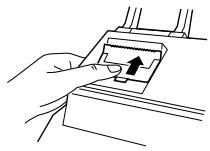
Fig. 1
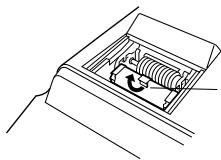
Knob of the ink roller
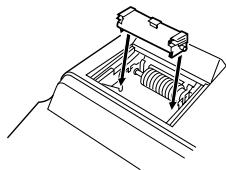
Fig. 3
Cleaning the printing mechanism
If the print becomes dull after long time usage, clean the printing wheel according to the following procedures:
1) Install the paper roll and feed it until it comes out of the front of the print mechanism.
2) Remove the printer cover and the ink roller.
3) Put a small brush (like a tooth brush) lightly to the printing wheel and clean it by pressing 1 .
4) Put back the ink roller and the printer cover.
PAPER ROLL REPLACEMENT
- Assemble the paper holder. (Fig. 1)
- Insert the leading edge of the paper into the opening directly behind the print mechanism. (Fig. 2)
- Press the paper feed key and feed the paper under the edge of the paper cutter. (Fig. 3)
- Place the paper roll in the paper holder at the back of the calculator. (Fig. 4)
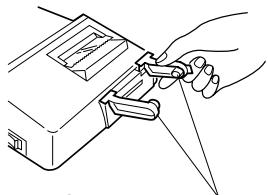
Fig. 1

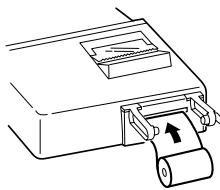
Fig. 2
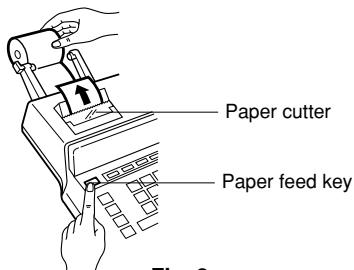
Fig. 3
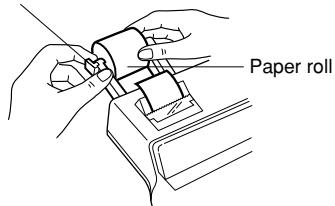
Paper holder
Fig. 4
DO NOT PULL PAPER BACKWARDS AS THIS MAY CAUSE DAMAGE TO PRINTER MECHANISM.
ERRORS
There are several situations which will cause an overflow or an error condition. When this occurs, the error symbol "E" will be displayed and all keys will electronically lock. The contents of the memory at the time of the error are retained.
If an "0.E" is printed on the tape at the time of the error, / must be used to clear the calculator. If an "E" with any numerals except zero is printed on the tape or if an "E" is not printed on the tape, the error may be cleared with / or -- and the calculation can still be continued.
Error conditions:
- Entry of more than 12 digits or 11 decimals.
This error can be cleared with / or
- When the integer portion of an answer exceeds 12 digits.
- When the integer portion of the contents of the memory exceeds 12 digits.
(Ex. 999999999999 + 1 + )
- When any number is divided by zero. (Ex. 5 0 ± )
SPECIFICATIONS
Power source: AC:220V-230V,50Hz
Operating capacity: 12 digits
Calculations: Four arithmetic, constant multiplication and division, power, add-on, discount, repeat addition and subtraction, reciprocal grand total, item count, markup, memory, etc.
PRINTING SECTION
Printing speed: Approx. 3.0 lines/sec.
Printing paper: 57 mm (2-1/4") ~ 58 mm (2-9/32") wide
80 mm (3-5/32") in diameter (max.)
Operating temperature: 0^ 40^ ( 32^ 104^ )
Power consumption: 73 mA
Dimensions: 220 (W) × 274 (D) × 69 (H) mm
8-21/32" (W) × 10-25/32" (D) × 2-23/32" (H)
Weight: Approx. 1.4kg (3.1 lbs.)
Accessories: 1 paper roll, 1 ink roller (installed), paper holder and operation manual
EINLEITUNG
A FESTÉKHENGER CSERÉJE
- Set the decimal selector as specified in each example.
The rounding selector should be in the "5/4" position unless otherwise specified. - The grand total mode selector and the constant/add mode selector should be in the "●" position (off position) unless otherwise specified.
- The print/item count mode selector should be in the "P" position unless otherwise specified.
- If an error is made while entering a number, press / * or and enter the correct number.
- Example procedures are listed in following manner unless otherwise specified.
| Operation | Display | |
RECHNUNGSBEISPIELE
B. 11.11 ÷ 77.77 = ①
22.22 ÷ 77.77 = ②
F63210
K·A


11.11
77.77

11.11
0.143
11·11 ÷
77·77 = K
0·143 * ①
22.22

0.286
22·22 = K
0·286 * ②
POWER / POTENZBERECHNUNGEN / PUISSANCE / HATVÁNYOZÁS
| 5.25 | 5.25 | 5·25 × 5·25 = |
| 27.563 | 27·563 * |
| 5 × ± | 5. | 5·× 5·=K |
| 25. | 25·* | |
| ± | 125. | 25·=K 125·* |
| F63210 K:A | ||
| 5 × × ± | 5. | 5·× 5·× |
| 25. | 5·= | |
| 125. | 125·* |
PERCENT / PROZENT / POURCENTAGE / SZÁZALEKSZÁMÍTÁS
| A. 100×25%= | ||
| 100 ×25 | 100. | 100·×25·% |
| 25.00 | 25·00 * | |
| B. 123÷1368=(%) | ||
| 123 ÷1368 | 123. | 123·÷1·368·% |
| 8.99 | 8·99 * | |
RECIPROCAL / REZIPROKRECHNUNGEN / INVERSES / RECIPROK SZÁMITÁS
| 1/7 = | 5/4 5/4 F63210 | |
| 7 | 7. | 7·÷ |
| 1. | 7·÷ | |
| ± | 7·= | |
| 0.14285714285 | 0.14285714285 * | |
ADD-ON AND DISCOUNT / AUFSCHLAG UND ABSCHLAG / MAJORATION ET RABAIS / AREMELES ES ARENGEDMÉNY
A. 5% add-on to 100. / Ein Aufschlag von 5% zu 100. / Majoration de 5% de 100. / 5% -kal novelje meg a 100 egységárat.

| 100 × 5 MU | 100. | 100·× 5·% |
| 5·00 { Increased amount Zusatzbetrag Majoration Növekmény } | ||
| 105.00 | 105·00 * { New amount Neuer Betrag Total majoré Üj erteşk } |
Markup and Profit Margin are both ways of calculating percent profit.
Profit margin is percent profit vs. selling price.
- Markup is percent profit vs. cost.
Cost is the cost.
- Sell is the selling price.
- GP is the gross profit.
- Mkup is the percent profit based on cost.
- Mrgn is the percent profit based on selling price.
| Cost | 200 |
| Sell | 250 |
| GP | $50 |
| Mkup | 25% |
| Mrgn | 20% |
F63210 1
| 200 ÷ 20 MU | 200. | 200·÷ Cost 20·%M Mrgn 250·00 * Sell 50·00 GP GP |
| 50.00 |
PERCENT CHANGE / PROZENTUALE VERÄNDERUNG / VARIATION EN POUR CENT / SZÁZALEKOS VALTOZÁS SZÁMITÁSA
- Calculate the dollar difference (a) and the percent change (b) between two yearly sales figures 1,500 in one year and 1,300 in the previous.
- Berechnung der Dollardifferenz (a) und der prozentualen Veränderung (b) zwischen den beiden Jahresumsatzzahlen 1.500 in einem Jahr und 1.300 im vorherigen Jahr.
- Calculer la différence en dollars (a) et la variation en pour cent (b) entre deux prix. 1.500 pour cette année et 1.300 pour l'année précédente.
- Számitsa ki a kūlönbséget (a) és a százalekos valtozást (b), ha az éves eladas 1300 Ft-ról 1500 Ft-ra nö!

| 1500 ± 1300 MU | 1,500.00 | 1·500·00 + |
| 200.00 | 1·300·00 - | |
| 200·00 * (a) | ||
| 15.38 | 15·38 %C (b) |
PERCENT PRORATION / PROZENTUALES VERHÄLTNIS / DISTRIBUTION PROPORTIONNELLE EN POURCENTAGE / SZÁZALEKOS ARÁNY
$$ 1 0 0 + 2 0 0 + 3 0 0 = ① $$
$$ +) 3 0 0 + 4 0 0 + 5 0 0 = ② $$
$$ +) 5 0 0 - 6 0 0 + 7 0 0 = \textcircled {3} $$
Grand total/Endsumme/ ④
$$ - 7 2 \times 8 = ③ $$
$$ ① + ② + ③ = ④ $$


*3
46 46.
78 M+
125 125.
5 M+
72 X 72.M
8 M-
M
46.
$$ 3, 5 8 8. ^ {M} $$
$$ 1 2 5. ^ {\text {M}} $$
$$ 2 5. ^ {\mathsf {M}} $$
$$ 7 2. ^ {\mathrm {M}} $$
$$ 5 7 6. ^ {\mathsf {M}} $$
$$ 3, 0 3 7. ^ {M} $$
$$ 4 6. \times $$
$$ 7 8 \cdot = $$
$$ 3. 5 8 8 \cdot + M ① $$
$$ 1 2 5 \cdot \div $$
$$ 5 \cdot = $$
$$ 2 5 \cdot + M ② $$
$$ 7 2 \cdot \times $$
$$ 8 \cdot = $$
$$ 5 7 6 \cdot - M \quad ③ $$
$$ 3. 0 3 7 \cdot \quad \text {M} \quad ④ $$

B. (123 + 45) × (456 - 89) =
*M *3
123 M+ 123.
45 M+ 45.M
456 456. M
89 367.
X
M
$$ 1 2 3. ^ {M} $$
$$ 4 5. ^ {\mathrm {M}} $$
$$ 4 5 6. ^ {\mathrm {M}} $$
$$ 3 6 7. ^ {\mathrm {M}} $$
$$ 3 6 7. ^ {\mathrm {M}} $$
$$ 1 6 8. ^ {M} $$
$$ 6 1, 6 5 6. ^ {\mathrm {M}} $$
$$ 1 2 3 \cdot + M $$
$$ 4 5 \cdot + M $$
$$ 4 5 6 \cdot + $$
$$ 8 9 \cdot - $$
$$ 3 6 7 \cdot \quad \diamondsuit $$
$$ 3 6 7 \cdot \times $$
$$ 1 6 8 \cdot \quad \diamond M $$
$$ 1 6 8 \cdot = $$
$$ 6 1, 6 5 6 \cdot * $$
This equipment complies with the requirements of Directives 89/336/EEC and 73/23/EEC as amended by 93/68/EEC.