
CS-2130 - Calculator SHARP - Free user manual and instructions
Find the device manual for free CS-2130 SHARP in PDF.


| Product type | Electronic calculator |
| Brand | SHARP |
| Model | CS-2130 |
| Display capacity | 12 digits |
| Main power supply | Built-in solar cell |
| Backup power supply | Lithium battery (included) |
| Automatic power-off | After approximately 7 minutes of inactivity |
| Operating temperature | 0 °C to 40 °C |
| Dimensions (L × D × H) | 185 × 175 × 18 mm |
| Weight (with battery) | Approximately 290 g |
| Foldable stand | Yes, for optimal operating angle |
| Memory functions | 2 independent memories (erase by CM and Rcl×2) |
| Error correction | CE key to clear entered number, CA to clear calculator and memory |
| Cleaning | Soft, dry cloth, without solvents |
| Usage precautions | Avoid extreme temperature variations, humidity, dust; do not touch the solar cell |
| Troubleshooting | Only by a SHARP authorized dealer or service center |
| Included accessories | Lithium battery (installed), instruction manual |
| Battery recycling | Return to dealer or collection point; do not dispose of in fire or water |
Frequently Asked Questions - CS-2130 SHARP
User questions about CS-2130 SHARP
0 question about this device. Answer the ones you know or ask your own.
Ask a new question about this device
Download the instructions for your Calculator in PDF format for free! Find your manual CS-2130 - SHARP and take your electronic device back in hand. On this page are published all the documents necessary for the use of your device. CS-2130 by SHARP.
USER MANUAL CS-2130 SHARP
ELECTRONIC CALCULATOR ELEKTRONISCHER RECHNER CALCULATRICE ÉLECTRONIQUE CALCULADORA ELECTRONICA CALCOLATRICE ELETTRONICA ELEKTRONISK RÄKNARE
ENGLISH Page 1
DEUTSCH. 5
FRANÇAIS Page 9
ESPANOL Pagina 13
ITALIANO . 17
SVENSKA Sidan 21
NEDERLANDS Page 25
COMPET
OPERATION MANUAL
This equipment complies with the requirements of Directive 89/336/EEC as amended by 93/68/EEC.
Thank you for your purchase of the SHARP electronic calculator, model CS-2130.
To ensure trouble-free operation of your SHARP calculator, we recommend the following:
- The calculator should be kept in areas free from extreme temperature changes, moisture, and dust.
- A soft, dry cloth should be used to clean the calculator. Do not use solvents or wet cloth.
- The solar cell is delicate. It should not be pressed or tampered with.
- If service should be required on this equipment, use only a SHARP servicing dealer, a SHARP approved service facility or SHARP repair service where available.

This calculator has a folding support so it can be positioned easily on the desk for a good operating angle. (See diagram)
POWER SUPPLY
Backup Battery
If the light exposed to the solar cell is insufficient, the backup battery is turned on automatically to operate the calculator.
Automatic Power-Off function:
This calculator is automatically turned off approximately 7 minutes after the last key operation to save the battery.
Please press the ON key when you see no indication.
CLEAR AND CORRECT
- Clear number entered
1 2 + 3 5 → 1 2 + 3 4 ⇒ 1 2 [3] 3 5 [CE] 3 4
(1 2 [±] 3 5 [-] 4)
- Correct function
1 2 3 [×] → 1 2 3 ÷ 4 ⇒ 1 2 3 [×] [÷] 4
- Clear the calculator (except memory)
Press the ON/C key.
- Clear the 1st memory
Press the CM key.
- Clear the 2nd memory
Press the R-cm key twice.
- Clear error conditions
Press the ON/C or CA key.
(In the case of pressing the CA key, the contents of the memory is cleared.)
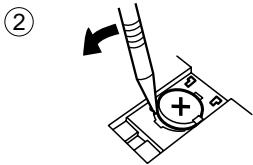
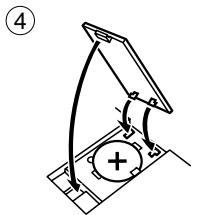
BATTERY REPLACEMENT
When to Replace:
- The display dims in dark places.
- The display will not appear by pressing the ON key after the power is automatically turned off.

(3)


SPECIFICATIONS
Type: Electronic calculator
Operating capacity: 12 digits
Built-in solar cell and Lithium battery
(3 V DC CR2032 × 1)
Automatic power-off: Approx. 7 min.
Operating temperature: 0°C to 40°C (32°F to 104°F)
Dimensions: 185 (W) × 175 (D) × 18 (H) mm
7-9/32" (W) × 6-7/8" (D) × 23/32" (H)
Weight: Approx. 290g (0.64 lb.) (with battery)
Accessories: Lithium battery (installed), Operation manual
For calculation examples, see page 30.
(3 V DC CR2032 × 1)
Automatic power-off: Approx. 7 minutes
(3V DC CR2032 × 1)
Ca. 7 min.
0°C to 40°C
185 (L) x 175 (W) x 18 (H) mm
Electronic calculator
12 digits
Press the % key prior to beginning any calculation. If nothing appears on the display during calculation, do not continue making entries.
NOTE:
USE WITH 2A MEMORY
EXAMPLE: (874 - 557) × (7 + 8) ÷ (1746 + 876) ÷ (12 + 23) =
| K· ↑5/4↓ F320A Σ· | ||
| Operation | Bedienung | Display Anzeige |
| Opération | Operazioni | Affichage Quadrante |
| Operación | Operation | Exhibición Angivning |
| Bediening | Display | |
| R:Cl R:Cl CM %C12 M+ 23 M+0%C1746 ± 876 ±÷ RM CM M+0%C874 +I557 +/- +I *0%C7 ± 8 ±× R:Cl | 0.23. M+0. M2'622. M35. M75. M874. M1557. M10. M115. M1317. M14'755. M175. M163. M1 | |
To store a negative number, use the +/- key before the + key. : To store a negative number, use the +/- key before the + key. : To store a negative number, use the +/- key before the + key. : To store a negative number, use the +/- key before the + key. : To store a negative number, use the +/- key before the + key. : Press the +/- key before the + key when storing a negative number. : To store a negative number, press the +/- key before pressing the + key.
— MEMO/NOTES/APUNTES/PROMEMORIA/ANTECKNINGAR/MEMO —
FOR GERMANY ONLY
Environmental protection
Brand : SHARP
Model : CS-2130
Category : Calculator