
UE65KS8000L - TV SAMSUNG - Free user manual and instructions
Find the device manual for free UE65KS8000L SAMSUNG in PDF.


| Product Type | 4K SUHD Smart TV |
| Model | UE65KS8000L |
| Brand | Samsung |
| Screen Size | 65 inches (163 cm) |
| Resolution | 3840 x 2160 (4K UHD) |
| Display Technology | SUHD (Quantum Dot LED) |
| Smart TV Platform | Tizen OS |
| Dimensions (with stand) | 1453.6 x 908.8 x 293.5 mm |
| Dimensions (without stand) | 1453.6 x 839.4 x 57.4 mm |
| Weight (with stand) | 25.3 kg |
| Weight (without stand) | 20.7 kg |
| Power Consumption (typical) | 200 W |
| Power Consumption (standby) | <0.3 W |
| HDMI Inputs | 4 |
| USB Ports | 3 |
| Ethernet Port | 1 |
| Wireless Connectivity | Wi-Fi 802.11ac, Bluetooth 4.2 |
| Audio Output | 40W (4.1ch) |
| Maintenance & Cleaning | Wipe with a soft, dry cloth. Do not use liquid or abrasive cleaners. |
| Safety Precautions | Keep away from moisture and heat sources. Ensure proper ventilation. |
| Spare Parts & Repairability | Spare parts available through Samsung service centers. Repairability index: 7/10. |
| General Information | Released in 2016. Supports HDR (HDR10, HLG). |
Frequently Asked Questions - UE65KS8000L SAMSUNG
User questions about UE65KS8000L SAMSUNG
0 question about this device. Answer the ones you know or ask your own.
Ask a new question about this device
Download the instructions for your TV in PDF format for free! Find your manual UE65KS8000L - SAMSUNG and take your electronic device back in hand. On this page are published all the documents necessary for the use of your device. UE65KS8000L by SAMSUNG.
USER MANUAL UE65KS8000L SAMSUNG
Warning! Important Safety Instructions
(Please read the Safety Instructions before using your TV.)
CAUTION
RISK OF ELECTRIC SHOCK DO NOT OPEN
CAUTION: TO REDUCE THE RISK OF ELECTRIC SHOCK, DO NOT REMOVE COVER (OR BACK). THERE ARE NO USER SERVICEABLE PARTS INSIDE. REFER ALL SERVICING TO QUALIFIED PERSONNEL.
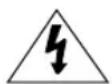
This symbol indicates that high voltage is present inside. It is dangerous to make any kind of contact with any internal part of this product.
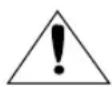
This symbol indicates that this product has included important literature concerning operation and maintenance.

Class II product : This symbol indicates that it does not require a safety connection to electrical earth (ground).
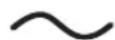
AC voltage : This symbol indicates that the rated voltage marked with the symbol is AC voltage

DC voltage : This symbol indicates that the rated voltage marked with the symbol is DC voltage.
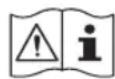
Caution, Consult Instructions for use: This symbol instructs the user to consult the user manual for further safety related information.
The slots and openings in the cabinet and in the back or bottom are provided for necessary ventilation. To ensure reliable operation of this apparatus and to protect it from overheating, these slots and openings must never be blocked or covered.
- Do not place this apparatus in a confined space, such as a bookcase or built-in cabinet, unless proper ventilation is provided.
- Do not place this apparatus near or over a radiator or heat register, or where it is exposed to direct sunlight.
- Do not place vessels (vases etc.) containing water on this apparatus, as this can result in a fire or electric shock.
Do not expose this apparatus to rain or place it near water (near a bathtub, washbowl, kitchen sink, or laundry tub, in a wet basement, or near a swimming pool etc.). If this apparatus accidentally gets wet, unplug it and contact an authorised dealer immediately.
This apparatus uses batteries. In your community, there might be environmental regulations that require you to dispose of these batteries properly. Please contact your local authorities for disposal or recycling information.
Do not overload wall outlets, extension cords or adaptors beyond their capacity, since this can result in fire or electric shock.
Power-supply cords should be placed so that they are not likely to be walked on or pinched by items placed upon or against them. Pay particular attention to cords at the plug end, at wall outlets, and at the point where they exit from the appliance.
To protect this apparatus from a lightning storm, or when left unattended and unused for long periods of time, unplug it from the wall outlet and disconnect the antenna or cable system. This will prevent damage to the set due to lightning and power line surges.
Before connecting the AC power cord to the DC adaptor outlet, make sure that the voltage designation of the DC adaptor corresponds to the local electrical supply.
Never insert anything metallic into the open parts of this apparatus. This may cause a danger of electric shock.
To avoid electric shock, never touch the inside of this apparatus. Only a qualified technician should open this apparatus.
Be sure to plug in the power cord until it is firmly seated. When unplugging the power cord from a wall outlet, always pull on the power cord's plug. Never unplug it by pulling on the power cord. Do not touch the power cord with wet hands.
If this apparatus does not operate normally - in particular, if there are any unusual sounds or smells coming from it - unplug it immediately and contact an authorised dealer or service centre.
Be sure to pull the power plug out of the outlet if the TV is to remain unused or if you are to leave the house for an extended period of time (especially when children, elderly or disabled people will be left alone in the house).
- Accumulated dust can cause an electric shock, an electric leakage, or a fire by causing the power cord to generate sparks and heat or by causing the insulation to deteriorate.
Be sure to contact an authorised service centre for information if you intend to install your TV in a location with heavy dust, high or low temperatures, high humidity, chemical substances, or where it will operate 24 hours a day such as in an aerial port, a train station, etc. Failure to do so may lead to serious damage to your TV.
Use only a properly grounded plug and wall outlet.
- An improper ground may cause electric shock or equipment damage. (Class I Equipment only.)
To turn off this apparatus completely, disconnect it from the wall outlet. Be sure to have the wall outlet and power plug readily accessible.
Store the accessories (battery, etc.) in a location safely out of the reach of children.
Do not drop or strike the product. If the product is damaged, disconnect the power cord and contact a service centre.
To clean this apparatus, unplug the power cord from the wall outlet and wipe the product with a soft, dry cloth. Do not use any chemicals such as wax, benzene, alcohol, thinners, insecticide, aerial fresheners, lubricants, or detergents. These chemicals can damage the appearance of the TV or erase the printing on the product.
Do not expose this apparatus to dripping or splashing.
Do not dispose of batteries in a fire.
Do not short-circuit, disassemble, or overheat the batteries.
There is danger of an explosion if you replace the batteries used in the remote with the wrong type of battery. Replace only with the same or equivalent type.
* Figures and illustrations in this User Manual are provided for reference only and may differ from the actual product appearance. Product design and specifications may change without notice.
CIS languages (Russian, Ukrainian, Kazakhs) are not available for this product, since this is manufactured for customers in EU region.
What's in the Box?
Make sure that the following items are included with your TV. If there are any items missing, contact your local dealer.
Samsung Smart Remote & Batteries (AA x 2) Power Cord
Regulatory Guide Warranty Card (Not available in some locations)
User Manual Cleaning cloth
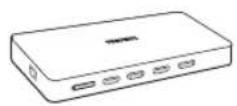
One Connect

2EA
Wall mount Adapter
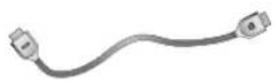
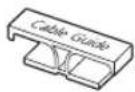
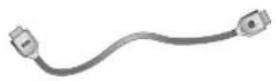
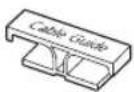
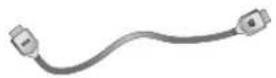
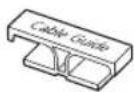
One Connect Cable Cable Guide
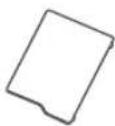
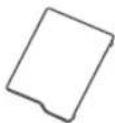
Cover Terminal

1EA 2EA
- The colours and shapes of the items differ with the model.
- Cables not supplied with this product can be purchased separately.
- Open the box and check for any accessory items hidden behind or inside the packing materials.
An administration fee may be charged in the following situations:
(a) An engineer is called out at your request, but there will be no defect with the product (i.e., where the user manual has not been read).
(b) You bring the unit to a repair centre, but there will be no defect identified the product (i.e., where the user manual has not been read).
You will be informed of the administration fee amount before a technician visits.

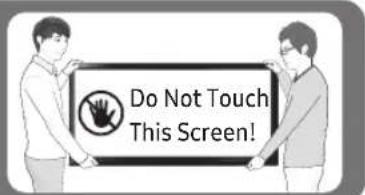
Warning: Screens can be damaged from direct pressure when handled incorrectly. We recommend lifting the TV at the edges, as shown.
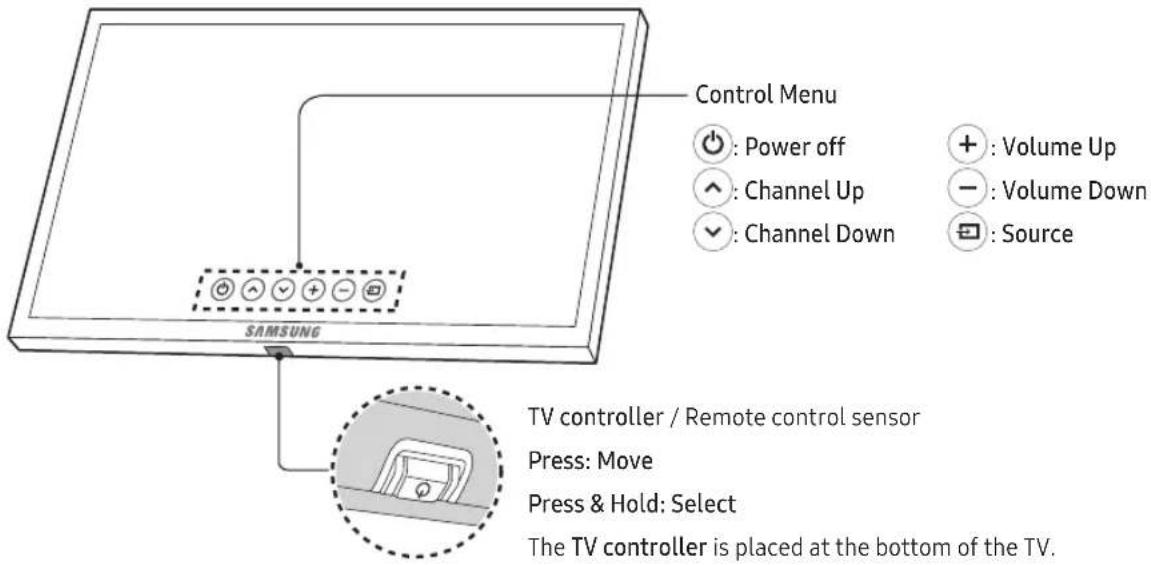
Using the TV Controller
You can turn on the TV with the TV controller button at the bottom of the TV, and then use the Control Menu. The Control Menu appears when the button is pressed while the TV is On. For more information about its usage, refer to the figure below.
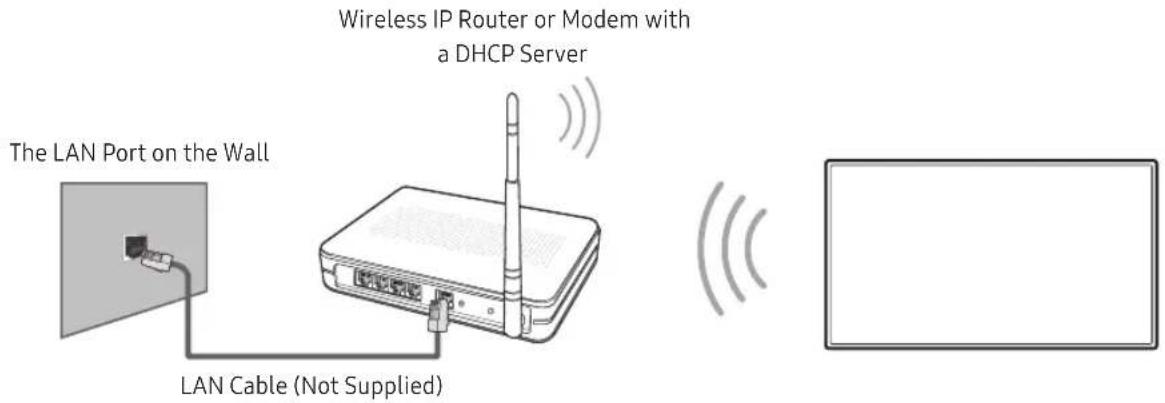
Connecting to a Network
Connecting the TV to a network gives you access to online services, such as Smart Hub, as well as software updates.
Network Connection - Wireless
Connect the TV to the Internet using a standard router or modem.
Network Connection - Wired
TV Rear Panel
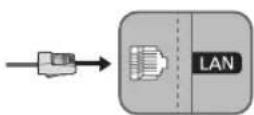
Connect your TV to your network using a LAN cable.
- The TV does not support the network speeds less than or equal to 10 Mbps.
- Use Cat7 (*STP Type) cable for the connection.
* Shielded Twist Pair
The Samsung Smart Remote
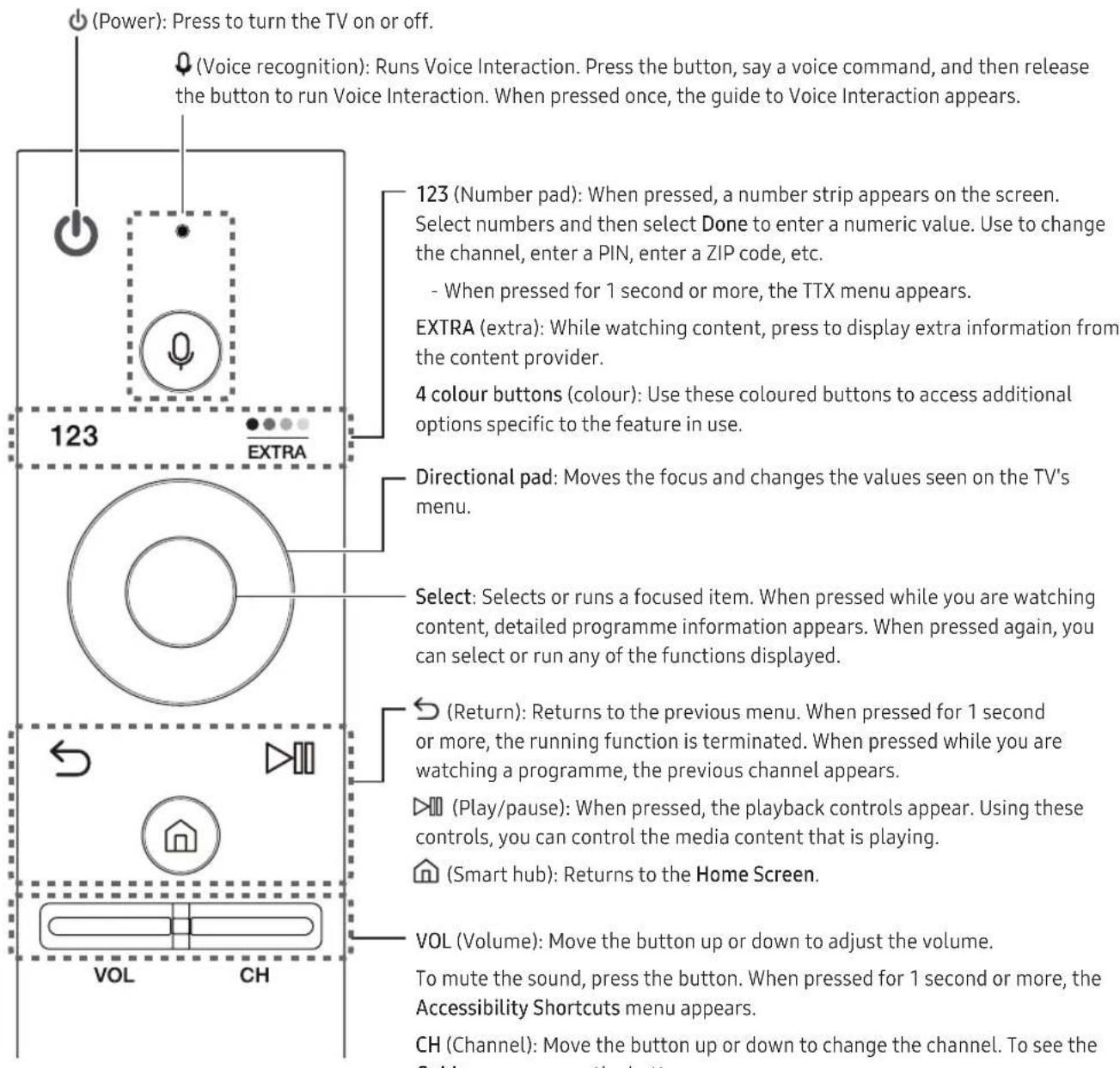
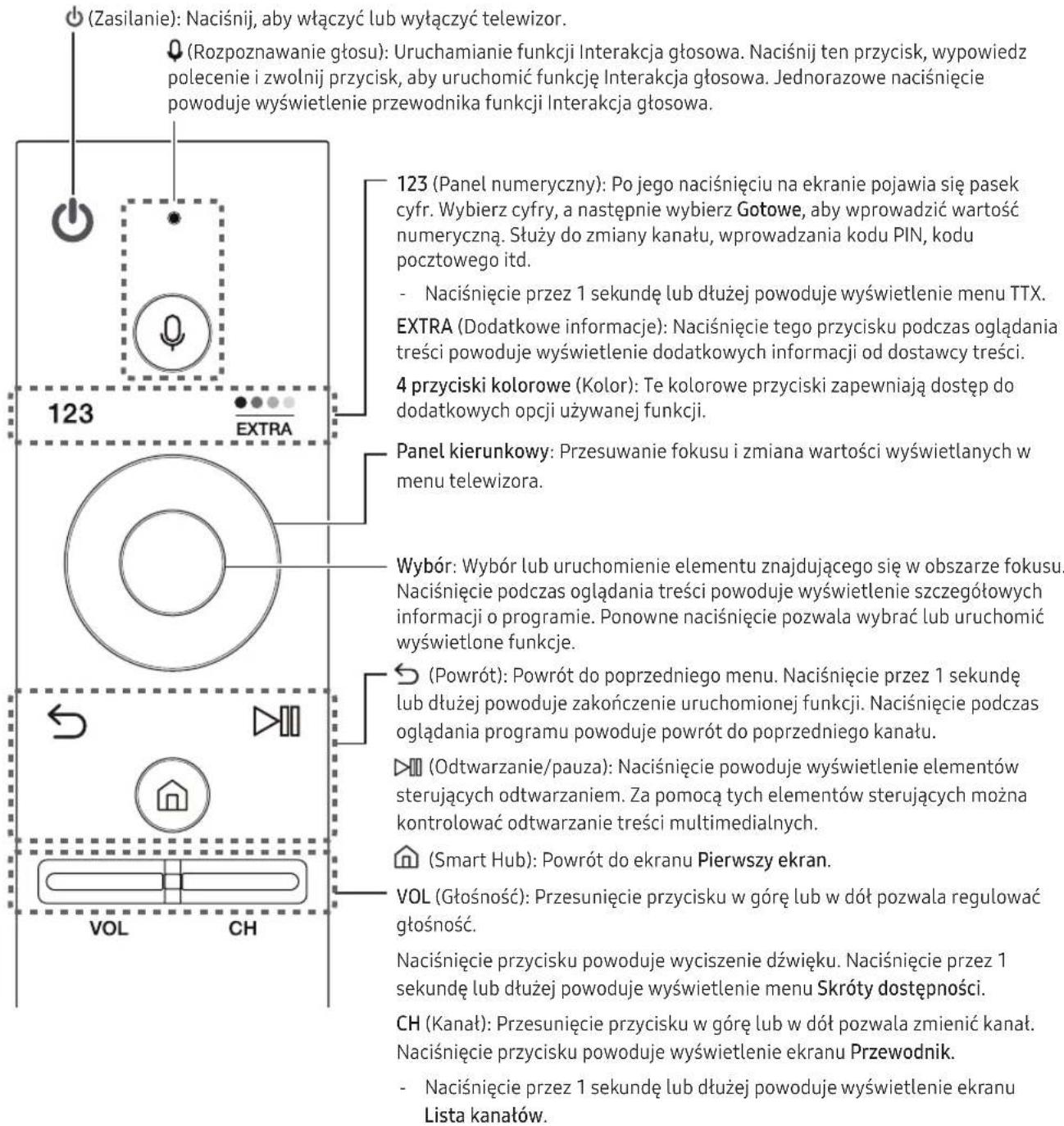
- When pressed for 1 second or more, the Channel List screen appears.
Installing batteries into the Samsung Smart Remote
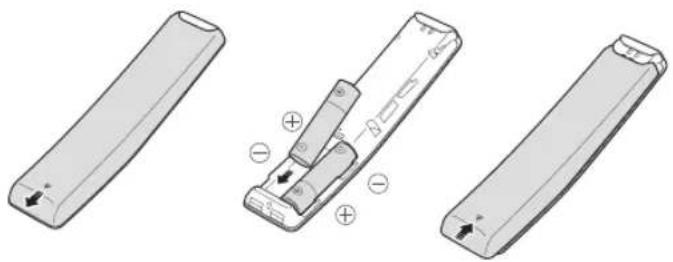
To use the Samsung Smart Remote, push the rear cover open in the direction of the arrow and insert the batteries as shown in the figure. Make sure that the positive and negative ends are facing the correct direction.
- Alkaline batteries are recommended for longer battery life.
natural_image
Three technical illustrations of remote control devices with labeled ports and polarity indicators (no text or symbols present)Pairing the TV to the Samsung Smart Remote
flowchart
graph TD
    A["Downward Arrow"] --> B["Process Box"]
    C["Downward Arrow"] --> B
    B --> D["Arrow Down"]
    B --> E["Arrow Up"]
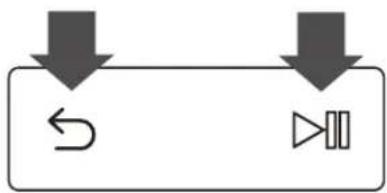
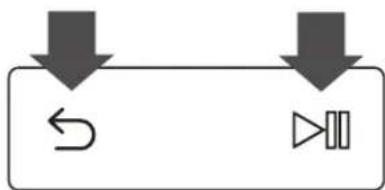
When you turn on the TV for the first time, the Samsung Smart Remote pairs to the TV automatically. If the Samsung Smart Remote does not pair to the TV automatically, point it at the remote control sensor of the TV, then press the and buttons on the Samsung Smart Remote simultaneously for 3 seconds or more.
The e-Manual

Settings > Support > Open e-Manual
The embedded e-Manual contains information about the key features of your TV.
- You can download and view a printable version of the e-Manual on the Samsung website.
Displaying the e-Manual:
Using the buttons in the e-Manual
 | Search Select an item from the search results to load the corresponding page. |
 | Index Select a keyword to navigate to the relevant page. |
 | Recent pages Select a topic from the list of recently viewed topics. |
 | Try Now Access the associated menu item and try out the feature directly. |
 | Link Access a topic referred to on an e-Manual topic page. |
Initial setup
The initial setup dialogue box appears when the TV is first activated. Follow the on-screen instructions to finish the initial setup process. You can manually perform this process at a later time in the ⓗ > ⚙️ Settings > System > Start Setup menu.
Troubleshooting and Maintenance
Troubleshooting
If the TV seems to have a problem, first review this list of possible problems and solutions. Alternatively, review the Troubleshooting Section in the e-Manual. If none of these troubleshooting tips apply, please visit "www.samsung.com" and click on Support, or contact the call centre listed on the back cover of this manual.
- This TFT LED panel is made up of sub pixels which require sophisticated technology to produce. There may be, however, a few bright or dark pixels on the screen. These pixels will have no impact on the performance of the product.
- To keep your TV in optimum condition, upgrade to the latest software. Use the Update now or Auto update functions on the TV's menu (☑ > Settings > Support > Software Update > Update now or ☑ > Settings > Support > Software Update > Auto Update).
The TV won't turn on.
• Make sure that the AC power cord is securely plugged in to the TV and the wall outlet.
• Make sure that the wall outlet is working and the power indicator on the TV is lit and glowing a solid red.
- Try pressing the Power button on the TV to make sure that the problem is not with the remote control. If the TV turns on, refer to "Remote control does not work" below.
There is no picture/video/sound or distorted picture/video/sound from an external device or "Weak or No Signal" displayed on TV or cannot find channel.
• Make sure the connection to the device is correct and that all cables are fully inserted.
- Remove and reconnect all cables connected to the TV and the external devices. Try new cables if possible.
- Confirm that the correct input source has been selected (n > Source).
- Perform a TV self diagnosis to determine if the problem is caused by the TV or the device. (n > Settings > Support > Self Diagnosis > Start Picture Test or Start Sound Test).
- If the test results are normal, reboot the connected devices by unplugging each device's power cord and then plugging it in again. If the issue persists, refer to the connection guide in the user manual of the connected device.
- If the TV is not connected to a cable or satellite box, run Auto Tuning to search for channels ⓗ > Settings > Broadcasting > Auto Tuning).
The remote control does not work.
- Check if the power indicator on the TV blinks when you press the remote's On button. If it does not, replace the remote control's batteries.
- Make sure that the batteries are installed with their poles (+/−) in the correct direction.
- Try pointing the remote directly at the TV from 5 ft. to 6 ft. (1.5\~1.8 m) away.
- If your TV came with a Remote Control (Bluetooth Remote), make sure to pair the remote to the TV. (Please refer to the e-Manual.)
The cable or satellite box remote control doesn't turn the TV on or off or adjust the volume.
- Programme the cable or satellite box remote control to operate the TV. Refer to the cable or satellite box user manual for the SAMSUNG TV code.
The TV settings are lost after 5 minutes.
- The TV is in the Retail Mode. Change the Usage Mode to Home Mode. ⓗ > Settings > System > Expert Settings > Usage Mode > Home Mode).
Intermittent Wi-Fi
• Make sure the TV has a network connection (n > Settings > Network > Network Status).
• Make sure the Wifi password is entered correctly.
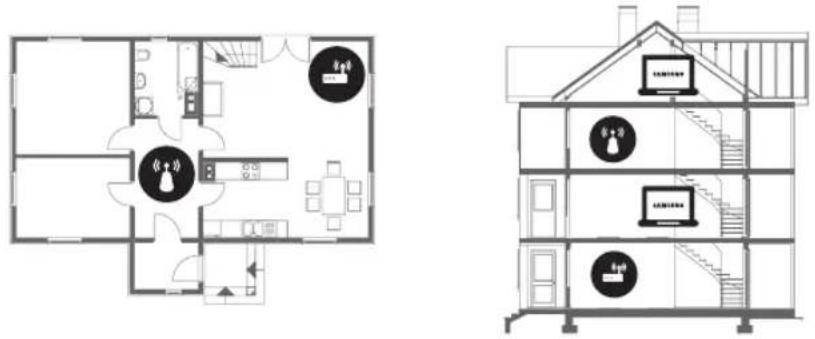
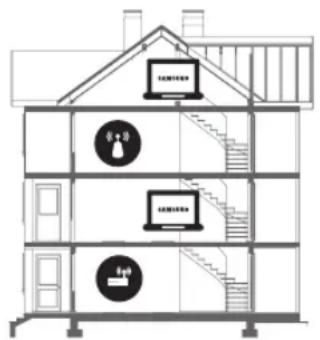
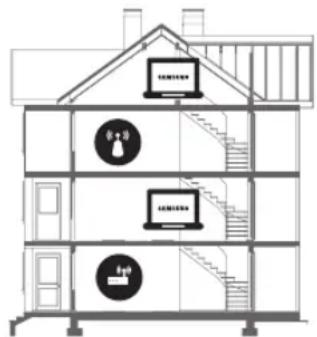
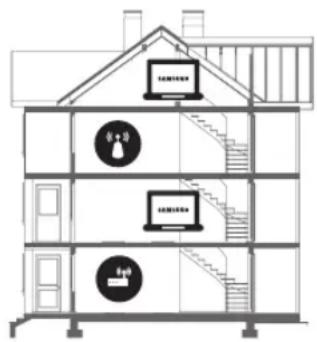
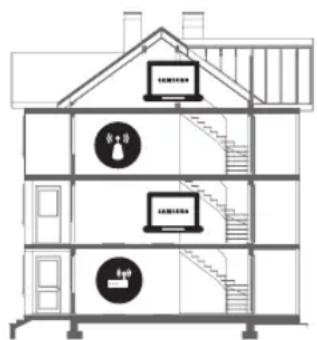
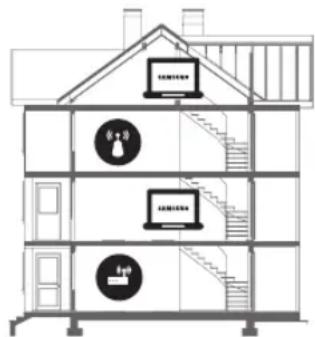
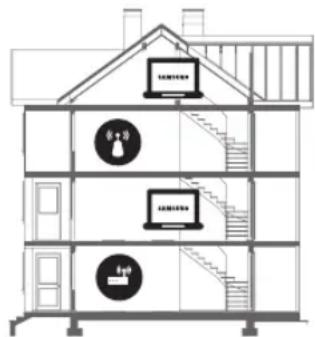
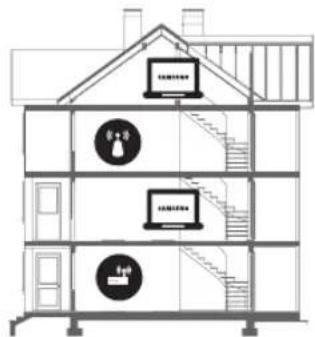
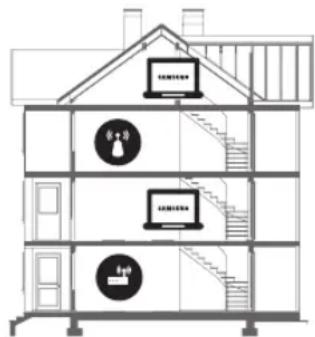
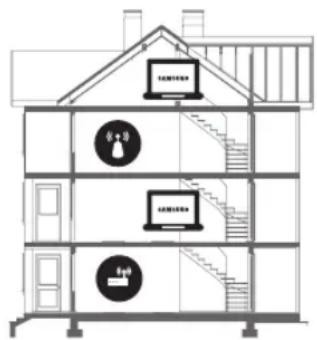
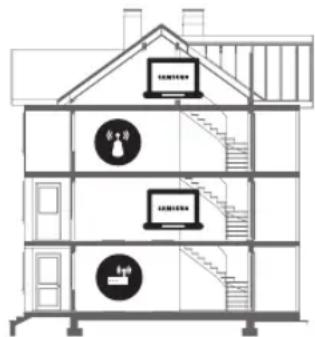
- Check the distance between the TV and the Modem/Router. The distance should not exceed 15.2 m.
- Reduce interference by not using or turning off wireless devices. Also, verify that there are no obstacles between the TV and the Modem/Router.
(The Wi-Fi strength can be decreased by appliances, cordless phones, stone walls/fireplaces, etc.)
Single story Multi story

Wireless router

Wireless repeater
- Contact your ISP and ask them to reset your network circuit to re-register the Mac addresses of your new Modem/Router and the TV.
Video App problems (Youtube etc)
- Change the DNS to 8.8.8.8, Select > Settings > Network > Network Status > IP Settings > DNS setting > Enter manually > DNS Server > enter 8.8.8.8 > OK.
- Reset by selecting > Settings > Support > Self Diagnosis > Reset Smart Hub.
What is Remote Support?
Samsung Remote Support service offers you one-on-one support with a Samsung Technician who can remotely:
• Diagnose your TV
- Adjust the TV settings for you
• Perform a factory reset on your TV
• Install recommended firmware updates
How does Remote Support work?
You can easily have a Samsung Tech service your TV remotely:
- Call the Samsung Contact Centre and ask for remote support.
- Open the menu on your TV and go to the Support section.
- Select Remote Management, then read and agree to the service agreements. When the PIN screen appears, provide the PIN number to the agent.
- The agent will then access your TV.
Eco Sensor and screen brightness
Eco Sensor adjusts the brightness of the TV automatically. This feature measures the light in your room and optimises the brightness of the TV automatically to reduce power consumption. If you want to turn this off, go to 📋 > ⚙️ Settings > System > Eco Solution > Eco Sensor.
- If the screen is too dark while you are watching TV in a dark environment, it may be due to the Eco Sensor.
- Do not block the sensor with any object. This can decrease picture brightness.
Still image warning
Avoid displaying still images (such as jpeg picture files), still image elements (such as TV channel logos, stock or news crawls at the screen bottom etc.), or programmes in panorama or 4:3 image format on the screen. If you constantly display still pictures, it can cause image burn-in on the LED screen and affect image quality. To reduce the risk of this adverse effect, please follow the recommendations below:
- Avoid displaying the still image for long periods.
• Always try to display any image in full screen. Use the picture format menu of the TV set for the best possible match. - Reduce brightness and contrast to avoid the appearance of after-images.
• Use all TV features designed to reduce image retention and screen burn. Refer to the e-Manual for details.
Caring for the TV
- If a sticker was attached to the TV screen, some debris can remain after you remove the sticker. Please clean the debris off before watching TV.
- The exterior and screen of the TV can get scratched during cleaning. Be sure to wipe the exterior and screen carefully using a soft cloth to prevent scratches.
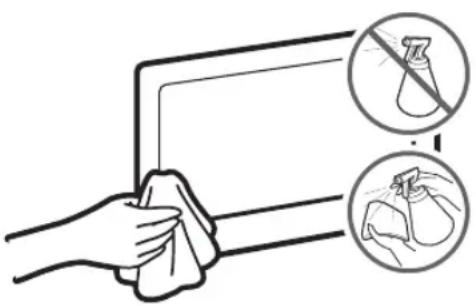
- Do not spray water or any liquid directly onto the TV. Any liquid that goes into the product may cause a failure, fire, or electric shock.
- Turn off the TV, then gently wipe away smudges and fingerprints on the panel with a micro-fiber cloth. Clean the body or panel of the TV with a micro-fiber cloth dampened with a small amount of water. After that, remove moisture with a dry cloth. While cleaning, do not apply strong force on the surface because it may cause damage to the panel. Never use flammable liquids (benzene, thinner, etc.) or a cleaning agent. For stubborn smudges, spray a small amount of screen cleaner on the cloth.
TV Installation
Mounting the TV on a wall

If you mount this product on a wall, follow the instructions exactly as recommended by the manufacturer. Unless it is correctly mounted, the product may slide or fall, thus causing serious injury to a child or adult and serious damage to the product.
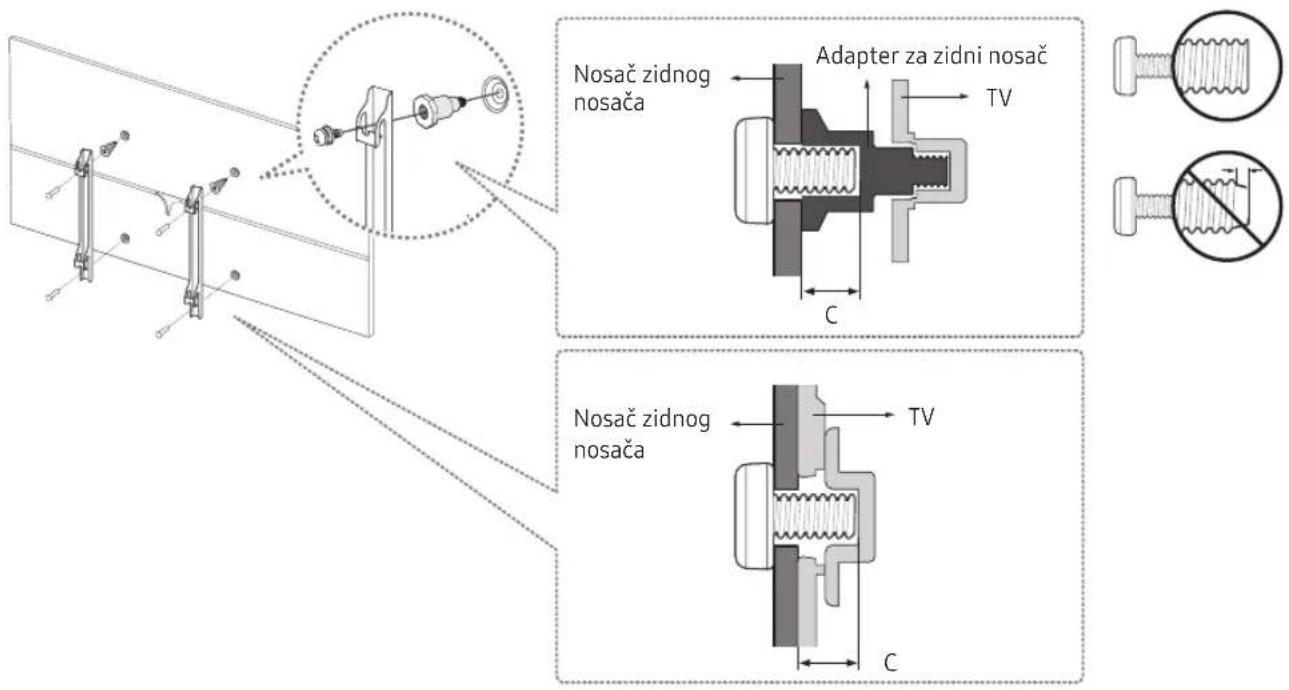
For models providing wall mount adapters, install them as shown in the figures below before installing the wall mount kit.
- Refer to the installation manual included with the Samsung wall mount kit.
Samsung Electronics is not responsible for any damage to the product or injury to yourself or others if you choose to install the wall mount on your own.
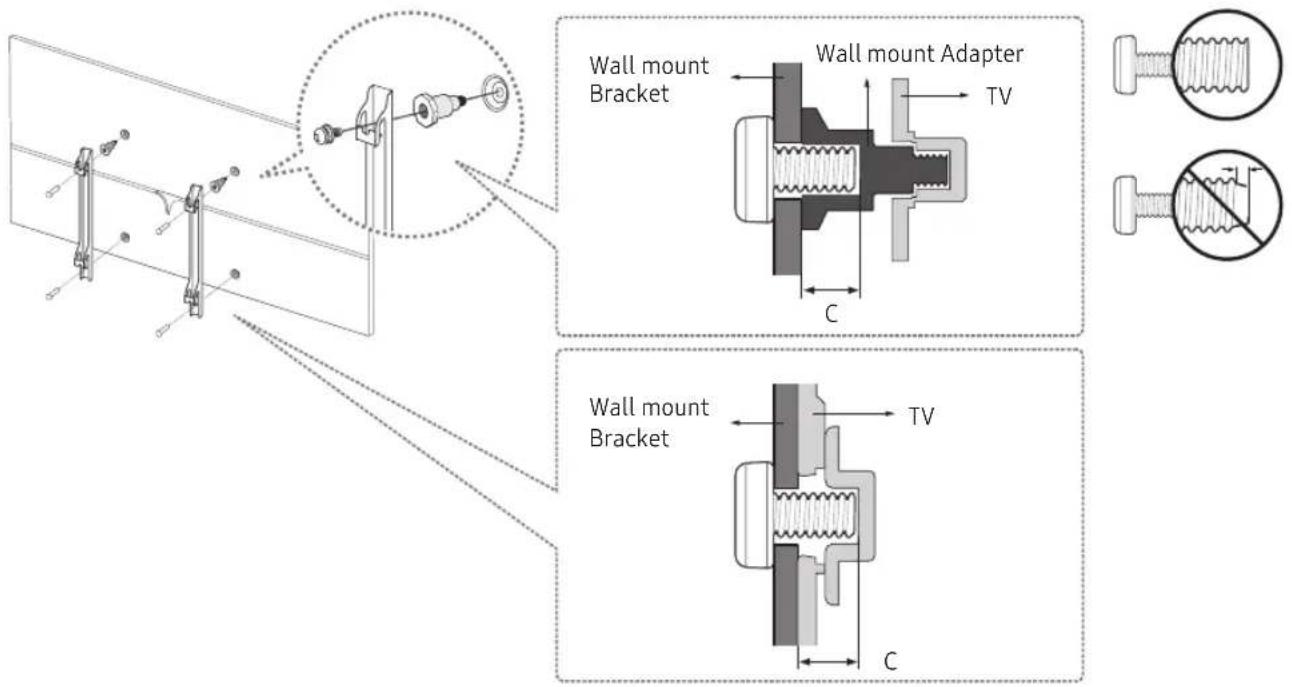
VESA wall mount kit notes and specifications
You can install your wall mount on a solid wall perpendicular to the floor. Before attaching the wall mount to surfaces other than plaster board, contact your nearest dealer for additional information. If you install the TV on a ceiling or slanted wall, it may fall and result in severe personal injury.
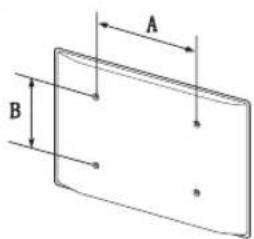
| TV size in inches | VESA screw hole specs(A * B) in millimetres | C (mm) | Standard Screw | Quantity |
| 49 ~ 75 400 X | 400 11 M8 4 |

Do not install your wall mount kit while your TV is turned on. This may result in personal injury from electric shock.
Do not use screws that are longer than the standard length or do not comply with VESA standard screw specifications. Screws that are too long may cause damage to the inside of the TV set.
- For wall mounts that do not comply with the VESA standard screw specifications, the length of the screws may differ depending on the wall mount specifications.
- Do not fasten the screws too firmly. This may damage the product or cause the product to fall, leading to personal injury. Samsung is not liable for these kinds of accidents.
- Samsung is not liable for product damage or personal injury when a non-VESA or non-specified wall mount is used or the consumer fails to follow the product installation instructions.
• Do not mount the TV at more than a 15 degree tilt.
• Always have two people mount the TV onto a wall.
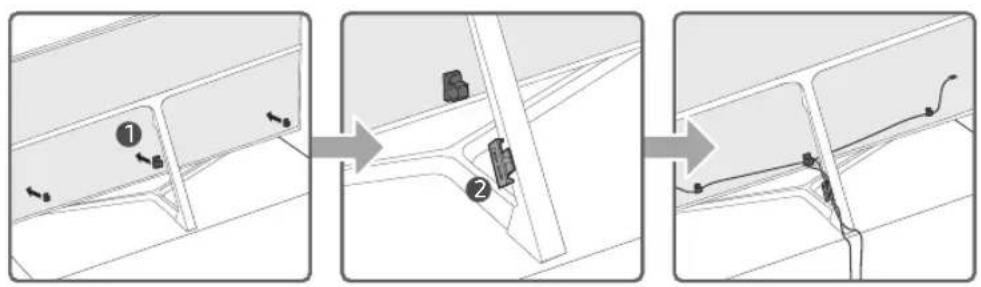
Arranging the cables with the cable guide
flowchart
graph TD
    A["①"] --> B["②"]
    B --> C["③"]
Covering the ports with the Cover Terminal
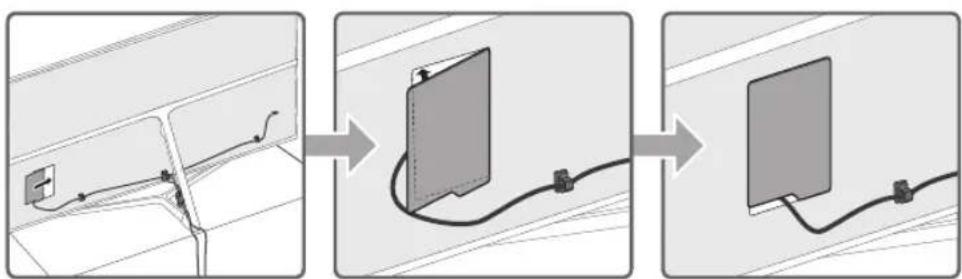
flowchart
graph LR
    A["Wire connection with cable"] --> B["Compression cable expansion"]
    B --> C["Compression cable termination"]
- Before covering the ports with the cover terminal, tidy up the cables on the TV.
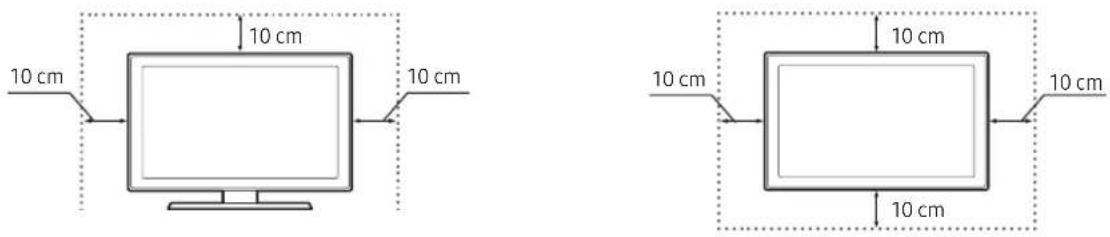
Providing proper ventilation for your TV
When you install your TV, maintain a distance of at least 10 cm between the TV and other objects (walls, cabinet sides, etc.) to ensure proper ventilation. Failing to maintain proper ventilation may result in a fire or a problem with the product caused by an increase in its internal temperature.
When you install your TV with a stand or a wall mount, we strongly recommend you use parts provided by Samsung Electronics only. Using parts provided by another manufacturer may cause difficulties with the product or result in injury caused by the product falling.
Installation with a stand Installation with a wall mount
Attaching the TV to the Stand
Make sure you have all the accessories shown, and that you assemble the stand following the provided assembly instructions.
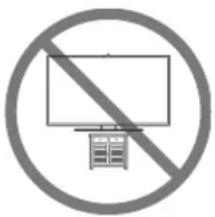
Safety Precaution: Securing the TV to the wall
natural_image
Prohibition sign with no text, featuring a circle and a monitor icon (no text or symbols)Caution: Pulling, pushing, or climbing on the TV may cause the TV to fall. In particular, ensure your children do not hang on or destabilise the TV. This action may cause the TV to tip over, causing serious injuries or death. Follow all safety precautions provided in the Safety Flyer included with your TV. For added stability and safety, you can purchase and install the anti-fall device as described below.

WARNING: Never place a television set in an unstable location. A television set may fall, causing serious personal injury or death. Many injuries, particularly to children, can be avoided by taking simple precautions such as
• Using cabinets or stands recommended by the manufacturer of the television set.
• Only using furniture that can safely support the television set.
• Ensuring the television set is not overhanging the edge of the supporting furniture.
- Not placing the television set on tall furniture (for example, cupboards or bookcases) without anchoring both the furniture and the television set to a suitable support.
- Not placing the television set on cloth or other materials that may be located between the television set and supporting furniture.
• Educating children about the dangers of climbing on furniture to reach the television set or its controls. If your existing television set is being retained and relocated, the same considerations as above should be applied.
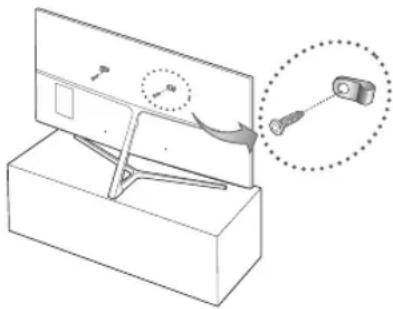
Preventing the TV from falling
- Put the screws into one set of brackets, and then firmly fasten them to the wall. Confirm that the screws are firmly attached to the wall.
- You may need additional material such as an anchor depending on the type of wall.
- Put the screws into a second set of brackets, and then fasten the screws to the TV.
- Screws may not be supplied with the product. In this case, please purchase the screws of the following specifications.
- Connect the brackets fixed to the TV and the brackets fixed to the wall with a durable, heavy-duty string, and then tie the string tightly.
- Install the TV near the wall so that it does not fall backwards.
- Connect the string so that the brackets fixed to the wall are at the same height as or lower than the brackets fixed to the TV.
natural_image
Diagram of a mechanical device with a magnified inset showing a component (no text or symbols present)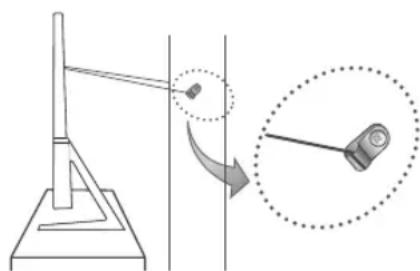
natural_image
Diagram showing a pendulum setup with a rotating arm and a magnified view of the pendulum (no text or symbols present)Specifications and Other Information
Specifications
| Display Resolution 3840 x 2160 | ||
| Environmental Considerations | ||
| Operating Temperature | 10°C to 40°C (50°F to 104°F) | |
| Operating Humidity | 10% to 80%, non-condensing | |
| Storage Temperature | -20°C to 45°C (-4°F to 113°F) | |
| Storage Humidity | 5% to 95%, non-condensing | |
| Stand Swivel (Left / Right) 0° | ||
| Model Name UE49KS8000 / UE49KS8002 UE55KS8000 / UE55KS8002 | ||
| Screen Size (Diagonal) 49 inches (123 cm) 55 inches (138 cm) | ||
| Sound(Output) 60 W | ||
| Dimensions (W x H x D) | ||
| Body | 1094.2 x 635.8 x 42.5 mm | 1230.9 x 712.3 x 40.8±3.0 mm |
| With stand | 1094.2 x 718.5 x 354.2 mm | 1230.9 x 799.5 x 376.2±3.0 mm |
| Weight | ||
| Without Stand | 15.0 kg | 17.7 kg |
| With Stand | 17.1 kg | 19.9 kg |
| Model Name UE65KS8000 / UE65KS8002 UE75KS8000 / UE75KS8002 | ||
| Screen Size (Diagonal) 65 inches (163 cm) 75 inches (189 cm) | ||
| Sound(Output) 60 W | ||
| Dimensions (W x H x D) | ||
| Body | 1448.9 x 835.8 x 40.8 mm | 1682.8 x 970.7 x 49.9 mm |
| With stand | 1448.9 x 929.9 x 414.1 mm | 1682.8 x 1071.1 x 438.9 mm |
| Weight | ||
| Without Stand | 26.6 kg | 41.7 kg |
| With Stand | 28.8 kg | 46.0 kg |
- The design and specifications are subject to change without prior notice.
- For information about the power supply, and about power consumption, refer to the label attached to the product.
- Typical power consumption is measured according to IEC 62087.
Decreasing power consumption
When you shut the TV off, it enters Standby mode. In Standby mode, it continues to draw a small amount of power. To decrease power consumption, unplug the power cord when you don't intend to use the TV for a long time.
Licences
DOLBY. DIGITAL PLUS
dts Premium Sound | 5.1
DIVX HD
rovi guide

HDMI
The terms HDMI and HDMI High-Definition Multimedia Interface, and the HDMI Logo are trademarks or registered trademarks of HDMI Licensing LLC in the United States and other countries.
Recommendation - EU Only
CE!
Hereby, Samsung Electronics, declares that this TV is in compliance with the essential requirements and other relevant provisions of Directive 1999/5/EC.
The official Declaration of Conformity may be found at http://www.samsung.com, go to Support > Search Product Support and enter the model name.
This equipment may only be used indoors.
This equipment may be operated in all EU countries.
Correct Disposal of This Product (Waste Electrical & Electronic Equipment) (Applicable in countries with separate collection systems)
This marking on the product, accessories or literature indicates that the product and its electronic accessories (e.g. charger, headset, USB cable) should not be disposed of with other household waste at the end of their working life. To prevent possible harm to the environment or human health from uncontrolled waste disposal, please separate these items from other types of waste and recycle them responsibly to promote the sustainable reuse of material resources.
Household users should contact either the retailer where they purchased this product, or their local government office, for details of where and how they can take these items for environmentally safe recycling.
Business users should contact their supplier and check the terms and conditions of the purchase contract. This product and its electronic accessories should not be mixed with other commercial wastes for disposal.
Correct disposal of the batteries in this product
(Applicable in countries with separate collection systems)
This marking on battery, manual or packaging indicates that the batteries in this product should not be disposed of with other household waste at the end of their working life. Where marked, the chemical symbols Hg, Cd or Pb indicate that the battery contains mercury, cadmium or lead above the reference levels in EC Directive 2006/66. If batteries are not properly disposed of, these substances can cause harm to human health or the environment.
To protect natural resources and to promote material reuse, please separate batteries from other types of waste and recycle them through your local, free battery return system.
For information on Samsung's environmental commitments and product-specific regulatory obligations, e.g. REACH, WEEE, Batteries, visit http://www.samsung.com/uk/aboutsamsung/samsungelectronics/corporatecitizenship/data_corner.html
WARNING - TO PREVENT THE SPREAD OF FIRE, KEEP CANDLES OR OTHER ITEMS WITH OPEN FLAMES AWAY FROM THIS PRODUCT AT ALL TIMES.

This page is intentionally left blank.
One Connect

2 db
Fali adapter
One Connect-kábel Kábeltartó
Fedölap

1 db 2 db
1 db
* Shielded Twist Pair
natural_image
Three technical illustrations of remote control devices with labeled ports and polarity indicators (no text or symbols present)flowchart
graph TD
    A["Downward Arrow"] --> B["Process Box"]
    C["Downward Arrow"] --> B
    B --> D["Downward Arrow"]

flowchart
graph LR
    A["Wire connection with cable"] --> B["Cable attachment"]
    B --> C["Bone cable connection"]
natural_image
Diagram of a mechanical device with a magnified inset showing a pin and cable (no text or symbols)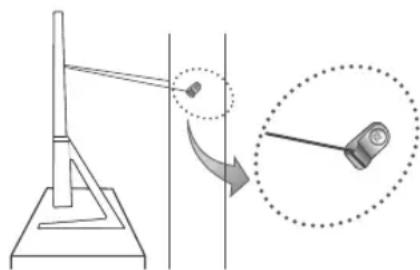
natural_image
Diagram showing a pendulum setup with an object on a platform and a magnified view of the pendulum (no text or symbols present)The terms HDMI and HDMI High-Definition Multimedia Interface, and the HDMI Logo are trademarks or registered trademarks of HDMI Licensing LLC in the United States and other countries.
This page is intentionally left blank.
* Shielded Twist Pair
Pilot Pilot Samsung Smart
natural_image
Three technical illustrations of remote control devices with labeled ports and polarity indicators (no text or symbols present)flowchart
graph TD
    A["Downward Arrow"] --> B["Process Box"]
    C["Downward Arrow"] --> B
    B --> D["Downward Arrow"]

flowchart
graph LR
    A["Wire connection with cable"] --> B["Cable attachment"]
    B --> C["Bear termination"]
natural_image
Prohibition sign with no text, featuring a circle and prohibition symbol (no text inside)natural_image
Diagram of a mechanical device with a magnified inset showing a pin adjustment (no text or symbols present)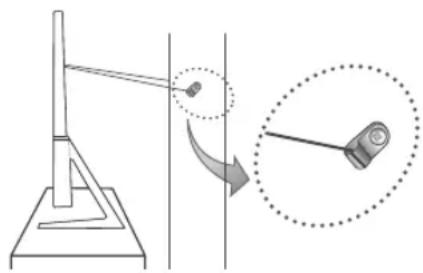
natural_image
Diagram showing a pendulum setup with an object on a platform and a magnified inset illustrating the motion (no text or symbols)The terms HDMI and HDMI High-Definition Multimedia Interface, and the HDMI Logo are trademarks or registered trademarks of HDMI Licensing LLC in the United States and other countries.
This page is intentionally left blank.
natural_image
Three technical illustrations of remote control devices with labeled ports and polarity indicators (no text or symbols present)flowchart
graph TD
    A["Downward Arrow"] --> B["Left Turn Icon"]
    C["Downward Arrow"] --> D["Right Triangle Symbol"]
flowchart
graph LR
    A["Wire connection with cable"] --> B["Cable attachment"]
    B --> C["BusSELLING cable routing"]
The terms HDMI and HDMI High-Definition Multimedia Interface, and the HDMI Logo are trademarks or registered trademarks of HDMI Licensing LLC in the United States and other countries.
Σύσταση - Μόνον EU
CE!
This page is intentionally left blank.
* Shielded Twist Pair
Дистанционно Samsung Smart
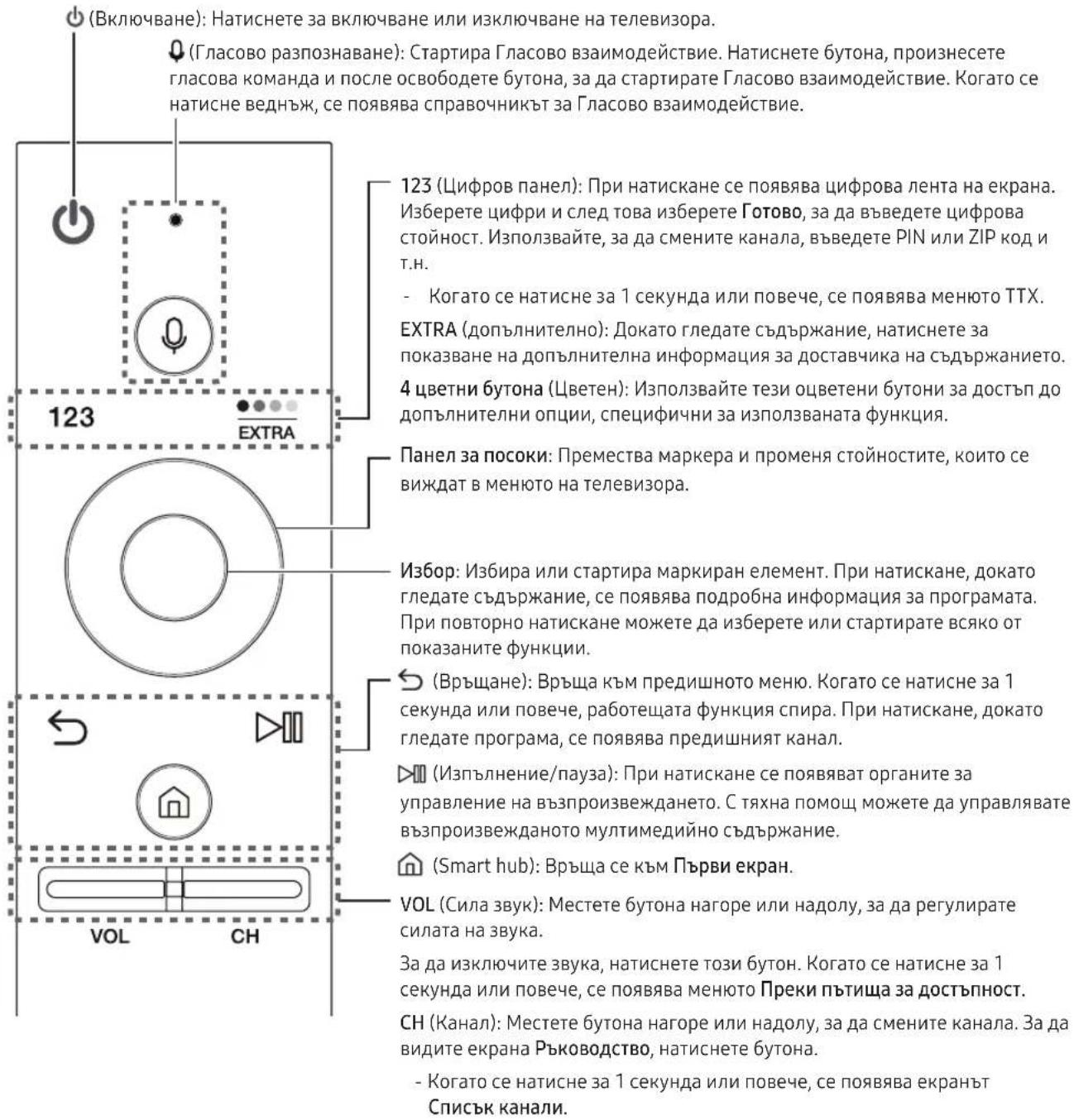
natural_image
Three technical illustrations of remote control devices with labeled ports and polarity indicators (no text or symbols present)flowchart
graph LR
    A["Wire connection"] --> B["Cable attachment"]
    B --> C["BusSELLING cable routing"]
natural_image
Prohibition sign with no text or symbols, featuring a circle and a monitor icon (no readable text)natural_image
Diagram of a mechanical device with a magnified inset showing a component (no text or symbols present)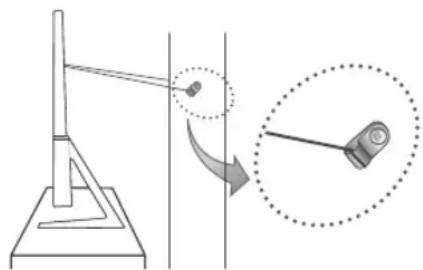
natural_image
Diagram showing a pendulum setup with an arrow indicating rotation, alongside a close-up of the pendulum's motion (no text or symbols present)The terms HDMI and HDMI High-Definition Multimedia Interface, and the HDMI Logo are trademarks or registered trademarks of HDMI Licensing LLC in the United States and other countries.
This page is intentionally left blank.
Upozorenje! Važne sigurnosne upute
(Prije korištenja televizora pročitajte sigurnosne upute.)
OPREZ
OPASNOST OD STRUJNOG UDARA, NE OTVARAJTE
OPREZ: KAKO BI SE SMANJILA OPASNOST OD STRUJNOG UDARA, NE SKIDAJTE POKLOPAC (NITI STRAŽNJU STRANICU). UNUTAR UREĐAJA NEMA DIJELOVA KOJE BISTE SAMI MOGLI POPRAVITI. SERVISIRANJE PREPUSTITE KVALIFICIRANOM OSOBLJU.
* Shielded Twist Pair
natural_image
Three technical illustrations of remote control devices with labeled ports and polarity indicators (no text or symbols present)flowchart
graph TD
    A["Downward Arrow"] --> B["Left Turn Icon"]
    C["Downward Arrow"] --> D["Right Turn Icon"]

Bežični usmjernik

Bežični ponavljač
- Obratite se davatelju internetskih usluga i zatražite od njih da ponovno postave mrežu za ponovnu registraciju MAC adresa vašeg novog modema/usmjernika i televizora.
Problemi s aplikacijama za videozapise (Youtube itd.)
- Promijenite DNS na 8.8.8.8. Odaberite 📂 > ✉ Postavke > Mreža > Status mreže > IP postavke > DNS postavka > Ručni upis > DNS poslužitelj > i unesite 8.8.8.8 > U redu.
- Ponovno postavite odabirom funkcije > Postavke > Podrška > Samodijagnoza > Smart Hub - vraćanje na zadane postavke.
Postavljanje televizora
Postavljanje televizora na zid

flowchart
graph LR
    A["Wire connection with cable"] --> B["Cable attachment"]
    B --> C["Bear termination"]
- Rasporedite kabele televizora prije postavljanja poklopca na priključke.
Osiguravanje odgovarajućeg prozračivanja televizora
Prilikom postavljanja televizora ostavite razmak od najmanje 10 cm između televizora i drugih predmeta (zidovi, stranice ormarića itd.) kako bi se zajamčila potrebna ventilacija. Nepostojanje odgovarajuće ventilacije može uzrokovati požar ili probleme s proizvodom uslijed povećanja njegove interne temperature.
Oprez: Potezanje, guranje ili penjanje na televizor može uzrokovati njegov pad. Naročito pripazite da se djeca ne ljuljaju na televizoru i da ga ne destabiliziraju. To može dovesti do prevrtanja televizora i rezultirati ozbiljnim ozljedama ili smrću. Slijedite sve sigurnosne upute navedene u sigurnosnom letku koji je isporučen s televizorom. Radi povećanja stabilnosti i sigurnosti montirajte uređaj protiv pada kao što je opisano u nastavku.

natural_image
Diagram of a mechanical device with a magnified inset showing a component (no text or symbols present)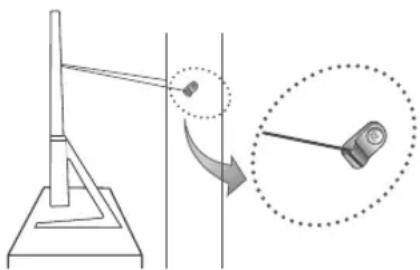
natural_image
Diagram showing a pendulum setup with an object on a platform and a magnified view of the pendulum (no text or symbols present)Specifikacije i ostale informacije
Specifikacije
| Rezolucija zaslona 3840 x 2160 | ||
| Uvjeti u okruženju | ||
| Radna temperatura | 10 °C do 40 °C (50 °F do 104 °F) | |
| Radna vlažnost | 10% do 80%, bez kondenzacije | |
| Temperatura pohrane | -20 °C do 45 °C (-4 °F do 113 °F) | |
| Vlažnost prilikom pohrane | 5% do 95%, bez kondenzacije | |
| Postolje s mogućnošću zakretanja (lijevo/desno) | 0° | |
| Naziv modela UE49KS8000 / UE49KS8002 UE55KS8000 / UE55KS8002 | ||
| Veličina zaslona (dijagonala) | 49 inča (123 cm) | 55 inča (138 cm) |
| Zvuk (izlaz) 60 W | ||
| Dimenzije (š x v x d) | ||
| Kućište | 1094,2 x 635,8 x 42,5 mm | 1230,9 x 712,3 x 40,8±3,0 mm |
| S postoljem | 1094,2 x 718,5 x 354,2 mm | 1230,9 x 799,5 x 376,2±3,0 mm |
| Težina | ||
| Bez postolja | 15,0 kg | 17,7 kg |
| S postoljem | 17,1 kg | 19,9 kg |
| Naziv modela UE65KS8000 / UE65KS8002 UE75KS8000 / UE75KS8002 | ||
| Veličina zaslona (dijagonala) | 65 inča (163 cm) | 75 inča (189 cm) |
| Zvuk (izlaz) 60 W | ||
| Dimenzije (š x v x d) | ||
| Kućište | 1448,9 x 835,8 x 40,8 mm | 1682,8 x 970,7 x 49,9 mm |
| S postoljem | 1448,9 x 929,9 x 414,1 mm | 1682,8 x 1071,1 x 438,9 mm |
| Težina | ||
| Bez postolja | 26,6 kg | 41,7 kg |
| S postoljem | 28,8 kg | 46,0 kg |
The terms HDMI and HDMI High-Definition Multimedia Interface, and the HDMI Logo are trademarks or registered trademarks of HDMI Licensing LLC in the United States and other countries.
Preporuka – samo za EU
CE!
This page is intentionally left blank.
* Shielded Twist Pair
natural_image
Three technical illustrations of remote control devices with labeled ports and directional arrows (no text or symbols present)flowchart
graph TD
    A["Downward Arrow"] --> B["Process Box"]
    C["Downward Arrow"] --> D["Next Step Icon"]

Bezdrátový směrovač

Instalace televizoru
Montáž televizoru na zed'

flowchart
graph LR
    A["Wire connection with cable"] --> B["Cable attachment"]
    B --> C["Bear termination"]
natural_image
Prohibition sign showing a TV with a diagonal line through it, no text or symbols present.natural_image
Diagram of a mechanical device with a magnified inset showing a pin adjustment (no text or symbols)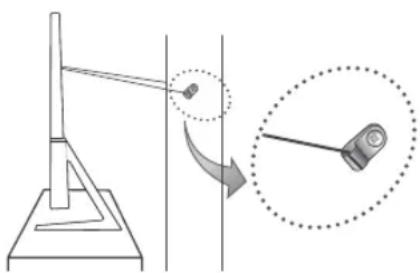
natural_image
Diagram showing a pendulum setup with an object on a platform and a magnified view of the pendulum (no text or symbols present)The terms HDMI and HDMI High-Definition Multimedia Interface, and the HDMI Logo are trademarks or registered trademarks of HDMI Licensing LLC in the United States and other countries.
This page is intentionally left blank.
* Shielded Twist Pair
natural_image
Three technical illustrations of a remote control casing with labeled ports and polarity indicators (no text or symbols present)flowchart
graph TD
    A["Downward Arrow"] --> B["Process Box"]
    C["Downward Arrow"] --> D["Next Step"]
flowchart
graph LR
    A["Wire connection with cable"] --> B["Compression cable expansion"]
    B --> C["Compression cable termination"]
natural_image
Prohibition sign with no text or symbols, featuring a TV and chair icon (no readable text)natural_image
Diagram of a mechanical device with a magnified inset showing a pin adjustment (no text or symbols)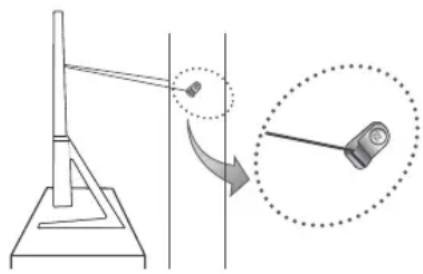
natural_image
Diagram showing a pendulum setup with an object on a platform and a magnified inset illustrating the motion (no text or symbols)The terms HDMI and HDMI High-Definition Multimedia Interface, and the HDMI Logo are trademarks or registered trademarks of HDMI Licensing LLC in the United States and other countries.
This page is intentionally left blank.
* Shielded Twist Pair
natural_image
Three technical illustrations of remote control devices with labeled ports and polarity indicators (no text or symbols present)flowchart
graph TD
    A["Downward Arrow"] --> B["Left Turn Icon"]
    C["Downward Arrow"] --> D["Right Turn Icon"]

Router wireless

Repetor wireless
flowchart
graph LR
    A["Wire connection with cable"] --> B["Cable attachment"]
    B --> C["Bear termination"]
natural_image
Diagram of a mechanical device with a magnified inset showing a pin adjustment (no text or symbols)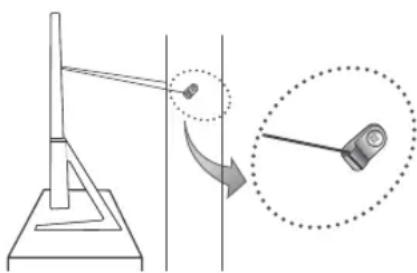
natural_image
Diagram showing a pendulum setup with an arrow indicating rotation, alongside a close-up of the pendulum's motion (no text or symbols present)The terms HDMI and HDMI High-Definition Multimedia Interface, and the HDMI Logo are trademarks or registered trademarks of HDMI Licensing LLC in the United States and other countries.
This page is intentionally left blank.
* Shielded Twist Pair
Daljinski upravljač Samsung pametni daljinski
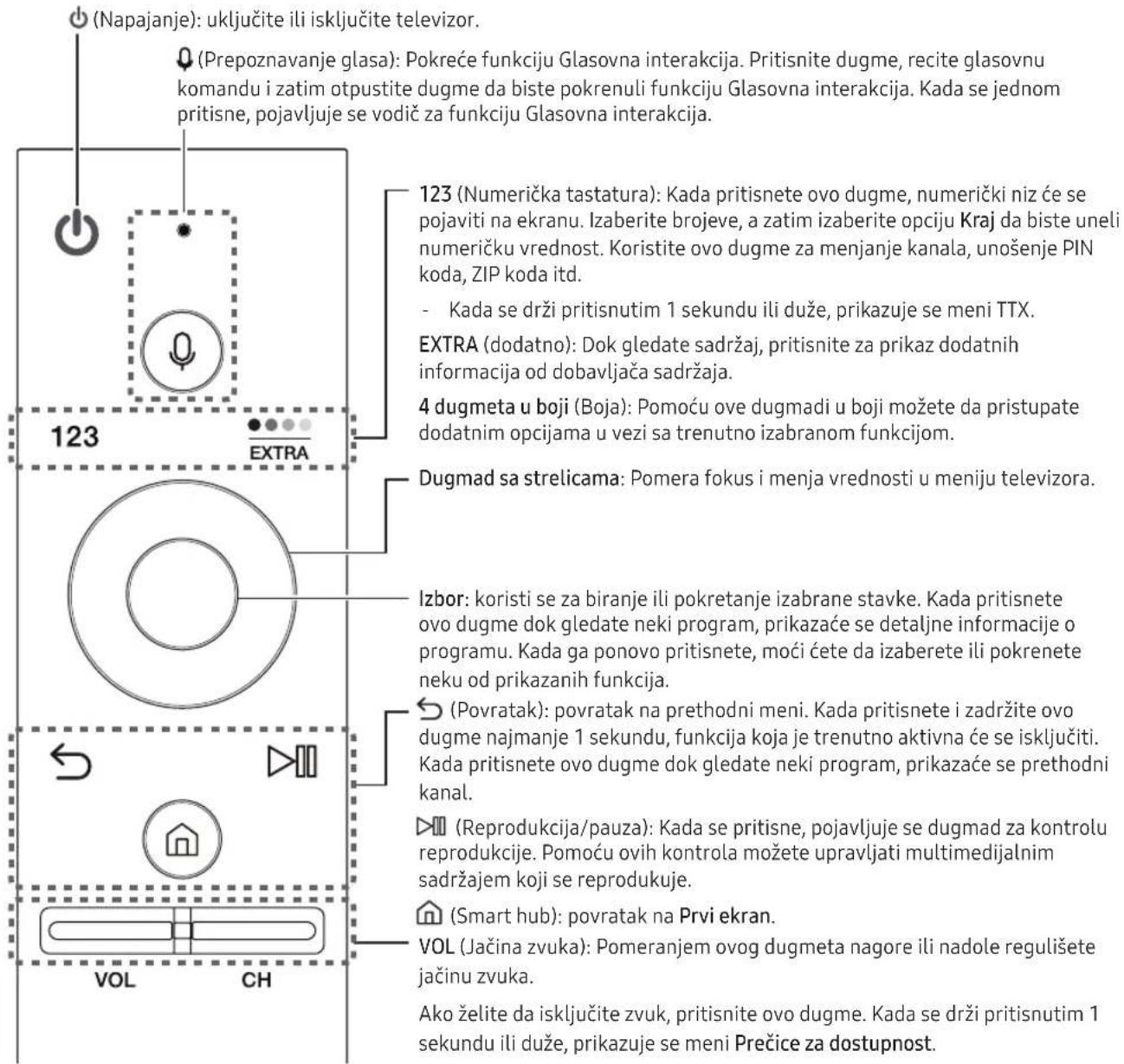
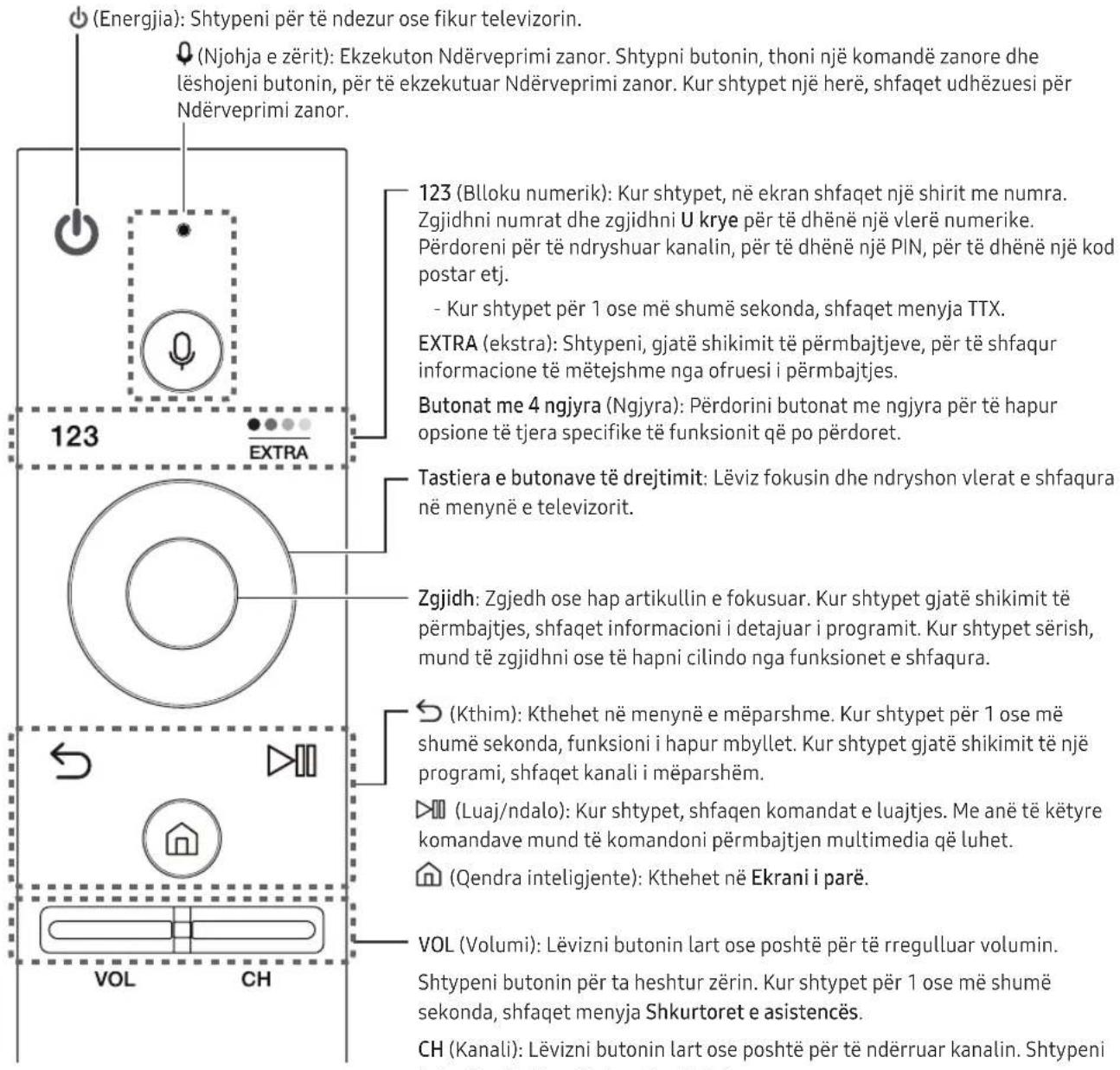
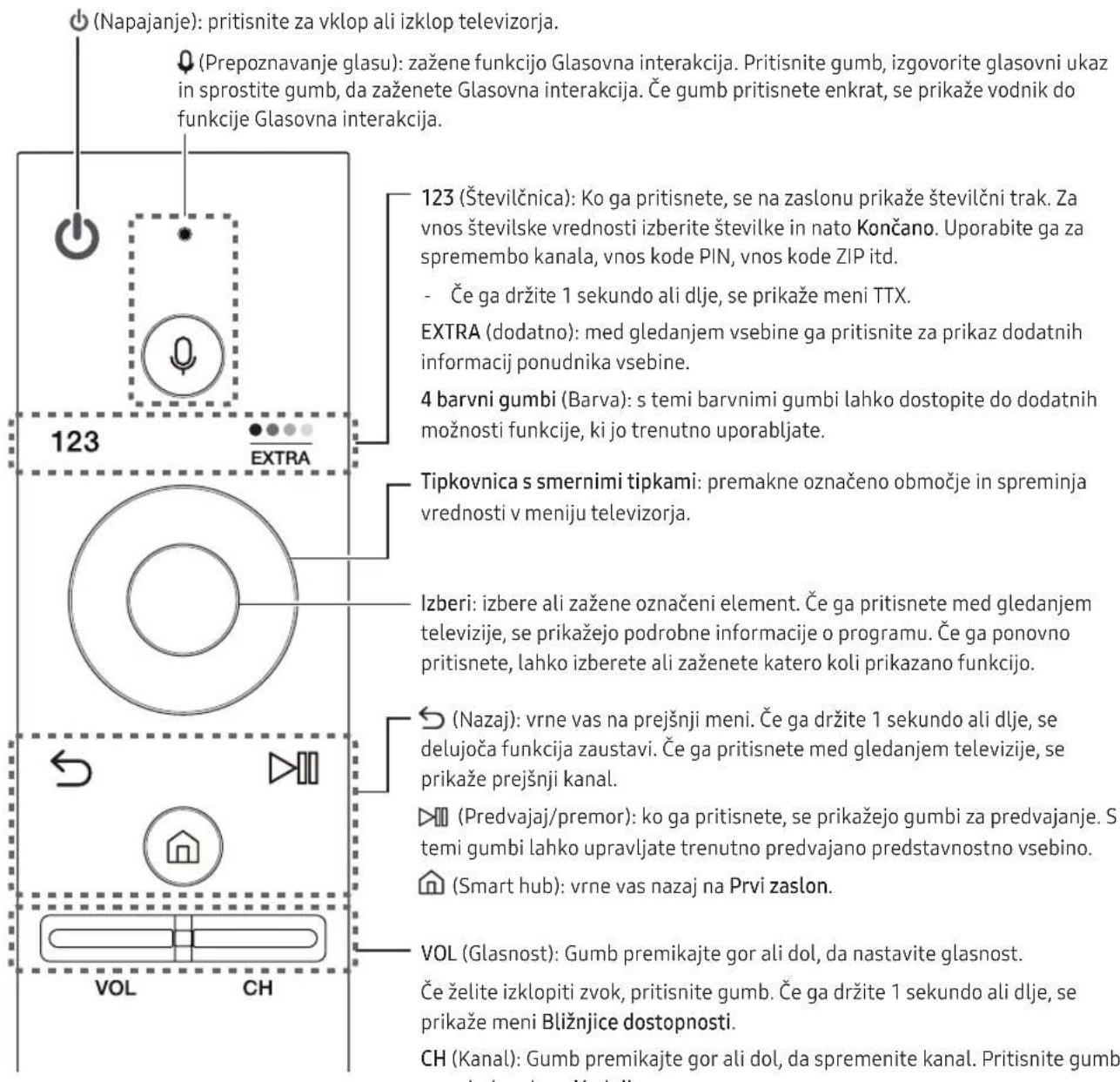
123 (Numerička tastatura): Kada pritisnete ovo dugme, numerički niz će se pojaviti na ekranu. Izaberite brojeve, a zatim izaberite opciju Kraj da biste uneli numeričku vrednost. Koristite ovo dugme za menjanje kanala, unošenje PIN koda, ZIP koda itd.
Izbor: koristi se za biranje ili pokretanje izabrane stavke. Kada pritisnete ovo dugme dok gledate neki program, prikazaće se detaljne informacije o programu. Kada ga ponovo pritisnete, moći ćete da izaberete ili pokrenete neku od prikazanih funkcija.
(S) (Povratak): povratak na prethodni meni. Kada pritisnete i zadržite ovo dugme najmanje 1 sekundu, funkcija koja je trenutno aktivna će se isključiti. Kada pritisnete ovo dugme dok gledate neki program, prikazaće se prethodni kanal.
natural_image
Three technical illustrations of a remote control device showing internal components and mounting points (no text or symbols)Uparivanje televizora sa daljinskim upravljačem Samsung pametni daljinski
flowchart
graph TD
    A["Downward Arrow"] --> B["Process Box"]
    C["Downward Arrow"] --> D["Downward Arrow"]
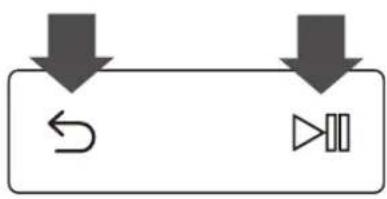
Prilikom prvog uključivanja televizora, daljinski upravljač Samsung pametni daljinski automatski će se upariti sa televizorom. Ako se daljinski upravljač Samsung pametni daljinski ne upari sa televizorom automatski, userite ga u senzor za daljinski upravljač na televizoru, pa istovremeno pritisnite i bar 3 sekunde držite dugmad i na daljinskom upravljaču Samsung pametni daljinski.
E-priručnik

Bežični ruter

Bežični ripiter
- Kontaktirajte dobavljača Internet usluga i zatražite da resetuje mrežno kolo i ponovo registruje MAC adrese novog modema/rutera i televizora.
Problemi sa video aplikacijama (Youtube itd.)
- Promenite DNS na 8.8.8.8. Pritisnite 📝 > ⚙️ Podešavanja > Mreža > Status mreže > IP postavke > DNS postavka > Ručni unos > DNS server > unesite 8.8.8.8 > OK.
- Resetujte pritiskom na 📝 > ⚙️ Podešavanja > Podrška > Sam. dijagnost. > Ponovo pokrenite Smart Hub.
Postavljanje televizora
Montiranje televizora na zid

Ako proizvod montirate na zid, strogo se pridržavajte uputstava proizvođača. U slučaju nepravilne montaže, proizvod može da sklizne ili padne, što može dovesti do ozbiljnih povreda dece i odraslih, kao i ozbiljnog oštećenja proizvoda.
Ako imate model sa adapterom za zidni nosač, namontirajte ga na način prikazan na slikama ispod pre nego što namontirate komplet za montažu na zid.
- Pogledajte priručnik za montažu koji ste dobili uz Samsung komplet za montažu na zid.
Kompanija Samsung Electronics ne odgovara za eventualno oštećenje proizvoda niti za povrede koje nanesete sebi ili drugima ako odlučite da sami postavite televizor na zid.
flowchart
graph LR
    A["Wire connection with cable"] --> B["Compression cable expansion"]
    B --> C["Compression cable termination"]
- Pre pokrivanja priključaka poklopcem terminala namestite kablove na televizoru.
natural_image
Diagram of a mechanical device with a magnified inset showing a component being inserted (no text or symbols present)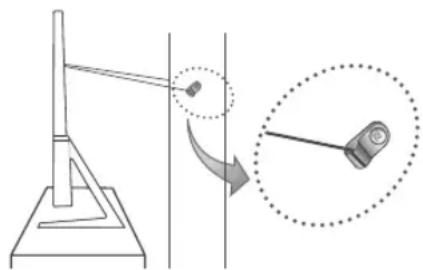
natural_image
Diagram showing a pendulum setup with a rotating arm and a magnified view of the pendulum (no text or symbols present)Specifikacije i druge informacije
Specifikacije
| Rezolucija ekrana 3840 x 2160 | ||
| Uticaj na životnu sredinu | ||
| Radna temperatura | Od 10°C do 40°C (Od 50°F do 104°F) | |
| Vlažnost vazduha | Od 10% do 80%, bez kondenzacije | |
| Temperatura pri skladištenju | Od -20°C do 45°C (Od -4°F do 113°F) | |
| Vlažnost pri skladištenju | Od 5% do 95%, bez kondenzacije | |
| Obrtno postolje (levo/desno) 0° | ||
| Naziv modela UE49KS8000 / UE49 | KS8002 UE55KS8000 / UE55KS8002 | |
| Veličina ekrana (dijagonala) | 49 inča (123 cm) | 55 inča (138 cm) |
| Zvuk(izlaz) 60 W | ||
| Dimenzije (Š x V x D) | ||
| Kućište | 1094.2 x 635.8 x 42.5 mm | 1230.9 x 712.3 x 40.8±3.0 mm |
| Sa postoljem | 1094.2 x 718.5 x 354.2 mm | 1230.9 x 799.5 x 376.2±3.0 mm |
| Težina | ||
| Bez postolja | 15.0 kg | 17.7 kg |
| Sa postoljem | 17.1 kg | 19.9 kg |
| Naziv modela UE65KS8000 / UE65 | KS8002 UE75KS8000 / UE75KS8002 | |
| Veličina ekrana (dijagonala) | 65 inča (163 cm) | 75 inča (189 cm) |
| Zvuk(izlaz) 60 W | ||
| Dimenzije (Š x V x D) | ||
| Kućište | 1448.9 x 835.8 x 40.8 mm | 1682.8 x 970.7 x 49.9 mm |
| Sa postoljem | 1448.9 x 929.9 x 414.1 mm | 1682.8 x 1071.1 x 438.9 mm |
| Težina | ||
| Bez postolja | 26.6 kg | 41.7 kg |
| Sa postoljem | 28.8 kg | 46.0 kg |
- Dizajn i specifikacije mogu se promeniti bez najave.
The terms HDMI and HDMI High-Definition Multimedia Interface, and the HDMI Logo are trademarks or registered trademarks of HDMI Licensing LLC in the United States and other countries.
Preporuka – samo za EU
CE!
Ovim putem kompanija Samsung Electronics izjavljuje da je ovaj televizor usklađen sa osnovnim uslovima i drugim primenljivim odredbama Direktive 1999/5/EC.
Zvaničnu izjavu o usklađenosti možete da pronađete na Web lokaciji http://www.samsung.com/rs, tako što ćete izabrati Podrška > uneti naziv modela u polje za pretragu proizvoda.
This page is intentionally left blank.
* Shielded Twist Pair
Telekomanda inteligjente "Samsung"
natural_image
Three technical illustrations of remote control devices with labeled ports and polarity indicators (no text or symbols present)Çiftimi i televizorit me Telekomanda inteligjente "Samsung"
flowchart
graph TD
    A["Downward Arrow"] --> B["Process Node"]
    C["Downward Arrow"] --> D["Downward Arrow"]

Rrugëzuesi me valë

Repetitor "Wi-Fi"
Instalimi i televizorit
flowchart
graph LR
    A["Wire connection with cable"] --> B["Compression cable expansion"]
    B --> C["Compression cable termination"]
natural_image
Diagram of a mechanical device with a magnified inset showing a component (no text or symbols present)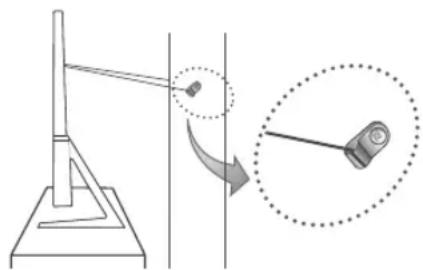
natural_image
Diagram showing a mechanical setup with a lever and a close-up of a component, no text or symbols present.The terms HDMI and HDMI High-Definition Multimedia Interface, and the HDMI Logo are trademarks or registered trademarks of HDMI Licensing LLC in the United States and other countries.
This page is intentionally left blank.
natural_image
Three technical illustrations of remote control devices with labeled ports and polarity indicators (no text or symbols present)flowchart
graph TD
    A["Downward Arrow"] --> B["Process Box"]
    C["Downward Arrow"] --> D["Downward Arrow"]
flowchart
graph LR
    A["Wire connection"] --> B["Compression"]
    B --> C["Replacement"]
natural_image
Diagram of a mechanical device with a magnified inset showing a pin adjustment (no text or symbols present)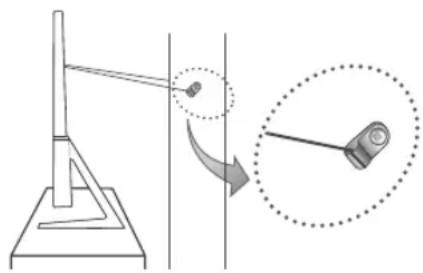
natural_image
Diagram showing a pendulum setup with an arrow indicating rotation, alongside a close-up of the pendulum (no text or symbols present)The terms HDMI and HDMI High-Definition Multimedia Interface, and the HDMI Logo are trademarks or registered trademarks of HDMI Licensing LLC in the United States and other countries.
Препорака - само ЕУ
CE!
This page is intentionally left blank.
* Shielded Twist Pair
Pametni daljinski upravljalnik Samsung
natural_image
Three technical illustrations of remote control devices with labeled ports and polarity indicators (no text or symbols present)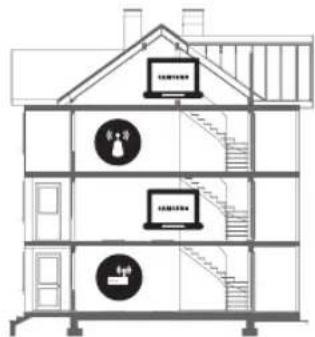

flowchart
graph LR
    A["Wire connection with cable"] --> B["Compression cable expansion"]
    B --> C["Compression cable termination"]
- Preden prekrijete vrata s pokrovom za priključke, uredite kable televizorja.
natural_image
Prohibition sign with diagonal line over a screen and desk (no text or symbols)natural_image
Diagram of a mechanical device with a magnified inset showing a component being inserted (no text or symbols present)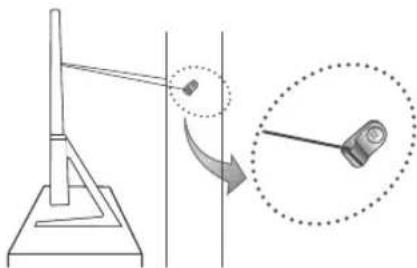
natural_image
Diagram showing a pendulum setup with an arrow indicating rotation, alongside a magnified view of the pendulum (no text or symbols present)Specifikacije in druge informacije
Specifikacije
| Ločljivost zaslona 3840 x 2160 | ||
| Okoljski vidiki | ||
| Delovna temperatura | 10-40 °C (50-104 °F) | |
| Delovna vlažnost | 10-80 %, brez kondenzacije | |
| Temperatura shranjevanja | -20-45 °C (-4-113°F) | |
| Vlažnost pri shranjevanju | 5-95 %, brez kondenzacije | |
| Vrtenje stojala (levo/desno) 0° | ||
| Ime modela UE49KS8000 / UE49K8002 UE55KS8000 / UE55KS8002 | ||
| Velikost zaslona (diagonala) 49 palci (123 cm) 55 palci (138 cm) | ||
| Zvok(izhod) 60 W | ||
| Dimenzije (Š x V x G) | ||
| Osrednji del | 1094,2 x 635,8 x 42,5 mm | 1230,9 x 712,3 x 40,8±3,0 mm |
| S stojalom | 1094,2 x 718,5 x 354,2 mm | 1230,9 x 799,5 x 376,2±3,0 mm |
| Teža | ||
| Brez stojala | 15,0 kg | 17,7 kg |
| S stojalom | 17,1 kg | 19,9 kg |
| Ime modela UE65KS8000 / UE65K8002 UE75KS8000 / UE75KS8002 | ||
| Velikost zaslona (diagonala) 65 palci (163 cm) 75 palci (189 cm) | ||
| Zvok(izhod) 60 W | ||
| Dimenzije (Š x V x G) | ||
| Osrednji del | 1448,9 x 835,8 x 40,8 mm | 1682,8 x 970,7 x 49,9 mm |
| S stojalom | 1448,9 x 929,9 x 414,1 mm | 1682,8 x 1071,1 x 438,9 mm |
| Teža | ||
| Brez stojala | 26,6 kg | 41,7 kg |
| S stojalom | 28,8 kg | 46,0 kg |
The terms HDMI and HDMI High-Definition Multimedia Interface, and the HDMI Logo are trademarks or registered trademarks of HDMI Licensing LLC in the United States and other countries.
This page is intentionally left blank.
One Connect ierices kabelis
1 gab.

1 gab.

2 gab.
Termināla vāciņš
* Shielded Twist Pair
natural_image
Three technical illustrations of remote control devices with labeled ports and polarity indicators (no text or symbols present)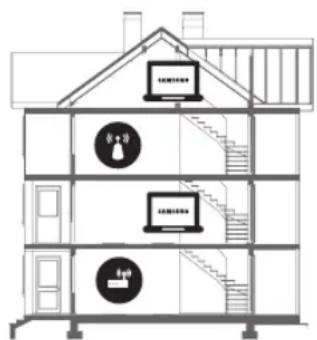

flowchart
graph LR
    A["Wire connection with cable"] --> B["Switch to cable attachment"]
    B --> C["Line connection to cable"]
    C --> D["Line connection to cable end"]
natural_image
Diagram of a mechanical device with a magnified inset showing a pin adjustment (no text or symbols present)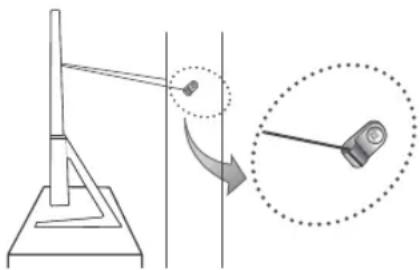
natural_image
Diagram showing a pendulum setup with an object on a stand and a magnified view of the pendulum (no text or symbols present)The terms HDMI and HDMI High-Definition Multimedia Interface, and the HDMI Logo are trademarks or registered trademarks of HDMI Licensing LLC in the United States and other countries.
leteikumi – tikai ES
CE!
Ar šo Samsung Electronics apstiprina, ka šis televizors atbilst pamata prasibām un citiem attiecigajiem 1999/5/EK direktivas nosacijumiem.
This page is intentionally left blank.
ELEKTROS SMÜGIO PAVOJUS. NEATIDARYKITE.
PERSPÉJIMAS. KAD SUMAŽINTUMÈTE ELEKTROS SMÜGIO PAVOJU, NENUIMKITE DANGČIO (ARBA GALINĖS DALIES). VIDUJE NĚRA DETALIŲ, KURIAS GALĖTŲ TAISYTI NAUDOTOJAS. VISUS TECHNINĖS PRIEŽIŪROS DARBUS TURI ATLIKTI KVALIFIKUOTAS SPECIALISTAS.
* Shielded Twist Pair
natural_image
Three technical illustrations of remote control devices with labeled ports and polarity indicators (no text or symbols present)flowchart
graph TD
    A["Downward Arrow"] --> B["Left Turn Icon"]
    C["Downward Arrow"] --> D["Right Turn Icon"]

Belaidis maršruto parinktuvas

Belaidis kartotuvas
flowchart
graph LR
    A["Wire connection with cable"] --> B["Switch to cable attachment"]
    B --> C["Line connection to cable"]
    C --> D["Line connection to cable"]
natural_image
Prohibition sign with no text or symbols, featuring a circle and a monitor icon (no text or numbers present)natural_image
Diagram showing a mechanical device with a magnified inset of its internal components (no text or symbols present)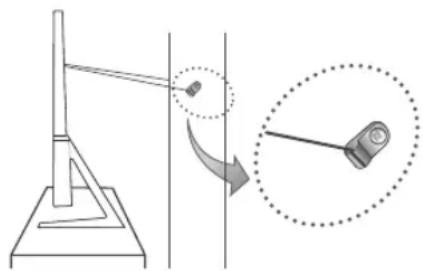
natural_image
Diagram showing a pendulum setup with an arrow indicating rotation, alongside a close-up of the pendulum (no text or symbols present)The terms HDMI and HDMI High-Definition Multimedia Interface, and the HDMI Logo are trademarks or registered trademarks of HDMI Licensing LLC in the United States and other countries.
Rekomendacija (tik ES)
CE!
This page is intentionally left blank.
* Shielded Twist Pair
natural_image
Three technical illustrations of remote control devices with labeled ports and polarity indicators (no text or symbols present)Teleri paigaldamine
Teleri paigaldamine seinale

flowchart
graph LR
    A["Wire connection with cable"] --> B["Switch to cable attachment"]
    B --> C["Line connection to cable"]
    C --> D["Line connection to cable"]
- Enne pesade katmist pesakattega seadke teleri kaablid korda.
natural_image
Diagram of a mechanical device with a magnified inset showing a component (no text or symbols present)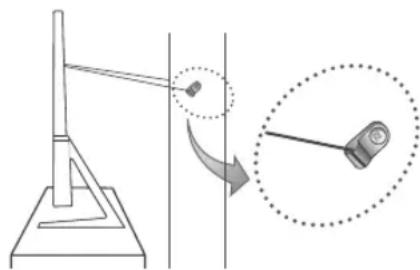
natural_image
Diagram showing a pendulum setup with a rotating arm and a magnified view of the pendulum (no text or symbols present)The terms HDMI and HDMI High-Definition Multimedia Interface, and the HDMI Logo are trademarks or registered trademarks of HDMI Licensing LLC in the United States and other countries.
This page is intentionally left blank.
This page is intentionally left blank.
This page is intentionally left blank.
Contact SAMSUNG WORLD WIDE
If you have any questions or comments relating to Samsung products, please contact the SAMSUNG customer care centre.
| Country Customer Care Centre Web Site | ||
| AUSTRIA 0800-SAMSUNG (0800-7267864) www.samsung.com/at/support | ||
| BELGIUM 02-201-24-13 www.samsung.com/be/support (Dutch) | www.samsung.com/be_fr/support (French) | |
| BOSNIA 055 233 999 www.samsung.com/support | ||
| BULGARIA 0800 111 31, Безплатна телефонна линия www.samsung.com/bg/support | ||
| CROATIA 072 726 786 www.samsung.com/hr/support | ||
| CZECH 800 - SAMSUNG (800-726786) www.samsung.com/cz/support | ||
| Samsung Electronics Czech and Slovak, s.r.o. V Parku 2343/24, 148 00 - Praha 4 | ||
| DENMARK 70 70 19 70 www.samsung.com/dk/support | ||
| FINLAND 030-6227 515 www.samsung.com/fi/support | ||
| FRANCE | 01 48 63 00 00 | www.samsung.com/fr/support |
| GERMANY 0180 6 SAM SUNG bzw.0180 6 7267864 ^* 0,20 €/Anruf aus dem dt. Festnetz, aus dem Mobilfunk max. 0,60 €/Anruf) | www.samsung.com/de/support | |
| CYPRUS | 8009 4000 only from landline, toll free | www.samsung.com/gr/support |
| GREECE | 80111-SAMSUNG (80111 726 7864) only from land line (+30) 210 6897691 from mobile and land line | |
| HUNGARY | 0680SAMSUNG (0680-726-786)0680PREMIUM (0680-773-648) | http://www.samsung.com/hu/support |
| ITALIA | 800-SAMSUNG (800.7267864) | www.samsung.com/it/support |
| LUXEMBURG | 261 03 710 | www.samsung.com/be_fr/support |
| MONTENEGRO | 020 405 888 www.samsung.com/support | |
| SLOVENIA | 080 697 267 (brezplačna številka) | www.samsung.com/si/support |
| NETHERLANDS | 0900-SAMSUNG (0900-7267864) (€ 0,10/Min) | www.samsung.com/nl/support |
| NORWAY | 815 56480 | www.samsung.com/no/support |
| POLAND | 801-172-678* lub +48 22 607-93-33*Dedykowana infolinia do obstugi zapytań dotyczących telefonów komórkowych: 801-672-678* lub +48 22 607-93-33 ^* (koszt połączenia według taryfy operatora) | www.samsung.com/pl/support |
| PORTUGAL | 808 20 7267 www.samsung.com/pt/support | |
| ROMANIA | *8000 (apel in retea)08008-726-78-64 (08008-SAMSUNG) Apel GRATUIT | www.samsung.com/ro/support |
| SERBIA | 011 321 6899 | www.samsung.com/rs/support |
| SLOVAKIA | 0800 - SAMSUNG (0800-726 786) | www.samsung.com/sk/support |
| SPAIN | 0034902172678 | www.samsung.com/es/support |
| SWEDEN 0771 726 7864 (0771-SAMSUNG) www.samsung.com/se/support | ||
| SWITZERLAND | 0800 726 78 64 (0800-SAMSUNG) | www.samsung.com/ch/support (German)www.samsung.com/ch_fr/support (French) |
| UK | 0330 SAMSUNG (7267864) | www.samsung.com/uk/support |
| EIRE | 0818 717100 | www.samsung.com/ie/support |
| LITHUANIA | 8-800-77777 | www.samsung.com/lt/support |
| LATVIA | 8000-7267 | www.samsung.com/lv/support |
| ESTONIA | 800-7267 | www.samsung.com/ee/support |
| TURKEY | 444 77 11 | www.samsung.com/tr/support |
- Warning! Important Safety Instructions
- (Please read the Safety Instructions before using your TV.)
- CAUTION
- RISK OF ELECTRIC SHOCK DO NOT OPEN
- What's in the Box?
- Using the TV Controller
- Connecting to a Network
- Network Connection - Wireless
- Network Connection - Wired
- The Samsung Smart Remote
- Installing batteries into the Samsung Smart Remote
- Pairing the TV to the Samsung Smart Remote
- The e-Manual
- Using the buttons in the e-Manual
- Initial setup
- Troubleshooting and Maintenance
- Troubleshooting
- The TV won't turn on.
- There is no picture/video/sound or distorted picture/video/sound from an external device or "Weak or No Signal" displayed on TV or cannot find channel.
- The remote control does not work.
- The cable or satellite box remote control doesn't turn the TV on or off or adjust the volume.
- The TV settings are lost after 5 minutes.
- Intermittent Wi-Fi
- Video App problems (Youtube etc)
- What is Remote Support?
- How does Remote Support work?
- Eco Sensor and screen brightness
- Still image warning
- Caring for the TV
- TV Installation
- Mounting the TV on a wall
- VESA wall mount kit notes and specifications
- Arranging the cables with the cable guide
- Covering the ports with the Cover Terminal
- Providing proper ventilation for your TV
- Attaching the TV to the Stand
- Safety Precaution: Securing the TV to the wall
- Preventing the TV from falling
- Specifications and Other Information
- Decreasing power consumption
- Licences
- HDMI
- Recommendation - EU Only
- CE!
- This page is intentionally left blank.
- Pilot Pilot Samsung Smart
- Σύσταση - Μόνον EU
- Дистанционно Samsung Smart
- Upozorenje! Važne sigurnosne upute
- (Prije korištenja televizora pročitajte sigurnosne upute.)
- OPREZ
- OPASNOST OD STRUJNOG UDARA, NE OTVARAJTE
- Problemi s aplikacijama za videozapise (Youtube itd.)
- Postavljanje televizora
- Postavljanje televizora na zid
- Osiguravanje odgovarajućeg prozračivanja televizora
- Specifikacije i ostale informacije
- Preporuka – samo za EU
- Instalace televizoru
- Montáž televizoru na zed'
- Daljinski upravljač Samsung pametni daljinski
- Uparivanje televizora sa daljinskim upravljačem Samsung pametni daljinski
- E-priručnik
- Problemi sa video aplikacijama (Youtube itd.)
- Montiranje televizora na zid
- Specifikacije i druge informacije
- Telekomanda inteligjente "Samsung"
- Çiftimi i televizorit me Telekomanda inteligjente "Samsung"
- Instalimi i televizorit
- Препорака - само ЕУ
- Pametni daljinski upravljalnik Samsung
- Specifikacije in druge informacije
- leteikumi – tikai ES
- ELEKTROS SMÜGIO PAVOJUS. NEATIDARYKITE.
- Rekomendacija (tik ES)
- Teleri paigaldamine
- Teleri paigaldamine seinale
- Contact SAMSUNG WORLD WIDE
Brand : SAMSUNG
Model : UE65KS8000L
Category : TV