
FO-2950M - Fax machine SHARP - Free user manual and instructions
Find the device manual for free FO-2950M SHARP in PDF.


| Product type | Multifunction laser fax machine |
| Brand | SHARP |
| Model | FO-2950M |
| Dimensions (W x D x H) | 386 x 398 x 169 mm |
| Weight (without options) | Approx. 6.3 kg |
| Power supply | 220-230 V AC, 50 Hz |
| Power consumption | Standby: 9.0 W, Maximum: 840 W |
| Compatibility | G3 (ITU-T) |
| Max. transmission speed | 14,400 bps with automatic fallback |
| Transmission time | Approx. 6 seconds (average) |
| Memory | Approx. 110 pages of average content |
| Automatic dialing | 20 one-touch keys and 100 speed dial numbers |
| Automatic document feeder | 20 pages max. (80 g/m², A4) |
| Paper tray capacity | 200 sheets A4 (80 g/m²) |
| Scanning resolution | Standard: 3.85 lines/mm, Fine/Halftone: 7.7 lines/mm, Super fine: 15.4 lines/mm |
| Printing resolution | Horizontal: 16 dots/mm, Vertical: 15.4 lines/mm |
| Gray levels (Halftone) | 64 levels (PC scanning: 256) |
| Toner cartridge | Initial: ~1875 pages, Replacement FO-29DC: ~3750 pages |
| Drum cartridge | FO-29DR: ~20,000 pages |
| Main functions | Send/receive fax, copy (99 copies), telephone, answering machine connection, dual access |
| Maintenance | Clean glass, rollers, casing; replace toner/drum |
| Safety | Unplug for complete power disconnect, avoid water, do not disassemble |
Frequently Asked Questions - FO-2950M SHARP
User questions about FO-2950M SHARP
0 question about this device. Answer the ones you know or ask your own.
Ask a new question about this device
Download the instructions for your Fax machine in PDF format for free! Find your manual FO-2950M - SHARP and take your electronic device back in hand. On this page are published all the documents necessary for the use of your device. FO-2950M by SHARP.
USER MANUAL FO-2950M SHARP
For a complete electrical disconnection pull out the mains plug.
CAUTION:
"The mains outlet (socket-outlet) shall be installed near the equipment and shall be easily accessible."
This equipment complies with the requirements of Directives 98/13/EC and 89/336/EEC, 73/23/EEC both amended by 93/68/EEC.
The equipment has been approved in accordance with Council Decision 98/482/EC for pan-European single terminal connection to the public switched telephone network (PSTN). However, due to differences between the individual PSTNs provided in different countries, the approval does not, of itself, give an unconditional assurance of successful operation on every PSTN network termination point.
In the event of problems, you should contact your equipment supplier in the first instance.
2 MB (approx. 130 pages)
Modem speed:
29-JAN 01:44 HT.PARL:FORT
29-JAN 01:44 HT.PARL:MOYEN
29-JAN 01:44 HT. PARL: FAIBLE

29-JAN 01:44 STANDARD :FONCE
29-JAN 01:44 DEMI-TON :FONCE
OK - Transmission/reception successful.
Country Differentiation Table
| Language Setting | Operation Manual | Accessory for TEL Line | Power Cord | |
| AUSTRIA | German | German | none | 3 WIRE |
| FRANCE | French | French | line cable | 3 WIRE |
| DENMARK | Swedish | English | none | 3 WIRE |
| BELGIUM | Swedish | English | none | 3 WIRE |
| FINLAND | Swedish | English | none | 3 WIRE |
| GERMANY | German | German | line cable | 3 WIRE |
| GREECE | Swedish | English | none | 3 WIRE |
| IRELAND | English | English | line cable | 3 PIN |
| ITALY | Italian | Italian | line cable | 3 WIRE |
| NETHERLANDS | Swedish | English | none | 3 WIRE |
| NORWAY | Swedish | English | none | 3 WIRE |
| PORTUGAL | Swedish | English | none | 3 WIRE |
| SPAIN | Spanish | Spanish | none | 3 WIRE |
| SWEDEN | Swedish | English | line cable | 3 WIRE |
| SWITZERLAND | German | German | none | 3 WIRE |
| UNITED KINGDOM | English | English | Adapter | 3 PIN |
The initial country setting is mentioned on the rating plate.
If the abbreviated name on the rating plate matches the intended country/network of usage, then no settings are needed.
If it is intended to move the Facsimile from one network to another and to connect the Facsimile to the other network, the user should contact the local dealer for the respective settings.
Parallel cable, connection, 25
Composition using one-touch keys, 61, 85
Sharp Laser Multifunction,
installation, 27
This product contains a low power laser device. To ensure continued safety do not remove any cover or attempt to gain access to the inside of the product. Refer all servicing to qualified personnel.
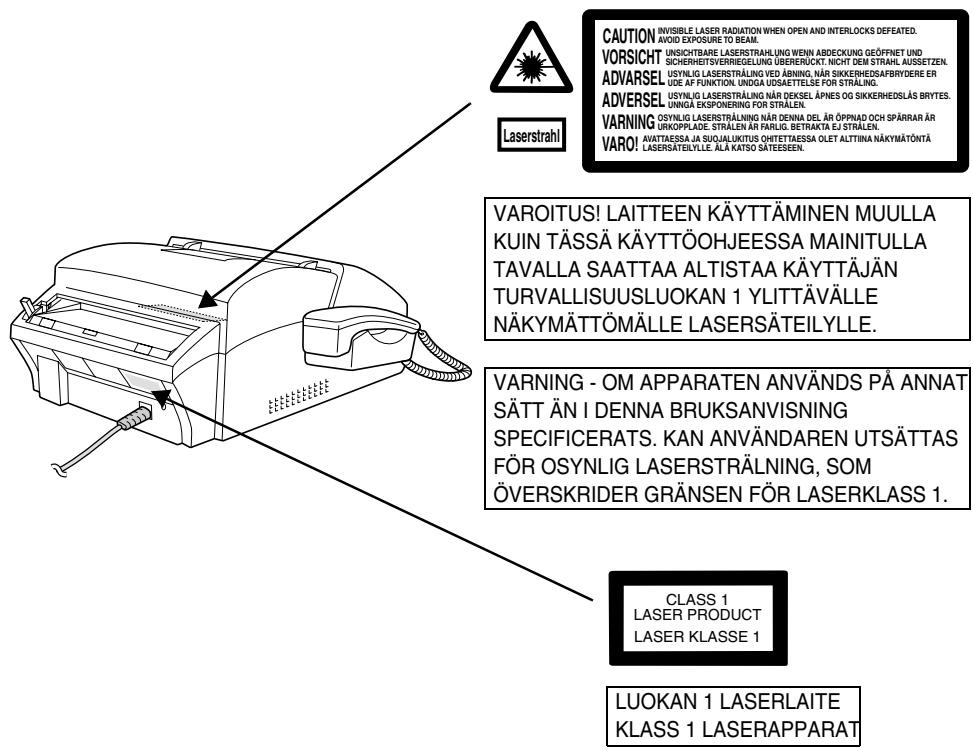
OUTPUT POWER : 0.37 mW ± 10% LASER WAVE - LENGTH : 770 - 810 nm PULSE-TIMES : 49.2 ms
SHARP®
SHARP ELECTRONICS FRANCE S.A.
22, Avenue des Nations, BP 50094
95948 ROISSY CDG Cedex, France
Telephone: +33 0 802 856 333
SHARP CORPORATION
Brand : SHARP
Model : FO-2950M
Category : Fax machine