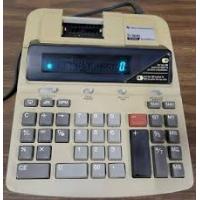
TI-5630 - Calculator TEXAS INSTRUMENTS - Free user manual and instructions
Find the device manual for free TI-5630 TEXAS INSTRUMENTS in PDF.


| Product Type | Printing Calculator with Roll |
| Brand | Texas Instruments |
| Model | TI-5630 |
| Power Supply | AC (electrical outlet) |
| Basic Functions | Addition, subtraction, multiplication, division, percentages, gross profit margin, taxes, memory, grand total, counter |
| Display Capacity | 12 digits |
| Printing | Yes, on thermal paper roll |
| Decimal Switch | 0, 2, 3, 4, 6, F (floating) |
| Rounding Switch | Down, 5/4, Up |
| Tax Switch | SET (definition) / CALC (calculation) |
| Print Switch | OFF, ON, IC (counter), GT (grand total) |
| Ink Type | Replaceable ink roller |
| Ink Roller Replacement | Yes, by user (extraction tab) |
| Memory Function | M+, M-, MS (subtotal), MT (total and clear) |
| GPM Function | Calculation of selling price with margin or loss |
| Tax Function | TAX+ (addition), TAX- (subtraction), programmable rate |
| Constant Function | Multiplication and division by constant |
| Error Handling | Display 'E' and print ERROR |
| Manual Languages | French, English, Spanish, Portuguese |
| Warranty | See warranty provided with product |
Frequently Asked Questions - TI-5630 TEXAS INSTRUMENTS
User questions about TI-5630 TEXAS INSTRUMENTS
0 question about this device. Answer the ones you know or ask your own.
Ask a new question about this device
Download the instructions for your Calculator in PDF format for free! Find your manual TI-5630 - TEXAS INSTRUMENTS and take your electronic device back in hand. On this page are published all the documents necessary for the use of your device. TI-5630 by TEXAS INSTRUMENTS.
USER MANUAL TI-5630 TEXAS INSTRUMENTS
Installing the Paper Roll
- Remove the printer compartment cover.
- Lift the paper holder so that it extends behind the printer compartment.
- Remove any packing materials from the printer compartment.
- Replace the printer compartment cover.
- Plug the calculator into an electrical outlet.
- Set the power switch on the right side of the calculator to on () .
- Place the paper roll on the paper holder as shown below.
- Insert the end of the paper into the paper slot on the back of the calculator above the black "bar". To avoid paper jams, use quality bond paper.
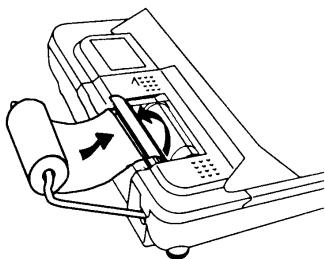
- Feed the paper into the slot; then press and hold
Note To prevent damaging the printer (which may void the warranty), when operating the calculator without paper, move the PRINTER switch to OFF.
Replacing the Ink Roller
- Set the power switch on the right side of the calculator to off (O).
- Remove the printer compartment cover.
- Lift the removal tab on the old ink roller and remove the roller, as shown in the following illustration.
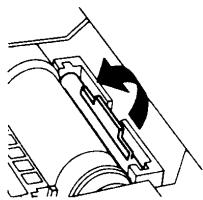
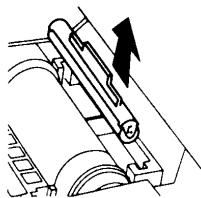
- Lower the new ink roller into the compartment and press down gently until it snaps into place.
- Replace the printer compartment cover.
Note Do not refill old ink rollers. New rollers are available from local retailers.
Key Descriptions

Advances the paper.

Cleared the entire pending operation except the memory or the grand total.

Changes the sign (+ or -) of the displayed number.

Interprets the number in the display as a percentage.

Clears an entry or an error or overflow.

Computes the percentage of change between two values. (The price increase from 9.75 to 11.25 is 1.50 and the percentage increase is 15.38% .)

Calculates the selling price and profit or loss amount on an item.

Removes the last digit entered in the display.

Prints a reference number or date without affecting calculations.
TAX+ Adds the stored tax rate to the value in the display.
TAX- Subtracts the stored tax rate from the value in the display.
G7 Pressed once, displays and prints the grand total of all totals. Pressed twice, clears the grand total. This is active only if PRINTER = GT.
/ Displays and prints the total, but does not clear the total.
串 / 串 Displays and prints the total and clears the total. If PRINTER = IC , also resets the item counter (IC) to zero.
MT Displays and prints the value in memory and clears the memory. Also clears M from the display and resets the memory item count to zero.
MS Displays and prints the subtotal in memory but does not clear the memory.
M Subtracts the displayed value from memory. If a M multiplication or division operation is pending, M completes it and subtracts the result from memory.
M± Addsthe displayed value to memory.If a multiplication or division operation is pending, = completes it and adds the result to memory.
Using Decimals (DECIMAL Switch)
- Lets you add and subtract numbers without entering the decimal point (key in 5321 to enter 53.21).
F The number of decimal places varies based on the result.
0,2,3,4,6 Sets the number of decimal places to 0, 2, 3, 4, or 6.
Rounding (ROUND Switch)
Results are rounded down (if DECIMAL = 1, 2.33 rounds to 2.3).
5/4 Results are rounded up or down, depending on the value and decimal setting (if DECIMAL = 2, 2.349 rounds to 2.35).
Results are rounded up (if DECIMAL = 1, 2.33 rounds to 2.4).
Entering a Tax Rate (TAX Switch)
SET Let's you enter a tax rate to perform tax calculations.
CALC Stores the tax rate.
Printing (PRINTER Switch)
OFF Calculations are displayed but not printed.
ON Calculations are displayed and printed.
IC Both the printer and item counter are active. To clear the item counter, press */T or MT.
GT Accumulates a running grand total of all calculations you perform until you clear the grand total. To print a grand total, press GT. To clear the grand total, press GT again.
Clearing Errors and Overflows
Correcting Entry Errors
If you have not pressed an operation key:
To clear an incorrect entry, press CE.
To clear the last digit, press
If you have pressed an operation key:
To cancel an incorrect entry, press the opposite operation key. This applies only to calculations involving + , , ^± , or ^- .
Error and Overflow Conditions and Indicators
If you divide by zero or calculate a selling price using a margin of 100% , an error occurs. The calculator prints ERROR 0.* and displays E and 0.
An overflow occurs if you calculate a result with too many digits for the calculator to display or print. When this occurs, the calculator:
- Displays E and the first 12 digits of the result with a decimal point 11 places to the left of its correct position.
- Prints ERROR and the first 12 digits of the result with the decimal shifted 11 places to the left of its correct position.
To clear an error or overflow, press C. The memory is not cleared unless the error or overflow occurred in a memory calculation.
Performing Basic Calculations
Addition and Subtraction 12.41 - 3.95 + 5.40 = 13.86
DECIMAL = + ,ROUND = 5 / 4 TAX = CALC,PRINTER IC
| Press | Display | ||
| C 1241 + | 12.41 | 12.41 | + |
| 395 - | 8.46 | 3.95 | - |
| 002 | |||
| ◇/S | 8.46 | 8.46 | ◇ |
| 540 + | 13.86 | 5.40 | + |
| 003 | |||
| */T | 13.86 | 13.86 | * |
Multiplication and Division 11.32 × (-6) ÷ 2 = -33.96
DECIMAL = F,ROUND = 5 / 4 TAX CALCPRINTER ON
| Press | Display | ||
| ○ 11.32 × | 11.32 | 11.32 | × |
| 6 +/- ÷ | -67.92 | -6. | ÷ |
| 2 ÷ | 2. | = | |
| -33.96 | -33.96 | * | |
Squares 2.5^2 = 6.25
| Press | Display | ||
| C 2.5 × | 2.5 | × | |
| 2.5 | = | ||
| 6.25 | 6.25 | * |
Reciprocals 1 / 25 = 0.04
| Press | Display | |
| ○ 25 | ○ | 25. ÷ |
| 25. = | ||
| 1. * | ||
| 1. = | ||
| 0.04 | 0.04 * |
Using Memory Operations
DECIMAL = 2 ,ROUND = 5 / 4 ,TAX CALC,PRINTER = ON
Multiplication with Memory Keys You need the total of three items at 10.50 and five items at 4.95. By using the memory keys, you will not disturb a current calculation.
| Press | Display | |||
| MT † 10.5 × 3 M± | 10.5 | x | ||
| 3. | = | |||
| M | 31.50 | 31.50 | M+ | |
| 4.95 × 5 M± | 4.95 | x | ||
| 5. | = | |||
| M | 24.75 | 24.75 | M+ | |
| MS †† | M | 56.25 | 56.25 | M◇ |
| 4.95 × 5 M- | M | 4.95 | x | |
| 5. | = | |||
| M | 24.75 | 24.75 | M- | |
| MT | 31.50 | 31.50 | M* | |
MT prints the current memory total and clears the memory.
You calculate a memory subtotal to see the current total amount of your order.
You decide not to order the last item.
Calculating Gross Profit Margin
DECIMAL = 2 ,ROUND = 5 / 4 ,TAX CALC,PRINTER = ON
Calculating a Profit Amount An item cost you 65.00. You want to earn a 40% profit. Calculate the selling price.
| Press | Display | |
| C 65 [GPM] | 65. | 65. M |
| 40 | 40. % | |
| 43.333333333 Δ* | ||
| 108.33 | 108.33 * |
Calculating a Loss Amount An item cost you 35,000. You must sell it, but can only afford to lose 33.3% . Calculate the selling price.
| Press | Display | |
| C 35000 GPM | 35,000. | 35,000. M |
| 33.3 +/- = | -33.3 % | |
| -8,743.435859 Δ* | ||
| 26,256.56 | 26,256.56 * |
Calculating Percentages
DECIMAL = F,ROUND = 5 / 4 TAX CALC,PRINTER = ON
Percent 49 × 15%
| Press | Display | ||
| C 49× | 49. | 49. | × |
| 15 % | 15. | % | |
| 7.35 | 7.35 | * | |
Percent Ratio 29.5 is what percent of 25?
| Press | Display | ||
| C 29.5 ÷ | 29.5 | 29.5 | ÷ |
| 25 ‰ | 25. | % | |
| 118. | 118. | * | |
Calculating Tax
DECIMAL = F,ROUND = 5 / 4 TAX SET,PRINTER ON
Add-On 1,450 + 15% tax
| Press | Display | ||
| C 15 and move TAX switch to CALC | 0. | 15. | % |
| 1450 (TAX+) | 1,450. | ||
| 217.5 | Δ | ||
| 1,667.5 | 1,667.5 | * | |
Discount 235 - 17.5%
(Remember to move the TAX switch to SET before you begin.)
| Press | Display | ||
| C 17 □ 5 and move TAX switch to CALC | 0. | 17.5 % | |
| 235 TAX- | 235. | ||
| -35. | Δ | ||
| 200. | 200. | * | |
Using Constants
DECIMAL = F,ROUND = 5 / 4 TAX CALC,PRINTER ON
Multiplying by a Constant 5 × 3 = 15 5 × 4 = 20
The first number in a multiplication problem is the constant multiplier.
| Press | Display | ||
| C 5 × | 5. | 5. | × |
| 3 = | 15. | 3. | = |
| 15. | * | ||
| 4 = | 20. | 4. | = |
| 20. | * | ||
Dividing by a Constant 66 ÷ 3 = 22 90 ÷ 3 = 30
The second number in a division problem is the constant divisor.
| Press | Display | ||
| 66 | 66. | 66. | ÷ |
| 3 | 3. | = | |
| 22. | 22. | * | |
| 90 | 90. | = | |
| 30. | 30. | * | |
Sumayresta 12.41 - 3.95 + 5.40 = 13.86
DECIMAL = + ,ROUND = 5 / 4 ,TAX CALC,PRINTER = IC
| Presione | Visualización | Impresión | |
| C 1241 | 12.41 | 12.41 | + |
| 395 | 8.46 | 3.95 | - |
| 002 | |||
| ◇/S | 8.46 | 8.46 | ◇ |
| 540 | 13.86 | 5.40 | + |
| 003 | |||
| */T | 13.86 | 13.86 | * |
Multiplicación y división 11.32 × (-6) ÷ 2 = -33.96
DECIMAL = F,ROUND = 5 / 4 TAX CALC,PRINTER ON
| Presione | Visualización | Impresión | |
| 11.32 | 11.32 | × | |
| 6 +/- ÷ | -67.92 | -6. | ÷ |
| 2 | 2. | = | |
| -33.96 | -33.96 | * | |
Cuadrados 2.5^2 = 6.25
Supplemento 1,450 + 15% taxa
English-Service & Warranty Information
For more information about TI products and services, contact TI by e-mail or visit the TI calculator home page on the World Wide Web.
ti-cares@ti.com
http://www.ti.com/calc
For information about the length and terms of the warranty or about product service, refer to the warranty statement enclosed with this product or contact your local Texas Instruments retailer/distributor.