
TechniLAN 4/4 aktiv - Uncategorized TECHNISAT - Free user manual and instructions
Find the device manual for free TechniLAN 4/4 aktiv TECHNISAT in PDF.


| Product Type | Coaxial Cable Network Adapter |
| Brand | TechniSat |
| Model | TechniLAN 4/4 aktiv |
| Article Number | 0000/3637 |
| Number of HF Inputs | 4 (satellite 0.95-2.15 GHz, terrestrial 80-790 MHz) |
| Number of HF Outputs | 4 (satellite & terrestrial, plus coaxial network 2-28 MHz) |
| Number of Ethernet Ports | 2 (Fast Ethernet 100 Mbit/s) |
| Max Data Rate | 200 Mbit/s (HomePlug-AV standard) |
| Reflection Dampening | 10 dB |
| Shielding Standard | EN 50083-2 (TechniSelect S) |
| Satellite Range Dampening | 2-3 dB |
| Terrestrial Dampening | 1-2 dB |
| Power Supply | Wall power supply 230V/13V DC, 3A, short-circuit & overload protected |
| Power Consumption (device only) | max. 400 mA, typ. 250 mA |
| Dimensions (L x W x H) | 121 x 114 x 33 mm |
| Weight | 240 g |
| Compliance | CE approved, meets EU standards |
| Application | Upgrades existing coaxial cable network to home network |
| Compatible Multi-switches | TechniSat TechniSwitch, TechniSystem, GigaSwitch, GigaSystem, GigaSet |
| Safety Precautions | Install in dry place, ensure earthing, protect from lightning, do not open housing |
| Reparability | Only by trained service personnel |
| LED Indicators | Power (green), Link (green/orange/red), Network (green/yellow) |
Frequently Asked Questions - TechniLAN 4/4 aktiv TECHNISAT
User questions about TechniLAN 4/4 aktiv TECHNISAT
0 question about this device. Answer the ones you know or ask your own.
Ask a new question about this device
Download the instructions for your Uncategorized in PDF format for free! Find your manual TechniLAN 4/4 aktiv - TECHNISAT and take your electronic device back in hand. On this page are published all the documents necessary for the use of your device. TechniLAN 4/4 aktiv by TECHNISAT.
USER MANUAL TechniLAN 4/4 aktiv TECHNISAT
natural_image
White wall-mounted electronic device with three circular buttons and a green indicator button (no visible text or symbols)1 Functionality and Application....10
2 Safety Instructions....11
3 TechniLAN Network....12
3.1 General....12
3.2 Installation Example....12
4 TechniLAN 4/4 aktiv....14
4.1 The Device 14
4.2 Displays and Indicators....14
4.3 Power Supply 14
5 Installation and Startup 15
6 Technical Data....15
7 Error Search Assistance....16
1 Functionality and Application
By using the TechniLAN components, it is possible to quickly and easily upgrade an existing coaxial cable network to a home network which electronic devices with Ethernet connections can use to communicate with each other and all of this without drilling, laying cable or using wireless options.
In order to upgrade an existing satellite distribution system, all that is needed is a TechniLAN signal combiner, i.e. the TechniLAN 4/4 aktiv which is to be installed upstream from an existing multi-switch into the integrated participant sockets. Then, the existing antenna outlets need to be replaced with the TechniLAN participant sockets.
Together with the TechniLAN participant sockets, the TechniLAN 4/4 aktiv is capable of making network functionality possible within existing star-formed distribution systems.
The TechniLAN system can be used in combination with all TechniSat multi-switches from the latest series, whether cascaded or just installed within the basic unit. This means that each satellite distribution with TechniSwitch, TechniSystem, GigaSwitch, GigaSystem and GigaSet multi-switches can also be used as a home network for up to four TV outlets per installed Techni 4/4 aktiv.
It is even possible to apply this technology to broadband building distribution systems with star-formed distribution structures.
Internet capable TV devices and network components such as PCs, NAS servers, printers or DSL routers, can easily be connected with each other using TechniLAN.
With a data rate of approx. 200 Mbit/s, the resulting network connections are best equipped, even for HD video streams ^3 . In this manner, there is of course also enough broadband for internet radio and music, pictures as well as all other common internet usages.
By using the shielded TV cable, which is usually installed behind plaster, there is no additional electromagnetic radiation or risk of eavesdropping as in the case of wireless networks (WLAN). Contrary to WLAN, there are also no network connection interferences in the 2.4 GHz range such as with cordless telephones, Bluetooth, wireless networks or RC technology.
2 Safety Instructions
For your own protection, you should read through the safety precautions carefully prior to installation. The manufacturer accepts no responsibility for damage caused by inappropriate operation, or by non-compliance with safety precautions.
• The components must be assembled in a dry place, on a level and fire-resistant surface.
- Do not install the device into any roof insulation. Take care that the power supply has sufficient air circulation.
• Install the device with the power switched off.
- The antenna system must be earthed.
- The antenna unit must be protected against lightning strikes in accordance with relevant requirements.
- The relevant European standards and VDE (Association of German Electrical Engineers) guidelines to guarantee electrical safety must be adhered.
- National legally required regulations governing broadcast receiving systems must be adhered.
• Never open the unit housing.
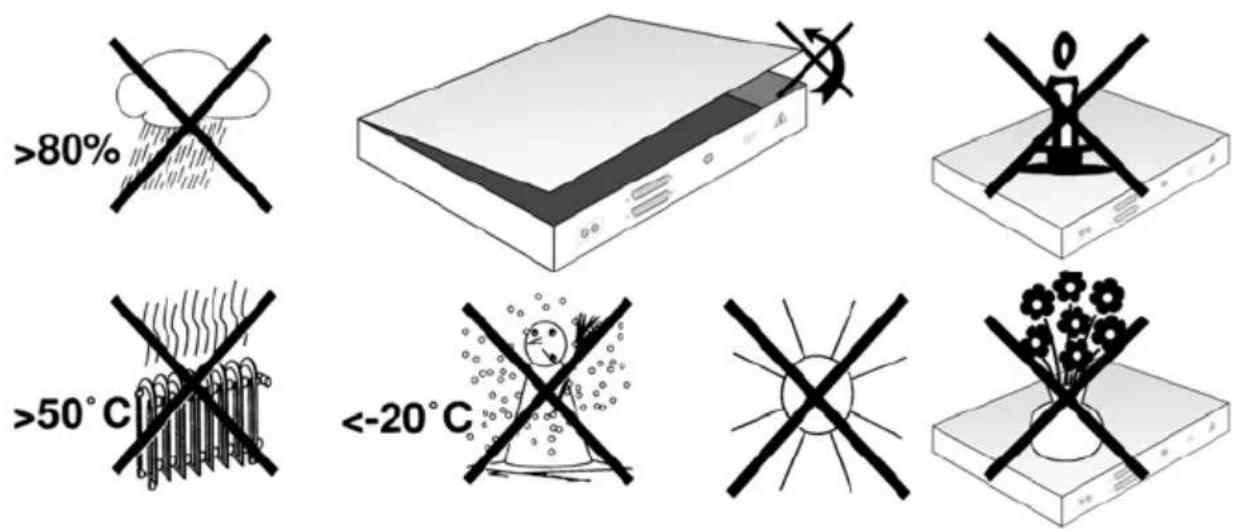
Any intervention necessary should only be carried out by trained service personnel. In the following cases, you should disconnect the unit from the mains power supply, and consult a qualified technician:
• the unit was exposed to humidity, or liquid has run into the unit,
• in the event of malfunctions,
• in case of severe external damage.
3 TechniLAN Network
3.1 General
EN
Network communication via coaxial cable is based on the HomePlug-AV standard with which a data rate of up to 200 Mbit/s can be reached.
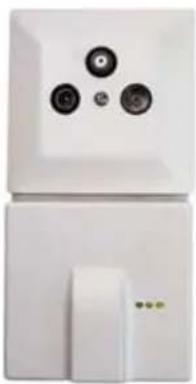
Such a network consists of the TechniLAN 4/4 aktiv and up to four TechniLAN participant sockets (Art. No. 0000/3639).
In order to realize more complex networks, it is possible to connect numerous TechniLAN 4/4 aktiv with each other using Ethernet cabling.
At the Ethernet sockets of the TechniLAN participant sockets and of the TechniLAN 4/4 aktiv, terminal devices such as computers, printers, DSL modems and also smart TVs and digital receivers from the ISIO family can be connected.
This is called a peer-to-peer network in which all Ethernet connections, even the one from the TechniLAN 4/4 aktiv itself, are equal.
natural_image
White appliance with three circular buttons and a white door, no visible text or symbolsIllustration 6: TechniLAN socket
3.2 Installation Example
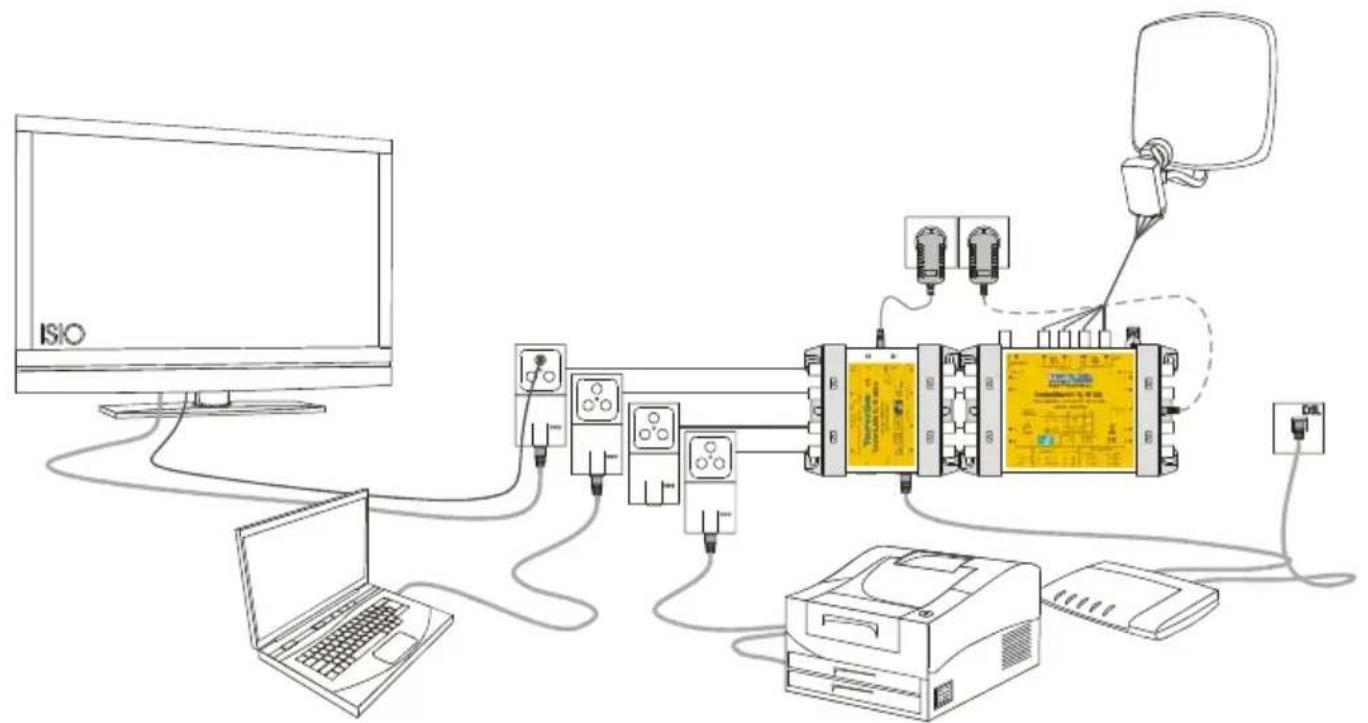
The following examples are meant to show how networks can be set up including the TechniLAN 4/4 aktiv. Receivers for satellite TV are seldomly depicted due to this fact.
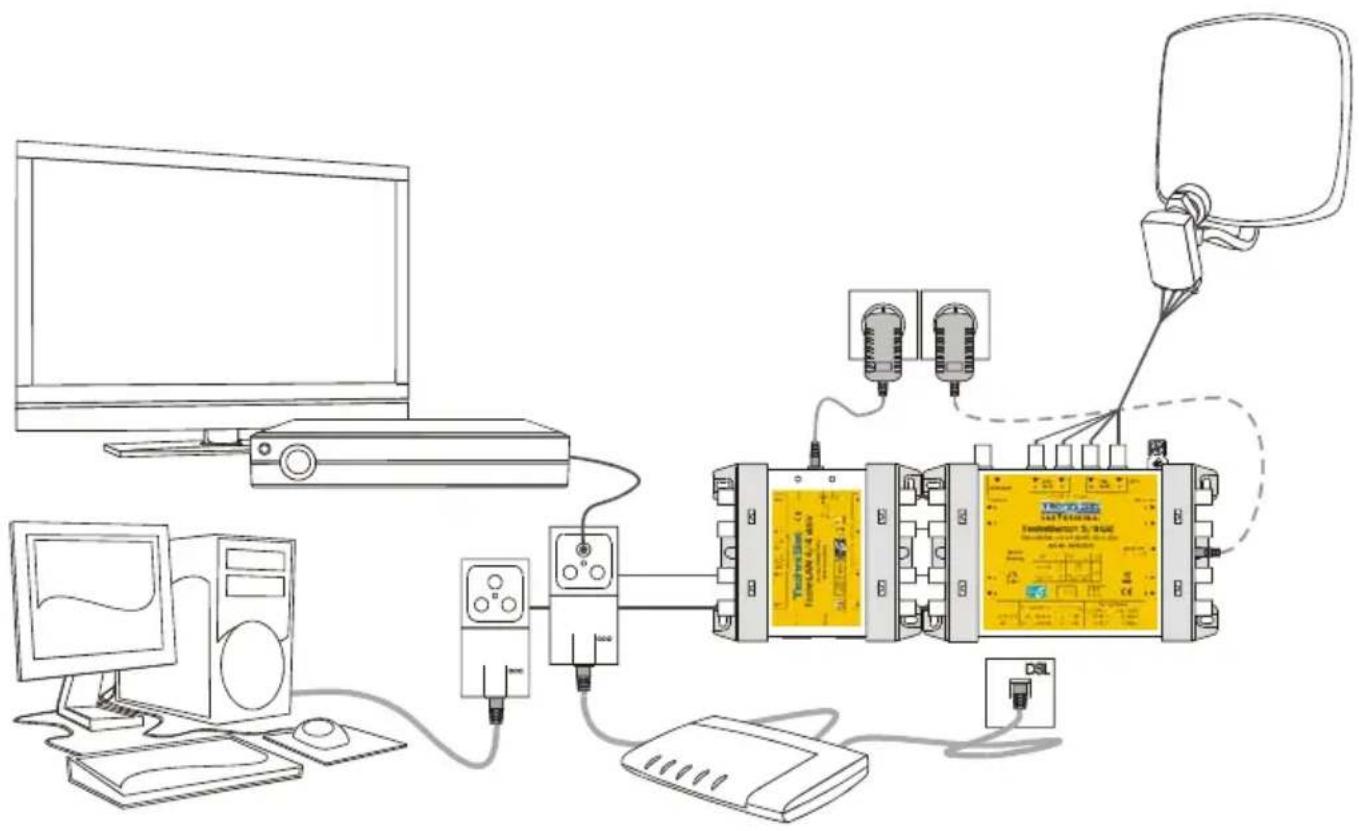
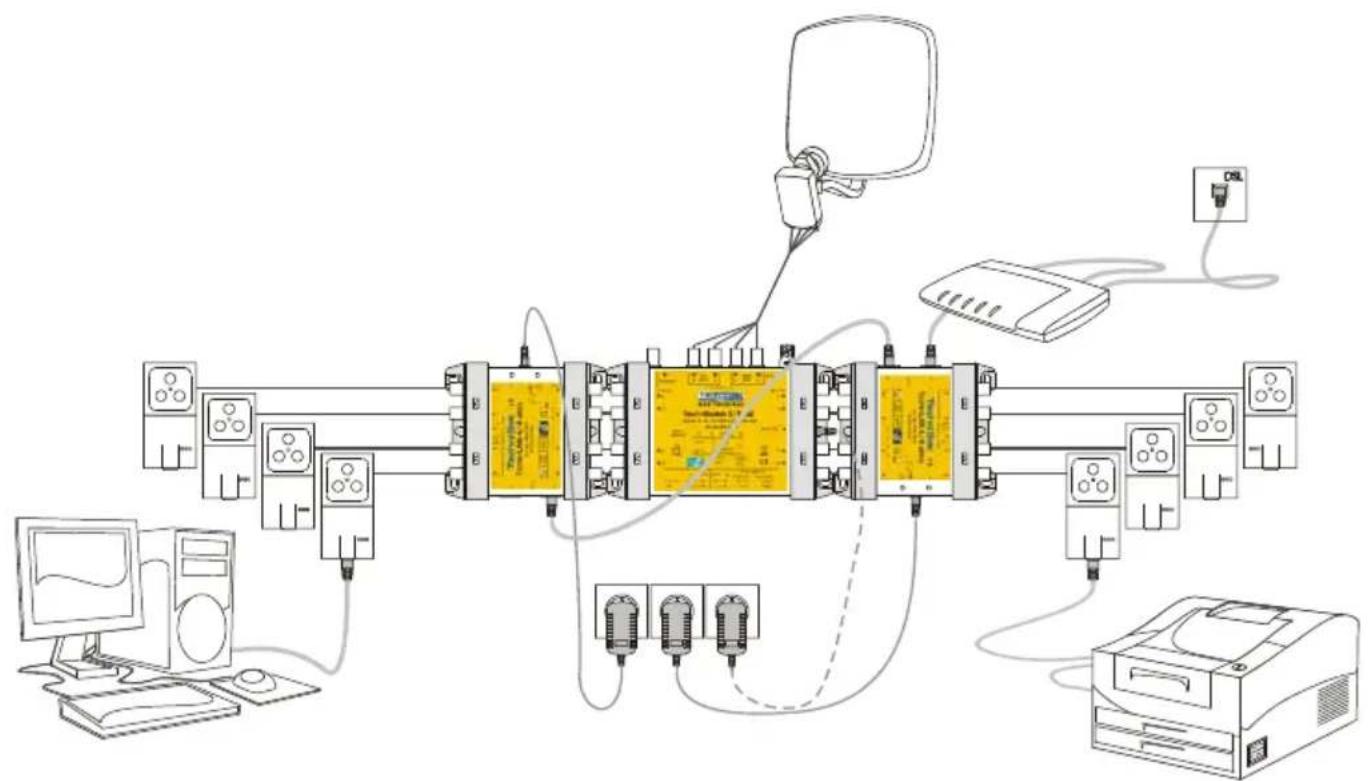
Illustration 7: Installation example, DSL modem (internet connection) connected to a TechniLAN socket
flowchart
graph TD
    A["Computer"] --> B["Network Equipment"]
    B --> C["Central Device"]
    C --> D["Microphones"]
    C --> E["Analog Devices"]
    C --> F["Display Module"]
    C --> G["PC2"]
    C --> H["Laptop"]
    C --> I["DSL"]
Illustration 8: Installation example, DSL modem (internet connection) connected to a TechniLAN 4/4 aktiv
flowchart
graph TD
    A["Computer"] --> B["Server"]
    B --> C["Switch"]
    C --> D["Printer"]
    D --> E["Desktop"]
    C --> F["Wireless Control Unit"]
    F --> G["Monitor"]
    G --> H["PC"]
    H --> I["Server"]
    style A fill:#f9f,stroke:#333
    style I fill:#bbf,stroke:#333
Illustration 9: Installation example, two TechniLAN 4/4 aktiv interconnected within one network
4 TechniLAN 4/4 aktiv
4.1 The Device

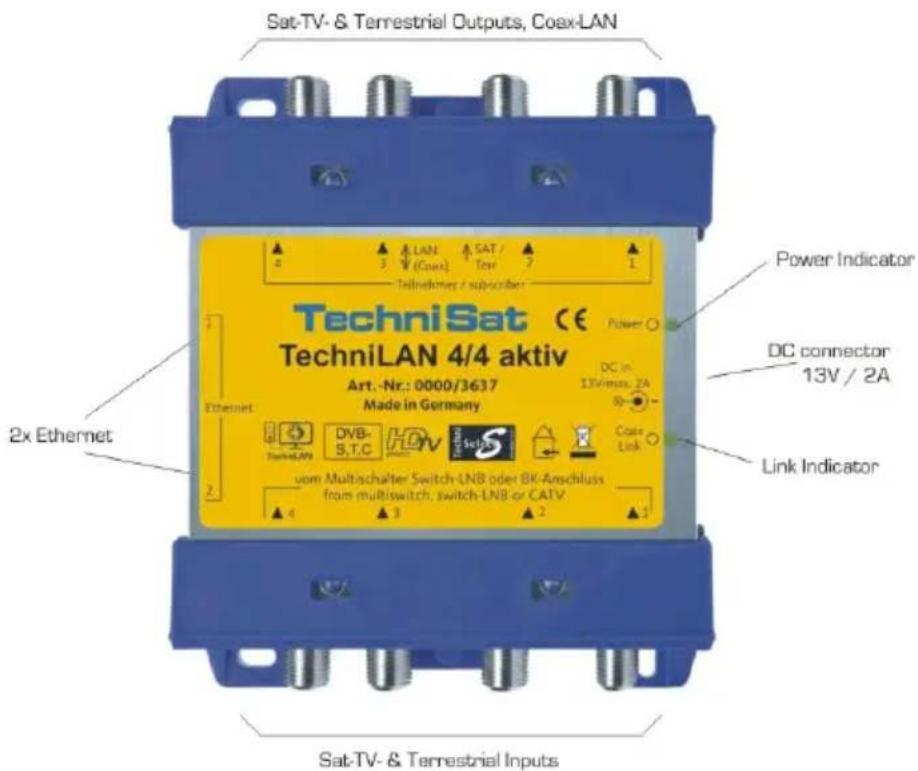
Illustration 10: TechniLAN 4/4 aktiv
4.2 Displays and Indicators
Power Indicator: lights up green as soon as the device is supplied with power.
Link Indicator: blinks when a network connection exists, displays the quality of the data being transferred via the coaxial cable.
- green: good transfer quality
• orange: sufficient transfer quality
• red: poor transfer quality - not lit: no connection
Network LEDs (at the Ethernet sockets):
- green: data rates used at the port: at ... 100Mbit/s; of ... 10Mbit/s
- yellow: blinks when a network connection exists
4.3 Power Supply
Via the TechniLAN 4/4 aktiv 13V wall power supply, all TechniLAN participant sockets are supplied with power. If a receiver, connected at the socket, has a higher voltage, for example 18 V for the horizontal polarization, then this receiver takes over with supplying the participant sockets with power with which it is connected. The receiver voltage is fed through to the multi-switch and/or the LNB so that the reception level desired by the receiver can be reached.
The TechniLAN 4/4 aktiv is designed so that it can take over supplying power to the multi-switches and the LNBs. Care should be taken that the maximum power allowed by the wall power supply is not exceeded, especially in the case of systems without power supplies, which is for example possible with the TechniSwitch 5/8.
The maximum power consumption can be estimated by using the following formula:
$$ = \cdot + \mathrm{mA} 4 0 0 \mathrm{mA} 3 5 0 \text {InI} $$
Here n is the number of connected TechniLAN sockets. In this manner, it is assumed that the power consumption for the sockets is at 350 mA and the consumption for the TechniLAN 4/4 aktiv is at 400 mA for conditions that are not ideal, for example lengthy coaxial cables.
I_Vert is the power which is fed into the distribution system (multi-switch and LNB). This is normally a maximum of 400 mA.
When necessary, a wall power supply is to be connected to the multi-switch which then supplies the distribution system with power. This is also true when a receiver is not capable of supplying the required power for the distribution system and the TechniLAN socket.
5 Installation and Startup
- Connect the TechniLAN 4/4 aktiv to the signal output of the multi-switch or LNB. F-to-F quick connectors (Art. No. 0001/3312) can be used for multi-switches from the series TechniSwitch 5/8, TechniSystem 5/8 and/or GigaSwitch 9/8 due to the similar grid system.
- The signal outputs of the TechniLAN 4/4 aktiv are to be connected to the participant sockets using coaxial cabling.
- Connect the provided wall power supply. Take care not to exceed the maximum amount of power allowed by the wall power supply (see section 4.3).
- Check, using the LEDs on the TechniLAN participant sockets, as to whether or not the operating power is being supplied at the socket. The green LEDs must be lit at every socket (see section 4.2).
- Several seconds later, the Coax-Link LED and the yellow traffic LEDs of the TechniLAN participant sockets should light up and signal that the coaxial cable network is ready for operation (see section 4.2). Network capable terminal devices can now be operated via the Ethernet sockets of the participant sockets and the TechniLAN 4/4 aktiv.
6 Technical Data
| TechniLAN 4/4 aktiv, Article Number 0000/3637 | |
| Number of HF Inputs | 4x for satellite (0,95...2,15 GHz) and terrestrial (80...790 MHz) |
| Number of HF Outputs | 4x for satellite (0,95...2,15 GHz), terrestrial (80...790 MHz); connected within the frequency range of the coaxial cable network (2..28 MHz) |
| Reflexion Dampening | 10 dB |
| Shielding Measurements | According to EN 50083-2 (TechniSelect S) |
| Network | Coaxial cable network according to HomePlug-AV standard |
| Max. Data Rate | 200 Mbit/s |
| Number of Network Sockets | 2x Fast Ethernet (100 Mbit/s) |
| Satellite Range Dampening ^4 | 2...3 dB |
| Terrestrial Dampening ^4 | 1...2 dB |
| Power Supply | Device, participant sockets and distribution technology without power supply are supplied via the wall power supply.Wall power supply 230 V / 13 V, 3 A DC, short-circuit and overload protected. |
| Power Consumption (without sockets and distribution technology) | max. 400 mA type 250 mA |
| Dimensions: L x B x H (mm), Weight | 121 x 114 x 33, 240 g |
7 Error Search Assistance
| Error | Possible Causes |
| The data rate is too low. | · Inputs and outputs of the TechniLAN 4/4 active have been switched.· The dampening between the TechniLAN 4/4 aktiv and the socket is too effective |
| The green power LED of a participant socket does not light up. | A short circuit has occurred between the participant socket and the TechniLAN 4/4 aktiv. |
| The power LED of the TechniLAN does not light up | The wall power supply switched off due to overloading |
| The yellow traffic LED of the participant socket does not light up. | Up to now, no successful LAN connection could be established via the coaxial cable |
| Connected receivers signal short circuits within the LNB cable for specific programs | The receiver is not capable of supplying the TechniLAN socket as well as the distribution system with enough power, especially when selecting programs from the horizontal polarization (18 V). |
Your device is CE approved and meets all necessary EU standards.
Subject to changes and printing errors. Status 8/12
Reproduction and copies are only allowed with the consent of the publisher.
TechniSat is a registered trademark of
TechniSat Digital GmbH · P.O. Box 560 · 54541 Daun · Germany · www.technisat.com
TechniSat
www.technisat.com
Brand : TECHNISAT
Model : TechniLAN 4/4 aktiv
Category : Uncategorized