
I-ALARM Wireless door - Door/window sensor Techly - Free user manual and instructions
Find the device manual for free I-ALARM Wireless door Techly in PDF.


| Product Type | Wireless Door/Window Sensor |
| Brand | Techly |
| Model | I-ALARM Wireless door |
| Power Supply | DC 1.5V (AA 1.5V LR6 battery x1) |
| Static Current | ≤ 30 μA |
| Alarm Current | ≤ 40 mA |
| Transmission Distance | ≤ 80 m (open area) |
| Radio Frequency | 433 MHz (±75 kHz) |
| Housing Material | ABS plastic |
| Operating Temperature | -10°C to +55°C |
| Relative Humidity | ≤ 80% (non-condensing) |
| Transmitter Dimensions (L×W×H) | 71 × 34 × 17.5 mm |
| Magnet Dimensions (L×W×H) | 51 × 12 × 13.5 mm |
| LED Indicator | Flashes once when door opens; quick blink for low battery |
| Tamper Protection | Built-in tamper switch triggers alarm if cover removed |
| Box Contents | 1 Detector, 1 Magnet, 1 User Manual |
| Installation | Surface mount with double-sided tape or screws; magnet must be ≤1 cm from transmitter |
| Operating Principle | Detects separation between transmitter and magnet (door/window opening) |
| Battery Life | Not specified; low battery indicated by LED |
| Certifications | CE, WEEE compliant |
Frequently Asked Questions - I-ALARM Wireless door Techly
User questions about I-ALARM Wireless door Techly
0 question about this device. Answer the ones you know or ask your own.
Ask a new question about this device
Download the instructions for your Door/window sensor in PDF format for free! Find your manual I-ALARM Wireless door - Techly and take your electronic device back in hand. On this page are published all the documents necessary for the use of your device. I-ALARM Wireless door by Techly.
USER MANUAL I-ALARM Wireless door Techly
Wireless door/ Window Contact
natural_image
Simple line drawing of a vertical rounded rectangle (no text or symbols)www.techly.com

Features
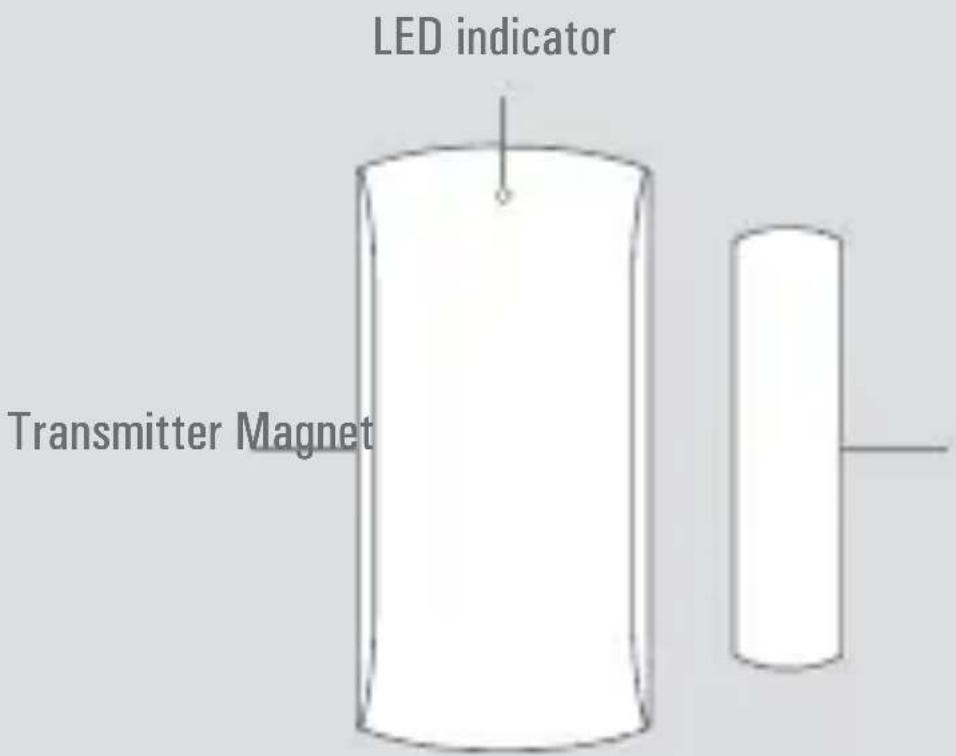
This Door/Window Contact can be installed on doors, windows, and any other objects that open and close. The sensor sends a signal to the control panel when the magnet si separated from the transmitter.
Thanks to the tamper switch, any attempt to remove the cover of the Door/Window Contact will trigger the alarm.
Box content
1 x Detector
1 x Magnet
1 x User's manual
Specifications
| Power supply DC 1.5V (AA 1.5V LR6 battery x1) | |
| Static current ≤ 30uA | |
| Alarm current ≤ 40mA | |
| Transmission distance ≤ 80 m (in open area) | |
| Radio-frequency 433MHz (±75kHz) | |
| Housing material ABS plastic | |
| Operating conditions Temperature: -10°C ~ +55°C | |
| Relative Humidity: ≤ 80% (non-condensing) | |
| Transmitter dimensions 71x34x17.5 m | |
| Magnet dimensions (L x W x H) | 51x12x13.5 mm |
PCB Layout
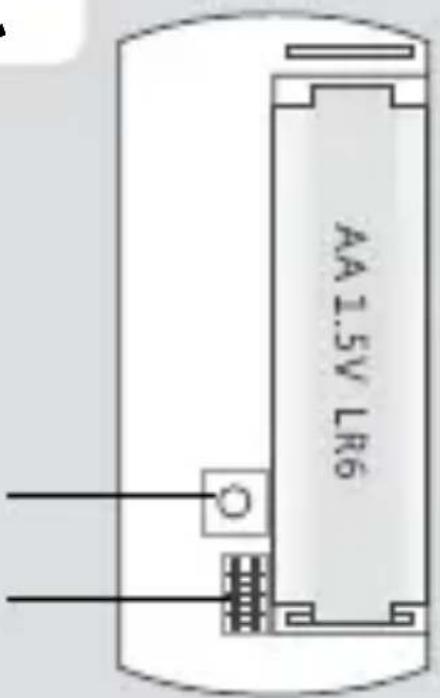
Tamper switch
Zone setup
LED indications
LED flashes once: the door or windows is open and the transmitter sends a signal to the control panel.
Blinks quickly: Low power indication, the batteries must be replaced.
Register in the control panel
Navigate through the menu of the control panel and reach “ADD A NEW” (Wireless sensor). Then separate the magnet from the transmitter to register the detector in the control panel. To check if the registration is complete, arm the system and separate the magnet from the transmitter again by opening the door or window on which it is installed. If the siren rings out, the registration is successful.
Installation
- Open the case and remove the battery activation strip.
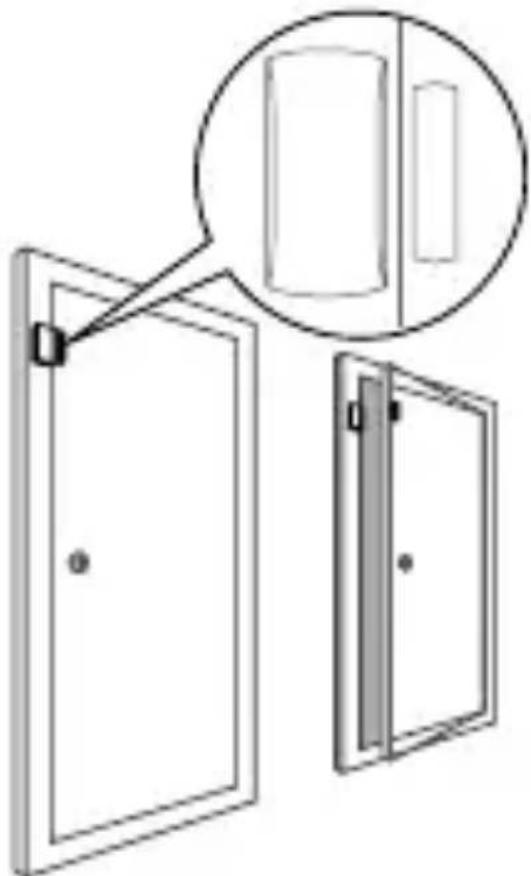
- Mount the sensor on the door and the magnet on the door frame.
- Make sure the magnet is on the right side of the transmitter. Place the transmitter in the desiderd location, mount the magnet no more than 1 cm away from the transmitter and secure the transmitter and magnet with double-sided tapes or screws.
- Avoid mounting the sensor in the areas with a large amount of metal or electrical wiring such
as a furnace or utility room.interferences and false alarms.
- The detector is more sensitive to cross movements than vertical movements.
natural_image
Diagram of two doors with a magnified inset showing a rectangular object (no text or symbols)
www.techly.com

in compliance with Eu Directive WEEE this product is market with this symbol. It means that used electrical and electronic products should not be mixed with general household waste. There is a separate collections system for there products in compliance with WEEE directive, otherwise contaminative and hazardous substances can pollute the environment

With CE sign, Techly ensures that the product is conformed to the basic European standards and directives.
natural_image
Simple line drawing of a rounded rectangular shape with no text or symbolswww.techly.com

Caratteristiche
natural_image
Diagram of two door compartments with a magnified inset showing a rectangular component (no text or symbols)
www.techly.com


Brand : Techly
Model : I-ALARM Wireless door
Category : Door/window sensor