
T15 - Phone AGFEO - Free user manual and instructions
Find the device manual for free T15 AGFEO in PDF.


User questions about T15 AGFEO
0 question about this device. Answer the ones you know or ask your own.
Ask a new question about this device
Download the instructions for your Phone in PDF format for free! Find your manual T15 - AGFEO and take your electronic device back in hand. On this page are published all the documents necessary for the use of your device. T15 by AGFEO.
USER MANUAL T15 AGFEO
Accessories and Content....19
Feature Phone T 15 eco....19
T 15 eco Buttons....20
T 15 eco Display....21
Installation....21
T 15 eco menu 22
Language Selection....23
Time and Date Setting....23
Set Flash 23
Factory Reset 24
To make a call....24
On-Hook Dialling....24
Handsfree 25
Using a Headset 25
Redial 25
VIP-Function 25
One-Touch Memory 26
Two-Touch Memory 27
Phonebook 28
Entering Names with alphanumeric keypad 29
Operation of Caller ID....30
Hotel Function 31
Technical Data 31
Wallmounting 32
Verpackungsinhalt
text_image
Diagram of a telephone receiver with labeled parts including LCD, keypad, and indicator lights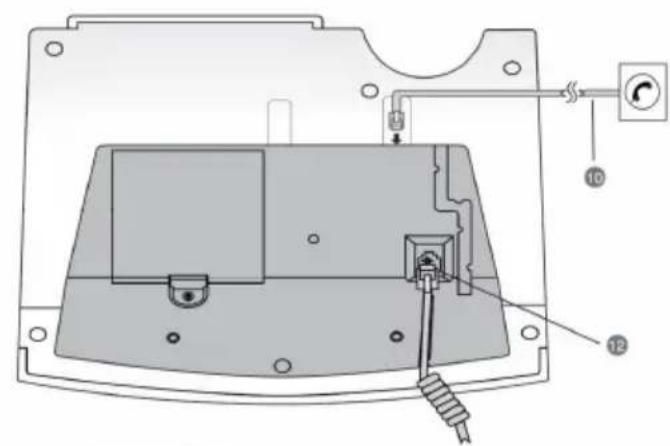
text_image
Technical diagram of a device with labeled components and wiring connections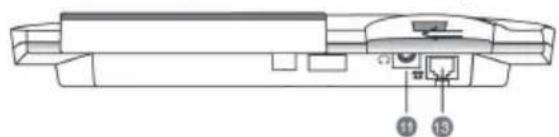
natural_image
Technical line drawing of a mechanical assembly with labeled components (no text or symbols present)Accessories and Content
Following items are included in the package of the AGFEO T 15 Feature Phone:
- Phone base unit
- Handset with coil cord and Handset Paper Insert
- Line cord RJ 11 to RJ 11 with preassembled TAE-plug
- TSS plug
- This manual
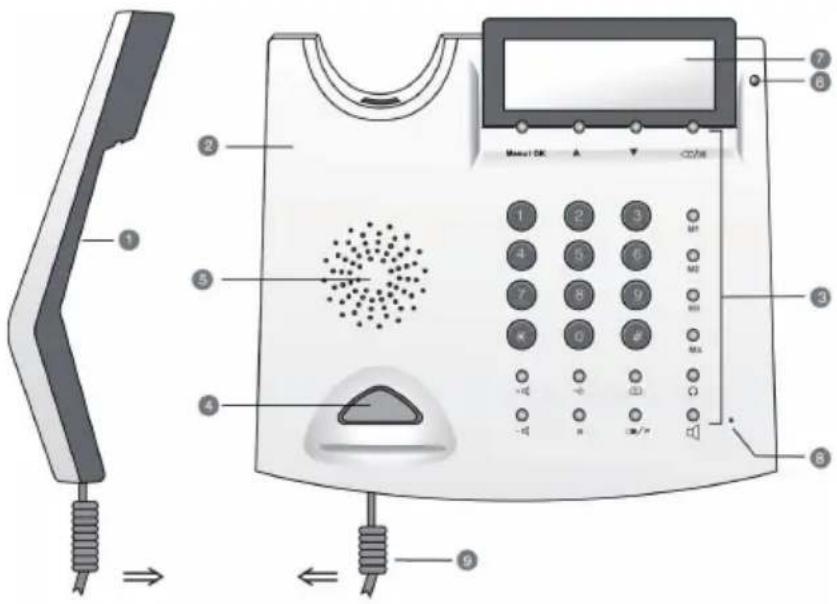
Feature Phone T 15 eco
- Handset with Handset Paper Index
- Base unit
- Key top
- Hook switch
- Speaker
- New call indicator
- LC-display
- Speaker phone mic
- Coil cord
- Line cord
- Jack for headset (3,5mm)
- Jack for coil cord
- Jack for line cord
text_image
Diagram of a mobile phone with labeled parts including keypad, buttons, and cable connections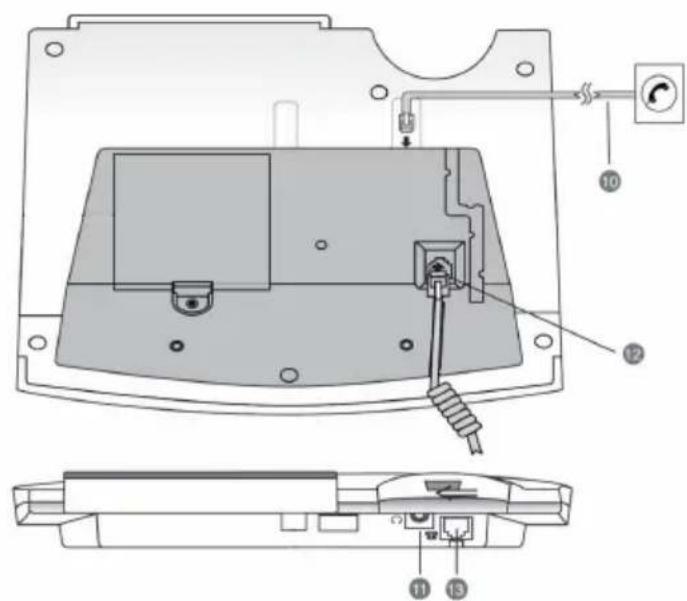
text_image
Technical diagram of a device with labeled parts and internal components, including a switch, power outlet, and wiring connections.T 15 eco Buttons
| Buttons Description | |
 | To enter the digits 0-9 |
 | To enter * |
 | To enter # |
| [BAHH] | This button functions as STORE when programming a telephone number into the Two-Touch Memory. Please refer to "Two-Touch Memory" and "Phone Book" section for details |
 | This button functions as "MUTE" during conversation. Press this button once and your voice will not pass through the microphone. To resume, press the button again.Accordingly this button can delete an entry or a record in the memory. It works as "ESC" when using the menu. |
| R | Flash or Recall to switch between 2 lines. Please refer to the manual of your PBX system for further information..Hotel Function: Press and Hold to delete Last Number Redial List and Missed Call Log. |
 | Handsfree Button. The phone will go on - or off hook. |
 | This button functions as "Last Number Redial" when you make a call (32 digits maximum). Numbers that are longer than 32 digits will not be stored in the redial memory. This button functions as "Pause" when programming a telephone number into the phone book. It is mainly used when storing a prefix in the one- or Two-Touch Memory. Press Pause button where the pause is needed and complete the storing process as described in "Two-Touch Memory" |
| M1 - M4 | One-Touch Memory (20 digits maximum). Push one of these keys to make a call to one of the stored telephone numbers. Please refer to instruction for users, section "One-Touch Memory". |
 | Phone book function has up to 99 memory locations in the Phone Book memory. For details, please see "Phone Book" section in this user manual. |
 | To scroll up/down when browsing selections. |
 | Display Menu and confirm entry. |
| + / - | To select the speaker volume from low to high (i.e. Level 1- Level 8) |
 | Headset button: To start and end a call while using a headset. |
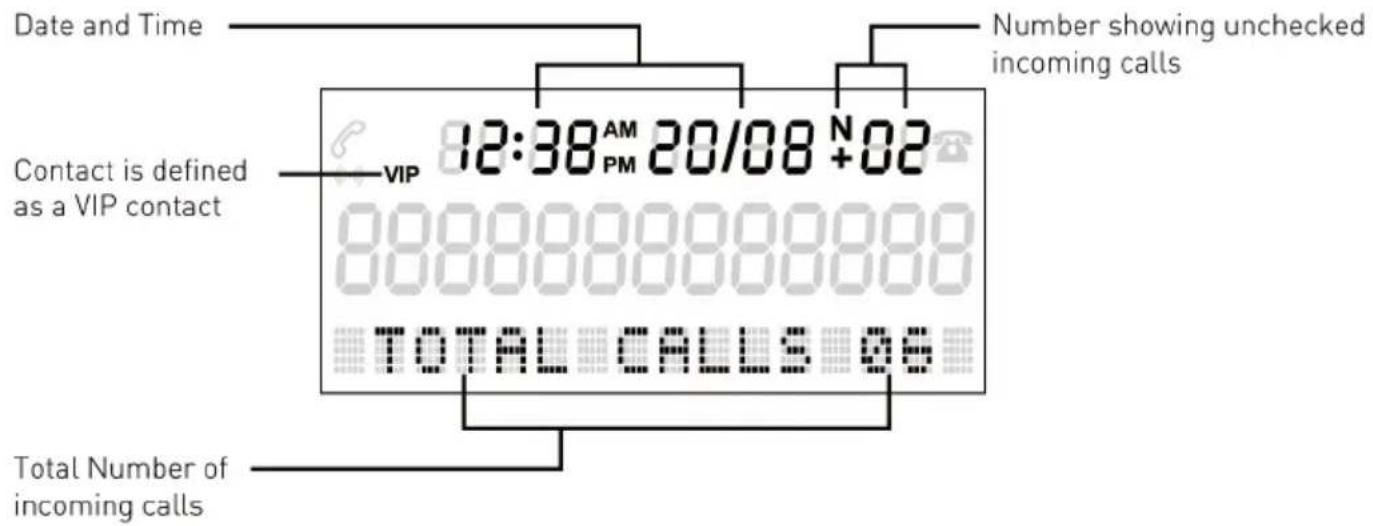
T 15 eco Display
text_image
Date and Time Number showing unchecked incoming calls Contact is defined as a VIP contact VIP 12:38 AM 20/08 +02 TOTAL CALLS 06 Total Number of incoming callsInstallation
Connect one end of the line cord to the jack on the base unit, and the other end to the wall outlet for telephone.
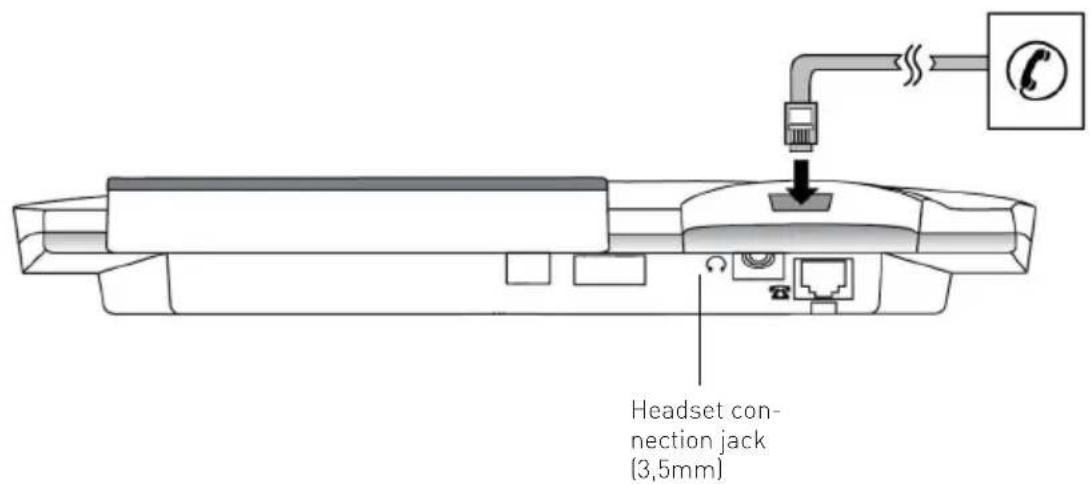
text_image
Headset connection jack (3,5mm)T 15 eco menu
Press button "Menu/OK" to open the T 15 eco menu. Choose a menu item with arrow buttons, confirm with "Menu/OK".
- PHONE BOOK
1.1. REVIEW
(Browse the phone book entries with arrow buttons.)
1.2. ADD
(Add a new entry to phone book, see Page 28)
- FACTORY RESET
(Reset T 15 eco to factory default)
- DATE FORMAT
(Allows to choose the date format between MM-DD (month/day) and DD-MM (day/month))
- HOUR FORMAT
(Allows to choose between 12 hour and 24 hour clock)
- SET FLASH
(To change flash time between 100 ms, 120 ms, 300 ms and 600 ms)
- SET AREA&LDS
(To set Area and country code. Some countries may require this setting for a proper working of the Call Log. This setting is not required for the UK.)
- SET LANGUAGE
(Choose between the following display languages: German, English, Hispanic,
Frensh, Greek, Italian, Dutch, Norwegian, Polish, Portuguese, Finnish, Swedish, Turkish, australien English, Czech and Danish; see Page 23).
- SET TIME
(Set time and date, see Page 23)
- DIAL MODE
(Choose between Loop Disconnect (LD) and Dual Tone Multi Frequenzy (DTMF))
- LCD-CONTRAST
(Set display contrast in 4 steps)
- SET RING
11.1. RING TYPE
(Choose between 5 melodys)
11.2. RING VOLUME
(Set volume in 5 steps)
Language Selection
In the state of On-hook, proceed as follows:
- Press Menu/OK Button
- Use arrow buttons (▲)/to select "Sprache" and press "OK".
- Use arrow buttons ( ▲ ) to select the language.
- Press "OK" button to confirm.
Time and Date Setting
- Press Menu/OK Button
- Use arrow buttons (▲)/to select "Set Time" and press "OK".
- Use key pad to enter time, date and year.
- Press "OK" button to confirm.
Note
The Setting sequence is "Hour/Minute/Month/Day/Year". When you receive the first incoming call, time and date will be automatically set if you have FSK Caller ID service.
Set Flash
You may change the Flashtime to fit your T 15 eco to your PBX. Possible Settings are: 100, 120, 300 and 600 ms. As default Flashtime is set to 100 ms.
- Press "Menu/OK" button.
- Select "Set Flash" with arrow buttons ( ▲/▼ ) and confirm with "Menu/OK".
- Select the preferred Flashtime with arrow buttons ( ▲/▼ ) and confirm with "Menu/OK".
- Close menu with "Esc" button (☐/☐).
Factory Reset
Use this function to reset your T 15 eco to factory default.
- Press "Menu/OK" button.
- Select "Factory Reset" with arrow buttons (▲/▼) and confirm with "Menu/OK".
- Confirm with "Menu/OK", the telephone is resetted to factory default.
NOTE:
Resetting the T 15 eco to factory default will clear all one touch memories, two touch memories, the phone book, the last number redial list and the call log.
The Following settings are factory default:
Flashtime: 100 ms Ring Volume: 3
Ring Type: 2 Language: german
To make a call
To make a call, simply pick up the handset and wait for the dialling tone. Then, dial the desired telephone number with the numeric keys.
To end a call, replace the handset onto the cradle of the base unit, or push the hook switch.
On-Hook Dialling
To Use On-Hook Dialling, you may enter the number to dial before or after pressing the SPEAKER button( ) . On-Hook Dialling works with phone numbers stored in phone book, one-touch memory, two-touch memory and redial list.
When the dialled number is answered, simply speak or pick up the handset to talk to the other end.
Handsfree
The telephone is equipped with a handsfree / speaker function. Is the handset off hook or the headset is switched on by pressing the headset button, then pressing the speaker button whilst replacing the handset, will switch the phone into the handsfree mode. You can adjust the volume during a conversation by using the volume control buttons on the telephone (+/-). The volume will remain at that setting until it is changed again. Please note that in handsfree mode the phone is using the half duplex process.
Using a Headset
If you are using a headset, press the Headset button ( 🔍 ) to start or stop a connection.
Redial
- In the state of on-hook, press Last Number Redial button ( ) once.
- Use arrow buttons to select the number you want to dial.
- Lift the handset or press the SPEAKER button (☐), the phone number will be dialled.
- To delete a single record, simply press DELETE button (☑). If you want to delete all records, press and hold DELETE button until the display shows "ALL DEL ?". Press DELETE button again to confirm.
VIP-Function
The VIP function of T 15 eco permits the assignment of one of the five different ringing tones to a VIP contact.
So you can always identify the caller by just hearing the ringing melody.
To store a number from the Phone Book as VIP
- Press PHONE BOOK button (☐) once followed by arrow buttons to select the number you want to store as a VIP call.
- Press "Menu/OK".
- Use arrow buttons (▲) to select "VIP" and press "OK".
- Use arrow buttons (▲)/to select a ringer tone and press "OK".
- To reassign a "VIP" contact as a normal contact, repeat the first three steps.
One-Touch Memory
One-Touch Memory provides you with the easiest way to make a call to a frequently used number.
Storing a phone Number
- Enter the Number with receiver on hook.
- Press and hold the One-Touch Memory button (M1...M4), until the display shows "SAVE OK".
Storing a phone Number out of Phone Book or Caller ID List
- Choose the number you want to store from the Caller ID List or Phone Book by using the arrow key.
- Press and hold the One-Touch Memory button (M1...M4), until the display shows "SAVE OK".
Deleting a One-Touch Memory number
- Press the STORE button (→) once.
- The Display will show"---->
- Press and hold the One-Touch Memory button (M1...M4), until the display shows "SAVE OK".
Dialling a One-Touch Memory number
To make a call with the One-Touch Memory, just press the desired button once (M1...M4) and lift the handset, or press the SPEAKER button (☐).
Notes
The maximum number of digits to be entered is 20. If the number exceeds 20 digits, the display will show "TOO LONG" and the number will not be stored.
Two-Touch Memory
Besides the One-Touch Memory, the AGFEO T 15 eco is also equipped with 10 Two-Touch Memory banks.
Storing a number
- Hold and press STORE button ( → ) until the display shows “---->”.
- Enter the desired phone number. You may enter * or # buttons into the dialling sequence just like the way you usually make calls to the desired phone number after you have picked up the handset. If your phone is connected behind a PABX switching system, you may enter a pause by pressing PAUSE button (○/P) into the dialling sequence to insert a time delay when necessary.
- Press STORE button (→) once again, “----?” will appear on the display.
- Press a button from 0 to 9 to select a memory bank location until the display shows "SAVE OK".
Deleting a number
To delete a number from the Two-Touch Memory, you have to overwrite the Position with a blank.
Dialling a number
To make a call with the Two-Touch Memory, simply press and hold the desired button from 0 to 9 until the display shows the stored number. Then lift the handset or press SPEAKER button ( ). The number will dial out automatically.
Note
The maximum number of digits to be entered is 20. If the number exceeds 20 digits, the display will show “TOO LONG” and the number will not be stored.
Phonebook
The AGFEO T 15 eco provides you with a built in phone book with 99 Store Positions.
Make a new entry
- Press and hold PHONE BOOK button ( [icon] ) for about 3 seconds
- Enter the phone number for the entry (maximum 20 digits). "TOO LONG" will appear on the display if more than 20 digits are entered.
- Press PHONE BOOK button ( ) again to enter the name setting.
- Enter the name by using the alphanumeric keypad, please refer to "Entering Names with alphanumeric keypad"
- Press PHONE BOOK button ( ) once to store the entry.
- End programming by pressing DELETE button ( ).
Copy Caller ID numbers and redial memories to the Phone Book
- Find the number in the Caller ID memory or the redial list.
- Press and hold PHONE BOOK button ( ) for 3 seconds.
- The number will be copied to the Phone Book and the cursor will flash to indicate that you can enter or edit the name (by using the keypad).
- Press PHONE BOOK button ( ) to confirm and to enter the next number.
- Press DELETE button ( ✉ ) to exit.
Edit Phone Book Number
- Press PHONE BOOK button ( ) and use the arrow keys to find the desired number.
- Use the arrow keys to view the whole number if the display is not showing your full phone book memory.
- Press PHONE BOOK button ( ) for 3 seconds. The phone enters editing mode.
- Press DELETE Button ( ✉ ). The cursors jumps to phone number, the first letter of the name will be deleted.
- Press DELETE Button (☒) again. The phone number will be deleted, and you can re-enter the phone number.
- Press PHONE BOOK button ( [ ] The new number is stored. Now you can reenter the Name as described in "make a new entry".
Delete an entry
- Press PHONE BOOK button ( ) and use the arrow keys to find the desired number.
- Press DELETE Button ( ✉ ). The display shows "DEL ?".
- Press DELETE button again to confirm and the record can be erased.
Dialling a Phonebook Number
- Press PHONE BOOK button ( ) and use the arrow keys to find the desired number.
- Select a record in the Phone Book.
- Use the arrow keys to view the whole number if the display is not showing your full phone book memory.
- Lift the handset or press SPEAKER button ( [ ] ). The number will be dialled automatically.
Entering Names with alphanumeric keypad
The following table shows you which numbered button provides you with the letter you need.
If two continuous letters are on the same key, you need to press "Menu/OK" button in between them to insert the second letter.
Press DELETE button (☒) for deleting the prevailing digit.
| 1x 2x 3x 4x 5x 6x 7x | |||||||
| 1 | 1 - + / % @ & | ||||||
| 2 | A B C 2 | ||||||
| 3 | D E F 3 | ||||||
| 4 | G H I 4 | ||||||
| 5 | J K L 5 | ||||||
| 6 | M N O 6 | ||||||
| 7 | P Q R S 7 | ||||||
| 8 | T U V Ú 8 | ||||||
| 9 | W X Y Z 9 | ||||||
| 0 | _ | 0 _ | . | ' | " | ||
| * | * | ( ) | [ | ] $ | |||
| # | # Ä Ä Ö Æ ø Ñ | ||||||
Operation of Caller ID
Caller ID shows and records caller's available phone numbers when it rings. Caller ID function only works if your phone line is provided with Caller ID function. In most countries, Caller ID function must be paid and subscribed separately from normal phone function. For details, please consult your phone service provider.
If the caller's number is already stored in the Phone Book, the matched name will be displayed when the phone receives a call. If the number cannot be transmitted, the display will show the text "PRIVATE"(number is suppressed by caller).
When there are new calls, the red indicator will flash. The light will continue to flash until the new calls have been reviewed.
This phone keeps up to 58 records of caller's numbers in the Caller ID memory. As long as the records have not been deleted, they will remain in the memory. When the memory is full, the oldest record will be deleted and replaced by the new one.
View Caller ID memory
Leave the phone on-hook, browse with the arrow buttons. Caller's numbers with matching names, and calling time and date will be shown as you browse through the Caller ID memories. If a new call comes repeatedly, the display will show "+" icon on the upper row of the screen. When the list of the Caller ID memories has reached the end, "END OF LIST" will be shown on the display. Then, press arrow buttons to continue.
Make a call from the Caller ID memory
When you are browsing the Caller ID memory as mentioned above, and the caller's number is shown on the display, push SPEAKER button ( [ ] ) and the displayed number will be dialled.
Delete a record
When you are browsing the Caller ID memory as mentioned above, and the caller's number is shown on the display, push DELETE button ( ) and the display will show "DEL ?".
Press DELETE button ( ) again to confirm the deletion and the displayed number will be deleted accordingly.
If you want to delete all records, press and hold DELETE button (☑) until the display shows "ALL DEL ?". Press DELETE button (☑) again to confirm. The display shows "NO CALL". Then, press any key to exit the mode.
Hotel Function
Due to the hotel function, the use of T 15 eco in hotels or similar accommodations ensures your guest that their personal phone numbers can not be seen by subsequent guests. Delete all entries in last number redial list and call log by just pressing one button.
- Press and hold Recall Button (R) until the display shows "ALL DELETE!". All records in call log and last number redial list are deleted.
Technical Data
Measurements (W x L x H): 210 x 210 x 100 mm
Line Connector: analogue 2 - wire TAE Plug
Line Cord PIN assignment: TAE Contacts 1/2 - RJ 11 PIN 4/5 (3/4)
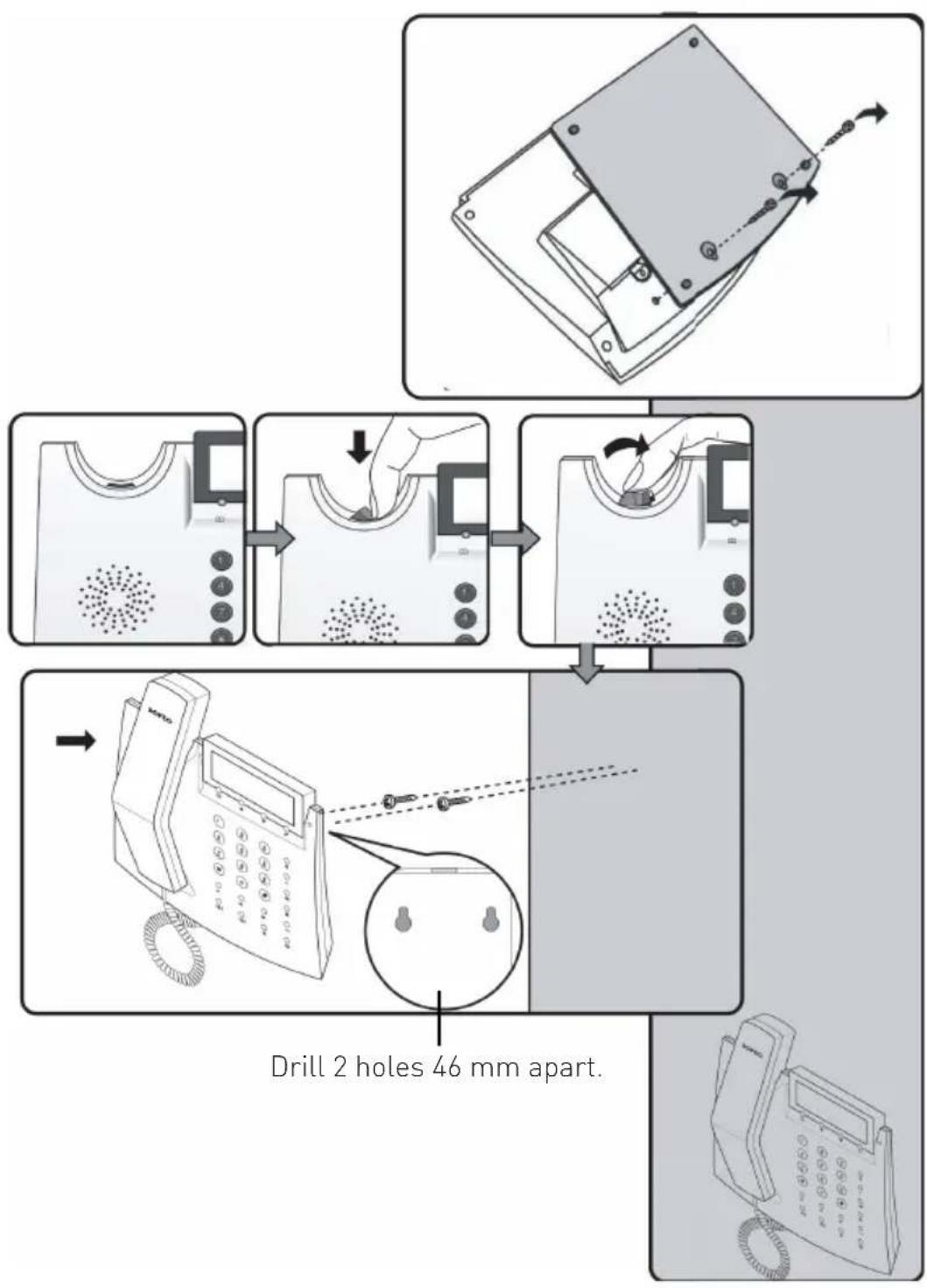
Wallmounting
flowchart
graph TD
    A["Start: Drill 2 holes 46 mm apart."] --> B["Step 1: Inserted telephone receiver"]
    B --> C["Step 2: Inserted telephone receiver"]
    C --> D["Step 3: Inserted telephone receiver"]
    D --> E["End: Drill 2 holes 46 mm apart."]
Please ensure that the handset is correctly replaced when ending a call!

natural_image
Two horizontal gray bars of varying shades on white background, no text or symbols present
natural_image
Symbol of a trash bin crossed with no visible text or labelsThe crossed out wheeled bin on the product means that this belongs to the group of Electro- and electronic apparatus.
In this context you are directed by the European regulation to dispose of used apparatus
- at the point of buying an item of equal proportion / value
- at the local available collection point for disposal
With this you will participate in the reuse of material and valorisation of disused electric- and electronic apparatus, which otherwise could be a health hazard and be negative to the environment.