
Tactum - Wristwatch LYNX - Free user manual and instructions
Find the device manual for free Tactum LYNX in PDF.


| Product Type | Receiver for Lynx wireless alert system built into a wrist watch |
| Brand | Lynx |
| Model | Tactum |
| Dimensions | Diameter 37 mm, thickness 12.5 mm |
| Weight | Approx. 30 g |
| Frequency | 433.92 MHz |
| Modulation | AM pulsing |
| Number of Channels | 16 (one common channel, channel 0 reserved for public alert) |
| Range | Approx. 100 m outdoors, 30 m indoors |
| Battery Life | 20 hours with max 15 alarms per day; battery warning at 18 hours |
| Charging Time | 7 hours maximum |
| Alarm Symbols | 7 types: telephone, door, fire, baby, pager, general warning, optional |
| Vibration Patterns | 7 different patterns, repeated after 6 seconds |
| Under-pillow Vibrator | Vibrates for 20 seconds max |
| Alarm Duration | Alarm symbol displayed for 25 seconds when in charger, 12 seconds when not |
| Microphone | Built-in microphone for detecting sound from standard alarm clocks |
| Cleaning | Wipe with damp cloth; do not use cleaning products or solvents; clean charging pins with small brush |
| Safety Precautions | Do not wear near NMR/CT scanners; external devices must meet EN 60601-1-1, EN 60335-1, or EN 60065 |
| Disposal | Contains electrical/electronic equipment; dispose via hearing care professional |
| Warranty and Repairs | Do not open case; repairs by qualified technician only; contact place of purchase |
Frequently Asked Questions - Tactum LYNX
User questions about Tactum LYNX
0 question about this device. Answer the ones you know or ask your own.
Ask a new question about this device
Download the instructions for your Wristwatch in PDF format for free! Find your manual Tactum - LYNX and take your electronic device back in hand. On this page are published all the documents necessary for the use of your device. Tactum by LYNX.
USER MANUAL Tactum LYNX
ENGLISH: Receiver for the Lynx alert system built into an elegant wrist watch...... page 2
natural_image
Black wristwatch with 'TACTUM' branding and a hand strap (no additional text or symbols visible)Ordering number: 200 21 04
Receiver for the Lynx system built into an elegant wrist watch
Tactum forms part of Lynx – our wireless alert system for people with impaired hearing. Lynx uses various types of transmitters and receivers that alert you to noises such as a ringing telephone or doorbell, or the first signs of a fire.
Tactum is a receiver in the form of a watch, which alerts you via various vibrations and symbols on the watch face when one of the transmitters in the system is activated. One or more Repeaters may also be installed in order to amplify the alarm signal and thus extend its range.
Example of how the signal is transmitted:
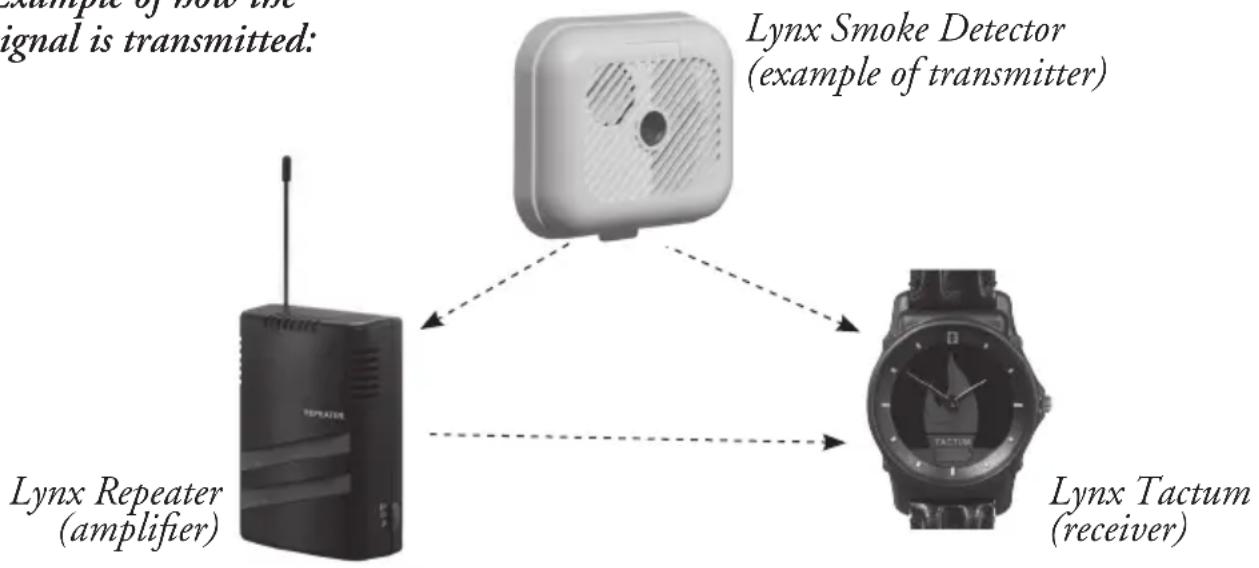
flowchart
graph TD
    A["Lynx Repeater (amplifier)"] --> B["Lynx Smoke Detector (example of transmitter)"]
    B --> C["Lynx Tactum (receiver)"]
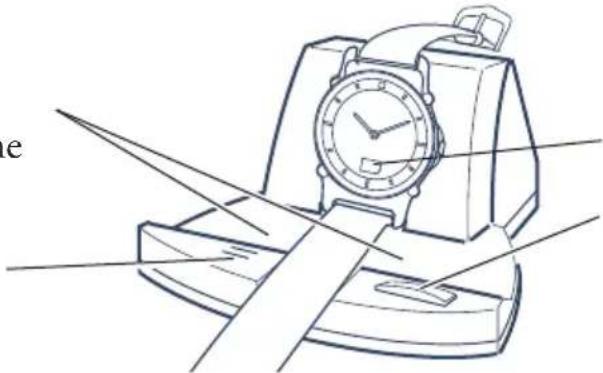
Overview of charger
Lamps for illuminating the watch face.
Microphone.
natural_image
Line drawing of a vintage typewriter with a face clock and base case (no text or symbols)Battery symbol.
Button for switching off alarm and switching on lamps.
Connection and location
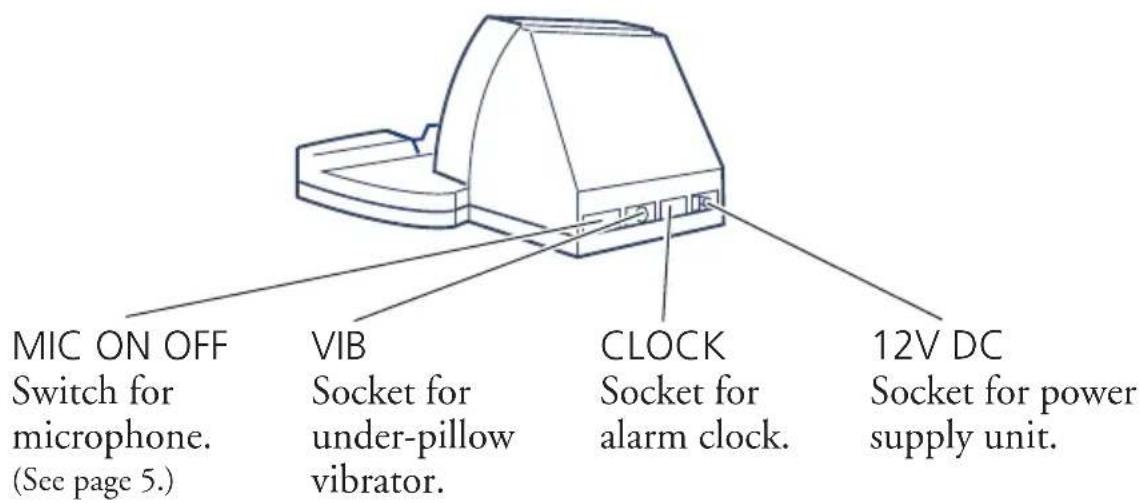
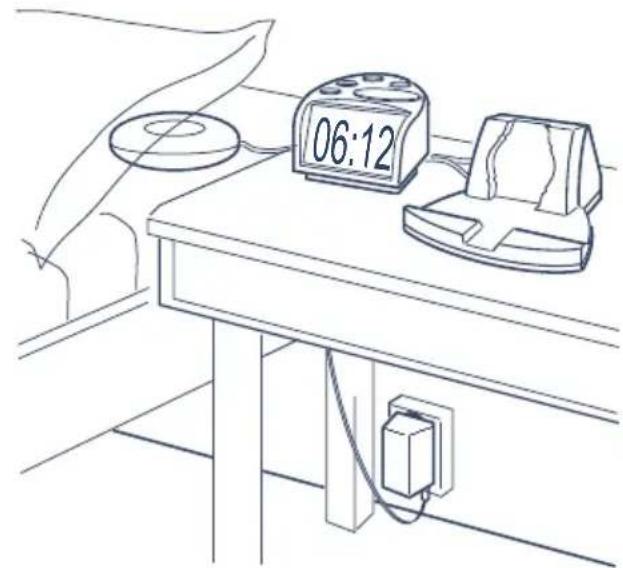
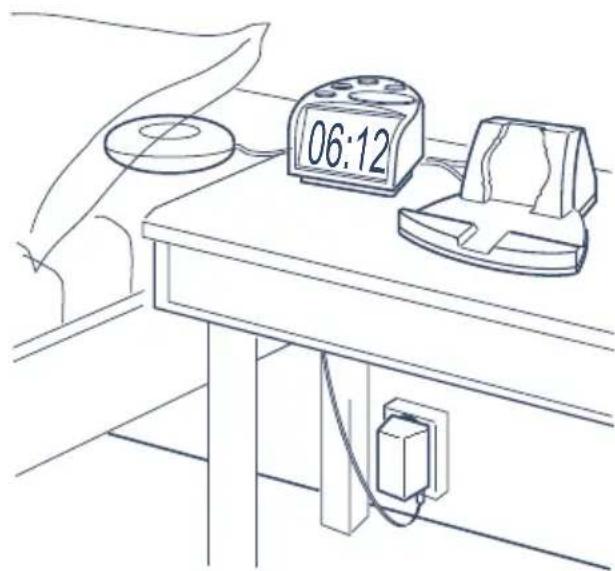
Connect the power supply unit and under-pillow vibrator to the rear of Tactum's charger. Connect our alarm clock, if applicable.
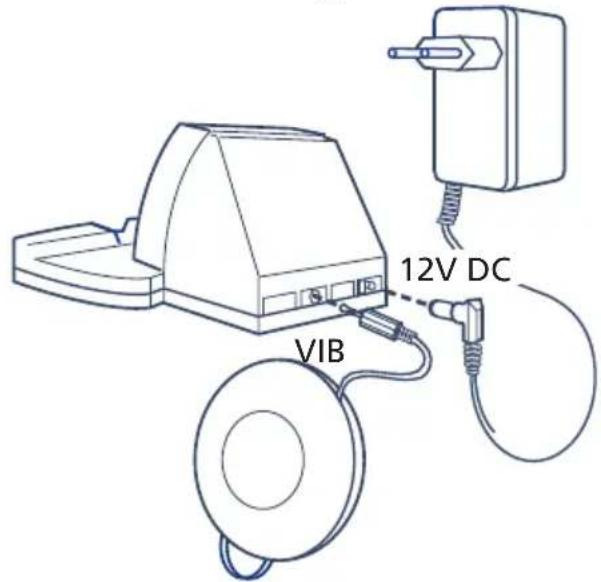
Place the charger beside the bed, and the under-pillow vibrator under the pillow. Insert the power supply unit in an electric socket.
natural_image
Line drawing of a desk with a digital timer and electrical socket connected to a wall (no text or symbols)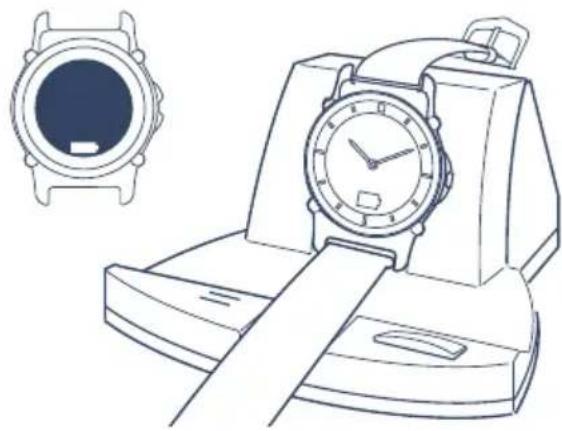
natural_image
Line drawing of a wristwatch with a circular dial and belt, alongside a separate inset image of the watch (no text or symbols)Charging Tactum
You must charge Tactum before you can use it. It takes approx. 7 hours to charge it fully. The battery will then last approx. 20 hours. The watch will receive an alarm even when charging!
A spare battery in the charger guarantees that it will operate for 24 hours if there is a power failure, including 7 hours charging the watch.
Place Tactum in its charger. A battery symbol is displayed in the watch. This goes out when charging is finished.
Installation and function test
- Start by installing the transmitters that are to be used and one or more Repeaters, if applicable. Read the user manual for the transmitters installed!
- Test the system by activating the transmitters in the system one at a time. Tactum starts to vibrate and the alarm symbol lights up. Check that the correct alarm is indicated (see below).
Alarm indication
Tactum can receive seven different types of alarm. Tactum vibrates according to a certain pattern and the symbol for the relevant alarm comes on. The vibration is repeated once.
| Alarm | Symbol | Vibration |
| Telephone |  | |
| Door |  | |
| Fire |  | |
| Baby |  | |
| Pager |  | |
| Optional |  | |
| Public alert |  |
Battery warning
Tactum: When you have used the watch and the battery power begins to fail (after approx. 18 hours), Tactum vibrates briefly and the battery symbol comes on. After another couple of hours the watch vibrates briefly and the battery symbol flashes. The battery is then completely flat and Tactum cannot receive any alarms.
NOTE: The watch mechanism has its own battery which is not dependent on charging.
Transmitters: When the battery power in one of the transmitters begins to fail, the battery symbol together with the transmitter symbol will come on in connection with an alarm.
Alarm at night
At night the Tactum watch should be placed in the charger. If an alarm comes from one of the transmitters, the under-pillow vibrator will vibrate, the charger lighting will come on and Tactum will display the current alarm symbol. Switch off the alarm by pressing the charger button, or wait for 20 seconds.
Alarm call
To use Tactum to wake you up, proceed as follows:
- Connect our alarm clock to the Tactum charger socket CLOCK.
- Set the switch MIC ON OFF on the rear of the Tactum charger to the OFF position.
- Connect our under-pillow vibrator to the Tactum charger socket VIB.
- Place the Tactum watch in the charger.
- The under-pillow vibrator starts vibrating 20 seconds after the alarm clock starts ringing.
- Switch off the alarm clock in the usual way, or wait for 20 seconds.
It is sometimes possible to use a standard alarm clock instead of the one which is adapted for the Lynx system. The Tactum charger has a built-in microphone which detects the sound from some alarm clocks, depending on what ringing tone they have. Try it out.
- Place the alarm clock next to the Tactum charger microphone.
- Set the switch MIC ON OFF on the rear of the Tactum charger to the ON position. Then follows steps 3-6 above.
Changing channels
The transmitters in the Lynx system transmit the signal wirelessly to Tactum. They can transmit on a total of 16 different channels (0-9, A-F). Tactum and all transmitters must be set to the same channel so that they can communicate. They are pre-set to channel 9, and then operate together without alteration.
In some cases, it may be necessary to change the channel setting. If two or more users live near one another, the alarms can interfere. This can be rectified by changing the channel settings so that they are different for everyone. Any channel can be selected except Channel 0. (Channel 0 is reserved for a common alert such as a fire alarm.)
To change channels on Tactum you need the “Channel Selector, Lynx Tactum”, which you can purchase from us.
Troubleshooting
| Type of fault: Cause: Action: | ||
| Tactum does not receive an alert from one of the transmitters. | 1. The distance between Tactum and the Repeater or between the transmitter and Repeater is too great.2. The transmitter has a flat battery.3. The transmitter is defective. 3. | 1. Test by moving the Repeater to another location. If you do not have a Repeater installed, you may need one to increase the range.2. Change the battery (see transmitter user manual).Contact the place of purchase for repair. |
| Tactum does not receive an alarm, even though the watch mechanism is working. | The battery is flat. The watch mechanism has its own battery and is still working. | Place the watch on charge. |
| Tactum often receives false alarms. | Someone in the vicinity has the same system installed. | Change to another channel on all units. |
| The under-pillow vibrator does not vibrate when there is an alarm from the alarm clock. | 1. The under-pillow vibrator connector or the cable to it has been removed.2. The microphone switch is in the wrong position. | 1. Insert the cables properly.2. See the Alarm call section, page 5, for the correct switch position. |
| An incorrect alarm is indicated when Tactum receives an alert from a transmitter. | The transmitter alarm code has been set incorrectly. | Change the transmitter alarm code (see transmitter user manual). |
Cleaning and maintenance
Use a damp cloth to wipe it on the outside. Never use cleaning products or solvents. It is shower-proof and wash-proof. The charging pins on the bottom should be kept clean to ensure good contact with the charger. Clean the charging pins with a small brush. To change the battery for the clock mechanism or vibrator, contact the place of purchase.
Repairs
If your product malfunctions, it must be repaired by a qualified technician. Do not attempt to open the case of the device since this would invalidate the warranty. If your product requires service, please contact your hearing care professional for assistance.
Waste disposal

This product contains electrical or electronic equipment and should be disposed of carefully in the interests of your safety and the environment. Please contact your local hearing care professional concerning disposal of the product.
General precautions
- Different types of radiation, e.g. from NMR or CT scanners, may damage the device. Therefore, do not wear the device in the vicinity of this type of equipment. Other types of radiation (burglar alarms, room surveillance systems, radio equipment, mobile telephones, etc) will not damage the device.
- WARNING: External devices connected to the product must be safe according the requirements of EN 60601-1-1, EN 60335-1 or EN 60065, as appropriate.
Technical data
Frequency: 433.92 MHz.
Modulation: AM pulsing.
Service life: 20 hours with a maximum of 15 alarms per day.
Battery warning: After 18 hours' operation a battery symbol comes on along with a short vibration at the same time.
Channels: 16 (one of which is common). “Programmed using “Channel Selector, Lynx Tactum”.
Range: Approx. 100 m outdoors and 30 m indoors.
Alarm symbols: Seven: telephone, door, fire, baby, pager, general warning and optional.
Vibration: Seven different vibrations, repeated after six seconds.
Alarm duration: The alarm symbol is displayed for 12 seconds. The vibration is repeated once after six seconds. When Tactum is in the charger, the alarm symbol is displayed for 25 seconds.
Charging time: 7 hours maximum.
Charging indicator: Battery symbol on the watch face.
Under-pillow vibrator: Vibrates for 20 seconds max.
Dimensions: Diameter 37 mm, thickness 12.5 mm.
Weight: Approx. 30 g.

Any issues relating to the EU Medical Device Directive 93/42/EEC should be directed to AB Transistor Sweden.
natural_image
Line drawing of a vintage typewriter with a face clock and stand (no text or symbols)Batterijsymbool.
natural_image
Line drawing of a desk with a digital timer and electrical socket connected to a wall-mounted power outlet (no text or symbols)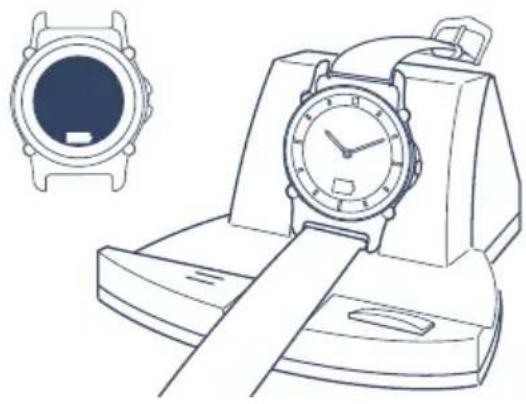
natural_image
Line drawing of a wristwatch and its side view showing front and back views (no text or symbols)Tactum opladen
natural_image
Line drawing of a desk setup with a clock and electrical socket connected to a wall-mounted power outlet (no text or symbols)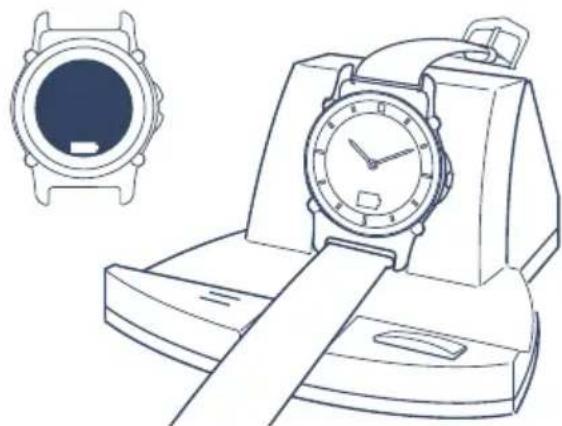
natural_image
Line drawing of a wristwatch with a circular display and a separate watch case (no text or symbols)Lade Tactum
Modulering: AM pulsering.
natural_image
Line drawing of a desk setup with a clock and electrical socket connected to a wall-mounted power outlet (no text or symbols)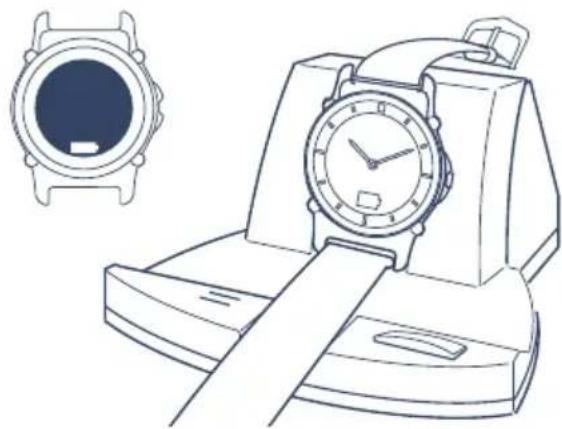
natural_image
Line drawing of a wristwatch with a circular display and a separate inset showing its front view (no text or symbols)Ladda Tactum
Modulering: AM pulsering.
AB Transistor Sweden
Bergkällavägen 23
192 79 Sollentuna
Tel: 08-545 536 30
Fax: 08-545 536 39
info@transistor.se
www.transistor.se
NORGE:
GN ReSound AS
Brynsveien 13
Postboks 132 Sentrum 0102 Oslo
Telefon: 22 47 75 30
Telefaks: 22 47 75 50
info@gnresound.no
www.gnresound.no
INTERNATIONAL INQUIRIES:
AB Transistor Sweden
Bergkällavägen 23
SE-192 79 Sollentuna, Sweden
Tel: +46 8 545 536 30
Fax: +46 8 545 536 39
info@transistor.se
www.transistor.se
MANUFACTURER:
in the sense of EU Medical Device Directive 93/42/EEC:
AB Transistor Sweden
Bergkällavägen 23
SE-192 79 Sollentuna, Sweden
Service and product-related questions: see contact details for each country or "International inquiries".
- Receiver for the Lynx system built into an elegant wrist watch
- Overview of charger
- Connection and location
- Charging Tactum
- Installation and function test
- Alarm indication
- Battery warning
- Alarm at night
- Alarm call
- Changing channels
- Cleaning and maintenance
- Repairs
- Waste disposal
- General precautions
- Technical data
- Tactum opladen
- Lade Tactum
- Ladda Tactum
- AB Transistor Sweden
- NORGE:
- GN ReSound AS
- INTERNATIONAL INQUIRIES:
- MANUFACTURER:
Brand : LYNX
Model : Tactum
Category : Wristwatch