
EW400 - Projector OPTOMA - Free user manual and instructions
Find the device manual for free EW400 OPTOMA in PDF.


| Product type | DLP projector |
| Brand | Optoma |
| Model | EW400 |
| Native resolution | WXGA (1280 x 800) |
| Brightness | 4000 ANSI lumens |
| Contrast ratio | 20000:1 |
| Lamp life | 4000 hours (normal mode), 10000 hours (economic mode) |
| Keystone correction | Vertical and horizontal (±30°) |
| Zoom | 1.2x manual |
| Built-in speaker | 10 watts mono |
| Connectivity | HDMI 1.4a, VGA, USB-A, RS232, 3.5 mm audio input |
| Power supply | 100-240 V AC, 50/60 Hz |
| Power consumption | 350 W (normal mode), 280 W (economic mode) |
| Dimensions (W x D x H) | 315 x 224 x 110 mm |
| Weight | 2.9 kg |
| Maintenance and cleaning | Clean the air filter every 500 hours of use |
| Security | Kensington lock, power-on password |
| Spare parts and repairability | Replacement lamp available (reference Optoma SP.90E01GC01) |
| General information | Manufacturer's warranty 2 years, parts and labor |
Frequently Asked Questions - EW400 OPTOMA
User questions about EW400 OPTOMA
0 question about this device. Answer the ones you know or ask your own.
Ask a new question about this device
Download the instructions for your Projector in PDF format for free! Find your manual EW400 - OPTOMA and take your electronic device back in hand. On this page are published all the documents necessary for the use of your device. EW400 by OPTOMA.
USER MANUAL EW400 OPTOMA
natural_image
Symbolic image of a computer monitor with a red X mark and eye icon inside a circle (no text or numbers)natural_image
Illustration of a projector with a lens and ventilation slots (no text or symbols)Projektor
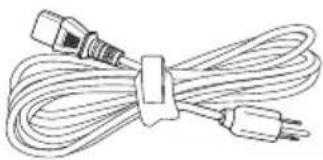
natural_image
Line drawing of a cord with two connectors and a separate plug, tied with a strap (no text or symbols)Netzkabel
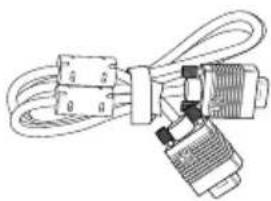
natural_image
Pure electrical connector diagram without any text, numbers, or symbolsVGA-Kabel
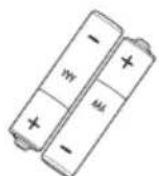
2 x AAA-Batterien
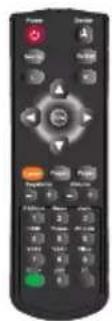
IR-Fernbedienung

natural_image
Close-up of a black electronic device with a circular button and two side ports (no visible text or symbols)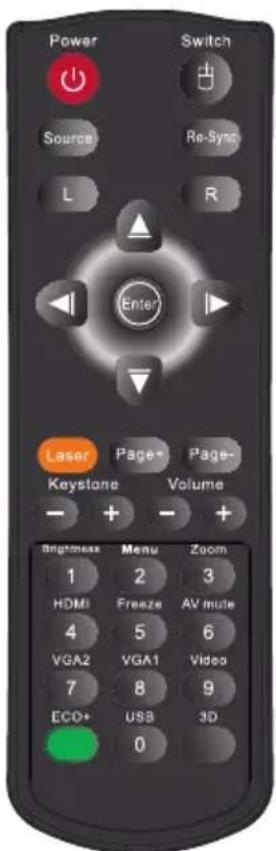
Bedienung
2. Raum bearbeiten

Projektorsteuerung
Netzwerkeinrichtung
System neu starten
natural_image
Close-up photo of a koala with visible eye and mouth, no text or symbols present
Mini WLAN USB Dongle (optionales Zubehör)

Bedienung

HIGH PRESSURE LAMP MAY EXPLODE IF IMPROPERLY HANDED. REFER TO LAMP REPLACEMENT INSTRUCTIONS.
ATTENTION:
Projector Return (Pass): P
Projector Return (Fail): F
XX=00-99, projector's ID,
XX=00 is for all projectors
Note: the \~XX must be set as \~00 when use on telnet command no matter what ID projector has.
eg: telnet with \~0004 1 can execute Freeze function but \~3804 1 can't.
SEND to projector (telnet supported)
| 232 ASCII Code | HEX Code | Function | Description |
| ~XX00 1=7E 30 30 30 30 20 31 0D-Power ON | |||
| ~XX00 0 | 7E 30 30 30 30 20 30 0D | Power OFF | (0/2 for backward compatible) |
| ~XX00 1 ~nnnn | 7E 30 30 30 30 20 31 20 a 0D | Power ON with Password | ~nnnn = ~0000 (a=7E 30 30 30 30)~9999 (a=7E 39 39 39 39) |
| ~XX01 1=7E 30 30 30 31 20 31 0D | Resync | ||
| ~XX02 1 | 7E 30 30 30 32 20 31 0D | AV Mute | On |
| ~XX02 0 | 7E 30 30 30 32 20 30 0D | Off (0/2 for backward compatible) | |
| ~XX03 1=7E 30 30 30 33 20 31 0D | Mutc | On | |
| ~XX03 0=7E 30 30 30 33 20 30 0D | Off (0/2 for backward compatible) | ||
| ~XX04 1=7E 30 30 30 34 20 31 0D=Freeze | |||
| ~XX04 0 | 7E 30 30 30 34 20 30 0D | Unfrecze | (0/2 for backward compatible) |
| ~XX05 1=7E 30 30 30 35 20 31 0D | Zoom Plus | ||
| ~XX06 1=7E 30 30 30 36 20 31 0D | Zoom Minus | ||
| ~XX12 1 | 7E 30 30 31 32 20 31 0D | Direct Source Commands | HDMI (for WXGA) |
| ~XX12 5=7E 30 30 31 32 20 35 0D | VGA1 | ||
| ~XX12 6=7E 30 30 31 32 20 36 0D | VGA 2 | ||
| ~XX12 8=7E 30 30 31 32 20 38 0D | VGA1 Component | ||
| ~XX12 10 | 7E 30 30 31 32 20 31 30 0D | Video | |
| ~XX12 13 | 7E 30 30 31 32 20 31 33 0D | VGA 2 Component | |
| ~XX12 17 | 7E 30 30 31 32 20 31 37 0D | Flash drive | |
| ~XX12 18=7E 30 30 31 32 20 31 38 0D | Network Display | ||
| ~XX12 19 | 7E 30 30 31 32 20 31 39 0D | USB display | |
| ~XX20 1 | 7E 30 30 32 30 20 31 0D | Display Mode | Presentation |
| ~XX20 2 -7E 30 30 32 30 20 32 0D | Bright | ||
| ~XX20 3 -7E 30 30 32 30 20 33 0D | Movie | ||
| ~XX20 4=7E 30 30 32 30 20 34 0D | sRGB | ||
| ~XX20 5=7E 30 30 32 30 20 35 0D | User | ||
| ~XX20 7-7E 30 30 32 30 20 37 0D | Blackboard | ||
| ~XX20 8-7E 30 30 32 30 20 38 0D | Classroom | ||
| ~XX20 9=7E 30 30 32 30 20 39 0D | 3D | ||
| ~XX21 n | 7E 30 30 32 31 20 a 0D | Brightness | n = -50 (a-2D 35 30) ~ 50 (a-35 30) |
| ~XX22 n | 7E 30 30 32 32 20 a 0D | Contrast | n = -50 (a-2D 35 30) ~ 50 (a-35 30) |
| ~XX23 n | 7E 30 30 32 33 20 a 0D | Sharpness | n = 1 (a=31) ~ 15 (a=31 35) |
| ~XX24 n | 7E 30 30 32 34 20 a 0D | Color Settings | Red Gain n = -50 (a-2D 35 30) ~ 50 (a-35 30) |
| ~XX25 n | 7E 30 30 32 35 20 a 0D | Green Gain n = -50 (a-2D 35 30) ~ 50 (a-35 30) | |
| ~XX26 n | 7E 30 30 32 36 20 a 0D | Blue Gain n = -50 (a-2D 35 30) ~ 50 (a-35 30) | |
| ~XX27 n | 7E 30 30 32 37 20 a 0D | Red Bias n = -50 (a-2D 35 30) ~ 50 (a-35 30) | |
| ~XX28 n | 7E 30 30 32 38 20 a 0D | Green Bias n = -50 (a-2D 35 30) ~ 50 (a-35 30) | |
| ~XX29 n | 7E 30 30 32 39 20 a 0D | Blue Bias n = -50 (a-2D 35 30) ~ 50 (a-35 30) | |
| ~XX30 n | 7E 30 30 33 30 20 a 0D | Cyan n = -50 (a-2D 35 30) ~ 50 (a-35 30) | |
| ~XX31 n | 7E 30 30 33 31 20 a 0D | Yellow n = -50 (a-2D 35 30) ~ 50 (a-35 30) | |
| ~XX32 n | 7E 30 30 33 32 20 a 0D | Magenta n = -50 (a-2D 35 30) ~ 50 (a-35 30) | |
| ~XX33 1 | 7E 30 30 33 33 20 31 0D | Reset | |
| ~XX34 n=7E 30 30 33 34 20 a 0D | BrilliantColorTM | n = 0 (a=30) ~ 10 (a=31 30) | |
| ~XX35 1 | 7E 30 30 33 35 20 31 0D | Degamma | Film |
| ~XX35 2=7E 30 30 33 35 20 32 0D | Video | ||
| ~XX35 3=7E 30 30 33 35 20 33 0D | Graphics | ||
| ~XX35 4-7E 30 30 33 35 20 34 0D | Standard | ||
| ~XX36 1=7E 30 30 33 36 20 31 0D | Color Temp. | Warm | |
| ~XX36 2=7E 30 30 33 36 20 32 0D | Medium | ||
| ~XX36 3-7E 30 30 33 36 20 33 0D | Cold | ||
| ~XX37 1 | 7E 30 30 33 37 20 31 0D | Color Space | Auto |
| ~XX37 2=7E 30 30 33 37 20 32 0D | RGB\ RGB(0-255) | ||
| ~XX37 3=7E 30 30 33 37 20 33 0D | YUV | ||
| ~XX37 4=7E 30 30 33 37 20 34 0D | RGB(16 - 235) | ||
\~XX45 n=7E 30 30 34 34 20 a 0D=Color (Saturation)=n=-50 (a=2D 35 30) \~50 (a=35 30) \~XX44 n=7E 30 30 34 35 20 a 0D=Tint=n=-50 (a=2D 35 30) \~50 (a=35 30)
\~XX60 1=7E 30 30 36 30 20 31 0D=Format=4:3 \~XX60 2=7E 30 30 36 30 20 32 0D=16:9-1 \~XX60 3 7E 30 30 36 30 20 33 0D \~XX60 5=7E 30 30 36 30 20 35 0D=LBX \~XX60 6=7E 30 30 36 30 20 36 0D Native \~XX60 7=7E 30 30 36 30 20 37 0D=Auto
\~XX61 n=7E 30 30 36 31 20 a 0D-Edge mask=n=0 (a=30) \~10 (a=31 30) \~XX62 n=7E 30 30 36 32 20 a 0D-Zoom=n=-5 (a=2D 35) \~25 (a=32 35) \~XX63 n=7E 30 30 36 33 20 a 0D=H Image Shift=n=-50 (a=2D 35 30) \~50 (a=35 30) \~XX64 n=7E 30 30 36 34 20 a 0D=V Image Shift=n=-50 (a=2D 35 30) \~50 (a=35 30) \~XX66 n=7E 30 30 36 36 20 a 0D=V Keystone-n=-40 (a=2D 34 30) \~40 (a=34 30)
\~XX69 1=7E 30 30 36 39 20 31 0D=Auto Keystone \~XX69 0=7E 30 30 36 39 20 30 0D=Auto Keystone
\~XX230 3 7E 30 30 32 33 30 20 31 0D 3D Mode IR \~XX230 1 7E 30 30 32 33 30 20 31 0D 3D Mode DLP-Link \~XX230 0 7E 30 30 32 33 30 20 30 0D 3D Mode Off (0/2 for backward compatible) \~XX231 1 7E 30 30 32 33 31 20 31 0D 3D Sync Invert On \~XX231 0 7E 30 30 32 33 31 20 30 0D 3D Sync Invert Off (0/2 for backward compatible)
\~XX70 1=7E 30 30 37 30 20 31 0D=Language \~XX70 2=7E 30 30 37 30 20 32 0D \~XX70 3=7E 30 30 37 30 20 33 0D \~XX70 4=7E 30 30 37 30 20 34 0D=Italian \~XX70 5=7E 30 30 37 30 20 35 0D=Spanish \~XX70 6=7E 30 30 37 30 20 36 0D \~XX70 7=7E 30 30 37 30 20 37 0D=Polish \~XX70 8=7E 30 30 37 30 20 38 0D=Dutch \~XX70 9=7E 30 30 37 30 20 39 0D=Swedish \~XX70 10 \~XX70 11 \~XX70 12 \~XX70 13 \~XX70 14 \~XX70 15 \~XX70 16 \~XX70 17 \~XX70 18 \~XX70 19 \~XX70 20 \~XX70 21 \~XX70 22 \~XX70 23 \~XX70 25 \~XX70 26 \~XX70 27 \~XX71 1=7E 30 30 37 31 20 31 0D-Projection English German French Portuguese Norwegian/Danish Finnish Greek Traditional Chinese Simplified Chinese Japanese Korean Russian Hungarian Czechoslovak Arabic Thai Turkish Farsi Vietnamese Indonesia Romanian
WXGA \~XX90 1 7E 30 30 39 31 20 31 0D Screen Type 16:10 \~XX90 0=7E 30 30 39 31 20 30 0D=16:9 \~XX73 n 7E 30 30 37 33 20 a 0D Signal Frcquency n = -5 (a=2D 35) \~ 5 (a=35) By signal \~XX91 n 7E 30 30 39 31 20 a 0D Automatic n = 0 disable; n = 1 enable \~XX74 n 7E 30 30 37 34 20 a 0D Phase n = 0 (a-30) \~ 31 (a-33 31) By signal \~XX75 n 7E 30 30 37 35 20 a 0D H. Position n = -5 (a-2D 35) \~ 5 (a-35) By timing \~XX76 n 7E 30 30 37 36 20 a 0D V. Position n = -5 (a=2D 35) \~ 5 (a=35) By timing \~XX77 n 7E 30 30 37 37 20 aabbcc 0D Security Security Timer Month/Day/Hour n = mm/dd/hh mm=00 (aa=30 30) \~ 12 (aa=31 32) dd = 00 (bb=30 30) \~ 30 (bb=33 30) hh=00 (cc=30 30) \~ 24 (cc=32 34) \~XX78 1 7E 30 30 37 38 20 31 0D Security Settings Enable \~XX78 0 \~nnnn 7E 30 30 37 38 20 32 20 a 0D Disablec (0/2 for backward compatible) \~nnnn = \~0000 (a=7E 30 30 30 30) \~9999 (a=7E 39 39 39 39)
\~XX79 n=7E 30 30 37 39 20 a 0D=Projector ID n=00 (a=30 30) \~99 (a=39 39)
| ~XX80 1 7E 30 30 38 30 20 31 0D Mute On | ||
| ~XX80 0 7E 30 30 38 30 20 30 0D Off (0/2 for backward compatible) | ||
| ~XX81 n 7E 30 30 38 31 20 a 0D Volume (Audio) n = 0 (a=30) ~ 10 (a=31 30) | ||
| ~XX93 n 7E 30 30 39 33 20 a 0D Volume (Mic) n = 0 (a=30) ~ 10 (a=31 30) | ||
| ~XX89 0 7E 30 30 38 39 20 30 0D Audio Input Default | ||
| ~XX89 1 7E 30 30 38 39 20 31 0D Audio1 | ||
| ~XX89 3 7E 30 30 38 39 20 33 0D Audio2 | ||
| ~XX82 1 7E 30 30 38 32 20 31 0D Logo Default | ||
| ~XX82 2 7E 30 30 38 32 20 32 0D Uscr | ||
| ~XX82 3 7E 30 30 38 32 20 33 0D Neutral | ||
| ~XX83 1 7E 30 30 38 33 20 31 0D Logo Capture | ||
| ~XX88 0 7E 30 30 38 38 20 30 0D Closed Captioning Off | ||
| ~XX88 1 7E 30 30 38 38 20 31 0D cc1 | ||
| ~XX88 2 7E 30 30 38 38 20 32 0D cc2 |
| ~XX100 1 7E 30 30 31 30 30 20 31 0D Source Lock On | |
| ~XX100 0 7E 30 30 31 30 30 20 30 0D Off (0/2 for backward compatible) | |
| ~XX100 3 7E 30 30 31 30 30 20 33 0D Next Source | |
| ~XX101 1 7E 30 30 31 30 31 20 31 0D High Altitude | On |
| ~XX101 0 7E 30 30 31 30 31 20 30 0D Off (0/2 for backward compatible) | |
| ~XX102 1 7E 30 30 31 30 32 20 31 0D Information Hide | On |
| ~XX102 0 7E 30 30 31 30 32 20 30 0D Off (0/2 for backward compatible) | |
| ~XX103 1 7E 30 30 31 30 33 20 31 0D Keypad Lock | On |
| ~XX103 0 7E 30 30 31 30 33 20 30 0D Off (0/2 for backward compatible) | |
| ~XX195 0 7E 30 30 31 39 35 20 30 0D Test Pattern None | |
| ~XX195 1 7E 30 30 31 39 35 20 31 0D Grid | |
| ~XX195 2 7E 30 30 31 39 35 20 32 0D White Pattern | |
| ~XX104 1 | 7E 30 30 31 30 34 20 31 0D | Background Color | Blue |
| ~XX104 2 7E 30 30 31 30 34 20 32 0D | Black | ||
| ~XX104 3 7E 30 30 31 30 34 20 33 0D | Red | ||
| ~XX104 4 7E 30 30 31 30 34 20 34 0D | Green | ||
| ~XX104 5 7E 30 30 31 30 34 20 35 0D | White |
| ~XX105 1 | 7E 30 30 31 30 35 20 31 0D | Advanced | Direct Power On | On | |
| ~XX105 0 7E 30 30 31 30 35 20 30 0D | Off (0/2 for backward compatible) | ||||
| ~XX106 n | 7E 30 30 31 30 36 20 a 0D | Auto Power Off (min) | n = 0 (a=30) ~ 180 (a=31 38 30) | ||
| ~XX107 n | 7E 30 30 31 30 37 20 a 0D | Sleep Timer (min) | n = 0 (a=30) ~ 995 (a=39 39 39) | ||
| ~XX115 1 7E 30 30 31 31 35 20 31 0D Quick Resumc | On | ||||
| ~XX115 0 | 7E 30 30 31 31 35 20 30 0D | Off (0/2 for backward compatible) | |||
| ~XX114 1 7E 30 30 31 31 34 20 31 0D Power Mode(Standby) | Eco.(<=0.5W) | ||||
| ~XX114 0 7E 30 30 31 31 34 20 30 0D | Active (0/2 for backward compatible) | ||||
| ~XX109 1 7E 30 30 31 30 39 20 31 0D Lamp Reminder On | |||||
| ~XX109 0 | 7E 30 30 31 30 39 20 30 0D | Off (0/2 for backward compatible) | |||
| ~XX110 1 7E 30 30 31 31 30 20 31 0D Brightness Mode | Bright | ||||
| ~XX110 2 7E 30 30 31 31 30 20 32 0D | Eco | ||||
| ~XX110 3 7E 30 30 31 31 30 20 33 0D | Eco+ | ||||
| ~XX111 1 7E 30 30 31 31 31 20 31 0D Lamp Reset | Yes | ||||
| ~XX111 0 | 7E 30 30 31 31 31 20 30 0D | No (0/2 for backward compatible) | |||
| ~XX112 1 7E 30 30 31 31 32 20 31 0D Reset | Yes | ||
| ~XX99 1 7E 30 30 39 39 20 31 0D RS232 Alert Reset Reset System Alert | |||
| ~XX210 n | 7E 30 30 32 30 30 20 n 0D | Display message on the OSD | |
SEND to emulate Remote
| ~XX140 10 | 7E 30 30 31 34 30 20 31 30 0D | Up |
| ~XX140 11 | 7E 30 30 31 34 30 20 31 31 0D | Left |
| ~XX140 12 | 7E 30 30 31 34 30 20 31 32 0D | Enter (for projection MENU) |
| ~XX140 13 | 7E 30 30 31 34 30 20 31 33 0D | Right |
| ~XX140 14 | 7E 30 30 31 34 30 20 31 34 0D | Down |
| ~XX140 15 | 7E 30 30 31 34 30 20 31 35 0D | Keystone + |
| ~XX140 16 | 7E 30 30 31 34 30 20 31 36 0D | Keystone - |
| ~XX140 17 | 7E 30 30 31 34 30 20 31 37 0D | Volume - |
| ~XX140 18 | 7E 30 30 31 34 30 20 31 38 0D | Volume + |
| ~XX140 19 | 7E 30 30 31 34 30 20 31 39 0D | Brightness |
| ~XX140 20 | 7E 30 30 31 34 30 20 32 30 0D | Menu |
| ~XX140 21 | 7E 30 30 31 34 30 20 32 31 0D | Zoom |
SEND from projector automatically
232 ASCII Code IHEX Code Function Projector Return Description
System status=INFOn=n : 0/1/2/3/4/6/7/8 = Standby/Warming/Cooling/Out of Range/
Lamp fail/Fan Lock/Over Temperature/Lamp Hours Running Out/Cover Open
READ from projector (telnet supported)
232 ASCII Code HEX Code Function Projector Return Description
| ~XX121 1=7E 30 30 31 32 31 20 31 0D=Input Source=OKn=n: =0/1/2/3/4/5/6/7 = None/VGA1/VGA2/Video/HDMI/ | Flash drive/Network display/USB display | ||||
| ~XX122 1=7E 30 30 31 32 32 20 31 0D=Software Version=OKddd=dddd; FW version | |||||
| ~XX123 1 | 7E 30 30 31 32 33 20 31 0D | Display Mode | OKn | n: 0/1/2/3/4/5/7/8/9 = None/Presentation/Bright/Movie/sRGB/User/Blackboard/Classroom/3D | |
| ~XX124 1=7E 30 30 31 32 34 20 31 0D=Power State | OKn=n: 0/1 = Off/On | ||||
| ~XX125 1=7E 30 30 31 32 35 20 31 0D=Brightness | OKn | ||||
| ~XX126 1=7E 30 30 31 32 36 20 31 0D=Contrast | OKn | ||||
| ~XX127 1=7E 30 30 31 32 37 20 31 0D=Aspect Ratio=OKn | WXGA n: 0/1/2/3/4 = 4:3/16:9 or 16:10 */LBX/Native/AUTOXGA n: 0/1/2/3/4 = 4:3/16:9-1/16:9-II/Native/AUTO* 16:9 or 16:10 depend on Screen Type setting | ||||
| ~XX128 1 | 7E 30 30 31 32 38 20 31 0D | Color Temperature | OKn | n: 0/1/2 = Warm/Medium/Cold | |
| ~XX129 1 | 7E 30 30 31 32 39 20 31 0D | Projection Mode | OKn | n: 0/1/2/3 = Front-Desktop/Rear-Desktop/Front-Ceiling/Rear-Ceiling | |
| ~XX150 1=7E 30 30 31 35 30 20 31 0D=Information | OKabbbbccdddde | ||||
| a: 0/1 = Off/Onbbb: LampHourcc: source =00/01/02/03/04/05/06/07 = None/VGA1/VGA2/Video/HDMI/Flash Drive/Network display/USB display dddd; FW versione: Display mode 0/1/2/3/4/5/7/8/9None/Presentation/Bright/Movie/sRGB/User/Blackboard/Classroom/3D | |||||
| ~XX151 1=7E 30 30 31 35 31 20 31 0D=Model name=OKn=n:1/2=XGA/WXGA | |||||
| ~XX108 1=7E 30 30 31 30 38 20 31 0D=Lamp Hours=OKbbbb=bbbb: LampHour | |||||
| ~XX108 2 | 7E 30 30 31 30 38 20 31 0D | Cumulative Lamp Hours | OKbbbb | bbbb: (5 digits) Total Lamp Hours | |
Wandmontage Einlegen
2420 Meadowpine Blvd., Suite #105 (888-289-6786)
Mississauga, ON, L5N 6S2, Canada 1510-897-8601
www.optoma.ca services@optoma.com
Europa
42 Caxton Way, The Watford Business Park
Watford, Hertfordshire,
WD18 8QZ, UK +44 (0) 1923 691 800
www.optoma.eu +44 (0) 1923 691 888
Service Tel : +44 (0)1923 691865 service@tsc-europe.com
Frankreich
Germany info@optoma.de
Skandinavien
Lerpeveien 25
3040 Drammen
Norwegen
+47 32 98 89 90
+47 32 98 89 99
info@optoma.no
PO.BOX 9515
3038 Drammen
Norwegen
Benelux BV
Randstad 22-123 +31 (0) 36 820 0253
1316 BW Almere +31 (0) 36 548 9052
The Netherlands www.optoma.nl
Südamerika
3178 Laurelview Ct. 888-289-6786
Fremont, CA 94538, USA 510-897-8601
www.optomausa.com services@optoma.com
Korea
WOOMI TECH.CO.,LTD.
4F, Minu Bldg.33-14, Kangnam-Ku, +82+2+34430004
seoul,135-815,KOREA +82+2+34430005
Japan
東京都足立区綾瀬3-25-18
5F., No. 108, Minchiuan Rd. +886-2-2218-2360
Shindian City, +886-2-2218-2313
Taipei Taiwan 231, R.O.C. services@optoma.com.tw
www.optoma.com.tw asia.optoma.com
Hong Kong
Unit A, 27/F Dragon Centre,
79 Wing Hong Street,
Cheung Sha Wan,
Kowloon, Hong Kong
+852-2396-8968
+852-2370-1222
www.optoma.com.hk
China
5F, No. 1205, Kaixuan Rd., +86-21-62947376
Changning District +86-21-62947375
Shanghai, 200052, China www.optoma.com.cn

Brand : OPTOMA
Model : EW400
Category : Projector