SPK417 - Loudspeaker Manta - Free user manual and instructions
Find the device manual for free SPK417 Manta in PDF.


| Product Type | Portable Bluetooth Speaker |
| Model | SPK417 |
| Brand | Manta |
| Dimensions (Estimated) | 15 x 10 x 5 cm (5.9 x 3.9 x 2.0 in) |
| Weight (Estimated) | 0.5 kg (1.1 lb) |
| Power Supply | 5V DC via USB charging port (500mA - 1A) |
| Battery Type (Estimated) | Lithium-ion rechargeable, 1200 mAh |
| Connectivity | Bluetooth, TF Card (32MB-32GB), Aux In (3.5mm) |
| Bluetooth Version (Typical) | 4.2 |
| Audio Output | Built-in speaker, 3W RMS (estimated) |
| Controls | Power/Play/Pause, Volume +/- , Previous/Next, Mode Switch, Hands-free button |
| Hands-free Function | Yes, with built-in microphone |
| Supported Audio Formats | MP3 (32-320 kbps), others via phone |
| Range (Bluetooth) | Up to 10 meters (33 ft) unobstructed |
| Charging Time (Estimated) | 2-3 hours |
| Playback Time (Estimated) | 4-6 hours at moderate volume |
| Maintenance | Clean with a soft dry cloth. Keep away from water and extreme temperatures. |
| Safety Precautions | Do not disassemble, expose to moisture, or use damaged charger. |
| Spare Parts Availability | Not available separately; contact manufacturer for support. |
| General Information | Manufacturer: Manta Europe. Made in P.R.C. For support visit www.manta.com.pl or www.manta.info.pl. |
Frequently Asked Questions - SPK417 Manta
User questions about SPK417 Manta
0 question about this device. Answer the ones you know or ask your own.
Ask a new question about this device
Download the instructions for your Loudspeaker in PDF format for free! Find your manual SPK417 - Manta and take your electronic device back in hand. On this page are published all the documents necessary for the use of your device. SPK417 by Manta.
USER MANUAL SPK417 Manta
natural_image
Black rectangular electronic device with mesh grille and lid (no visible text or symbols)Instrukcja obsługi
User's Manual
Bedienungsanleitung
Manual de usuario
Istruzioni d'uso
Návod k obsluze
natural_image
Symbol of a trash bin with crossed lines indicating no waste or discharge, and a solid black rectangle below (no text or labels)Descripon of the keys

- Power on/off/button: when power o, long press model switch butt-on can power on; When power on, long press model switch button can power o;
- Previous MP3 button: When TF card and Bluetooth model, quick press means previous MP3, when inline model, quick or long press no function!
- Pause button: when in TF card, quick press means pause or play, long press no funcon, when in line mode, quick press means mute, long press no function.
- Next MP3 button: when TF card and Bluetooth, quick press means next MP3, when in line funcon, quick or long press both no function!
- Model switch button: switch between TF card and Bluetooth
- Microphone: when connect Bluetooth, if somebody call you or you are called, after answer the call, you can speak against the microphone, then the other side can hear your voice
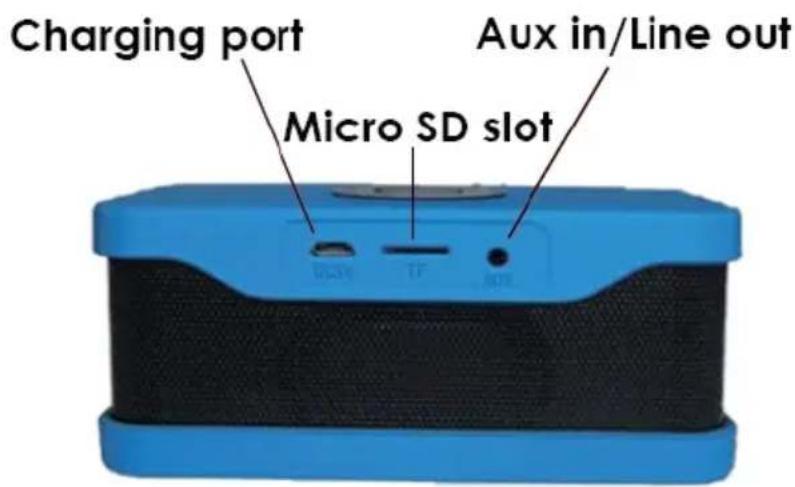
- LINE IN input port, common 3.5mm headphone connector. when external audio input, the device cannot support TF card and Bluetooth!
- TF port; support TF card with the capacity of 32MB-32GB and song rate of 32Kbps-320KbpS
- Charging port; MK charging cable, power 5v-500mah or 5v-1A,moible phone adapter can be used as power connector
- Push button: long press from previous MP3 direction, voice lower, otherwise, voice higher!
How to connect your mobile phone
-
Long press power off/on button can power on the device
-
Open the Bluetooth device in your phone, then searching, when connect successfully, your phone
will show "Q1" and "connect", then play music with your mobile phone! Because of different phone brand, the Bluetooth devices are varied, thus the
connect time will also be varied, commonly, just need 30s! If need password, just input "0000", then press "enter" button
- Buttons function: means pause/play, hands-free /hand up! When somebody call you, the device will hint you automacally, press hands-free button, can speak against the device with the other side, aer ending the conversation, press the hands-free button again then hang up the call, connue to play the music before!
- Power o, when do not use the device, need charging aer every 15days How to charge speaker Charging: connect the USB cable attached with computer or DC5v/500mah power bank in case of power consume!
Ways to solve the usual problems
- First Connect failure
(1) Please check your speaker if it is in the state of Bluetooth searching
(2) Try to close other Bluetooth devices as not to cause hard searching
- Lower voice or distortion
Please set your mobile phone volume setng, adjust the proper volume
- Staccato Please check if there are obstructions between speaker and mobile phone or exceed the valid conncon distance
4. Buttons without working
Please try to use the player that your phone comes with or other players
- Bluetooth photo-taking funcon cannot work Please check your phone whether it is the system updated from Aneroid 4.2 or updated from phone IOS 5.0 system!

natural_image
Symbol of a trash bin crossed out by two diagonal lines (no text or numbers present)
Correct Disposal of this product.
This marking indicates that this product should not be disposed with other household wastes throughout the EU. To prevent possible harm to the environment or human health from uncontrolled waste disposal, recycle it responsibly to promote the sustainable reuse of material resources. To return your used device, please use the return and collecon systems or contact the retailer where the product was purchased. They can take this product for environmental safe recycling.
Note!
Product design and Technical parameters may be change without noce. This mainly concerns parameters technical, sware and user manual present. User's Manual is a general orientation on service product. Manufacturer and distributor do not assume any responsibility as compensation for any inaccuracies errors in the descripons appearing in this user manual.
natural_image
Abstract black-and-white circular logo with interlocking curved shapes (no text or symbols)MANTA
INFOLINIA SERWISOWA
from Monday to Friday. 9.00-17.00
The manufacturer reserves the right to make changes to product specifics without noce.
Home: www.manta.com.pl
Home support: www.manta.info.pl


Made in P.R.C.
FOR MANTA EUROPE
Brand : Manta
Model : SPK417
Category : Loudspeaker