
OV-serie - Oven INVENTUM - Free user manual and instructions
Find the device manual for free OV-serie INVENTUM in PDF.


| Product Type | Built-in Electric Oven |
| Brand | Inventum |
| Model | OV-serie |
| Dimensions (H x W x D) | 595 x 595 x 575 mm |
| Weight | Approx. 35 kg |
| Power Supply | 230 V, 50 Hz |
| Power Consumption | 2400 W |
| Energy Efficiency Class | A |
| Cooking Modes | Conventional, Fan-Assisted, Grill, Defrost, Pizza |
| Temperature Range | 50°C - 250°C |
| Capacity | 65 liters |
| Interior Material | Enamel |
| Cleaning Type | Manual cleaning with mild detergent |
| Safety Features | Child lock, automatic shut-off, cool-touch door |
| Door Type | Drop-down with cool glass |
| Control Type | Mechanical dials and digital timer |
| Display | Digital LCD |
| Interior Light | Yes |
| Spare Parts Availability | Available via manufacturer or authorized dealers |
| Repairability Index | 7.5/10 |
| Warranty | 2 years |
Frequently Asked Questions - OV-serie INVENTUM
User questions about OV-serie INVENTUM
0 question about this device. Answer the ones you know or ask your own.
Ask a new question about this device
Download the instructions for your Oven in PDF format for free! Find your manual OV-serie - INVENTUM and take your electronic device back in hand. On this page are published all the documents necessary for the use of your device. OV-serie by INVENTUM.
USER MANUAL OV-serie INVENTUM
natural_image
Black and white photo of a modern kitchen toaster oven with open door and control knobs (no visible text or symbols)- Safety instructions page 10
- Description of the appliance page 12
- Installing the oven page 13
- Using the oven page 13
- Rotisserie function page 14
- Cleaning & maintenance page 14
- Technical specifications page 15
- Baking table page 15
Guarantee & after sales Service page 18
natural_image
Mechanical linkage or support structure with symmetrical arms and central shaft (no text or symbols visible)1 safety instructions
- Please read these instructions before operating the appliance and retain for future use.
- The appliance is intended solely for domestic use within the home. Do not use corrosive chemicals or vapors in this appliance. It is not designed for industrial or laboratory use.
- Attention! Avoid touching hot surfaces, especially the outside of the appliance when the appliance is in use. Always use handles and knobs.
- This appliance shall not be used by children from 0 to 8 years. This appliance can be used by children over the age of 8 and above if they are continuously supervised. This can be used by people with reduced physical, sensory or mental capabilities or lack of experience or knowledge, if they have been given supervision or instruction concerning use of the appliance in a safe way and understand the hazards involved. Keep the appliance and its cord out of reach of children aged less than 8 years.
- Cleaning and maintenance shall not be made by children.
• Children must not play with the appliance. - Never immerse any part of the main body, lid, power cord and plug in water or any other liquid to protect against electrical hazards.
- Do not let the cord hang over the edge of the table or counter and keep it away from the heated surface.
- Always carry out regular checks of the appliance and the power cord to ensure no damage is evident. Should there be any signs that the appliance or the power cord is damaged in the slightest degree, the entire appliance should be returned to the Customer Service Department.
- For your own safety, only use the accessories and spare parts from the manufacturer which are suitable for the appliance.
- To guarantee a good circulation of the air keep a minimum clearance of 10 cm between the oven and any adjacent walls.
- Do not cover any vents of the oven.
- Before moving or cleaning the appliance, make sure it is switched of and unplugged. Make sure the oven has cooled down.
- A fire may occur if the oven is covered or touching flammable materials, such as curtains, cloths.
- Do not use the oven cavity for storage purposes. Do not store items,
such as bread, cookies, etc. inside.
- Always use oven mitts when taking hot food out off the oven and use the enclosed handles.
- This appliance has a tempered, safety glass door. The glass is stronger than ordinary glass and more resistant to breakage.
- Only use and store the appliance indoors.
- The appliance is not intended to be operated by means of an external timer or separate remote-control system.
• Always use the appliance on a heat resistant, dry and level surface. - Before plugging into a socket, check that the voltage in your home corresponds with the voltage printed on the bottom of the appliance.
- Never leave the appliance unattended when in use.
- Never unplug it from the socket by pulling on the cable.
- Always ensure that your hands are dry before handling the plug, switch or power cord.
- Should you decide not to use the appliance anymore, make it inoperative by cutting the power cord after removing the plug from the socket. We also recommend making all potentially dangerous parts of the appliance harmless, particularly for children who might be tempted to play with it.
- Never use the appliance if it is not working properly, or if it has been damaged. Any intervention other than cleaning and normal maintenance by the customer must be carried out by an approved service centre.
- If the appliance is used for other purposes than intended, or is it not handled in accordance with the instruction manual, the full responsibility for any consequences will rest with the user. Any damages to the product or other things are not covered by the warranty.
- Legislation requires that all electrical and electronic equipment must be collected for reuse and recycling. Electrical and electronic equipment marked with the symbol indicating separate collection of such equipment must be returned to a municipal waste collection point.
2 appliance description
-
Housing
-
Handle
-
Oven door
-
Control panel
4.1. Indicator light
4.2 Temperature knob
4.3 Oven setting knob
4.4 Timerbutton
-
Lamp
-
Drive sleeve for roasting spit
-
Convection ventilator
-
Support for roasting spit
-
Removal handle for grill and baking tray (2 pieces for OV425CS and OV525CS)
-
Baking tray
-
Grill
-
Clamp draaispit
-
Roasting spit
13.1 Roasting spit OV305CS
13.2 Roasting spit OV425CS & OV525CS
-
Removal handle for roasting spit
14.1 Handle OV305CS
14.2 Handle OV425CS & OV525CS -
Crumb plate
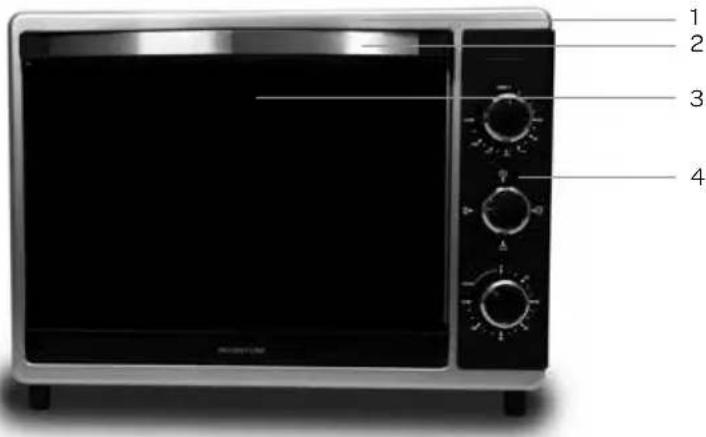
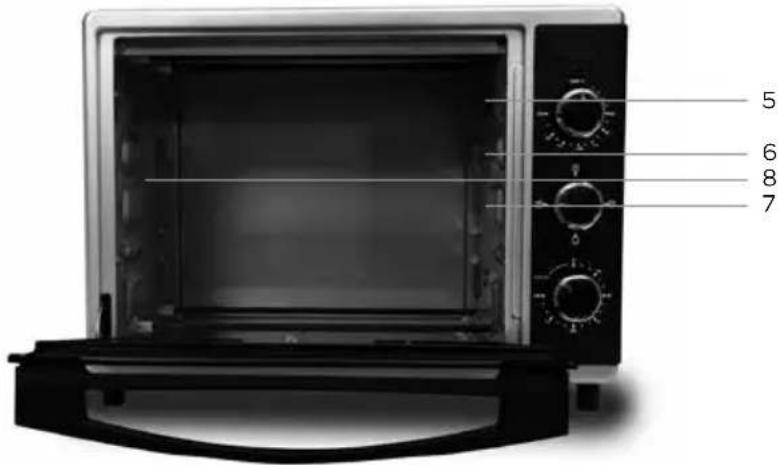
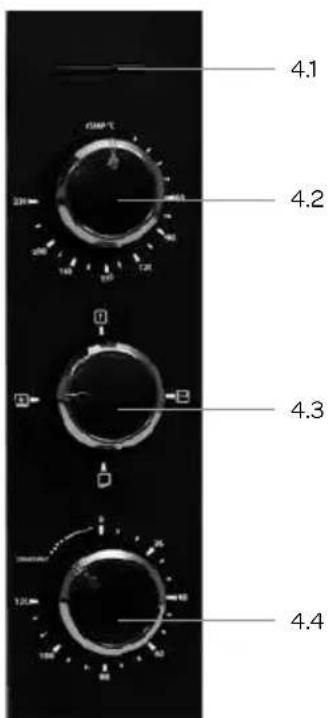
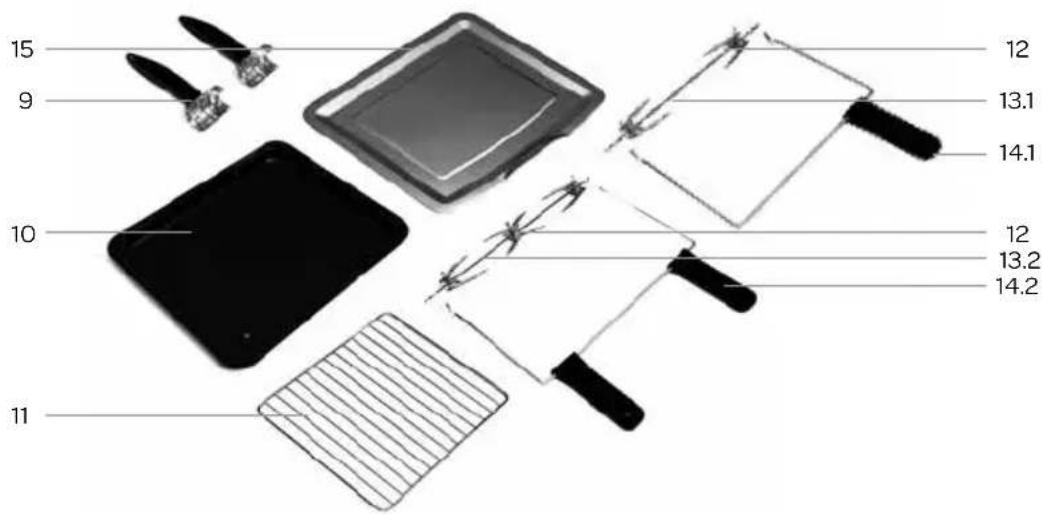
3 installing the oven
Before you use the appliance for the first time, please do as follows: Carefully unpack the appliance and remove all the packaging material. Keep the material (plastic bags and cardboard) out of reach of children. Check the appliance after unpacking for any damage, possible from transportation. Place the appliance on a heat resistant, flat and stable surface. Make sure there is enough open space around the appliance for the intake and/or outlet vents.
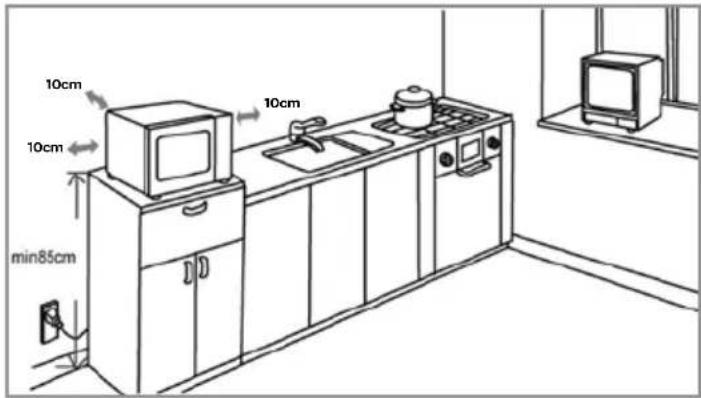
A minimum clearance of 10 cm is required between the oven and any adjacent walls. Do not remove the feet of the microwave. Blocking the intake and/or outlet openings can damage the microwave.
Clean the oven and the accessories with a damp cloth. The appliance is now ready for use. Note: the new appliance can give off a bit of a 'new' smell at the first use, this is perfectly normal and causes no harm to the appliance. Check that the voltage in your home corresponds with the voltage printed on the bottom of the appliance and plug it in a socket. Make sure the timer knob is set on "0".
We recommend tha you turn the oven on for 15 minutes on the maximum temperature before the first use to eliminate any smells and oils from production.
The heating elements will become red gradually as the temperature of the oven rises.
4 using the oven
Depending on your model the oven has the following settings:
| Ovensetting | OV185C OV305CS OV425CS OV525CS | |||||
| Bottom heat |  | ● | ● | ● | ||
| Bottom heat + convection |  | ● | ||||
| Top heat + convection |  | ● | ||||
| Top and bottom heat + convection |  | ● | ● | ● | ||
| Top heat + roasting spit |  | ● | ● | ● | ||
| Defrost |  | ● | ● | ● | ● | |
Baking with just bottom heat:
suitable for pies, cookies, etc.
Baking with convection:
suitable for bread, cake, cupcakes, waffles, pizza, etc.
Roasting with roasting spit:
can cook up to 2 kilograms of meat or poultry.
Defrost:
for defrosting of different kinds of food (the oven uses the room temperature and lets it circulate inside the oven).
Turn the oven setting knob to the desired setting and adjust the temperature knob to the right temperature. Open the oven door. Place the food to baked on the tray and place it on the sliders in the oven. Close the door. Turn the timer knob to the desired time and the oven starts working. The indicator light will light up indicating the oven is functioning.
The bell signal will sound when the set time is over and the oven will turn off. So will the indicator light.
- Always place the baking tray on the lowest sliders in the oven while using the grill. The baking tray will catch any food drippings. To make it easier to clean the baking tray use tinfoil on the baking tray.
- If the food is ready but the timer is not finished, you can turn off the oven by turning the timer knob to "0".
Attention: always wear oven mitts to take out food of the hot oven.
Open the oven door by the handle. Take out the baking tray using the enclosed removal handle. Close the oven door and check that the timer knob is set to "0".
TIMER KNOB
Turn the timer knob clockwise to the desired time. The CONSTANT function is suited for cooking big size food which needs cooking for a long time. The oven stays on without the timer. To turn the oven off, set the timer knob to "0".
5 rotisserie function
only available on model OV305CS/OV425CS/OV525CS
natural_image
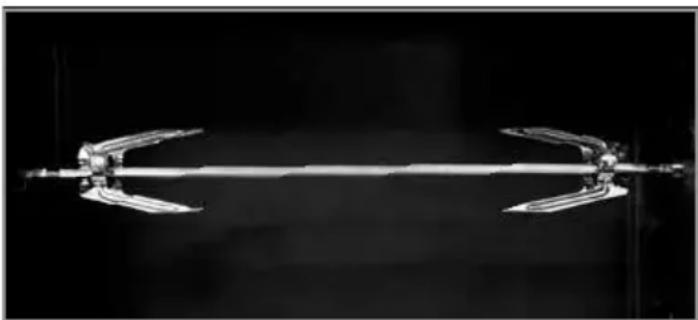
Mechanical assembly with a central rod and two curved arms, shown against a dark background (no text or symbols visible)With the oven setting top heat and roasting spit you can easily roast meat and poultry.
Turn the oven setting knob to the desired setting and adjust the temperature with the temperature knob. Open the oven door. Place the baking tray on the lowest sliders in the oven so it will catch the food drippings and protect the bottom heating elements from grease. To make it easier to clean the baking tray use tinfoil on the baking tray.
Remove the clamp from the rounded end of the roasting spit. Spike the meat or poultry on the rounded end of the roasting spit. Make sure the meat is centred on the spit and the clamps are well punctured. The clamps can be moved over the roasting spit by adjusting the screws.
Place the roasting spit with the rounded end into the drive sleeve and place the straight end on the support on the left. Make sure the meat or poultry does not touch the top heating elements.
Turn the timer knob to the desired time and the oven with start working. The indicator light will indicate the oven is on.
The bell signal will sound when the set time is over and the oven with shut off. The indicator light will also go out.
Attention: always use oven mitts to remove food from the hot oven.
Open the oven door by the handle. Take out the roasting spit with the removal handle and place it on a plate.
Carefully remove the clamp from the rounded end.
Attention: the roasting spit and the clamps are hot. Slide the meat or poultry of the roasting spit.
Remove the baking tray with the enclosed handle.
Attention: the baking tray and the juices are hot.
Close the oven door and make sure the timer knob is set on "0".
6 cleaning & maintenance
Before cleaning the oven be sure to switch it off and unplug it. Leave the oven to cool down completely.
Interior
Clean the inside of the appliance after every use. The sides and the ceiling have a special coating - easy to clean. Use a damp cloth. For a thorough cleaning use warm soapy water and dry the interior. Do not use any abrasives or metal scrapers. This will damage the oven. At the bottom of the oven lies the crumb tray. Lift it out carefully and whipe of all the crumbs. Clean the plate with a damp cloth.
Accessories
Clean the separate accessories such as the grill, the baking tray, the roasting spit and the handles with warm soapy water. These accessories can not be cleaned in the dishwasher. Thoroughly dry everything before using them again.
Exterior
Clean the exterior of the appliance with a damp cloth or sponge. If necessary use a mild detergent. Also clean the door.
7 technical specifications
Model OV185C
Voltage 230Volt \~50Hz
Input power 1000 Watt
Timer 60 minutes
Capacity 18 liter
External dimensions 293 x 413 x 289 mm
Internal dimensions 265 x 290 x 220 mm
Net weight ± 6,3 kg
Model OV305CS
Voltage 230Volt \~50Hz
Input power 1600 Watt
Timer 120 minutes
Capacity 30 liter
External dimensions 342 x 453 x 345 mm
Internal dimensions 310 x 328 x 290 mm
Net weight ± 9 kg
Model OV425CS
Voltage 230Volt \~50Hz
Input power 1800 Watt
Timer 120 minutes
Capacity 42 liter
External dimensions 365 x 515 x 361 mm
Internal dimensions 330 x 386 x 310 mm
Net weight ± 11 kg
Model OV525CS
Voltage 230Volt \~50Hz
Input power 2000 Watt
Timer 120 minutes
Capacity 52 liter
External dimensions 449 x 572 x 385 mm
Internal dimensions 411 x 370 x 340 mm
Net weight ±11,2 kg
8 baking table
| Type of food | Quantity (pcs) | Time (minutes) | |
| Chicken | 1-6 | 30-45 | Put the chicken in the oven and turn it over after 20-25 minutes. |
| Sausage | 1-8 | 15-18 | Turn the sausages continually to ensure they cook evenly. |
| Hamburger | 1-6 | 20-25 | Turn the hamburgers after 15 minutes. |
| Steak | 1-2 | 25-35 | Turn the steak after 15 minutes and cook it to your own taste. |
| Fish | 1-6 | 25 | Set the timer to 10 minutes and leave the fish to cook on a lower temperature setting until it is cooked. |
| Bread | 1-4 | 7-10 | Place a slice of bread on the top slider and place on top a slice of cheese. Keep a close eye on the bread because it can easily burn. |
The above information is just an indication. You should adjust the time to your personal taste. Check the food regularly to prevent it from overcooking.
general terms and conditions of service and warranty
We do not need to remind you of the importance of service. After all, we develop our products to a standard so that you can enjoy them for many years, without any concerns. If, nevertheless, there is a problem, we believe you are entitled to a solution straight away. Hence our products come with an exchange service, on top of the rights and claims you are entitled to by law. By exchanging a product or part, we save you time, effort and costs.
2-year full manufacturer's warranty
- Customers enjoy a 2-year full manufacturer's warranty on all Inventum products. Within this period, a faulty product or part will always be exchanged for a new model, free of charge. In order to claim under the 2-year full manufacturer's warranty, you can either return the product to the shop you bought it from or contact the Inventum costumer service department via the form at www.inventum.eu/service-aanvraag.
- The 2-year warranty period starts from the date the product is bought.
- In order to claim under the warranty, you must produce a copy of the original receipt.
- The warranty applies only to normal domestic use of Inventum products within the Netherlands.
5-year Inventum warranty
- Inventum offers a 5-year warranty on most large domestic appliances and a selection of small domestic appliances. This 5-year Inventum warranty consists of a 2-year full manufacturer's warranty, extended by a further 3-year warranty. The only thing you need to do to qualify for the 3-year extended warranty is to register the product within 45 days of purchase. You can read more about registering the product in the following paragraph.
- In accordance with the 5-year Inventum warranty provisions, a faulty product or part will always be exchanged for a new model during the first 2 years under the warranty. During the 3rd to 5th year under the warranty, you will only pay the costs of exchange. The current costs of exchange are listed at www.inventum.eu/omruilkosten.
- In order to claim under the 5-year Inventum warranty, you can either return the product to the shop you bought it from or contact the Inventum costumer service department via the form at www.inventum.eu/service-aanvraag.
- The 5-year warranty period starts from the date the product is bought.
- In order to claim under the warranty, you must produce a copy of the original receipt.
- The warranty applies only to normal domestic use of Inventum products within the Netherlands.
Product registration
- The 3-year extended warranty is easy to obtain, free of charge, by registering the product within 45 days of purchase, via the website www.inventum.eu/garantie- registratie. If you did not register the product within 45 days of purchase, you can still do so up to 2 years after the purchase date. However, there will be a charge. The one-off registration charge is € 89 for each separate product. Registration is possible only for products that are subject to the 5-year Inventum warranty. Whether the product qualifies for the 5-year Inventum warranty is stated in the product user manual and in the product information sheet, on Inventum's website.
- The warranty period always starts from the date the product is bought. If the product is registered for the extended warranty at a later date, the warranty period still starts from the original date of purchase.
- The 3-year extended warranty can only be applied for if you are in the possession of a copy of the original receipt and the Inventum 5-year warranty certificate.
Large domestic appliances
- Breakdowns or faults in large domestic appliances (separate and built-in white goods) can be registered via the form at www.inventum.eu/service-aanvraag, by calling the Inventum costumer service department or in the store where you bought the device. The telephone number of the costumer service department can be found at www.inventum.eu.
- In the event of breakdowns or faults in large domestic appliances, Inventum will have the option to have a service engineer inspect the faulty device onsite at the customer in the Netherlands and to carry out repairs, there and then. The Inventum customer service department can also decide to have the device exchanged.
- If you suffer a breakdown or fault in a large domestic appliance during the first 2 years from the date of purchase, Inventum will not charge any costs for the exchange, call-out or for parts and labour.
- If you registered the product as described before at www.inventum.eu/garantie-registratie and you subsequently report a breakdown of a large domestic appliance in the 3rd to 5th year of the date of purchase, the 5-year Inventum warranty applies and the device will be repaired or exchanged, free of charge. In the event of a repair or exchange of the device, you only pay the costs of exchange. The current costs of exchange are listed at www.inventum.eu/omruilkosten. If you did not register the product, the 3-year extended warranty does not apply.
- When reporting a breakdown or fault, a service engineer will contact the customer within 1 working day in order to make an appointment. When the report is made in a weekend or during a public holiday, this will be the next working day.
- If you report a breakdown or fault via the form at www.inventum.eu/service-aanvraag, you will be kept informed of the progress via mobile messages and e-mail.
- The warranty period starts from the date the product is bought.
- In order to claim under the warranty, you must produce a copy of the original receipt and the Inventum 5-year warranty certificate.
- The warranty applies only to normal domestic use of Inventum products within the Netherlands.
Breakdowns or faults outside the warranty period
- Breakdowns or faults in small or large domestic appliances outside the warranty period, can be reported to the costumer services department via the form at www.inventum.eu/service-aanvraag or by calling the costumer services department.
- The costumer services department may ask you to send the product for inspection or repair. The costs of dispatch will be at your expense.
- The inspection to establish whether repair is possible involves a charge. You need to grant your permission for this, in advance.
- In the event of a large domestic appliance, Inventum, at your request, can send out a service engineer. In that case, you will be charged the call-out costs, as well as parts and labour.
- In the event of an instruction to repair, the repair costs must be paid in advance. In the event of a repair by a service engineer, the costs of the repair must be settled with the engineer onsite, preferably by means of PIN payment.
Warranty exclusions
- The following is excluded from the aforesaid warranties:
• normal wear and tear;
- improper use or misuse;
• insufficient maintenance;
- failure to comply with the operating and maintenance instructions;
- unprofessional installation or repairs by third parties or the customer himself;
• non-original parts used by the customer;
- use for commercial or business purposes;
- removal of the serial number and/or rating label.
-
In addition, the warranty does not apply to normal consumer goods, such as:
-
dough hooks, baking tins, (carbon) filters, etc.;
- batteries, bulbs, carbon filters, fat filters etc.;
• external connection cables; -
glass accessories and glass parts such as oven doors;
• and similar items. -
Transport damage not caused by Inventum is also excluded. Therefore, inspect your new device before starting to use it. If you detect any damage, you must report this to the store where you purchased the product within 5 working days, or to the Inventum customer service department via the form at www.inventum.eu/service-aanvraag. If transport damage is not reported within this period, Inventum does not accept any liability in this respect.
-
The following are excluded from warranty and/or replacement: faults, loss of and damage to the device as a result of an event that is normally insured under the home contents insurance.
Important to know
- The replacement or repair of a faulty product, or a part thereof, does not lead to an extension of the original warranty period.
- Parts that have been replaced, packaging material and exchanged devices are taken back by the service engineer and become the property of Inventum.
- If a complaint is unfounded, all costs arising from it will be at the customer's expense.
- Following expiry of the warranty period, all costs of repair or replacement, including administration costs, dispatch and call-out charges, will be charged to the customer.
- Inventum cannot be held liable for damage as a result of devices built in incorrectly.
- Inventum cannot be held liable for damage caused by external events, unless this liability arises from mandatory statutory provisions.
- These warranty and service provisions are governed by Dutch law. Disputes will be settled exclusively by the competent Dutch court.

klein huishoudelijk

witgoed vrijstaand

witgoed inbouw

twitter.com/inventum1908
facebook.com/inventum1908
youtube.com/inventum1908


- safety instructions
- appliance description
- installing the oven
- using the oven
- Baking with just bottom heat:
- Baking with convection:
- Roasting with roasting spit:
- Defrost:
- TIMER KNOB
- rotisserie function
- Attention: always use oven mitts to remove food from the hot oven.
- cleaning & maintenance
- Interior
- Accessories
- Exterior
- technical specifications
- Model OV185C
- Model OV305CS
- Model OV425CS
- Model OV525CS
- baking table
- general terms and conditions of service and warranty
- 2-year full manufacturer's warranty
- 5-year Inventum warranty
- Product registration
- Large domestic appliances
- Breakdowns or faults outside the warranty period
- Warranty exclusions
- Important to know
Brand : INVENTUM
Model : OV-serie
Category : Oven