Seaman 60 GPS-Auto Skew - Satellite receiver MEGASAT - Free user manual and instructions
Find the device manual for free Seaman 60 GPS-Auto Skew MEGASAT in PDF.


| Product Type | Satellite Receiver |
| Brand | Megasat |
| Model | Seaman 60 GPS-Auto Skew |
| Dimensions (Approx.) | 30 x 20 x 5 cm |
| Weight (Approx.) | 1.8 kg |
| Power Supply | AC 100-240V, 50/60Hz |
| Power Consumption | Max 30W |
| GPS Auto Skew | Yes, automatic skew adjustment via GPS |
| Supported Satellite Systems | DVB-S, DVB-S2 |
| DiSEqC Support | DiSEqC 1.0, 1.2 |
| LNB Input | 1 x F-type female |
| Outputs | HDMI, AV (RCA), Optical Audio |
| RF Loop Through | Yes |
| USB Port | 1 x USB 2.0 for firmware updates and media playback |
| Remote Control | Included |
| User Interface Languages | Multiple, including English, German, French, etc. |
| Cleaning Instructions | Wipe with a dry, soft cloth; do not use liquid cleaners |
| Safety Warnings | Ensure adequate ventilation; do not expose to rain or moisture |
| Spare Parts Availability | Contact Megasat customer service for remote control, power adapter |
| Repairability | Designed for professional repair only; no user-serviceable parts |
| General Information | Satellite receiver with integrated GPS for automatic dish skew adjustment. Suitable for motorized systems. |
Frequently Asked Questions - Seaman 60 GPS-Auto Skew MEGASAT
User questions about Seaman 60 GPS-Auto Skew MEGASAT
0 question about this device. Answer the ones you know or ask your own.
Ask a new question about this device
Download the instructions for your Satellite receiver in PDF format for free! Find your manual Seaman 60 GPS-Auto Skew - MEGASAT and take your electronic device back in hand. On this page are published all the documents necessary for the use of your device. Seaman 60 GPS-Auto Skew by MEGASAT.
USER MANUAL Seaman 60 GPS-Auto Skew MEGASAT
natural_image
White MEGASAT satellite dish with power control panel and satellite display (no readable text or symbols beyond branding)natural_image
3D illustration of a white MEGASAT radar dish mounted on a yellow box with a red upward arrow (no text or symbols)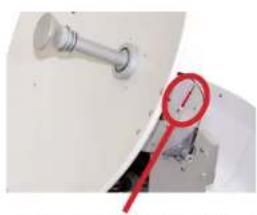
natural_image
Close-up of a metallic pipe fitting next to a red thermometer gauge (no visible text or symbols)natural_image
Illustration of a satellite with red and blue stripes (no text or symbols)SD CARD DETECTED WRITING SOFTWARE
natural_image
White MEGASAT satellite dish with control panel and antenna (no visible text or symbols on the dish itself)User manual and installation instruction
Contents
1. Introduction
Safety Information 03
Short description....03
Delivery....03
System Components 04
2. Installation
Connection 05
The control unit 06
Satellite broadcasting....07
Startup and operation....08
Setting the LNB skew 09
-
Troubleshooting....10
-
Skew Settings....11
-
Firmware Update....12
-
Footprint 14
-
Specifications 15
Safety Information

Caution - Improper handling by unqualified personnel can cause serious damage to this equipment. Unqualified personnel who tamper with this equipment may be held liable for any resultant damage to the equipment.
Note - Before you begin, carefully read each of the procedures in this manual. If you have not performed similar operations on comparable equipment, do not attempt to perform these procedures.
Short description
The satellite antenna system is the innovative and a technologically advanced satellite Positioner system. The antenna has a unique combination of cutting-edge components. Fast satellite search and compatibility with all digital, HD-ready set-top boxes and TV sets are guaranteed.
Delivery
• Control unit incl. powercable
- 1x antenna cable (10 m)
- 1x antenna cable (1 m)
• Power supply 230 V (12 V, 5 A) (optional)
- User manual
System Components
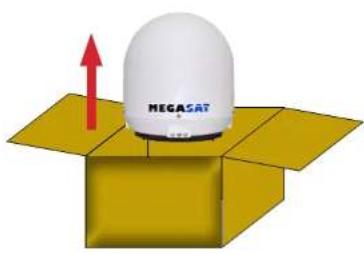
Open box and remove the control unit, cables and packing material. Lift the antenna straight up out of the box. Never place the system upside down!
natural_image
Illustration of a white MEGASAT radar dish mounted on an open yellow box with a red upward arrow (no text or symbols on the dish itself)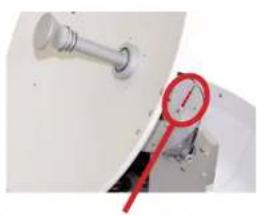
natural_image
Close-up of a metallic pipe fitting with a red pressure gauge attached, next to a small mechanical component (no visible text or symbols)Warning: transport lock
Then remove with the „LOCK" marked screw inside the antenna.
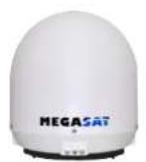
Antenna unit
The elegant plastic housing will protecting the antenna against outside weather conditions. Under the housing there is a 37 cm (45 or 60 cm) high performance antenna. The new technology of 0-90° elevation enables optimal reception across Europe.
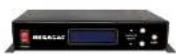
Control unit
The control unit is used for satellite selection and control. It is connected between the antenna and the set-top box and supplied the antenna with electricity.

Warning:
Seaman 45 and 60 additionally has an auto skew feature that automatically adjusts the angle of polarization of the LNB and a GPS receiver for fast and accurate positioning.
Connection
Install the control unit and the set-top box is not inside the vehicle in the region of an airbag. Maintain a careful installation of the cable in order to avoid short circuits. Pay attention also to existing cables.
Connect the antenna as shown in the illustration below:
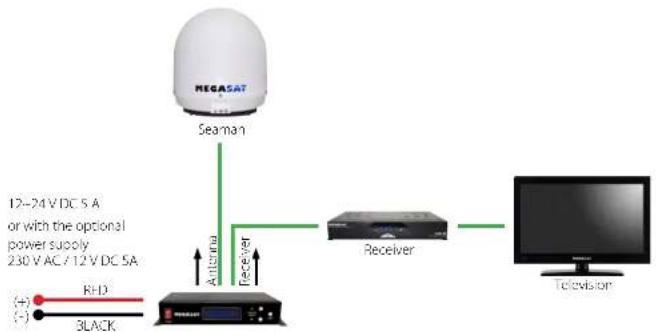
flowchart
graph TD
    A["NEGASAT"] --> B["Seaman"]
    B --> C["Antenna"]
    C --> D["Receiver"]
    D --> E["Television"]
    F["RHD"] --> G["Black"]
    H["12-24 V DC 5A or with the optional power supply 230 V AC / 12 V DC 5A"] --> C
The contron unit
Front view of the control unit
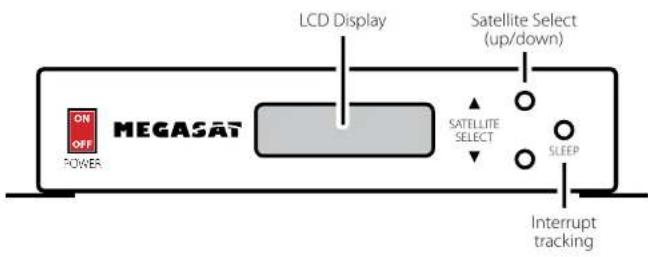
flowchart
graph LR
    A["ON OFF POWER"] --> B["MEGASAT"]
    B --> C["LCD Display"]
    C --> D["Satellite Select (up/down)"]
    D --> E["SATELLITE SELECT"]
    E --> F["SLEEP"]
    F --> G["Interrupt tracking"]
Rear view of the control unit
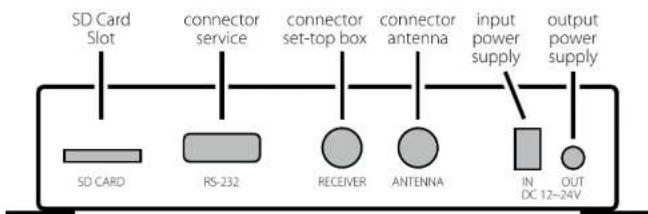
text_image
SD Card Slot connector service connector set-top box connector antenna input power supply output power supply SD CARD RS-232 RECEIVER ANTENNA IN DC 12-24V
Warning:
Connect the device only at a 7 amp protected line.
The line must be at least 2.5 mm ^2 strong. (never directly to the car battery).
Satellite broadcasting
Direct Broadcast Service (DBS) satellites broadcast audio, video and data information from satellites located 22 miles in space. A receiving station, such as the antenna, should include a dish and satellite receiver to receive the signals and process them for use by the consumer audio and video equipment. The system requires a clear view of the satellite to maximize the signal reception.
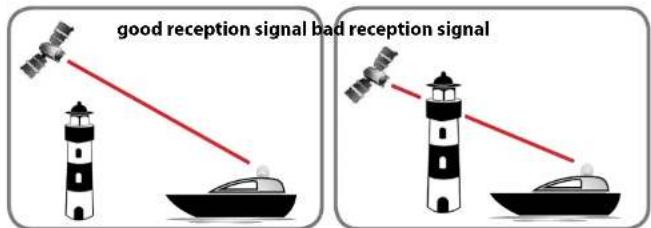
text_image
good reception signal bad reception signalObjects such as tall lighthouse, bridges and big ship that block this view will cause a loss of signal. The signal will be quickly restored once the antenna has a clear line of sight again. Heavy rain, cloud, snow or ice may also interfere with the signal reception quality. If the satellite signal is lost due to blockage or severe weather condition, services from the receiver will be lost (picture will freeze frame and may disappear). When the satellite signal strength is again high enough, then the receiver will resume providing desired programming services.
Startup and operation
- Turn on the TV and the set-top box. The green LNB LED on the display of the control box lights up when the satellite receiver is turned on and a supply voltage for the LNB is available.
- Turn on the control unit. Then, the indicator of the preset satellites lights red. Shortly thereafter, the LED starts to flash for about 5 seconds. Only this time you can select another satellite by press the white key. Each press of the button, the display will continue to a satellite position. Press it as long until the desired satellite is flashing. Now the search is started.
- When a satellite is found, the antenna stop and carries out a fine-tuning. Then begins to identify the satellite identification (ID). This process can be tracked on the display. After successful identification, LOCKED* ap-
pears in the display. Should not be identified the satellite of your choice, the antenna corrected the position. Once the satellite is correct, the display will show it (eg ID:AS1). After a successful search, the receiver is assured by the antenna.
| It shows user selected satellite | It shows satellite id |
| It shows current operational status | It shows intensity of signal |
- The Seaman 45 and 60 has a tracking function, which allows to receive even while driving a permanent signal. This is fully automatic and requires no adjustments to the equipment.
- The antenna is constantly moving in order to detect any changes in the position. If your vehicle at a fixed location, the movement of the antenna cause irritating noises. Therefore press the "SLEEP" button on the control unit to turn off the tracking function of the antenna. To activate the automatic positioning again, please restart the control unit.
- When the tracking function is not disabled and there was no movement on the vehicle at least for 10 min., the function is switched off automatically. If the antenna or the vehicle moves easily (eg walking in the vehicle), the tracking function is activated automatically.
Note: Changing the satellite is only possible shortly after switching on the power (as described in point 3) or after successful satellite search.
Preprogrammed satellites:
ASTRA 2 Position for Astre 7 to 78.7° East
ASTRA 3 Position for Astre 3 to 23.5° East
ASTRA 1 Position for Astre 1 to 19.2^ East
HOTBIRD Position for Hotbird to 13° East
ASTRA 4 Position for Astra 4 (Sirius) to 4,8° East
THOR Position for Thor to 0.8 ^th West
HISPASAT Position for Hispaset to 30° Wey
TURKSAT Position for Turksat to 47° East
Setting the LNB Skew
The following settings are only for the Seaman 37 (without AutoSkew). An overview of the skew settings can be found on page 11.
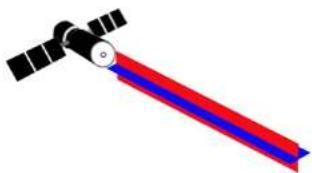
natural_image
Illustration of a satellite with red and blue stripes (no text or symbols)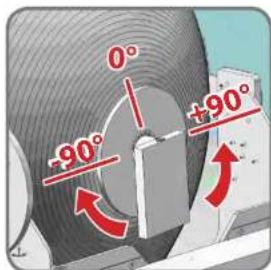
text_image
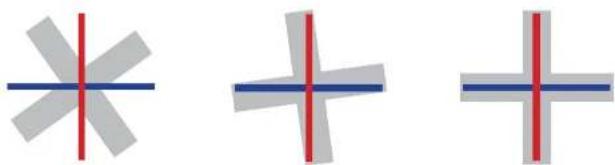
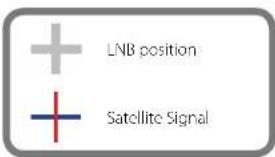
0° -90° +90°Signals in the vertical (red) and horizontal (blue) line have an offset of exactly 90° to each other. Due to the different position of the satellites, depending on your location, it is possible that the signals do not meet exactly vertically and horizon tally on the LNB. To adjust this, turn the LNB into the correct position to the transmitted signal. This adjustment to the LNB is called „skew adjustment“. The following figure shows the optimal setting of the LNB. More accurate the match, the better of reception.
natural_image
Three abstract geometric shapes with red and blue lines, no text or symbols presentbad reception good reception best reception
text_image
LNB position Satellite SignalTroubleshooting
No Signal
- Objects such as trees, bridges, and large buildings, which are located in the angle of the satellite will lead to a loss of the signal.
- If the satellite signal is lost through severe weather conditions, the current program of the receiver is stopped (the image freeze, or disappear). If the weather conditions allow a good reception again, the TV screen will be restored.
- Make sure that the settings of the set-top box to LNB voltage is switched on. This is indicated by the green LED on the control unit (LED green = LNB voltage present).
• Only Seaman 37 (without AutoSkew)
If the antenna has not found satellites, check the Skew settings for the satellite at your location. An overview of the skew settings can be found on page 11. The basic setting of the LNB is 0°. Should they deviate more than 5°, adjust the degrees accordingly.
There is dirt on the antenna?
Excessive dirt on the housing may cause reception problems.
Everything is properly connected and turned on?
Your satellite TV receiver might be set up incorrectly or defective. First check the receiver's configuration to ensure it is set up for the desired programming. In the case of a faulty receiver, refer to your selected receiver's user manual for service and warranty information.
Satellite footprint
Television satellites are located in fixed positions above the Earth's equator and beam TV signals down to certain regions of the planet (not worldwide). To receive TV signals from a satellite, you must be located within that satellite's unique coverage area. With the figure on page 14, you can check if you are located in the footprint of the satellite. In the outlying areas of the footprint there may be interference.
Satellite Frequency Data Changed
If some channels work, while one or more other channels do not, or if the antenna cannot find the selected satellite, the satellite's frequency data might have changed.
Error message on the display: „Communication Error“
The antenna is not connected to the control unit. Check the wiring to the antenna.
Skew Settings
| Country | City | GSE | TUESDAY | HILLIAS | EUTELSATWADWY | ASTBA2A/BOEUROBIDZILAR | ASTRAALM1M17LAR | EUTELSATWADSATEUROBIDZILAR | HOTTRED06/9LAR | EUTELSATWADA06/9LAR | EUTELSATWADA7/8LAR | SUSIKAT4LAR | THUK3/5/6LAR | ATLANTICBIRD 3LAR | HISPASATC1/C1/DLAR | |||
| 2A/2A6/2R | 5/4/2NAR | 5/4/2NAR | 30/4R | 20/4R | 21/4R | |||||||||||||
| Bulgaria | Sofia | AZ | 153.5 | 157.5 | 161.6 | 172.8 | 179.7 | 186 | 190.7 | 195 | 199.2 | 203.3 | 206.3 | 213.7 | 218.5 | 242.2 | ||
| CL | 37.2 | 38.2 | 29.1 | 40.5 | 40.7 | 40.5 | 40.2 | 39.6 | 38.9 | 38 | 37.3 | 34.9 | 33 | 17.8 | ||||
| SOW | -19.2 | -16.3 | -13.4 | 1.7 | 0.8 | 11.4 | 7.8 | 11 | 11.5 | 16.9 | 19 | 24 | 27.2 | 41 | ||||
| Iberianum | Kombiarum | AZ | 349.7 | 349 | 192.4 | 161.1 | 166.9 | 172 | 175.9 | 176.5 | 180.1 | 186.6 | 190.4 | 196.3 | 201 | 738.1 | ||
| CL | 31.7 | 32.2 | 32.2 | 35 | 36.0 | 36.2 | 36.5 | 36.5 | 36.5 | 36.2 | 36.1 | 36.8 | 34.6 | 36.3 | ||||
| SOW | -19.3 | -16.0 | -15.2 | 3.4 | 0.4 | 2.2 | 2.2 | 4.0 | 1.6 | 2.0 | 5.2 | 6.1 | 17.0 | 24.0 | ||||
| Finland | Nebelni | AZ | 100.6 | 105.4 | 157.4 | 176.3 | 181.7 | 186.7 | 190.7 | 191.8 | 197.2 | 200.0 | 203 | 209.4 | 214.7 | 238.7 | ||
| CL | 20.3 | 20.8 | 23.2 | 21.8 | 21.8 | 21.7 | 21.4 | 21.1 | 20.7 | 20.1 | 19.7 | 18.4 | 17.3 | 8 | ||||
| SOW | -8.5 | -7.9 | -6.3 | 5.2 | 7.9 | 10.2 | 5.1 | 6.8 | 8.5 | 10.1 | 11.2 | 14.2 | 16 | 25.2 | ||||
| France | Paris | AZ | 122.2 | 126.3 | 138.5 | 147.2 | 152.8 | 158 | 164.1 | 165.9 | 168.8 | 173.8 | 176.7 | 184.6 | 189.7 | 220 | ||
| CL | 22.3 | 23.9 | 25.3 | 28.6 | 30.3 | 31.6 | 32.4 | 32.9 | 33.4 | 33.7 | 33.8 | 33.0 | 33.4 | 25.9 | ||||
| SOW | -28.1 | -27.5 | -29.8 | -13.9 | -10.5 | -11.2 | -11.7 | -9.2 | -6.1 | -8.1 | -14.2 | 2.9 | 6.3 | 25 | ||||
| Germany | Berlin | AZ | 145.5 | 148.9 | 152.2 | 163.6 | 167.4 | 172.7 | 176.7 | 180.5 | 184.2 | 188.1 | 190.8 | 197.9 | 202.8 | 220 | ||
| CL | 24.4 | 25.5 | 26.4 | 28.4 | 29.2 | 29.7 | 29.9 | 30 | 29.9 | 29.7 | 29.4 | 28.5 | 27.6 | 18 | ||||
| SOW | -20.2 | -18.3 | -16.4 | -4.1 | -0.7 | 2.6 | -2.0 | 0.3 | 2.6 | 4.9 | 6.6 | 10.8 | 11.6 | 27.8 | ||||
| United Kingdom | London | AZ | 130.8 | 133.8 | 136.9 | 145.4 | 150.7 | 155.8 | 159.6 | 163.3 | 167.1 | 170.8 | 173.6 | 181 | 186.1 | 206.2 | ||
| CL | 19.3 | 20.7 | 23.1 | 25.2 | 27.3 | 28.3 | 29.1 | 30.8 | 30.5 | 30.7 | 30.6 | 31.5 | 30.4 | 34.8 | ||||
| SOW | -28.2 | -26.2 | -26.5 | -33.2 | -33.3 | -33.8 | -34.8 | -34.0 | -34.0 | -34.0 | -34.0 | -34.0 | -34.0 | -34.0 | ||||
| Greece | Athens | AZ | 173.0 | 156.6 | 164.5 | 172.2 | 180.3 | 187.3 | 185.4 | 191.7 | 201.6 | 205.2 | 209.1 | 216.0 | 221.7 | 245.2 | ||
| CL | 42 | 43.1 | 44.1 | 42.7 | 46 | 45.7 | 45.2 | 44.6 | 43.7 | 42.6 | 41.7 | 39 | 50.8 | 19.6 | ||||
| SOW | -21.9 | -18.7 | -15.2 | 1.3 | 7.3 | 12.7 | 12.7 | 13.4 | 16.9 | 20.2 | 22.5 | 28.1 | 21.6 | 45.9 | ||||
| Hungary | Budapest | AZ | 150.2 | 153.9 | 157.6 | 162.7 | 174 | 179.8 | 184.2 | 188.3 | 193.8 | 196.2 | 199.1 | 206.4 | 211.3 | 237.4 | ||
| CL | 31 | 32.1 | 33 | 34.7 | 35.3 | 35.4 | 35.3 | 35.1 | 34.7 | 34.2 | 33.7 | 32 | 30.6 | 18 | ||||
| SOW | -19.9 | -17.3 | -14.9 | -1.3 | 3 | 0.9 | 2.8 | 5.6 | 8.5 | 10.9 | 12.8 | 17.5 | 20.5 | 34.7 | ||||
| Italy | Italy | AZ | 116.7 | 144.1 | 146.9 | 159.7 | 164.8 | 170 | 174.8 | 179.1 | 184.7 | 189.7 | 191.9 | 199.8 | 203.1 | 219.9 | ||
| CL | 33.1 | 34.6 | 36 | 39 | 40.3 | 41.1 | 41.5 | 41.6 | 41.5 | 41.3 | 41 | 39.7 | 38.4 | 35.4 | ||||
| SOW | 28.8 | 26.4 | 24.0 | 5.0 | 5.0 | 5.4 | 3.9 | 0.6 | 2.8 | 6.1 | 8.5 | 14.6 | 18.5 | 37 | ||||
| Polandu | Norwau | AZ | 154.1 | 157.7 | 161.3 | 170.9 | 176.8 | 180.3 | 186.3 | 190.1 | 193.8 | 197.5 | 200.2 | 207.1 | 211.7 | 237.4 | ||
| CL | 27.1 | 27.9 | 28.1 | 29.6 | 30.1 | 30.2 | 30.7 | 29.7 | 29.3 | 28.8 | 28.3 | 26.8 | 25.5 | 14.2 | ||||
| SOW | -34.4 | -31.6 | -27.8 | -11.3 | -8.5 | -8.4 | -8.5 | -8.4 | -8.4 | -10.6 | -11.1 | -12.3 | -13.7 | -19.3 | ||||
| Portugal | Lisbon | AZ | 110.2 | 119.2 | 121.0 | 128.3 | 134.2 | 139.8 | 145.3 | 149.9 | 152.9 | 155.1 | 158.3 | 167 | 173.3 | 211.3 | ||
| CL | 21.2 | 23.4 | 25.5 | 30.9 | 32.6 | 36.4 | 38.1 | 39.6 | 40.9 | 42.8 | 43.9 | 44.6 | 45 | 40.2 | ||||
| SOW | -44.7 | -47.9 | -43.1 | -40.7 | -37.0 | -37.7 | -39.0 | -37.6 | -37.5 | -39.2 | -40.8 | -38.1 | -39.7 | -37.9 | ||||
| Euguesa | Madrid | AZ | 123.2 | 125.1 | 128 | 136.2 | 141.6 | 146.9 | 151.3 | 155.2 | 159.8 | 163.8 | 167 | 175.8 | 182 | 217.2 | ||
| CL | 24.2 | 26.2 | 28.2 | 32 | 35.6 | 37.7 | 39.1 | 40.2 | 41.2 | 42 | 43.2 | 43.2 | 43.2 | 36 | ||||
| SOW | -40.1 | -30.6 | -36.9 | -24.8 | -21.2 | -17.6 | -21.6 | -18.7 | -15.6 | -17.1 | -9.9 | -3.2 | 1.5 | 27.5 | ||||
| Belgium | Brussels | AZ | 135.2 | 138.3 | 141.6 | 150.4 | 155.9 | 161.2 | 165.2 | 169 | 172.8 | 176.7 | 179.5 | 187 | 192.1 | 221.5 | ||
| CL | 23.5 | 22.4 | 24.7 | 27.6 | 28.1 | 29.2 | 29.8 | 30.2 | 31.6 | 21.8 | 21.8 | 21.6 | 21.1 | 23.5 | ||||
| SOW | -24.9 | -24.9 | -23.1 | -21.2 | -7.9 | -4.8 | 0.3 | -7.0 | -4.6 | -2.1 | -0.2 | -0.4 | 7.6 | 24.7 | ||||
| Sweden | Switzerland | AZ | 152.7 | 156.1 | 159.4 | 160.3 | 173.7 | 179.7 | 185.4 | 189.9 | 193.9 | 195.9 | 195.4 | 201.9 | 206.4 | 232.4 | ||
| CL | 39.6 | 33.3 | 21 | 22.1 | 22.5 | 32.7 | 22.5 | 22.3 | 22 | 21.7 | 21.7 | 20.7 | 19.8 | 13.4 | ||||
| SOW | -33.5 | -33.0 | -30.3 | -31.8 | -34.4 | -34.4 | -34.4 | -34.4 | -34.4 | -34.4 | -34.4 | -34.4 | -34.4 | -34.4 | ||||
| AZ | 130.7 | 129.9 | 143.3 | 152.5 | 158.5 | 164.3 | 168.3 | 172.4 | 176.5 | 180.6 | 183.6 | 191.4 | 196.7 | 226.5 | ||||
| CL | 26.4 | 27.8 | 29.2 | 32.3 | 33.7 | 34.7 | 35.3 | 35.7 | 35.9 | 36 | 35.9 | 35.3 | 34.6 | 24.9 | ||||
| SOW | -27.9 | -26.0 | -24.1 | -11.3 | -7.5 | -3.8 | -7.9 | -5.2 | -2.4 | 0.4 | 2.4 | 7.8 | 11.3 | 29.5 | ||||
| Austria | Spain | AZ | 140.1 | 140.8 | 154.5 | 164.8 | 181.5 | 170.1 | 185.5 | 186.6 | 189.6 | 197.5 | 195.8 | 203.8 | 201.7 | 248.8 | ||
| CL | 29.6 | 30.5 | 31.5 | 32.3 | 34.2 | 34.6 | 34.7 | 34.5 | 34.3 | 32.0 | 32.5 | 32.1 | 30.9 | 19.2 | ||||
| SOW | 71.0 | 19.0 | 16.7 | 3.4 | 0.7 | 4.5 | 0.4 | 0 | 5.7 | 8.3 | 10.2 | 11.6 | 18.1 | 32.0 | ||||
Firmware Update
When the frequency is switched off, on which the antenna idendifiziert the satellite, you must update the firmware of the control unit.
The current firmware version of the control unit, you can read on the bottom of the screen in the first 3 seconds after switching on.
Please check our website for the latest firmware version.
Preparing the SD card:

Before you use the SD card, format it to "FAT32"
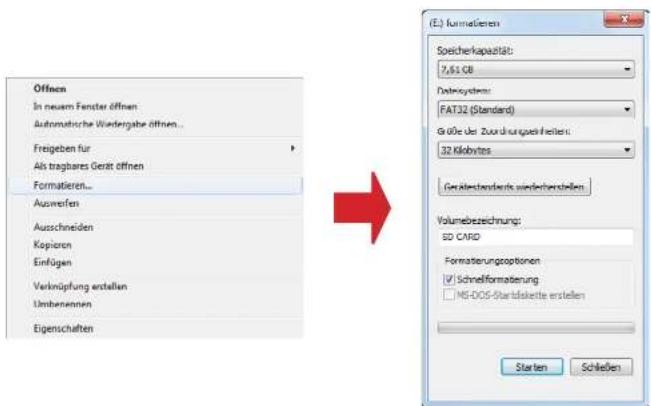
After you format the SD card, copy the new software on it.
Update process:
- Turn off the controller.
- Insert the SD card into the slot on the rear side of the control unit.
- Turn on the control unit. The following will appear in the display:
SD CARD DETECTED WRITING SOFTWARE
- After the software is copied, the following message appears:
LOAD COMPLETE
- Now switch off the control unit and remove the SD card.
- Turn on the control unit again. The firmware is updated now.
Footprint
Seaman 37
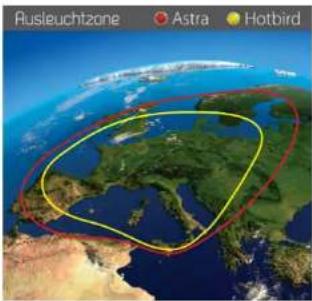
text_image
Rusleuchtzone Astra HotbirdSeaman 45 GPS/AutoSkew
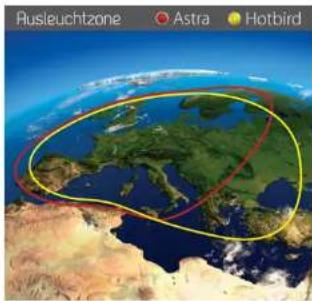
text_image
Rusleuchtzone Astra HotbirdSeaman 60 GPS/AutoSkew
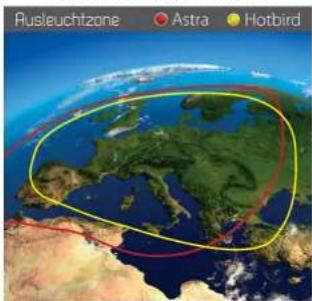
text_image
Rusleuchtzone Astra HotbirdNote: In the outlying areas of the footprint there may be interference.
Specifications
Seaman 37 Seaman 45 Seaman 60
| Antenna typ. | Off-Set-Dish | Off-Set-Dish | Off-Set-Dish |
| Users | 3 | 3 | 3 |
| LNB typ. | Universal LNB | Universal LNB | Universal LNB |
| Frequency band | Ku Band | Ku Band | Ku Band |
| Frequency range | 10.7 GHz to 12.75 GHz | 10.7 GHz to 12.75 GHz | 10.7 GHz to 12.75 GHz |
| I NB Verstärkung | 31 dBi | 33 dBi | 35 dBi |
| Minimum HPR | 51 dBW | 49 dBW | 47 dBW |
| Polarization | W/H or RHCP/LI/CP | W/H or RHCP/LHCP | W/H or RHCP/LHCP |
| Type of Stabilisation | 7-Axis DC Motor | 7-Axis XC Motor | 7-Axis DC Motor |
| Hovation | 0^ to 30^ | 0^ to 30^ | 0^ to 90^ |
| Azimuth | 360^ | 360^ | 360^ |
| Tracking rate | 50^ /sec | 50^ /sec | 50^ /sec |
| Search time | 1-2 min | 1-2 min | 1-2 min |
| Temperature range | -25^ to +70^ | -25^ to +70^ | -25^ to +70^ |
| Power supply | 12VDC @ 5A | 12VDC @ 5A | 12VDC @ 5A |
| Weight | 9kg | 5kg | 20kg |
| Dimensions dish (Ω) | 170 min | 450 min | 600 min |
| Dimensions housing (xV/f) | 440 x 430 mm | 550 x 580 mm | 800 x 800 mm |
| Dimensions control unit (B/V/f) | 745 x 43 x 147 mm | 745 x 43 x 147 mm | 745 x 43 x 147 mm |
Declaration of Conformity
Note:
Weight and dimensions are not absolutely exact values.
Technical details can be changed at any time (according to manufacturer) without prior notice.
Declaration of Conformity
This complies with the following directives / standards is confirmed:
Electromagnetic Compatibility Directive 2004/108/EC
EN 55013:2001+A1:2003+A2:2006
EN 55020:2007
EN 61000-3-2:2006 | A1:2009 | A2:2009
EN 61000-3-3:2008
Low Voltage Directive 2006/95/EG
EN 60065:2002 | A1:2006 | A11:2008
Status: v2.1 February 2014