
Campingman Twin Auto Skew WSTA-DP250PMS - Satellite receiver MEGASAT - Free user manual and instructions
Find the device manual for free Campingman Twin Auto Skew WSTA-DP250PMS MEGASAT in PDF.


User questions about Campingman Twin Auto Skew WSTA-DP250PMS MEGASAT
0 question about this device. Answer the ones you know or ask your own.
Ask a new question about this device
Download the instructions for your Satellite receiver in PDF format for free! Find your manual Campingman Twin Auto Skew WSTA-DP250PMS - MEGASAT and take your electronic device back in hand. On this page are published all the documents necessary for the use of your device. Campingman Twin Auto Skew WSTA-DP250PMS by MEGASAT.
USER MANUAL Campingman Twin Auto Skew WSTA-DP250PMS MEGASAT
natural_image
White spherical device with 'MEGASAT' branding on the front face (no additional text or symbols visible)natural_image
White circular device with open lid and internal components, no visible text or symbols2. Allgemeines
natural_image
Abstract geometric diagram with intersecting gray bars and a red vertical line (no text or symbols)Bad

natural_image
Simple geometric cross shape with red and blue lines on gray background (no text or symbols)Good

natural_image
Simple cross-shaped diagram with red and blue lines intersecting at center (no text or symbols)Best
- : LNB "Signal collector"
- : Satellite Signal
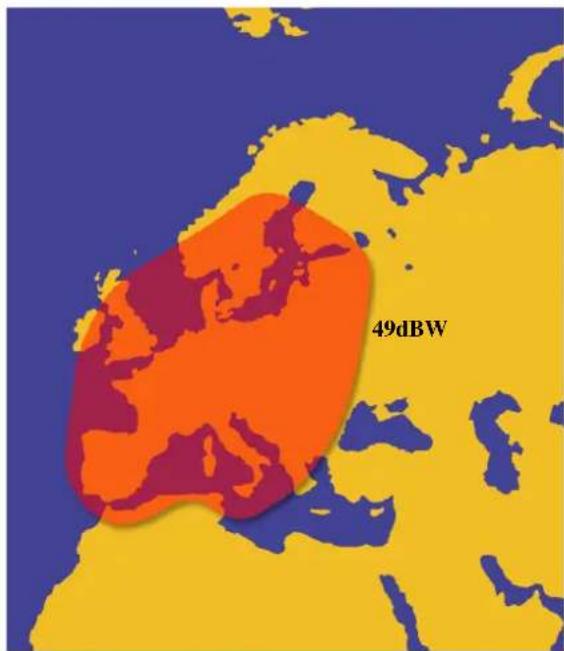
Ausleuchtzonen
Footprint
Astra 2N
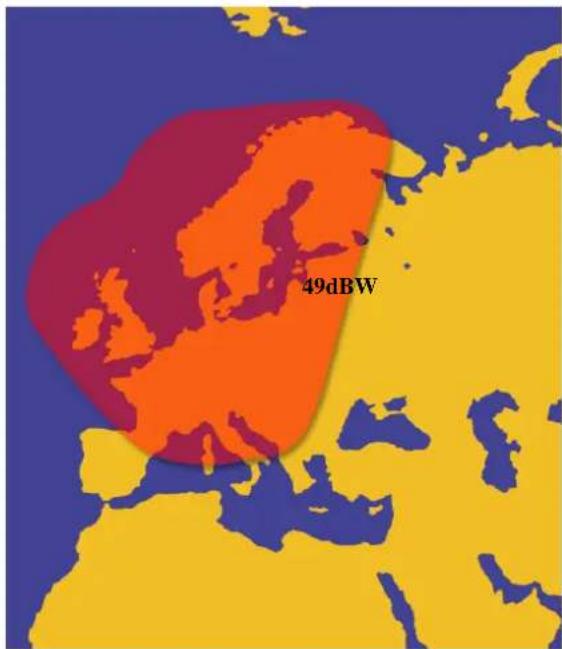
text_image
49dBWAstra 2S
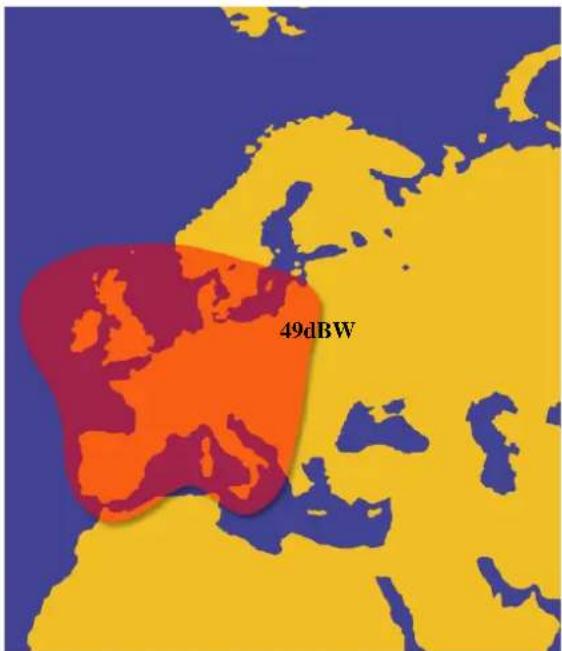
text_image
49dBWAstra 1
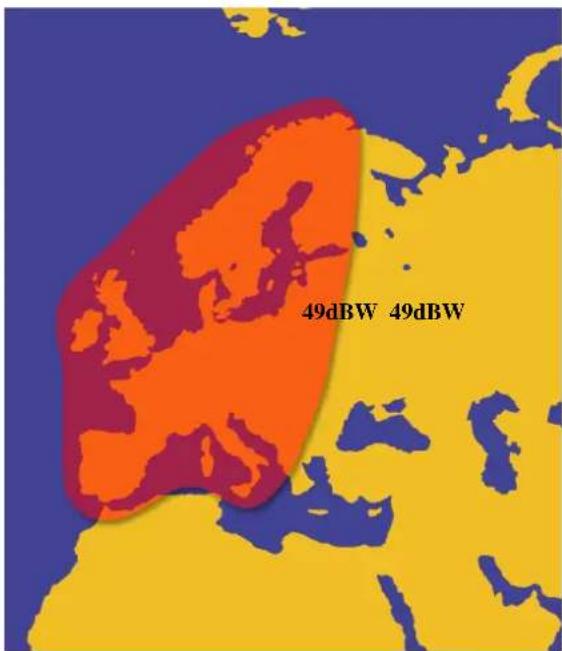
text_image
49dBW 49dBWHotbird
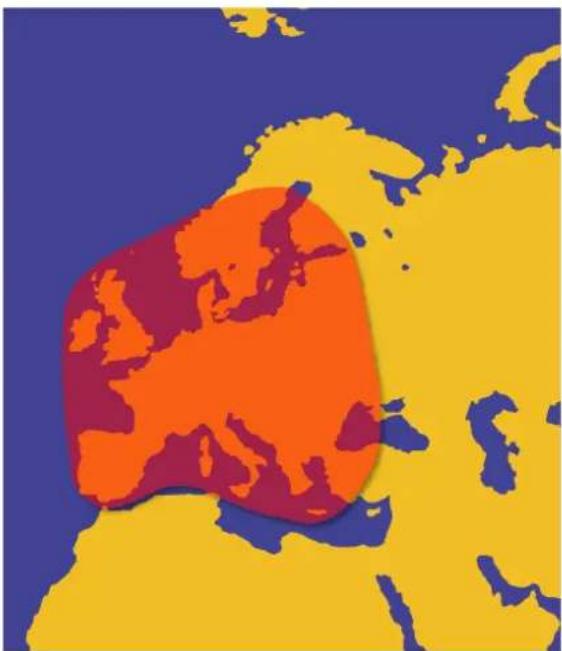
natural_image
Color-coded map of Europe showing a highlighted region in orange and red against a blue background (no text or labels)ASTRA4
Thor 2/3
text_image
49dBW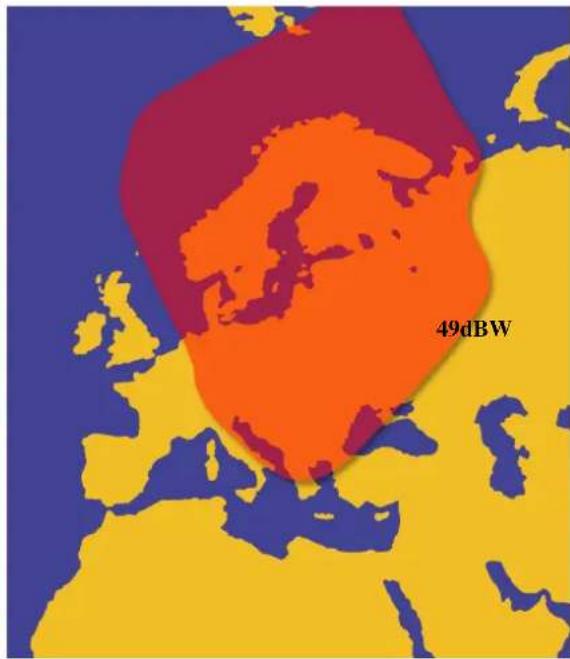
text_image
49dBWASTRA 3
text_image
51dB 49dB 47dB 44dBTURKSAT
text_image
51dB 49dB 47dBAtlantic Bird 3
text_image
49dBWHispasat
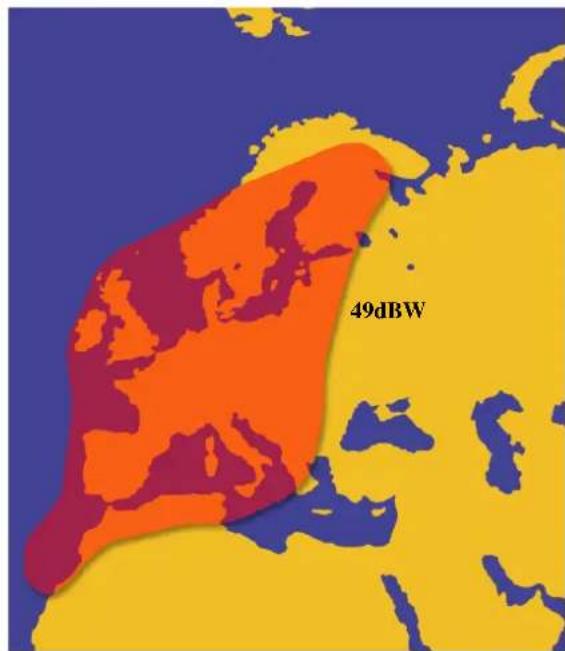
text_image
49dBWable of contentsable of contents
1 Introduction
Specification....5
Antenna System Overview......6
Direct Broadcast Satellite Overview....7
System Components......8
2 Installation
Unpacking the Unit....9
Preparing for the installation....10
Selecting the location....11
Equipment and cable installation....12
Setting the LNB Skew Angle(Manual Skew version only)....13
3 Operation
Receiving Satellite TV Signals....14
Turning the System On/Off....15
Changing Channels....15
Watching TV....15
Switching between Satellites....15
Operating the IDU....16
4 Troubleshooting
Simple Check....19
Causes and Remedies....20
Appendix A How to set the skew angle....21
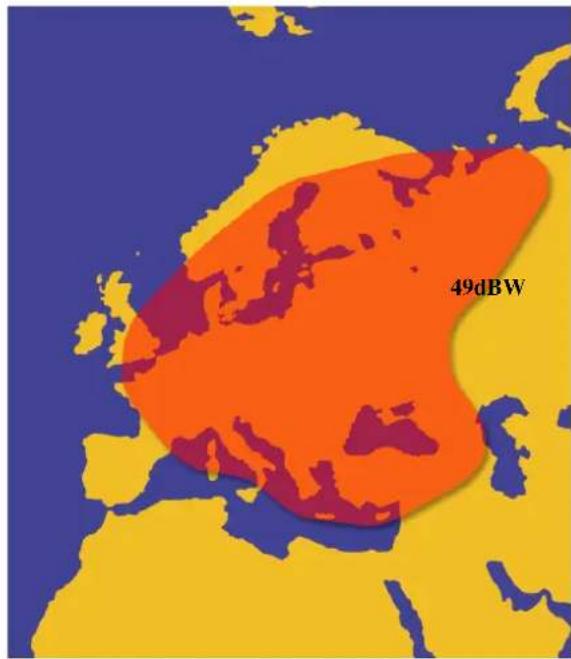
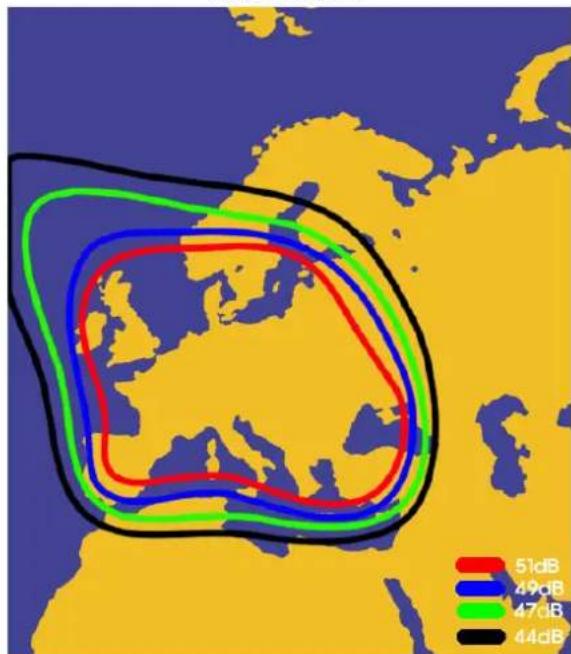
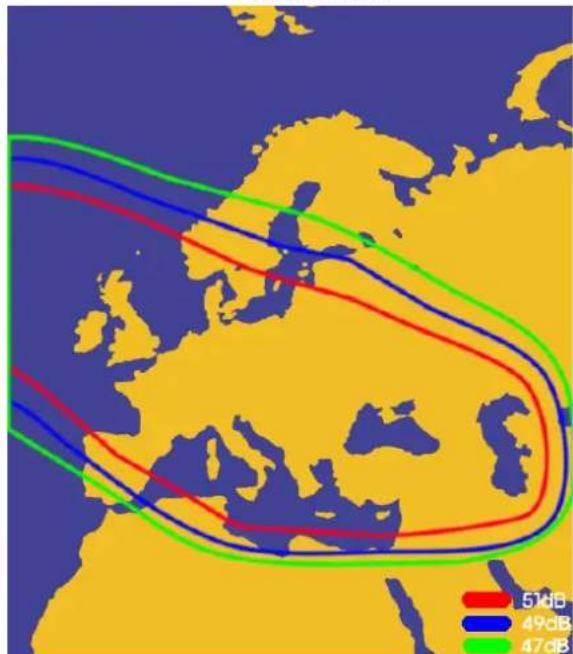
Appendix B Satellite Coverage Map....26
Appendix C Antenna Drawing....28
Appendix D Adhesive Instruction....30
Notes, Cautions, and Warnings

Caution – Improper handling by unqualified personnel can cause serious
damage to this equipment. Unqualified personnel who tamper with this
equipment may be held liable for any resultant damage to the equipment.
Install under DRY condition ONLY! Do not install this system in the rain,
or under any wet conditions. Moisture may affect electronics and void warranty!

Warning – Need 2 people to install the antenna onto the roof. Do not try to install the antenna by yourself.
Note – Before you begin, carefully read each of the procedures in this manual. If you have not performed similar operations on comparable equipment, do not attempt to perform these procedures.
SpecificationSpecification
| Antenna Type Parabola | |
| Frequency Band Ku Band | |
| Radome Dimension 700x400mm | |
| Antenna Weight 12kg | |
| Antenna Gain 33dBi | |
| Minimum EIRP 49dBW | |
| Polarization V/H or RHCP/LHCP | |
| Type of Stabilization 2-Axis Step Motor | |
| Elevation Range | 15° to 62° |
| Azimuth Range Unlimited | |
| Tracking Rate | 50°/sec |
| Temperate Range | -20° to 70° |
| Power 12~24VDC | |
| LNB Twin Auto Skew |
Table 1-1 Specification
natural_image
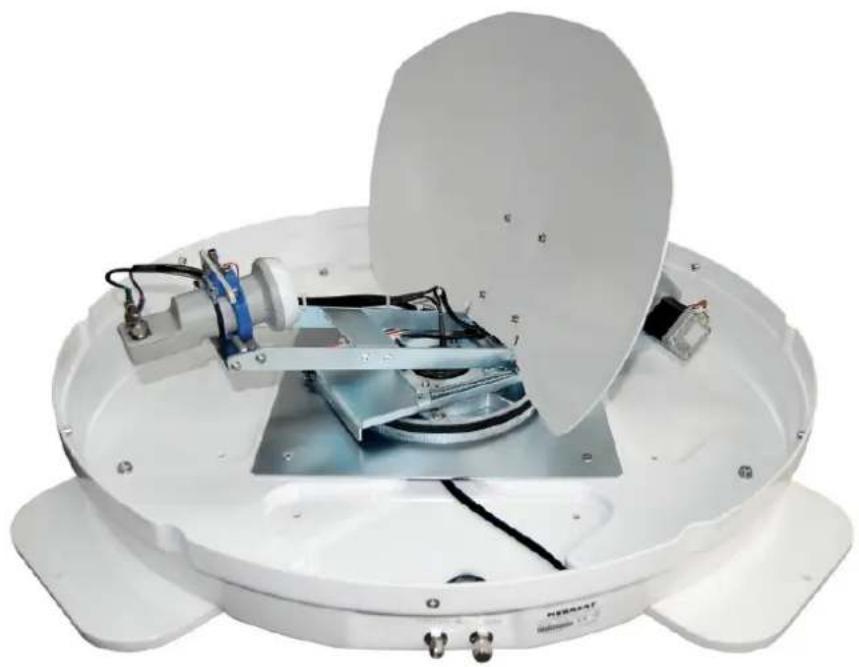
Interior view of a white satellite or radar device with visible components and wiring (no text or symbols)WSTA-DP250PMS satellite antenna system is the innovative and a technologically advanced satellite Stationary system. WSTA-DP250PMS has a unique combination of state-of-the-art components with the most sophisticated satellite acquisition and tracking programs to provide the following features:
■ Fast satellite acquisition
■ Compatible with any Satellite Receiver
■ Compatible with all Direct Broadcast Satellites (DBS)
■ Built-in Digital Broadcast Receiver(DVB)
■ Capable of High Definition receiving
■ Automatic Skew
■ Twin output for 2 Receivers
Antenna System Overview Antenna System Overview
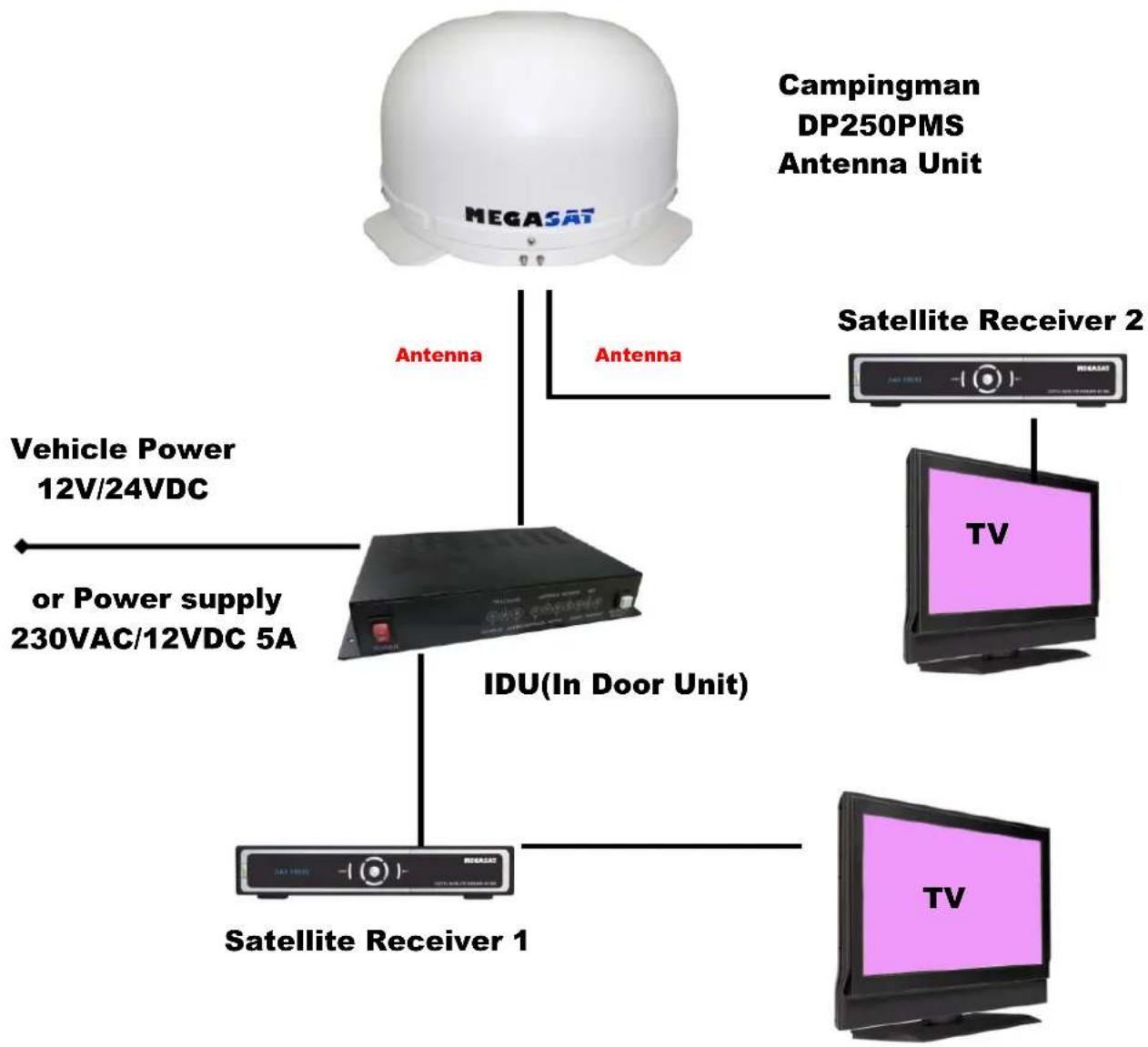
A complete satellite TV system, illustrated in Figure 1-1, includes WSTA-DP250PMS antenna connected to a IDU, a satellite TV receiver, and a television set.
flowchart
graph TD
    A["MEGASAT"] -->|Antenna| B["IDU(In Door Unit)"]
    B --> C["Satellite Receiver 1"]
    B --> D["Satellite Receiver 2"]
    B --> E["TV"]
    A -->|Antenna| F["Vehicle Power 12V/24VDC"]
    A -->|Antenna| G["or Power supply 230VAC/12VDC 5A"]
    A --> H["Campingman DP250PMS Antenna Unit"]
Figure 1-1 System Diagram
Direct Broadcast Satellite Overviewadcast Satellite Overview
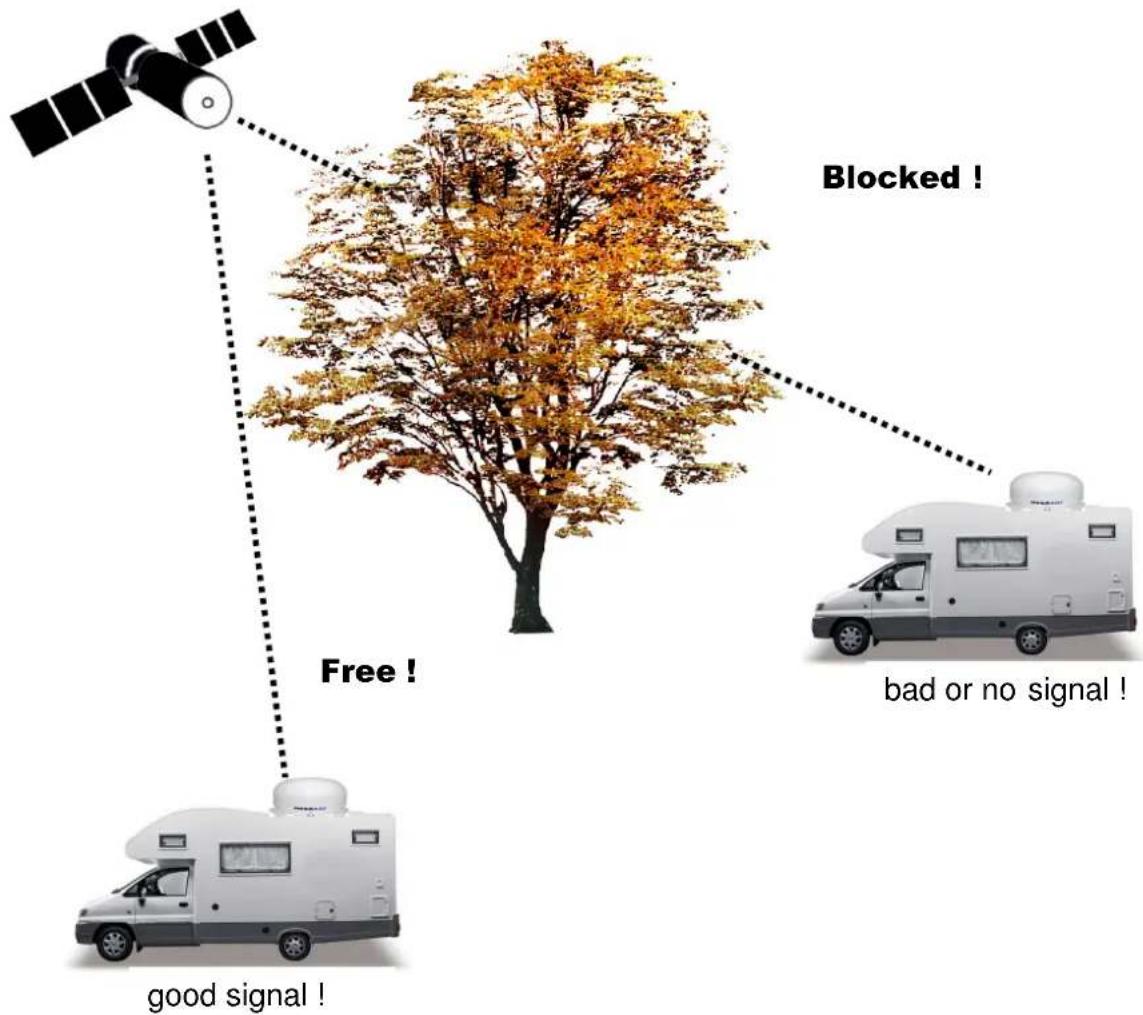
Direct Broadcast Service (DBS) satellites broadcast audio, video and data information from satellites located 22,000 miles in space. A receiving station, such as WSTA-DP250PMS antenna, should include a dish and satellite receiver to receive the signals and process them for use by the consumer audio and video equipment. The system requires a clear view of the satellite to maximize the signal reception.
flowchart
graph TD
    A["Satellite"] -->|Free!| B["Red Tree"]
    C["Rear Vehicle"] -->|Good signal!| B
    D["RV Car"] -->|Bad or no signal!| B
    E["Blocked !"] --> B
    style A fill:#f9f,stroke:#333
    style C fill:#f9f,stroke:#333
    style D fill:#ccf,stroke:#333
    style E fill:#ccf,stroke:#333
Figure 1-2 Satellite Blockage
Objects such as tall lighthouse, bridges and big ship that block this view will cause a loss of signal. The signal will be quickly restored once the antenna has a clear line of sight again. Heavy rain, cloud, snow or ice may also interfere with the signal reception quality. If the satellite signal is lost due to blockage or severe weather condition, services from the receiver will be lost (picture will freeze frame and may disappear). When the satellite signal strength is again high enough, then the receiver will resume providing desired programming services.
System Components System Components
natural_image
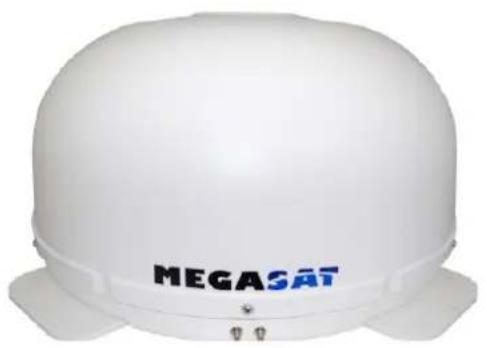
White hard hat with 'MEGASAT' branding on the front face (no additional text or symbols visible)Antenna Unit
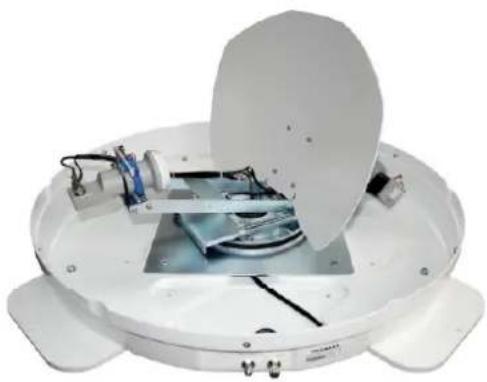
The antenna unit houses the antenna positioning mechanism, LNB (low noise block), and control elements within a radome. Weathertight connectors join the power, signal, and control cabling from the belowdecks units.
natural_image
White circular scientific instrument with open lid and internal components (no visible text or symbols)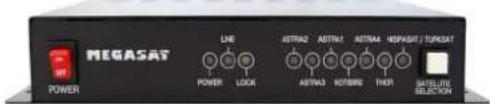
text_image
MEGASAT POWER LINE AETRA2 AETRA1 AETRA4 HSPAGIT / TURISAT POWER LOCK ASTRA3 ROTBING THY SET LIME SELECTIONIDU(InDoor Unit)
The IDU is the system's user interface, providing access to the system and its functions through an LCD and three buttons. The IDU also serves as the vehicle's junction box, allowing the system to use vehicle power, and supply and receive data to/from the antenna unit.
Figure 1-3 System Components
This section offers a general explanation of how properly to install WSTA-DP250PMS antenna. Installation of WSTA-DP250PMS antenna must be accomplished by or under the supervision of an authorized dealer for the Limited Warranty to be valid and in force. The steps in the installation and setup process are as follows:
Unpacking the unit Unpacking the unit
1. Open box and remove packing material.
The following items are included in the packaging of Free Way 1S antenna.
| Item | Description | Quantity |
| 1 | Megasat WSTA-DP250PMS Antenna Unit 1 each | |
| 2 | Megasat IDU(In Door Unit) | 1 each |
| 3 | Power Cable(1.5m) | 1 each |
| 4 | Coaxial Cable (10m) | 1 each |
| 5 | Coaxial Cable (1m) | 1 each |
| 6 | User Manual | 1 set |
| 7 | Gluing set (Primer 50ml, Applicator, Special adhesive 310ml) | 1 set |
Table 2-1 Parts included
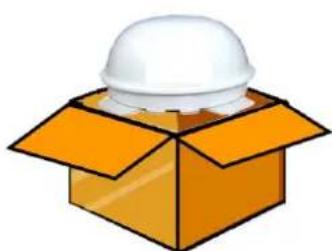
- Lift dome out of box vertically. Then lift unit out of box vertically. Do not turn box and "roll" out, or turn upside down to remove.
natural_image
Illustration of a white hard hat emerging from an orange box (no text or symbols)
Lift Unit straight up out of the carton!
Figure 2-1 Unpacking the unit
Preparing for the installation at sign for the instal
Install Tools and Materials
WSTA-DP250PMS antenna system is designed for simple installation and setup. However, the following list of equipment or items should be available during installation of WSTA-DP250PMS antenna.
■ Electric drill and drill bits
- Socket wrench
■ Silicon sealant
■ Fastener suitable for specific application
1. Verification of the Vehicle's Power Supply.
- Confirm that the vehicle's power supply is 12VDC\~24VDC or Power supply with 230VAC to 12VDC 5A.
2. Verification of the Satellite Receiver and IDU's attachment and the electricity supply
■ Attach Satellite Receiver and IDU in the interior of the vehicle or the trunk.
■ Connect the power of Satellite Receiver and IDU.
■ Once the power of Satellite Receiver and IDU is verified, it confirms that both Satellite Receiver and IDU are working normally.
3. Procedure of the satellite's attachment and installation.
- Attach the satellite on the flat surface area of the vehicle’s roof.
- Connect each end of the Coaxial antenna cable to the satellite's terminal and the IDU.
■ Connect the IDU and the Satellite Receiver box together through the coaxial cable.
■ Make sure that the satellite is working normally, once the power is supplied.

Warning : Things to consider when installing the antenna.
■ Turn off the power when attaching or detaching the antenna.
■ Make sure that the attached satellite is fixed on the flat surface.
■ When attaching, ensure that all the products are adhered properly.
■ Ensure that all the cables are connected properly.
Selecting the locationng the location
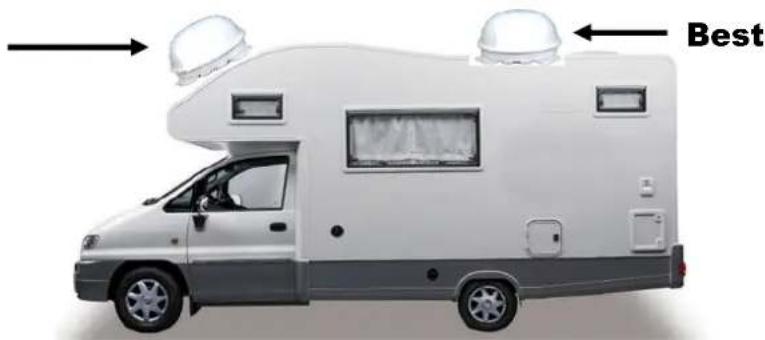
Determine the optimum mounting location for the antenna radome assembly. It should be installed where :
- The antenna has a clear line-of-sight view to as much of the sky as is practical. Choose a location where masts or other structures do not block the satellite signal from the dish as the vehicle turns.
- The antenna is at least 5 feet away from other transmitting antennas (HF, VHF and radar) that may generate signals that may interfere with WSTA-DP250PMS antenna. The further away WSTA-DP250PMS antenna is from these other antennas, the less impact their operation will have on it.
- Direct radiation into the antenna from vehicles radar, especially high power surveillance radar arrays, is minimized. The radome should be as far away from the vehicles Radar as possible and should NOT be mounted on the same plane as the vehicles Radar.
- The antenna radome assembly should be rigidly mounted to the vehicle. If necessary, reinforce the mounting area to assure that it does not flex due to the vehicle motion or vibration.
If these conditions cannot be entirely satisfied, the site selection will inevitably be a “best” compromise between the various considerations.
Perform a through site inspection on the roof for the antenna to be mounted.
- The antenna must have a clear view of the sky and the horizon at all the directions to avoid blockage of the satellite signal.
- The antenna should be on the top of the vehicle.
Poor
natural_image
Side view of a white and gray recreational vehicle with two dome-shaped antennas above it, labeled 'Best' in the corner (no other text or symbols)Figure 2-2 Selecting the location
Equipment and cable installation equipment and cable installati
This offers a general explanation of how to install the IDU and satellite receiver properly to the inside of vehicle connecting with coaxial cable.
- The Coaxial cable is routed from the antenna to the IDU inside the vehicle.
- After Once deciding where to place the IDU and satellite receiver, make sure that both units are placed in a dry and protected area.
- The IDU and satellite receiver should be placed away from any heat source and in an area with proper ventilation.
-
Ensure that there are at least 3cm of space around both units for ventilation and connection of cables. Do not stack the units on top of each other.
-
The following describes the basic wiring configurations for DP250PMS antenna.
■ Connect the Coaxial cable to WSTA-DP250PMS antenna port on the back of IDU
■ Connect one end of the supplied coaxial cable to the receiver port on the back of the IDU
■ Connect the other end of the coaxial cable to the satellite receiver
■ The second receiver you can directly connect the coaxial cable from antenna to the satellite receiver.
Setting the LNB skew angle Setting the LNB skew angle
natural_image
Illustration of a satellite with solar panels extending into a red and blue band (no text or symbols)Figure 2-3 Satellite signals
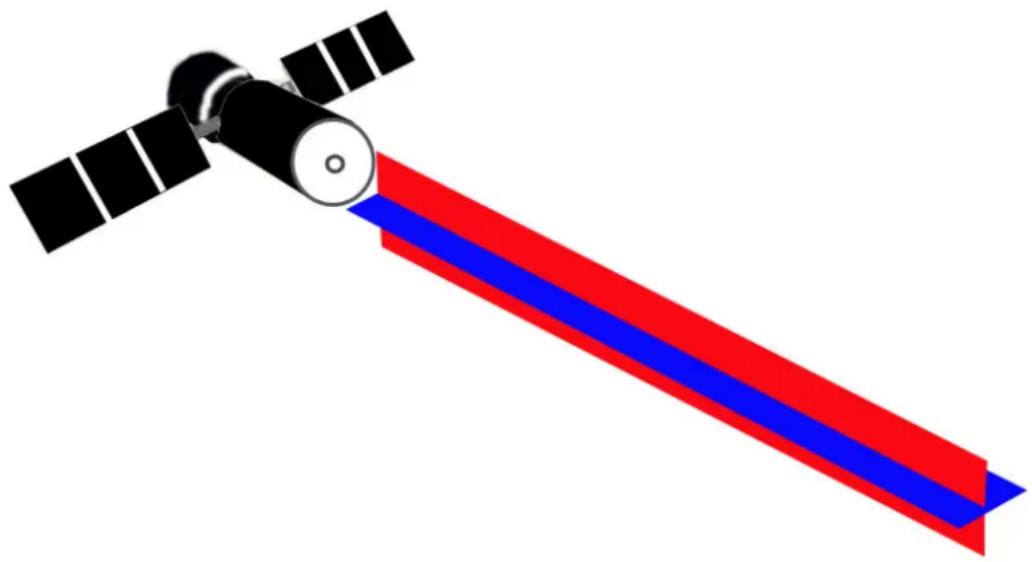
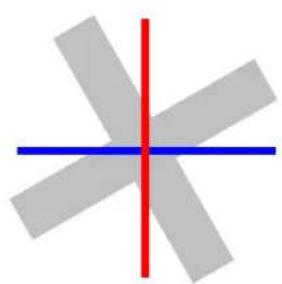
Signals transmitted in vertical(red) and horizontal(blue) wave offset exactly 90^ from each other. Since linear satellite signals are oriented in a precise cross pattern, Free Way 1S antenna's receiving element, called an LNB (low-noise block) must be oriented in the same way to optimize reception. This orientation adjustment is referred to as the LNB's “skew angle.” Figure 1-4 illustrates how skew determines the amount of signal the LNB collects. The more signal, the better reception.
natural_image
Abstract geometric diagram with intersecting gray rectangles and a red vertical line (no text or symbols)Bad

natural_image
Abstract geometric shape with intersecting red and blue lines on gray background (no text or symbols)Good

natural_image
Simple cross-shaped diagram with a red vertical line crossing a blue horizontal line (no text or symbols)Best

Figure 2-4 Best Skew Angle
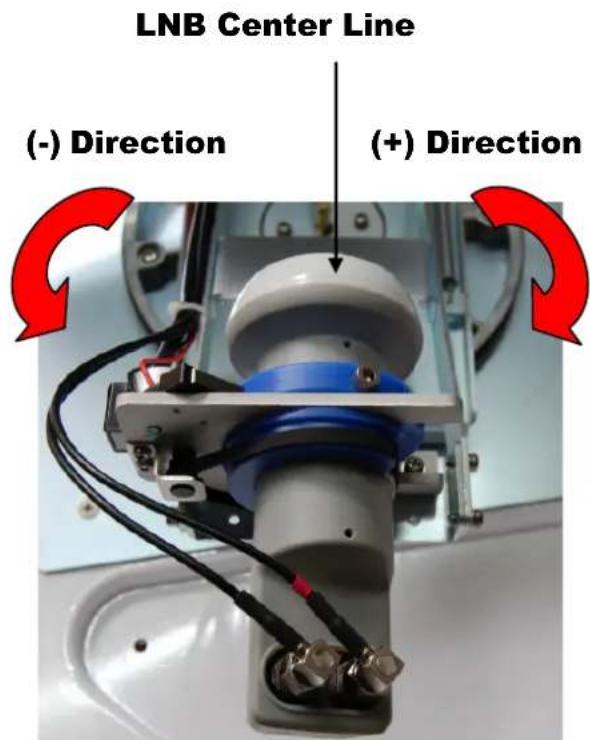
text_image
LNB Center Line (-) Direction (+) Direction
Attention – The Model Megasat Campingman TAS (Twin Auto Skew) work full automatically
Do not work on the auto skew system (only for engineer).
The correct skew setting varies depend on your geographic location, since the orient-tation of your antenna to the satellite changes as you move. For complete details about adjusting the LNB's skew angle, see "Appendix A – How to Set the Skew Angle"
WSTA-DP250PMS antenna system is easy to use. Under normal conditions, operation of WSTA-DP250PMS antenna requires no intervention from the user. Antenna unit initialization, satellite acquisition and skew is completely automatic.
Receiving Satellite TV SignalsReceiving Satellite TV Signals
Television satellites are located in fixed positions above the Earth's equator and beam TV signals down to certain regions of the planet. To receive TV signals from a satellite, you must be located within that satellite's unique coverage area. To check it, see “Appendix B – Satellite Coverage Map” In addition, since TV satellites are located above the equator, WSTA-DP250PMS antenna must have a clear view of the sky to receive satellite TV signals. Anything that stands between the antenna and the satellite can block the signal, resulting in lost reception. Common causes of blockage include lighthouses, boat masts, trees, buildings, and bridges. Heavy rain, ice, or snow might also temporarily interrupt satellite signals.
Turning the System On/Off Turning the System On/Off
Since power to WSTA-DP250PMS system is controlled by the IDU, you can turn the antenna on or off by applying/removing operating power to the IDU.
Turning on the System
Follow the steps below to turn on your WSTA-DP250PMS System.
- Make sure the antenna has a clear view of the sky.
- Turn on your satellite TV receiver and TV.
- Apply operating power to the IDU.
- Wait one minute for system startup. The IDU will display the Tracking Satellite screen after system testing is complete.
Turning off the System
Follow the steps below to turn off your WSTA-DP250PMS System.
- Remove operating power from the IDU.
- Turn off your satellite TV receiver and TV.
Changing ChannelsChanging Channels
If you have followed the installation instructions, your system should be set to the satellite of your choice and the system should have downloaded the appropriate channel guides. When WSTA-DP250PMS antenna system and satellite receiver is properly configured, it is easy to change the channel using the remote control that normally comes with the receiver unit.
Watching TV Watching TV
WSTA-DP250PMS antenna is designed to operate as efficiently and as reliably as possible when the vehicle is moved and anchored. It is also the quickest satellite acquisition system available among WSTA-DP250PMS antennas. If you have anchored the vehicle and the antenna has completed to searching selected satellite, turn off IDU Power to avoid unnecessary use of power. Because the LNB receives its power from the Satellite Receiver through the IDU, the antenna will continue to receive the satellite TV signals.
Switching between Satellites Switching between Satellites
You can switch between satellites using the IDU by pressing Satellite select buttons. Follow the steps below to switch to another satellite.
- Ensure that the LEDs turn on. If antenna is disconnected, all led will blink.
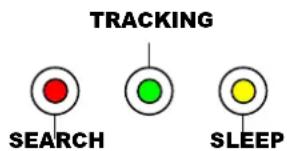
text_image
TRACKING SEARCH SLEEPFigure 3-1 IDU LED
- Press the Satellite select buttons to switch to another satellite.
- The antenna shifts to track selected satellite. Wait for the Tracking Satellite screen.
Operating the IDUOperating the IDU
Appearance
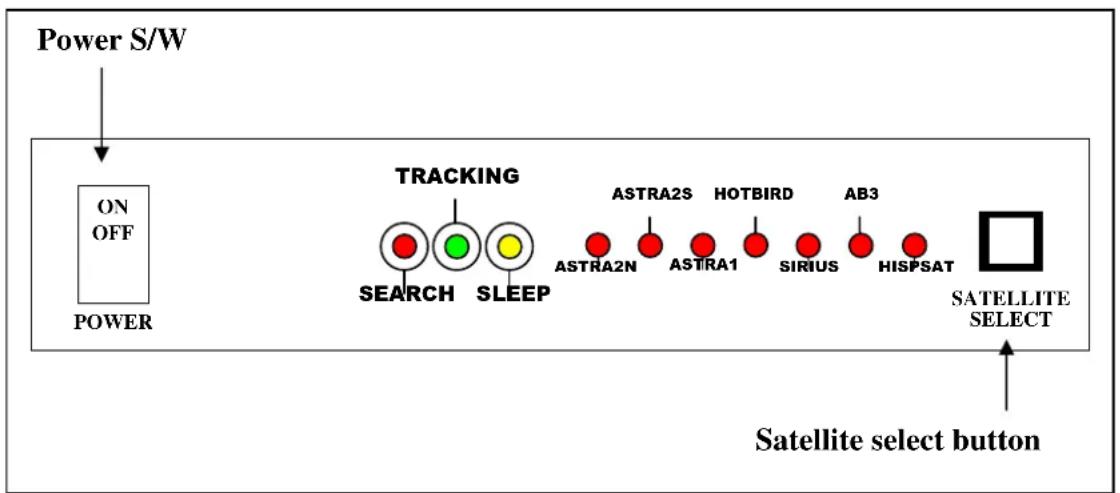
flowchart
graph TD
    A["Power S/W"] --> B["ON OFF POWER"]
    B --> C["TRACKING"]
    C --> D["SEARCH"]
    C --> E["SLEEP"]
    D --> F["ASTRA2N"]
    E --> G["ASTRA1"]
    E --> H["HOTBIRD"]
    E --> I["SIRIUS"]
    E --> J["AB3"]
    E --> K["HISPSAT"]
    L["SATELLITE SELECT"] --> M["Satellite select button"]
    M --> N["Power"]
Figure 3-2 Appearance of IDU
Functions of LCD Display
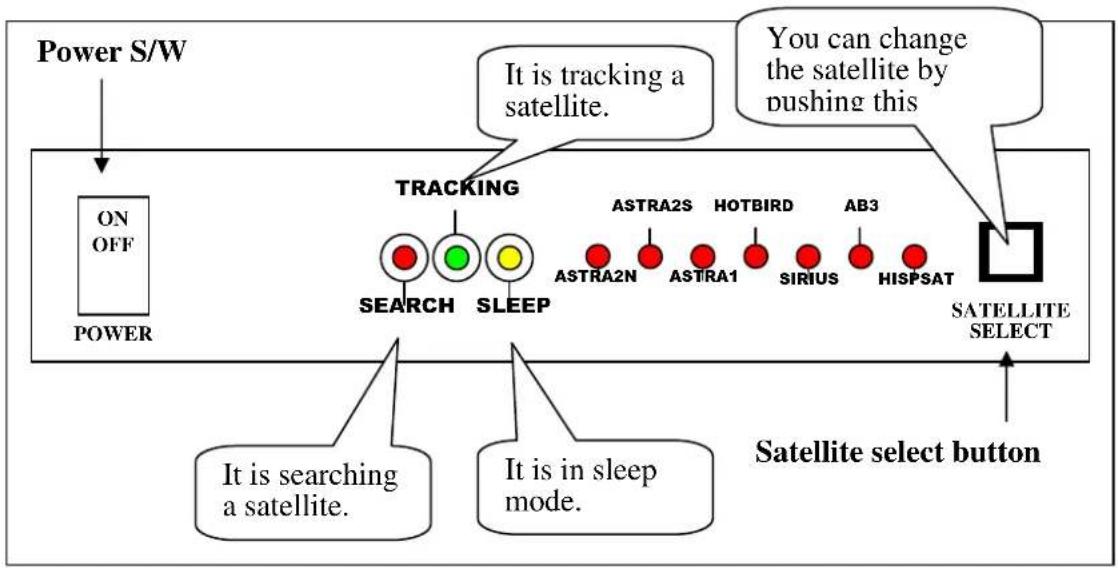
flowchart
graph TD
    A["Power S/W"] --> B["ON OFF POWER"]
    B --> C["TRACKING"]
    C --> D["SEARCH"]
    C --> E["SLEEP"]
    D --> F["ASTRA2N"]
    D --> G["ASTRA1"]
    E --> H["HOTBIRD"]
    E --> I["SIRIUS"]
    E --> J["AB3"]
    E --> K["HISPSAT"]
    L["SATELLITE SELECT"] --> M["Satellite select button"]
    N["It is searching a satellite."] --> C
    O["It is in sleep mode."] --> C
    P["You can change the satellite by pushing this"] --> L
Figure 3-3 Functions of LED
General Operation Order
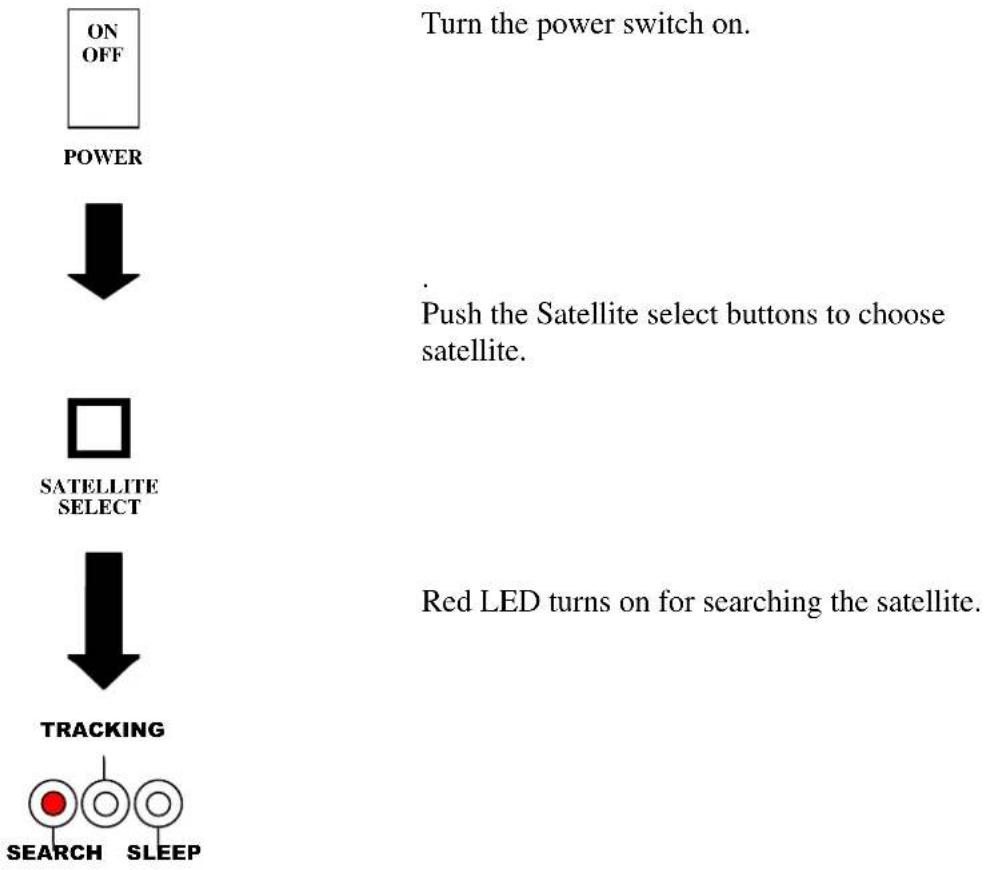
flowchart
graph TD
    A["ON OFF"] --> B["POWER"]
    B --> C["SATELLITE SELECT"]
    C --> D["TRACKING"]
    D --> E["SEARCH"]
    D --> F["SLEEP"]
    G["Turn the power switch on."] --> H["Push the Satellite select buttons to choose satellite."]
    I["Red LED turns on for searching the satellite."] --> J["Red LED turns on for searching the satellite."]
Turn the power switch on.
Push the Satellite select buttons to choose satellite.
Red LED turns on for searching the satellite.
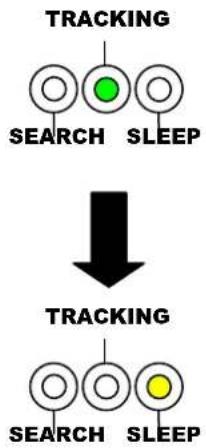
flowchart
graph TD
    A["TRACKING"] --> B["SEARCH"]
    A --> C["SLEEP"]
    B --> D["TRACKING"]
    C --> D
    D --> E["SEARCH"]
    D --> F["SLEEP"]
Turn the power switch on.
Push the Satellite select buttons to choose satellite.
Red LED turns on for searching the satellite.
It is tracking the target satellite.
If detached satellite is chosen satellite, it goes to auto_sleep mode.
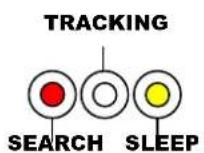
In case of search failure

text_image
ON OFF POWER ↓ □ ATELLIT SELECT ↓ TRACKING RCH SIf the antenna cannot find selected satellite, it goes to sleep mode during about 2 minutes with turning on 2-LED. And then the antenna will search the satellite again.
Troubleshootingroubleshooting
There are a number of common issues that can affect the signal quality or the operation of WSTA-DP250PMS antenna system. The following sections address these issues and potential solutions.
Simple check....24
Causes and Remedies....25
Simple checkSimple check
Can the antenna see the satellite?
The antenna requires an unobstructed view of the sky to receive satellite TV signals. Common causes of blockage include trees, buildings, bridges, and mountains.
Is there excessive dirt or moisture on the antenna dome?
Dirt buildup or moisture on the dome can reduce satellite reception. Clean the exterior of the dome periodically.
Is it raining heavily?
Heavy rain or snow can weaken satellite TV signals. Reception should improve once the inclement weather subsides.
Is everything turned on and connected properly?
Make sure your TV and receiver are both turned on and set up for the satellite input. Finally, check any connecting cables to ensure none have come loose.
Causes and Remedies Causes and Remedies
Receiver Fault
Your satellite TV receiver might be set up incorrectly or defective. First check the receiver's configuration to ensure it is set up for the desired programming. In the case of a faulty receiver, refer to your selected receiver's user manual for service and warranty information.
Satellite Coverage Issue
Television satellites are located in fixed positions above the Earth's equator and beam TV signals down to certain regions of the planet (not worldwide). To receive TV signals from a satellite, you must be located within that satellite's unique coverage area. See “Appendix-B Satellite Coverage Map”
Satellite Signal Blocked
The WSTA-DP250PMS Antenna needs a clear line of sight (LOS), view to the satellite for uninterrupted reception. Objects such as tall lighthouse, bridges and big ship that block this view will cause a loss of signal. The signal will be quickly restored once the antenna has a clear line of sight again. Heavy rain, cloud, snow or ice may also interfere with the signal reception quality. If the satellite signal is lost due to blockage or severe weather condition, services from the receiver will be lost (picture will freeze frame and may disappear). When the satellite signal strength is again high enough, then the receiver will resume providing desired programming services.
Satellite Frequency Data Changed
If some channels work, while one or more other channels do not, or if the antenna cannot find the selected satellite, the satellite's frequency data might have changed.
Improper Wiring
If the system has been improperly wired, the antenna will not operate correctly. Refer to the User Manual for complete system wiring information.
Loose Cable Connectors
We recommends periodically checking the antenna unit's cable connections. A loose cable connector can reduce signal quality or prevent automatic satellite switching using the receiver's remote control. Fasten the cable connector.
Appendix A
How to Set up the Skew Angle
Signals transmitted in vertical and horizontal wave offset exactly 90^ from each other. Since linear satellite signals are oriented in a precise cross pattern, Free Way 1S antenna's receiving element, called an LNB (low-noise block) must be oriented in the same way to optimize reception. This orientation adjustment is referred to as the LNB's “skew angle.” The correct skew setting varies depending on your geographic location, since the orientation of your antenna to the satellite changes as you move. This appendix provides how to set up the skew angle.
European Position Grid European Position Grid
If you wish to determine the Skew Angle(LNB), use the position grid(Figure A-1 European Position Grid) and table(TableA-1 Regional Skew angle) on page 32.
| 1 | 2 | 3 | 4 | 5 |
| 6 | 7 | 8 | 9 | 10 |
| 11 | 12 | 13 | 14 | 15 |
| 16 | 17 | 18 | 19 | 20 |
| 21 | 22 | 23 | 24 | 25 |
Figure A-1 Europe Position Grid
If you wish to set the correct skew, see “TableA-1 Regional Skew angle”. The correct skew setting varies depending on your geographic location, since the orientation of your antenna to the satellite changes as you move.
Appendix C Antenna Drawing
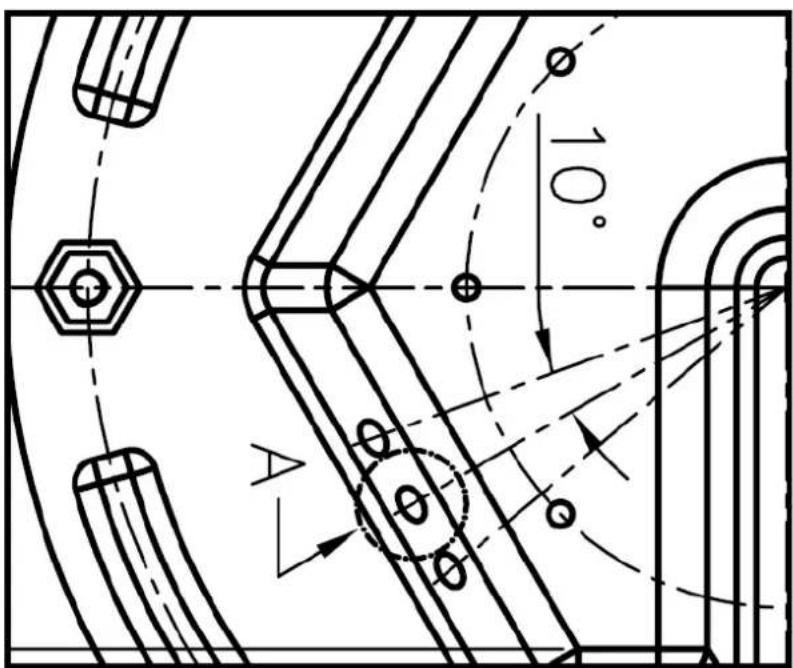
text_image
10° AAntenna Drawing Antenna Drawing
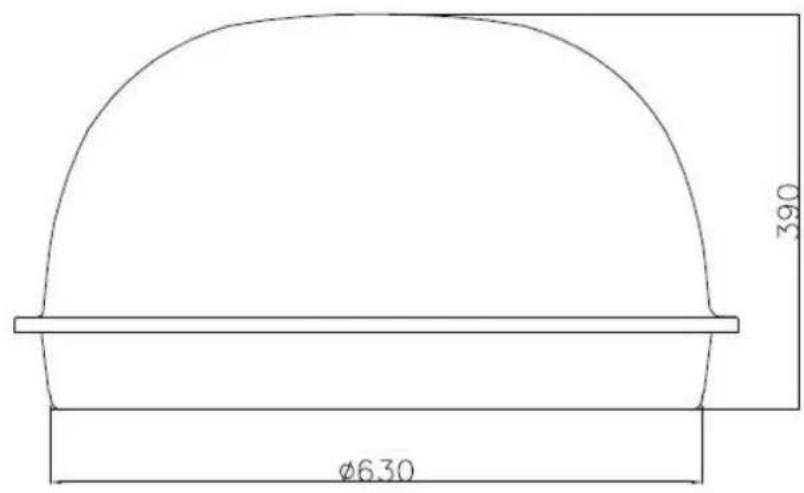
text_image
Ø6.30 390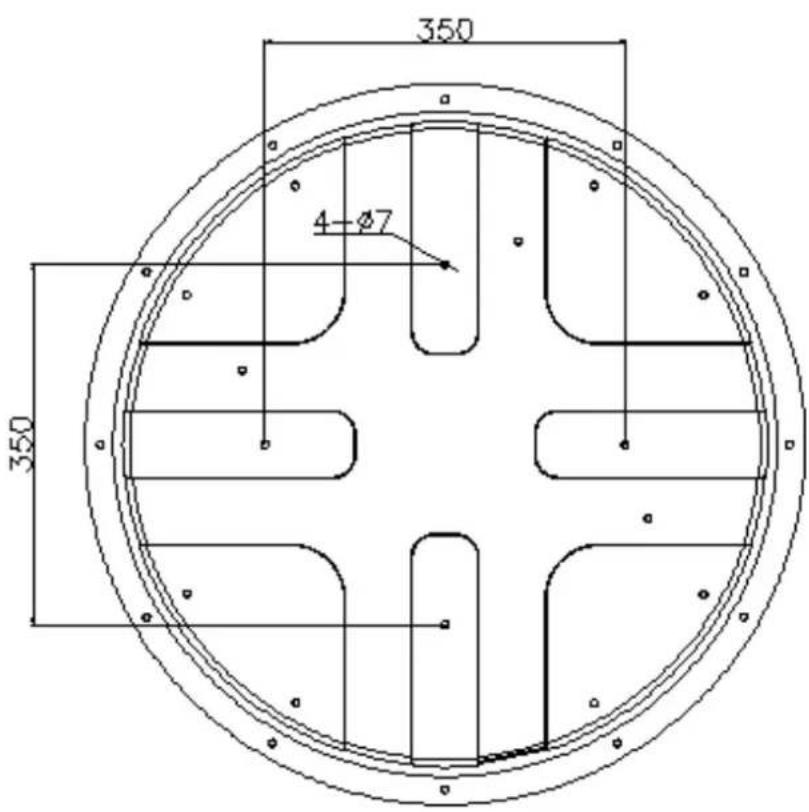
text_image
350 4-Ø7 350Megasat
Industriestrasse 4a