
Portable Professional - Satellite receiver MEGASAT - Free user manual and instructions
Find the device manual for free Portable Professional MEGASAT in PDF.


User questions about Portable Professional MEGASAT
0 question about this device. Answer the ones you know or ask your own.
Ask a new question about this device
Download the instructions for your Satellite receiver in PDF format for free! Find your manual Portable Professional - MEGASAT and take your electronic device back in hand. On this page are published all the documents necessary for the use of your device. Portable Professional by MEGASAT.
USER MANUAL Portable Professional MEGASAT
natural_image
Three horizontal color bands: black, red, and yellow (no text or symbols)Deutsch
text_image
ssic emium fessionalClassic
Premium
Professional
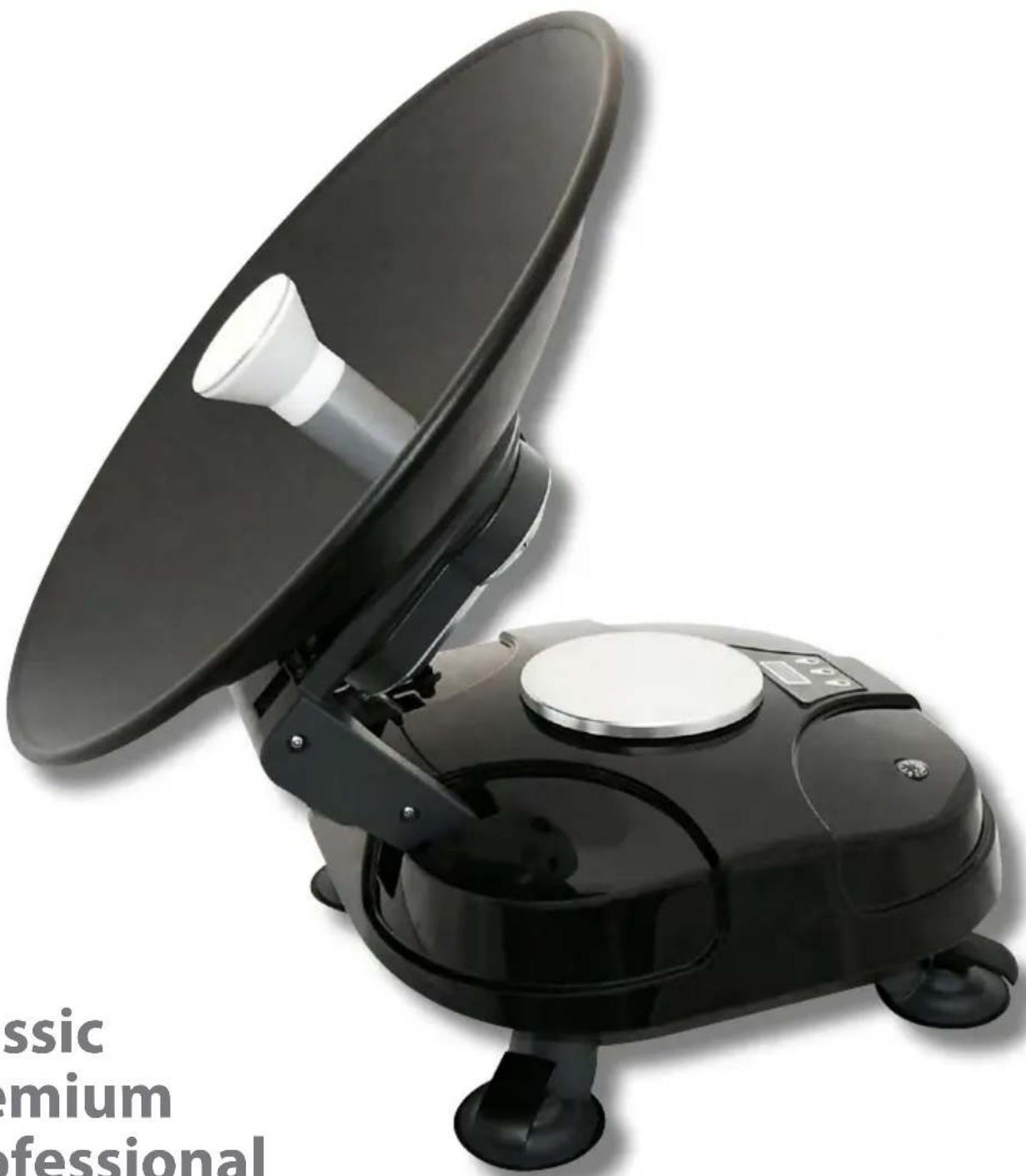
Satmaster Portable Professional
text_image
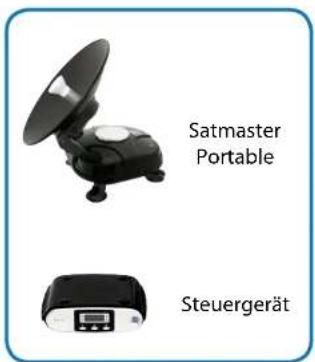
Satmaster Portable Steuergerät
LNB
natural_image
Technical line drawing of a 3D mechanical assembly with internal components (no text or symbols)
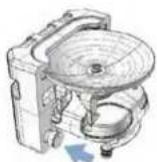
natural_image
Black industrial amplifier with a conical top and four legs (no visible text or symbols)natural_image
Black satellite or antenna device with open lid and four legs, shown in a circular motion pattern (no text or symbols)text_image
Download Program 10.1.1 Open the download file Core Part Selected Post NO: CMN Contact Part Disable Progress Fail Status Display No File ... Open the Instltext_image
Download Program ID (I.1) Open the download file C:\ASTRA1_NIT.hen Case Properties Full Import COMS Serial Port Enabletext_image
Download Program 10.dwg Open the download file C:\ASTRA1.NET.exe Open Case Part Select Part NO: 100 Save Part Display Progress: 87% Exit Status: Displaytext_image
Diagram illustrating satellite weathering with cloud, rain, and snowfall, showing a vehicle driving a van.natural_image
Close-up of a car wheel rim with blue arrows indicating direction and 'Grad' label (no other text or symbols)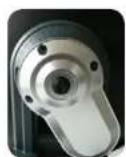
- 20^0^ + 20^
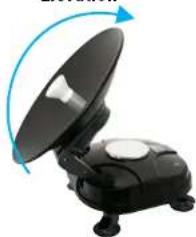
Elevation
natural_image
Black satellite dish with extended solar panel and blue circular arrow indicating rotation (no text or symbols)Satmaster Portable Classic: Astra1
Satmaster Portable Premium:
Astra 1 Nord, Astra 1 Süd, Astra 2 Nord,
Astra 2 Süd, Astra 3, Astra 4 Nord,
Astra 4 Süd, Atlantic Bird 3, Eurobird 9,
Eutelsat W2M, Hispasat, Hotbird, Thor, TürkSat
Satmaster Portable Professional:
Astra 1 Nord, Astra 1 Süd, Astra 2 Nord,
Astra 2 Süd, Astra 3, Astra 4 Nord,
Astra 4 Süd, Atlantic Bird 3, Eurobird 9,
Eutelsat W2M, Hispasat, Hotbird, Thor,
TürkSat
MEGASAT
natural_image
Black industrial vacuum cleaner with a large circular top and control panel (no visible text or symbols)Stand: 04.04.2012


Classic
Premium
Professional
Safety Contents
Before using this product please read this manual carefully and follow exactly all installation, mounting & orientation instructions.
- All the instructions should be followed in order to avoid any technical problems.
- Any electric or magnetic field close to Satmaster Portable may cause a bad reception or even cut off the signal completely.
- Do not drill the plastic cover of the antenna, which seals the antenna from moisture.
- Handle the antenna with care as any impact will cause damage to the electronics.
- Do not open the cover, any attempt to repair by a non-qualified person can be dangerous and void the warranty.
- Any obstacle (buildings, tree, etc...) will block the reception of the signal from the satellite to the antenna.
- Do not paint or add any substance on the antenna cover, this will block the reception of the signal from the satellite.
- The use of non-isolated jacks will result in a loss of the signal level.
- This product contains one universal LNB, it is forbidden to add, change or modify the LNB.
- For more precise details on the above points or for any information, please ask your retailer or customer service.
04 Delivery includes
05 Package
06 Name of Part - Outdoor Unit (ODU)
07 Name of Part - Indoor unit (IDU) / Power Inserter
08 - 09 Installation
10 Commissioning
11 LCD Display
12 - 13 Program update
14 Signal attenuation
15 - 16 Examples of finding the satellite
17 Setting values for European capitals
18 Troubleshooting
19 Specifications
Megasat | Industriestraße 4a | D-97618 Niederlauer | www.megasat.tv | info@megasat.tv
Delivery includes
Satmaster Portable Classic
Satmaster Portable Premium
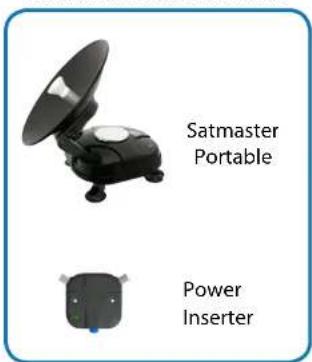
text_image
Satmaster Portable Power InserterSatmaster Portable Professional
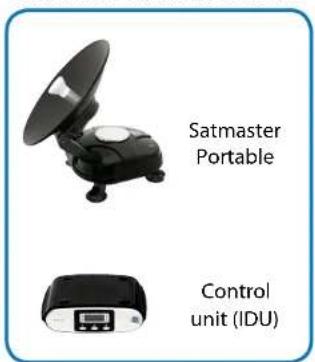
text_image
Satmaster Portable Control unit (IDU)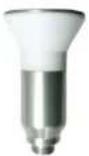
Horn
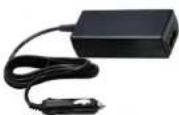
Power Supply (For Automotive)
12V IN / 24V OUT
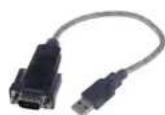
USB to Serial cabel (option)
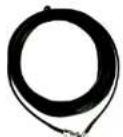
Feeder Cable Rubber Ring
Package
- Remove tape from packaging (Do not use knife)
- Packaging contains user manual. Please read carefully.
- Remove antenna gently from packaging
- Remove antenna parts from packaging foam
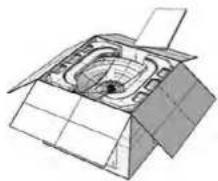
natural_image
Technical line drawing of a mechanical assembly with no visible text or symbols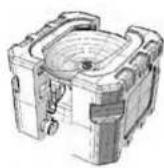
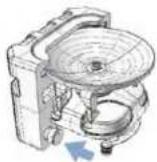

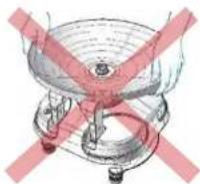
Do not handle antenna "dish". Hold antenna by body "only".
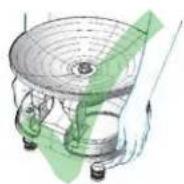
text_image
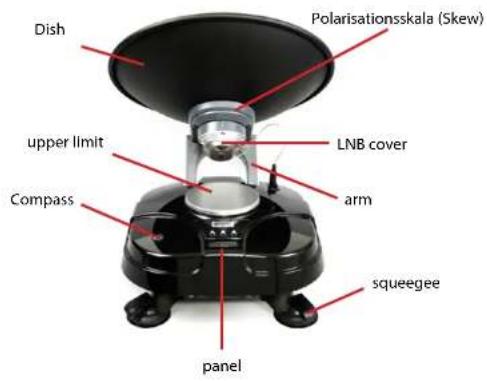
Dish Polarisationsskala (Skew) upper limit LNB cover Compass arm squeegee panelAll panels are different for each package!
Name of Part Indoor unit (IDU) / Power InserterName of I
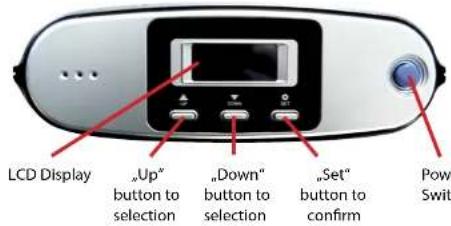
Indoor unit for Satmaster Portable Professional
text_image
LCD Display „Up" button to selection „Down" button to selection „Set" button to confirm Power Switch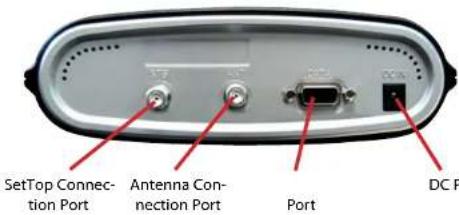
text_image
SetTop Connec- tion Port Antenna Con- nection Port Port DC PProfessionalPremiumClassic
text_image
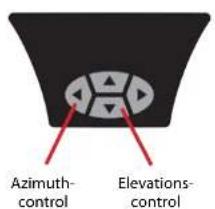
Azimuth- control Elevations- control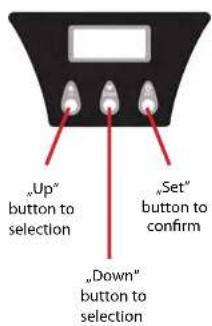
text_image
"Up" button to selection "Down" button to selection "Set" button to confirm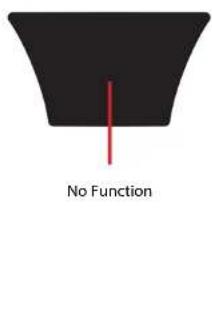
text_image
No FunctionPowerinserter for Satmaster Portable Classic and Premium
text_image
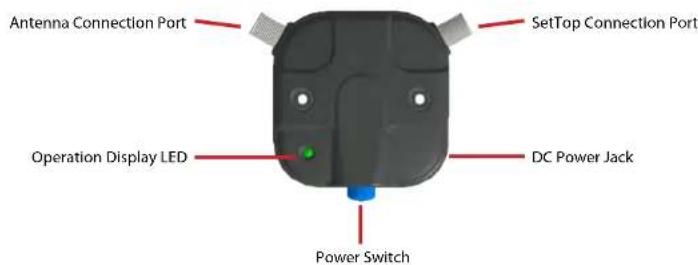
Antenna Connection Port SetTop Connection Port Operation Display LED DC Power Jack Power SwitchInstallation
Check First!
By following the instructions step by step you can proceed easily to install "Satmaster Portable" by yourself or with the help of a professional antenna installer. Before installing your antenna, you check that Satmaster Portable box contains all the items listed above in the 'Box Contents'. In the event of any missing parts, please contact your distributor.
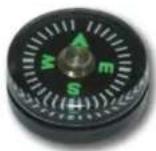
In order to receive a signal from the Satellite, Satmaster Portable is to be installed in an open loop space (outside the house or the apartment), in the direction of the satellite towards the equator, for which, you can refer a compass to exactly orient Satmaster Portable toward the satellite.
Where to Install?
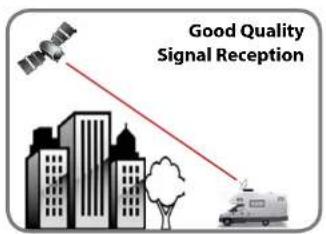
Make sure that there are no obstacles in front of Satmaster Portable which can decrease the signal reception quality, such as buildings, or trees (you may keep in mind that trees will grow and may block the signal). In order to be able to fix and install your antenna easily you might choose an easily accessible place without any potential danger for installation. Think about the way you might pass your cable in a discreet way from the Satmaster Portable to your Set-top Box.
text_image
HAR Good Quality Signal Reception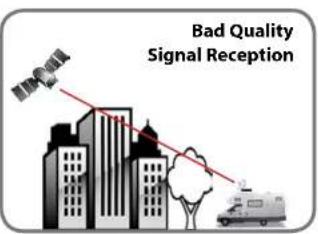
text_image
Bad Quality Signal ReceptionInstallation
flowchart
graph TD
    A["Outdoor Indoor"] --> B["Feeder Cable"]
    B --> C["Set-top-box"]
    C --> D["TV"]
    D --> E["Power Supply"]
    E --> F["Connection diagram Classic and Premium"]
    F --> G["Indoor"]
    G --> H["Set-top-box"]
    H --> I["TV"]
    I --> J["Power Supply"]
    J --> K["Connection diagram Professional"]
    K --> L["Indoor"]
    L --> M["Set-top-box"]
    M --> N["TV"]
    N --> O["Power Supply"]
    O --> P["Connection diagram Classic and Premium"]
    P --> Q["Indoor"]
    Q --> R["Set-top-box"]
    R --> S["TV"]
    S --> T["Power Supply"]
    T --> U["Connection diagram Professional"]
    U --> V["Indoor"]
Startup
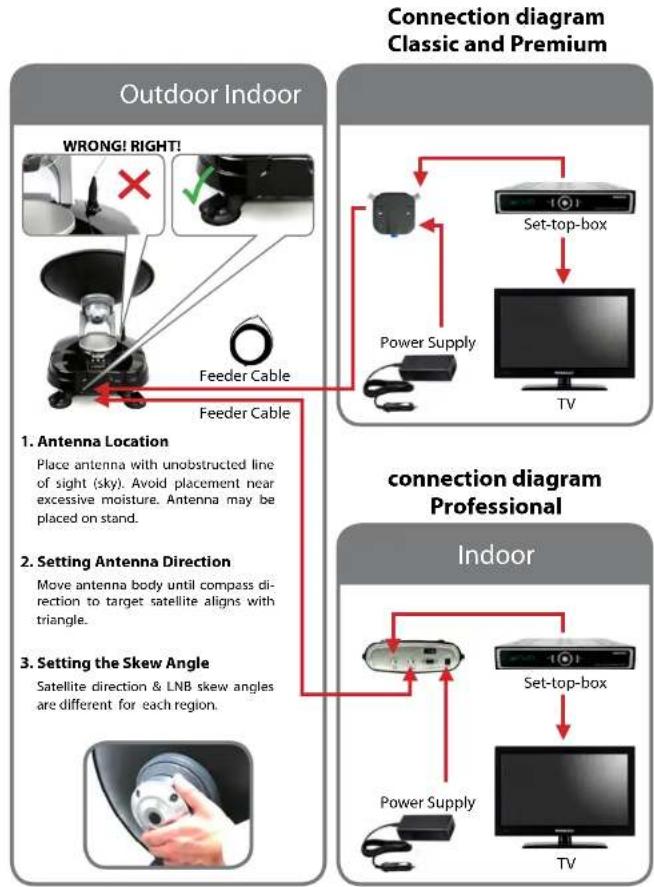
Select the appropriate version for your column and follow the instructions.
| Satmaster Portable Classic | Satmaster Portable Premium Satmaster Portable Professional | |
| Turn on the TV and Settop box. | ||
| Setting the set-top box options to watching TV, (Refer to Subscriber's Manual of your settop box) | ||
| Turn on the power inserter | Turn on the IDU | |
| Wait 10 seconds to start the automatic search with the last setting.To change the setting or manual search press any key. | ||
| Did you press a button, the scan starts now. Otherwise, wait 10 seconds before the scan starts automatically. Wait until the antenna and the positioning of your search has ended (about one minute). | Did you press a button, the safe like name appears on the LCD. If not, the antenna is now investigating the pre-satellite and you can skip the next 6 steps. | |
| Select the desired satellite using the „up“ - and „down" buttons. | ||
| Then press the „Set" button to accept the setting. | ||
| A few seconds later the „elevation ang-a menu" on the LCD. | ||
| Choose an appropriate elevation with the „up“ - and „down" buttons. | ||
| Then press the „Set" button to accept the setting. | ||
| Wait until your antenna has finished scanning and positioning (about one minute). | ||
| After commissioning, you must turn off the power supply so that you can receive all TV programs easily. (Do not remove the input cable between antenna and receiver.) | ||
| After positioning is completed the TV reception is automatically started and you receive a TV signal. If you get no TV, check all connections and settings (Receiver, Portable and Satmaster TV) and follow the above steps again | ||
| If you want to stop using the Portable Satmaster or bring the antenna for transport into the park position, connects the power supply (if you removed it) and turn from the IDU or the Enspisebox and again. The antenna is automatically returned to the park position. The elevation drops and rotates the base unit to the antenna off in the park position. This process takes about one minute. | ||
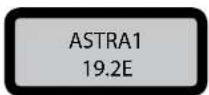
Example Screen (Satellite Selection)
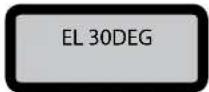
Example Screen (Elevation Selection)
Example (Parking position)
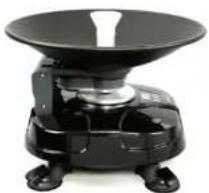
natural_image
Black industrial amplifier with a conical top and four legs (no visible text or symbols)LCD Display
The LCD display shows the current status of the automated search system. (applies to Satmaster Portable Premium and Professional)
H POL, SELECTED
18V from set-top-box
V POL, SELECTED
13V from set-top-box
CHECK STB CBL.
Not connected to receiver. Check the supply cable to the STB-1 connection.
SIGNAL DETECTED
Satellite signal is found
NIT DETECTED
Confirmed that the signal from the target satellite is correct
SIGNAL LOST.
Can not find a satellite signal. Check the orientation of the antenna.
use the "high" - and "down" - the keys to adjust the azimuth or elevation angle.
Elevation angles are set from 20 degree to 70 degrees. Factory setting will be 50 degrees. After the first settings have been activated they will be automatically memorized. There is no need to reset as long as you remain in the same location.
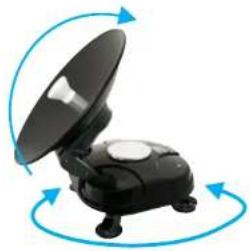
natural_image
Black satellite or antenna device with open lid and four legs, shown in a circular motion pattern (no text or symbols)Connection diagram for updating
Update the unit with external control unit
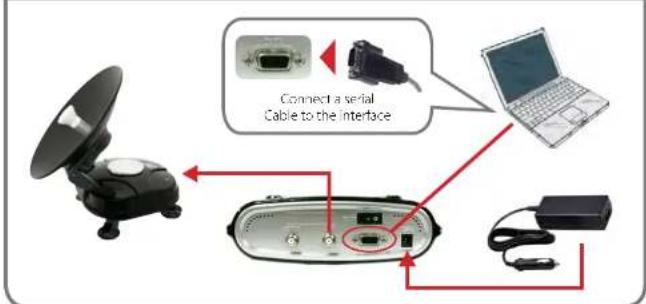
text_image
Connect a serial Cable to the interfaceUpdate the unit with internal controller
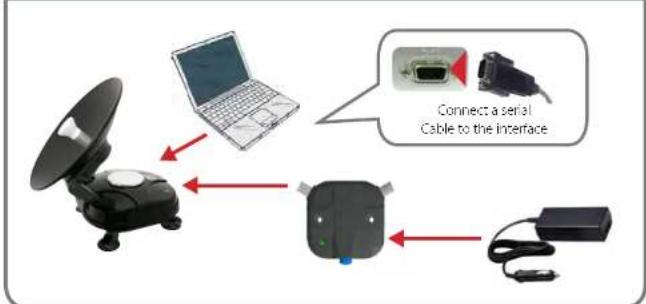
flowchart
graph TD
    A["Satellite"] --> B["Laptop"]
    B --> C["Device"]
    C --> D["Server"]
    style A fill:#f9f,stroke:#333
    style B fill:#ccf,stroke:#333
    style C fill:#cfc,stroke:#333
    style D fill:#fcc,stroke:#333
Program updateProgram update
update process
- Switch off the IDU and Connect a cable between any COM port of PC and IDU's 'Program upgrade PORT (A cable must support RS-232C and "USB to Serial converting function)
- Run the DOWNLOAD Program.
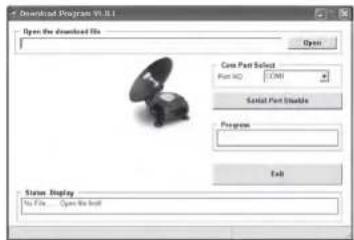
text_image
Download Program VI.1.1 Open the download file Core Part Select Part NO: COM1 Serial Part Disable Progress Exit Status Display No File... Open the install- Select the path of your update file from Open'.
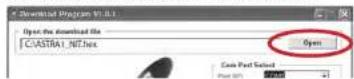
- Select the COM-Prot on your computer you wish to use and activate it
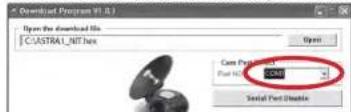
text_image
Download Program ID (I.D.) Open the download file C:\ASTRA1.NIT.hex Open Core Preferences Port NO: COMT Serial Port Enable- Switch the Satmaster 'ON' then 'DOWNLOAD' will be Processed.
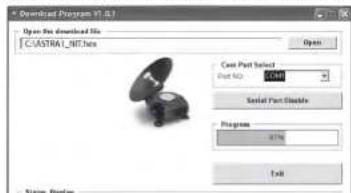
text_image
Download Program ID: 01.01 Open the download file C:\ASTRA1.NET.exe Case Part Selected Part NO: 1644 Serial Part Display Progress: 37% Exit Status: Display- When 'DOWNLOAD' is finished, let 'DATA CABLE' out and run Satmaster Portable.
If the antenna is already on, then turn it off and back on, so that the download starts. In Com Port Select' Only numbers are displayed to the COM ports that can be used. The program supports Windows XP & 7th No Visua.
Signal attenuation
- The satellite signal may be lost temporarily due to unusually heavy rainfall. An optimally aligned antenna, along with the shortest possible cable run, minimizes the chances of "rain fade".
• Make sure the antenna is mounted securely to prevent it from being blown out of alignment in a heavy wind. - Heavy snow accumulation on the antenna may reduce the satellite signal strength; snow should be swept away as soon as possible.
- Tree foliage growth into antenna's line-of-sight to the satellite may result in gradual loss of picture.
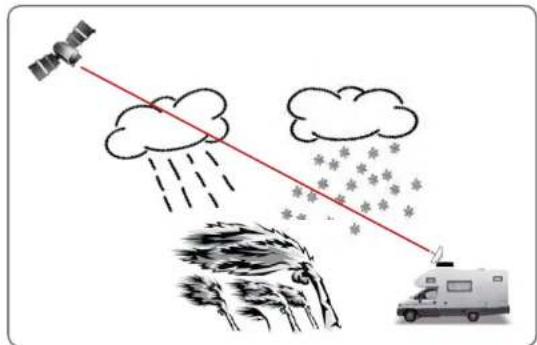
text_image
Diagram illustrating satellite weathering with cloud, rain, and snowfall, showing a vehicle driving a van.A tip for the horn assembling
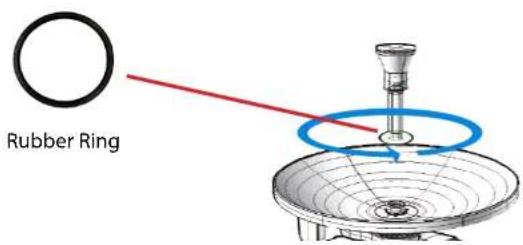
text_image
Rubber RingExamples of finding the satellite (skew, elevation and azimuth)
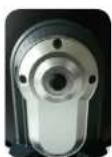
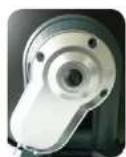
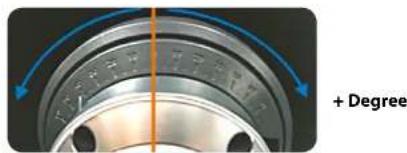
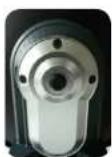
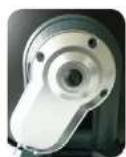
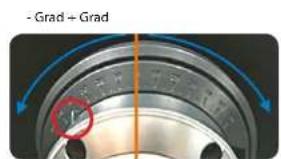
Obtain the Skew Angle of the chosen satellite to tilt your antenna to the specified degree by looking to the degree graduation located on the back of the LNB skew degree controller.
Elevation :
Adjust the elevation angle corresponding to the table at the end of the manual in.
Azimuth :
All EU-related satellites are in the south. The azimuth angle increases or decreases from one satellite to another.
- Degree
text_image
+ Degree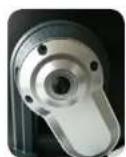
- 20^0^ + 20^
Elevation
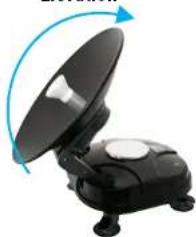
natural_image
Black satellite dish with extended screen and blue circular arrow indicating rotation (no text or symbols)Examples of finding the satellite (skew, elevation and azimuth)
In order to watch Canal + through ASTRA1 (19.2 East) from the city 'Brest' of France, you will see Skew angle at -19.7, Elevation angle at 30, and Azimuth angle at 149.6.
Satellite position
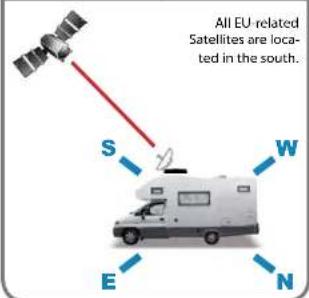
text_image
All EU-related Satellites are loca- ted in the south. S W E NAzimuth
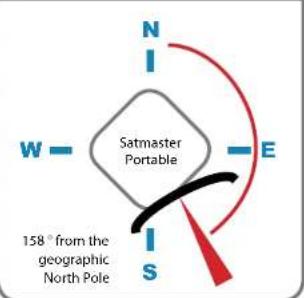
text_image
N I W — Satmaster Portable E I S 158° from the geographic North PoleElevation
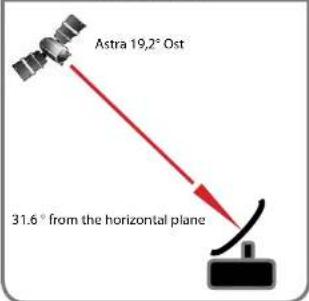
text_image
Astra 19,2° Ost 31.6° from the horizontal planeSkew
text_image
- Grad + GradThe scale for skew is divided in 5 steps, which is the tolerance for the setting. So make the value of -7.2° to -10° or -5° and place the pointer will move between these values.
Setting values for European capitals
| Country | City | SAT | TURKSAF 241A | HELLAS 54F 2 | EVTLELSAR W4W7 | ASTRA/BO EUROBID 201A | ASTRA/BO EUROBID 201A | ASTRA/BO EUROBID 201A | ASTRA/BO EUROBID 201A | EVTLELSAR W3W69 | HOTENBO 600P | EVTLELSAR WCA | EVTLELSAR WTA | SORIGA 600P | THOR 3506 | ATLANTIC BMO 3 | HEPEPAT 1C10 |
| 4Q08 | FMR | 3QA | 2QA | 2QA | 1QA | 1QA | 1QA | 1QA | 1QA | 4QA | 0.00N | 5.00N | RUWN | ||||
| Bulgaria | Sotho | AZ | 153.5 | 157.5 | 161.6 | 172.8 | 179.7 | 186 | 190.7 | 195 | 199.2 | 203.3 | 206.3 | 212.7 | 218.5 | 242.2 | |
| DL | 37.2 | 38.2 | 38.1 | 40.5 | 40.7 | 40.5 | 40.2 | 39.6 | 38.9 | 38 | 37.3 | 34.9 | 33 | 17.8 | |||
| SCHW | -39.2 | -46.3 | -13.4 | 1.7 | 6.8 | 11.4 | 7.8 | 11 | 94 | 16.9 | 19 | 24 | 27.2 | 41 | |||
| Iohama | Kodomin | AZ | 140.7 | 149.4 | 154.4 | 161.6 | 166.9 | 172.7 | 175.9 | 174.5 | 180.7 | 188.2 | 194.4 | 196.5 | 201.1 | 226.1 | |
| DL | 71.7 | 72.3 | 72.2 | 75.1 | 75.8 | 76.2 | 76.7 | 76.7 | 76.7 | 76.7 | 76.7 | 76.7 | 76.7 | 81.7 | |||
| SCHW | 18.5 | 19.5 | 18.4 | 2.4 | 6.6 | 2.2 | 2.3 | 0.3 | 1.8 | 2.4 | 6.2 | 9.3 | 13.7 | 24.8 | |||
| Finland | Nokia | AZ | 190.6 | 194 | 194.4 | 178.3 | 181.7 | 190.7 | 195.4 | 193.8 | 197.2 | 201.1 | 193.7 | 194.8 | 209.4 | 230.7 | |
| DL | 30.3 | 30.6 | 21.2 | 21.8 | 21.8 | 21.7 | 21.4 | 21.1 | 20.7 | 20.1 | 19.7 | 18.4 | 17.3 | 8 | |||
| SCHW | -4.5 | -7.9 | -4.3 | 1.2 | 7.9 | 10.2 | 5.1 | 6.8 | 8.5 | 10.1 | 11.2 | 14.3 | 16 | 15.2 | |||
| France | Paris | AZ | 132.2 | 135.2 | 138.5 | 147.2 | 152.8 | 158 | 162.1 | 168.9 | 188.8 | 172.8 | 176.7 | 184.4 | 190.7 | 220 | |
| DL | 22.3 | 23.9 | 25.3 | 26.6 | 30.3 | 31.6 | 32.4 | 32.9 | 33.4 | 33.7 | 33.8 | 33.8 | 33.4 | 35.8 | |||
| SCHW | -29.1 | -32.5 | -25.8 | -28.9 | -30.5 | -31.2 | -31.2 | -4.2 | -6.7 | -4.1 | -4.2 | 4.9 | 6.3 | 25 | |||
| Germany | Berlin | AZ | 145.5 | 145.9 | 152.2 | 161.6 | 167.4 | 172.7 | 176.7 | 180.5 | 184.2 | 188.1 | 190.8 | 197.9 | 202.8 | 220 | |
| DL | 24.4 | 25.3 | 26.4 | 28.4 | 29.2 | 29.7 | 29.9 | 30 | 20.9 | 29.7 | 29.4 | 28.5 | 27.6 | 18 | |||
| SCHW | -20.2 | -18.3 | -16.4 | -4.1 | -6.7 | 2.6 | 2.0 | 0.3 | 2.6 | 4.9 | 6.6 | 10.8 | 13.6 | 27.8 | |||
| United Kingdom | London | AZ | 130.8 | 133.8 | 136.9 | 145.4 | 150.7 | 155.8 | 159.6 | 163.3 | 167.1 | 170.9 | 173.6 | 181 | 186.1 | 216.2 | |
| DL | 171.1 | 172.7 | 175.7 | 179.3 | 177.3 | 182.0 | 184.7 | 187.5 | 190.6 | 194.0 | 197.1 | 199.9 | 203.9 | 226.8 | |||
| SCHW | -28.1 | -26.7 | -26.2 | -25.2 | -27.7 | -27.8 | -23.5 | -19.3 | -48.1 | -52.7 | -49.5 | -56.1 | -59.4 | -54.8 | |||
| Greece | Athens | AZ | 151.0 | 156 | 160.5 | 172.7 | 180.3 | 187.3 | 192.4 | 197.1 | 201.6 | 206 | 209.1 | 216.0 | 221.7 | 234.6 | |
| DL | 42 | 43.1 | 44.1 | 45.7 | 46 | 45.7 | 45.2 | 44.0 | 43.7 | 42.6 | 41.7 | 39 | 36.8 | 19.6 | |||
| SCHW | -21.9 | -18.7 | -15.3 | 1.3 | 7.3 | 12.7 | 9.7 | 13.4 | 16.9 | 20.2 | 22.5 | 28.1 | 31.6 | 45.9 | |||
| Hungary | Luxembourg | AZ | 150.2 | 153.9 | 157.6 | 162.7 | 174 | 179.2 | 184.3 | 188.3 | 192.2 | 196.2 | 196.1 | 206.4 | 211.3 | 237.4 | |
| DL | 31 | 32.1 | 33 | 34.7 | 33.3 | 35.4 | 35.3 | 35.1 | 34.7 | 34.2 | 33.7 | 32 | 30.6 | 18 | |||
| SCHW | -19.6 | -17.3 | -14.9 | -1.2 | 3 | 0.9 | 2.8 | 5.8 | 8.3 | 10.9 | 12.6 | 17.5 | 20.5 | 34.7 | |||
| Italy | Korea | AZ | 110.7 | 144.1 | 146.9 | 151.7 | 161.8 | 170 | 174.8 | 179.1 | 184.7 | 190.7 | 191.5 | 199.8 | 205.5 | 214.9 | |
| DL | 31.1 | 34.6 | 36 | 39 | 40.3 | 41.1 | 41.5 | 41.6 | 41.5 | 41.3 | 41 | 39.7 | 38.4 | 25.4 | |||
| SCHW | 28.8 | 26.4 | 24.9 | 5.0 | 0.4 | 3.9 | 2.9 | 2.8 | 6.1 | 8.5 | 8.5 | 14.6 | 18.5 | 37 | |||
| Poland | Watanana | AZ | 154.1 | 167.7 | 161.3 | 170.9 | 182.3 | 188.3 | 196.1 | 193.8 | 197.5 | 197.5 | 200.2 | 207.1 | 211.7 | 237.4 | |
| DL | 277.7 | 277.9 | 266.8 | 270.8 | 81.1 | 86.2 | 85.7 | 87.7 | 91.9 | 90.8 | 88.3 | 90.9 | 93.5 | 94.4 | |||
| SCHW | -31.5 | -33.4 | -31.5 | -1.5 | 5.1 | 6.4 | 7.0 | 6.1 | 8.4 | 10.4 | 12.7 | 16.2 | 18.7 | 27 | |||
| Portugal | Libyaon | AZ | 110.7 | 119.2 | 121.8 | 123.8 | 130.2 | 139.2 | 143 | 146.9 | 150.9 | 155.1 | 158.2 | 167.1 | 173.3 | 211.3 | |
| DL | 31.2 | 31.6 | 25.5 | 30.9 | 31.8 | 36.4 | 38.1 | 39.6 | 40.9 | 42.1 | 42.9 | 44.4 | 45 | 40.2 | |||
| SCHW | -48.7 | -47.9 | -43.5 | -40.7 | -27.0 | -24.7 | -26.0 | -7.1 | -27.3 | -19.7 | -16.8 | -18.1 | -9.7 | -74.9 | |||
| Espania | Madrid | AZ | 132.2 | 135.1 | 138 | 136.2 | 141.6 | 146.9 | 151.1 | 155.2 | 159.4 | 162.8 | 167 | 175.8 | 182 | 217.2 | |
| DL | 24.2 | 26.2 | 28.2 | 22 | 26.6 | 27.7 | 29.1 | 40.2 | 41.2 | 42 | 42.5 | 43.2 | 43.2 | 36 | |||
| SCHW | -40.1 | -38.6 | -36.9 | -24.8 | -21.2 | -17.6 | -21.6 | -18.7 | -15.8 | -12.3 | -9.3 | -3.2 | 1.5 | 27.5 | |||
| Sergium | Brunei | AZ | 135.2 | 138.3 | 140.6 | 150.4 | 155.9 | 160.2 | 166.2 | 169 | 172.8 | 176.7 | 179.5 | 187 | 192.1 | 221.5 | |
| DL | 22 | 22.8 | 24.7 | 27.6 | 28.1 | 28.2 | 28.8 | 31.3 | 23.6 | 21.8 | 21.8 | 21.6 | 21.1 | 22.5 | |||
| SCHW | -34.5 | -34.9 | -32.1 | -31.2 | -3.9 | -4.8 | -6.3 | -7.0 | -6.6 | -2.3 | -0.3 | 0.4 | 1.6 | 24.7 | |||
| Sweden | Stockholm | AZ | 150.7 | 156.1 | 159.4 | 160.7 | 171.7 | 178.7 | 182.4 | 185.9 | 190.4 | 192.9 | 195.9 | 201.9 | 205.4 | 232.4 | |
| DL | 30.6 | 29.3 | 21.7 | 22.5 | 24.5 | 24.7 | 22.5 | 23.3 | 22.3 | 22.2 | 21.7 | 20.7 | 18.3 | 13.4 | |||
| SCHW | -13.5 | -13.3 | -10.3 | 11.1 | 3.8 | 3.7 | 3.2 | 3 | 4.6 | 6.4 | 7.8 | 11 | 12.4 | 23.8 | |||
| Switzerland | Barra | AZ | 136.7 | 139.9 | 143.3 | 152.6 | 158.5 | 164.1 | 168.2 | 172.4 | 176.5 | 180.6 | 182.6 | 191.4 | 196.7 | 236.5 | |
| DL | 36.4 | 27.8 | 29.2 | 32.3 | 31.7 | 34.7 | 35.3 | 35.7 | 35.9 | 36 | 35.9 | 35.3 | 34.6 | 24.9 | |||
| SCHW | -27.9 | -26.0 | -24.1 | -11.3 | -7.5 | -5.8 | -7.9 | -5.6 | -2.4 | 0.4 | 2.4 | 7.8 | 11.3 | 29.5 | |||
| Austria | Spain | AZ | 847.1 | 100.8 | 944.8 | 100.0 | 116.3 | 100.6 | 100.6 | 100.6 | 100.6 | 100.6 | 100.6 | 101.8 | 101.7 | 214.6 | |
| DL | 20.4 | 20.5 | 21.5 | 22.5 | 24.2 | 24.6 | 24.7 | 24.6 | 24.2 | 23.9 | 23.5 | 22.1 | 20.9 | 19.2 | |||
| SCHW | 21.1 | 19.0 | 16.7 | 2.4 | 0.7 | 4.5 | 0.4 | 3 | 5.7 | 8.3 | 10.2 | 15 | 18.1 | 32.9 |
There are a number of common issues that can affect the signal reception quality or the operation of the Satmaster Portable. The following sections address these issues and potential solutions.
Blown Fuse, Low Power, or Wiring
If the antenna unit is installed but entirely non-responsive, there are three key factors to check as part of the troubleshooting Process:
1. Blown Fuse
With the system powered on, move the antenna reflector slowly by hand. If the reflector does not move freely, a fuse is not the Problem. If the reflector does move freely, one of the two fuses mounted on the CPU Board may have blown or been broken. The Satmaster Portable Technical Manual Provides detailed instructions for authorized service personnel who may be required to replace a fuse. Contact your local Megast dealer or service center for assistance.
2. Low Power
If the power cable to the antenna unit is more than 50ft (15 m), the power levels can decrease over the course of the cable, resulting in a voltage or current level at the antenna unit that is too low to power the system Property. The Satmaster Portable Technical Manual Provides detailed instructions for supplying adequate power to the antenna unit. Contact your local Megasat dealer or service center for assistance.
3. Cable connection
If the system has been imProperly wired, it will not operate correctly. The Satmaster Technical Manual Provides detailed instructions for authorized service personnel who may be required to check the wiring. Contact your local Megasat dealer or service center for assistance.
4. Satellite Signal Blocked
Satellite signals can be blocked or degraded by buildings, other vessels, or equipment on the vessel itself. Simply moving the vessel or obstruction will clear the signal.
5. Satellite Coverage Issue
Satmaster Portable will Provide outstanding reception within the 18" (46 cm) antenna coverage area for your satellite television service of choice. However, reception can be degraded as you approach the fringe coverage areas. Refer to your satellite television service manual to check the viable coverage area for a18" (46 cm) antenna.
6. Radar Interference
The energy levels radiated by radar units can overload the antenna's front-end circuits. Check with your installer to make certain that the Satmaster Portable antenna unit is in the optimal location with regard to your radar unit.
7. Satellite Frequency Data Changed
If some channels work while one or more other channels do not, or if the antenna is unable to find the satellite, the selected satellite's frequency data may have changed. This frequency data can be updated via the maintenance port. Contact your local Megasat dealer or service center for assistance.
8. Incorrect or Loose RF Connectors
A loose RF connector can reduce the quality of the satellite signal. Also, if you cannot switch satellites using your IRD remote, your IRD may be connected to the wrong antenna base plate connector. The Satmaster Portable Technical Manual Provides instructions for authorized service personnel who may need to check the RF connections. Contact your local Megasat dealer or service center for assistance.
SpecificationsTroubleshooting
| Antenna Typ | Parabolantenna |
| LNB Typ | Universal Single LNB |
| User | 1 |
| Frequency Band | Ku Band |
| Operating Frequency | 10.7GHz - 12.75GHz |
| Polarization | V/H or RHCP/LHCP |
| Antenna Gain | 33dBi |
| Minimum EIRP (reception area) | 50dBW |
| Tracking Rate | ca. 1-2 min. |
| Elevation Range | 10^ - 60^ |
| Azimuth Range | 360^ |
| Type of Stabilization | 2-Achsen DC Motor |
| Temperate Range | -30^ to 80^ |
| Power | 12 V / 24 V / 230 V (P) |
| Dish Diameter | 46cm |
| Dimensions (W/H/D) | 46cm / 46cm / 41cm |
| Weight | 7kg |
Preprogrammed Satellite:
| Satmaster Portable Classic: | Astra1 |
| Satmaster Portable Premium: | Astra 1 Nord, Astra 1 Süd, Astra 2 Nord, Astra 2 Süd, Astra 3, Astra 4 Nord, Astra 4 Süd, Atlantic Bird 3, Eurobird 9, Eutelsat W2M, Hispasat, Hotbird, Thor, TürkSat |
| Satmaster Portable Professional: | Astra 1 Nord, Astra 1 Süd, Astra 2 Nord, Astra 2 Süd, Astra 3, Astra 4 Nord, Astra 4 Süd, Atlantic Bird 3, Eurobird 9, Eutelsat W2M, Hispasat, Hotbird, Thor, TürkSat |