SDV49-AM - Portable DVD Player Nextbase - Free user manual and instructions
Find the device manual for free SDV49-AM Nextbase in PDF.


User questions about SDV49-AM Nextbase
0 question about this device. Answer the ones you know or ask your own.
Ask a new question about this device
Download the instructions for your Portable DVD Player in PDF format for free! Find your manual SDV49-AM - Nextbase and take your electronic device back in hand. On this page are published all the documents necessary for the use of your device. SDV49-AM by Nextbase.
USER MANUAL SDV49-AM Nextbase
Safety Precautions....3
Package Contents....4
Primary Controls 5
System Connection....6
In Car Installation....11
Remote Control Operation....15
Basic Operation 17
System Setup 28
Specification....31
Internal Battery 32
Troubleshooting 35
This manul covers as the following models:
1) SDV48-A / SDV49-A Single DVD player.
2) SDV48-AM / SDV49-AM Single DVD player + monitor.
3) SDV48-AC / SDV49-AC Twin DVD player.
The model number of your product is clearly marked on the box.
Safety Precautions
Thank you for choosing a SDV48/SDV49 portable DVD player. This unit incorporates the latest state of art electronics and is designed for use at home, in hotels and in offices etc for your enjoyment. The compact size makes carrying easier, as well as use. Please read this manual carefully prior to use and keep it for later reference.
text_image
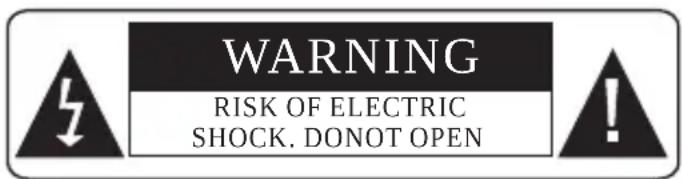
WARNING RISK OF ELECTRIC SHOCK. DONOT OPENLASER
| Type | Semiconductor laser GaAIAs |
| Wave length | 650 nm/780nm |
| Output Power | 5mW |
| Beam divergence | 60degree |
text_image
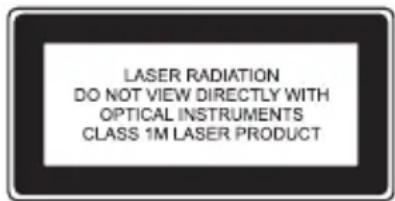
LASER RADIATION DO NOT VIEW DIRECTLY WITH OPTICAL INSTRUMENTS CLASS 1M LASER PRODUCTWarning: To reduce the risk of fire or electric shock, do not expose this player to rain or moisture.
- Please read this instruction manual carefully and follow all the requirements for safe operation of the player & accessories.
- Do not use this player near water. Do not place any container with liquid inside, above the player.
- Do not install near any heat sources such as radiators, heat registers, stoves, or other apparatus (including amplifiers) that produce heat.
- Unplug this unit during lightning storms or when unused for a long time.
- Cleaning: Unplug the player, use only dry cloth to clean. Do not use liquid detergent or other cleaning agents.
- Only use accessories specified by the manufacturer.
- Refer all servicing to the Next base Service Centre. Servicing is required when the unit has been damaged in any way, such as power supply cord or plug is damaged, liquid has been spilled or objects have fallen on to the unit, exposed to moisture, or does not operate normally. Don't try to repair the player by yourself, because of the danger of high voltage and electric shock.
- Do not use irregular shaped discs such as heart or star-shaped discs as they may cause the unit to malfunction.
SPECIAL NOTE REGARDING USE OF THE PLAYER IN A VEHICLE
y We strongly advise against the driver of a vehicle using this product, whilst moving.
y Most countries and states have laws which prohibit or severely restrict the use of the product in vehicles while driving, where the driver can see the screen. Please adhere to these laws.
Do not leave the product in places where the temperature is extremely low (about-10 °C or lower) or extremely high (about 60 °C or higher), such as inside the passenger cabin or trunk in midsummer. Doing so may warp the outer case or reduce the performance or quality of the battery pack.
Always switch the engine on before connecting power to the product.
Always disconnect the power play before switching off the engine.
SPECIAL NOTE REGARDING USE OF THE PLAYER ON AEROPLANES
This product may be allowed to be used on an aero plane at the discretion of the airline.
Always conform to the instructions given with respect to the use of electronic devices whilst traveling on an aero plane.
Package Contents
DVD Player Monitor Headrest Mount
SDV48-A / SDV49-A x 1 SDV48-AM / SDV49-AM x 1 SDV48-AC / SDV49-AC x 2
Supplied with SDV48-AM & SDV49-AM models only
SDV48-A / SDV49-A x 1 SDV48-AM / SDV49-AM x 2 SDV48-AC / SDV49-AC x 2
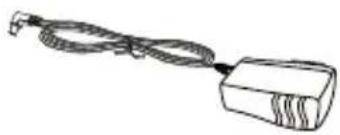
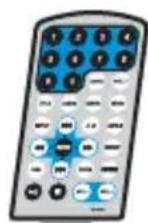
AC/DC ADAPTOR REMOTE CONTROL AV CABLE
SDV48-A / SDV49-A x 1 SDV48-AM / SDV49-AM x 1 SDV48-AC / SDV49-AC x 2
SDV48-A / SDV49-A x 1 SDV48-AM / SDV49-AM x 1 SDV48-AC / SDV49-AC x 2
SDV48-A / SDV49-A x 1 SDV48-AM / SDV49-AM x 1 SDV48-AC / SDV49-AC x 2
STEREO EARNON ES CAR POWER CABLE INTERCONNECTION CABLE
SDV48-A & SDV49-A SDV48-AM & SDV49-AM
SDV48-A & SDV49-A SDV48-AM & SDV49-AM
SDV48-A / SDV49-A x 1 SDV48-AM / SDV49-AM x 1 SDV48-AC / SDV49-AC x 2
SDV48-AC & SDV49-AC MANUAL
SDV48-AC & SDV49-AC
CARRY CASE
MANUAL
Primary Controls
DVD Player SDV48 series
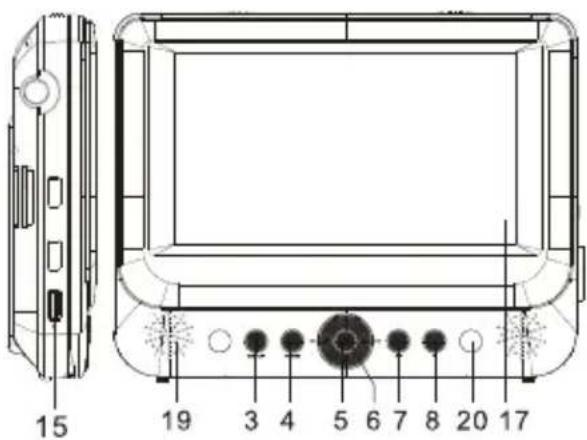
text_image
15 19 3 4 5 6 7 8 20 17- Open Button
- Power ON-OFF/CHARGE switch
- SETUP Button
- MODE Button
- ▲▼◀▶ ▶▶◀
- OK / Enter Button
- Play/Pause
- STOP Button
- DC IN 9-12V
- DC OUT
(applicable to -AM master only)
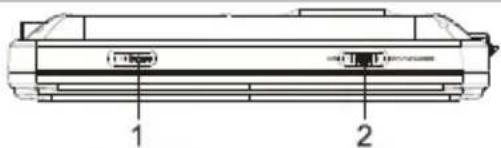
natural_image
Technical line drawing of a mechanical component with labeled parts (1 and 2), no readable text or symbols beyond labels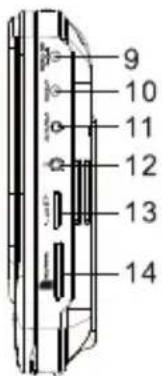
text_image
9 10 11 12 13 14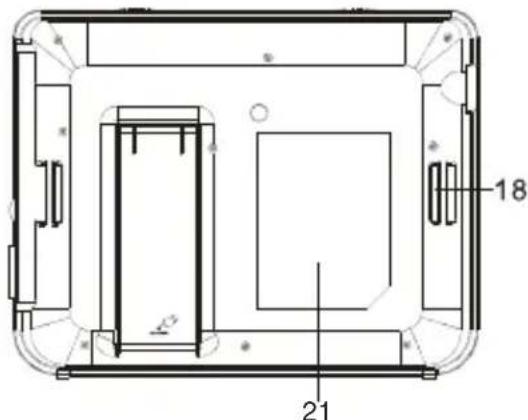
text_image
18 21- AV/IN OUT
- Earphone Jack
- Volume Control
- SD/MMC Card Slot
- USB Port (For memory stick only)
- Stand (Pull out to use and click back to stow)
- LCD Screen
- Headrest Mount Strap Guide
- Speakers
- Indicator Lights Blue = Power On
$$ \text { Red } = \text { Battery Charging } $$
$$ \text { Green } = \text { Battery Fully Charged } $$
- Rating Label Position
Monitor (SDV48-AM Only)
natural_image
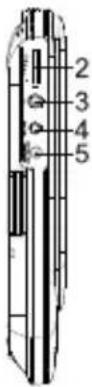
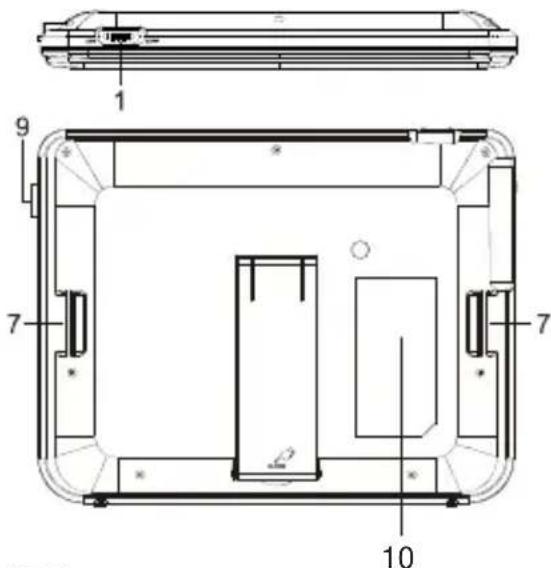
Technical line drawing of a rectangular device with rounded corners and labeled dimensions (no text or symbols beyond measurement markers)- Power ON/OFF Switch
- Volume Control
- Earphone jack
- AV IN
- DC IN 9-12V
text_image
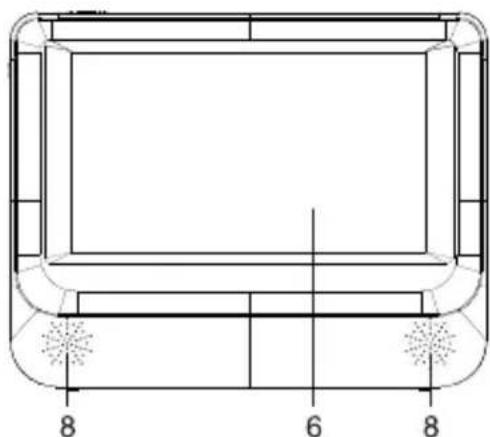
Technical diagram of a device interior with numbered components, likely an electronic or mechanical assembly.- LCD Screen
- Headrest mount strap guide
- Speakers
- Brightness control
- Rating Label Position
©
©
©
System Connection
SDV48-AC / SDV49-AC
Twin screen system with two DVD players.
text_image
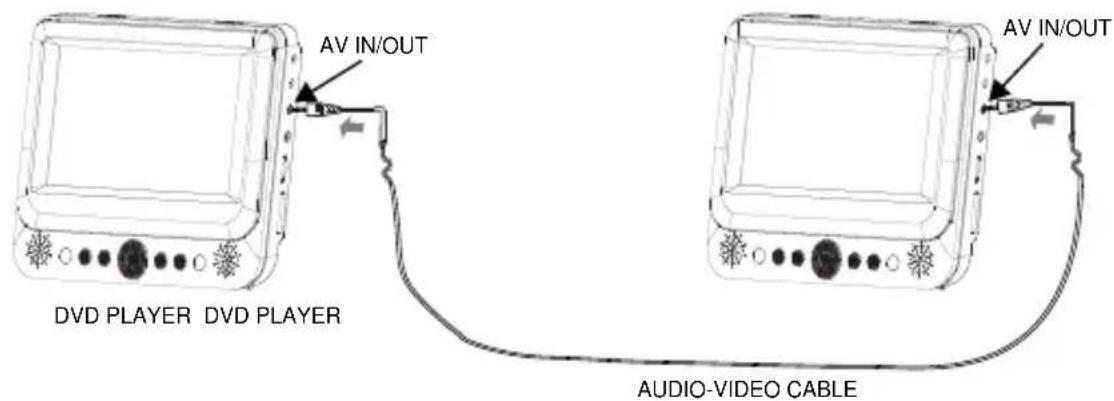
AV IN/OUT DVD PLAYER DVD PLAYER AV IN/OUT AUDIO-VIDEO CABLEEither use the two DVD players independently (no interconnection required), or connect them together as shown above, to share one movie across two screens. After connection, to share one movie across two screens, insert the DVD disc into one player and start playback. The second screen (without the playing disc inside) has to be set to AV-IN mode by pressing the DVD/IN button upon the remote control. Remove the cable if watching different movies.
text_image
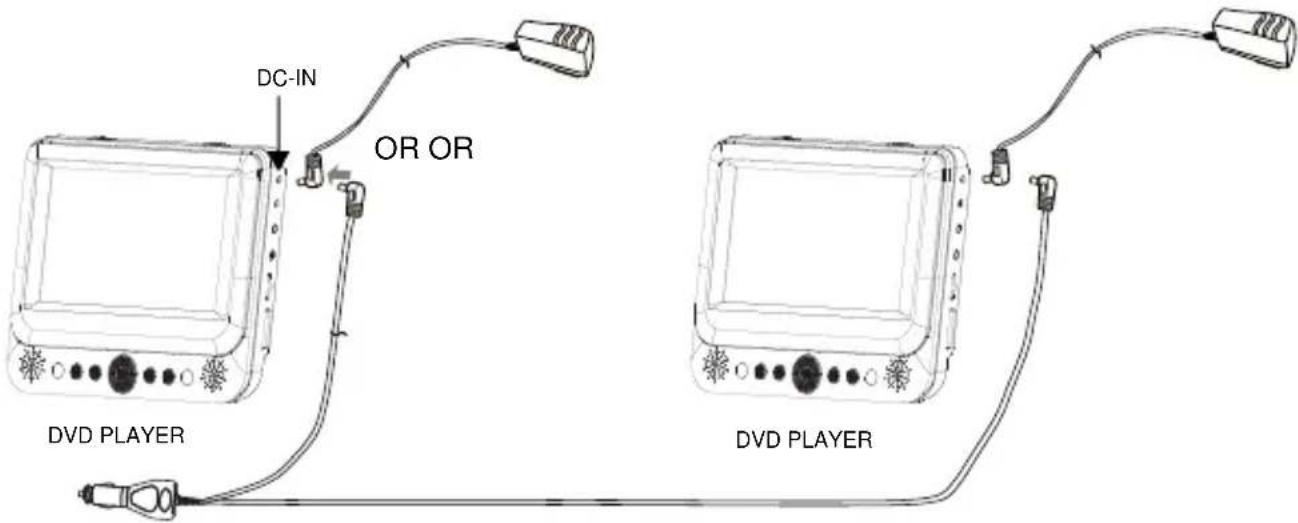
DC-IN OR OR DVD PLAYER DVD PLAYERBoth players can operate from their internal batteries, or connect either the domestic mains adaptors or the dual car adaptor for continuous use, as above.
NOTE:
- For use in 12VDC vehicles only, NOT 24VDC vehicles, or damage will result.
• Always start the vehicle engine before connecting the DVD players to the supply or damage could result due to electrical surges during engine start. - To charge the internal battery of the DVD players, connect either power supply method above and switch to the "OFF/CHARGE" position.
- Remove the interconnection cable if watching different movies, or sound interference will occur.
Car Adaptor
Cigarette Lighter Plug
DC Plug
SDV48-AC / SDV49-AC models only
The Car Adaptor is fused in order to protect the car and DVD system from damage as a result of voltage / current surges, short circuit, cable damage or product failure.
If the DVD player will work perfectly on the domestic mains adaptor but not on the Car Adaptor, then the fuse should be checked, as it may have blown.
If found to be blown, check the player and cables for damage. Replacement fuse details are shown below.
20mm glass fuse
SDV48-A / SDV49-A: 1.5A
SDV48-AM / SDV49-AM: 1.5A
SDV48-AC / SDV49-AC: 2.0A
Unscrew
To remove fuse Exploded view
CAUTION: The fuse, spring, collar and tip are small components and must not be lost, or re-assembly is impossible.
Mains Adaptor
The mains adaptor (supplied with UK and EU plug tops) is a 100-240VAC 50-60Hz type which covers most domestic supplies around the world, for your convenience.
Please use whichever plug top suits your needs, either at home or whilst travelling.
Press the release button to remove / insert the desired plug top and ensure that the latch clicks firmly in place for security.
NOTE: The plug tops can be inserted in either of 2 directions for your convenience.
BOTH orientations are acceptable, safe and functional.
Your local electrical distributor will be able to supply any additional adaptors to convert the pin configuration to other worldwide travel destination requirements.
Only the supplied adaptor is to be used with the SDV48 & SDV49. Using other adaptors or supplies may cause irreparable damage to the player. The supplied adaptor is labelled to identify its use for the SDV48 & SDV49 Series accordingly.
In Car Installation
- Fit the headrest mount to the DVD Player / Monitor as required.
front straps
Once secured correctly, the back of the player (or monitor) will sit against the front of the headrest mount.
TOP
fixing strap
fixing strap
front
Turn the headrest mount and player around so the backs are facing you.
fixing point
back
Slide the fixing strap through the left-hand fixing point on the back of the player or monitor, as shown.
Fold the strap over on to the back of the headrest mount and secure firmly.
Repeat process for the other strap.
Ensure the DVD player or monitor is mounted centrally.
Turn the headrest and player around so the front is facing you.
Using the front straps secure the player or monitor as shown.
NOTE: For SDV48-AM /SDV49-AM products the same design headrest mount is used for both the player and monitor.
©
©
©
©
Use of the Remote Control
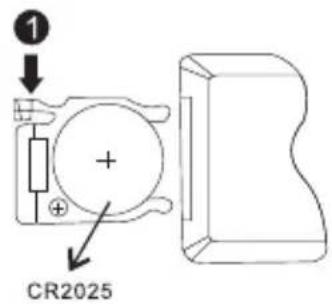
As supplied, a new battery is already fitted to the remote control. To activate, simply pull out the isolating tab, where it says PULL.
To replace the battery in the remote control, see illustration below.
1) Push down tab.
2) Pull out tray
3) Insert battery with + to the back
4) Refit
text_image
① + CR2025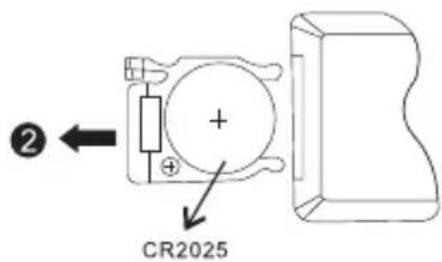
text_image
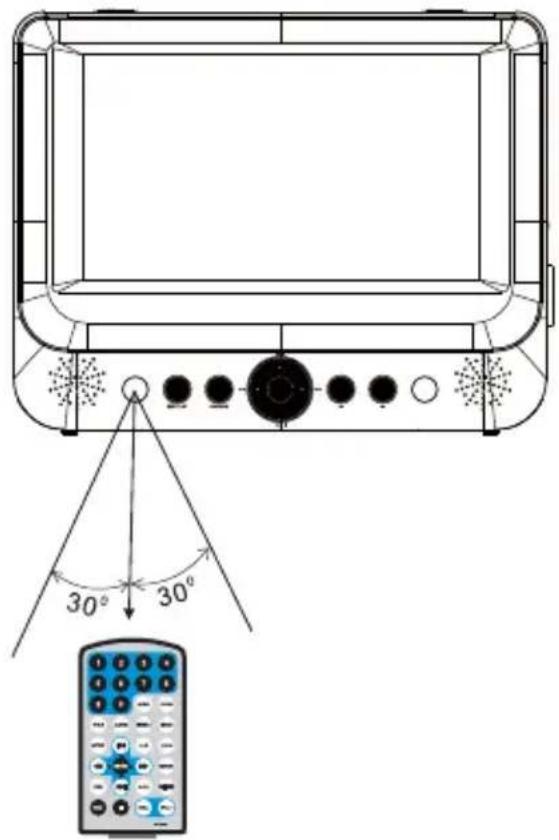
② + CR2025When using the remote control, make sure the remote is pointed to the infrared receiving window of the DVD player (NOT the monitor). The distance between player and remote control must be within 3 meters. Please see below.
text_image
30° 30°Notices
- Do not drop or step on the remote control or subject it to shock or liquid.
- Do not expose the DVD player to direct sunlight or this may prevent the remote control from working normally.
- If the remote control stops working, replace the battery with a new one, type Cr2025.
- With an SDV48-AM / SDV49-AM the remote control must be pointed at the DVD player, not the monitor.
- With an SDV48-AC / SDV49-AC there are two identical remote controls supplied, to simplify matters. Just point the remote control at the specific DVD player to control it.
©
Fast forward and fast backward

text_image
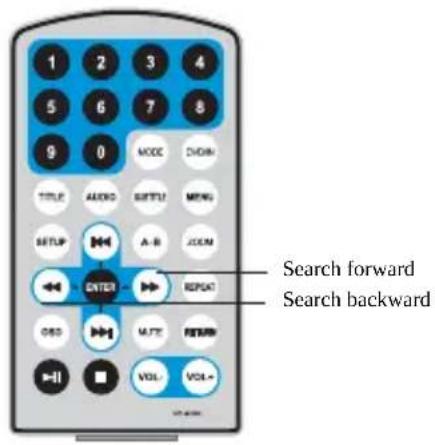
DVD DivX SVCD VCD CD MP3 XvidDuring playback of media, the player can search forward or backwards.
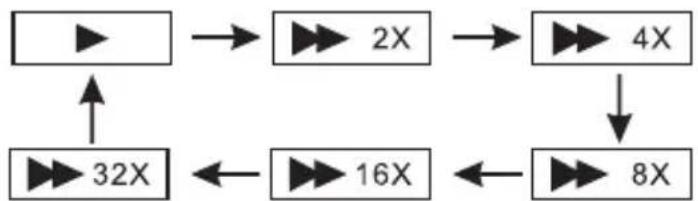
- Press ▶, the unit will search forward. Press it repeatedly, the unit will play at 2, 4, 8, 16, or 32 times speed.
flowchart
graph TD
    A["Input"] --> B["2X"]
    B --> C["4X"]
    C --> D["8X"]
    D --> E["16X"]
    E --> F["32X"]
    F --> A
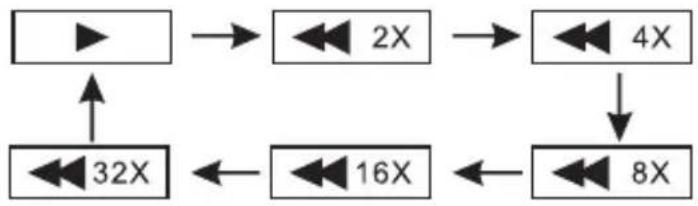
- Press ◀, the unit will search backward. Press it repeatedly, the unit will reverse at 2, 4, 8, 16, or 32 times speed.
flowchart
graph TD
    A["▶"] --> B["2X"]
    B --> C["4X"]
    C --> D["8X"]
    D --> E["16X"]
    E --> F["32X"]
    F --> A
text_image
1 2 3 4 5 6 7 8 9 0 MODE DOWN TITLE AUDIO SWITCH MENU SETUP A-B JCOM ENTER REPEAT GSD MULTI RETURN VOL VOLT Search forward Search backwardRepeat playback

text_image
DVD DivX SVCD VCD CD MP3 XvidDuring playback of media you can repeat the playback of one chapter, title or the whole disc.
For a DVD disc, press the “REPEAT” button, you can repeat playing one Chapter; press it again to repeat playing one Title; press it the third time to repeat playing the whole disc. Press it a forth time to cancel repeat playback.

flowchart
graph LR
    A["Chapter"] --> B["Title"]
    B --> C["All"]
    C --> D["Repeat off"]
For MP3 files, press the "REPEAT" button to repeat playing the present file; press it again to repeat playing the folder; press it the third time to cancel repeat playback.

flowchart
graph LR
    A["Repeat one"] --> B["Repeat folder"]
    B --> C["Repeat off"]
Repeat playback of a specific scene

text_image
DVD DivX SVCD VCD CD MP3 XvidDuring playback, you can choose to repeatedly playback a specific section.
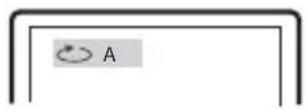
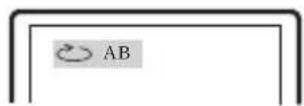
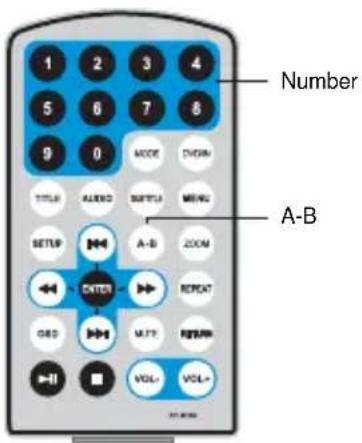
During playback, press "A-B" button at point A, the start. Press "A-B" again at point B, the end point. The player will automatically repeat playback of the part between A-B.
Press "A-B" a third time, the unit will then return to normal playback.
text_image
Number A-B©
©
©
Browser Mode
Photo Mode
Music Mode
Movie Mode
For a detailed explanation of each mode, please see subsequent pages.
Browser Mode
Mp3
Mp3
Mp3
Mp3
Mp3
In the Browser Mode, the player will show the list of files and folders on the selected device (SD/MMC or USB).
Press the Up, Down button to highlight the required file and press “ENTER” to play.
Press “ ” to enter the folder.
Press “ ” to exit the folder.
Note: If you want to return to the Main Menu, first, the system must be displaying the List of files and folders, and then you can press the "RETURN" KEY to return to the Main Menu.
©
Music Mode
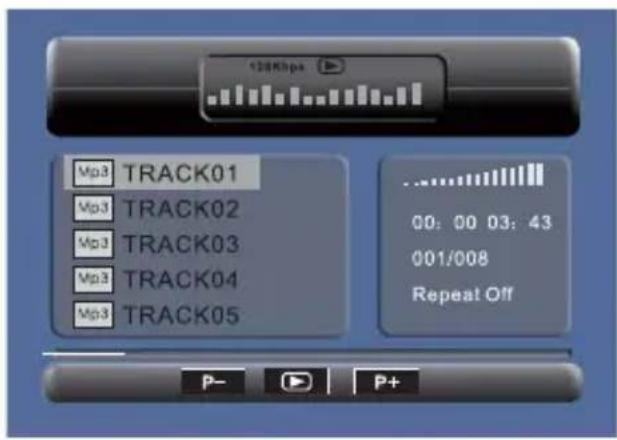
text_image
128Kbps Mp3 TRACK01 Mp3 TRACK02 Mp3 TRACK03 Mp3 TRACK04 Mp3 TRACK05 00: 00 03: 43 001/008 Repeat Off P- P+In Music Mode, the player will show the list of playable music files.
Press Up, Down to select the desired track and "ENTER", to play.
Press “◀/” to fast forward /backward the music during playback.
When stopped, press the Right or Left to highlight the lower menu options, as follows:
P- Page Up
P+ Page Down
Play
Note : Press "Return" Key to Return to the Main Menu.
Movie Mode
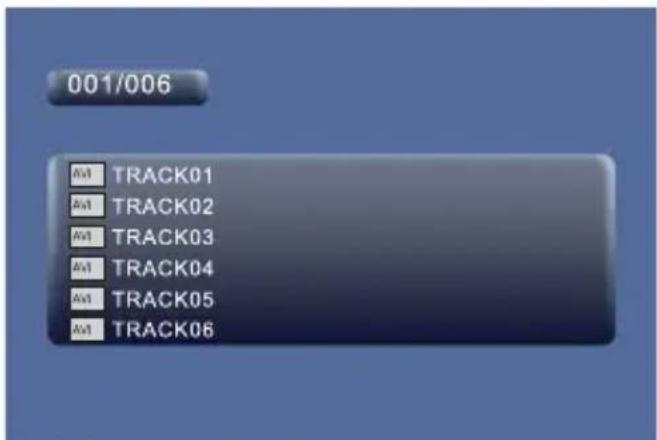
text_image
001/006 AVI TRACK01 AVI TRACK02 AVI TRACK03 AVI TRACK04 AVI TRACK05 AVI TRACK06In the Movie Mode, the player will show a list of playable Movie files, such as MP2, DivX etc. Press Up, Down to select the desired movie and then “ENTER” to play.
When playing a movie you can press “MENU” or the “RETURN” Key to go back to the list of playable movie files.
If you want to return to the Main Menu, Please Press the “Return” key when the list of movie files is displayed.
NOTE:
For details upon playable movie formats and recommendations, see later in this manual.
Movie compression formats
The use of the DivX encoder is recommended in order to compress movies and then play upon this player. Whilst there are many movie formats and compression software available, most use MPEG4 algorithms at their heart.
DivX is just one such MPEG4 compressor, but it is the most widely used and recognised by Sony, Panasonic and other manufacturers.
This device is capable of DivX playback in order to provide a reliable and consistent playback performance.
When using the official DivX encoder (download from www.DivX.com at a small charge) and always use the “Home Theatre” option for optimum compression and suitable playback quality upon the player. Maintain the 16:9 ratio for full screen viewing.
Use of other compression software, or the playback of other format files (such as Quick Time) may have unreliable or unpredictable results and is not recommended.
CD Ripping
A basic CD ripping function is available upon the player, but the resultant tracks are simply labelled.
Whilst playing a CD, you can enter the CD Ripping function, by pressing the “SUBTITLE” button. The player will be able to change the CD format into MP3 format and then store it in the inserted USB or SD/MMC card, in a folder entitled “CDA_RIP”.
After pressing "SUBTITLE", this menu appears:
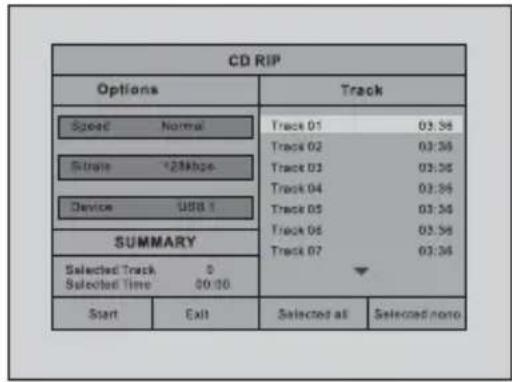
text_image
CD RIP Options Track Speed Normal Track 01 03:56 Track 02 03:56 Track 03 03:56 Track 04 03:56 Track 05 03:56 Track 06 03:56 Track 07 03:56 SUMMARY Selected Track 0 Selected Time 00:00 Start Exit Selected all Selected noneSpeed : Select the ripping speed: Normal or Fast.
Bitrate : Select the bitrate. You have 6 choices 96, 112, 128, 192, 256 and 320Kbps
Device : This item indicates whether USB or SD/MMC is connected to the DVD player.
Exit: Exits to the previous menu.
Select all : Selects all the files on the disc for ripping.
Select none : Deselects all the files on the disc.
Start: Move the cursor to the item and press the "ENTER" button, the ripping starts and shows the following screen:
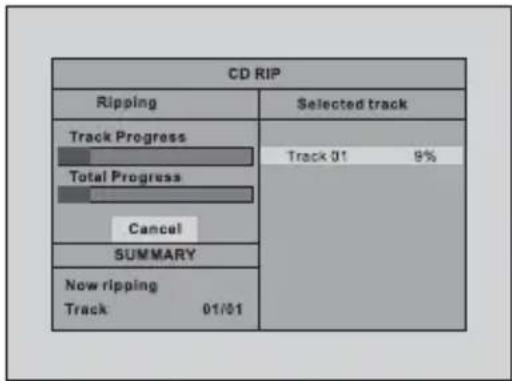
text_image
CD RIP Ripping Selected track Track Progress Track 01 9% Total Progress Cancel SUMMARY Now ripping Track 01/01During the ripping, you can select CANCEL to stop the process.
NOTE: You can select individual tracks to rip to MP3. Use the Up, Down, Left, Right buttons to highlight those desired tracks and press "ENTER" to select. Press "START" to initiate the ripping process of those selected tracks.
©
©
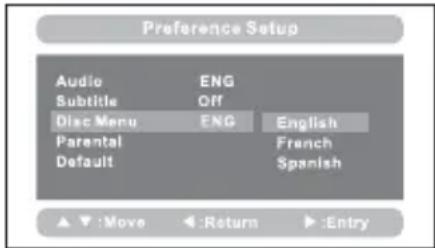 | Disc Menu:This function allows you to choose the menu language from the DVD disc.Default is English.The disc menu language depends upon the information available upon each disc. |
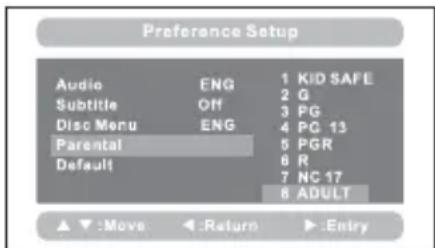 | Parental:Enter this option to set the parental control level, to prevent unsuitable disc scenes being watched by children.Optional parental control levels: KID SAFE, G, PG, PG 13, PGR, R, NC17, ADULT.The default of this option is ADULT.The default password: 8888. |
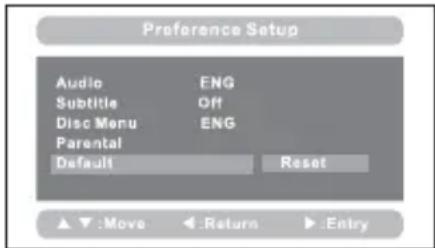 | Default:Select this item and press the “ENTER” button to reset all settings to the original factory settings.This includes reset of the region setting to multiregional. |
Specification
Compatible disc: DVD / VCD / CD / MP3 / DIVX / DVD±R / DVD±RW
Signal system: PAL/NTSC
Panel size: SDV48 series: 7"
SDV49
series:
Panel resolution: SDV48 series: 480 x 234 RGB
SDV49 series: 640 x 234 RGB
Frequency response: 20 Hz to 20 kHz
Video output: 1 Vp-p/75 Ohm, unbalanced (Composite video)
Audio output: 1.4Vrms/10kOhm (Stereo Audio)
Audio S/N: Better than 80 dB
Dynamic range: Better than 85 dB
Laser: Semiconductor Laser, Wave Length: 650 mm/795 mm
Power source: DC 9-12V
Mains adaptor:
Input: 100-240V 50-60Hz
Output: 9VDC 1A
Car adaptor:
Input: 12V (not for use with 24V systems)
Fuse Type: SDV48-A / SDV49-A & SDV48-AM / SDV49-AM
Fuse Type: SDV48-AC / SDV49-AC
Battery:
Type: Lithium Polymer
Capacity: SDV48 series: 850mAh
SDV49 series:1000mAh
Voltage: 7.4V
Power consumption: <10W for all model types
Remote Control Battery:
Type: CR2025
USB stick: Max. size 8GB, formatted FAT or FAT32
SD/MMC card: Max. size 8GB, formatted FAT or FAT32
Operating temperature: 0\~40°C
Storage temperature: 0\~50°C
Dimensions:
DVD Player: SDV48 Series: 212 x 167 x 40 mm
SDV49 Series: 245 x 190 x 42 mm
Monitor: SDV48 Series: 212 x 167 x 25 mm
SDV49 Series: 245 x 190 x 30 mm
Weight:
DVD Player: SDV48 Series: 0.70Kg
SDV49 Series: 0.91Kg
Monitor: SDV48 Series: 0.35Kg
SDV49 Series: 0.52Kg
Internal Battery
The DVD Player incorporates an integral Lithium Polymer battery for high performance and optimum playback times. The battery has no memory effect and be charged safely, regardless of whether the battery is fully or partially discharged.
Playback time is approximately 2 hours after a full battery charge, when used under normal operating conditions.
Battery Charging
Connect the DVD player to the supplied power supply (either the AC Adaptor or 12V Car Adaptor) and switch the Player to OFF/CHARGE.
If the player is turned on, then charging stops, but playback will continue from the external power source and NOT drain the battery.
Always unplug from the AC Adaptor or Car Adaptor once charging is complete.
LED Indicator light
Green / Red flashing = player is checking battery level
Red = charging
Green = fully charged
Blue = Power on
Battery Replacement
The integral battery is not user replaceable once exhausted (approx. 300 charging cycles).
Please contact your NEXTBASE Authorised Service Centre for a replacement battery to be fitted by a qualified engineer.
Low Battery Warning
A low battery warning will appear on-screen when the battery is nearly exhausted.
Please connect the supplied power source (car power cable or mains adaptor) at this time to either continue using the player, or recharge the battery.
Caution: Danger of explosion if battery is incorrectly replaced. Replace only with the same or equivalent type.
battery charge time paragraph
Charge time for a fully discharged battery is approximately:
SDV48 1.25 to 1.75 hours
SDV49 2.15 to 2.30 hours
©
©
©
©
©
©
Tragbarer 7- & 9-Zoll DVD-Player
natural_image
Line drawing of a toaster oven with control panel and indicator lights (no text or symbols)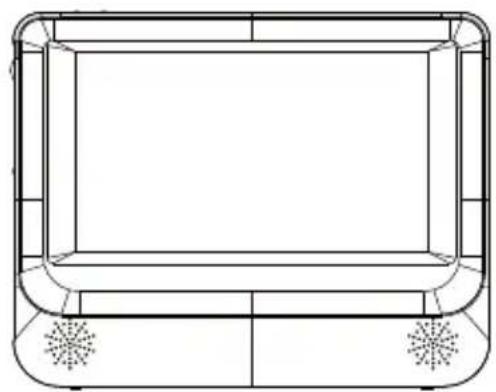
natural_image
Line drawing of a rectangular electronic device with two side-mounted fans and a central screen (no text or symbols)Bedienungsanleitung
Inhalt
Sicherheitshinweise .... 1
Lieferumfang....2
Bedienelemente....3
Systemanschluss....4
natural_image
Line drawing of a front panel with control buttons and indicator lights (no text or symbols)SDV48-A / SDV49-A x 1 SDV48-AM / SDV49-AM x 1 SDV48-AC / SDV49-AC x 2 SD
natural_image
Line drawing of a rectangular frame with rounded corners and two small flower-like symbols on the sides (no text or labels)natural_image
Pure mechanical diagram of a frame with clamps and brackets (no text or symbols)SDV48-A / SDV49-A x 1 SDV48-AM / SDV49-AM x 2
NETZTEIL FERNBEDIENUNG AV-KABEL
natural_image
Simple line drawing of a cable and connector (no text or symbols)SDV48-A / SDV49-A x 1 SDV48-AM / SDV49-AM x 1 SDV48-AC / SDV49-AC x 2
SDV48-A / SDV49-A x 1 SDV48-AM / SDV49-AM x 1 48-AC / SDV49-AC x 2 SDV48-AC
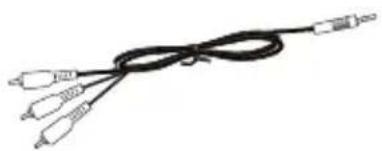
natural_image
Line drawing of a black cable with three connectors (no text or symbols)SDV48-A / SDV49-A x 1 SDV48-AM / SDV49-AM x 1 SDV49-AC x 2
SDV48-A / SDV49-A x 1 SDV48-AM / SDV49-AM x 1 SDV48-AC / SDV49-AC x 2

natural_image
Line drawing of a toolbox with handle and clasp (no text or symbols)BEDIENUNGSANLEITUNG

Monitor (nur SDV48-AM)
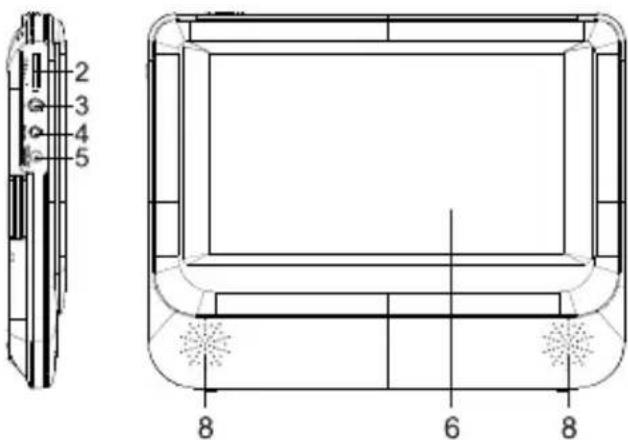
text_image
2 3 4 5 8 6 8text_image
Technical diagram of a device interior with numbered components and labeled partsnatural_image
Line drawing of a device with a checkmark and circular arrows indicating rotation or operation (no text or symbols)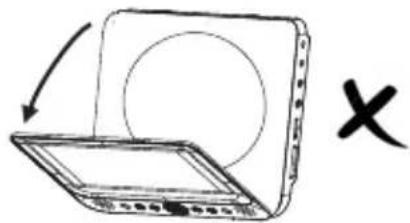
natural_image
Simple line drawing of a laptop with an arrow indicating rotation and a cross symbol (no text or labels)BITTE BEACHTEN SIE:
text_image
2X 3X 4X 1/2X 1/3X 1/4Xnatural_image
Grid of grayscale landscape photos showing landscapes and structures, no text or symbols presentnatural_image
Diagram of a device with a black ink splatter on screen, labeled A and B (no text or symbols on the diagram itself)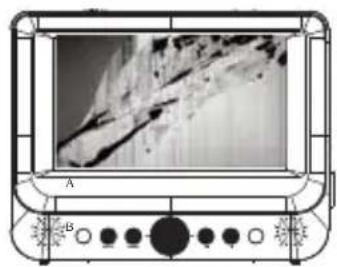
natural_image
Front view of a portable electronic device with a screen displaying a textured surface and control knobs (no visible text or symbols)Pixelausfälle
NEXT BASE® one step further
SDV48_49 SERIES-NB ENG MANUAL A2