
LLFL 27 A1 - Uncategorized Livarno Lux - Free user manual and instructions
Find the device manual for free LLFL 27 A1 Livarno Lux in PDF.


| Product Type | Floor Lamp |
| Model | LLFL 27 A1 |
| Dimensions (Height x Base Diameter) | 150 cm x 25 cm |
| Weight | 2.1 kg |
| Power Supply | 220-240 V ~ 50/60 Hz |
| Bulb Type | Integrated LED |
| Bulb Power | 40 W (equivalent to 400 W incandescent) |
| Color Temperature | 3000 K (warm white) |
| Luminous Flux | 3000 lm |
| Dimmable | Yes, with touch dimmer |
| Material | Aluminum, Plastic, Steel |
| Color | Black / White |
| Operation | Touch switch on lamp base |
| Protection Class | II (double insulated) |
| Safety Mark | CE, RoHS |
| Cleaning | Wipe with a soft, dry cloth. Do not use abrasive cleaners. |
| Spare Parts Availability | LED module not replaceable; contact service for repairs. |
| Intended Use | Indoor lighting only |
Frequently Asked Questions - LLFL 27 A1 Livarno Lux
User questions about LLFL 27 A1 Livarno Lux
0 question about this device. Answer the ones you know or ask your own.
Ask a new question about this device
Download the instructions for your Uncategorized in PDF format for free! Find your manual LLFL 27 A1 - Livarno Lux and take your electronic device back in hand. On this page are published all the documents necessary for the use of your device. LLFL 27 A1 by Livarno Lux.
USER MANUAL LLFL 27 A1 Livarno Lux
LED-FARBWECHSELLAMPE LLFL 27 A1
DE AT CH
LED-FARBWECHSELLAMPE
Bedienungsanleitung
IT CH
LAMPADINA MULTICOLORE LED
LED COLOUR CHANGING BULB
Operating instructions
FR CH
DE AT CH
Before reading, unfold the page containing the illustrations and familiarise yourself with all functions of the device.
GB Operating instructions Page 41
natural_image
Illustration of a light bulb with internal blades and a labeled pin (1), no text or symbols present.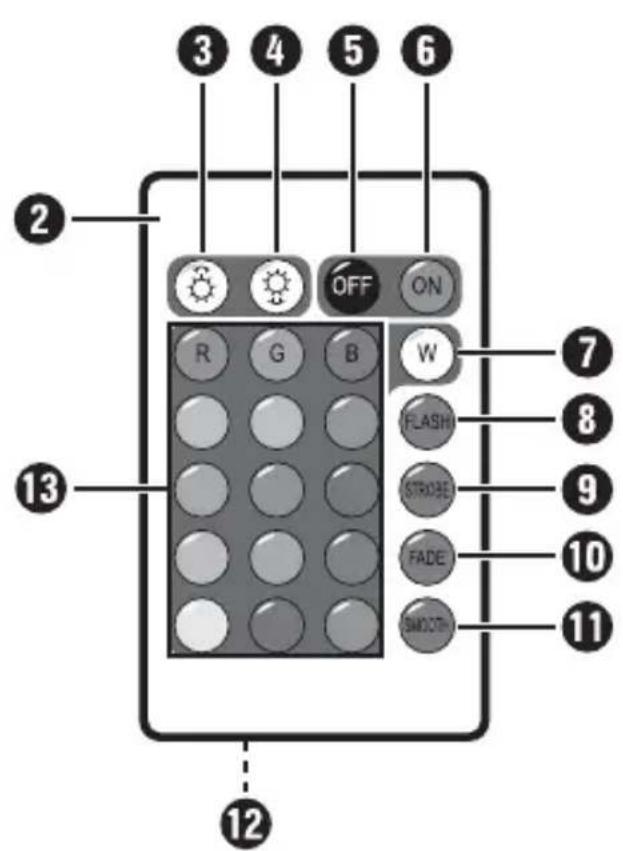
Inhaltsverzeichnis
Einleitung 2
KOMPERNASS HANDELS GMBH
BURGSTRASSE 21
44867 BOCHUM
GERMANY
www.kompernass.com
Table des matières
Introduction 12
KOMPERNASS HANDELS GMBH
BURGSTRASSE 21
44867 BOCHUM
GERMANY
www.kompernass.com
Indice
Introduzione 22
Uso conforme....22
KOMPERNASS HANDELS GMBH
BURGSTRASSE 21
44867 BOCHUM
GERMANY
www.kompernass.com
Inhoud
Inleiding 32
KOMPERNASS HANDELS GMBH
BURGSTRASSE 21
44867 BOCHUM
GERMANY
www.kompernass.com
Table of Contents
Introduction 42
Intended use 42
Package contents. 42
Technical details 43
Component description 44
Safety instructions 44
Information on using batteries 45
Initial operation 46
Light bulb. 46
Remote control.... 46
Handling and use 47
Cleaning 48
Disposal 49
Service 50
Importer 50
Introduction
Congratulations on the purchase of your new light bulb.
You have selected a high-quality product. The operating instructions are part of this product. They contain important information on safety, use and disposal. Before using the product, familiarise yourself with all operating and safety instructions. Use this product only as described and only for the specified areas of application. Retain these instructions for future reference. Please also pass these operating instructions on to any future owner(s).
Intended use
The light bulb is only intended for indoor use. It may only be installed and used in dry, enclosed indoor areas. The light bulb is intended for use in an E27 bulb fitting. The light bulb can be controlled wirelessly using the IR remote control provided, e.g. colour change is possible.
The light bulb is not intended for commercial use. The light bulb is only intended to be used as decoration and is not suitable for illumination purposes.
It is not intended for any other use or for uses extending beyond those stated. Claims of any kind for damage arising as a result of non-intended use will not be accepted. The user has sole liability.
Package contents
Light bulb
- IR remote control
• CR2025 button cell (already inserted)
• This operating manual
Technical details
| Light bulb | |
| Voltage 220 - 240 V, 50 - 60 Hz | |
| Power consumption approx. 3 W | |
| Bulb fi tting E27 | |
| Dimensions (∅ x height) approx. 6 x 11 cm | |
| Weight approx. 110 g | |
| Remote control | |
| Voltage | 1 x 3 V = (CR2025 button cell) |
| Range max. 5 m | |
| Dimensions (W x H x D) approx. | 8.2 x 4.9 x 0.5 cm |
| Weight approx. 20 g (incl. battery) | |
GB
Component description
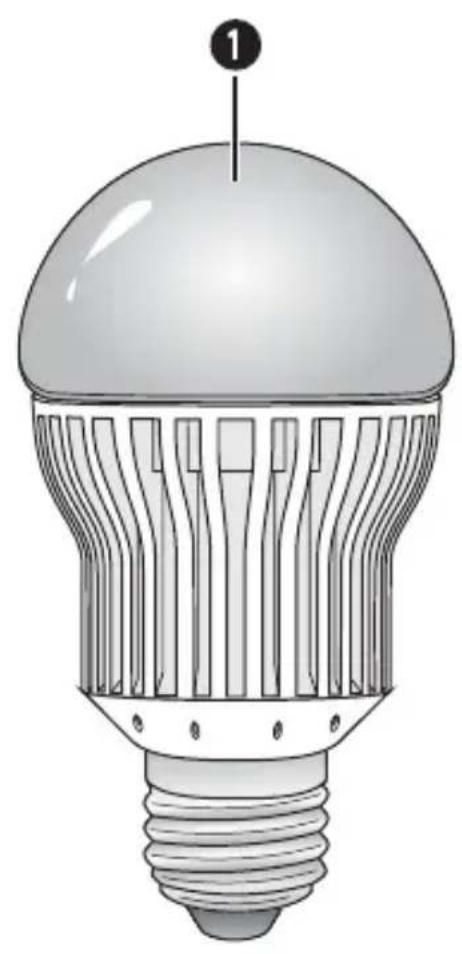
① Light bulb
2 Remote control
3 button
4 button
5 OFF button
6 ON button
⑦ W button
8 FLASH button
9 STROBE button
10 FADE button
11 SMOOTH button
12 Battery compartment
13 Colour buttons
Safety instructions
■ Always switch off the power supply before installing or removing light bulbs.
- Check light bulb for visible external damage before use. Do not use damaged light bulbs. There is a risk of electrocution.
- Do not install the light bulb with wet hands. There is a risk of electrocution.
■ Opening, repairing or modifying the light bulb could cause a fire.
Do not look directly into the beam of light, and do not use optical instruments such as a magnifying glass to look directly into the beam of light. There is a risk of eye damage.
Do not touch the light bulb if it is switched on or has only just been switched off. There is a risk of being burnt.
- Do not install the light bulb outdoors.
■ Ensure that the light bulb is always firmly seated in the socket so that it does not fall out.

The light bulb is not suitable for use with dimmers.
Do not use the light bulb in locations with fluctuating temperatures such as near ignition sources, heaters or air conditioning systems.
Information on using batteries

DANGER
Do not throw the battery into a fire.
▶ Do not short-circuit the battery.
Do not attempt to recharge the battery.
▶ Check the condition of the battery regularly. Leaking battery acid can cause permanent damage to the device.
▶ Special care should be taken when handling damaged or leaking batteries. Risk of acid burns! Wear protective gloves.
Store batteries in a place inaccessible to children. If a battery is swallowed, seek medical attention IMMEDIATELY.
If you do not intend to use the device for a long time, remove the battery.
Initial operation
Light bulb
♦ Screw the light b1 into a lamp with an E27 socket.
CAUTION
Please note that the heavier weight of the light bulb may reduce the mechanical stability of certain lights and bulb socket, and may adversely affect the contact and the bulb socket.
Remote control
NOTE
The supplied battery (CR2025) is already installed in the remote control ② when delivered. Before use, remove the insulating strip on the base of the remote control ②.
The battery must be replaced if the range of the remote control ② decreases or the light bulb ① no longer reacts to the remote control ②.
◆ Pull the battery compartment out of the remote control ② by first pressing the lateral locking device and then pulling the battery compartment ⑫ out.
Remove the depleted battery and insert a new battery of the type CR2025 (button cell) into the battery compartment 12. Make sure that the battery is inserted in accordance with its correct polarity.
- Slide the battery compartment back into the remote control ②.
Handling and use
Turn the light bulb 1 on or off using the light switch as usual.
Once the light bulb ① is switched on via the light switch, additional functions are available by using the remote control ②:
■ Press the OFF button to switch the light bulb off.
Press the ON button to switch the light bulb on.
Press one of the colour buttons in order to select one of 15 different light colours.
NOTE
You can set the brightness of the light colours (in 5 levels) using the 🔊 3 and ⚙ 4 buttons:
Press the ⚙ 3 button to make the light colour brighter. Press the ⚙ 4 button to dim the light colour.
To change colours, simply press the corresponding button. You can choose between 4 different colours:
FLASH button 8 = Three-colour (RGB) colour change with "hard" transition
STROBE button 9 = White light fl ashes 6 times, then...
Switch between R-G-B light colours with "hard" transition, then...
Switch between 7 colours with "hard" transition, then...
Switch between R-G-B light colours with "soft" transition, then...
Switch between 7 colours with "soft" transition.
FADE button 10 = Switch between 7 colours with "soft" transition SMOOTH button 11 = Switch between 7 colours with "hard" transition
NOTE
You can set the speed of the colour changes by using the ⚙ 3 and ⚙ 4 buttons. The medium speed is set when activating the colour changes (speed level 5).
Press the ⚙③ button in order to increase the speed of the colour changes.
Press the ⚙④ button in order to reduce the speed of the colour changes.
NOTE
If you turn the light bulb ①boff and on again using the light switch, the light bulb ① will always light up white. Preset light colours or colour changes are not stored.
If you turn the light bulb off and then on again using the remote control ②, the light bulb ① will be illuminated in the light colour or colour change most recently selected.
Cleaning
CAUTION
▶ Only clean the light b when it is switched off and cold.
- Clean the light bulb and the remote control ② with a soft dry cloth.
Disposal
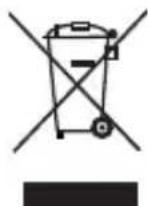
Do not dispose of the light bulb in your normal domestic waste. This product is subject to the provisions of European Directive 2012/19/EU-WEEE (Waste Electrical and Electronic Equipment).
Dispose of the product via an approved disposal centre or at your community waste facility. Please observe the currently applicable regulations. Please contact your waste disposal centre if you are in any doubt.
Disposal of batteries
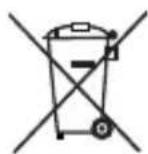
Used batteries may not be disposed of in the household waste. All consumers are statutorily required to dispose of batteries or cells at a collection point in their community or at a retail store. The purpose of this obligation is to ensure that batteries are disposed of in a non-polluting manner. Only dispose of batteries when they are fully discharged.
GB
Service

Service Great Britain
Tel.: 0871 5000 720 (£ 0.10/Min.)
E-Mail: kompernass@lidl.co.uk
IAN 91291
Hotline availability: Monday to Friday 08:00 - 20:00 (CET)
Importer
GB
KOMPERNASS HANDELS GMBH
BURGSTRASSE 21
44867 BOCHUM
GERMANY
www.kompernass.com
CE
MADE IN CHINA
KOMPERNASS HANDELS GMBH
BURGSTRASSE 21
44867 BOCHUM
DEUTSCHLAND / GERMANY
www.kompernass.com


- LED-FARBWECHSELLAMPE LLFL 27 A1
- LED-FARBWECHSELLAMPE
- LAMPADINA MULTICOLORE LED
- LED COLOUR CHANGING BULB
- DE AT CH
- Inhaltsverzeichnis
- Einleitung 2
- Table des matières
- Introduction 12
- Indice
- Introduzione 22
- Inhoud
- Inleiding 32
- Table of Contents
- Introduction 42
- Component description 44
- Safety instructions 44
- Initial operation 46
- Handling and use 47
- Cleaning 48
- Disposal 49
- Service 50
- Importer 50
- Introduction
- Intended use
- Package contents
- Technical details
- Component description
- Safety instructions
- Information on using batteries
- DANGER
- Initial operation
- Light bulb
- CAUTION
- Remote control
- NOTE
- Handling and use
- Cleaning
- Disposal
- Disposal of batteries
- Service
- Importer
- CE
- KOMPERNASS HANDELS GMBH
Brand : Livarno Lux
Model : LLFL 27 A1
Category : Uncategorized