
MOC-01 - Humidifier MPM - Free user manual and instructions
Find the device manual for free MOC-01 MPM in PDF.


| Product Type | Air Purifier with UV-C and Ionizer |
| Brand | MPM |
| Model | MOC-01 |
| Filtration System | 3-stage: Pre-filter, HEPA, Activated Carbon |
| UV-C Lamp | Yes, for biological air treatment |
| Ionizer | Yes, generates negative ions |
| Fan Speeds | 3 (I, II, III) + Turbo mode |
| Timer | 2h, 4h, 8h auto shut-off |
| Sleep Mode | Yes, reduces speed and dims lights |
| Filter Replacement Indicator | Yes, control lamp (4f) |
| Power Cord Length | 1.70 m |
| Operating Position | Vertical only, control panel facing up |
| Control Type | Touch buttons (On/Off, Timer, UV/Sleep, Speed) |
| Installation Requirements | Dry, flat, stable surface; unobstructed air circulation |
| Maintenance – Housing | Clean monthly with damp cloth; do not submerge |
| Maintenance – Filter | Replace every 6 months; dust pre-filter externally |
| Maintenance – UV Lamp | Replace every 3 years; do not look at operating lamp |
| Safety Features | Auto shut-off timer; child safety warnings; do not cover |
| Usage Environment | Indoor only; not outdoors |
| Package Contents | Air purifier, integrated filter, user manual |
Frequently Asked Questions - MOC-01 MPM
User questions about MOC-01 MPM
0 question about this device. Answer the ones you know or ask your own.
Ask a new question about this device
Download the instructions for your Humidifier in PDF format for free! Find your manual MOC-01 - MPM and take your electronic device back in hand. On this page are published all the documents necessary for the use of your device. MOC-01 by MPM.
USER MANUAL MOC-01 MPM
natural_image
White MPM air purifier with perforated ventilation grille and digital display (no text or symbols on device body)OCZYSZCZACZ POWIETRZA MOC-01
natural_image
Interior view of a white electronic device showing internal components and ventilation duct (no text or symbols visible)g. lampki kontrolne minutnika (2h,4h,8h)
h. lampka kontrolna lampy UV i joni-zatora (UV-C/ION)
natural_image
Exploded view diagram of three cylindrical battery cells with internal components (no text or labels)natural_image
Technical line drawing of a cylindrical device with mesh insulation and a separate connector (no text or symbols)rys.2
INSTRUCTIONS ASSOCIATED WITH USE SAFETY
Before use thoroughly read the operation manual.
Do not touch the appliance with wet hands.
Extreme care is required in case of children presence in vicinity of the appliance!
Do not use the appliance for the purposes different than it was designed for.
Do not immerse the appliance, its cord and plug in water or any other fluids.
Do not leave the appliance without supervision in course of its operation.
▶Always pull out the plug from the socket unless the appliance is used or before its cleaning.
- Do not use the appliance in case of its damage, also if its cord or plug is damaged – in such case the appliance should be handed over to an authorized service shop for repair.
Do not use the appliance outdoors. Do not hang the cord on any sharp edges and prevent any contact with hot surfaces.
Periodically inspect the power cord for damage.
Do not place the appliance on hot surfaces.
Do not place the appliance in vicinity of electric and gas cookers, burners, ovens, etc.
Place the appliance on a dry, flat and stable surface.
The device is intended for domestic use only.
Before use always make sure that all parts of the appliance are properly installed.
To avoid the risk of damage, fire or injury, always use the attachments recommended by the manufacturer.
This appliance is not intended for use by children under 8 years of age and individuals with reduced physical, sensory or mental capabilities, or lack of experience and knowledge, unless they have been given supervision or instruction concerning use of the appliance in a safe way and if they understand the hazards involved. Cleaning and user maintenance shall not be carried out by children without supervision.
- Ensure that children do not play with the appliance.
- Store the appliance and its cord out of reach of children under 8 years of age.
Do not remove the plug from the mains by pulling by the cord.
The appliance is not intended to be operated by means of an external timer or separate remote-control system.
Do not plug the power cord with wet hands.
In order to ensure your children's safety, please keep all packaging (plastic bags, boxes, polystyrene etc.) out of their reach.
WARNING! Do not allow small children to play with the foil as there is a danger of suffocation!
Do not attempt to repair or adjust any electrical or mechanical functions on this unit. Doing so will void your warranty. The inside of the unit contains no user serviceable parts.
Place the appliance where the air circulation is not obstructed. Do not obstruct the air inlet and outlet vents. Do not cover the appliance when in use. Do not place anything on the appliance.
Do not use the air purifier if there are metal filings or flammable gases in the air.
Do not use the air purifier without the installed filters.
Do not put your hands or other objects into the air inlet and outlet.
The device can only work in a vertical position.
APPLIANCE OVERVIEW
flowchart
graph TD
    A["Neuron 1"] --> B["Neuron 2"]
    C["Neuron 3"] --> D["Neuron 4"]
    E["Neuron 5"] --> F["Neuron 6"]
    G["Neuron 7"] --> H["Neuron 8"]
    I["Neuron 9"] --> J["Neuron 10"]
    K["Neuron 11"] --> L["Neuron 12"]
    M["Neuron 13"] --> N["Neuron 14"]
    O["Neuron 15"] --> P["Neuron 16"]
    Q["Neuron 17"] --> R["Neuron 18"]
    S["Neuron 19"] --> T["Neuron 20"]
    U["Neuron 21"] --> V["Neuron 22"]
    W["Neuron 23"] --> X["Neuron 24"]
    Y["Neuron 25"] --> Z["Neuron 26"]
    AA["Neuron 27"] --> AB["Neuron 28"]
    AC["Neuron 29"] --> AD["Neuron 30"]
    AE["Neuron 31"] --> AF["Neuron 32"]
    AG["Neuron 33"] --> AH["Neuron 34"]
    AI["Neuron 35"] --> AJ["Neuron 36"]
    AK["Neuron 37"] --> AL["Neuron 38"]
    AM["Neuron 39"] --> AN["Neuron 40"]
    AO["Neuron 41"] --> AP["Neuron 42"]
    AQ["Neuron 43"] --> AR["Neuron 44"]
    AS["Neuron 45"] --> AT["Neuron 46"]
    AU["Neuron 47"] --> AV["Neuron 48"]
    AW["Neuron 49"] --> AX["Neuron 50"]
    AY["Neuron 51"] --> AZ["Neuron 52"]
    BA["Neuron 53"] --> BB["Neuron 54"]
    BC["Neuron 55"] --> BD["Neuron 56"]
    BE["Neuron 57"] --> BF["Neuron 58"]
    BG["Neuron 59"] --> BH["Neuron 60"]
    BI["Neuron 61"] --> BJ["Neuron 62"]
    BK["Neuron 63"] --> BL["Neuron 64"]
    BM["Neuron 65"] --> BN["Neuron 66"]
    BO["Neuron 67"] --> BP["Neuron 68"]
    BQ["Neuron 69"] --> BR["Neuron 70"]
    BS["Neuron 71"] --> BT["Neuron 72"]
    BU["Neuron 73"] --> BV["Neuron 74"]
    BW["Neuron 75"] --> BX["Neuron 76"]
    BY["Neuron 77"] --> BZ["Neuron 78"]
    CA["Neuron 79"] --> CB["Neuron 7A"]
    CC["Neuron 80"] --> CD["Neuron 81"]
    CE["Neuron 81"] --> CF["Neuron 82"]
natural_image
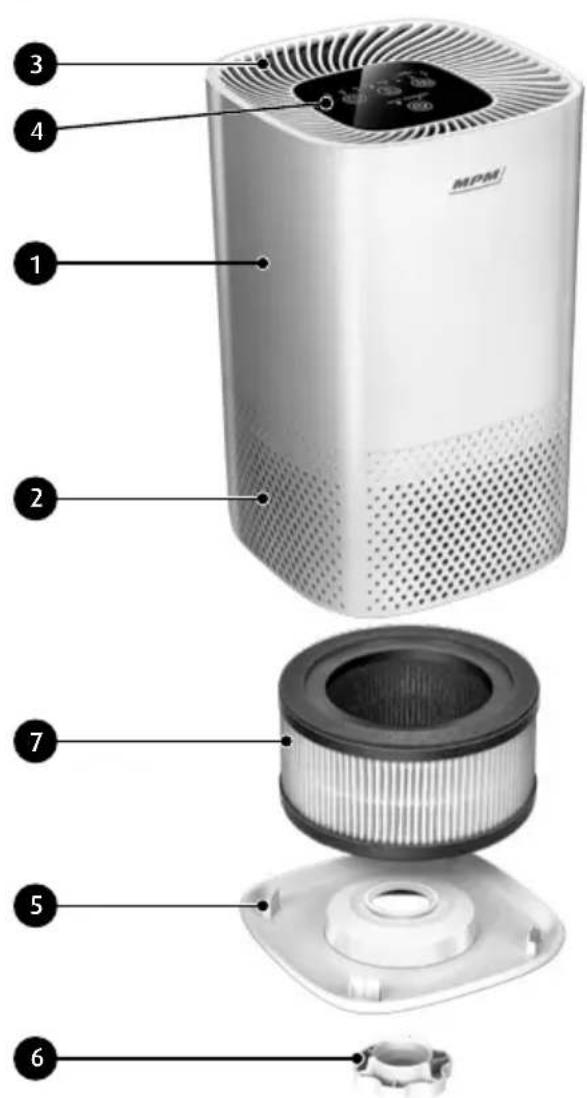
Interior view of a white electronic device showing internal components and ventilation duct (no text or symbols visible)- Housing
- Air intake grate
- Air exhaust grate
- Control panel
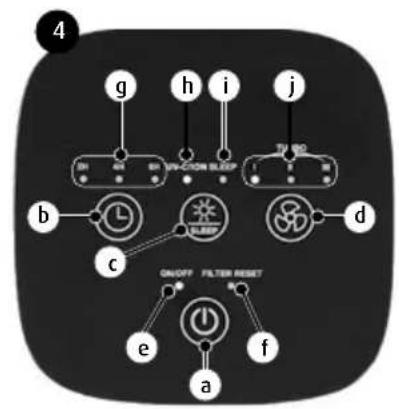
a. On/off touch button
b. Timer touch button
c. UV lamp and Sleep mode touch button
d. Air filtering rate touch button
e. Air purifier (ON/OFF) control lamp
f. Filter reset control lamp
g. Timer control lamps (2 hrs, 4 hrs, 8 hrs)
h. UV-C control lamp and ionizer (UV-C/ION)
i. Sleep mode control lamps
j. Airflow rate control lamps (I,II,III)
- Filter housing cover
- Filter housing cover nut
- Integrated filter
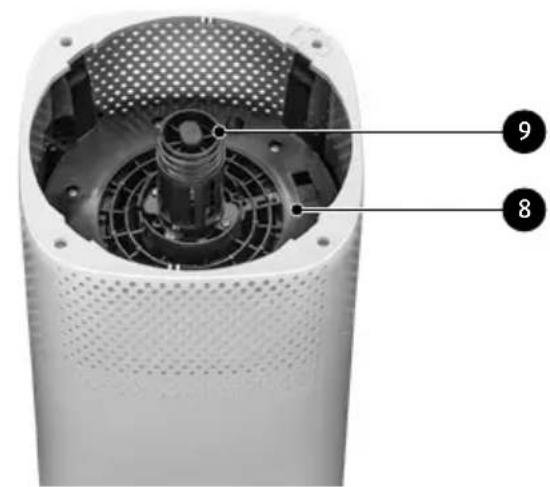
- Integrated filter housing
- UV lamp housing
APPLICANCE FEATURES
The air purifier is an appliance for end-to-end treatment of the indoor air you breathe. The air is purified with a three-stage filter bank (comprising a prefilter, a HEPA filter and an activated carbon filter). Each of the three filter stages has a unique function. The air purifier also includes a UV-C lamp and an air ionizer.. Initial filter is located in the integrated filter's external circuit, the HEPA filter is located inside the integrated filter and the carbon filter is located in the internal circuit.
Prefilter: pre-filtering of air to remove dust, allergens and hair from the air.
HEPA filter: main filtering of air to remove remaining dust, pollens, allergens, mould spores and smoke.
Carbon filter: filters out formaldehyde, benzene, harmful airborne gases and all bad odours.
UV-C lamp: biological treatment of air by killing viruses, bacteria and microbes.
▶ Ionizer: the ionizer generates negative ions to regulate the ionic balance of indoor air and improve your well-being by generating the air present at natural locations, e.g. in a forest or at the seaside.
BEFORE FIRST USE
- Unpack the air purifier, remove all bags, fillers and transport interlocks.
- Make sure the electrical mains parameters match the data on the device's name plate.
- Make sure the integrated filter (7) remains in its place, inside the purifier, and that its protective film is removed.
REMOVING AND INSTALLING THE FILTER BANK
- Make sure the device is not connected to the power supply.
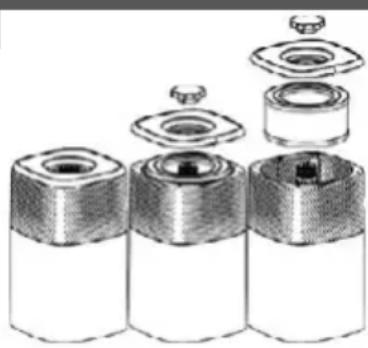
- Rotate the device by 180 degrees, so that the cover (5) faces upwards.
- Unscrew the nut (6) and remove the cover (5).
- Take out the integrated filter (7) from the housing (8).
- Install a new filter in the housing (8). Remove the protective film from the new filter, if used.
- Install the cover (5) and turn the nut (6).
natural_image
Exploded view diagram of three cylindrical components with internal cavities and mounting holes (no text or labels)Filter disassembly schematics
- Rotate the device back to its normal position (control panel facing up)
- If the purifier indicated, with the FILTER RESET control lamp (4f), that it is necessary to replace the filter, press the ON/OFF button (4a) and keep it depressed for 5 seconds. The filter's control lamp will reset and be deactivated.
NOTE! The filter itself cannot be dismantled and any attempts to separate the individual filters (initial, HEPA, carbon) will render it damaged.
USING THE APPLIANCE
- Place the device on a dry, flat and stable surface. Make sure there is enough free space around the device to ensure unobstructed air circulation. The device may only work in a vertical position, its control panel facing up.
- Connect the power cord to the mains.
- Start the purifier with a button (4a). The device starts purifying the air and signals its with a control lamp (4e).
- Adjust the air purification rate with the button (4d). Three speeds are available: "I" – low speed, "II" – average speed, "III" – high speed. The selected purifying speed is indicated by a relevant control lamp (4j). There is also a "TURBO" mode available, signalled by all control lamps on at the same time (4j).
- A UV-C germicidal lamp and air ionizer is activated with a button (4c). The operation of the UV-C lamp and air ionizer is signalled by a control lamp (4h). The same button (4c) can be used to activate the Sleep mode. Once this mode is selected, the control lamp (4j) flashes at first and then the Sleep mode is activated. All control lamps are deactivated and the purifying rate is reduced in this mode. The Sleep mode is deactivated once the button (4c) is pressed again.
- The Timer button (4b) can be used to set the time after which the device stops filtering the air and is deactivated. The available times are: 2, 4 and 8 hours. The selected time for automatic deactivation is indicated by a relevant control lamp (4g). To deactivate the Timer mode, press the button (4b) until the control lamps are off (4g).
- Once your work is done, deactivate the device with the button (4a) and unplug it from the mains.
CLEANING AND MAINTENANCE OF THE DEVICE
CAUTION! Unplug the device from the mains before any cleaning or maintenance operations.
CAUTION! Do not submerge the device in water or other liquids.
CAUTION! Do not use any aggressive cleaning agents, gasoline, solvents etc. to clean the device.
CAUTION! Clean the device at least monthly.
- Use a damp and gentle cloth to clean the device's housing and wipe it dry afterwards. Use a mild cleaning agent for stubborn dirt.
- The integrated filter (7) can be periodically dusted with a damp cloth from the side of the initial filter (externally). Do not submerge the filter in water, do not dust it and do not disassemble it. If the air purifier indicates that a filter replacement is necessary, with the Filter Reset lamp (4f), replace the filter with a new one (see: FILTER INSTALLATION AND REMOVAL DE-
SCRIPTION). Under normal conditions, the air purifier will indicate it is necessary to replace the filter every six months, but this time may be reduced if working conditions are demanding. Replace the filter every 6 months, even if not prompted by the device.
- While replacing the filter, clean its housing (8) with a damp cloth.
-
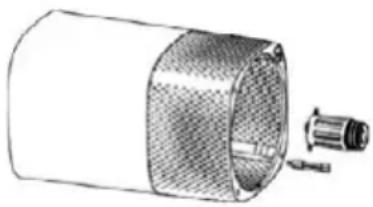
The UV lamp maintenance consists in replacing it every 3 years. To replace the UV lamp follow these steps:
-
Remove the filter from the device (7)
- Place the device on its side (Fig. 2)
- Remove 4 bolts holding the UV lamp housing (9)
- Rotate the lamp slightly and remove it
- Unscrew the UV lamp
- Insert and screw in a new UV lamp
- Install the UV lamp housing and secure it with 4 bolts
- Install the filter (7) in the air purifier
natural_image
Technical line drawing of a cylindrical mechanical component with a separate inset showing a connector or fitting (no text or symbols present)Fig. 2
NOTE! Never look at a working UV lamp. Your eyesight may be damaged.
TECHNICAL SPECIFICATIONS
See the product's nameplate for technical specifications.
Power cord length: 1.70 m

CAUTION! MPM agd S.A. may change the technical features of the product without notice.
PROPER DISPOSAL OF THE PRODUCT (waste electrical and electronic equipment)
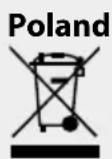
Marking on the product indicates that after the service–life of the product expires, it should not be disposed with other type of municipal waste. Used equipment may have a negative impact on the environment and health of people due to potentially containing hazardous substances, mixtures and components. Mixing electric waste with other types of waste or disassembling those in an unprofessional manner may cause a release of substances that are hazardous to the environment and health. Used equipment should be handed-over to a point for collection of electric waste. In order to obtain detailed information regarding the electric waste collection points, the user should contact the municipal point of electric waste collection or used equipment processing department.
natural_image
Interior view of a white cylindrical device showing internal components and ventilation duct (no text or symbols visible)natural_image
Exploded view diagram of three cylindrical components with internal cavities and mounting holes (no text or labels)natural_image
Technical line drawing of a cylindrical mechanical component with a separate inset showing a pin inserted (no text or symbols)natural_image
Interior view of a white electronic device showing internal components and ventilation duct (no text or symbols visible)natural_image
Exploded view diagram of three cylindrical battery cells with internal components (no text or labels)natural_image
Technical line drawing of a cylindrical device with mesh insulation and a separate connector (no text or symbols)Abb. 2
We wish you satisfaction from using the product and invite you to check a wide range of other MPM appliances
natural_image
Line drawing of a vacuum cleaner with a cat silhouette and bulb (no text or symbols)MPM agd S.A.

- OCZYSZCZACZ POWIETRZA MOC-01
- INSTRUCTIONS ASSOCIATED WITH USE SAFETY
- APPLIANCE OVERVIEW
- APPLICANCE FEATURES
- BEFORE FIRST USE
- REMOVING AND INSTALLING THE FILTER BANK
- USING THE APPLIANCE
- CLEANING AND MAINTENANCE OF THE DEVICE
- CAUTION! Clean the device at least monthly.
- TECHNICAL SPECIFICATIONS
- PROPER DISPOSAL OF THE PRODUCT (waste electrical and electronic equipment)
Brand : MPM
Model : MOC-01
Category : Humidifier