
CR3BK - Alarm Clock BLAUPUNKT - Free user manual and instructions
Find the device manual for free CR3BK BLAUPUNKT in PDF.


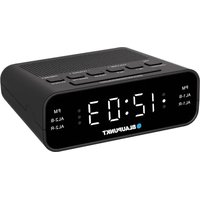
| Product Type | Alarm clock radio |
| Brand | Blaupunkt |
| Model | CR3BK |
| Power Supply (Main) | 5V AC/DC adapter (included) |
| Battery Backup | 3x AA batteries (not included) |
| Display Type | LED backlit LCD |
| Time Format | 12-hour or 24-hour selectable |
| Alarm | Single alarm with snooze |
| Snooze Duration | 5 minutes |
| Radio Band | FM |
| Radio Preset | Manual store via long press MODE |
| Scheduled Radio On | Set hour and minute; volume gradually increases |
| Scheduled Radio Off | Countdown timer: 10-90 minutes (adjustable) |
| Temperature Display | Indoor temperature |
| Temperature Range | -9°C to +50°C (indoor) |
| Temperature Unit | °C or °F selectable |
| Calendar | Day, month, year display |
| Backlight | Press SNOOZE.LIGHT for 5 seconds |
| Volume Control | Separate VOL- and VOL+ buttons |
| Cleaning | Use soft cloth; no solvents or immersion |
| Battery Precautions | Do not mix old/new or different types; remove if unused long |
| Service Contact | Tel: 00 48 22 331 99 53, Email: info@blaupunkt-audio.pl |
| Dimensions (approx) | 15 cm x 10 cm x 5 cm (estimated) |
| Weight (approx) | 300 g (estimated) |
Frequently Asked Questions - CR3BK BLAUPUNKT
User questions about CR3BK BLAUPUNKT
0 question about this device. Answer the ones you know or ask your own.
Ask a new question about this device
Download the instructions for your Alarm Clock in PDF format for free! Find your manual CR3BK - BLAUPUNKT and take your electronic device back in hand. On this page are published all the documents necessary for the use of your device. CR3BK by BLAUPUNKT.
USER MANUAL CR3BK BLAUPUNKT
Multifunction Clock With Radio
We thank you for the purchase of Multifunction Clock with Radio. It has been designed and constructed using innovative components and techniques to enable the perfect display of time by this device. This unit is also equipped with FM radio.
Please read the instructions carefully to become familiar with the properties and functions, before you use the unit.
For the start-up of this device you require:
For the main unit: one piece of 5V AC/DC Adaptor (included).
OVERVIEW
- MAIN UNIT
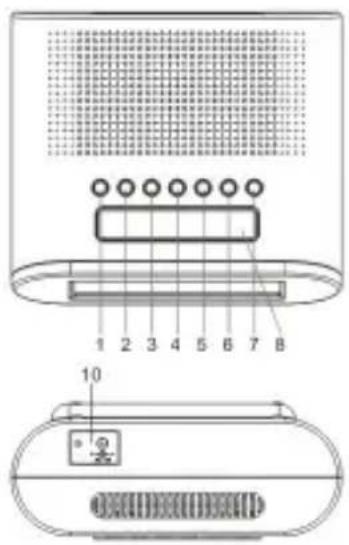
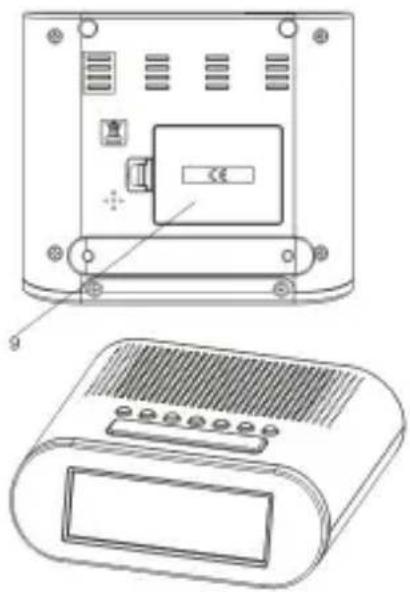
- DOWN
- UP
- MODE
- C/F
- VOL-
- VOL+
- RADIO ON/OFF
- SNOOZE.LIGHT
- BATTERY COMPARTMENT
- DC
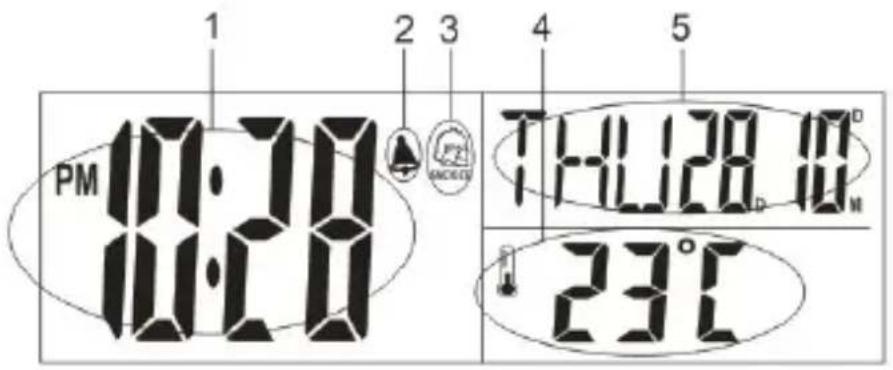
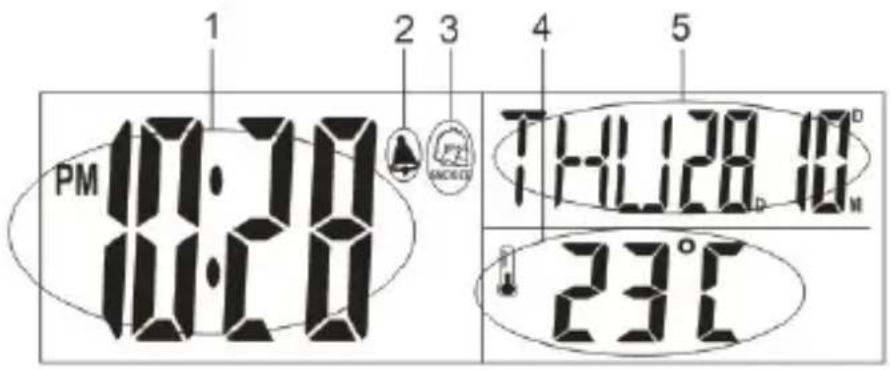
LCD SCREEN DISPLAY
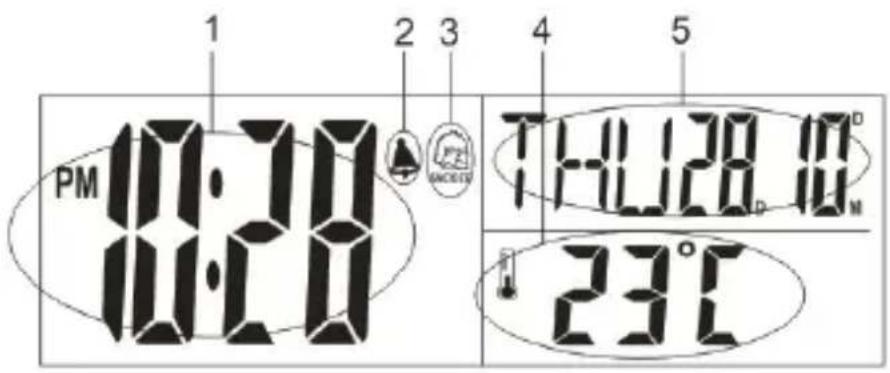
- TIME
- ALARM
- SNOOZE
- TEMPERATURE
- MONTH/DATE
FEATURES
- FM Radio function.
- LED back light.
- Calendar display.
- 12/24 hours selectable.
- Alarm function & Snooze function.
- Temperature C/F selectable.
- Indoor temperature range: -9°C ~ +50°C
GETTING STARTED
POWER SUPPLY
MAIN UNIT INSTALLATION
- Remove the battery compartment cover.
- Insert 3xAA batteries matching the polarity (+ and -).
TIME SET
Time mode
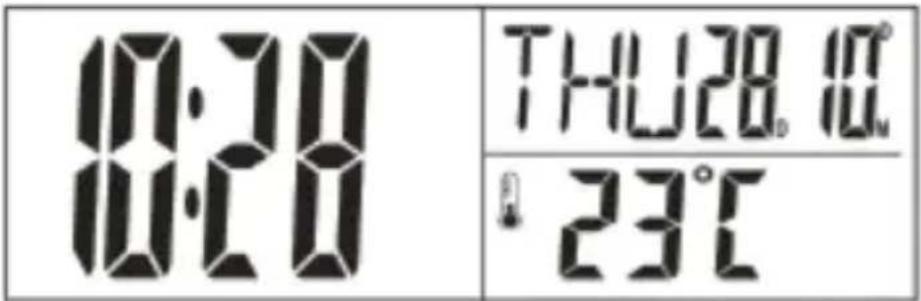
- Press "MODE" key to enter into ALARM mode.
- Hold "MODE" key for 2 seconds to enter into time setting.
- The figure to be set will be flashing.
- Press "UP" or "DOWN" to change the settings.
- Press "MODE" key to confirm and go to next setting.
- The setting order is: 12/24-hr format, Year, Month, Day, Hour, Minute.
- Press "MODE" again to confirm and exit setting.
ALARM & SNOOZE SET
ALARM SETTING
Alarm mode
| 10:20 | RLM |
- Press "MODE" key to enter into "ALM" mode.
- On alarm mode, press and hold "MODE" key for 2 seconds to enter into alarm setting
- The figure to be set will be flashing.
- Press "UP" or "DOWN" to change the settings. Press "MODE" key to confirm and go to next setting
- Press "MODE" key to confirm and go to next setting.
- The setting order is: Hour → Minute.
- Press "MODE" again to confirm and exit setting.
- Press "UP" to switch alarm on/off, "indicate alarm is on."
SNOOZE FUNCTION
When alarm ring, click "SNOOZE.LIGHT" to silence it for 5 minutes (snooze icon will flashing); click any other keys to stop ringing.
TEMPERATURE
- The indoor temperature will display automatically after set up.
- Press "C/F" key to switch C/F.
FM RADIO
FM mode
| 100.3 MHz | FM |
| 10 VOL |
AUTOMATICALLY SET
- Press "RADIO ON/OFF" key to turn radio on.
- Press "UP" or "DOWN" to search frequency automatically. When a signal is find, it will stop searching and broadcast.
- Press "VOL-" /"VOL+" to adjust volume.
- When radio is working, choose the frequency and hold "MODE" key above 2 second to store the frequency.
MANUAL SET
- Press "RADIO ON/OFF" key to turn radio on.
- Press "UP" or "DOWN" for 2 seconds to enter the radio settings. While "SCN" displayed, press "UP" or "DOWN" to adjust frequency manually.
- Press "VOL-" /"VOL+" to adjust volume.
SCHEDULED RADIO ON
Radio mode
| 0:20 | RDO |
| - - - |
- Press "MODE" key to choose "RADIO" mode.
- Press and hold "MODE" key for 2 seconds to set "Scheduled Radio On".
- The figure to be set will be flashing.
- Press "UP" or "DOWN" to change the settings.
- The setting order is: Hour → Minute.
- Press "MODE" again to confirm and exit setting.
- In "RADIO" mode, click "UP" to switch "Scheduled Radio On" function on/off. When the function is on, the set frequency and 📋 will be displayed.
- When scheduled time arrived, radio will broadcast the stored frequency automatically. The radio volume will gradually increase 2 levels by every 10 seconds until reaches level 12 (like 2-4-6 -8-10-12); During this process, if any key is clicked, the volume increase process will be terminated and the present volume level will be set.
SCHEDULED RADIO OFF
- Press "RADIO ON/OFF" key to turn radio on.
- Press "SNOOZE.LIGHT" to switch on/off "Schedule Radio Off" function.
- indicate "Schedule Radio Off" function is on.
- Press "SNOOZE.LIGHT" for 2 seconds to enter the "Schedule Radio Off" time settings
- The countdown is: 10 mins\~90mins. The preset is 30 minutes, click "UP" or "DOWN" to adjust 10 minutes per step.
- Press "SNOOZE.LIGHT" to confirm setting.
BACK LIGHT
Press "SNOOZE.LIGHT" to switch on backlight, it will last for 5 seconds.
PRECAUTIONS
- Do not clean any part of the product with benzene, thinner or other solvent chemicals. When necessary, clean it with a soft cloth.
- Never immerse the product in water. This will damage the product.
- Do not subject the product to extreme force, shock, or fluctuations in temperature or humidity.
- Do not tamper with the internal components.
- Do not mix new and old batteries or batteries of different types.
- Do not mix alkaline, standard or rechargeable batteries with this product.
- Remove the batteries if storing this product for a long period of time.
- Do not dispose of this product as unsorted municipal waste. Collection of such waste separately for special treatment is necessary.
AUTOMATIC SETTING
- DOWN
- UP
- MODE
- C/F
- VOL -
- VOL +
- RADIO ON/OFF
- SNOOZE.LIGHT
- Battery compartment
- DC
LCD DISPLAY
- DOWN
- UP
- MODE
- C/F
- VOL -
- VOL +
- RADIO ON/OFF
- SNOOZE.LIGHT
- Battery compartment
- DC
LCD DISPLAY
AUTOMATIC SETTING
- DOWN (LE)
- UP (FEL)
- MODE (MODE)
- C/F
- VOL- (VOLUME DOWN)
- VOL+ (VOLUME UP)
- RADIO ON/OFF (RADIO ON/OFF)
- SNOOZE.LIGHT (SNOOZE - LIGHT)
- BATTERY HOLDER
- DC CONNECTOR
LCD DISPLAY
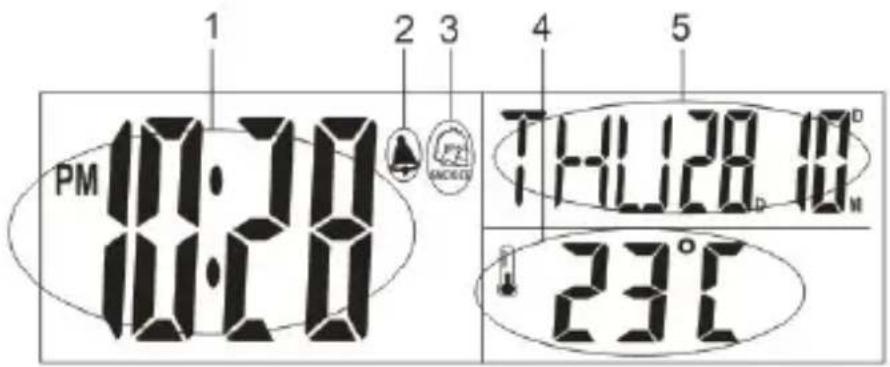
- TIME
- ALARM
- SNOOZE
- TEMPERATURE
- MONTH/DATE
FUNCTIONS
AUTOMATIC SEARCH
Competence Centre Audio
2N-Everpol Sp. z o.o.
ul. Puławska 403A
02-801 Warsaw, Poland
phone: +48 22 331 99 59
e-mail: info@everpol.pl
Enjoy it.
In case of questions or problems
please contact our service.
Tel. 00 48 22 331 99 53
E-mail: info@blaupunkt-audio.pl
All rights reserved. All brand names are registered trademarks of their respective owners. Specifications are subject to change without prior notice.



- OVERVIEW
- MAIN UNIT
- LCD SCREEN DISPLAY
- FEATURES
- GETTING STARTED
- POWER SUPPLY
- MAIN UNIT INSTALLATION
- TIME SET
- ALARM & SNOOZE SET
- SNOOZE FUNCTION
- TEMPERATURE
- FM RADIO
- AUTOMATICALLY SET
- MANUAL SET
- SCHEDULED RADIO ON
- SCHEDULED RADIO OFF
- BACK LIGHT
- PRECAUTIONS
- AUTOMATIC SETTING
- LCD DISPLAY
- FUNCTIONS
- AUTOMATIC SEARCH
- ENJOY IT
Brand : BLAUPUNKT
Model : CR3BK
Category : Alarm Clock