
MasterCase Pro 5 - Computer Case COOLER MASTER - Free user manual and instructions
Find the device manual for free MasterCase Pro 5 COOLER MASTER in PDF.


Pick your language and provide your email: we'll send you a specifically translated version.
| Product Type | Computer Case |
| Model | MasterCase Pro 5 |
| Brand | Cooler Master |
| Form Factor | Mid Tower |
| Motherboard Support | ATX, Micro-ATX, Mini-ITX |
| Dimensions (L x W x H) | 528 x 235 x 512 mm |
| Weight | 10.5 kg |
| Material | Steel, Plastic, Tempered Glass (side panel) |
| Power Supply Support | ATX PS2 (not included) |
| Expansion Slots | 7 |
| Drive Bays | 2 x 5.25", 2 x 3.5", 2 x 2.5" |
| Max VGA Card Length | 412 mm (with HDD cage installed) |
| Max CPU Cooler Height | 190 mm |
| Cooling Support (Front) | 2 x 120/140mm fans or 240/280mm radiator |
| Cooling Support (Top) | 2 x 120/140mm fans or 240/280mm radiator |
| Cooling Support (Rear) | 1 x 120/140mm fan |
| Front I/O Ports | 2 x USB 3.0, 1 x Audio In/Out |
| Dust Filters | Front, Top, Bottom (removable) |
| FreeForm Modular System | Yes (adjustable HDD cage and 5.25" bay) |
| Side Panel | Tempered Glass (left side) |
| Cleaning Method | Use compressed air or soft cloth; avoid liquids |
Frequently Asked Questions - MasterCase Pro 5 COOLER MASTER
How do I remove the side panel?
Unscrew the thumbscrews at the rear of the case and slide the panel back and off.
What is the maximum graphics card length supported?
Up to 412 mm with the HDD cage installed. Removing the HDD cage allows longer cards.
How do I remove the 5.25" drive bay?
Press the release tabs on both sides of the bay and pull it out from the front.
Can I install a 280mm radiator in the front?
Yes, the front supports up to 280mm radiators with proper fan placement.
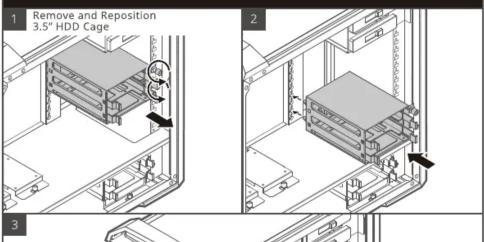
How do I adjust the hard drive cage?
Remove the screws holding the cage, then slide it to the desired position and secure it.
What type of power supply does this case require?
Standard ATX PS2 power supply (not included).
How many fans are included with the case?
Typically one 140mm rear fan is included; other fans must be purchased separately.
How do I clean the dust filters?
Remove the filters from front, top, and bottom; rinse with water or use a vacuum, then dry before reinstalling.
Is the side panel made of tempered glass?
Yes, the left side panel is tempered glass for showcasing components.
What is the FreeForm modular system?
It allows repositioning or removal of drive cages and bays for customized interior layout.
User questions about MasterCase Pro 5 COOLER MASTER
0 question about this device. Answer the ones you know or ask your own.
Ask a new question about this device
No questions yet. Be the first to ask one.
Download the instructions for your Computer Case in PDF format for free! Find your manual MasterCase Pro 5 - COOLER MASTER and take your electronic device back in hand. On this page are published all the documents necessary for the use of your device. MasterCase Pro 5 by COOLER MASTER.
USER MANUAL MasterCase Pro 5 COOLER MASTER
- HARD DRIVE CAGE ADJUSTMENT



Manual assistant
Powered by Anthropic
Waiting for your message
Product information
Brand : COOLER MASTER
Model : MasterCase Pro 5
Category : Computer Case