
Elite 372 - Computer Case COOLER MASTER - Free user manual and instructions
Find the device manual for free Elite 372 COOLER MASTER in PDF.


| Product Type | Mid Tower Computer Case |
| Motherboard Support | ATX, Micro-ATX, Mini-ITX |
| Dimensions (H x W x D) | 469 x 200 x 478 mm |
| Weight | 5.0 kg |
| Material | Steel, Plastic |
| Front I/O Ports | USB 3.0 x 2, Audio (Headphone & Mic) |
| Drive Bays - Internal 3.5" | 2 |
| Drive Bays - Internal 2.5" | 2 |
| Expansion Slots | 7 |
| Cooling Support - Front | 2 x 120mm or 2 x 140mm |
| Cooling Support - Rear | 1 x 120mm |
| PSU Support | Standard ATX PSU (bottom mount) |
| Max GPU Length | 320 mm |
| Max CPU Cooler Height | 155 mm |
| Side Panel | Acrylic Window |
| Color | Black |
| Installation | Tool-free drive bays, removable front panel |
| Cleaning | Use dry cloth; remove dust from filters regularly |
| Safety | Keep away from liquids; ensure proper grounding |
| Spare Parts & Repairability | Replaceable filters; standard screws; contact support |
Frequently Asked Questions - Elite 372 COOLER MASTER
User questions about Elite 372 COOLER MASTER
0 question about this device. Answer the ones you know or ask your own.
Ask a new question about this device
Download the instructions for your Computer Case in PDF format for free! Find your manual Elite 372 - COOLER MASTER and take your electronic device back in hand. On this page are published all the documents necessary for the use of your device. Elite 372 by COOLER MASTER.
USER MANUAL Elite 372 COOLER MASTER
Installation Guide ▶
User manual / English
Taiwan, Asia Pacific - Cooler Master Co., Ltd.
9F, No. 786, Chung-Cheng Road, Chung-Ho City, Taipei, Taiwan, R.O.C.
Tel: +886-2-3234-0050 Service: eservice@coc
China — Cooler Master China
4F. Hui-Cheng Building, Hui-Tai industrial Park, Hui-Huan Town, Hui-Zhou City, China
Tel: +86-752-260-8898
Service: web@coolermaster.com.cn
Europe - Cooler Master Europe B.V.
Hudsonweg 3 Trade Port West 9272, 5928 LW Venlo, The Netherlands Tel: +31 (II) 77-396-8226
Service: Support@coolen
North America - Cooler Maste
4820 Schaefer Ave. Chino CA, 91710, US
Service: Customersupport@coolermaster.com
Cooler Master USA Inc.
4820 Schaefer Ave. China, CA 91710
TEL: 909-673-9880
FAX: 909-673-9882
Live Help
http://www.coolenmaster.com/invenhelp
For the most updated information, please visit our official website: http://www.cmstorm.com ©2014 Geley Masters Co., Ltd. All Rights Reserved. All trademarks are registered at
[NO TEXT]
©2011 Cooler Master Co., Ltd. All Rights Reserved. All trademarks are registered to their respective owners
Warranty Information
English (EN)
Cooler Master guarantees that this device is free of defect in material and workmanship, and provides a two-year limited hardware warranty for the device commencing from the date of purchase. Please keep your receipt for proof of purchase.
This product is designed for computer usage only. Using this device in any other capacity voids the warranty. If you are not familiar with computer hardware installation, please ask for professional assistance. The warranty offered upon normal use. Defect as damage that result from improper advertising, Wisconsin, Midwest or Ohio, accident as
The warranty offered covers formal use: defect of damage that results from improper operation, storage, misuse or abuse, accident or neglect, which are not the fault of Cooler Master, are exclude from warranty coverage.
Note: the warranty is voided by removal or aternation of product or parts identification label 1. All DEN/bulk packaging product come with one year limited warranty
-
In case of conflict between the warranty provided by the country of point of sale and this manual, the warranty of the actual country of point of sale shall be the prevailing document.
-
In case of malfunction of electronic components or need of accessories purchase during the warranty period, please return to the original stock of purchase.
original store of purchase
Arabic (AR)
العربية مُمْنَّةٍ وَلَجْرِيَّةٍ وَلَجْرِيَّةٍ وَلَجْرِيَّةٍ وَلَجْرِيَّةٍ وَلَجْرِيَّةٍ وَلَجْرِيَّةٍ وَلَجْرِيَّةٍ وَلَجْرِيَُّةٍ وَلَجْرِيَّةٍ وَلَجْرِيَّةٍ وَلَجْرِيَّةٍ وَلَجْرِيَّةٍ وَلَجْرِيَّةٍ وَلَجْرِيَّةٍ وَلَجْرِيَّهٍ وَلَجْرِيَّهٍ وَلَجْرِيَّهٍ وَلَجْرِيَّهٍ وَلَجْرِيَّهٍ وَلَجْرِيَّهٍ وَلَجْرِيَّهٍ وَلَجْرِيَّهن وَلَجْرِيَّهن وَلَجْرِيَّهن وَلَجْرِيَّهن وَلَجْرِيَّهن وَلَجْرِيَّهن وَلَجْرِيَّهن وَلَجْرِيَّهن وُلَجْرِيُّهن وَلَجْرِيُّهن وُلَجْرِيُّهن وُلَجْرِيُّهن وُلَجْرِيُّهن وُلَجْرِيُّهن وُلَجْرِيُّهن وُلَجْرِيُّهن وُلَجْرِيُّهن وُلُجْرِيُّهن وُلُجْرِيُّهن وُلُجْرِيُّهن وُلُجْرِيُّهن وُلُجْرِيُّهن وُلُجْرِيُّهن وُلُجْرِيُّهن وُلُج ^1
العربية مُمْنَّةٍ وَلَجْرِهُ عَلَّدُ وَلَجْرِهُ عَلَّدُ وَلَجْرِهُ عَلَّدُ وَلَجْرِهُ عَلَّدُ وَلَجْرِهُ عَلَّدُ وَلَجْرِهُ عَلَّدُ وَلَجْرِهُ عَلَْتُ وَلَجْرِهُ عَلَّدُ وَلَجْرِهُ عَلَّدُ وَلَجْرِهُ عَلَّدُ وَلَجْرِهُ عَلَّدُ وَلَجْرِهُ عَلَّدُ وَلَجْرِهُ عَلْتُ وَلَجْرِهُ عَلَّدُ وَلَجْرِهُ عَلَّدُ وَلَجْرِهُ عَلَّدُ وَلَجْرِهُ عَلَّدُ وَلَجْرِهُ عَلَّدُ وَلَجْرِهُ عِلَّدُ وَلَجْرِهُ عِلَّدُ وَلَجْرِهُ عِلَّدُ وَلَجْرِهُ عِلَّدُ وَلَجْرِهُ عِلَّدُ وَلَجْرِهُ عِلَّدُ وَلَجْرِهٍ
product specifications are subject to change without notice
● Fittings pack
| Figure | Name | Q'Ty | Used for |
| Stand-off | 7 | M/B tray | |
| Stand-off | 2 | M/B tray | |
| #6-32*6 screw | 11 | Power Supply, PCI | |
| M3*5 screw | 25 | FDO, ODD, M/B tray | |
| #6-32*5 screw | 20 | HDD | |
| Cable tie | 10 | Cable management | |
| Lock buckle | 1 | Security | |
| #6-32*5 Lock buckle screw | 1 | Security | |
| Buzzer | 1 | Motherboard speaker |
German (DE)
m = 311
Greek (EL)
The Ground Truth image displays a single, solid horizontal line. According to Rule 2 (UNDERSCORE & LINE RULES), this is a stylistic or background line, not a placeholder underscore. Therefore, the OCR result must ignore it and output nothing or only meaningful text. The provided OCR content is "____", which consists of four underscores. This is an incorrect interpretation of the line as a placeholder, violating the rule that stylistic lines must be ignored. The OCR has hallucinated underscores where none should exist based on the GT's visual context. Hence, the OCR result is inconsistent with the Ground Truth.
I/O Function panel installation guide
- Please refer to the illustration in the section of USB2.0 and Audio connector from the
motherboard user manual. Please select the motherboard which uses the same USB2.0,
AC'97, HD Audio standard as below. otherwise, it will cause damage to device(s
● The following illustration is a diagram showing the front panel I/O connectors.
- On some motherboards, the connectors for USB2.0 and Audio are not the same as the
drawing below. Please check with your motherboard manual before installing.
I/O面板安装说明
The Ground Truth image displays a single, solid horizontal line. According to Rule 2 (UNDERSCORE & LINE RULES), this is a stylistic or background line, not a placeholder underscore. Therefore, the OCR result must ignore it and output nothing or only meaningful text. The provided OCR content is "____", which consists of four underscores. This is an incorrect interpretation of the line as a placeholder, violating the rule that stylistic lines must be ignored. The OCR has hallucinated underscores where none should exist based on the GT's visual context. Hence, the OCR result is inconsistent with the Ground Truth.
Russian (RU)
The following illustration is based on Elite 370
2.1
| EN | How to remove the side panel
| AR | بستاجه حُلّا قَرْدِمَيْفِيَك
|BG| Как се о
CHS 折下函数
| CS | 2nd adcredit postpract by
|EN| How to install the power supply
AR | قَلَّة إِمْتَّاً : فَرْمٌ وَجُسْمُمْتَّهِ تَكْفَيْمِكِ
|EN| How to install the Motherboard
[14] Department of Health and Life

Note: Accommodates to 1) top flow w/o top fans 2) Top flow with top fans
3) Tower cooler w/o top fans 4) Tower cooler with top fans
Note: Please remove PCI slots before installing the Motherboard
| EN | How to install the add-on cards
| F1 | Como instalar as piecas adicionais | RUI |
140 | Kalo yeransetna spinnamenskite korta 150 | Kako da instalirate dodatne kartice
EN | How to install the 5.25" and 3.5" devices
|AR| نصوب 5.257/3.25" ساويم فزاحلا تيوبت نيفرید
|BG| Как се инстали
CHS 安装光驱和软驱
LHT: 安装无螺栓和胶囊液
100 San Francisco London 5125 - 8.6
E1. Plus un programmable no materia 5.267 um 3,67
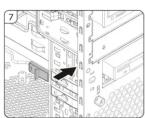
2.5.1 How to install the 5.25" device
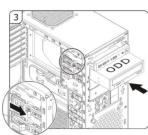
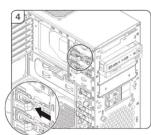
2.5.2 How to install the 3.5" device
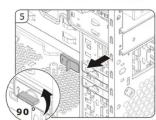
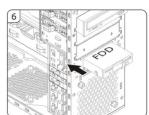

-05-
2.6
[EM] How to install the hard disk drive
[AP] data(2021)11 min/6:45
(1) There will be a hospital referral


-06-
2.7
| EN | How to install or replace case fans
| EN | How is clean the file | AR | in a* or b*ifing
| EN | Completing installation
|AR| تيېڭتىلابكتى


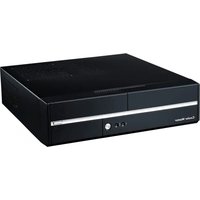


Brand : COOLER MASTER
Model : Elite 372
Category : Computer Case