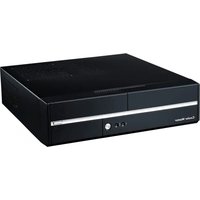
Mini 210 - Computer Case COOLER MASTER - Free user manual and instructions
Find the device manual for free Mini 210 COOLER MASTER in PDF.


| Product Type | Mini Tower Computer Case |
| Brand | Cooler Master |
| Model | Mini 210 |
| Dimensions (W x H x D) | 367 x 593 x 383 mm |
| Weight | 5.0 kg (estimated) |
| Materials | Steel (SECC) body, plastic front bezel |
| Motherboard Support | Mini-ITX |
| Expansion Slots | 4 |
| Drive Bays | 2 x 3.5" HDD, 2 x 2.5" SSD |
| Front I/O Ports | USB 3.0 x 1, USB 2.0 x 1, Audio x 1 |
| Cooling System | 80mm rear fan (pre-installed) |
| Power Supply Support | Standard ATX (not included) |
| Color | Black |
| Usage | Home, office, HTPC |
| Cleaning Instructions | Use a soft dry cloth; avoid liquids |
| Replacement Parts Availability | Contact Cooler Master support or authorized distributors |
| Warranty | Limited 1-year warranty (check local regulations) |
Frequently Asked Questions - Mini 210 COOLER MASTER
User questions about Mini 210 COOLER MASTER
0 question about this device. Answer the ones you know or ask your own.
Ask a new question about this device
Download the instructions for your Computer Case in PDF format for free! Find your manual Mini 210 - COOLER MASTER and take your electronic device back in hand. On this page are published all the documents necessary for the use of your device. Mini 210 by COOLER MASTER.
USER MANUAL Mini 210 COOLER MASTER
User manual / English
Asia Pacific Cooler Master
9F, 786 Chung Cheng Road, Zhonghe District,
New Taipei City 23586, Taiwan (R.O.C.) Tel: +886-2-3234-0050
Service: eservice@coolermaster.com.tw
CHINA
Cooler Master Chi
Sr., Baozong B, No. 18, HeChiang E. 401 KU., Zhongkai, Hui-Zhou City, Guang Dong Province, China
Tel: +06-752-260-8898 Service: a@briplemaster.com, cn
service: Webmaster@master.com.cn
EUROPE Cooler M
Hudsonweg 3 Trade Port West 92
5928 LW Venio, The Netherlands Service: Support@coolermaster.nl
LTD.
USA Cooler Master USA
4820 Schaefer Ave. Chino CA 91710, U Service: support@scalermaster.com
service. support@coolermaster.com
Global Live Help: http://www.coolermaster.com/livehelp
For the most updated information,
please visit our official website: http://www.xiaotera master.com

© 2013 Cooler Master Co., Ltd. All Rights Reserved.
All trademarks are registered to their respective owners.
510008970-GP
Var 1.0: 2013/05
2.2
|EN| How to install the motherboard
Please connect all device cables before mount this device bracket into the case.
1.5
(EN) How to install the 2.5" SSD, 3.5" HDD and ODD devices
- Как се инстарура 3 F SSD, 3 F HDD, Slim OD
Icshi 如何安装2.5" 硬盘、3.5" 硬盘和光驱
| Model | MN-210-KKR300 | MN-210-KKA300 | MN-211-KKA300 | |
| Available | Exterior | Black | ||
| Color | Interior | Non-coating | ||
| Material | Appearance: PolymerCase body: SECC | |||
| Dimensions (H x D x W) | 367 x 99 x 350 mm / 14.4 x 3.9 x 13.8 inch | |||
| Weight | 5.0 kg / 11.0 kx | |||
| MIB Type | microATx | |||
| Drive | 3.2ndDrive Bay | 1(reversed) | 1(reversed) | 1 (hidden) |
| 3.3rdDrive Bay | 1(reversed) | 1 (reversed) | ||
| Expansion Style | 4 (Line profile file) | |||
| Cooling System | Front: 80mm fan x (installed) | |||
| IO Panel | USB3(Int) x2, MC1. Audi via s(props HD Audio) | |||
| Power Supply | TFX 12V 300WnonPFC (installed) | TFX 12V 300Wactive installed | TFX 12V 300WnonPFC(installed) | |
| Maximum Compatibility | VGA card length: 215.0 mm / 9.5 inchCPU tighter height: 83.0mm / 3.3 inch | |||
* Product specifications are subject to change without notice

1.2 Fittings pack
| Figure | Name | Q'ty | Used for |
| #6-32°4.8 screw | 12 | M/B, 3.5" HDD | |
| M3°5 screw | 7 | 2.5" SSD, 5.25" ODD | |
| M3°6 screw | 2 | 5.25" ODD | |
| #6-32°5 screw | 1 | 3.5" HDD | |
| Cable tie | 2 | Cable management | |
| #6-32°6 screw | 4 | Power supply |
1.3 Diagram

Top view

广力云
2.3-1 Install the 2.5" SSD
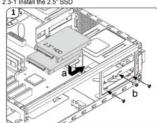

2.3-2 Install the 3.5" HDD


2.3-4 Install the 3.5" device / internal card reader
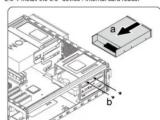
-5
1. 产品简介
1.1规格
| 机型 | MIN-210-KKR300 | MIN-210-KKA300 | MIN-211-KKA300 | |
| 颜色 | 外部 | 黑色 | ||
| 内部 | non-coating | |||
| 材质 | Appearance, Polymer Case body; SECC | |||
| 尺寸(高×长×宽) | 367 x 99 x 350 mm | |||
| 重量 | 5.0 kg | |||
| 主轴规格型号 | microATX | |||
| 装箱类型 | 5.25" Dine Bay | 1(内圈) | ||
| 3.5" Dine Bay | 1(外圈+1)(地圈) | |||
| 2.5" Dine Bay | 1 (severed from max 3/4 drive leg) | |||
| 扩能带 | 4 (Low profile slots) | |||
| 散热系统 | 前驱:80nm 复振:1(后驱) | |||
| L/O面板 | USB3(int) q2, Mic t, Auto x1 (supports HD Audio) | |||
| 电源 | TFX 12V 300W nonPFC (installed) | TFX 12V 300W active (installed) | TFX 12V 300W nonPFC (installed) | |
| 最大限制 | VGA charging capacity: 215.0 mmCPU 整数频率: 55.0 mm | |||
史聪不另行通知

1.2 配件包
[59]. How to answer the center has
1.20. 1.20.
17.11 Some mark a delta central
[SR]. Kakn osigurati centralnu poluyu.
[TR]. Orta cubuðun sabitlenmesi
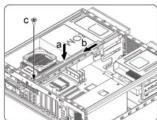
2.6
LENI. How to install an replace case frame
In addition, the other
|EN| How to mount the front bezel
|EN| Completing installation
|AR| التي hyp لستال
LED: Networking Installation

©2013 Cooler Master Co., Ltd. All Rights Reserved. All trademarks are registered to their respective owners.

French (FR)
■ Please refer to the illustration in the section of USB 3.0, USB 2.0 and Audio connector from the motherboard user manual
Please select the motherboard which uses the same USB 3.0, USB 2.0, AC'97,HD Audio standard as below; otherwise, it will change from the device(s).
will cause damages to device(s).
The following illustration is a diagram showing the front panel I/O connectors. On some multibehands, the connection for USB 3.0, USB 2.0 and Audio are not the same as the drawing below. Please
- On some motherboard, the connectors for ODA 5.0; check with your motherboard manual before installing
NO面板安装说明
property base is 10 maps, a boryn billion map.
Portugal (PT)
English (EN)
Cooler Master guarantees that this device is free of defect in material and workmanship, and provides a two-year limited hardware warranty for the device commencing from the date of number. Please note you consent for proof of purchase.
Warranty for the device commencing from the sale of purchase. Please keep your receipt for prior or purchase.
This product is designed for computer usage only. Using this device in any other capacity voids the warranty. If you are not familiar with computer hardware installation, please call for professional assistance.
The warranty offered covers normal use. Defect or damage that result from improper operation, storage, misuse or abuse, accident or
neglect, which are not the fault of Cooler Master, are exclude from warranty coverage. Note: The property is unified by removal as alteration of product or parts identification links.
Note: The warranty is voided by removal or assimilation of product or parts identification labels.
1. All OEM/bulk packaging product come with one year limited warranty
2. In case of conflict between the warranty provided by the country of point of sale and this manual, the warranty of the actual country of point of sale shall be the prevailing document.
3. In case of malfunction of electronic components or need of accessories purchase during the warranty period, please return to the
of the sales of merchandise in different categories of items in different product lines during the maturity period, plus retail in the original store of purchase.
Arabic (AR)
The Ground Truth image displays a single, solid horizontal line. According to Rule 2 (UNDERSCORE & LINE RULES), this is a stylistic or background line, not a placeholder underscore. Therefore, the OCR result must ignore it and output nothing or only meaningful text. The provided OCR content is "____", which consists of four underscores. This is an incorrect interpretation of the line as a placeholder, violating the rule that stylistic lines must be ignored. The OCR has hallucinated underscores where none should exist in the GT. Therefore, the OCR result is inconsistent with the Ground Truth.
[Non-Text]
The Ground Truth image displays a single, solid horizontal line. According to Rule 2 (UNDERSCORE & LINE RULES), this is a stylistic or background line, not a placeholder underscore. Therefore, the OCR result must ignore it. The provided OCR content is "____", which consists of four underscores. This is an incorrect interpretation of the line as a placeholder, violating the rule that stylistic lines must be ignored. The OCR has hallucinated text (underscores) where none should exist. Hence, the result is inconsistent with the Ground Truth.
Serbian (SR)
Cocker Master garantuje da je ovaj uređaj nemva defekte meterijala i rada i doje dvogodišinju garanciju na hardver uređaja od dara lavoranje. Holtmu lios da predalite vilača hov dolce o kurnodi. Oroti nasivad je nasvulnu nemo za hiviljente u lavoruju. Kostljenja
Kopovine. Holimo Vasa da zastanje hican kao doča o kopovine. Oraj prostvoju je napravljem slamo za konstorje o kompjutensko. Konstorje ovog uređaja u biko kojem drugom kapaciteta poništava garanciju. Ako niste upoznati sa instalacijom kompjuterskog hardvers, molimo Vas
da se obratite za stručnu pomoć.
Data naračita se odoveni ramo na normalno korišćenja. Kvarnzi i oltlađenia koja nastanu uvrđe neporavilnaa korišćenja, rkladilberta
časih garancijski se nevečen sarno na normašnir kvaracijpi: išvaren Pistotcijpi koji nastali osloj neprižinog vorkočnje; Maitatsnje; zloupotrebe, nemara ili nezgode, koji nisu nastali greškom Cooler Master-a, nisu obutvaćeni garancijom.
Napomena: garancija se ponitava otklanjanjem ili promenom proizvoda ili dijela identifikacije.
1. Svi OEM/pekovani proizvodi su sa jednogodičnjom ograničenom garancijom
2. U slučaju sukoba garancje izdane od strane protajnog mesta u zemlje i one opsane u ovom prinučniku, preklost ima garancja izdeta od strane protajnog mesta dote zemlje.
3. U slučaju kvara elektroreskih komponenata ili potrebe za dodatnom opremom tokom perioda važenja garancije, molimo obratite se prodavniki
u kojoj me kupii proszivod.
The Ground Truth image displays a single, solid horizontal line. According to Rule 2 (UNDERSCORE & LINE RULES), if the GT contains lines used for stylistic emphasis or as background elements (like ruled paper), the OCR result must ignore them. The line in the GT is clearly a stylistic or background line, not a placeholder for text. Therefore, the OCR should not have output any underscores. Outputting `____` constitutes an error under Rule 2, as it hallucinates placeholder symbols where none are semantically intended. Hence, the OCR result is inconsistent with the Ground Truth.
The Ground Truth image displays a single, solid horizontal line. According to Rule 2 (UNDERSCORE & LINE RULES), this is a stylistic or background line, not a placeholder underscore. Therefore, the OCR result must ignore it and output nothing or only meaningful text. The provided OCR content is "____", which consists of four underscores. This is an incorrect interpretation of the line as a placeholder, violating the rule that stylistic lines must be ignored. The OCR has hallucinated placeholder underscores where none should exist in the GT. Hence, the OCR result is inconsistent with the Ground Truth.
[Non-Text]
[Non-Text]
[Non-Text]
[Non-Text]
[Non-Text]
[Non-Text]
[Non-Text]
[Non-Text]
[Non-Text]
[Non-Text]
[Non-Text]
[Non-Text]
[Non-Text]
[Non-Text]
[Non-Text]
[Non-Text]
[Non-Text]
[Non-Text]
[Non-Text]
[Non-Text]
[Non-Text]
[Non-Text]
[Non-Text]
[Non-Text]
[Non-Text]
[Non-Text]
[Non-Text]
[Non-Text]
[Non-Text]
[Non-Text]
[Non-Text]
[Non-Text]
[Non-Text]
[Non-Text]
Chinese《简体中文》
Cooler Master Products: Limited Warranty This document describes the warranty terms for all
This document describes the warranty terms for an cooler master product sold in Australia
Our goods come with
Our goods come with guarantees that cannot be excluded under the Australian Consumer Law. You are entitled to a replacement or refund for a major failure and for compensation for any other reasonably foreseeable loss or damage. You are also entitled to have the
goods repaired or replaced if the goods fail to be of acceptable quality and the failure does not amount to a major failure. ( Cooler
Master Co., Ltd, 9F., No.766, Zhongzheng Rd., Zhongfe Dist., New Taipei City 235, Taiwan R.O.L. Telephone: +886-2-3234-0050 (standard international call charges apply.)
Who the Warranty Protects:
This Warranty is valid to the origin
What the warranty protects:
This warranty is valid only for the Cooler Master Products distributed by authorized dealer(s) in Australia. Please contact Cooler Master for warranty information and services:
● Cooler Master Pty Ltd., 9F., No.786, Zhongzheng Rd., Zhonghe Dist., New Taipei City 235, Taiwan R.O.C.
● E-mail Support: eservice@coolermaster.com.tw ● Online live chat support: www.coolermaster.com/lix
- Customer service: +806-2-3234-0050 (standard international call charges apply.)
What the warranty does not cover
- Any product, on which the serial number has been defaced, modified or removed; 2. Accident, misuse, neglect, fire, water, lightning, or other acts of nature, unauthorized
product modification, or failure to follow instructions supplied with the product.
- Repair or attempted repair by anyone not authorized by Cooler Pastel
-
Damage to or loss of any programs, data or removable storage media
-
Software or data loss occurring during repa
-
Any damage of the product due to shipment
-
Removal or installation of the product.
-
External causes, such as electric power fluctuations or failure.
-
Use of supplies or parts not meeting Cooler Master's specificity.
-
Normal wear and tear.
-
Failure of owners to perform periodic product maintenance as stated in User Guide, Such
as cleaning of user-cleanable projector fibers. 1.2. Any other cause which does not relate to a product defect.
- Damage caused by static (non-moving) images displayed for lengthy periods of time (also referred to as image burn-in).
Limitation of implied warranties:
THERE ARE NO WARRANTIES, EXPRESS OR IMPLIED, WHICH EXTEND BEYOND THE DESCRIPTION CONTAINED HEREIN INCLUDING THE IMPLIED WARRANTY OF MERCHANTABILITY AND FITNESS FOR A PARTICULAR PURPOSE.
Exclusion of damages
COOLER MASTER'S LIABILITY IS LIMITED TO THE COST OF REPAIR OR REPLACEMENT OF THE PRODUCT.COOLER MASTER SHALL NOT BE LIABLE FOR:
● DAMAGE TO OTHER PROPERTY CAUSED BY ANY DEFECT IN THE PRODUCT, DAMAGES BASED UPON
INCONVENIENCE, LOSS OF USE OF THE PRODUCT, LOSS OF TIME, LOSS OF PROFITS, LOSS OF BUSINESS OPPORTUNITY, LOSS OF GOODWILL, INTERFERENCE WITH BUSINESS RELATIONSHIP
BUSINESS OF PORTION, C. LOSS OF GROSSWIDE, INTEREXCHANGE WITH BUSINESS RELATION(S) OR OTHER COMMERCIAL LOSS, EVEN IF ADVISED OF THEIR POSSIBILITY OF SUCH DAMAGES.
● ANY OTHER DAMAGES, WHETHER INCIDENTAL, CONSEQUENTIAL OR OTHERWISE ● ANY CLAIM AGAINST THE CUSTOMER BY ANY OTHER PARTY
● ANY CLAIM AGAINST THE CUSTOMER BY ANY OTHER PART
Warranty Information If the goods is found with
If the goods is found much reasonable defect within the period of (refer to date R_c ), starting on the first day of purchase (with proof or invoice), this is what you must do, to claim the warranty from the above address.
Procedures:
-
Consumers should return to the shop where he/she has bought the goods, After confirming with the shop with a valid invoice, they may approach the distributor for \$5A claim.
-
After confirmed by the distributor that the goods w
in favor, distinguished by the distributor that the goods that damages due to natural conditions, replacements and repairs. Will be done by distributor (including brand new or refurbished goods)
- All faulty goods must return to the distributor, expenses for returning the faulty goods will be covered by distributors will move the cost involved in the transporting of parts as required needs to the consumer
distributor will cover the cost involved in the transporting of parts or repaired goods to the consumer. Regarding all the expenses insured in making the claim, and this is how you would claim:
Regarding all the expenses incurred in making the claim, and this is now you would claim. 1. Within the valid warranty date, starting from the first day of issuing invoice. Retail shop
- Within the TaaS market, existing from the next day of issuing inventory, then shape this deal of confirmation that distribution for the consumer for the following.
A. If the damage was caused by the consumer, then the consumer should cov still can't be fixed, we would suggest consumer in buying a brand new product.
B. Product defect caused under natural use, expenses will be covered by the distributor.
- Faulty products with expired warranty dates, we would suggest consumer to purchase a brand new products, without undergoing for repairs.


Brand : COOLER MASTER
Model : Mini 210
Category : Computer Case