CKB-3589-CS - Keyboard Connect IT - Free user manual and instructions
Find the device manual for free CKB-3589-CS Connect IT in PDF.


User questions about CKB-3589-CS Connect IT
0 question about this device. Answer the ones you know or ask your own.
Ask a new question about this device
Download the instructions for your Keyboard in PDF format for free! Find your manual CKB-3589-CS - Connect IT and take your electronic device back in hand. On this page are published all the documents necessary for the use of your device. CKB-3589-CS by Connect IT.
USER MANUAL CKB-3589-CS Connect IT
USER MANUAL BENUTZERHANDBUCH UŽIVATELSKÝ MANUÁL POUŽÍVATELŠKÝ MANUÁL HASZNÁLATI ÚTMUTATÓ
natural_image
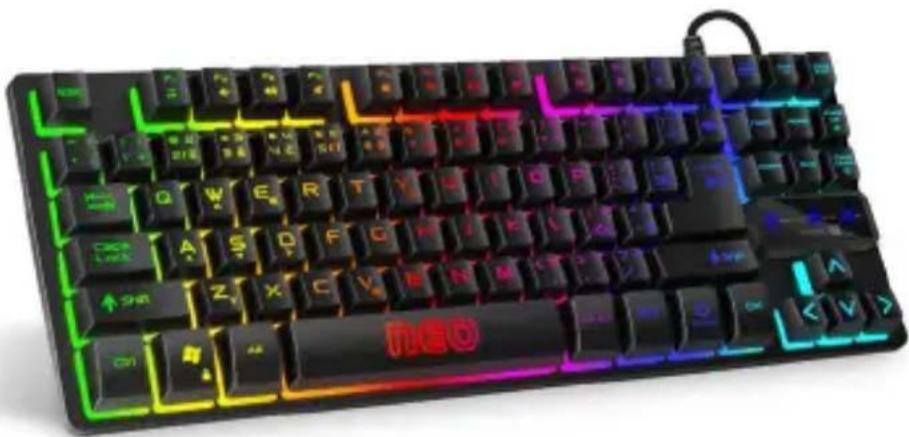
Black and white photo of a retro keyboard with glowing neon lights and a red 'HBO' on the keyboard (no readable text or symbols beyond standard font)EN COMPACT GAMING KEYBOARD
DE KOMPAKTE GAMING-TASTATUR
CZ KOMPAKTNÍ HERNÍ KLÁVESNICE
SK KOMPAKTNÁ HERNÁ KLÁVESNICA
HU KOMPAKT GAMER-BILLENTYÜZET
CKB-3589-CS
THANK YOU
FOR BUYING A CONNECT IT PRODUCT.
Do you want to be the first to know about other news of CONNECT IT? Follow us on social media.


YouTube

connectit
- Before putting this product into operation please read through the User's Manual carefully, even if you are already familiar with the use of similar products. Use the product only as described in this User's Manual.
- Keep this User's Manual for future reference. It is an integral part of the product and may contain important instructions for commissioning this product, its operation and cleaning.
- Make sure that all other people handling this product are familiar with this Manual. If you hand the product over to other people, make sure that they read this User's Manual, which shall be given to them together with the product.
We recommend keeping the original packaging of the product, proof of purchase and the warranty card, if supplied, at least for the warranty period. In case of transport, we recommend packing the product in the original packaging, in which it has been delivered in, as it protects it best against damage during transport. Scan this QR code to get the latest version of the User's Manual. In your smartphone, open the QR code reader application and point the smartphone at this code – the page for downloading the latest version of the User's Manual will open:
text_image
QR code containing a small animal icon in the center, likely linking to a digital resource or website.You can also find the latest version of the User's Manual on our website
www.connectit-europe.com
The text and technical specifications are subject to change.

connect

CONNECT IT ^® is a registered trade mark
R202009-IM
1 Technical Specifications
Properties:
- LED illumination
• 12 multimedia keys (Fn+) - Compact TKL design
● Easy Plug & Play installation
Technical Specifications:
- Dimensions (l x d x h): 360 x 136 x 39 mm
● Weight, including cable: 734 g - Cable length: 150 cm
- USB 1.1 and higher
Compatibility:
- Operating system: Microsoft Windows XP/Vista/7/8/10 and Mac OS
This product is compatible with Mac OS although some features unsupported by Mac OS may not work properly.
2 Basic Functions
presets
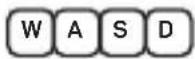
to
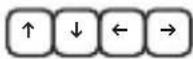
Locking the Windows key
The Windows key can be locked and unlocked using the shortcut Fn + WIN-L This function is very important for enthusiastic players because it prevents the menu from being accidentally recalled by pressing the Windows key on the keyboard during gameplay.
3 Multimedia Functions
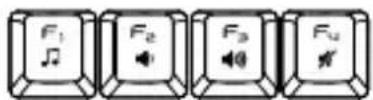
Activate multimedia functions with key shortcuts in combination with the Fn key.
12
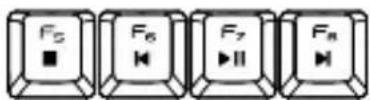
●
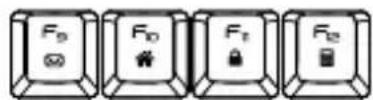
●
1 Music player
2 Volume (-)
3 Volume (+)
4 Mute sound
5 Stop
6 Previous track
7 Play/Pause
8 Next track
9 E-mail client
10 Internet browser homepage
1 Lock the keyboard
2 Calculator
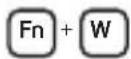
4 Changing the Backlight Colour
The keyboard has 2 colored backlight options: Static, Breathing
To switch between these modes, use the keyboard shortcut
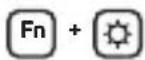
To increase the intensity of the backlight in 3 steps, press
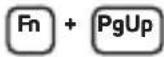
To decrease the backlight intensity in 3 steps, press
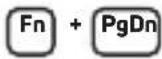
(The fourth press turns the backlight off completely.)
5 Notices
INSTRUCTIONS AND INFORMATION REGARDING THE DISPOSAL OF USED PACKAGING MATERIALS
Packaging materials and old appliances shall preferably be recycled. The packaging materials of this product can be disposed of as sorted waste. The same applies to the plastic bags made of polyethylene (PE) and other materials – please hand them over for recycling.
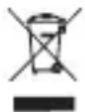
DISPOSAL OF WASTE ELECTRICAL & ELECTRONIC EQUIPMENT
In accordance with the European Directive 2012/19/EU on waste electrical and electronic equipment (WEEE), this appliance is labeled with this symbol on the product or its packaging to indicate that this product shall not be treated as household waste. It must be disposed of at a collection site for recycling of waste electrical and electronic equipment. The proper disposal of this product helps to prevent adverse impacts on the environment and human health, which could otherwise result from improper waste disposal. The disposal shall be carried out in accordance with waste management regulations. For more detailed information about the recycling of this product, contact the local authorities, household waste disposal services or the shop where you have bought the product. For proper disposal, renewal and recycling, hand the products over to the designated collection sites. Alternatively, in some EU or other European countries, you can return the products to your local dealer when buying an equivalent new product. The proper disposal of this product helps to preserve valuable natural resources and prevent potential adverse impacts on the environment and human health, which could result from improper waste disposal. For details, contact your local authorities or the nearest collection facility. In case of improper disposal of this type of waste, fines may be imposed in accordance with national legislation.
For business entities in the EU countries
If you want to dispose of electrical and/or electronic equipment, please contact your dealer or supplier for the necessary information.
Disposal in other countries outside the European Union
This symbol is valid in the European Union. If you want to dispose of this product, contact your local authorities or your dealer for the necessary information about the proper way of disposal.
In accordance with the law, we provide the take-back, processing and free environmentally friendly disposal of electrical and electronic equipment through the collective system of REMA System, a.s. The main purpose is to protect the environment by ensuring the efficient recycling of waste electrical and electronic equipment.
For the current list of collection sites, see the web www.rema.cloud

This product meets all the basic requirements of the applicable EU directives. It is CE marked. This mark indicates the conformity of the product's technical characteristics with the applicable technical regulations. The EU Declaration of Conformity is available at www.connectit-europe.com.
WIR DANKEN IHNEN
FÜR DEN KAUF EINES PRODUKTS VON CONNECT IT.
text_image
QR code containing a small animal silhouette in the centertext_image
QR code containing a central logo with elephant and bird imagery, likely for scanning to access digital content or a website.CONNECT IT® is a registered trade mark
R202009-IM

KOMPAKTNÍ HERNÍ KLÁVESNICE
CKB-3589-CS
UŽIVATELSKÝ MANUÁL
1 Specifikace
Vlastnosti:
text_image
QR code containing a small animal icon in the center, likely linking to a digital resource or website.CONNECT IT® is a registered trade mark
R202009-IM

KOMPAKTNÁ HERNÁ KLÁVESNICA
CKB-3589-CS
POUŽÍVATELŠKÝ MANUÁL
1 Špecifikácie
Vlastnosti:
POUŽÍVATELŠKÝ MANUÁL
text_image
QR code containing a central logo of an elephant, likely for scanning to access digital content or a website.text_image
F_G F_H F_Z F_Wtext_image
F₃ F₄ F₅ F₆ F₇ ● ● ● ●CONNECT IT® is a registered trade mark
R202009-IM
5 Figyelmeztetés
natural_image
Two stylized animal figures, one in teal and one in black, walking side by side (no text or symbols)connect IT®
MANUFACTURER
HERSTELLER
VÝROBCE
VÝROBCA
GYÁRTÓ
IT TRADE, a.s.
Brtnická 1486/2
101 00 Praha 10
Czech Republic
tel.: +420 734 777 444
service@connectit-europe.com
www.connectit-europe.com
