
iD.Run HR - Smartwatch SIGMA - Free user manual and instructions
Find the device manual for free iD.Run HR SIGMA in PDF.


| Product Type | Smartwatch |
| Brand | Sigma |
| Model | iD.Run HR |
| Case Dimensions | 43 mm diameter, 12 mm thickness |
| Weight | 52 g (with strap) |
| Display Type | 1.3 inch color LCD, 240x240 pixels |
| Touchscreen | Yes |
| Battery Type | Rechargeable lithium-ion |
| Battery Life | Up to 7 days typical use |
| Charging Method | Magnetic charging cable |
| Connectivity | Bluetooth 5.0 |
| Compatible OS | iOS 10+ and Android 5+ |
| Water Resistance | 5 ATM (50 meters) |
| Heart Rate Monitor | Optical HR sensor |
| GPS | Built-in GPS |
| Accelerometer | Yes |
| Notifications | Call, SMS, App alerts |
| Activity Tracking | Steps, distance, calories, sleep |
| Sports Modes | Running, cycling, walking, swimming, etc. |
| Cleaning Instructions | Wipe with soft damp cloth; avoid solvents |
| Replaceable Strap | Yes, standard 22 mm quick release |
| Warranty | 2 years (manufacturer) |
Frequently Asked Questions - iD.Run HR SIGMA
User questions about iD.Run HR SIGMA
0 question about this device. Answer the ones you know or ask your own.
Ask a new question about this device
Download the instructions for your Smartwatch in PDF format for free! Find your manual iD.Run HR - SIGMA and take your electronic device back in hand. On this page are published all the documents necessary for the use of your device. iD.Run HR by SIGMA.
USER MANUAL iD.Run HR SIGMA
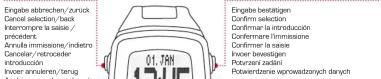
Tastenbelegung / Button functions / Funciones de las teclas / Assegnazione pulsanti/Affectation des touches / Knoppenfuncties / Obsazení tlačitek / Funkcje przycisków
STOP/EXIT
| Country, City Time Zone (UTC) | |
| United Kingdom, London / Ireland, Dublin / Portugal, Lisbon 0 | |
| Germany, Berlin / France, Paris / Italy, Rome / Spain, Madrid / Denmark, Copenhagen / Netherlands, Amsterdam / Norway, Oslo / Sweden, Stockholm / Poland, Warsaw / Slovakia, Bratislava / Slovenia, Ljubljana | +1 |
| Finland, Helsinki / Romania, Bucharest / Bulgaria, Sofia / Turkey, Ankara | +2 |
| Russia, Moscow +3 |
Alternative Doppel-TAP-Funktion / Alternative double-tap-function / Función TAP doble alternativa / Funzione doppio TAP alternativa / Fonction « double tapotement » alternative / Alternatieve dubbele TIK-functie / Alternativní funkce dvojitého poklepání / Alternatywna funkcja podwójnego stuknięcia
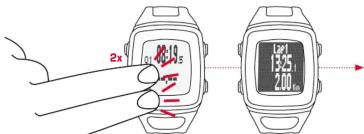
Wenn die Funktion Auto-Runde auf manuell eingestellt ist, wird durch leisten jedemter Doppel-TAP auf das Display die nächste Runde gestartet. Il Auto Lap is set to MANUAL, you can start the next lap by double-tapping the display. Lonourse la fonction « Tour automatique » est réglage sur « Manuel », il tour suivent peut être diéméré en taptantat légerément à deux renprises sur l'écrain. Se la functione gin automatique à impostata sur manuelu, un leggero doppio TAP sur display avila il giro successivo. Cuando la función vuelta automatique están en posición manul, se inicia la vuelta préterma con un legero TOQUE DOBLE en la pantalla. Vannérne de functie : Auto ronde om handmige is ingestekt, worb door zachit dubbel aantikken van het scherm de volgende ronde gestart. Jezeli da fricki automatycznego okrénizien włączono automale nekrejne, te aby nopyrazca nowe okrénizie trbeža ikko dwukrotnzie stuknacj wywiewlacz. Jest funkce automatického odnuhu nastavena na manulni, spust se distil duhrh dovtjim pokapéminá en parlant.
GPS-Signal empfangen / Receiving a GPS signal / Signal GPS recu / Ricevere segnale GPS / Recibir señal GPS / GPS-signaal ontvangen / Odbieraj signal GPS / Příjem GPS signálu
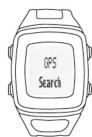
Keep in a free area (no trees or buildings) during the search for GPS. For the fastest result, do not move until your position was successfully determined.
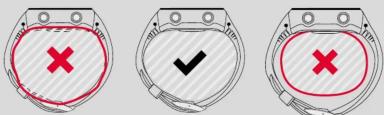
Nicht zu eng! Not too tight! ¡No demasiado estrecho! Non troppo stretto! Pas trop semé ! Niet te strak! Priliš nedotahovat! Nie za ciesno!
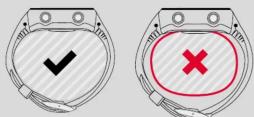
Gut anliegend Fitting fine Bien ajustado Ben aderente Bien ajusté Good aansluitend Musí dobre doléhat Dobrze przylega
Nicht zu locker! Not too loose! ¡No demasiado flajo! Non troppo lento! Pas trop läche! Niet te los! Ne philis volné! Nie za lužno!
Trainieren / Train / Entrenar / Allenarsi / Entraînement / Trainen / Trénování / Trening
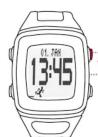
Hauptmenü öffnen Enter main menu Entrar al menü principal Entrare nel menu principale Accéder au menu principal Hoofdmenu ingaan Vstup do hlavního menu Przejdz do menu głównego
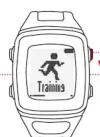
Trainingsmenù öffnen Enter training menu Intrar al menù de entrenamiento Entrare nel menu di allenamento Accéder su menu d'entraînementen Trainingsmenu ingaan Vstup do tréninkového menu Przejdz do menu treningu
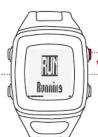
Modus wählen und bestätigen Choose and select mode Electionner un mode et confirm selezionäre e confermare model. Seleccioner y confirmer mode Modus kiezen en bevestigen Wybierz tryb i potwierdz Zvolte režim a potwirdte
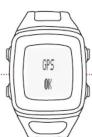
GPS-Signal Suche/OK GPS search/OK Recherche du signal GPS / OK Segnele GPS Ricerca/OK Busqueda de señal del GPS/OK GPS-signaal zoeken/OK Wyszukiwanie sygnału GPS/OK GPS signal wyhledsvéní/OK
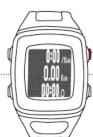
Training ist gestoppt Training stopped El entrenamiento está parado L'allenamento è interrotto L'entraînement est arrêté Training is gestopt Trénink je zastaven Trening zostel zatrzymany
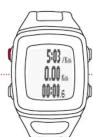
Training läuft Training started El entrenamiento está activo L'allenamento è in corso L'entraînement est en cours Training loopt Trénink probihá Trening w toku
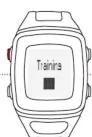
STOP-Taste zum Beenden drücken Press STOP to end the training Appuyer sur le bouton STOP pour quitter Premere il pulsente STOP per terminare Apretar la tecla STOP para finlizer STOP-toets om te beändigen indrukken Aby zakończyć, naciśnij przycisk STOP Tlačitko STOP stiskněte pro ukončení
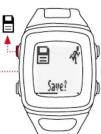
Trainingsdaten speichern Save training data
Using the SIGMA DATA CENTER /LINK App you can change the training views and individualize the sport profiles.
You can download the SIGMA DATA CENTER free of charge at http://sigma-download.com. You can download the SIGMA LINK APP for free in the Google Play Store (Android) or the App Store (iOS).


Brand : SIGMA
Model : iD.Run HR
Category : Smartwatch