MoCo - Remote control ESI - Free user manual and instructions
Find the device manual for free MoCo ESI in PDF.


| Product Type | Passive Monitor Controller |
| Brand | ESI |
| Model | MoCo |
| Inputs | 2 stereo inputs: Input A (2x balanced TRS), Input B (2x RCA + stereo mini-jack) |
| Outputs | 2 stereo outputs: Output A (2x balanced XLR), Output B (2x balanced/unbalanced TRS + stereo mini-jack) |
| Volume Control | Rotary knob |
| Mute | Yes (mutes signal to silence) |
| Input Selection | A/B switch |
| Output Selection | Buttons A and B (select active outputs) |
| Channel Swap L<>R | Yes (swaps left and right channels) |
| Mono Downmix | Yes (creates sum of left and right to both channels) |
| Signal Path | Fully passive (no active components) |
| Power Supply | None (passive, no power required) |
| Dimensions (approx.) | 10 x 5 x 3 cm (W x D x H) |
| Weight (approx.) | 0.3 kg |
| Construction | Compact desktop design with metal chassis |
| Cleaning | Wipe with a soft, dry cloth |
| Safety | No electrical hazard due to passive design |
| Disposal | Dispose according to local electronics waste regulations |
| Warranty | Check with local dealer or ESI support |
| Support | www.esi-audio.com |
| Trademarks | ESI and MoCo are trademarks of ESI Audiotechnik GmbH |
Frequently Asked Questions - MoCo ESI
User questions about MoCo ESI
0 question about this device. Answer the ones you know or ask your own.
Ask a new question about this device
Download the instructions for your Remote control in PDF format for free! Find your manual MoCo - ESI and take your electronic device back in hand. On this page are published all the documents necessary for the use of your device. MoCo by ESI.
USER MANUAL MoCo ESI
Passive Monitor Controller with 2 stereo I/O
MoCo
User's Guide

natural_image
Stylized metallic logo design with no text or symbolsIntroduction
Thank you for choosing ESI MoCo, a fully passive monitor controller that helps you to provide perfect control over the playback volume of your studio monitors; "fully passive" means that there are no active components involved, that could in any way alter the audio signal - keeping the maximum sound quality level for your studio monitors. MoCo provides two separate stereo inputs and two separate stereo outputs.
Connectors
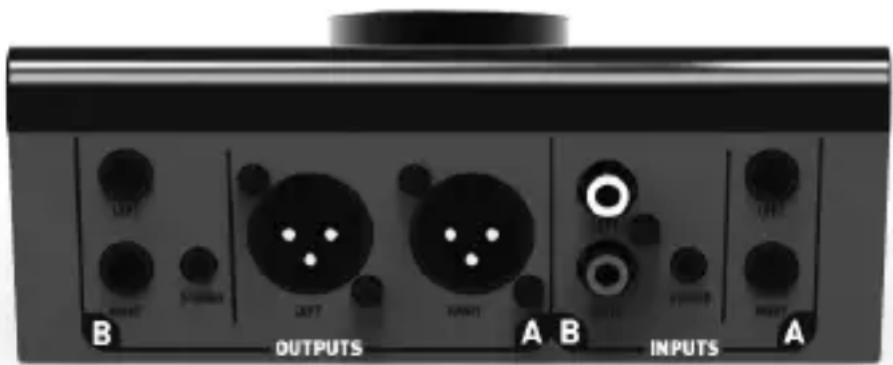
The rear panel of MoCo provides on the right section a pair of balanced TRS inputs (left / right), which is labeled as input A. Next to it is input B, which is provided with stereo RCA connectors as well as stereo mini-jack connection. The output labeled A is provided with balanced XLR connectors in the middle of the unit. Output B in the left section of the back panel is available both with balanced / unbalanced TRS connectors (left / right) and with a stereo mini-jack connector.
text_image
OUTPUTS INPUTSUsage
Typically, MoCo is connected and used between your computer with its soundcard or an audio interface and your usually active studio monitor speakers. For that you connect your computer or your audio interface with one of the inputs of MoCo and at least one of the outputs with your monitors. If you have multiple sources (i.e. both your soundcard and a professional audio interface), you can connect them simultaneously via inputs A and B. Via the outputs A and B, usage of two pairs of speakers can be used simultaneously (i.e. to compare signals via the separate speakers). Please keep in mind that there is no conversion of unbalanced audio signals into balanced audio signals.
Functions
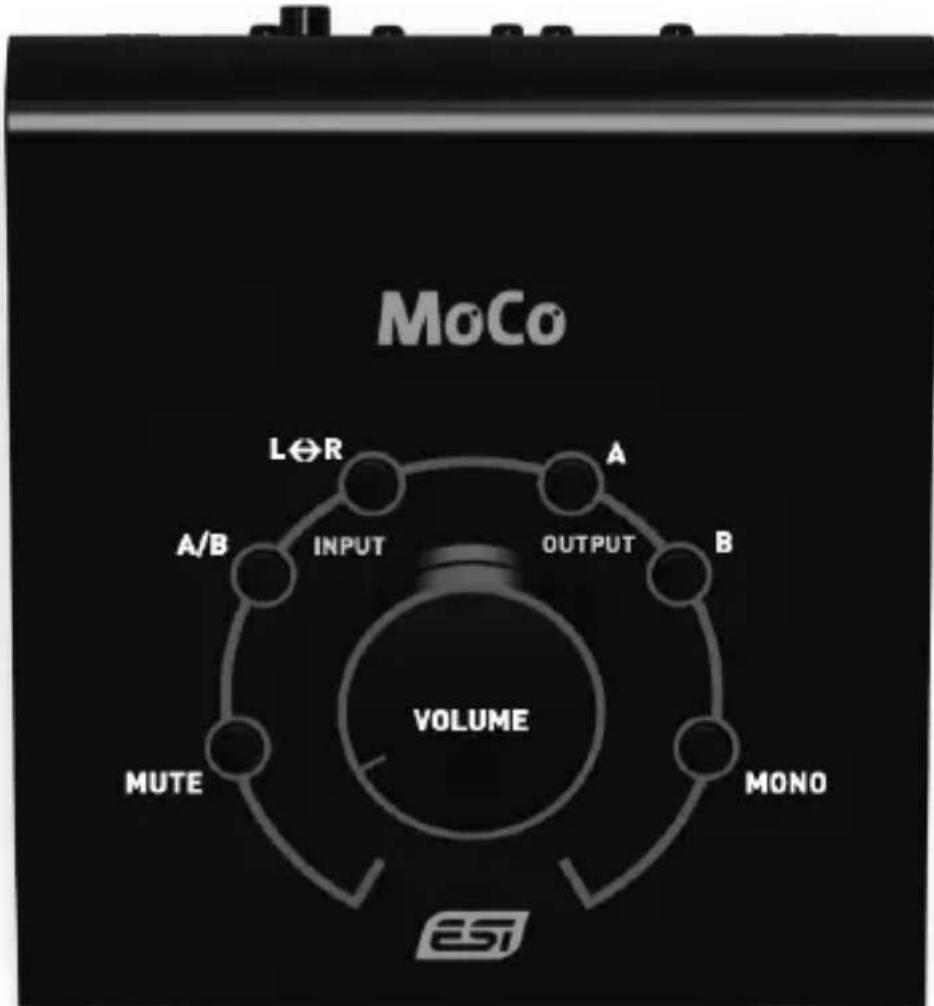
The VOLUME knob controls the output volume, while MUTE allows you to mute the signal to have silence. The OUTPUT section provides the possibility to select which outputs are currently active via the A
and B buttons. The A/B switch in the INPUT section allows you to select the audio signal source, while L<>R provides the option to swap the left and right audio channel. MONO creates a down mix where the left and right audio signal are each played via both audio output channels.
flowchart
graph TD
    A["A/B"] --> B["INPUT"]
    B --> C["VOLUME"]
    C --> D["MUTE"]
    D --> E["MONO"]
    E --> F["OUTPUT"]
    F --> G["L∅R"]
    G --> H["MoCo"]
General Information
Trademarks: ESI and MoCo are trademarks of ESI Audiotechnik GmbH. Other product and brand names are trademarks or registered trademarks of their respective companies.
Correspondence: For technical support inquiries, contact your nearest dealer, local distributor or ESI support online at www.esi-audio.com.
Disclaimer: All features and specifications subject to change without notice. Parts of this manual are continually being updated. Please check our web site www.esi-audio.com occasionally for the most recent update information.