MAYA22 - Hi-Fi System ESI - Free user manual and instructions
Find the device manual for free MAYA22 ESI in PDF.


| Product Type | Hi-Fi System |
| Brand | ESI |
| Model | MAYA22 |
| Dimensions (W x H x D) | Approximately 300 x 250 x 200 mm |
| Weight | Approximately 4.5 kg |
| Power Supply | AC 230V ~ 50Hz |
| Power Consumption | 30 W (max) |
| Speaker Configuration | 2.0 stereo |
| Total Output Power | 2 x 15 W RMS |
| Frequency Response | 60 Hz – 20 kHz |
| Supported Media | CD, CD-R/RW, MP3 via USB |
| Radio Tuner | FM with 20 preset stations |
| Connectivity | USB, AUX input, Bluetooth (optional) |
| Display | LED display with CD/radio info |
| Remote Control | Included |
| Functions | CD player, FM radio, USB playback, Bluetooth streaming, AUX input |
| Maintenance and Cleaning | Wipe with a soft, dry cloth. Do not use solvents. |
| Safety | Keep away from moisture and heat. Unplug during storms. |
| Spare Parts and Repairability | Contact ESI support for genuine parts. Repairs by qualified personnel only. |
| General Information | Designed for home audio enjoyment. Includes 1-year warranty. |
Frequently Asked Questions - MAYA22 ESI
User questions about MAYA22 ESI
0 question about this device. Answer the ones you know or ask your own.
Ask a new question about this device
Download the instructions for your Hi-Fi System in PDF format for free! Find your manual MAYA22 - ESI and take your electronic device back in hand. On this page are published all the documents necessary for the use of your device. MAYA22 by ESI.
USER MANUAL MAYA22 ESI
Flexible High Performance 24-bit USB Audio Interface
User's Guide

natural_image
Abstract metallic logo design with stylized 'EST' letters, no text or symbols presentESI - Copyright © 2013
Revision 1, November 2013
INDEX
1. Introduction......4
1.1 Features....4
2. Installation 5
2.1 System Recommendation....5
2.2 Hardware Installation....5
2.3 Driver & Software Installation....5
2.3.1 Installation under Windows XP 6
2.3.2 Installation under Windows Vista / 7 / 8....7
2.3.3 Installation under Mac OS X....8
3. Control Panel under Windows 9
3.1 Input Selection....9
3.2 Input Monitoring....9
3.3 Latency settings 10
3.3 DirectWIRE 10
4. Control Panel under Mac OS X....11
4.1 Input Selection....12
4.2 Input Monitoring....12
5. Specifications....13
6. General Information....14
1. Introduction
MAYA22 USB is not simply another USB audio interface - it's a very stylish portable device that can go with you anywhere. It offers total flexibility as an external and fully bus-powered USB device with excellent professional 24-bit audio quality.
It features 2 analog input and 2 analog output channels with RCA connection, a microphone preamplifier with XLR input and support for +48V phantom power, a Hi-Z instrument input for guitars, a high quality headphone output and TRS line outputs. This can make MAYA22 USB easily one of the most useful devices in your studio, wherever that may be.
Use it to record microphone and guitar signals simultaneously and then process the incoming signals with your PC or Mac notebook or desktop in realtime and listen to the mix directly via headphones or studio monitoring speakers. All these features are provided with a professional low latency drivers with support for WDM, ASIO 2.0 and CoreAudio.
If you're looking for a really powerful USB audio device that is small and that gives you maximum performance under any current Windows system as well as under Mac OS X, then MAYA22 USB is for you. It's incredible how many functions are provided by this small device!
1.1 Features
The MAYA22 USB hardware has these main features:
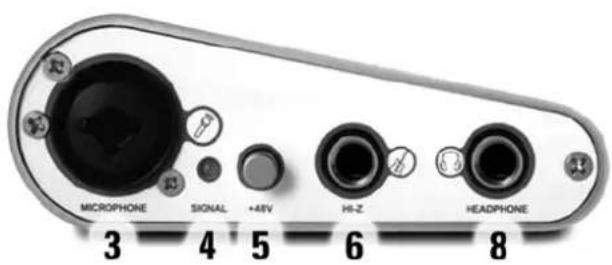
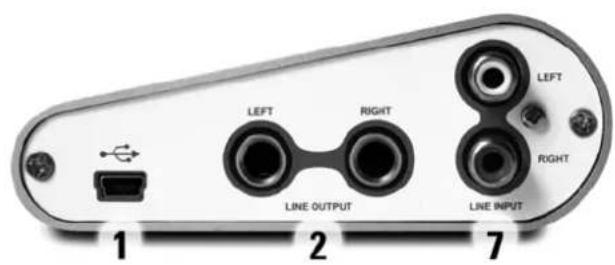
- USB connection port (connects to your computer with the supplied cable)
- Line Output with balanced 1/4" TRS connection
- XLR and TRS microphone input
- input signal indicator LED
- +48V phantom power switch (for condenser microphones)
- Hi-Z instrument input with 1/4" connector
- Line Input with RCA connectors
- Stereo Headphone Output with 1/4" connection
The cool compact design allows you to take MAYA22 USB with you, wherever you go. As companion to a notebook computer, you can take your recording projects with you. MAYA22 USB is simple to install and even easier to use. Working with recording software has never been easier, with the help from MAYA22 USB.
2. Installation
2.1 System Recommendation
MAYA22 USB is not simply a standard digital audio interface, but a high-resolution device capable of advanced processing of audio content. Even though MAYA22 USB is built to have low-CPU resource dependability, system specifications play a key part in the MAYA22 USBs performance. Systems with more advanced components are generally recommended.
Minimum System Requirements
PC
- Intel Pentium III 600MHz CPU or comparable AMD CPU (or equivalent)
- Windows XP or Windows Vista / 7 / 8 (32- and 64-bit) operating system
- 1 available USB port
- at least 2 GB RAM
- high quality audio software with ASIO support recommended
Mac
- Macintosh with Intel CPU
- 1 available USB port
- at least 2 GB RAM
- Mac OS X 10.4 or higher
2.2 Hardware Installation
MAYA22 USB is simply connected to an available USB port of your computer. A separate power supply is not required, as MAYA22 USB is a USB powered device. Simply install the hardware by plugging it into your computer with the supplied cable.
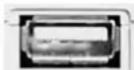
USB port of a computer
2.3 Driver & Software Installation
After the connection of MAYA22 USB, the operating system automatically detects it as a new hardware device. Modern operating systems like Windows XP, Windows Vista/7/8 or Mac OS X usually detect the hardware directly and are installing the correct USB audio drivers automatically.
You can use MAYA22 USB already now in typical consumer audio applications that do not need special professional ASIO driver support. Under Windows XP this could be for example programs
used for DVD playback or more simple DJ applications that don't require ASIO. Under Mac OS X this could be applications like Garageband.
2.3.1 Installation under Windows XP
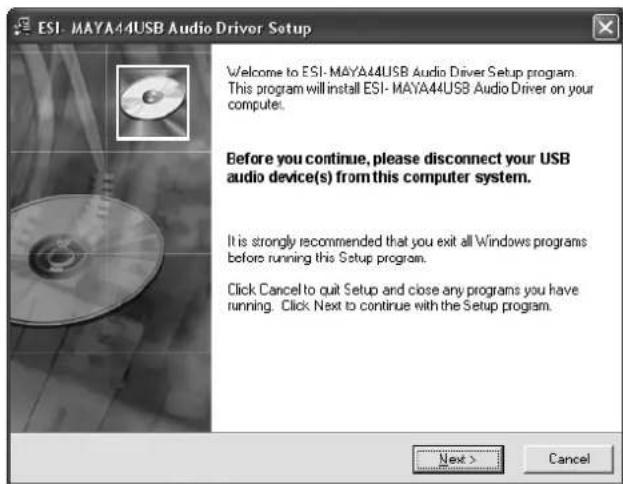
Unplug the device before you start the installer if it is already connected. Then launch setup.exe from the Windows folder of the included driver CD or from a download of a recent driver from our website.
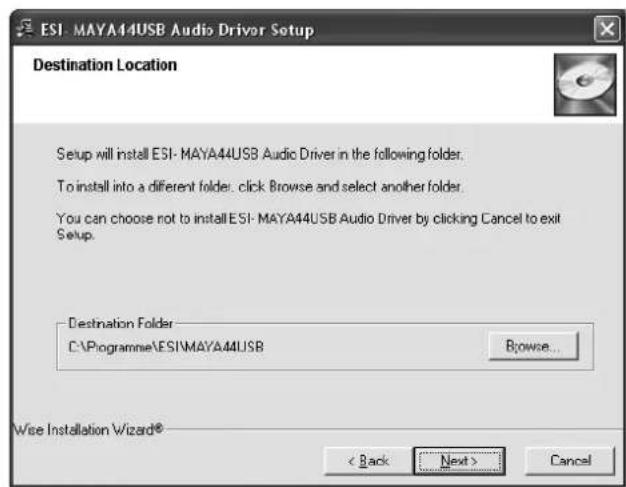
You will now see a dialog as shown on the left picture below. Click Next. You can define the target directory for the installation now. Confirm it with Next.
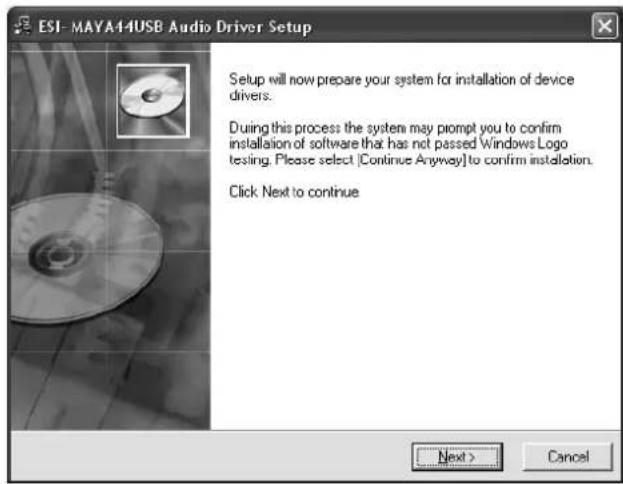
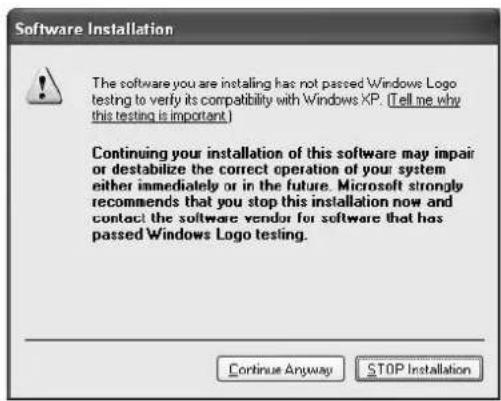
The installer now informs you that the driver installation will start as shown on the left picture below. Confirm this with Next. During the following process you will see a dialog box once or several times that informs you that the driver software has not passed Windows Logo testing. Please be assured that our drivers have been tested in various different ways and are OK to be used. Confirm any such dialog with Continue Anyway.
You will now be prompted to connect the hardware on the next dialog that is shown below on the left. Plug in MAYA22 USB. Do not click Next yet. During the driver installation, Windows might again prompt you to confirm the Windows Logo testing dialog once or several times with Continue Anway before the driver installation is finalised.
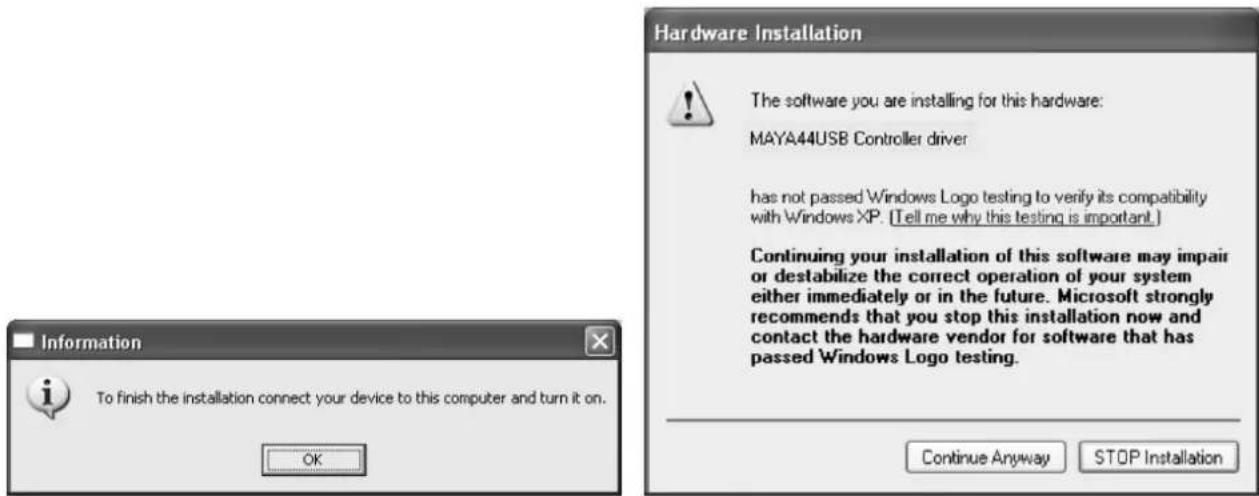
You can now finally click Next on the ESI MAYA22 USB Audio Driver Setup dialog. The installation is now finished. To confirm this, please check if the ESI icon is displayed in the taskbar notification area as shown below. Sometimes a reboot is required.

If yes, the driver installation has been completed successfully.
2.3.2 Installation under Windows Vista / 7 / 8
Unplug the device before you start the installer if it is already connected. Then launch setup.exe from the Windows folder of the included driver CD or from a download of a recent driver from our website.
When launching the installation, Windows Vista / 7 / 8 might prompt a security message. Make sure to allow the installation. You will then see a dialog as shown on the left picture below. Click Next. You can define the target directory for the installation now. Confirm it with Next.
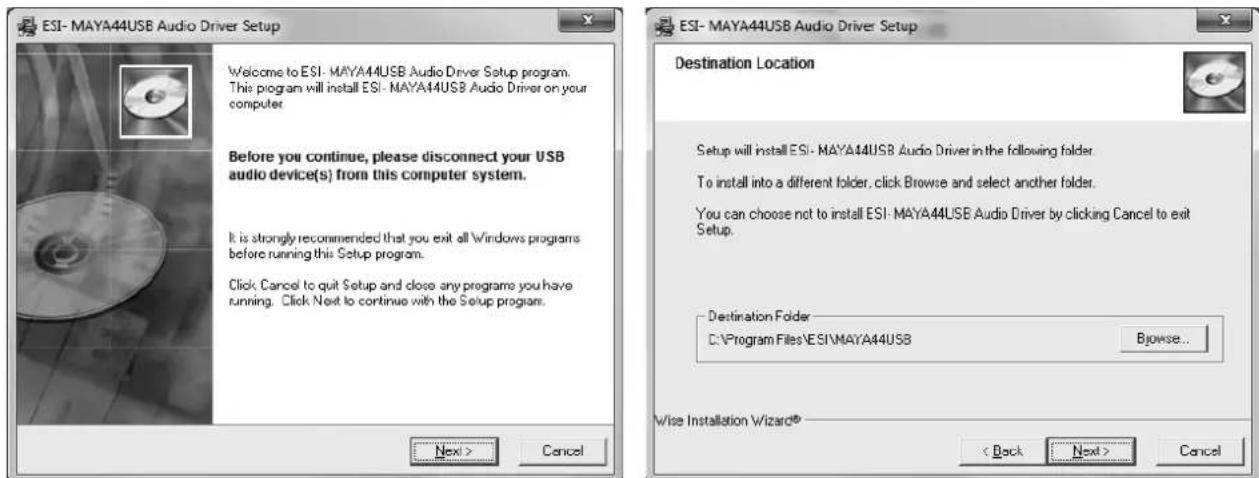
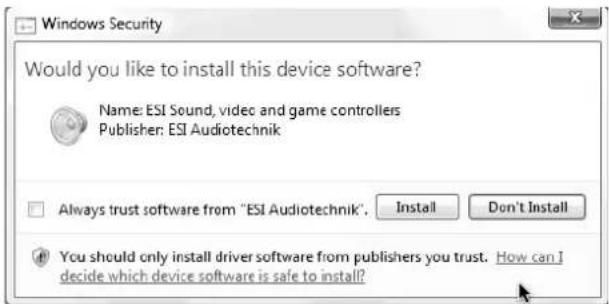
The installer now informs you that the driver installation will start as shown on the left picture below. Confirm this with Next. During the following process you might see a Windows Security dialog box once or several times that asks you for confirmation to install the driver software. Confirm any such dialog with Install.
![ESI- MAYA44USB Audio Driver Setup Setup will now prepare your system for installation of device drivers. During this process the system may prompt you to confirm installation of software that has not passed Windows Logo testing. Please select [Continue Anyway] to confirm installation. Click Next to continue. Next > Cancel](/content/2026/05/973042/images/722e5c3819f40092779fe5db440606bd575698d86b174a6e8760e261b11d7a91.jpg)
You will now be prompted to connect the hardware on the next dialog that is shown below on the left. Plug in MAYA22 USB. Do not click Next yet. Instead, wait a few seconds for the automatic device driver installation. You can monitor this in the task notification area where Windows Vista / 7 informs that the driver is installed via a bubble message box.
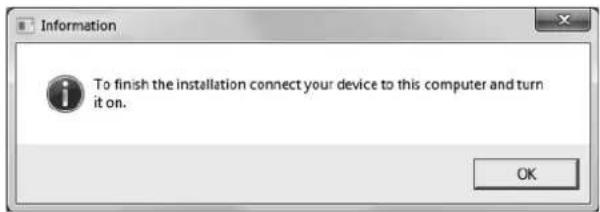
You can now finally click Next on the ESI MAYA22 USB Audio Driver Setup dialog. The installation is now finished. To confirm this, please check if the ESI icon is displayed in the taskbar notification area as shown below. Sometimes a reboot is required.

If yes, the driver installation has been completed successfully.
2.3.3 Installation under Mac OS X
Mac OS X already provides support for class compliant USB audio devices such as MAYA22 USB. This means that no software or driver needs to be installed to use MAYA22 USB under Mac OS X. Simply connect the unit with the supplied USB cable to your Mac and you can start using it.
To make the usage more simple, we provide a control panel application that can be installed from the included CD (Mac OS X folder) or downloaded on our website. To install it, open the .dmg file and then launch the installer by double clicking the contained .pkg package file. Follow the instructions on screen to install it.
Controlling some of the basic options of MAYA22 USB under Mac OS X can also be done via the Audio MIDI Setup utility from Mac OS X.
3. Control Panel under Windows
This chapter describes the MAYA22 USB Control Panel under Windows.
To open the control panel double click on the ESI icon in the task notification area. The following dialog will appear:
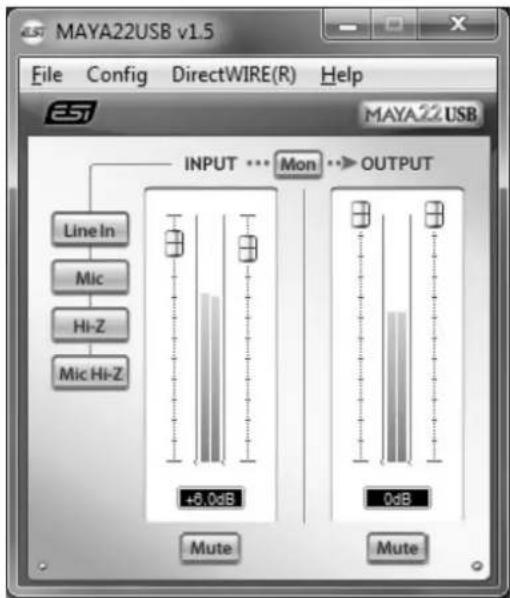
The panel has the following functions and sections:
INPUT section: this section controls the input monitoring volume of the incoming signal from the hardware. A pair of mono faders can be controlled together or individually depending on your mouse position – perfect for stereo signals. The Mute button the channel allows you to mute the signal. A red Mute button indicates that the mute function is enabled. When disabled, the button is gray.
OUTPUT section: this section controls the playback volume of the playback signal from your audio applications. The pair of mono faders can be controlled together or individually depending on your mouse position – perfect for stereo signals. The Mute button the channel allows you to mute playback. A red Mute button indicates that the mute function is enabled. When disabled, the button is gray.
3.1 Input Selection
With the buttons on the left side, you can select the line input (Line In), the microphone input (Mic), the instrument input (Hi-Z) or simultaneous recording of microphone and instrument signals (Mic Hi.Z) via the corresponding button. When Mic Hi-Z is selected, the microphone input signal will be recorded on the left input channel 1 and the instrument signal on the right input channel 2.
3.2 Input Monitoring
The Mon button (located between INPUT and OUTPUT) allows you to enable realtime input monitoring. Once enabled all incoming signals are audible through the output. You can control the input monitor level, the input level and the output level with the faders in the control panel.
3.3 Latency settings
Via Config > Latency in the Control Panel it is possible to change the latency setting (also called "buffer size") for the driver of MAYA22 USB. A smaller latency is the result of a smaller buffer size. Depending on the typical application (e.g. for playback of software synthesizers) a smaller latency is an advantage. At the same time, the best latency setting indirectly depends on the performance of your system. For recording applications, a typical latency buffer size between 4 and 8ms is standard. Note that the latency has to be setup before launching the audio application using MAYA22 USB.
3.3 DirectWIRE
What is DirectWIRE?
DirectWIRE is a driver technology, developed by ESI, which can be used for routing audio streams internally within applications using EWDM Audio MIDI Drivers exclusively developed by ESI.
With the DirectWIRE router, an application can record from other application's audio outputs without external wiring or any loss of data when they are running at the same time.
DirectWIRE also allows you to easily rip any audio stream in real time by transferring data thru DirectWIRE from MP3s, live On-line Broadcast and On-demand content, and more.
DirectWIRE is not available under Mac OS X.
DirectWIRE Panel
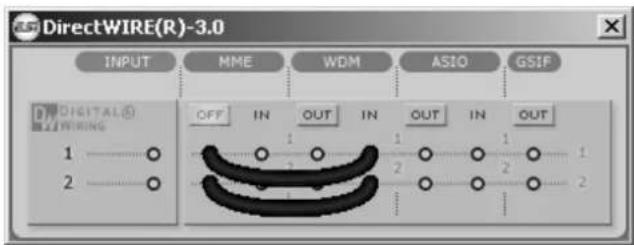
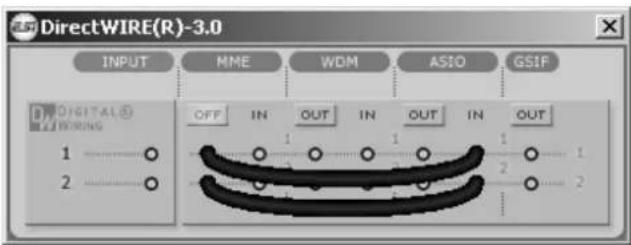
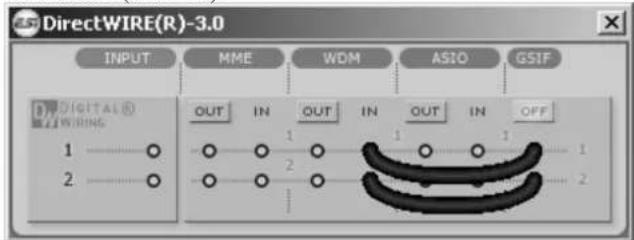
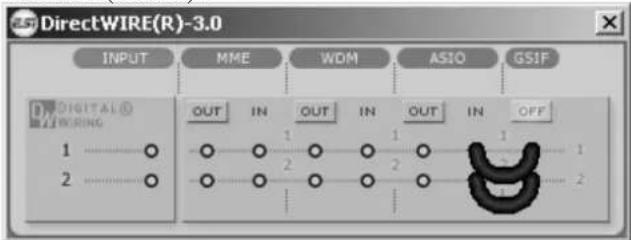
Click on DirectWIRE on the MAYA22 USB control panel. The DirectWIRE dialog as shown below will appear. DirectWIRE digital virtual wiring technology, developed by ESI, routes audio streams internally within applications using standard audio drivers such as WDM, ASIO and MME, even when they are running at the same time.
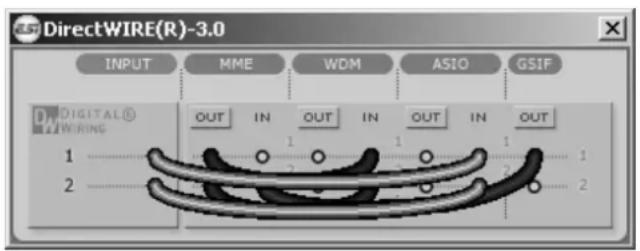
The number on the row represents the input or output port. The columns represent ins and outs (on and off) of the respected drivers. Patch the virtual cables from one point to another as you drag your mouse point.
INPUT section: It's used to route signals from the card's hardware inputs.
MME section represents general application's I/O: Ex.) WinAmp, WaveLab (non ASIO mode), Cakewalk, Audition, Vegas, etc.
WDM section represents Multi-MME application's I/O: Ex.) SONAR (when using WDM/KS), PowerDVD, WinDVD, etc.
ASIO section represents ASIO application's I/O: Ex.) Cubase, Logic, Reason, Nuendo, SONAR (when using ASIO), Samplitude, etc.
GSIF section represents GSIF application like GigaStudio.
Note that some applications support multiple driver modes.
DirectWIRE Examples
Example 1. Recording from WinAmp (MME) to WaveLab (MME).
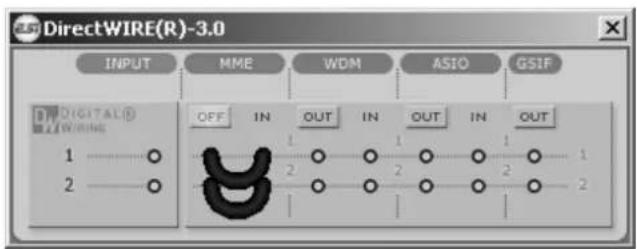
If you want to record what's played back in WinAmp, but don't want to hear the sound, you should click the OUT button in the MME section so it'll change to OFF.
Example 2. Recording from WinAmp (MME) to SONAR (WDM).
Example 3. Recording from WinAmp (MME) to Cubase, Logic, Nuendo (ASIO).
Example 4. Recording from GigaStudio (GSIF) to SONAR (WDM).
Example 5. Recording from GigaStudio (GSIF) to Cubase (ASIO).
4. Control Panel under Mac OS X
This chapter describes the MAYA22 USB Control Panel under Mac OS X.
After the installation, the panel can be found in your Applications folder. You can launch it in the Finder via Go>Applications >MAYA22 USB Panel. The following dialog appears:
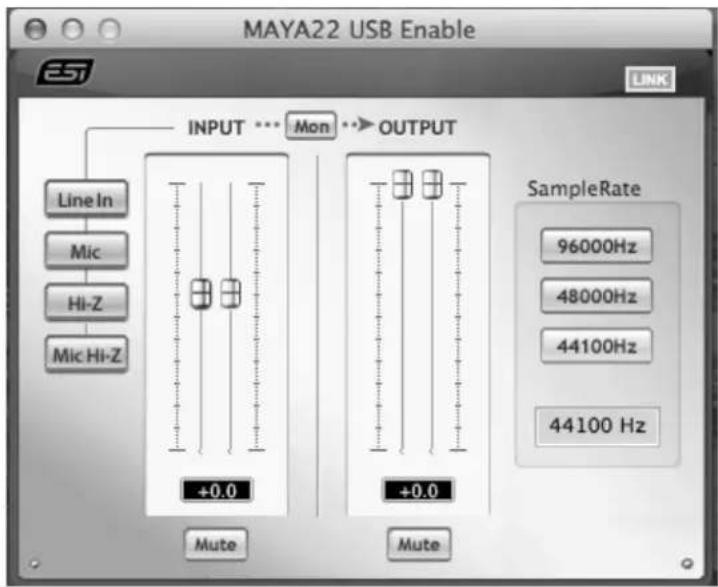
The panel has the following functions and sections:
INPUT section: this section controls the input monitoring volume of the incoming signal from the hardware. A pair of mono faders can be controlled together or individually depending on your mouse position – perfect for stereo signals. The Mute button the channel allows you to mute the signal. A red Mute button indicates that the mute function is enabled. When disabled, the button is gray.
OUTPUT section: this section controls the playback volume of the playback signal from your audio applications. The pair of mono faders can be controlled together or individually depending on your mouse position – perfect for stereo signals. The Mute button the channel allows you to mute playback. A red Mute button indicates that the mute function is enabled. When disabled, the button is gray.
4.1 Input Selection
With the buttons on the left side, you can select the line input (Line In), the microphone input (Mic), the instrument input (Hi-Z) or simultaneous recording of microphone and instrument signals (Mic Hi.Z) via the corresponding button. When Mic Hi-Z is selected, the microphone input signal will be recorded on the left input channel 1 and the instrument signal on the right input channel 2.
4.2 Input Monitoring
The Mon button (located between INPUT and OUTPUT) allows you to enable realtime input monitoring. Once enabled all incoming signals are audible through the output. You can control the input monitor level, the input level and the output level with the faders in the control panel.
5. Specifications
Product Overview:
- 2 input / 2 output USB 2.0 24-bit Audio Interface
- line, guitar and microphone inputs
- simultaneous recording of microphone and guitar signals
- microphone preamp with +48V phantom power support
- line and headphone outputs
- ESI 7012L controller chip
- USB bus powered
Key Features:
- USB 2.0 Full Speed
- 2 input channels
- 2 output channels
- Input Type:
- 1 XLR (for microphone), +48V support
- 1 TS unbalanced Hi-Z (for guitar)
- 2 RCA unbalanced (for line signals)
- Output Type:
- 2 TRS balanced (left/right channel line signal)
- 1 headphone output (stereo)
Audio Specifications:
- 24-bit / 96kHz
- ADC Dynamic Range:
102dBA@48kHz, SNR = 102dBA@48kHz - DAC Dynamic Range:
108dBA@48kHz, SNR = 108dBA@48kHz
Compatibility:
- supports Windows XP, Windows Vista, Windows 7 and Windows 8 with ASIO 2.0, MME, WDM and DirectSound incl. DirectWIRE support and realtime level meters in MAYA22 USB for Windows control panel software
- supports Mac OS X (10.4 and above) via the native CoreAudio USB audio driver from Apple (no driver install required, MAYA22 USB for Mac control panel available)
6. General Information
Trademarks
ESI, MAYA22 and MAYA22 USB are trademarks of ESI Audiotechnik GmbH. Windows is a trademark of Microsoft Corporation. Other product and brand names are trademarks or registered trademarks of their respective companies.
The FCC and CE Regulation Warning
This device complies with Part 15 of the FCC Rules. Operation is subject to the following two conditions: (1) this device may not cause harmful interference, and (2) this device must accept any interference received, including interference that may cause undesired operation. Caution: Any changes or modifications in construction of this device with are not expressly approved by the party responsible for compliance, could void the user's authority to operate equipment.
Note: This equipment has been tested and found to comply with the limits for a Class A digital device, pursuant to Part 15 of the FCC Rules. These limits are designed to provide reasonable protection against harmful interference when the equipment is operated in a commercial environment. This equipment generates, uses, and can radiate radio frequency energy and, if not installed and used in accordance with the instruction manual, may cause harmful interference to radio communications. Operation of this equipment in a residential area is likely to cause harmful interference in which case the user will be required to correct the interference at his own expense. If necessary, consult an experienced radio/television technician for additional suggestions.
Correspondence
For technical support inquiries, contact your nearest dealer, local distributor or ESI support online at www.esi-audio.com. Please also check our extensive Knowledge Base with Frequently Asked Questions, installation videos and technical details about our products in the support section of our website.
Disclaimer
All features and specifications subject to change without notice.
Parts of this manual are continually being updated. Please check our web site www.esi-audio.com occasionally for the most recent update information.

- Flexible High Performance 24-bit USB Audio Interface
- User's Guide
- ESI - Copyright © 2013
- INDEX
- Introduction......4
- Installation 5
- Control Panel under Windows 9
- Control Panel under Mac OS X....11
- Specifications....13
- General Information....14
- Introduction
- Features
- Installation
- System Recommendation
- Minimum System Requirements
- PC
- Mac
- Hardware Installation
- Driver & Software Installation
- Installation under Windows XP
- Installation under Windows Vista / 7 / 8
- Installation under Mac OS X
- Control Panel under Windows
- Input Selection
- Input Monitoring
- Latency settings
- DirectWIRE
- What is DirectWIRE?
- DirectWIRE Panel
- DirectWIRE Examples
- Control Panel under Mac OS X
- Input Selection
- Input Monitoring
- Specifications
- Product Overview:
- Key Features:
- Audio Specifications:
- Compatibility:
- General Information
- Trademarks
- The FCC and CE Regulation Warning
- Correspondence
- Disclaimer
Brand : ESI
Model : MAYA22
Category : Hi-Fi System