USER MANUAL CareStyle 7 Pro IS 7286 BRAUN
Type 12870020
Type 12870021
Register your product
www.braunhousehold.com/register
Ironing system
Deutsch ....8 .... For demo videos scan the following QR code English.... 13 .... For demo videos scan the following QR code Français ...... 18 ...... For demo videos scan the following QR code Español...... 23 ...... For demo videos scan the following QR code Português ...... 29 ...... For demo videos scan the following QR code Italiano .... 34 .... For demo videos scan the following QR code Nederlands ...... 39 ...... For demo videos scan the following QR code Dansk .... 44 .... For demo videos scan the following QR code Norsk....49 ....For demo videos scan the following QR code Svenska .... 54 .... For demo videos scan the following QR code Suomi ....59 .... For demo videos scan the following QR code Polski ...... 64 ...... For demo videos scan the following QR code Český ...... 70 ...... For demo videos scan the following QR code Slovenský ..... 74 ..... For demo videos scan the following QR code Magyar ...... 79 ...... For demo videos scan the following QR code Hrvatski.... 85 .... For demo videos scan the following QR code Slovenski....90 .... For demo videos scan the following QR code Türkçe....94 .... For demo videos scan the following QR code Română (RO/MD) . 99 ..... For demo videos scan the following QR code Ελληνικά...... 104 ...... For demo videos scan the following QR code Казак ..... 110..... For demo videos scan the following QR code Русский.... 116.....For demo videos scan the following QR code Українська...... 123 ...... For demo videos scan the following QR code عربي ..... 129 ...... For demo videos scan the following QR code
© Copyright 2021. All rights reserved
De'Longhi Braun Household GmbH
EN Please read safety instructions (separate booklet) carefully and completely before using the appliance.
B![graph LR A["flashing"] --> B["permanent"] B --> C["off"] C --> D["max 2.0 L"] D --> E["min"] E --> F["on"]](/content/2026/05/756958/images/61c164d65fb85d1cdbe54cf471b455a7dc00801e5953565cd5f586282bca1a18.jpg)
C![graph LR A["Power plug"] --> B["Power switch"] B --> C["flashing"] C --> D["iron ready +"] D --> E["Iron drop"]](/content/2026/05/756958/images/fdae443330ca4fc5de668ad4d56ff2aeab43039172ac2b9dc6f2b3375ab12cf1.jpg)
D CareStyle 7 Pro![graph TD A["iCare"] --> B["iMode"] B --> C["iN"] C --> D["eiMode"] D --> E["boost 15'"] F["Turbo"] --> G["Turbo +"] G --> H["ProSteam"] H --> I["Eco Boost"] J["eco"] --> K["eco"] K --> L["boost 15'"] M["1x"] --> N["30 sec"] N --> O["30 sec"] P["15 min"] --> Q["15 min"]](/content/2026/05/756958/images/50f8960c2b92a7d1512452785e626586411c6e9a9f8044512c6e28eac146a679.jpg)
CareStyle 7
![graph TD A["iCare"] --> B["Top Gear Icon"] B --> C["Hand Cutting Down"] D["iMode"] --> E["Turbo"] E --> F["Top Gear Icon"] F --> G["Hand Cutting Down"] H["iMode"] --> I["Eco"] I --> J["Hand Cutting Down"]](/content/2026/05/756958/images/eeee44f2aead39a0f220026589f78ba63135c515c0d59121a434e32261b77792.jpg)
E![graph LR A["Auto-Off\n10 min"] --> B["Stand-by Off\nflashing"] B --> C["+ 10 min"] C --> D["+ 2x\n2x"] D --> E["Thermometer\n°C"]](/content/2026/05/756958/images/e2a78a870c7eb7016a1db8c9237a66a1cb8191ca85a933bcc6df1c0f6a6be381.jpg)
F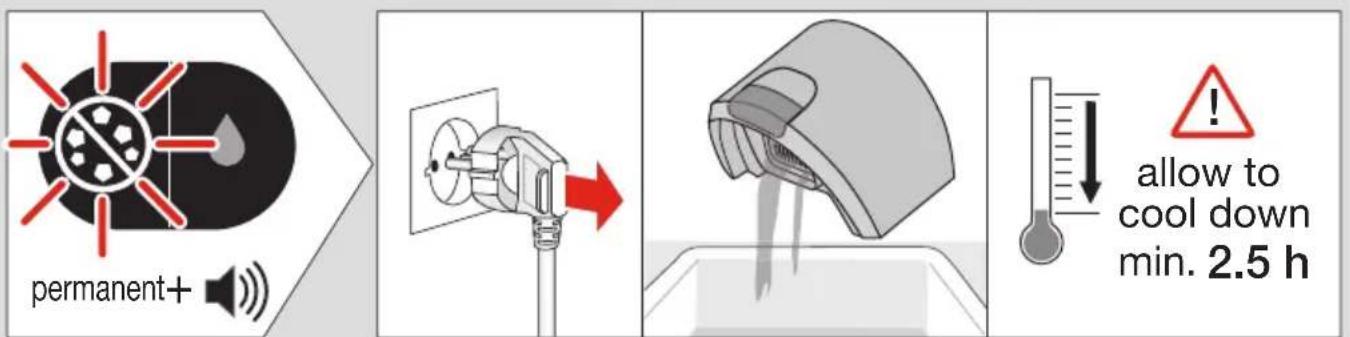
GERMAN
Description
ProSteam 🎨 (CareStyle 7 Pro only)
1 On/Off button/icon
2 Boost button/icon (certain models only)
3 FastClean system button/icon
4 Water reserve icon
5a iMode selector
5b Steam setting icons
6 Steam button
7 Iron rest
8 Lock system
9 Removable water tank
10 Closure
11 Double cord / storage
12 Power cord / storage
13 Heel rest
Intended use
The appliance must be used only for ironing garments which are suitable for ironing according to the care label. In addition, the appliance can be used for refreshing. Never iron or dampen garments while wearing them.
Before first use
When steam is ready for the first time, we recommend ironing for a few minutes over a rag to avoid manufacturing residues that could dirty your garments.
(A) Filling the water tank
Make sure that the appliance is switched off and the system is unplugged.
- Remove the water tank (9).
- Fill the water tank with tap water, taking care not to exceed the “max” level but at least up to the mark “min”.
- If you have extremely hard water, we recommend that you use a mixture of 50% tap water and 50% distilled water.
- Never use distilled water exclusively. Do not add any additives (e.g., starch). Do not use condensation water from a tumble dryer.
- Insert the water tank.
- Place the appliance on a stable, level surface.
Note: If you use filtering devices or in-house permanent descaler, make absolutely sure the water obtained is neutral pH.
(B) Water reserve function
When the water level is becoming low, the water reserve icon ♦ (4) starts flashing. At this stage it is possible to continue steam ironing for about 10-15 minutes.
When the water reserve icon turns permanently on, it becomes necessary to refill the water tank. At the same time, the On/Off icon (1) and the icon related to the selected setting start flashing.
To continue steam ironing, refill the water tank at least up to the mark "min".
(C) Start into operation
Before start ironing follow the garment care label instructions carefully. Fabrics with this symbol 📋 are not ironable.
- Place the iron on the iron rest (7) or on its heel rest (13), unwind completely both cords (11,12), plug in the appliance and press the On/Off button (1).
- The iCare setting 🔊 and the On/Off button start flashing and you hear an acoustic signal. The iron will start to heat up.
- Once the temperature is reached, the On/Off button and the related steam setting icon turn permanently on and you hear an acoustic signal indicating steam is ready.
Steam ironing
Press the steam button (6) to release steam.
Dry ironing
Iron without pressing the steam button (6).
Please note that after 10 minutes of dry ironing, the iron switches to the stand-by mode. After additional 10 minutes the auto-off mode is activated.
Steam shot function
Press the steam button (6) twice in quick succession within 1 second. There will be a continuous steam emission for a few seconds. Press the steam button once again during steam emission to stop the function.
(D) Settings
When the appliance is switched on, it will always be set to the iCare setting, independently of the last setting chosen.
To switch from one setting to another, press the iMode selector (5a).
Eco
It is suggested for most delicate garments like synthetics, silk and blended fabrics. This setting allows less power consumption.
iCare
It is suggested for garments like wool, polyester and cotton.
Turbo
It is suggested for garments that need more powerful steam, like thick cotton/linen and jeans.
This setting can also be used to refresh and hygienize garments that were in the closet before dressing.
Note: Do not use the hygienize function on people and pets.
Boost function (CareStyle 7 Pro only)
With this setting you can iron with maximum steam for 15 minutes.
- To activate press the boost button (2).
- The boost icon and the turbo icon turn permanently on and you hear a short beep.
- To stop this function, press the iMode selector (5a) or the boost button again.
After 15 minutes you can continue ironing in the turbo mode.
Note: The boost function is only available if the temperature has been reached and steam is ready.
ProSteam (CareStyle 7 Pro only)
This setting provides up to 30 seconds of continuous steam, without pressing the steam button (6).
As it has a similar steam rate to the iCare setting it is suggested for the same garments like wool, polyester and cotton.
- To activate this setting, select ProSteam and press once the steam button (6).
- The iron will steam automatically for 30 seconds.
- To stop the function earlier, press the steam button again.
Vertical steam
The iron can also be used for steaming hanging clothes. Hold the iron in a vertical position and select ProSteam setting.
Caution: steam is very hot. Never iron or dampen garment while wearing them.
Ergonomic certification
This unit, assessed and certified by an Ergonomics Certifying Institute, has been ergonomically designed for effortless ironing and excellent results, fulfilling the ergonomic requirements belonging to Polytechnical, Biomedical, Psychosocial (usability), and Human Centered Design Process areas.
Real users have been actively involved in all phases of product design and in the testing process to get a more satisfying experience.
Follow the recommendations below for an effortless and more comfortable ironing experience:
- Before starting your ironing session, it is recommendable to self-adjust your ironing board in order to reduce poor shoulder postures. The ideal position should allow a 90° angle for your elbow so that your shoulders and back can freely move.
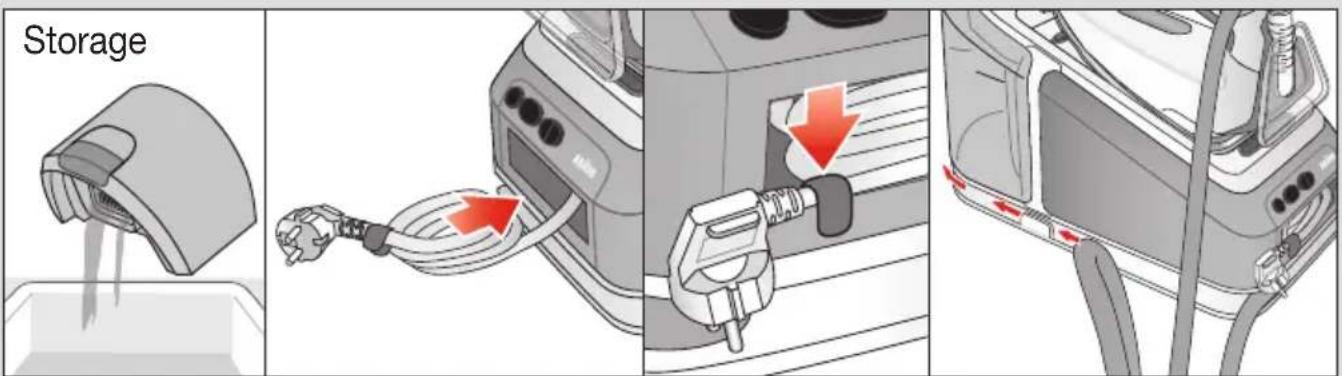
- In addition, for extra comfort and convenience during storage and transportation, wrap the power cord around your hand before storing it inside the machine securely, then block it with the provided clip.
- It is recommendable to empty the water tank before transporting the unit and to make sure not to overly bend your back while lifting it.
(E) Auto Off
This function is activated if after 10 minutes there has been no steam emission.
- When the iron is in the auto-off mode, the On/Off button (1) and the icon related to the selected setting start flashing.
- To continue ironing, press any button and wait until the related icon for the setting is permanently on.
- After an additional 10 minutes without steam emission, the iron and the steam station turn off.
(F) Descaling
Never open or touch the closure (10) when the appliance is hot and/or plugged in.
Do not use any chemicals, additives, or descaler to rinse the boiler.
When the system needs to be decalcified, the FastClean icon (3) turns permanently on.
To perform the descaling take the following steps:
- Switch off (1) and unplug the appliance.
- Empty the water tank.
- Wait until the appliance has cooled down (minimum 2.5 hours).
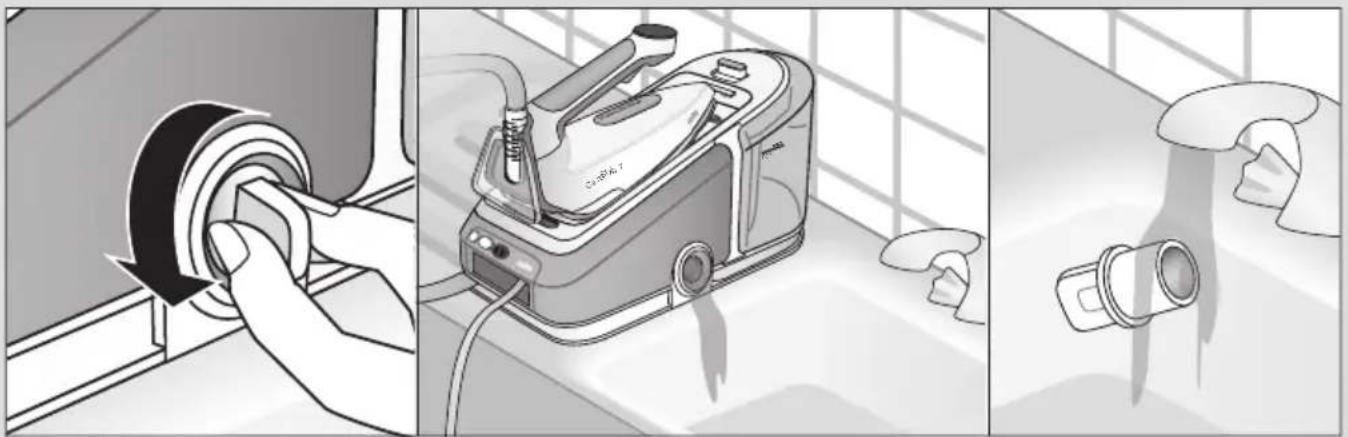
- Place the appliance on the edge of the sink and turn the closure (10) anticlockwise to open it. Let the water flow into the sink.
- Clean the closure under running water to remove the scale formations.
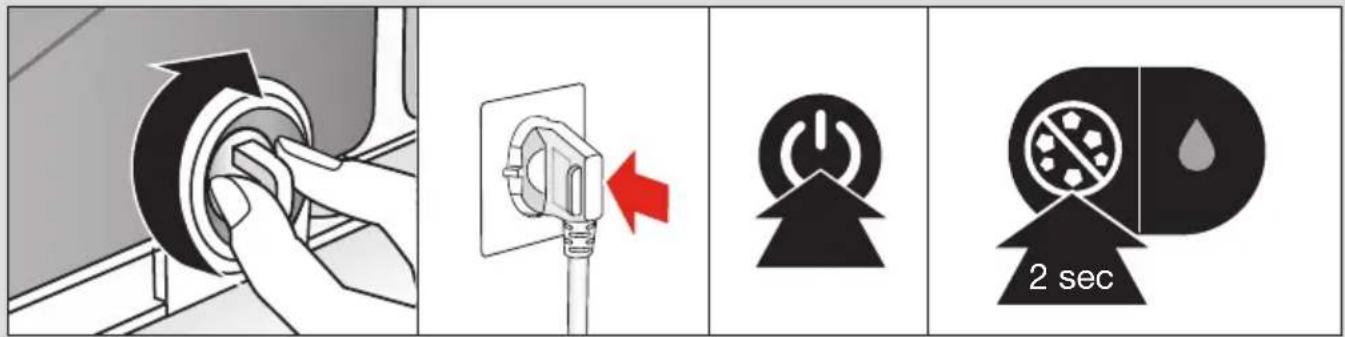
- When no more water comes out of the appliance screw the closure clockwise to close the boiler.
- Plug in and switch on.
- Press the FastClean system button (3) for 2 seconds to reset.
If the appliance is switched off without descaling, the FastClean icon (3) turns permanently on again when it is next switched on.
Note: Because of the different water composition by using an installed in-house permanent descaler, it is recommended to descale the system after every 4 complete refills or at least once per month.
Please note that in this case the FastClean icon will not automatically turn on.
(G) After ironing
Care & Cleaning
After every ironing session remove and empty the water tank.
- Before cleaning, always make sure that the appliance is switched off, unplugged and has cooled down completely.
- To clean the soleplate and the soft material on the handle it is suggested to use a damp cloth.
- Never use chemicals, vinegar or scouring pads (eg. sponges with coarse nylon fabrics etc).
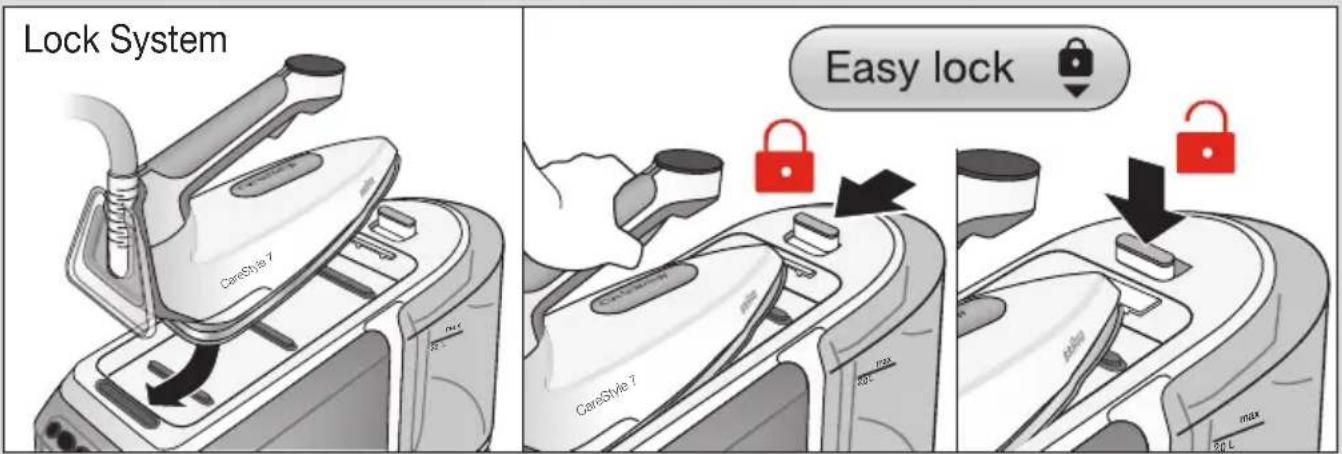
Lock system
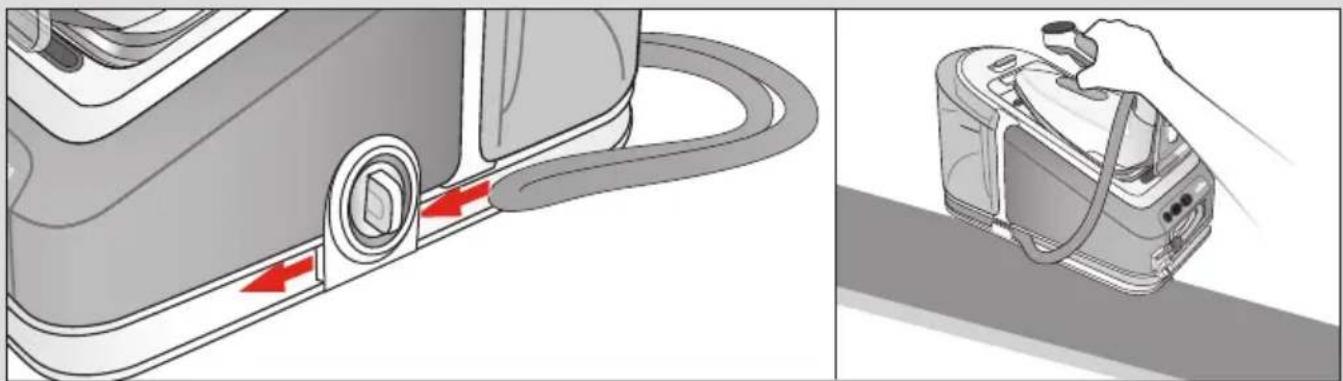
The appliance is equipped with a lock system for convenient transportation and easy storage. It is possible to lift and carry the appliance on the handle of the locked iron.
Note: Before transportation make sure the iron is properly locked and the water tank is empty.
- Place the soleplate into the recess on the iron mat.
- To lock the iron push the slider (8) (easy lock) toward the iron until you hear a "click".
- To unlock the iron push down the button on the slider (easy lock). The iron will be released.
Storage
Unplug, empty the water tank and let the appliance cool down before winding the cords for storage.
For a convenient storage of the power cord also refer to "Ergonomic Certification".
Warranty and Service
For detailed information see separate warranty and service leaflet or visit www.braunhousehold.com.
Troubleshooting Guide
| Problem Cause Solution | | |
| The appliance does not switch on. | The appliance is not plugged into a mains socket. | Make sure the appliance is correctly connected and press the On/Off button. |
| Steam comes out under the base unit. | The “max” pressure safety system has opened. | Turn the appliance off immediately and contact an authorised Braun Customer Service. |
| There are some water drops from the holes in the bottom of the soleplate. | Water has condensed inside the tubes because steam is being used for the first time, or has not been used for some time. | Press the steam button several times away from the ironing board. This will eliminate cold water from the steam circuit. |
| Brown coloured fluid leaks from the soleplate. | Chemical water softeners or additives have been poured into the water tank. | Never pour products into the water tank. Clean the soleplate with a damp cloth and rinse the boiler. |
| The first time the appliance is turned on, you notice smoke or smell. | Some parts have been treated with sealer/ lubricant which evaporates the first time the iron heats up. | This is normal and will stop when you have used the iron a few times. If the smoke/smell is still present after turning off the appliance, contact an authorised Braun Customer Service. |
| The appliance emits an intermittent noise associated with vibrations. | Water is being pumped into the boiler. | This is normal and no action is needed. |
| The closure is difficult to unscrew. | Lime scale has made the closure difficult to open. | Turn the cap forcefully. To avoid the problem, descale the system frequently. |
| The boiler is still under pressure. | Never open the closure if the boiler is still under pressure or hot. Wait at least 2.5 hours before opening the closure. |
| After refilling the water tank, the icon does not reset. | The water float does not work appropriately. | Empty the water tank, rinse out and refill. |
| The water tank is not positioned correctly. | Position the water tank correctly. |
| All LEDs are flashing. System error. | Unplug the appliance, plug it in again and press On/Off button. If this problem is still present, turn the appliance off immediately, unplug and contact an authorised Braun Customer Service. |
| Steam setting icon is permanently on, but there is no steam emission from the soleplate. | Water tank float is locked or the water tank is not correctly inserted. | Turn off and unplug the appliance.Remove and empty the water tank, rinse out and refill. Insert the water tank.Wait until the appliance has cooled down (min 2.5 hours) then try again. If the problem is still present, contact an authorized Braun Customer Service. |
| Steam or water comes out from the closure. | The closure is not tightened properly. | Switch off the appliance, unplug and let it cool down (for at least 2.5 hours).Unscrew the closure and screw it back on the appliance properly.Note: Some water can escape when you unscrew the closure. |
| The double cord gets hot during use. | This is normal. It is caused due to the steam passing through the cord during ironing. | Place the double cord on the opposite side so that you cannot touch the cord during ironing. |
| There are some water drops when removing the water tank | | This is normal and no action is needed. |
FRANÇAIS
Description
1 Button/icon for On/Off
2 Button/icon for Boost (only on certain models) 3 Button/icon for FastClean system 4 Button for water reserve 5a iMode selector 5b Icons for steam setting



