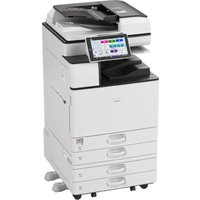
IM 3500A - Printer RICOH - Free user manual and instructions
Find the device manual for free IM 3500A RICOH in PDF.


| Product type | Monochrome multifunction printer |
| Brand | Ricoh |
| Model | IM 3500A |
| Main functions | Print, copy, scan, fax |
| Power supply | 220–240 V, 8 A, 50/60 Hz |
| Power consumption | Not specified in the manual |
| Dimensions (L × D × H) | Not specified |
| Weight | Not specified |
| Supported paper sizes | A4, A3, etc. (not exhaustive) |
| Paper tray capacity | Main tray + optional drawers |
| Automatic duplex | Yes |
| Document feeder (ADF) | Yes, duplex |
| Connectivity | Ethernet, USB, Wi-Fi (optional) |
| Touch screen | Yes, control panel |
| Laser safety | Class 1, compliant with IEC60825-1:2014 |
| Consumables | Toner (black), maintenance unit |
| Maintenance | Regular internal cleaning by service center |
| Spare parts | Contact service center or dealer |
| Repairability | Service center intervention recommended |
| General information | Manual available in PDF at notice-facile.com |
Frequently Asked Questions - IM 3500A RICOH
User questions about IM 3500A RICOH
0 question about this device. Answer the ones you know or ask your own.
Ask a new question about this device
Download the instructions for your Printer in PDF format for free! Find your manual IM 3500A - RICOH and take your electronic device back in hand. On this page are published all the documents necessary for the use of your device. IM 3500A by RICOH.
USER MANUAL IM 3500A RICOH
IM 2500/3000/3500/4000/5000/6000 series
Safety Information
Read This First
Bitte zuerst lesen
Safety Information English
natural_image
Gray circular icon with a lowercase 'i' in the center, representing information (no additional text or symbols)English
Safety Information
-
Manuals Provided with This Machine
-
Safety Information for This Machine
-
Other Information for This Machine
For information not found in this manual, see the online manuals available on our web site (https://www.ricoh.com/) or via the control panel.


natural_image
Gray circular icon with a lowercase 'i' in the center, representing information (no text or symbols beyond the icon itself)Read this manual carefully before you use this machine and keep it handy for future reference. For safe and correct use, be sure to read the Safety Information in this manual before using the machine.
TABLE OF CONTENTS
How to Read the Manuals....3
- Manuals Provided with This Machine
Manuals for This Machine....4
- Safety Information for This Machine
The Meanings of the Safety Symbols Used with This Machine....5
The Meanings of Safety Labels 5
Safety Precautions to Be Followed....6
Safety Labels of This Machine 9
- Other Information for This Machine
Laws and Regulations.... 13
Legal Requirements....13
Trademarks 15
How to Read the Manuals
Symbols Used in the Manuals
This manual uses the following symbols:
Important
Indicates points to pay attention to when using functions. This symbol indicates points that may result in the product or service becoming unusable or result in the loss of data if the instructions are not obeyed. Be sure to read these explanations.
Note
Indicates supplementary explanations of the product's functions and instructions on resolving user errors.
[ ]
Indicates the names of keys or buttons on the product or display.
Region A (mainly Europe and Asia), (mainly Europe), or (mainly Asia)
Region B (mainly North America)
Differences in the functions of Region A and Region B models are indicated by two symbols. Read the information indicated by the symbol that corresponds to the region of the model you are using. For details about which symbol corresponds to the model you are using, see "Model-Specific Information", Specifications,
Disclaimer
To the maximum extent permitted by applicable laws, in no event will the manufacturer be liable for any damages whatsoever arising out of failures of this machine, losses of the registered data, or the use or non-use of this product and operation manuals provided with it.
Make sure that you always copy or have backups of the data registered in this machine. Documents or data might be erased due to your operational errors or malfunctions of the machine.
In no event will the manufacturer be responsible for any documents created by you using this machine or any results from the data executed by you.
Notes
Contents of this manual are subject to change without prior notice.
The manufacturer shall not be responsible for any damage or expense that might result from the use of parts other than genuine parts from the manufacturer with your office products.
For good output quality, the manufacturer recommends that you use genuine toner from the manufacturer.
Some illustrations in this manual might be slightly different from the machine.
Certain options might not be available in some countries. For details, please contact your local dealer.
Depending on which country you are in, certain units may be optional. For details, please contact your local dealer.
1. Manuals Provided with This Machine
Manuals for This Machine
The operating instructions of this machine are provided in the following formats:
| Format Manuals | |
| Printed manual • Safety Information | |
| CD-ROM • Driver Installation Guide (HTML) | |
| Manuals displayed on the control panel • User Guide (Full Version) (HTML) | |
| Web pages • Safety Information | • User Guide (Selected Version) (PDF)• User Guide (Full Version) (HTML)• Driver Installation Guide (HTML) |
Safety Information
Before using the machine, be sure to read the section of this manual entitled Safety Information. It also describes each regulation and environmental conformance.
User Guide (Selected Version)
Regarding the basic usage of this machine, frequently used functions, troubleshooting when an error message appears, etc., summaries are provided for each user manual.
User Guide (Full Version)
Describes the setup for using the machine, how to use functions to copy, fax, print, scan or for maintenance and specifications, troubleshooting, system settings, and security functions.
Manuals are available in English, German, French, Italian, Spanish, Dutch, and Russian. The User Guide for languages other than shown above contains the information in User Guide (Selected Version) and Security.
Driver Installation Guide
Describes how to install and configure each driver. This manual is included in the drivers CD.
Note
- Before you configure the extended security and authentication settings, refer to "Registering Administrators Before Using the Machine" in the Security.
- Using the machine's security function prevents unauthorized use of the machine, data tampering, or information leakage. For enhanced security, we recommend that you first make the following settings:
• Install the Device Certificate. - Enable SSL (Secure Sockets Layer) Encryption.
- Change the user name and password of the administrator.
- You can download information about the machine's certification, which is based on an IT security certification system (hereafter CC Certification), from the following URL:
U.S. Government Protection Profile for Hardcopy Devices Version 1.0 (IEEE Std 2600.2 ^™ -2009)
For Administrator: https://support.ricoh.com/services/device/ccmanual/
IM_2500_3500_4000_5000_6000/en/download_admin.html
For User: https://support.ricoh.com/services/device/ccmanual/
IM_2500_3500_4000_5000_6000/en/download_user.html
Protection Profile for Hardcopy Devices 1.0 dated September 10, 2015
For Administrator: https://support.ricoh.com/services/device/ccmanual/
im_2500_3500_4000_5000_6000/en/download_admin.html
This information is about how to set up the machine. If you have purchased a CC Certified machine, be sure to read it before operating the machine so you can make the correct settings before using it.
2. Safety Information for This Machine
The Meanings of the Safety Symbols Used with This Machine

Prohibition

Caution

Keep out of reach of children

Do not touch

Do not throw into the fire

Do not use the cleaner

Caution, risk of having hands or arms caught

Caution, hot surface
The Meanings of Safety Labels

WARNING
Indicates a potentially hazardous situation which, if instructions are not followed, could result in death or serious injury.

CAUTION
Indicates a potentially hazardous situation which, if instructions are not followed, may result in minor or moderate injury or damage to property.
Safety Precautions to Be Followed
Requirements for Unpacking Products
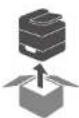

WARNING
- The following explains the warning messages on the plastic bag used in this product's packaging:
Do not leave the polythene materials (bags, etc.) supplied with this machine close to babies and small children. Suffocation can result if polythene materials are brought into contact with the mouth or nose.
Requirements for Locating and Installing Machines
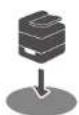

WARNING
- Avoid taking the following actions close to or inside this machine because doing so can result in fire or electric shock:
• Using flammable sprays, solvents, and so on
- Placing flammable sprays, solvents, and so on
- Placing containers holding liquids or small metal objects

CAUTION
- Do not place the machine in a humid or dusty environment. Doing so can result in fire or electric shock.
- Do not place the machine on an unstable or tilted surface. Doing so can cause the machine to fall or topple over, possibly resulting in injury.
- Do not obstruct the machine's vents. Doing so can result in fire as the internal components are overheated.
- Do not place heavy objects on the machine. Doing so can cause the machine to fall or topple over, possibly resulting in injury.
When using this machine in a poorly ventilated or narrow room continuously for a long period of time or printing a high volume of materials, make sure to ventilate the room sufficiently.
Requirements for Using Power Plugs and Cords


WARNING
Avoid taking the following actions because doing so can result in fire or electric shock:
• Using any power supply voltage or frequencies other than those that match the specifications shown
• Using multi-socket adaptors
• Using extension cords
- Touching the prongs of the power cable's plug with anything metallic
- Avoid applying the following actions to power cords because doing so can result in fire or electric shock:
- Damaging them
- Bundling them
- Modifying them
- Putting heavy objects on them
- Pulling them forcibly
• Bending them forcibly
- Do not handle the power cord plug with wet hands. Doing so can result in electric shock.
- The supplied power cord or cords are for use with this machine only. They cannot be used for appliances other than this machine. Also, do not use power cords other than the power cord or cords supplied with this machine. Doing so can result in fire or electric shock.
To prevent fire or electric shock, disconnect the plug and the power cord from the wall outlet at least once a year and check them. If any of the following conditions exist, do not use the plug and the power cord continuously, and consult your dealer or service representative.
• There are burn marks on the plug
• The prongs on the plug are deformed
• The power cord's inner wires are exposed or broken
• The power cord's coating is cracked, dented, or damaged
- When the power cord is bent, the power turns off and on
• Part of the power cord becomes hot

CAUTION
- When disconnecting the power cord from the wall outlet, make sure to pull the plug, not the cord. Do not pull the power cord forcibly. Doing so can damage the power cord, possibly resulting in fire or electric shock.

CAUTION
Be sure to push the power cord plug fully into the wall outlet. Also, do not push it into loose and unstable wall outlets likely to cause a contact failure. Doing so can result in heat generation.
- Be sure to disconnect the plug from the wall outlet and clean the prongs and the area around the prongs at least once a year. Allowing dust to build up on the plug constitutes a fire hazard.
- If you do not use the machine for a long period of time such as consecutive holidays, be sure to disconnect the power cord plug from the wall outlet for reasons of safety.
- When performing maintenance on the machine, disconnect the power cord from the wall outlet for safety.
• Power Source
220-240 V, 8 A or more, 50/60 Hz
Please be sure to connect the power cord to a power source as above. For users in Norway, this product is also designed for an IT power distribution system with phase-to-phase voltage of 230V.
Requirements during Emergencies


WARNING
- Do not touch this machine if a lightning strike occurs in the immediate vicinity. Doing so could result in electric shock.
- Be sure to install the machine as close as possible to a wall outlet so that you can disconnect the power cord plug easily in an emergency.
- If the machine behaves unusually as follows, turn off the power immediately. After turning off the power, make sure to disconnect the power cord plug from the wall outlet, and then contact your service representative and report the problem. Continuously using the power cord can result in fire or electric shock.
• The machine is emitting smoke
• The machine is emitting odors
• Metal objects or other foreign objects have fallen inside the machine
• Water or other fluids have fallen inside the machine
- If the machine topples or a cover or other part is damaged, turn off the power immediately. After disconnecting the power cord plug from the wall outlet, contact your service representative. Using the machine continuously can result in fire or electric shock.
Requirements for Relocating Machines


CAUTION
- When moving the machine, do not hold the control panel. Doing so may damage the control panel and can result in injury or malfunction.
- When moving the machine with the optional paper tray unit attached, do not push the upper part of the main unit forcibly. Doing so can cause the main unit to detach from the optional paper tray unit, possibly resulting in injury.
- When carrying or moving the machine by lifting it for relocation to another floor, contact your service representative. Dropping or toppling the machine can result in injury or malfunction.
• After moving the machine, use the caster fixture to fix it in place. Otherwise, the machine might move or topple over to cause injury.
- When moving the machine, make sure to unplug the power cord from the wall outlet and confirm that line cords and other connecting cables have been removed. Otherwise, the power cord is damaged, possibly resulting in fire or electric shock.
Requirements for Using the Machine


CAUTION
• Do not look into the light source. Doing so may damage your eyes.
- Do not use stapled sheets of paper, aluminum foil, carbon paper, or any kind of conductive paper. Doing so can result in fire.
- Keep SD cards and USB flash memory devices out of reach of children. If a child accidentally swallows an SD card or USB flash memory device, consult a doctor immediately.
- When lowering the ADF, do not place your hands on the hinges and exposure glass. Your hands or fingers are caught, which can result in injury.
- If the lower paper tray is installed, do not pull out more than one tray at a time. Pressing down forcefully on the machine's upper surface might cause the machine topple over, possibly resulting in injury.
Requirements for Handling the Machine's Interior


WARNING
- Do not remove any covers or screws other than those explicitly mentioned in this manual. There are high voltage components inside the machine that can cause electric shock. Also there are laser components inside the machine that can cause blindness. Contact your sales or service representative if any of the machine's internal components require maintenance, adjustment, or repair.
- Do not disassemble or modify this machine. Doing so can result in fire and electric shock. Also, exposure to the laser components inside this machine risks blindness.

CAUTION
- There are highly-heated parts inside the machine. When removing misfed paper, do not touch areas other than those specified in this manual. Touching those areas can result in burns.
- There are parts inside the machine that may break when touched. When removing misled paper, do not touch connectors, sensors, and LED specified in "Troubleshooting". Touching them can result in malfunction.
- Although the machine is designed so that a safety device protects users from injury, take care not to touch the rollers during operation. The rollers may pinch before stopping completely.
- Contact your sales or service representative for cleaning the machine's interior. If the machine's interior is not regularly cleaned while dust accumulates, fire and malfunction can result.
- When replacing paper or removing jammed paper, make sure not to trap or injure your fingers.
- Keep your hands clear of the paper output slot of the finisher booklet tray when pulling it out or pushing it in the finisher's staple unit. You may trap your fingers in the machine's gap and injury can result.
Requirements for Handling Supplies


WARNING
- Do not store toner (new or used) or toner containers while toner is inside in a place with an open flame. The toner can ignite and result in burns or fire.
- Do not dispose of the following items into a fire. Toner will ignite on contact with naked flame and burns can result.
- Toner (new or used)
- Toner containers while toner is inside
- Toner-attached parts
Do not absorb spilled toner (including used toner) using a vacuum cleaner. Absorbed toner may cause ignition or explosion due to electric contact sparks inside the vacuum cleaner. However, you can use a toner-compatible industrial vacuum cleaner. When toner is spilled, remove the spilled toner using a wet cloth so that the toner is not scattered.

CAUTION
- Do not open toner containers forcibly while toner is inside, crush or squeeze them. Toner spillage can cause accidental ingestion or dirtying of clothes, hands, or floor.
- Do not leave the following items in a place where children can reach them:
- Toner (new or used)
- Toner containers while toner is inside
- Toner-attached parts
- When removing jammed paper, replenishing or replacing toner (new or used), make sure not to inhale toner.
- When the following occurs while toner is handled, receive emergency measures first, and then consult a doctor if necessary.
- When inhaling loner, gargle with a large amount of water and move into a fresh air environment.
- When swallowing toner, dilute gastric contents with a large amount of water.
- When getting loner into your eyes, flush them with a large amount of water.
- When removing jammed paper, replenishing or replacing toner (new or used), be careful not to have toner dirt your skin or clothes.

CAUTION
If toner (new or used) comes into contact with your skin or clothes and smears them, take the following actions:
- If toner comes into contact with your skin, wash the affected area thoroughly with soap and water.
- If toner comes into contact with your clothes, wash the stained area with cold water. Heating the stained area by applying hot water will set the toner into the fabric and removing the stain may become impossible.
- When replacing a container with toner (including used toner) or consumables with toner, be careful that the toner does not splatter. After removing used consumables and shutting the lid of the container if the lid is available, put them in a bag.
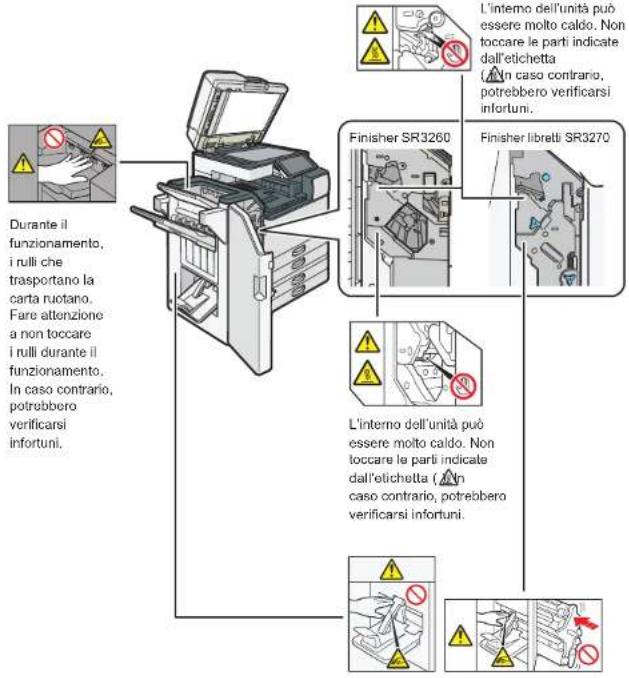
Safety Labels of This Machine
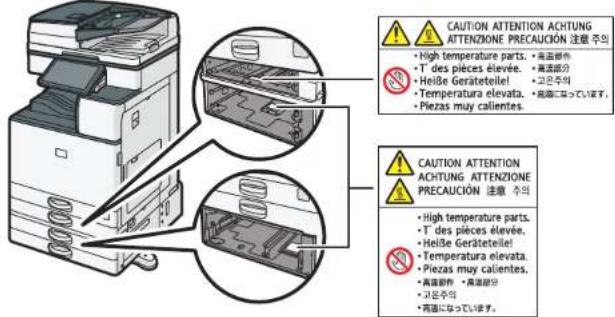
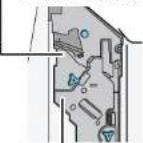
Positions of WARNING and CAUTION labels
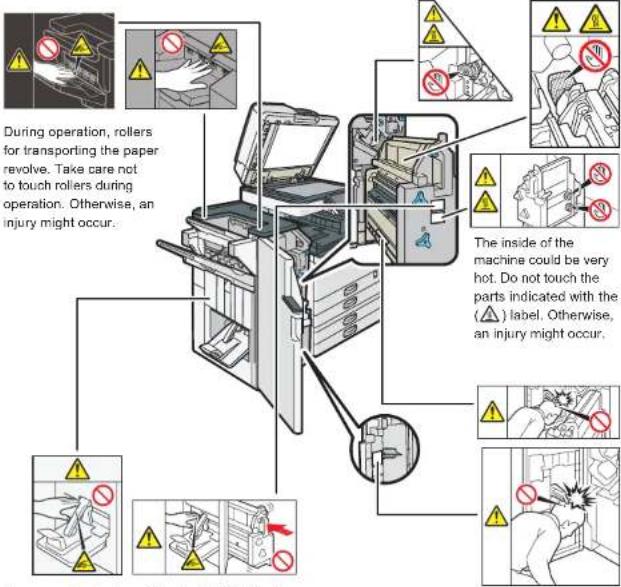
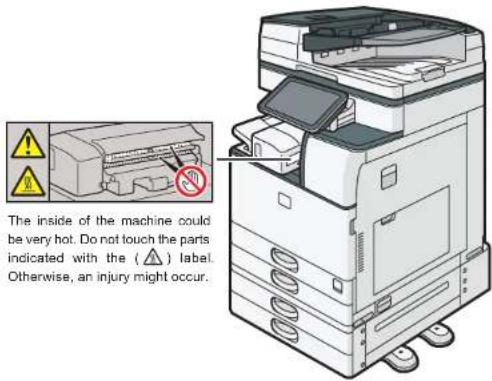
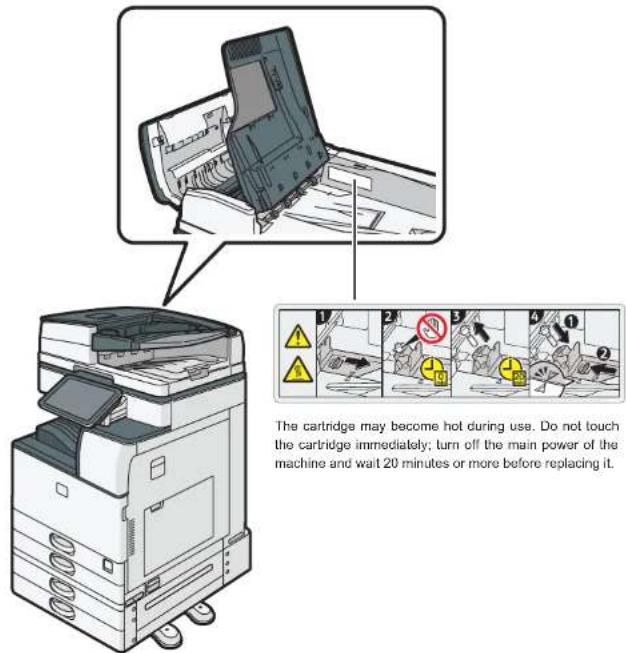
This machine has labels for WARNING and CAUTION at the positions shown below. For safety, please follow the instructions and handle the machine as indicated.
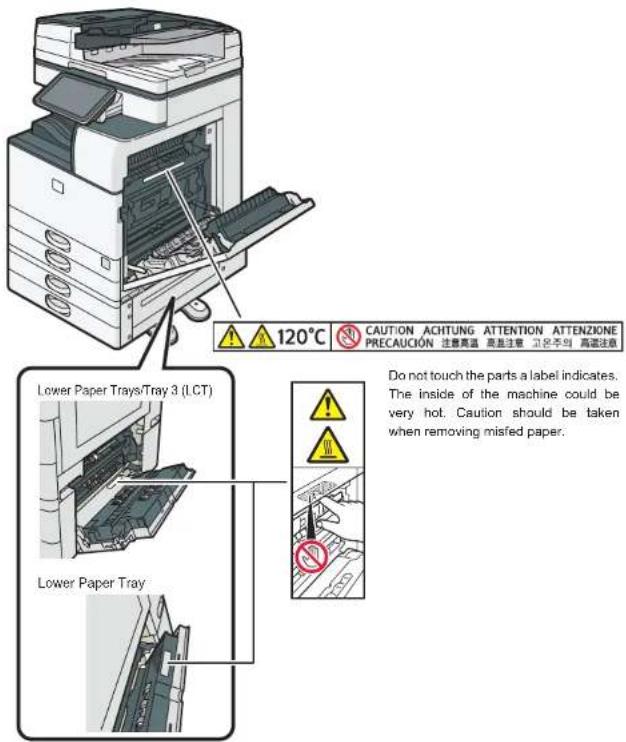
The inside of the machine could be very hot. Do not touch the parts which a label is put on. Otherwise, an injury might occur.
Finisher SR3260 or Booklet Finisher SR3270
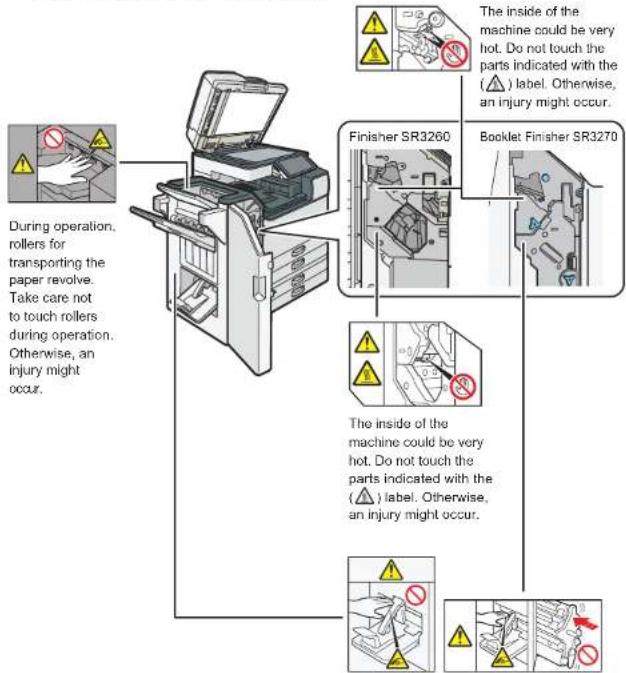
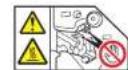
The inside of the machine could be very hot. Do not touch the parts indicated with the (△) label. Otherwise, an injury might occur.
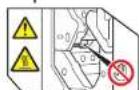
The inside of the machine could be very hot. Do not touch the parts indicated with the (△) label. Otherwise, an injury might occur.
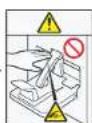
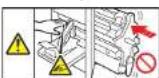
Keep your hands clear of the booklet finisher tray when pulling out or pushing in the finisher's staple unit, or removing paper jam. You might trap your fingers if you do not.
Finisher SR3280 or Booklet Finisher SR3290
Keep your hands clear of the booklet finisher tray when pulling out or pushing in the finisher's staple unit, or removing paper jam. You might trap your fingers if you do not.
Be careful of the protruding parts of the front cover when replacing the cartridge in the saddle stitch unit or clearing a paper jam from the saddle stitch unit.
Internal Finisher SR3300
ARDF
Large capacity tray (LCT)
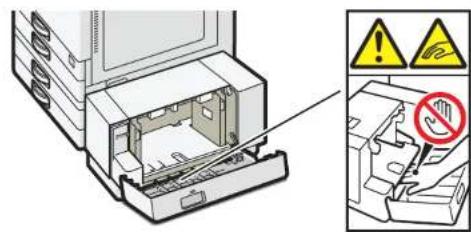
Do not place your hand under the bottom plate. Doing so may result in your fingers becoming trapped in the gap and injured.
Symbols for the Power Switch
The meanings of the symbols for the switches on this machine are as follows:
I : POWER ON
: STANDBY
3. Other Information for This Machine
Laws and Regulations
Duplication and Printing Prohibited
Do not copy or print any item for which reproduction is prohibited by law.
Copying or printing the following items is generally prohibited by local law:
bank notes, revenue stamps, bonds, stock certificates, bank drafts, checks, passports, driver's licenses.
The preceding list is meant as a guide only and is not inclusive. We assume no responsibility for its completeness or accuracy. If you have any questions concerning the legality of copying or printing certain items, consult with your legal advisor.
Legal Requirements
Laser Safety
For IM 2500/2500A/3000/3000A/3500/3500A
This machine complies with the requirements of IEC60825-1:2014 (EN60825-1:2014) for class 1 laser product. This machine contains one AlGaInP laser diode, 660 nanometer wavelength. The beam divergence angle is 21 degrees (minimum) and 29 degrees (maximum) in the vertical direction, and 7 degrees (minimum) and 11 degrees (maximum) in the horizontal direction, and laser beams are generated in Continuous Wave (CW) mode. The maximum output power of the light source is 10 milliwatt.
The following label is attached on the rear side of the machine:
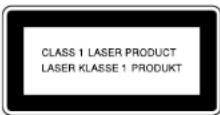
Caution
Use of controls or adjustments or performance of procedures other than those specified in this manual might result in hazardous radiation exposure.
For IM 4000A/5000A/6000
This machine complies with the requirements of IEC60825-1:2014 (EN60825-1:2014) for class 1 laser product. This machine contains two AlGaInP laser diodes, 660 nanometer wavelength for each emitter. The beam divergence angle is 15 degrees (minimum) and 25 degrees (maximum) in the vertical direction, and 7 degrees (minimum) and 13 degrees (maximum) in the horizontal direction, and laser beams are generated in Continuous Wave (CW) mode. The maximum output power of the light source is 15 milliwatt.
The following label is attached on the rear side of the machine:
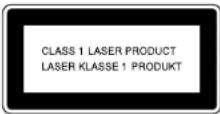
Caution
Use of controls or adjustments or performance of procedures other than those specified in this manual might result in hazardous radiation exposure.
Note to Users EEA Countries
Manufacturer:
Ricoh Co., Ltd.
3-6 Nakamagome 1-chome, Ohta-ku, Tokyo. 143-8555, Japan
Importer:
Ricoh Europe SCM B.V.
Blankenweg 24, 4612 RC Bergen op Zoom, The Netherlands
Declaration of Conformity
Notice to Users in EEA Countries
This product complies with the essential requirements and provisions of Directive 2014/53/EU.
The CE Declaration of Conformity is available by accessing the URL:
https://www.ricoh.com/products/ce_doc2/
and selecting the product applicable.
Operating frequency band: 2400 - 2483.5 MHz
maximum radio-frequency power: less than 17.0 dBm
As this equipment with the radiating part is not intended to be used in close proximity to the human body, it is recommended to use at least 20 cm apart from the user.
Overseas Affiliates and Noise Emission Information
In accordance with TUV "GS Symbol" requirements, details of the EU office or representative company are given below.
Overseas Affiliates
Ricoh Europe SCM B.V.
Blankenweg 24, 4612 RC Bergen op Zoom, The Netherlands
Noise Emission
Installing the Ferrite Core
Attach a ferrite core to the following cables to prevent RF interference:
• An Ethernet interface cable connecting to the Device Server Option port
• A telephone line cable connecting to the G3 interface connector
- A telephone line cable connecting to the Extra G3 interface unit connector
Trademarks
The SD is a trademark of SD-3C, LLC.
Other product names used herein are for identification purposes only and might be trademarks of their respective companies. We disclaim any and all rights to those marks.
Deutsch
Sicherheitshinweise
natural_image
Gray circular icon with a lowercase 'i' in the center, representing information (no additional text or symbols)https://www.ricoh.com/products/ce_doc2/
natural_image
Gray circular icon with a lowercase 'i' in the center, representing information (no additional text or symbols)Attention, surface chaude
https://www.ricoh.com/products/ce_doc2/
natural_image
Gray circular icon with a lowercase 'i' in the center, representing information (no additional text or symbols)Finisher SR3260 o Booklet Finisher SR3270
https://www.ricoh.com/products/ce_doc2/
natural_image
Gray circular icon with a lowercase 'i' in the center, representing information (no text or symbols beyond the icon itself)https://www.ricoh.com/products/ce_doc2/
natural_image
Gray circular icon with a lowercase 'i' in the center, representing information (no text or symbols beyond the icon itself)https://www.ricoh.com/products/ce_doc2/
- IM 2500/3000/3500/4000/5000/6000 series
- Safety Information
- English
- TABLE OF CONTENTS
- How to Read the Manuals
- Symbols Used in the Manuals
- Important
- Note
- Disclaimer
- Notes
- Manuals Provided with This Machine
- Manuals for This Machine
- User Guide (Selected Version)
- User Guide (Full Version)
- Driver Installation Guide
- Protection Profile for Hardcopy Devices 1.0 dated September 10, 2015
- Safety Information for This Machine
- The Meanings of the Safety Symbols Used with This Machine
- The Meanings of Safety Labels
- WARNING
- CAUTION
- Safety Precautions to Be Followed
- Requirements for Unpacking Products
- Requirements for Locating and Installing Machines
- Requirements for Using Power Plugs and Cords
- Requirements during Emergencies
- Requirements for Relocating Machines
- Requirements for Using the Machine
- Requirements for Handling the Machine's Interior
- Requirements for Handling Supplies
- Safety Labels of This Machine
- Positions of WARNING and CAUTION labels
- Symbols for the Power Switch
- Other Information for This Machine
- Laws and Regulations
- Duplication and Printing Prohibited
- Legal Requirements
- Laser Safety
- For IM 2500/2500A/3000/3000A/3500/3500A
- For IM 4000A/5000A/6000
- Note to Users EEA Countries
- Manufacturer:
- Importer:
- Notice to Users in EEA Countries
- Overseas Affiliates and Noise Emission Information
- Overseas Affiliates
- Noise Emission
- Installing the Ferrite Core
- Trademarks
- Deutsch
- Sicherheitshinweise
Brand : RICOH
Model : IM 3500A
Category : Printer