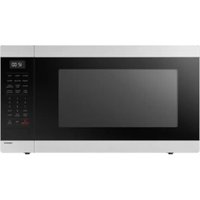
MS19DG8500SRAC - Microwave Oven SAMSUNG - Free user manual and instructions
Find the device manual for free MS19DG8500SRAC SAMSUNG in PDF.


| Product Type | Solo Microwave Oven |
| Brand | Samsung |
| Model | MS19DG8500SRAC |
| Interior Volume | 1.9 cu ft (54 L) |
| Microwave Output Power | 900 W (IEC-705) |
| Power Consumption | 1650 W |
| Voltage / Frequency | 120 V ~ 60 Hz |
| Operating Frequency | 2,450 MHz |
| External Dimensions (W x H x D) | 59.4 x 35.1 x 45.9 cm |
| Cavity Dimensions (W x H x D) | 44.8 x 27.5 x 45.2 cm |
| Net Weight | 20.0 kg |
| Control Type | Touch and Push Buttons |
| Display | Numeric LED |
| Turntable | Yes, removable glass (dishwasher safe) |
| Number of Power Levels | 10 (including 0) |
| Automatic Functions | Sensor Cooking (popcorn, potato, pizza, vegetables, beverage, reheat) |
| Additional Functions | Defrost, soften/melt, snack/children's meal, keep warm, deodorization, timer, clock, control lock, auto door lock |
| Energy Saving Mode | Yes (manual and automatic after 25 min) |
| Safety | Child lock, door lock, grounding, auto shut-off |
| Exterior Material | Stainless steel (smudge-resistant finish) |
| Cleaning | Interior: soapy water and soft cloth; auto deodorization; turntable dishwasher safe |
| Repairability | Non-user replaceable parts; contact a certified Samsung technician |
| Warranty | 1 year parts and labor, 10 years magnetron (parts only) |
| Included Accessories | Turntable, roller ring, user manual |
Frequently Asked Questions - MS19DG8500SRAC SAMSUNG
User questions about MS19DG8500SRAC SAMSUNG
0 question about this device. Answer the ones you know or ask your own.
Ask a new question about this device
Download the instructions for your Microwave Oven in PDF format for free! Find your manual MS19DG8500SRAC - SAMSUNG and take your electronic device back in hand. On this page are published all the documents necessary for the use of your device. MS19DG8500SRAC by SAMSUNG.
USER MANUAL MS19DG8500SRAC SAMSUNG
Important safety instructions 3
What you need to know about safety instructions 3
Precautions to avoid possible exposure to excessive microwave energy 3
Important safety symbols and precautions 4
California proposition 65 warning 5
Grounding instructions 5
Use of extension cords 6
Critical installation warnings 6
Installation cautions 7
Critical usage warnings 7
Usage cautions 9
Critical cleaning instructions 10
Installing your microwave oven 10
Cleaning the turntable and roller 11
Storing and repairing your microwave oven
Installation 12
What's included 12
Turntable 12
Maintenance 13
Cleaning 13
Replacement (repair) 13
Care during an extended period of disuse 13
Before you start 14
Current time 14
Energy saving 14
Control lock 14
Door Auto Lock 15
To open the door 15
Sound On/Off 16
Timer 16
About microwave energy 17
Cookware for microwaving 17
Operations 19
Feature panel 19
Simple steps to start 19
Manual mode 20
Common settings 21
Sensor mode 22
Auto mode 24
Convenience 26
Cooking Smart 29
Microwave cooking guide 29
Reheating guide 31
Defrosting guide 33
Quick & easy 33
Troubleshooting 34
Checkpoints 34
Information code 38
Technical specifications 38
Warranty (USA) 39
Warranty (CANADA) 41
Important safety instructions
Congratulations on your new Samsung microwave oven. This manual contains important information on the installation, use and care of your appliance. Please take time to read this manual to take full advantage of your microwave oven's many benefits and features.
WHAT YOU NEED TO KNOW ABOUT SAFETY INSTRUCTIONS
Warnings and Important Safety Instructions in this manual do not cover all possible conditions and situations that may occur. It is your responsibility to use common sense, caution, and care when installing, maintaining, and operating your microwave oven.
PRECAUTIONS TO AVOID POSSIBLE EXPOSURE TO EXCESSIVE MICROWAVE ENERGY
A. Do not attempt to operate this oven with the door open since open-door operation can result in harmful exposure to microwave energy. It is important not to defeat or tamper with the safety interlocks.
B. Do not place any object between the oven front face and the door or allow soil or cleaner residue to accumulate on the sealing surface.
C. Do not operate the oven if it is damaged. It is particularly important that the oven door close properly and that there is no damage to the:
- Door (bent).
- Hinges and latches, (broken or loosened).
- Door seals and sealing surface.
D. The oven should not be adjusted or repaired by anyone except properly qualified service personnel.
When using any electrical appliance, basic safety precautions should be followed, including the following:
WARNING
To reduce risk of burns, electric shock, fire, personal injury or exposure to excessive microwave energy:
- Read all safety instructions before using the appliance.
- Read and follow the specific "Precautions to avoid possible exposure to excessive microwave energy" on page 3.
- This appliance must be grounded. Connect only to properly grounded outlets. See Important "Grounding instructions" on page 5 of this manual.
- Install or locate this appliance only in accordance with the provided installation instructions.
- Some products such as whole eggs and sealed containers (for example, closed glass jars) can explode if heated rapidly. Never heat them in a microwave oven.
- Use this appliance only for its intended purpose as described in this manual. Do not expose this appliance to corrosive chemicals or vapors. This type of oven is specifically designed to heat, cook, or dry food. It is not designed for industrial or laboratory use.
- HOT CONTENTS CAN CAUSE SEVERE BURNS. DO NOT ALLOW CHILDREN TO USE THE MICROWAVE.
- Do not operate this appliance if it has a damaged cord or plug, if it is not working properly, or if it has been damaged or dropped.
- This appliance should be repaired or serviced only by qualified service personnel. Contact the nearest authorized service facility for examination, repair, or adjustment.
- Do not cover or block any openings on the appliance.
- Do not tamper with or make any adjustments or repairs to the door.
- Do not store this appliance outdoors. Do not use this product near water, for example, near a kitchen sink, in a wet basement, near a swimming pool, or similar locations.
- Do not immerse the cord or plug in water.
SAVE THESE INSTRUCTIONS SAVE THESE INSTRUCTIONS
Important safety instructions
- Keep the cord away from heated surfaces (including the back of the oven).
- Do not let the cord hang over the edge of a table or counter.
- When cleaning surfaces of the door and oven that come together when the door closes, use only mild, nonabrasive soaps, or detergents applied with a sponge or soft cloth. Unplug the plug before cleaning.
- To reduce the risk of fire in the oven cavity:
A. Do not overcook food. Carefully attend the appliance when paper, plastic, or other combustible materials are placed inside the oven to facilitate cooking.
B. Remove wire twist-ties from paper or plastic bags before placing the bags in the oven.
C. If materials inside the oven ignite, keep the oven door closed, turn the oven off, and disconnect the power cord, or shut off the power at the fuse or circuit breaker panel. If the door is opened, the fire may spread.
D. Do not use the cavity for storage purposes. Do not leave paper products, cooking utensils, or food in the cavity when not in use.
- Liquids, such as water, milk, coffee, or tea can be overheated beyond the boiling point without appearing to be boiling. Visible bubbling or boiling when the container is removed from the microwave oven is not always present. THIS COULD RESULT IN VERY HOT LIQUIDS SUDDENLY BOILING OVER WHEN THE CONTAINER IS DISTURBED OR A SPOON OR OTHER UTENSIL IS INSERTED INTO THE LIQUID. To reduce the risk of injury:
A. Do not overheat liquid.
B. Stir liquid both before and halfway through heating it.
C. Do not use straight-sided containers with narrow necks.
D. After heating, allow the container to stand in the microwave oven for a short time before removing the container.
E. Use extreme care when inserting a spoon or other utensil into the container.
- Oversized food or oversized metal utensils should not be inserted into the microwave / toaster oven as they may cause a fire or electric shock.
-
Do not clean with metal scouring pads. A piece of metal could come off the pad, contact electrical parts, and cause an electric shock.
-
Do not put paper products into the oven when you are operating it in the toaster mode.
- Do not store any materials, other than the manufacturer's recommended accessories, in this oven when not in use.
- Do not cover the racks or any other part of the oven with metal foil. This will cause the oven to overheat.
IMPORTANT SAFETY SYMBOLS AND PRECAUTIONS
What the icons and signs in this user manual mean:
WARNING
Hazards or unsafe practices that may result in severe personal injury or death.
CAUTION
Hazards or unsafe practices that may result in minor personal injury or property damage.
CAUTION
To reduce the risk of fire, explosion, electric shock, or personal injury when using your microwave oven, follow these basic safety precautions:
These warning signs are here to prevent injury to you and others. Please follow them explicitly. After reading this section, keep it in a safe place for future reference.
SAVE THESE INSTRUCTIONS SAVE THESE INSTRUCTIONS
1. FCC Notice
FCC STATEMENT:
This appliance has been tested and found to comply with the limits for a class B digital device, pursuant to Part 18 of the FCC rules.
These limits are designed to provide reasonable protection against harmful interference in a residential installation.
This unit generates, uses and can radiate radio frequency energy and, if not installed and used in accordance with the instructions, may cause harmful interference to radio communications.
However there is no guarantee that interference will not occur in a particular installation. If this unit does cause harmful interference to radio or television reception, which can be determined by turning the unit off and on, the user is encouraged to try to correct the interference by one or more of the following measures:
Reorient or relocate the receiving antennae.
- Increase the distance between the unit and receiver.
- Connect the unit into an outlet or a circuit different from that to which the receiver is connected.
FCC RF Exposure Requirements
This device complies with FCC RF radiation exposure limits set forth for an uncontrolled environment. The antenna(s) used for this transmitter must not be collocated or operating in conjunction with any other antenna or transmitter and must be installed to provide a separation distance of at least 20cm from all persons.
2. IC Notice
The CISPR 11 standard referenced in ICES-001 specifies normative user manual statements for some types of industrial, scientific and medical equipment.
CANICESB/NMB(B)
CALIFORNIA PROPOSITION 65 WARNING
WARNING
Cancer and Reproductive Harm - www.P65Warnings.ca.gov.
CAUTION
Push Button type model only
- To avoid possible exposure to excessive microwave energy, do not open the door by pulling on any part of the door by hand. Open the door by pushing the button located on the bottom front-right side of the microwave only.
GROUNDING INSTRUCTIONS
This appliance must be grounded. In the event of an electrical short circuit, grounding reduces the risk of electric shock by providing an escape wire for the electrical current. This appliance is equipped with a cord that includes a grounding wire and a grounding plug. The plug must be plugged into an outlet that is properly installed and grounded.
SAVE THESE INSTRUCTIONS SAVE THESE INSTRUCTIONS
Important safety instructions
WARNING
Improper use of the grounding plug can result in a risk of electric shock.
- Plug the power cord into a grounded 3 pronged outlet. Do not remove the third (grounding) prong. Do not use an adaptor or otherwise defeat the grounding plug.
- Consult a qualified electrician or service person if you do not understand the grounding instructions or if you are not sure if the appliance is properly grounded.
- We do not recommend using an extension cord with this appliance. If the power-supply cord is too short, have a qualified electrician or serviceman install an outlet near the appliance. However, if it is necessary to use an extension cord, read and follow the "Use of extension cords" section on this page.
USE OF EXTENSION CORDS
A short power-supply cord is provided to reduce the risk of your becoming entangled in or tripping over a longer cord. Longer cord sets or extension cords are available and you can use them if you exercise care. If you use a long cord or extension cord:
- The marked electrical rating of the cord set or extension cord should be at least as great as the electrical rating of the appliance.
- The extension cord must be a grounding-type 3-wire cord and it must be plugged into a 3-slot outlet.
- The longer cord should be arranged so that it will not drape over the counter top or tabletop where it can be pulled on by children or tripped over accidentally. If you use an extension cord, the interior light may flicker and the speed of the blower may vary when the microwave oven is on. Cooking times may be longer too.
CRITICAL INSTALLATION WARNINGS
If your microwave oven is an over-the-range model, installation must be performed by a qualified technician or service company.
- Failing to have a qualified technician install the oven may result in electric shock, fire, an explosion, problems with the product, or injury.
Unpack the oven, remove all packaging material and examine the oven for any damage such as dents on the interior or exterior of the oven, broken door latches, cracks in the door, or a door that is not lined up correctly. If there is any damage, do not operate the oven and notify your dealer immediately.
Make sure to install your oven in a location with adequate space.
Remove all foreign substances such as dust or water from the power plug terminals and contact points using a dry cloth on a regular basis.
- Unplug the power plug and clean it with a dry cloth.
- Failing to do so may result in electric shock or fire.
Plug the power cord into a properly grounded 3 pronged outlet. Your oven should be the only appliance connected to this circuit. - Sharing a wall socket with other appliances, using a power strip, or extending the power cord may result in electric shock or fire.
- Do not use an electric transformer to power the microwave. It may result in electric shock or fire.
- Ensure that the voltage, frequency, and current provided match the product's specifications. Failing to do so may result in electric shock or fire.
Keep all packaging materials out of the reach of children. Children may use them for play.
SAVE THESE INSTRUCTIONS SAVE THESE INSTRUCTIONS
This appliance must be properly grounded. Read and follow the specific "Grounding instructions" found in the beginning of this Section. Do not ground the appliance to a gas pipe, plastic water pipe, or telephone line.
- This may result in electric shock, fire, an explosion, or problems with the product.
- Never plug the power cord into a socket that is not grounded correctly and make sure that it is grounded in accordance with local and national codes. Do not cut or remove the third (ground) prong from the power cord under any circumstances.
The microwave requires a separate branch circuit single grounded outlet of at least 15A and max of 20A.
Do not install this appliance in a humid, oily, or dusty location, or in a location exposed to direct sunlight or water (rain drops).
This may result in electric shock or fire.
Plug the power plug into the wall socket firmly. Do not use a damaged power plug, damaged power cord, or loose wall socket.
This may result in electric shock or fire.
Do not mount over a sink.
Do not pull or excessively bend the power cord.
Do not twist or tie the power cord.
Do not hook the power cord over a metal object, place a heavy object on the power cord, insert the power cord between objects, or push the power cord into the space behind the appliance.
This may result in electric shock or fire.
Do not pull the power cord when you unplug the oven.
- Unplug the oven by pulling the plug only.
- Failing to do so may result in electric shock or fire.
If the power plug or power cord is damaged, contact your nearest Samsung service center for a replacement or repair.
INSTALLATION CAUTIONS
Position the oven so that the plug is easily accessible.
- Failing to do so may result in electric shock or fire due to electric leakage. Unplug the oven when it is not being used for long periods of time or during a thunder/lightning storm.
- Failing to do so may result in electric shock or fire.
CRITICAL USAGE WARNINGS
If the microwave appliance is flooded, please contact your nearest Samsung service center. Failing to do so may result in electric shock or fire. Read and follow the specific "Precautions to Avoid Possible Exposure to Excessive Microwave Energy", found in the beginning of this Safety Information section. If the microwave makes a strange noise or generates a burning smell or smoke, unplug it immediately and contact your nearest service center.
- Failing to do so may result in electric shock or fire.
In the event of a gas leak (propane gas, LP gas, etc), ventilate the room immediately. Do not touch the microwave, power cord, or plug. - Do not use a ventilating fan.
- A spark may result in an explosion or fire.
Take care that the door or any of the other parts do not come into contact with your body while cooking or just after cooking. - Failing to do so may result in burns.
SAVE THESE INSTRUCTIONS SAVE THESE INSTRUCTIONS
Important safety instructions
In the event of a grease fire on the surface units below the oven, smother the flaming pan on the surface unit by covering the pan completely with a lid, a cookie sheet, or a flat tray.
Never leave surface units beneath your oven unattended at high heat settings. Boil overs cause smoking and greasy spillovers that may ignite and spread if the vent fan is operating. To minimize automatic fan operation, use adequately sized cookware and use high heat on surface units only when necessary. If materials inside the oven should ignite, keep the oven door closed, turn the oven off, and disconnect the power cord or shut off power at the fuse or circuit breaker panel. If the door is opened, the fire may spread.
- Always observe Safety Precautions when using your oven. Never try to repair the oven on your own. There is dangerous voltage inside. If the oven needs to be repaired, contact an authorized Samsung service center near you.
Do not attempt to repair, disassemble, or modify the appliance yourself. - Because a high voltage current enters the product chassis during operation, opening the chassis can result in electric shock or fire.
- You may be exposed to electromagnetic waves.
- When the oven requires repair, contact your nearest Samsung service center. If any foreign substance such as water enters the microwave, unplug it and contact your nearest Samsung service center.
- Failing to do so may result in electric shock or fire.
Do not touch the power plug with wet hands.
This may result in electric shock.
Do not turn the appliance off by unplugging the power plug while the appliance is in operation.
- Plugging the power plug into the wall socket again may cause a spark and result in electric shock or fire.
Keep all packaging materials well out of the reach of children. Packaging materials can be dangerous to children.
If a child places a bag over his or her head, the child can suffocate.
Do not let children or any person with reduced physical, sensory, or mental capabilities use this appliance unsupervised. Make sure that the appliance is out of the reach of children.
- Failing to do so may result in electric shock, burns, or injury.
Do not touch the inside of the appliance immediately after cooking. The inside of the appliance will be hot.
The heat on the inside of the oven can cause burns.
Do not put aluminum foil (except as specifically directed in this manual), metal objects (such as containers, forks, etc.) or containers with golden or silver rims into the microwave.
These objects can cause sparks or a fire.
Do not use or place flammable sprays or objects near the oven. - Heat from the microwave can cause flammable sprays to explode or burn.
- Failing to do so may result in electric shock or injury.
Do not tamper with or make any adjustments or repairs to the door. Under no circumstances should you remove the outer cabinet.
Do not store or use the oven outdoors.
SAVE THESE INSTRUCTIONS SAVE THESE INSTRUCTIONS
USAGE CAUTIONS
If the surface of the microwave is cracked, turn the microwave off.
- Failing to do so may result in electric shock.
Dishes and containers can become hot. Handle with care.
Hot foods and steam can cause burns. Carefully remove container coverings, directing steam away from your hands and face.
Remove lids from baby food before heating. After heating baby food, stir well to distribute the heat evenly. Always test the temperature by tasting before feeding the baby. The glass jar or surface of the food may be cooler than the food in the interior, which can be so hot that it will burn the infant's mouth.
Make sure all cookware used in the oven is suitable for microwaving.
Use microwavable cookware in strict compliance with the manufacturer's recommendations.
Do not stand on top of the microwave or place objects (such as laundry, oven
covers, lighted candles, lighted cigarettes, dishes, chemicals, metal objects, etc.) on the appliance.
- Items, such as a cloth, may get caught in the door.
- This may result in electric shock, fire, problems with the product, or injury. Do not operate the appliance with wet hands.
This may result in electric shock.
Do not spray volatile material such as insecticide onto the surface of the appliance.
- As well as being harmful to humans, it may also result in electric shock, fire, or problems with the product.
Do not place the appliance over a fragile object such as a sink or glass object.
- This may result in damage to the sink or glass object.
Do not put your face or body close to the appliance while cooking or when opening the door just after cooking.
Take care that children do not come too close to the appliance.
- Failing to do so may result in children burning themselves.
Do not place food or heavy objects over the door.
The food or object may fall when you open the door and this may result in burns or injury.
Do not abruptly cool the door, the inside of the appliance, or the cooked food inside by pouring water over it during or just after cooking.
- This may result in damage to the appliance. The steam or water spray may result in burns or injury.
Do not cook without the glass tray in place on the oven floor. Food will not cook properly without the tray.
Do not defrost frozen beverages in narrow-necked bottles. The containers can break.
Do not scratch the glass of the oven door with a sharp object.
- This may result in the glass being damaged or broken.
Do not store anything directly on top of the appliance when it is in operation.
Do not use sealed containers. Remove seals and lids before heating. Sealed containers can explode due to the buildup of pressure even after the oven has been turned off.
TV/radio interference might be noticed while using the microwave. Similar to the interference caused by other small appliances, it does not indicate a problem with the microwave. Plug the microwave into a different electrical circuit, move the radio or TV as far away from the microwave as possible, or check the position and signal of the TV/radio antenna.
SAVE THESE INSTRUCTIONS SAVE THESE INSTRUCTIONS
Important safety instructions
CRITICAL CLEANING INSTRUCTIONS
Do not clean the appliance by spraying water directly onto it.
Do not use benzene, thinner, or alcohol to clean the appliance.
- This may result in discoloration, deformation, damage, electric shock, or fire. Before cleaning or performing maintenance, unplug the appliance from the wall socket and remove food waste from the door and cooking compartment.
- Failing to do so may result in electric shock or fire.
Take care not to hurt yourself when cleaning the appliance inside and outside. - You may hurt yourself on the sharp edges of the appliance.
Do not clean the appliance with a steam cleaner.
This may result in corrosion.
Keep the inside of the oven clean. Food particles or spattered oils stuck to the oven walls or floor can cause paint damage and reduce the efficiency of the oven.
Place the oven on a flat level surface 33.5 inches (85 cm) above the floor. The surface should be strong enough to safety bear the weight of the oven.
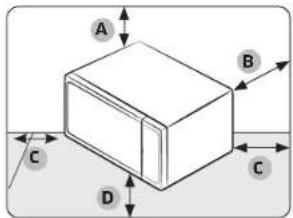
A. 20 ~cm above
B. 10 ~cm behind
C. 10 ~cm on the side
D. 85 ~cm of the floor
- Trim kit(MA-TK8020TS/TG) is required in order to be installed in a built-in application.
- Select a flat, level surface approx. 85 cm above the floor. The surface must support the weight of the microwave oven.
- Secure room for ventilation, at least 10 cm from the rear wall and both sides, and 20 cm from above.
- Do not install the microwave oven in hot or damp surroundings, such as next to other microwave ovens or radiators.
- Conform to the power supply specifications of this microwave oven. Use only approved extension cables if you need to use.
- Wipe the interior and the door seal with a damp cloth before using your microwave oven for the first time.

NOTE
A trim kit is available for select models (M519DG8500****). The trim kit allows you to install this microwave in a cabinet or any other built-in application. For complete installation instructions, see the trim kit installation manual. To purchase trim kit visit our online store.
- When using the trim kit, make sure to turn off the Door Auto Lock function before using it. Please refer to the Door Auto Lock guide on page 15.
SAVE THESE INSTRUCTIONS SAVE THESE INSTRUCTIONS
CAUTION
- If the power cord is damaged, it must be replaced by the manufacturer, the manufacturer's service agent or similarly qualified persons in order to avoid a hazard. For your personal safety, plug the power cord into a properly grounded AC socket.
- Do not install the microwave oven in hot or damp surroundings such as next to a traditional oven or radiator. The power supply specifications of the oven must be observed and any extension cable used must have the same specifications as the power cable supplied with the oven. Wipe the interior and the door seal with a damp cloth before using your microwave oven for the first time.
CLEANING THE TURNTABLE AND ROLLER
Clean the roller periodically and wash the turntable as required. You can wash the turntable safely in your dishwasher.
STORING AND REPAIRING YOUR MICROWAVE OVEN
If you need to store your microwave oven for a short or extended period of time, choose a dust-free, dry location. Dust and dampness may adversely affect the microwave parts.
AWARNING
- Do not repair, replace, or service any part of your microwave oven yourself. Allow only a qualified service technician to perform repairs. If the oven is faulty and needs servicing, or you are in doubt about its condition, unplug the oven from the power outlet and contact your nearest Samsung service center.
- Do not use the oven if it is damaged, in particular, if the door or door seals are damaged. Door damage includes a broken hinge, a worn out seal, or distorted/bent casing.
- Do not remove the oven from its casing.
This microwave oven is for home use only and is not intended for commercial use.
InstallationInstallation
What's included
Make sure all parts and accessories are included in the product package. If you have a problem with the oven or accessories, contact a local Samsung customer center or your retailer.
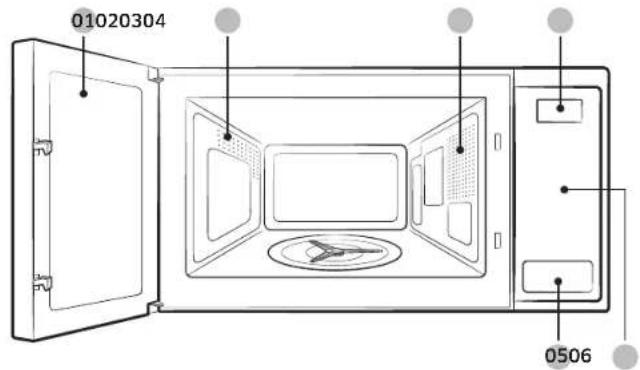
Oven at a glance
01 Door
02 Vent
03 Oven light
04 Display
The oven comes with different accessories that help you prepare different types of food.
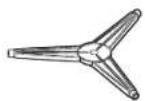
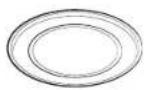
Roller Turntable
| Roller | Insert the shaft of the roller into the coupler on the floor of the microwave. The roller supports the turntable. |
| Turntable | Put the turntable on the roller with the center of the turntable on the center of the roller. The turntable serves as a cooking base. |

Do not operate the oven without the turntable on the roller.
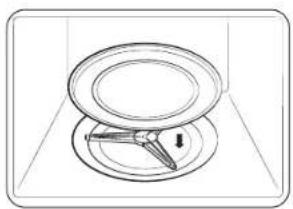
Turntable
Remove all packing materials inside the oven. Install the roller and turntable. Check that the turntable rotates freely.
Maintenance
Cleaning
Clean the oven regularly to prevent debris from building up on or inside the oven. Also pay special attention to the door, door sealing, and turntable and roller (applicable models only).
If the door won't open or close smoothly, first check if the door seals have built up debris. Use a soft cloth and soapy water to clean both the inner and outer sides of the oven. Rinse and dry well.
To remove stubborn debris and bad smells from inside the oven
- With the oven empty, put a cup of diluted lemon juice on the center of the turntable.
- Heat the oven for 10 minutes at maximum power.
- When the cycle is complete, wait until the oven cools down. Then, open the door and clean the cooking chamber.
To clean inside swing-heater models
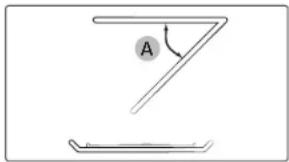
To clean the upper area of the cooking chamber, lower the top heating element by 45^ (A) as shown. This will help you clean the upper area. When done, reposition the top heating element.
Replacement (repair)
WARNING
This oven has no user-removable parts inside. Do not try to replace parts or repair the oven yourself.
- If you encounter a problem with hinges, sealing, and/or the door, contact a qualified technician or a local Samsung service center for technical assistance.
If you want to replace the light bulb, contact a local Samsung service center. Do not replace it yourself. - If you encounter a problem with the outer housing of the oven, first unplug the power cord from the power source, and then contact a local Samsung service center.
Care during an extended period of disuse
If you are not going to use the oven for an extended period of time, unplug the power cord and move the oven to a dry, dust-free location. Dust and moisture that builds up inside the oven may affect the performance of the oven.
CAUTION
- Keep the door and door seal clean and ensure the door opens and closes smoothly. Otherwise, the oven's life span may be shortened.
Take caution not to spill water into the oven vents. - Do not use any abrasive or chemical substances for cleaning.
After each use of the oven, use a mild detergent to clean the cooking chamber after waiting for the oven to cool down.
Before you start
Before you use the microwave for the first time, there is some basic information you should know. This information starts below.
NOTE
Before or during any cooking mode, you can set/change the clock or the kitchen timer.
Current time
It is important to set the correct clock time to ensuring operations.
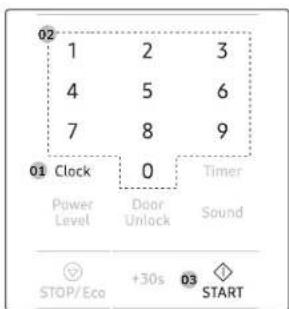
- Touch Clock.
- Use the number buttons to enter the current time. For example, touch 5, 0, and 0 in sequence for 5:00 o'clock.
- Touch START to confirm your settings. The colon () indicator blinks several times.
Energy saving
To reduce energy consumption when not using the oven, use the energy saving function of the oven.


To activate energy saving, touch STOP/ Eco to turn off the display.
To deactivate energy saving, open the door or touch STOP/Eco again. The display turns back on showing the current time.
Auto energy saving
- After 25 minutes of user inactivity, the oven automatically enters energy saving mode. Any previous function will be cancelled, and the current time will be displayed.
If you open the door and leave it open, the oven light will turn off after 5 minutes.
Control lock
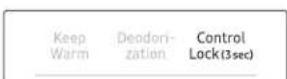
To prevent accidents, Control Lock disables all controls except for the STOP/Eco button. Hold down Control Lock (3 sec) for 3 seconds to activate. Hold down
Control Lock (3 sec) again for 3 seconds to deactivate.
Door Auto Lock
When Door Auto Lock function is on, the door will be locked automatically for safety reasons.
NOTE (US model only)
- When oven is powered up at first, it will not lock until it is operated in any mode.
- If nothing is operated for 30 minutes after cooking, door will be unlocked and can be opened without touching Door Unlock button.
The door is not locked in standby mode other than cooking operation.
You can turn Door Auto Lock function on or off.
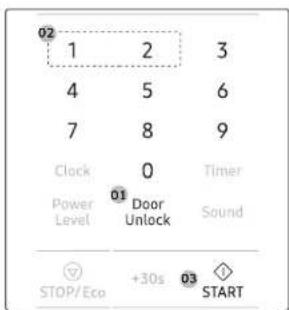
- Touch Door Unlock for 3 sec.
- Touch 1 for on, 2 for off.
- Touch START.
NOTE
When Door Auto Lock is on, "Loc" sign and current time change every 3 seconds. When you touch Door Unlock after cooking is finished, the phrase changes to "unLo" then turns to current time.
It takes 1 second for the door to lock and 1 second to open. Touch Door Unlock and be careful not to press Button Door Opener too quickly.
To open the door
Touch Door Unlock to open the door.
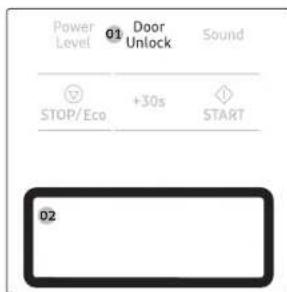
NOTE
When the microwave oven stops while working due to a power outage or malfunction, force the door open through the following steps.
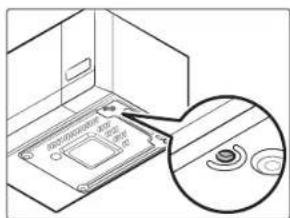
- Touch Door Unlock
- Press Push Button Door Opener.
Before you start
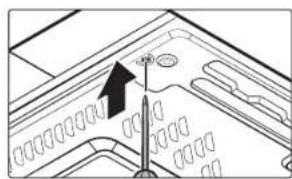
- Insert the following tool into the forced open hole and press it.
Required tool for service.
Use the commercial tools less than 2 mm in diameter, longer than 100 mm.
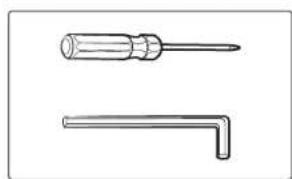
Tools for service is not included.
- When error codes occurs for the Door Unlock function, the service must be received.
Sound On/Off
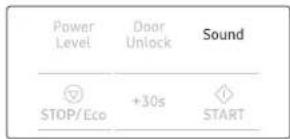
You can mule or unmule the sounds (beeps or melody) made by the oven.
To mute the sounds, touch Sound until "OFF" appears in the display.
To unmute the sounds, touch Sound again until "ON" appears in the display.
Timer
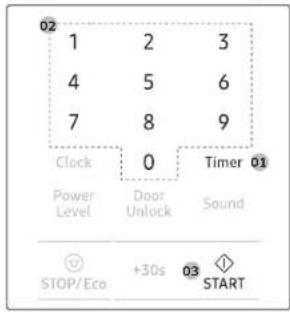
- Touch Timer
- Touch the number buttons to set the length of time. For example, touch
3-0 0 to set the timer to 3 minutes. - Touch START. The Timer counts down the time.
About microwave energy
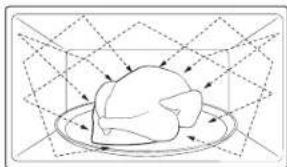
Microwaves are high-frequency electromagnetic waves. The magnetron built into the oven generates microwaves which cook or reheat food without deforming or discoloring it.
-
The microwaves generated by the magnetron are distributed uniformly by the microwave's distribution system. This is why the food cooks evenly.
-
The microwaves are absorbed by the food to a depth of approx. 1 inch (2.5 cm). Then, the microwaves dissipate inside the food as cooking continues.
-
The cooking time is affected by the following conditions of the food:
Quantity and density
- Moisture content
- Initial temperature (especially, when frozen)
NOTE
The cooked food retains heat in its core after cooking is complete. This is why you must observe the standing times specified in this manual, which ensures food cooks evenly down to the core.
Cookware for microwaving
Cookware used for Microwave Mode must allow microwaves to pass through and penetrate food. Metals such as stainless steel, aluminum, and copper reflect microwaves. Therefore, do not use cookware made of metallic materials. Cookware marked "Microwave safe" is always safe for use. For additional information on appropriate cookware, refer to the following guide.
Requirements:
- Flat bottom and straight sides
- Tight-fitting lid
Well-balanced pan with handles that weigh less than the main pan
| Material Microwave-safe Description | ||
| Aluminium foil | Δ | Use for a small serving size to protect against overcooking. Arcing can occur if the foil is near the oven wall or if you use an excessive amount of foil. |
| Crusty plate | ○ | Do not use for preheating for more than 8 minutes. |
| Bone china or earthenware | ○ | Porcelain, pottery, glazed earthenware, and bone china are usually microwave-safe, unless decorated with a metal trim. |
| Disposable polyester cardboard dishes | ○ | Some frozen foods are packaged in these dishes. |
O: Microwave Safe : Use Caution : Microwave Unsafe
Before you start
| Material Microwave-safe Description | |||
| Fast-food packaging | Polystyrene cups or containers | ○ | Overheating may cause these to melt. |
| Paper bags or newspaper | × | These may catch fire. | |
| Recycled paper or metal trims | × | These may cause arcing | |
| Glassware | Oven-to-table ware | ○ | Microwave-safe unless decorated with metal trim. |
| Fine glassware | △ | Rapid heating may cause delicate glassware to break or crack. | |
| Glass jars | ○ | Appropriate for warming only. Remove the lid before cooking. | |
| Metal | Dishes | × | These may cause arcing or fire. |
| Freezer bag with twist-ties | × | ||
| Paper | Plates, cups, napkins, and kitchen paper | ○ | Use to cook for a short time. These absorb excess moisture. |
| Recycled paper | × | Causes arcing. | |
O: Microwave Safe : Use Caution : Microwave Unsafe
| Material Microwave | safe Description | ||
| Plastic | Containers | ○ | Use thermoplastic containers only. Some plastics may warp or discolour at high temperatures. |
| Cling film | ○ | Use to maintain moisture after cooking. | |
| Freezer bags | △ | Use boilable or ovenproof bags only. | |
| Wax or grease-proof paper | ○ | Use to maintain moisture and prevent spattering. | |
O: Microwave Safe : Use Caution : Microwave Unsafe
Operations
Feature panel
The front panel comes in a wide range of materials and colors. For improved quality, the actual appearance of the oven is subject to change without notice.
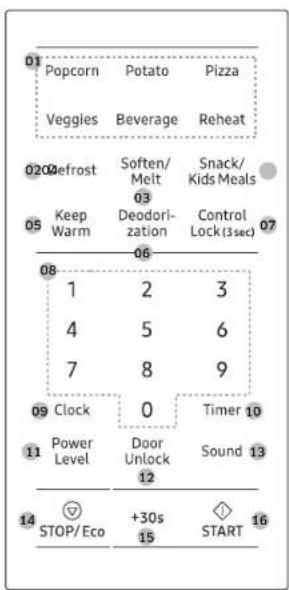
| 01 Sensor Cook |
| 02 Defrost |
| 03 Soften/Melt |
| 04 Snack/Kids Meals |
| 05 Keep Warm |
| 06 Deodorization |
| 07 Control Lock (3 sec) |
| 08 Number |
| 09 Clock |
| 10 Timer |
| 11 Power Level |
| 12 Door Unlock |
| 13 Sound |
| 14 STOP/Eco |
| 15 +30s |
| 16 START |
Simple steps to start
To cook food
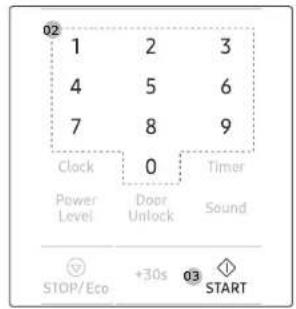
- Put the food in a microwave-safe container, and then put the container in the center of the turntable.
- Use the number buttons to set the cooking time.
- Touch START
NOTE
When cooking is complete, the oven beeps 4 times. Use oven gloves to take out the food.
Operations
To defrost frozen food
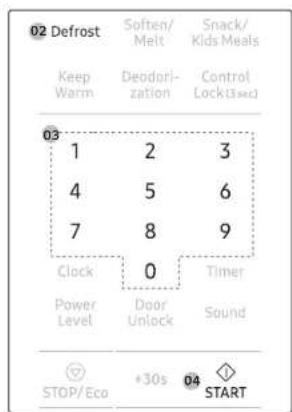
- Put the frozen food in a microwave-safe container, and then put the container in the center of the turntable.
- Touch Defrost
- Use the number buttons to set the serving size.
- Touch START
NOTE
For more information, see the Defrost section on page 26.
Manual mode
Microwave
This is the basic function of this microwave oven. The power level is set to High by default.
- Put food in a microwave-safe container, and then place the container on the turntable.
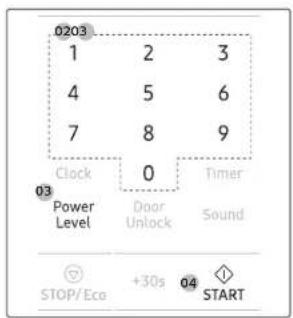
- Use the number buttons to set the cooking time (max: 99 min 99 sec). For example, to set the time to 10 minutes, touch 1 and 0 for the minutes, and 0 and 0 for the seconds (10:00).
- To change the default power level, touch Power Level, and then select a different level. See the Power level section on page 21 for details.
- Touch START
- When cooking is complete, the oven beeps 4 times. Use oven gloves to take out the food.
Common settings
Cooking time
Follow these steps to set or change the cooking time. By default, the power level is set to High.
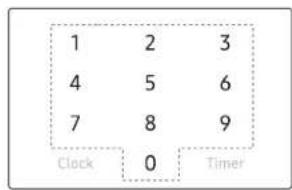
Use the number buttons to set the cooking time (max: 99 min 99 sec). The time area consists of the minute and second elements. To set a cooking time of 25 minutes, for example, touch 2 and 5 for the minutes, then 0 and 0 for the seconds.
NOTE
To change the cooking time during operation, touch STOP/Eco twice, and then repeat the steps above.
To stop cooking, simply open the door, or touch STOP/Eco. To resume operation, close the door and touch START.
To cancel cooking, touch STOP/Eco twice.
Time Increment
You might want to add extra time to the current cooking time while cooking is in progress. Time can be added in 30 second intervals.
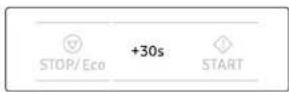
Before or during cooking, touch +30s as many times as needed. For example, to add 2 minutes to the current cooking time, touch the button 4 times.
NOTE
This button is disabled when you use Auto mode.
Powerlevel
Select the cooking time, and then choose the power level before touching the START button.
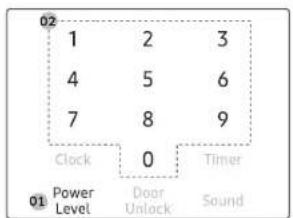
1. Touch Power Level
- Use the number buttons to select a specific power level. Available levels range from No power (0) to High (10). See the table below.
| 0 PL:0 No power | |
| 1 PL:10 Warm | |
| 2 PL:20 Defrost | |
| 3 PL:30 Low | |
| 4 PL:40 Medium low | |
| 5 PL:50 Medium | |
| 6 PL:60 Simmer | |
| 7 PL:70 Medium high | |
| 8 PL:80 Reheat | |
| 9 PL:90 Saute | |
| 10 PL:Hi High |
NOTE
To check the current power level while cooking is in progress, touch Power Level.
Operations
Sensor mode
Sensor Cook
For inexperienced cooks, the oven offers a total of 9 Sensor Cook programs in 6 different categories. Take advantage of this feature to save time or shorten your learning curve. The cooking time and temperature will be adjusted according to the selected recipe.
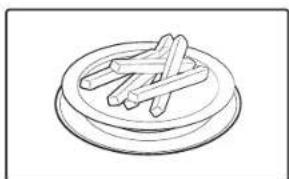
- Put food in a microwave-safe container, and then put the container in the center of the turntable.
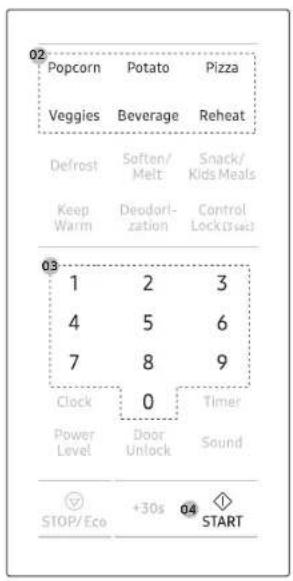
- Select a category by touching Popcorn, Potato, Pizza, Veggies, Beverage, or Reheat
- Touch the selected button again or the number buttons to select a specific program.
- Touch START
- When cooking is complete, the oven beeps 4 times. Use oven gloves to take out the food.
Sensor cook guide
The following table presents auto programs for cooking, roasting, and baking. The table contains food quantities, weight ranges, and appropriate recommendations. Cooking modes and times have been pre-programmed for your convenience.
| Code/Food Serving size Instructions | ||
| Popcorn | 3.0 to 3.5 oz(1 package) | Use only one microwave popcorn bag at a time. Be careful when removing the heated bag from the oven and opening it. Let the oven cool for at least 5 minutes before using it again. |
| Potato 1 to 6 pcs | Pierce each potato several times with a fork. Place on the turntable in a spoke-like fashion. After cooking, let the potatoes stand for 3 - 5 minutes. Let the oven cool for at least 5 minutes before using it again. | |
| Pizza 1 to 4 slices | Place 1 - 4 pizza slices on a microwave-safe plate with the wide ends of the slices towards the outside edge of the plate. Do not let the slices overlap. Do not cover. Let the oven cool for at least 5 minutes before using it again. | |
| Code/Food Serving size Instructions | |||
| Veggies | 1.Fresh Vegetables | 1 to 4 servings | Place the food in a microwave-safe ceramic, glass, or plastic dish and add 2 - 4 lbs. water. Cover with vented plastic wrap, and then cook. Stir before letting stand. Let the oven cool for at least 5 minutes before using it again. |
| 2.Frozen Vegetables | 1 to 4 servings | ||
| Beverage 8 to 10 oz | Use a measuring cup or mug and do not cover. Place the beverage in the oven. After heating, stir well. Let the oven cool for at least 5 minutes before using it again. | ||
Operations
| Code/Food Serving size Instructions | |||
| Reheat | 1. Dinner Plate 1 serving | Use only precooked, refrigerated foods. Cover the plate with vented plastic wrap or waxed paper tucked under the plate. If the food is not as hot as you would like after using the "Sensor" function, continue heating using additional time and power. Let the oven cool for at least 5 minutes before using it again. Contents:3 - 4 oz meat, poultry, or fish (up to 6 oz with bone) 1/2 cup starch (potatoes, pasta, rice, etc.) 1/2 cup vegetables (about 3 - 4 oz) | |
| 2. Casserole | 1 to 4 servings | Cover the plate with vented plastic wrap. If the food is not as hot as you would like after using the "Sensor Cook" function, continue heating using additional time and power. Stir the food once before serving. Let the oven cool for at least 5 minutes before using it again. Contents:Casseroles, soup, refrigerated foods. | |
| 3. Pasta | 1 to 4 servings | ||
Auto mode
Snack/Kids Meals
The Snack/Kids Meals feature has 9 pre-programmed cooking times. You do not need to set either cooking times or the power level.
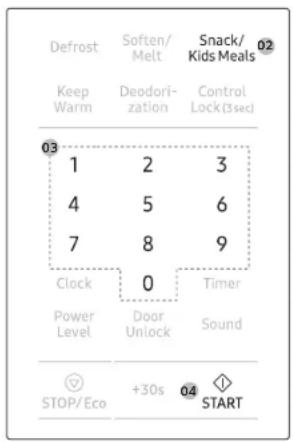
-
Put food in the center of the turntable, and then close the door.
-
Touch Snack/Kids Meals.
-
Touch the Snack/Kids Meals button again or the number buttons to select a specific program.
-
Touch START
-
When the cycle is complete, the oven beeps 4 times. Use oven gloves to take out the food.
CAUTION
Before inserting food in the oven, remove any metal or plastic cover or lid from the food.
Snack/Kids Meals guide
The following table lists auto programs for heating snack foods. The table contains food quantities, weight ranges, and appropriate recommendations.
| Code | Food Serving size | Instructions | |
| 1 Bacon 4 slices | Layer 2 paper towels on microwave safe plate and arrange the bacon on the towels. Do not overlap bacon. Cover with an additional paper towel. Remove the paper towel immediately after cooking. | ||
| 2 | Frozen Cheese Sticks | 5 - 6 pcs | Place the cheese sticks on a plate in a spoke-like fashion. Do not cover. Let stand for 1 to 2 minutes after heating. |
| 3 | Frozen Chicken Wings | 7 - 8 oz | Use precooked, refrigerated chicken wings. Place the chicken wings around the plate in a spoke-like fashion and cover with wax paper. Let stand for 1 to 2 minutes. |
| 4 Nachos 1 serving | Place the nachos on a plate without letting them overlap. Sprinkle cheese evenly over them. Contents:2 cups tortilla chips1/3 cup grated cheese | ||
| 5 Potato skins | 2 (cooked) potatoes | Cut the cooked potato into 4 even wedges. Scoop or cut out the potato flesh, leaving about a 1/4 in. flesh on the skin. Place the skins in a spoke-like fashion around the plate. Sprinkle with bacon, onions and cheese. Do not cover. Let stand for 1 to 2 minutes. | |
| Code | Food Serving size | Instructions | |
| 6 | Frozen Chicken Nuggets | 1 serving | Place a paper towel on a plate and arrange the nuggets in a spoke-like fashion on the paper towel. Do not cover. Let stand for 1 minute after heating. Refer to the package directions for the serving size and the amount of food. |
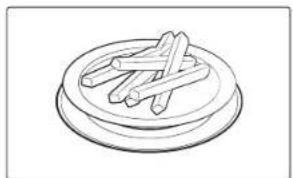
| 7 | Frozen French Fries | 1 serving | Place two paper towels on a microwave safe plate and arrange the French fries on the towels without letting them overlap. Blot the fries with additional paper towels after removing from the oven. Let stand for 1 minute. Refer to the directions on the packaging for the serving size and the amount of food. |
| 8 | Frozen Sandwich | 1 serving (1 sandwich) | Place the frozen sandwich in a susceptor "crisping sleeve" (which is in the package) and place on a microwave safe plate. Remove from the "crisping sleeve". Let stand for 2 minutes after heating. |
| 9 Hot Dogs | 1 serving (2 hot dogs) | Pierce the hot dogs and place them on a plate. When the oven beeps, remove the hot dogs from the oven, put each hot dog in a bun, place the buns and hot dogs in the oven, and then restart the oven. Let stand for 1 minute after heating. For the best texture, the buns should be added to the hot dogs when the oven beeps. | |
Operations
Convenience
Defrost
Use to defrost frozen meat, poultry, fish, or bread. The operating time and power level will be adjusted according to the selected program.
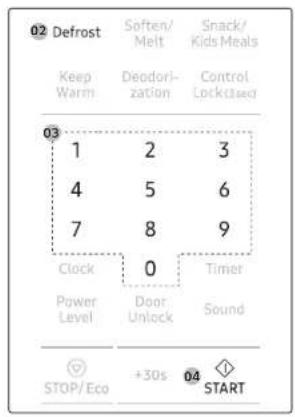
- Put food in the center of the turntable, and then close the door.
- Touch Defrost to select a category.
- Use the number buttons to select a weight.
- Touch START
- When the cycle is complete, the oven beeps 4 times. Use oven gloves to take out the food.
NOTE
The oven beeps in the middle of the cycle to remind you to turn the food over. Turn the food over, and then touch START again to continue. When the cycle is complete, the oven beeps 4 times.
- You can defrost food manually.
To do this, set a time, touch the 2 button (20% power), and then touch START. For more information, see the Power level section on page 21.
Defrost guide
The following table lists auto programs for defrosting food. The table contains food quantities, weight ranges, and appropriate recommendations.
| Code | Food Serving | size (lb) | Instructions |
| 1 | Meat 0.1 - 3.5 | Shield the edges with aluminium foil. Turn the meat over when the oven beeps. This program is suitable for beef, lamb, pork, steaks, chops, minced meat. Let stand for 10 - 30 minutes. | |
| 2 | Poultry 0.1 - 3.5 | This program is suitable for whole chicken as well as for chicken pieces. Before defrosting, if there are a large number of ice crystals on the surface of the poultry, rinse the surface with cold water until all the ice crystals are removed. The poultry should then be left to stand for 5 to 10 min. at room temperature. Shield the leg and wing tips with aluminium foil. Place chicken pieces skin-side down, and whole chicken breast-side down on the middle of a flat microwave-safe plate. Turn the poultry over when the oven beeps | |
| 3 | Fish 0.1 - 3.5 | Shield the tail of a whole fish with aluminium foil. Turn the fish over, when the oven beeps. This program is suitable for whole fish as well as for fish fillets. Let stand for 10 - 30 minutes. |
| Code | Food Serving size (lb) | Instruct ons |
| 4 Bread 0.1 - 2 | 0 | Put bread on a piece of kitchen paper and turn over as soon as the oven beeps. Place cake on a ceramic plate and, if possible, turn over, as soon as the oven beeps. (The oven keeps operating and stops when you open the door.) This program is also suitable for all kinds of bread, sliced or whole, as well as for bread rolls and baguettes. Arrange bread rolls in a circle. In addition, this program is suitable for all kinds of yeast cakes, biscuits, cheese cakes, and puff pastry. It is not suitable for short/crust pastry, fruit and cream or for cakes with chocolate topping. Let stand for 5 - 30 minutes. |
Soften/Melt
This is useful to soften or melt soft food or confections such as butter, chocolate, and sugar.
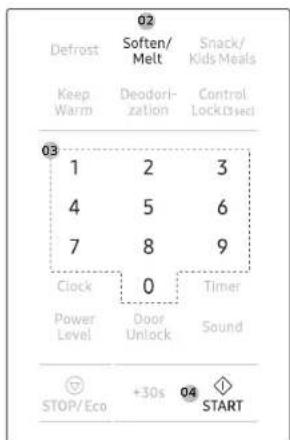
- Put food in the center of the turntable.
- Touch Soften/Melt
- Touch the Soften/Melt button again or the number buttons to select a specific program.
- Touch START
- When the cycle is complete, the oven beeps 4 times. Use oven gloves to take out the food.
Operations
Soften/Melt guide
The following table lists auto programs for softening or melting specific kinds of food. The table contains food quantities, weight ranges, and appropriate recommendations.
| Code | Food Serving size | (oz) Instructions | |
| 1 | Melting Butter 1.75 | (50 g) | Cut butter into 3 or 4 pieces, and then put them in a small glass bowl. |
| 2 | Melting Butter 3.5 | (100 g) | Melt uncovered. Stir after cooking. Let stand for 1 - 2 minutes. |
| 3 | Melting Dark Chocolate | 1.75 (50 g) | Grate dark chocolate, and then put in a small glass bowl. Melt uncovered. Stir after melting. Let stand for 1 - 2 minutes. |
| 4 | Melting Dark Chocolate | 3.5 (100 g) | |
| 5 | Melting Sugar 1 (25 g) | Put sugar in a small glass bowl. Add 2 tbsp (10 ml) water for 1 oz (25 g). Add 4 tbsp (20 ml) water for 1.75 oz (50 g). Melt uncovered. Take out carefully using oven gloves! Use spoon or fork and pour caramel decorations on baking paper. Let stand for 10 minutes until dry, and then remove from paper. | |
| 6 | Melting Sugar 1.75 | (50 g) | |
| 7 | Soften Butter 1.75 | (50 g) | Cut butter into 3 or 4 pieces, and then put them in small glass bowl. |
| 8 | Soften Butter 3.5 | (100 g) | Soften uncovered. Let stand for 1 - 2 minutes. |
Keep Warm
If you want to keep cooked foods warm until serving, use this function. The operating time and power level will be adjusted according to the selected program.
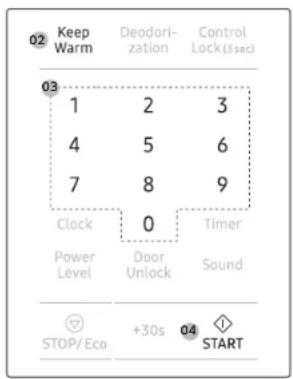
-
Put food in the center of the turntable, and then close the door.
-
Touch Keep Warm. The default time is 99 minutes.
-
Use the number buttons to set the warming time (max: 99 min 99 sec.)
4. Touch START
- When the cycle is complete, the oven beeps 4 times. Use oven gloves to take out the food.
CAUTION
- Do not use this function to reheat cold food. Use this only for keeping food that has just been cooked warm.
- Do not keep food for more than 1 hour. The food surface may dry up.
- Do not put food covered with lids or plastic wrap in the oven.
Cooking Smart
Deodorization
Deodorization helps remove bad smells from inside the oven after cooking. The default time is 5 minutes.
| 01 | ||
| Keep Warm | Deodori-zation | Control Lock(Based) |
| 1 | 2 | 3 |
| 4 | 5 | 6 |
| 7 | 8 | 9 |
| Clock | 0 | Timer |
| Power Level | Door Unlock | Sound |
| STOP/Eco | +30s 02 | START 01 |
- To activate, touch Deodorization and then START on the feature panel.
- To increase the time in 30 second increments, touch +30s (max: 15 min).
We provide these cooking guides to help you make the most out of this oven. Experience our cooking know-how to add convenience and richness to your life.
Microwave cooking guide
- Cover the food for the entire time it is cooking. The vaporised moisture from the food cycles through inside and helps cook the food evenly.
- When cooking is complete, let stand for the specified time. This allows the food to cook evenly throughout.
- Use only microwave-safe cookware.
Frozen vegetables
Use a suitable glass Pyrex container with a lid.
- Stir twice during cooking and once after cooking, and then add the seasoning of your preference.
| Food Serving | size (oz) Power (%) Time (min.) | |
| Spinach | 5.3 (150 g) 60 5 - 6 | |
| Add 1 tbsp (15 ml) cold water. Let stand for 2 - 3 minutes. | ||
| Broccoli | 10.6 (300 g) 60 8 - 9 | |
| Add 2 tbsp (30 ml) cold water. Let stand for 2-3 minutes. | ||
| Peas | 10.6 (300 g) 60 7 - 8 | |
| Add 1 tbsp (15 ml) cold water. Let stand for 2-3 minutes. | ||
| Green Beans | 10.6 (300 g) 60 7 1/2 - 8 1/2 | |
| Add 2 tbsp (30 ml) cold water. Let stand for 2-3 minutes. | ||
| Mixed Vegetables (Carrots/Peas/Corn) | 10.6 (300 g) 60 7 - 8 | |
| Add 1 tbsp (15 ml) cold water. Let stand for 2-3 minutes. | ||
| Mixed Vegetables (Chinese style) | 10.6 (300 g) 60 7 1/2 - 8 1/2 | |
| Add 1 tbsp (15 ml) cold water. Let stand for 2 - 3 minutes. | ||
Cooking Smart
Fresh vegetables
- Use a suitable glass Pyrex container with a lid.
- Cut ingredients so that pieces are as small as possible to reduce the cooking time.
- Add 2 - 3 tbsp (30 - 45 ml) of cold water for every 9 oz (250 g) of vegetables unless otherwise directed.
- Stir once during cooking and once after cooking, and then add seasoning to your preference.
| Food Serving | size (oz) Power (%) | Time (min.) | |
| Broccoli | 9 (250 g)17.6 (500 g) | 90 | 4 1/2 - 57 - 8 |
| Prepare even sized florets. Arrange so the stems are in the center. Let stand for 3 minutes. | |||
| Brussels Sprouts | 9 (250 g) 90 6 | - 6 1/2 | |
| Add 4 - 5 tbsp (60-75 ml) water. Let stand for 3 minutes. | |||
| Carrots | 9 (250 g) 90 4 | 1/2 - 5 | |
| Cut carrots into even sized slices. Let stand for 3 minutes. | |||
| Cauliflower | 9 (250 g)17.6 (500 g) | 90 | 5 - 5 1/27 1/2 - 8 1/2 |
| Prepare even sized florets. Cut big florets into halves. Arrange so the stems are in the center. Let stand for 3 minutes. | |||
| Courgettes(Zucchini) | 9 (250 g) 90 4 | 4 1/2 | |
| Cut courgettes into slices. Add 2 tbsp (30 m) water or a pat of butter. Cook until just tender. Let stand for 3 minutes. | |||
| Eggplant | 9 (250 g) 90 3 | 1/2 - 4 | |
| Cut eggplant into small slices and sprinkle with 1 tbsp lemon juice. Let stand for 3 minutes. | |||
| Food Serving | size (oz) Power (%) | Time (min.) | |
| Leeks | 9 (250 g) 90 4 | - 4 1/2 | |
| Cut leeks into thick slices. Let stand for 3 minutes. | |||
| Mushrooms | 4.5 (125 g)9 (250 g) | 90 | 1 1/2 - 22 1/2 - 3 |
| Prepare small whole or sliced mushrooms. Do not add any water. Sprinkle with lemon juice. Spice with salt and pepper. Drain before serving. Let stand for 3 minutes. | |||
| Onions | 9 (250 g) 90 5 | - 5 1/2 | |
| Cut onions into slices or halves. Add only 1 tbsp (15 ml) water. Let stand for 3 minutes. | |||
| Pepper | 9 (250 g) 90 4 | 1/2 - 5 | |
| Cut pepper into small slices. Let stand for 3 minutes. | |||
| Potatoes | 9 (250 g)17.6 (500 g) | 90 | 4 - 57 - 8 |
| Weigh the peeled potatoes and cut them into similar sized halves or quarters. Let stand for 3 minutes. | |||
| Turnip | 9 (250 g) 90 5 | 1/2 - 6 | |
| Cut turnip into small cubes. Let stand for 3 minutes. | |||
Rice and pasta
Rico
- Use a large-sized glass Pyrex container with a lid. Note that rice doubles in volume during cooking.
Pasta - Use a large-sized glass Pyrex container. Cook uncovered.
- Add boiling water, a little salt, and then stir well. Stir several times during and after cooking.
Cover with a lid while letting stand, and then drain well.
| Food Serving | size Power (%) Time (min.) | ||
| White Rice (Pa) | 9 oz (250 g) 13.25 oz (375 g) | 90 | 15 - 16 17 1/2 - 18 1/2 |
| Add 2 cups (500 ml) cold water for 9 oz (250 g). Add 3.125 cups (750 ml) cold water for 13.25 oz (375 g). Let stand for 5 minutes. | |||
| Brown Rice (Pa) | 9 oz (250 g) 13.25 oz (375 g) | 90 | 20 - 21 22 - 23 |
| Add 2 cups (500 ml) cold water for 9 oz (250 g). Add 3.125 cups (750 ml) cold water for 13.25 oz (375 g). Let stand for 5 minutes. | |||
| Mixed Rice (Rice + Wild Rice) | 9 oz (250 g) 90 | 16 - 17 | |
| Add 2 cups (500 ml) cold water. Let stand for 5 minutes. | |||
| Mixed Grains (Rice + Grain) | 9 oz (250 g) 90 | 17 - 18 | |
| Add 1.66 cups (400 ml) cold water. Let stand for 5 minutes. | |||
| Pasta | 9 oz (250 g) 90 | 10 - 11 | |
| Add 4 cups (1000 ml) hot water. Let stand for 5 minutes. | |||
Reheating guide
General
This reheating guide is based on the following standards: That the temperature of liquid at room temperature is between 64.4^ and 68^ (18 °C and 20 °C) and that the temperature of chilled food is between 41^ and 44.6^ (5 °C and 7 °C). Follow the operating time, power level, and standing times specified in this table.
| Food Serving | size Power (%) Time (min.) | ||
| Drinks(Coffee, Tea and Water) | 1 cup (150 ml)2 cups (300 ml)3 cups (450 ml)4 cups (600 ml) | 90 | 1 - 1 ½2 - 2 ½3 - 3 ½3 ½ - 4 |
| Pour into cups and reheat uncovered: 1 cup in the center,2 cups opposite of each other, 3 cups in a circle. Keep in microwave oven during standing time and stir well.Let stand for 1 - 2 minutes. | |||
| Soup (Chilled) | 9 oz (250 g)12.3 oz (350 g)15.87 oz (450 g)1.2 lb (550 g) | 90 | 2 ½ - 33 - 3 ½3 ½ - 44 ½ - 5 |
| Pour into a deep ceramic plate or deep ceramic bowl. Cover with plastic lid. Stir well after reheating. Stir again before serving. Let stand for 2 - 3 minutes. | |||
| Stew (Chilled) | 12.3 oz (350 g) 60 | 4 ½ - 5 ½ | |
| Put stew in a deep ceramic plate. Cover with plastic lid. Stir occasionally during reheating and again before standing and serving. Let stand for 2 - 3 minutes. | |||
| Pasta with Sauce(Chilled) | 12.3 oz (350 g) 60 | 3 ½ - 4 ½ | |
| Put pasta (e.g. spaghetti or egg noodles) on a flat ceramic plate. Cover with microwave cling film. Stir before serving. Let stand for 3 minutes. | |||
Cooking Smart
| Food Serving | size Power (%) Time (min.) | ||
| Filled Pasta with Sauce (Chilled) | 12.3 oz (350 g) 60 | 4 - 5 | |
| Put filled pasta (e.g. ravioli, tortellini) in a deep ceramic plate. Cover with plastic lid. Stir occasionally during reheating and again before standing and serving. Let stand for 3 minutes. | |||
| Plated Meal (Chilled) | 12.3 oz (350 g) 15.87 oz (450 g) | 60 | 4 1/2 - 5 5 1/2 - 6 1/2 |
| Put a meal of 2-3 chilled components on a ceramic dish. Cover with plastic cling-film. Let stand for 3 minutes. | |||
| Cheese Fondue Ready-to- Serve (Chilled) | 14 oz (400 g) 60 | 6 - 7 | |
| Put the ready-to-serve cheese fondue in a suitable sized glass pyrex bowl with lid. Stir occasionally during and after reheating. Stir well before serving. Let stand for 1 - 2 minutes. | |||
Special care for baby food
To prevent accidents such as burns, special care must be taken with baby food before serving. Make sure to strictly follow this reheating guide for baby food. Baby food
- Use a deep ceramic plate and cover it with a plastic lid.
Recommended serving temperature is 86 - 104°F (30 - 40°C). Baby milk - Use a sterilised glass bottle and reheat it uncovered.
- Remove the nipple before reheating. Otherwise, the milk in the bottle can boil over.
| Food Serving | size Power (%) Time | (sec.) | |
| Baby Food (Vegetables + Meat) | 6.7 oz (190 g) 60 | 30 | |
| Empty into a deep ceramic plate. Cook covered. Stir after cooking time. Before serving, stir well and check the temperature carefully. Let stand for 2 - 3 minutes. | |||
| Baby Porridge (Grain + Milk + Fruit) | 6.7 oz (190 g) 60 | 20 | |
| Empty into a deep ceramic plate. Cook covered. Stir after cooking time. Before serving, stir well and check the temperature carefully. Let stand for 2 - 3 minutes. | |||
| Baby Milk | 3.4 oz (100 ml) | 30 | 30 - 40 |
| 6.7 oz (200 ml) | 60 - 70 | ||
| Stir or shake well, and then pour into a sterilized glass bottle. Place in the center of turn-table. Cook uncovered. Shake well and let stand for at least 3 minutes. Before serving, shake well and check the temperature carefully. | |||
Defrosting guide
This defrosting guide is based on the following standard: That frozen food has an internal temperature between 0^ and -4^ (-18°C and -20°C). The standing time varies depending on the food type (meat or vegetables) and serving size (thinner or thicker pieces of food).
- Put frozen food in a microwave-safe container uncovered.
- Turn it over halfway through defrosting time and drain well when complete.
| Food Food Serving size Power (%) Time (min.) | ||||
| Meat | Minced (Ground) Meat | 9 oz (250 g) 1.1 lb (500 g) | 20 | 6 - 7 8 - 13 |
| Pork Steaks 9 oz | (250 g) 7 - 8 | |||
| Place the meat on turntable. Shield thinner edges with aluminium foil. Turn over after half of defrosting time! Let stand for 15 - 30 minutes. | ||||
| Poultry | Chicken Pieces | 1.1 lb (500 g) (2 pcs) | 20 | 14 - 15 |
| Whole Chicken 2.65 lb (1200 g) 32 - 34 | ||||
| First, put chicken pieces skin-side down, whole chicken breast-side-down on a flat ceramic plate. Shield the thinner parts like wings and ends with aluminium foil. Turn over after half of defrosting time! Let stand for 15 - 60 minutes. | ||||
| Fish | Fish Fillets 9 oz (250 g) | 20 | 6 - 7 | |
| Whole Fish 14 oz (400 g) 11 - 13 | ||||
| Put frozen fish in the middle of a flat ceramic plate. Arrange the thinner parts under the thicker parts. Shield narrow ends of fillets and tail of whole fish with aluminium foil. Turn over after half of defrosting time! Let stand for 10 - 25 minutes. | ||||
| Food Food Serving size Power (%) Time (min.) | ||||
| Fruit | Berries 10.6 oz | (300 g) 20 | 6 - 7 | |
| Spread fruit on a flat, round glass dish (with a large diameter). Let stand for 5 - 10 minutes. | ||||
| Bread | Bread Rolls (Each ca. 50 g) | 2 pcs 4 pcs | 20 | 1 - 1 1/2 2 1/2 - 3 |
| Toast/Sandwich | 9 oz (250 g) | 4 - 4 1/2 | ||
| German Bread (Wheat + Rye Flour) | 1.1 lb (500 g) | 7 - 9 | ||
| Arrange rolls in a circle or bread horizontally on kitchen paper in the middle of turntable. Turn over after half of defrosting time! Let stand for 5 - 20 minutes. | ||||
Quick & easy
Melting crystallized honey
Put 7 oz (20 g) crystallized honey into a small deep glass dish.
Heat for 20 - 30 seconds at 30% power, until honey is melted.
Melting gelatine
Put dry gelatine sheets (3.5 oz (10 g)) into cold water for 5 minutes. Put drained gelatine into a small glass pyrex bowl.
Heat for 1 minute at 30% power.
Stir after melting.
Cooking glaze/icing (for cake and gateaux)
Mix instant glaze (approximately 5 oz (14 g)) with 1.5 oz (40 g) sugar and 8.5 oz (250 ml) cold water.
Cook uncovered in a glass pyrex bowl for 3 12 to 4 12 minutes at 90 % power, until glaze/icing is transparent. Stir twice during cooking.
Cooking Smart
Cooking Jam
Put 1.3 lb (600 g) fruit (for example mixed berries) in a suitably sized glass pyrex bowl with lid. Add 10.6 oz (300 g) preserving sugar and stir well. Cook covered for 10 - 12 minutes at 90% power. Stir several times during cooking. Empty directly into small jam glasses with twist-off lids. Let stand for 5 minutes.
Cooking pudding/ custard
Mix pudding powder with sugar and milk (2 cups (500 ml)) following the manufacturer's instructions. Stir well. Use a suitably sized glass pyrex bowl with lid. Cook covered for 612 to 712 minutes at 90% power. Stir well several times during cooking.
Browning almond slices
Spread 1 oz (30 g) sliced almonds evenly on a medium sized ceramic plate. Brown for 3 12 to 4 12 minutes at 60 % power. Stir several times during browning. Let stand for 2 - 3 minutes in the oven. Use oven gloves while taking out!
Troubleshooting
If you encounter a problem with your oven, first check the tables starting below and try the suggestions. If a problem persists, or if an information code keeps appearing on the display, contact a local Samsung service center.
Checkpoints
If you encounter a problem with the oven, first check the tables below and try the suggestions.
| Problem Cause | Action | |
| General | ||
| The buttons cannot be pressed properly. | Foreign matter may be caught between the buttons. | Remove the foreign matter and try again. |
| For touch models: Moisture is on the exterior. | Wipe the moisture from the exterior. | |
| Child lock is activated. Do activate Child lock. | ||
| The time is not displayed. | Power is not supplied. | Make sure power is supplied. Confirm the microwave is plugged in. Check your fuses or circuit breakers. |
| The Eco (power-saving) function is on. | Turn off the Eco function. | |
| The oven does not work. | Power is not supplied. | Make sure power is supplied. Confirm the microwave is plugged in. Check your fuses or circuit breakers. |
| The door is open. Close the door and try again. | ||
| The door open safety mechanisms are covered with foreign matter. | Remove the foreign matter and try again. | |
| The oven stops while in operation. | The user has opened the door to turn food over. | After turning over the food, touch the START button again to start operation. |
| The power turns off during operation. | The oven has been cooking for an extended period of time. | After cooking for an extended period of time, let the oven cool. |
| The cooling fan is not working. | Listen for the sound of the cooling fan. | |
| Trying to operate the oven without food inside. | Put food in the oven. | |
| There is not enough ventilation space around the oven. | There are intake/exhaust outlets on the front and rear of the oven for ventilation. Check the installation guide and make sure that the microwave is far enough away from walls and cabinets for proper ventilation. | |
| Several appliances or devices are plugged into the same outlet. | Unplug all other appliances or devices from the outlet. | |
| There is no power to the oven. | Power is not supplied. | Make sure power is supplied. Confirm the microwave is plugged in. Check your fuses or circuit breakers. |
| There is a popping sound during operation, then the oven doesn't work. | Cooking sealed food or using a container with a lid may causes popping sounds. | Do not use sealed containers as they may burst during cooking due to expansion of the contents. |
| Problem Cause | Action | |
| The oven exterior gets too hot during operation. | There is not enough ventilation space around the oven. | There are intake/exhaust outlets on the front and rear of the oven for ventilation. Check the installation guide and make sure that the microwave is far enough away from walls and cabinets for proper ventilation. |
| Objects are on top of the oven. | Remove all objects on the top of the oven. | |
| The door cannot be opened properly. | Food residue is stuck between the door and oven interior. | Clean the oven and then open the door. |
| The oven does not heat. | The oven may not work, too much food is being cooked, or improper cookware is being used. | To test the oven, put one cup of water in a microwave-safe container, put the container in the oven, and then run the microwave for 1 - 2 minutes to check whether the water is heated. If the water is heated, reduce the amount of food and start the function again. Use a microwave safe cooking container with a flat bottom. |
Troubleshooting
| Problem Cause | Action | |
| Heating is weak or slow. | The oven may not work, too much food is being cooked, or improper cookware is being used. | To test the oven, put one cup of water in a microwave-safe container, put the container in the oven, and then run the microwave for 1 - 2 minutes to check whether the water is heated. If the water is heated, reduce the amount of food and start the function again. Use a microwave safe cooking container with a flat bottom. |
| The warm function does not work. | The oven may not work, too much food is being cooked, or improper cookware is being used. | To test the oven, put one cup of water in a microwave-safe container, put the container in the oven, and then run the microwave for 1 - 2 minutes to check whether the water is heated. If the water is heated, reduce the amount of food and start the function again. Use a microwave safe cooking container with a flat bottom. |
| The thaw function does not work. | The oven may not work, too much food is being cooked, or improper cookware is being used. | To test the oven, put one cup of water in a microwave-safe container, put the container in the oven, and then run the microwave for 1 - 2 minutes to check whether the water is heated. If the water is heated, reduce the amount of food and start the function again. Use a microwave safe cooking container with a flat bottom. (continued) |
| Problem Cause | Action | |
| The interior light is dim or does not turn on. | The door has been left open for a long time. | The interior light may automatically turn off when the Eco function operates. Close and reopen the door or touch the STOP/Eco button. |
| The interior light is covered by foreign matter. | Clean the inside of the oven and check again. | |
| A beeping sound occurs during cooking. | If the Auto Cook function is being used, this beeping sound means it's time to turn over the food during thawing. | After turning over the food, touch the START button again to restart operation. |
| The oven is not level. | The oven is installed on an uneven surface. | Make sure the oven is installed on flat, stable surface. |
| There are sparks during cooking. | Metal containers are used during the oven/thawing functions. | Do not use metal containers. |
| When power is connected, the oven immediately starts to work. | The door is not properly closed. | Close the door and check again. |
| There is electricity coming from the oven. | The power cord or power socket is not properly grounded. | Make sure the power cord and power socket are properly grounded. |
| There is water dripping. | Water or steam may be generated by the cooking or defrosting process, depending on the food. This is not an oven malfunction. | Let the oven cool and then wipe with a dry dish towel. |
| Steam leaks from the door. | Water or steam may be generated by the cooking or defrosting process, depending on the food. This is not an oven malfunction. | Let the oven cool and then wipe with a dry dish towel. |
| There is water left in the oven. | Water or steam may be generated by the cooking or defrosting process, depending on the food. This is not an oven malfunction. | Let the oven cool and then wipe with a dry dish towel. |
| The brightness inside the oven varies. | Changes in brightness reflect changes in power output. Power output changes depending on the functions in use. | Power output changes during cooking are not malfunctions. |
| Cooking is finished, but the cooling fan is still running. | To ventilate the oven, the cooling fan continues to run for about 5 minutes after cooking is complete. | This is not an oven malfunction. |
| Touching the +30s button operates the oven. | This happens when the oven was not operating. | The microwave oven is designed to start operating when you touch the +30s button if it was not operating. |
| Problem Cause | Action | |
| Turntable | ||
| While turning, the turntable comes out of place or stops turning. | There is no roller, or the roller is not properly in place. | Install the roller and then try again. |
| The turn table drags while turning. | The roller is not properly in place, there is too much food, or the container is too large and touches the inside of the microwave. | Adjust the amount of food and do not use containers that are too large. |
| The turn table rattles while turning and is noisy. | Food residue is stuck to the bottom of the oven. | Remove any food residue stuck to the bottom of the oven. |

NOTE
If the above guidelines do not enable you to solve the problem, then contact your local SAMSUNG customer service center.
Please have the following information ready:
The model and serial numbers, normally printed on the rear of the oven
- Your warranty details
A clear description of the problem
Troubleshooting
Information code
| Code Description Action | ||
| C-d0 | Control buttons are pressed for more than 10 seconds without working. | Clean the keys and check if there is water on the surface around the keys. If this occurs again, turn off the microwave oven for more than 30 seconds, and then try setting again. If this code appears again, call your local Samsung service center. |
| C-d1 | When door lock motor cannot find its position. | Check door lock operation when re-applying power. If this code appears again, call your local Samsung service center. |
| C-10 | The GAS Sensor is open. | Unplug the power cord of the oven, and then contact a local Samsung service center. |
| The GAS Sensor is shorted. | ||
NOTE
If the suggested solution does not solve the problem, contact your local SAMSUNG Service Center.
Technical specifications
SAMSUNG strives to improve its products at all times. Both the design specifications and these user instructions are consequently subject to change without notice.
| Model MS19DG8500**AA MS19DG8500**AC | |||
| Power Source 120 V | ~ 60 Hz | ||
| Power Consumption 1650 W 1500 W | |||
| Output Power | 100 W / 950 W(IEC - 705) | 100 W / 900 W(IEC - 705) | |
| Operating Frequency 2450 MHz | |||
| Cooling Method Cooling fan motor | |||
| Dimensions(W x H x D) | Main unit 23 | \( ^5/8 \times 13^5/18 \times 18^7/16 (in) \) | |
| Cooking chamber 17 | \( ^2/3 \times 10^3/8 \times 17^7/6 (in) \) | ||
| Volume 1.9 cu.ft | |||
| Weight Net | 44.1 lbs. | ||
| Standby mode entry time | 30 sec. | ||
SAMSUNG MICROWAVE OVEN
LIMITED WARRANTY TO ORIGINAL PURCHASER WITH PROOF OF PURCHASE
This SAMSUNG brand product, as supplied and distributed by SAMSUNG ELECTRONICS AMERICA, INC. (SAMSUNG) and delivered new, in the original carton to the original consumer purchaser, is warranted by SAMSUNG against manufacturing defects in materials or workmanship for the limited warranty period, starting on the date of delivery to the original consumer purchaser, of:
One (1) Year Parts and Labor Ten (10) Years Magnetron Part (Part Only)
This limited warranty is valid only on products purchased and used in the United States that have been installed, operated, and maintained according to the instructions attached to or furnished with the product. To receive warranty service the purchaser must contact SAMSUNG at the address or phone number provided below for problem determination and service procedures. Warranty service can only be performed by a SAMSUNG authorized service center. The original dated bill of sale and/or proof of delivery must be presented upon request as proof of purchase to SAMSUNG or SAMSUNG's authorized service center to receive warranty service.
SAMSUNG will provide in-home service within the contiguous United States during the warranty period at no charge, subject to availability of SAMSUNG authorized servicers within the customer's geographic area. If in-home service is not available, SAMSUNG may elect, at its option, to provide transportation of the product to and from an authorized service center. If the product is located in an area where service by a SAMSUNG authorized servicer is not available, you may be responsible for a trip charge or required to bring the product to a SAMSUNG authorized service center for service.
To receive in-home service, product must be unobstructed and accessible to the service agent.
During the applicable warranty period, a product will be repaired, replaced, or the purchase price refunded, at the sole option of SAMSUNG. SAMSUNG may use new or reconditioned parts in repairing a product, or replace the product with a new or reconditioned product. Replacement parts and products are warranted for the remaining portion of the original product's warranty or ninety (90) days, whichever is longer. All replaced parts and products are the property of SAMSUNG and you must return them to SAMSUNG.
This limited warranty covers manufacturing defects in materials or workmanship encountered in normal household, noncommercial use of this product and shall not cover the following: damage that occurs in shipment, delivery, installation, and uses for which this product was not intended; damage caused by unauthorized modification or alteration of the product; product where the original factory serial numbers have been removed, defaced, changed in any way, or cannot be readily determined; cosmetic damage including scratches, dents, chips, and other damage to the product's finishes; damage caused by abuse, misuse, overheating due to overcooking, glass tray or turntable, pest infestations, accident, fire, floods, or other acts of nature or God; damage caused by use of equipment, utilities, services, parts, supplies, accessories, applications, installations, repairs, external wiring or connectors not supplied or authorized by SAMSUNG; damage caused by incorrect electrical line current, voltage, fluctuations and surges; damage caused by failure to operate and maintain the product according to instructions; in-home instruction on how to use your product; service to correct installation not in accordance with electrical or plumbing codes or correction of household electrical or plumbing (i.e., house wiring, fuses, or water inlet hoses); and reduced magnetron power output related to normal aging.
The cost of repair or replacement under these excluded circumstances shall be the customer's responsibility.
Visits by an authorized servicer to explain product functions, maintenance or installation are not covered by this limited warranty. Please contact SAMSUNG at the number below for assistance with any of these issues.
Warranty (USA)
Samsung will charge a repair fee for replacing an accessory or repairing cosmetic damage if the damage to the unit and/or damage to or loss of the accessory was caused by the customer. Items this covers include:
Dented, scratched, or broken door, handle, out-panel, or control panel
- Broken or lost tray, guide roller, coupler, filter, or wire rack
Parts that SAMSUNG has determined can be replaced by the user may be sent to the customer for installation. In SAMSUNG's discretion, an authorized servicer can be dispatched to perform such installation.
EXCLUSION OF IMPLIED WARRANTYES
IMPLIED WARRANTYES, INCLUDING THE IMPLIED WARRANTYES OF MERCHANTABILITY OR FITNESS FOR A PARTICULAR PURPOSE, ARE LIMITED TO ONE YEAR OR THE SHORTEST PERIOD ALLOWED BY LAW. Some states do not allow limitations on how long an implied warranty lasts, so the above limitations or exclusions may not apply to you. This warranty gives you specific rights, and you may also have other rights, which vary from state to state.
LIMITATION OF REMEDIES
YOUR SOLE AND EXCLUSIVE REMEDY IS PRODUCT REPAIR, PRODUCT REPLACEMENT, OR REFUND OF THE PURCHASE PRICE AT SAMSUNG'S OPTION, AS PROVIDED IN THIS LIMITED WARRANTY. SAMSUNG SHALL NOT BE LIABLE FOR SPECIAL, INCIDENTAL OR CONSEQUENTIAL DAMAGES, INCLUDING BUT NOT LIMITED TO TIME WAY FROM WORK, HOTELS AND/OR RESTAURANT MEALS, REMODELING EXPENSES, LOSS OF REVENUE OR PROFITS, FAILURE TO REALIZE SAVINGS OR OTHER BENEFITS REGARDLESS OF THE LEGAL THEORY ON WHICH THE CLAIM IS BASED, AND EVEN IF SAMSUNG HAS BEEN ADVISED OF THE POSSIBILITY OF SUCH DAMAGES. Some states do not allow exclusion or limitation of incidental or consequential damages, so the above limitations or exclusions may not apply to you. This warranty gives you specific rights, and you may also have other rights, which vary from state to state.
SAMSUNG does not warrant uninterrupted or error-free operation of the product. No warranty or guarantee given by any other person, firm, or corporation with respect to this product shall be binding on SAMSUNG.
To obtain warranty service, please contact SAMSUNG at:
Samsung Electronics America, Inc.
85 Challenger Road
Ridgefield Park, NJ 07660
1-800-SAMSUNG (726-7864) and www.samsung.com/us/support
Samsung microwave oven
Limited warranty to original purchaser
This SAMSUNG brand product, as supplied and distributed by Samsung Electronics Canada, Inc. (SAMSUNG) and delivered new, in the original carton to the original consumer purchaser, is warranted by SAMSUNG against manufacturing defects in materials and workmanship for a limited warranty period of:
ONE (1) YEAR PARTS AND LABOR, FIVE (5) YEARS PARTS WARRANTY FOR MAGNETRON
Samsung will charge a repair fee for replacing an accessory or repairing a cosmetic defect if the damage to the unit and/or damage to or loss of the accessory was caused by the customer. Items this stipulation covers include:
- A Dented, Scratched, or Broken Door, Handle, Out-Panel, or Control Panel
- A Broken or missing Tray, Guide Roller, Coupler, Filter, or Wire Rack User Replaceable Parts may be sent to the customer for unit repair. If necessary, a Service Engineer can be dispatched to perform service.
This limited warranty begins on the original date of purchase, and is valid only on products purchased and used in the United States. To receive warranty service, the purchaser must contact SAMSUNG for problem determination and service procedures. Warranty service can only be performed by a SAMSUNG authorized service center. The original dated bill of sale must be presented upon request as proof of purchase to SAMSUNG or SAMSUNG's authorized service center. SAMSUNG will repair or replace this product, at our option and at no charge as stipulated herein, with new or reconditioned parts or products if found to be defective during the limited warranty period specified above. All replaced parts and products become the property of SAMSUNG and must be returned to SAMSUNG. Replacement parts and products assume the remaining original warranty, or ninety (90) days, whichever is longer.
In-home service will be provided during the warranty labor period subject to availability within the contiguous United States. In-home service is not available in all areas. To receive in-home service, the product must be unobstructed and accessible to service personnel. If during in-home service repair can not be completed, it may be necessary to remove, repair and return the product. If in-home service is unavailable, SAMSUNG may elect, at our option, to provide for transportation of our choice to and from a SAMSUNG authorized service center. Otherwise, transportation to and from the SAMSUNG authorized service center is the responsibility of the purchaser.
This limited warranty covers manufacturing defects in materials and workmanship encountered in normal, noncommercial use of this product and shall not apply to the following, including, but not limited to: damage which occurs in shipment; delivery and installation; applications and uses for which this product was not intended; altered product or serial numbers; cosmetic damage or exterior finish; accidents, abuse, neglect, fire, water, lightning or other acts of nature; use of products, equipment, systems, utilities, services, parts, supplies, accessories, applications, installations, repairs, external wiring or connectors not supplied or authorized by SAMSUNG which damage this product or result in service problems; incorrect electrical line voltage, fluctuations and surges; customer adjustments and failure to follow operating instructions, cleaning, maintenance and environmental instructions that are covered and prescribed in the instruction book; problems caused by pest infestations, and overheating or overcooking by user; glass tray or turntable; reduced magnetron power output related to normal aging. SAMSUNG does not warrant uninterrupted or error-free operation of the product.
Warranty (CANADA)
THERE ARE NO EXPRESS WARRANTYES OTHER THAN THOSE LISTED AND DESCRIBED ABOVE, AND NO WARRANTYES WHEHTER EXPRESS OR IMPLIED, INCLUDING, BUT NOT LIMITED TO, ANY IMplied WARRANTYES OF MERCHANTABILITY OR FITNESS FOR A PARTICULAR PURPOSE, SHALL APPLY AFTER THE EXPRESS WARRANTY PERIODS STATED ABOVE, AND NO OTHER EXPRESS WARRANTY OR GUARANTY GIVEN BY ANY PERSON, FIRM OR CORPORATION WITH RESPECT TO THIS PRODUCT SHALL BE BINDING ON SAMSUNG. SAMSUNG SHALL NOT BE LIABLE FOR LOSS OF REVENUE OR PROFITS, FAILURE TO REALIZE SAVINGS OR OTHER BENEFITS, OR ANY OTHER SPECIAL, INCIDENTAL OR CONSEQUENTIAL DAMAGES CAUSED BY THE USE, MISUSE OR INABILITY TO USE THIS PRODUCT, REGARDLESS OF THE LEGAL THEORY ON WHICH THE CLAIM IS BASED, AND EVEN IF SAMSUNG HAS BEEN ADVISED OF THE POSSIBILITY OF SUCH DAMAGES. NOR SHALL RECOVERY OF ANY KIND AGAINST SAMSUNG BE GREATER IN AMOUNT THAN THE PURCHASE PRICE OF THE PRODUCT SOLD BY SAMSUNG AND CAUSING THE ALLEGDED DAMAGE. WITHOUT LIMITING THE FOREGOING, PURCHASER ASSUMES ALL RISK AND LIABILITY FOR LOSS, DAMAGE OR INJURY TO PURCHASER AND PURCHASER'S PROPERTY AND TO OTHERS AND THEIR PROPERTY ASING OUT OF THE USE, MISUSE OR INABILITY TO USE THIS PRODUCT SOLD BY SAMSUNG NOT CAUSED DIRECTLY BY THE NECLIGENCE OF SAMSUNG. THIS LIMITED WARRANTY SHALL NOT EXTEND TO ANYONE OTHER THAN THE ORIGINAL PURCHASER OF THIS PRODUCT. IS NONTRANSFERABLE AND STATES YOUR EXCLUSIVE REMEDY. Some provinces or territories may or may not allow limitations on how long an implied warranty lasts, or the exclusion or limitation of incidental or consequential damages, so the above limitations or exclusions may not apply to you. This warranty gives you specific legal rights, and you may also have other rights which vary from state to state.
To obtain warranty service, please contact SAMSUNG at:
1-800-SAMSUNG (726-7864) or www.samsung.com/ca/support (English) www.samsung.com/ca_fr/support (French)
Memo
Scan the QR code or visit
www.samsung.com/spsn
to view our helpful
How-to Videos and Live Shows
- Requires reader to be installed on your smartphone.
Scan this with your smartphone.
Please be advised that the Samsung warranty does NOT cover service calls to explain product operation, correct improper installation, or perform normal cleaning or maintenance.
QUESTIONS OR COMMENTS?
| COUNTRY CALL OR VISIT US ONLINE AT | ||
| U.S.A Consumer Electronics | 1-800-SAMSUNG (726-7864) www.samsung.com/us/support | |
| CANADA 1-800-SAMSUNG (726-7864) | www.samsung.com/ca/support (English) www.samsung.com/ca_fr/support (French) | |

MS19DC8500***-00
Horno microondas
Manual del usuario
MS19DG8500**/MS19DG8500
Contenido
Sensor Cook (Cocci on sensor)
Soften/Melt (Ablandar/Fundir)
Gula de Ablandar/Fundir
www.samsung.com/spsn
InstallationInstallation
Ce qui est inclus
Ridgefield Park, NJ 07660
1-800-SAMSUNG (726-7864) et www.samsung.com/us/support
Garantie (CANADA)
- Important safety instructions 3
- Installation 12
- Maintenance 13
- Before you start 14
- Operations 19
- Cooking Smart 29
- Troubleshooting 34
- Technical specifications 38
- Warranty (USA) 39
- Warranty (CANADA) 41
- Important safety instructions
- WHAT YOU NEED TO KNOW ABOUT SAFETY INSTRUCTIONS
- PRECAUTIONS TO AVOID POSSIBLE EXPOSURE TO EXCESSIVE MICROWAVE ENERGY
- WARNING
- SAVE THESE INSTRUCTIONS SAVE THESE INSTRUCTIONS
- IMPORTANT SAFETY SYMBOLS AND PRECAUTIONS
- CAUTION
- FCC Notice
- FCC STATEMENT:
- FCC RF Exposure Requirements
- IC Notice
- CALIFORNIA PROPOSITION 65 WARNING
- GROUNDING INSTRUCTIONS
- USE OF EXTENSION CORDS
- CRITICAL INSTALLATION WARNINGS
- INSTALLATION CAUTIONS
- CRITICAL USAGE WARNINGS
- USAGE CAUTIONS
- CRITICAL CLEANING INSTRUCTIONS
- NOTE
- CLEANING THE TURNTABLE AND ROLLER
- STORING AND REPAIRING YOUR MICROWAVE OVEN
- AWARNING
- InstallationInstallation
- What's included
- Maintenance
- Cleaning
- To remove stubborn debris and bad smells from inside the oven
- To clean inside swing-heater models
- Replacement (repair)
- Care during an extended period of disuse
- Before you start
- Current time
- Energy saving
- Auto energy saving
- Control lock
- Door Auto Lock
- NOTE (US model only)
- To open the door
- Required tool for service.
- Sound On/Off
- Timer
- About microwave energy
- Cookware for microwaving
- Requirements:
- Operations
- Feature panel
- Simple steps to start
- To cook food
- To defrost frozen food
- Manual mode
- Microwave
- Common settings
- Cooking time
- Time Increment
- Powerlevel
- Touch Power Level
- Sensor mode
- Sensor Cook
- Sensor cook guide
- Auto mode
- Snack/Kids Meals
- Snack/Kids Meals guide
- Convenience
- Defrost
- Defrost guide
- Soften/Melt
- Soften/Melt guide
- Keep Warm
- Touch START
- Cooking Smart
- Deodorization
- Microwave cooking guide
- Frozen vegetables
- Fresh vegetables
- Rice and pasta
- Reheating guide
- General
- Special care for baby food
- Defrosting guide
- Quick & easy
- Melting crystallized honey
- Melting gelatine
- Cooking glaze/icing (for cake and gateaux)
- Cooking Jam
- Cooking pudding/ custard
- Browning almond slices
- Troubleshooting
- Checkpoints
- Information code
- Technical specifications
- SAMSUNG MICROWAVE OVEN
- LIMITED WARRANTY TO ORIGINAL PURCHASER WITH PROOF OF PURCHASE
- One (1) Year Parts and Labor Ten (10) Years Magnetron Part (Part Only)
- Warranty (USA)
- EXCLUSION OF IMPLIED WARRANTYES
- LIMITATION OF REMEDIES
- Limited warranty to original purchaser
- ONE (1) YEAR PARTS AND LABOR, FIVE (5) YEARS PARTS WARRANTY FOR MAGNETRON
- Warranty (CANADA)
- Horno microondas
- Contenido
- Sensor Cook (Cocci on sensor)
- Soften/Melt (Ablandar/Fundir)
- Gula de Ablandar/Fundir
- Ce qui est inclus
- Garantie (CANADA)
Brand : SAMSUNG
Model : MS19DG8500SRAC
Category : Microwave Oven