USER MANUAL SC 7026S QLIMA
| GB | OPERATING MANUAL | 2 |
| D | GEBRAUCHSANLEITUNG | 65 |
| F | MANUEL D’UTILISATION | 137 |
| NL | GEBRUIKSAANWIJZING | 206 |
TABLE OF CONTENTS
A SAFETY SENTENCES 3
B NAME OF PARTS 17
C OPERATION INSTRUCTIONS 20
D INSTRUCTIONS FOR SERVICING (R32) 22
E INSTALLATION PRECAUTIONS 26
F INDOOR UNIT INSTALLATION 28
G OUTDOOR UNIT INSTALLATION 35
H TEST OPERATION 40
I MAINTENANCE 42
J TROUBLE SHOOTING 44
K REMOTE CONTROL 49
L WARRANTY CONDITIONS 64
* The design and specifications are subject to change without prior notice for product improvement. Consult with the sales agency or manufacturer for details.
* The shape and position of buttons and indicators may vary according to the model, but their functions are the same.
SAFETY SENTENCES
SAFETY INSTRUCTIONS
Read this manual carefully before installing or operating the appliance.
To prevent death or injury to the user, other people and/or property damage, the following instructions must be followed. Incorrect operation due to ignoring the instructions may cause death, harm or damage.
The manuals and informative documents are part of the appliance. Make sure to save the manual(s) for future reference. Do not use this appliance for functions other than those described in this instruction manual.
Explanation of the words/symbols of warning, caution, danger:
 | WARNING | Indicates that improper handling could have dramatic consequences like death, serious injury, etc. |
 | CAUTION | Might cause a serious problem, depending on the circumstances. Please observe these precautions with great care, since they are essential to your safety. |
 | DANGER | Indicates that wrongfully operating will most definitely result in a hazardous/life threatening situation. |
This appliance shall be installed and operated in accordance with national and local legislation and European union standards.
- This appliance is not intended for use by persons (including children) with reduced physical, sensory or mental capabilities, or lack of experience and knowledge, unless they have been given supervision or instruction concerning use of the appliance by a person responsible for their safety.
• Children should be supervised to make sure that they do
not play with the appliance.
- This appliance can be used by children aged from 8 years and above and by persons with reduced physical, sensory or mental capabilities or lack of experience and knowledge. If they have been given supervision or instruction concerning use of the appliance in a safe way and understand the hazards involved.
- Cleaning and user maintenance can not be made by children without supervision.
- Means for disconnection must be incorporated in the fixed wiring in accordance with the wiring rules.
- This appliance contains a UV-C lamp. Read the maintenance instructions before opening the appliance.
- Do not operate UV-C lamps outside of the appliance.
- Appliances that are obviously damaged must not be operated.
- Before cleaning or other maintenance, the appliance must be disconnected from the supply mains.
- Unintended use of the appliance or damage to the housing may result in the escape of dangerous UV-C radiation. UV-C radiation may, even in small doses, cause harm to the eyes and skin.
- The appliance must be disconnected from the supply before replacing the UV-C lamp.
- Before opening doors and access panels bearing the ultraviolet radiation hazard symbol for the conducting user maintenance, it is recommended to disconnect the power.
- UV-C barriers bearing the ultraviolet radiation hazard symbol should not be removed.
- Keep batteries out of reach of children. Swallowing can lead to chemical burns, perforation of soft tissue, and death. Severe burns can occur within 2 hours of ingestion. Seek medical attention immediately.
- Non-rechargeable batteries may not be recharged.
- - Rechargeable batteries are to be removed from the appliance before being charged.
- - Different types of batteries or new and used batteries may not be mixed.
- - Exhausted batteries are to be removed from the appliance and safely disposed of. Always make sure to place the battery conforming to the polarity as shown in the battery placeholder.
- - If the appliance is to be stored for a long period, the batteries should be removed.
- - Do not expose the appliance or battery to excessive temperatures.
- - Do not use modified or damaged batteries.
- - Do not use non-rechargeable batteries in place of rechargeable batteries.
- Be aware of the risk of terminals of the battery-operated appliance or battery being short-circuited by metal objects.
- Do not use means to accelerate the defrosting process or to clean, other than those recommended by the manufacturer.
- The appliance should be stored in a room without continuously operating ignition sources (for example: open flames, an operating gas appliance or an operating electric heater).
- Do not pierce or burn the appliance.
- Be aware that refrigerants might not contain an odour.
- Mechanical connectors used indoors must comply with ISO 14903. When mechanical connectors are reused indoors, sealing parts shall be renewed. When flared joints are reused indoors, the flare part should be re-fabricated.
- Servicing should only be performed as recommended by the equipment manufacturer. Maintenance and repair requiring the assistance of other skilled personnel shall
be carried out under the supervision of the person competent in the use of flammable refrigerants.
- Prior to beginning work on systems containing flammable refrigerants, safety checks are necessary to make sure that the risk of ignition is minimised.
- The appliance should be stored so as to prevent mechanical damage from occurring.
- Anyone who is involved with working on or breaking into a refrigerant circuit should hold a current valid certificate from an industry-accredited assessment authority, which authorises their competence to handle refrigerants safely in accordance with an industry recognised standard.
For R32/R290 refrigerant models:
The appliance should be installed, operated and stored in a room with a floor area larger than Xm2 . Where X is the minimum room area depended on the refrigerant charge (please refer to the product rating label).
| Explanation of symbols displayed on the appliance (For the appliance adopts R32/R290 Refrigerant only): |
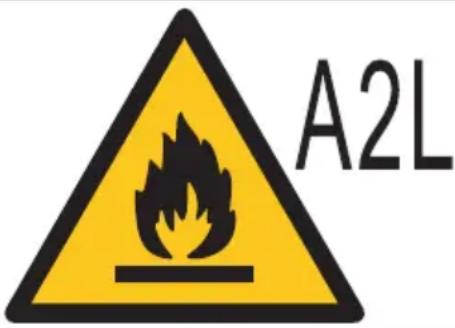 | WARNING:This symbol shows that this appliance used a flammable refrigerant. If the refrigerant is leaked and exposed to an external ignition source, there is a risk of fire. |
 | CAUTION:This symbol shows that the user manual should be read carefully. |
 | CAUTION:This symbol shows that the installation manual should be read carefully. |
 | CAUTION:This symbol shows that the technical manual should be read carefully. |
In the regard of transport, marking, disposal, and storage of the equipment/appliance please make sure that it is in compliance with all national, local and European Standards.
Service operations regarding Flammable refrigerant
- Checks to the area
Before beginning to work on systems containing flammable refrigerants, safety checks are necessary to ensure that the risk of ignition is minimized. For repair to the refrigerating system, the following precautions must be complied with before conducting work on the system.
- Work procedure
Work should be undertaken under a controlled procedure so as to minimize the risk of a flammable gas or vapour being present while the work is being performed.
- General work area
All maintenance staff and others working in the local area shall be instructed on the nature of work being carried out. Work in confined spaces will be avoided. The area around the workspace shall be sectioned off. Make sure that the conditions within the area have been made safe by control of flammable material.
- Checking for presence of refrigerant
The area shall be checked with an appropriate refrigerant detector before and during work, to make sure the technician is aware of potentially flammable atmospheres. Make sure that the leak detection equipment being used is suitable for use with flammable refrigerants, i.e. nonsparking, adequately sealed or intrinsically safe.
- Presence of fire extinguisher
If any hot work is to be conducted on the refrigeration equipment or any associated parts, appropriate fire extinguishing equipment must be available to hand. Have a dry powder or CO2 fire extinguisher next to the charging area.
- No ignition sources
No person carrying out work in relation to a refrigeration system which involves exposing any pipe work that contains or has contained flammable refrigerant shall use any sources of ignition in such a manner that it may lead to the risk of fire or explosion.
All possible ignition sources, including cigarette smoking, should be kept sufficiently far away from the site of installation, repairing, removing and disposal, during which flammable refrigerant can possibly be released to the surrounding space. Prior to work taking place, the area around the equipment is to be surveyed to make sure that there are no flammable hazards or ignition risks. “No Smoking” signs will be displayed.
- Ventilated area
Make sure that the area is in the open or that it is adequately ventilated before breaking into the system or conducting any hot work. A degree of ventilation shall continue during the period that the work is carried out. The ventilation should safely disperse any released refrigerant and preferably expel it externally into the atmosphere.
- Checks to the refrigeration equipment
Where electrical components are being changed, they shall be fit for the purpose and to the correct specification. At all times the manufacturer's maintenance and service guidelines shall be followed. If in doubt consult the manufacturer's technical department for assistance.
The following checks must be applied to installations using flammable refrigerants:
- The charge size is in accordance with the room size within which the refrigerant containing parts are installed;
- The ventilation machinery and outlets are operating adequately and are not obstructed;
- If an indirect refrigerating circuit is being used, the secondary circuit shall be checked for the presence of refrigerant;
- Marking to the equipment continues to be visible and legible. Markings and signs that are illegible must be corrected;
- Refrigeration pipe or components are installed in a position where they are unlikely to be exposed to any substance which may - corrode refrigerant containing components, unless the components are constructed of materials which are inherently resistant to being corroded or are suitably protected against being so corroded.
- Checks to electrical devices
Repair and maintenance to electrical components shall include initial safety checks and component inspection procedures. If a fault exists that could compromise safety, then no electrical supply shall be connected to the circuit until it is satisfactorily dealt with. If the fault cannot be corrected immediately but it is necessary to continue operation, an adequate temporary solution shall be used. This will be reported to the owner of the equipment so all parties are advised.
Initial safety checks shall include:
- That capacitors are discharged: this shall be done in a safe manner to avoid possibility of sparking;
- That no electrical parts and wiring are exposed while charging, repairing or purging through the system;
- That there is continuity of earth bonding.
• Repairs to sealed components
- During repairs to sealed components, all electrical power supplies shall be disconnected from the equipment being worked upon before removing sealed covers, etc. If it is absolutely necessary to have an electrical supply to equipment during servicing, then a permanently operating form of leak detection must be located at the most critical point to warn of a potentially hazardous situation.
- Particular attention shall be paid to the following to make sure that when working on electrical components, the casing is not altered in such a way that the level of protection is affected. This shall include damage to cables, excessive number of connections, terminals not made to original specification, damage to seals, incorrect fitting of glands, etc.
Make sure that the appliance is mounted securely.
Make sure that seals or sealing materials have not degraded such that they no longer serve the purpose of preventing the ingress of flammable atmospheres. Replacement parts must be in accordance with the manufacturer's specifications.
Note: The use of silicon sealant may inhibit the effectiveness of some types of leak detection equipment. Intrinsically safe components do not have to be isolated prior to working on them.
Repair to intrinsically safe components
Do not apply any permanent inductive or capacitance loads to the circuit without ensuring that this will not exceed the permissible voltage and current permitted for the equipment in use. Intrinsically safe components are the only types that can be worked on while live in the presence of a flammable atmosphere. The test appliance shall be at the correct rating.
Replace components only with parts specified by the manufacturer.
Other parts may result in the ignition of refrigerant in the atmosphere from a leak.
Cabling
Check that cabling will not be subject to wear, corrosion, excessive pressure, vibration, sharp edges or any other adverse environmental effects. The check shall take into account the effects of aging or continual vibration from sources such as compressors or fans.
Detection of flammable refrigerants
Under no circumstances shall potential sources of ignition be used in the search for or detection of refrigerant leaks. A halide torch (or any other detector using a naked flame) shall not be used.
- Leak detection methods
The following leak detection methods are deemed acceptable for systems containing flammable refrigerants. Electronic leak detectors shall be used to detect flammable refrigerants, but the sensitivity may not be adequate, or may need re-calibration. (Detection equipment shall be calibrated in a refrigerant-free area.) Ensure that the detector is not a potential source of ignition and is suitable for the refrigerant used. Leak detection equipment shall be set at a percentage of the LFL of the refrigerant and shall be calibrated to the refrigerant employed and the appropriate percentage of gas (25% maximum) is confirmed. Leak detection fluids are suitable for use with most refrigerants, but the use of detergents containing chlorine shall be avoided, as the chlorine may react with the refrigerant and corrode the copper pipe-work.
If a leak is suspected, all naked flames must be removed or extinguished.
If a leakage of refrigerant is found which requires brazing, all of the refrigerant shall be recovered from the system, or isolated (by
means of shut-off valves) in a part of the system remote from the leak. Oxygen-free nitrogen (OFN) shall then be purged through the system both before and during the brazing process.
- Removal and evacuation
When breaking into the refrigerant circuit to make repairs – or for any other purpose – conventional procedures shall be used. However, it is important that best practice is followed since flammability is a consideration. The following procedure shall be adhered to:
- Remove refrigerant;
- Purge the circuit with inert gas;
- Evacuate;
- Purge again with inert gas;
- Open the circuit by cutting or brazing.
The refrigerant charge shall be recovered into the correct recovery cylinders. The system shall be “flushed” with OFN to render the unit safe. This process may need to be repeated several times. Compressed air or oxygen shall not be used for this task.
Flushing shall be achieved by breaking the vacuum in the system with OFN and continuing to fill until the working pressure is reached, then venting to atmosphere, and finally to vacuum. This process shall be repeated until no refrigerant is in the system. When the final OFN charge is used, the system shall be vented to atmospheric pressure so that work can take place. This operation is absolutely vital if brazing operations on the pipework are to take place.
Ensure that the outlet for the vacuum pump is not close to any ignition sources and there is ventilation available.
- Charging procedures
In addition to conventional charging procedures, the following requirements shall be followed.
- Ensure that contamination of different refrigerants does not occur when using charging equipment. Hoses or lines shall be as short as possible to minimise the amount of refrigerant contained in them.
- Cylinders shall be kept upright.
- Ensure that the refrigeration system is earthed prior to charging
the system with refrigerant.
- Label the system when charging is complete (if not already).
- Extreme care shall be taken not to overfill the refrigeration system.
Prior to recharging the system it shall be pressure tested with OFN. The system shall be leak tested on completion of charging but prior to commissioning. A follow up leak test shall be carried out prior to leaving the site.
- Decommissioning
Before carrying out this procedure, it is essential that the technician is completely familiar with the equipment and all its detail. It is recommended good practice that all refrigerants are recovered safely. Prior to the task being carried out, an oil and refrigerant sample shall be taken in case analysis is required prior to re-use of reclaimed refrigerant. It is essential that electrical power is available before the task is commenced.
- Become familiar with the equipment and its operation.
- Isolate system electrically. Before attempting the procedure ensure that:
- Mechanical handling equipment is available, if required, for handling refrigerant cylinders;
- All personal protective equipment is available and being used correctly;
- The recovery process is supervised at all times by a competent person;
- Recovery equipment and cylinders conform to the appropriate standards.
- Pump down refrigerant system, if possible.
- If a vacuum is not possible, make a manifold so that refrigerant can be removed from different parts of the system.
- Make sure that cylinder is on the scale before recovery takes place.
- Start the recovery machine and work according with the manufacturer's instructions.
- Do not overfill cylinders. (No more than 80 % volume liquid charge).
- Do not exceed the maximum working pressure of the cylinder,
even temporarily.
- When the cylinders have been filled correctly and the process completed, make sure that the cylinders and the equipment are removed from site promptly and all isolation valves on the equipment are closed off.
- Recovered refrigerant shall not be charged into another refrigeration system unless it has been cleaned and checked.
- Labelling
Equipment shall be labelled stating that it has been decommissioned and emptied of refrigerant. The label shall be dated and signed. Ensure that there are labels on the equipment stating the equipment contains flammable refrigerant.
- Recovery
When removing refrigerant from a system, either for maintenance or decommissioning, it is recommended that all refrigerants are removed safely.
When transferring refrigerant into cylinders, make sure that only appropriate refrigerant recovery cylinders are used. Ensure that the correct number of cylinders are available for holding the total system charge. All cylinders to be used are designated for the recovered refrigerant and labelled for that refrigerant (i.e. special cylinders for the recovery of refrigerant). Cylinders shall be complete with pressure relief valve and associated shut-off valves in good working order. Empty recovery cylinders are evacuated and, if possible, cooled before recovery occurs.
The recovery equipment shall be in good working order with a set of instructions concerning the equipment that is at hand and shall be suitable for the recovery of flammable refrigerants. In addition, a set of calibrated weighing scales shall be available and in good working order. Hoses shall be complete with leak-free disconnect couplings and in good condition. Before using the recovery machine, check that it is in satisfactory working order, has been properly maintained and that any associated electrical components are sealed to prevent ignition in the event of a refrigerant release. Consult manufacturer if in doubt.
The recovered refrigerant shall be returned to the refrigerant supplier in the correct recovery cylinder, and the relevant Waste Transfer Note arranged. Do not mix refrigerants in recovery units and especially not in cylinders.
Transfer Note arranged. Do not mix refrigerants in recovery units and especially not in cylinders.
If compressors or compressor oils need to be removed, make sure that they have been evacuated to an acceptable level to ensure that flammable refrigerant does not remain within the lubricant. The evacuation process shall be carried out before returning the compressor to the suppliers. Only electric heating to the compressor body shall be employed to accelerate this process. When oil is drained from a system, it shall be carried out safely.
- The appliances with supplementary heaters shall have at least 1 meter clearance from the combustible surfaces.
- This appliance is equipped with a refrigerant leak detector for safety. To be effective, the appliance must be electrically powered at all times after installation, other than when servicing.
- This appliance is equipped with electrically powered safety measures. To be effective, the appliance must be electrically powered at all times after installation, other than when servicing.
- Ducts connected to an appliance shall not contain a potential ignition source.
- Keep ventilation openings clear of any obstruction.
- Make sure the airflow of the appliance is not disrupted by other products in the room, for example gas burners.
- Have any repairs and/or maintenance carried out by a recognized service engineer only. Install the appliance on a flat, sturdy surface. Failure to do so could result in damage or excessive noise and vibration.
- The appliance must be placed and mounted on a stable surface.
- The appliance must be kept free from obstruction to ensure proper function and to mitigate safety hazards.
- Children must be supervised around the appliance at all times.
- Do not operate the appliance when it has been dropped or damaged. Return to an authorized service facility for examination and/or repair or discard the appliance.
- Prior to cleaning or other maintenance, the appliance must be disconnected from the mains supply.
- This appliance incorporates an earth connection for functional purposes.
- If the supply cord is damaged, it must be replaced by a special cord or assembly available from the manufacturer or its service agent.
- Do not insert hands, fingers or objects into any of the appliance's openings.
- Do not cover or obstruct the inlet or outlet grilles.
- Do not run cord under carpeting. Do not cover cord with throw rugs, runners, or similar coverings. Do not route the cord under furniture or appliances. To reduce the risk of fire or electric shock, do not use this fan with any solid-state speed control device.
- The appliance shall be installed in accordance with national wiring regulations.
- Turn off the appliance when not in use and unplug the appliance.
- Only press the buttons with your fingers.
- Do not operate or stop the appliance by inserting or pulling out the power cord plug.
- Always transport your appliance in a vertical position and stand on a stable, level surface during use.
- Do not take the water reservoir out during operation.
- The appliance shall be installed and serviced by a certified professional.
PVG hereby declares that this appliance complies with the following EU directives:
Restriction of Hazardous Substances (RoHS) Directive 2011/65/EU
Electromagnetic Compatibility (EMC) Directive 2014/30/EU
Ecodesign energy-related products Directive 2009/125/EC
Low Voltage Directive (LVD) 2014/35/EU
Radio Equipment Directive (RED) 2014/53/EU
Construction Products Regulation EU 305/2011
The full text of the EU declaration of conformity is available at the
following internet address: https://www.qlima.com/ or https://www.
pvg.eu/
Hereby, PVG declares that the radio equipment type [designation of type of radio equipment] is in compliance with Directive
DISPOSING OF THE APPLIANCE
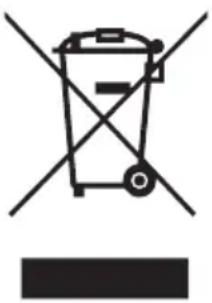
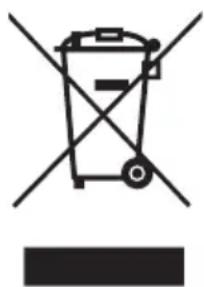
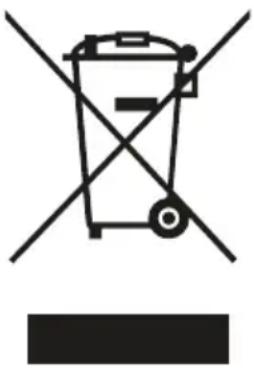
In the EU this symbol indicates that this appliance should be disposed accordingly to the EU-WEEE legislation. Do not dispose of electrical appliances as unsorted municipal waste, use separate collection facilities. Contact your local government for information regarding the collection systems available. If electrical appliances are disposed of in landfills or dumps, hazardous substances can leak into the groundwater and get into the food chain, damaging your health and well-being. When replacing old appliances with new once, the retailer is legally obligated to take back your old appliance for disposal at least for free of charge. Please dispose any batteries according to the local collection facilities.
This equipment contains fluorinated greenhouse gases covered by the Kyoto Protocol. It should only be serviced or dismantled by professional trained personnel. Venting fluorinated greenhouse gasses into the environment is strictly forbidden by EU legislation.
This equipment contains R290 refrigerant in the amount as stated on the unit's rating label. Do not vent R290 into atmosphere: R290, is a fluorinated greenhouse gas with a Global Warming Potential (GWP).
B NAME OF PARTS
Indoor Unit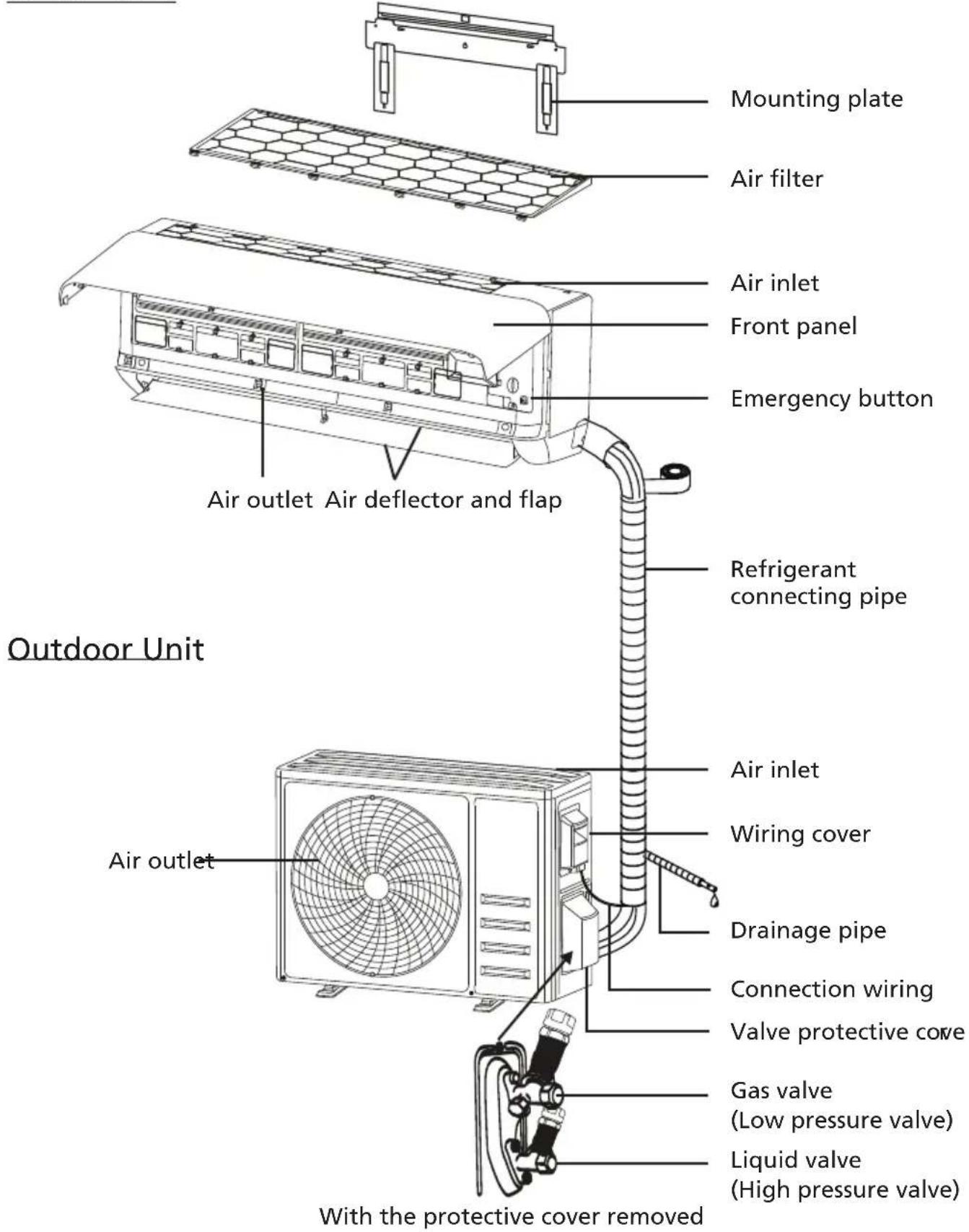
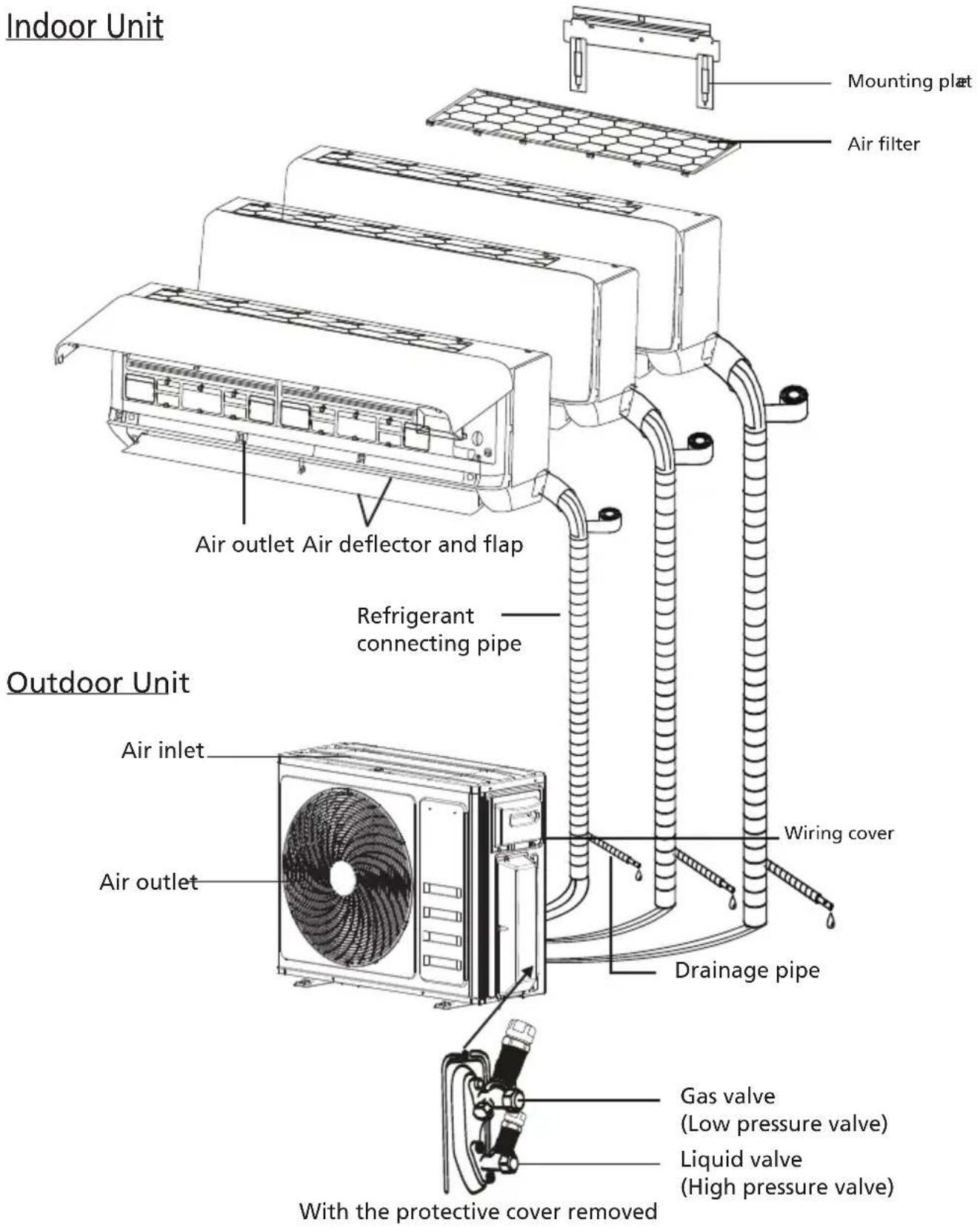
Note: This figure shown may be different from the actual object. Please take the latter as the standard.
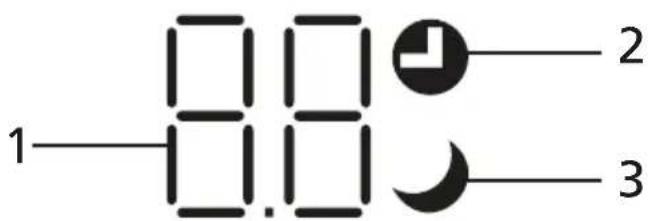
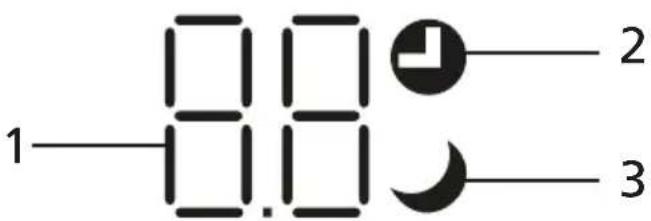
Indoor Function
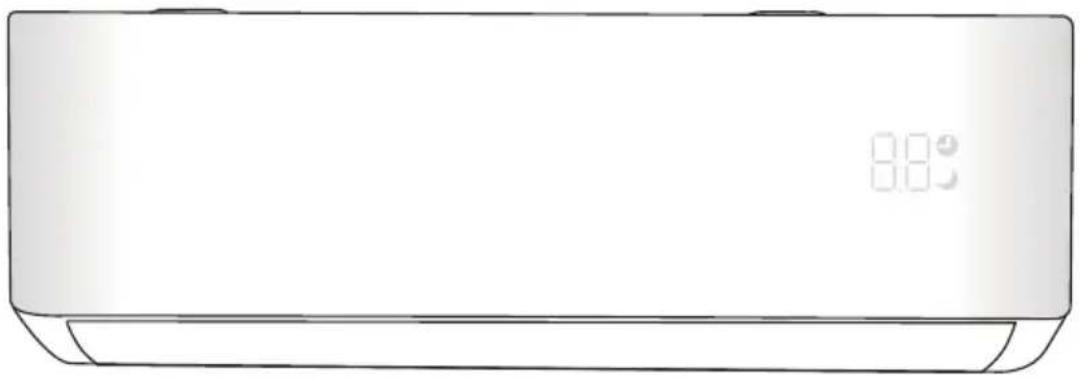
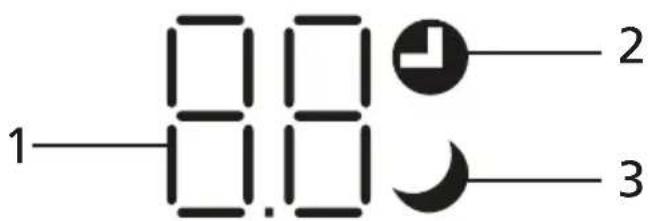
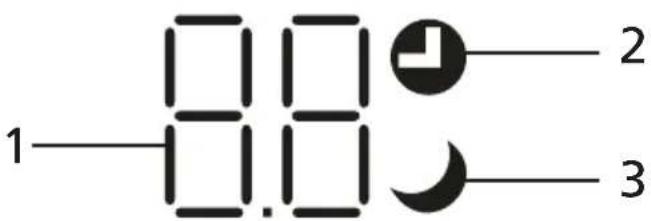
| No. | LED Function |
| 1 | Indicator for Timer, temperature and Error codes. |
| 2 | Light-up during Timer operation. |
| 3 | SLEEP mode |

The shape and position of switches and indicators may differ by model, but their function is the same.
C OPERATION INSTRUCTIONS
Attempting to use the appliance at temperatures beyond the specified range may cause the appliance's protection device to activate, and the appliance may fail to operate. Therefore, try to use the appliance within the following temperature conditions.
Inverter appliance:
| MODETemperature | Heating Cooling Dry | |
| Room temperature 0°C | ~30°C 17°C ~32°C | |
| Outdoor temperature -20°C | ~30°C -15°C ~53°C | |
With the power supply connected, restarting the appliance after shutdown or switching to another mode during operation will activate the appliance's protection device. The compressor will resume operation after 3 minutes.
Characteristics of heating operation (applicable to heat pump models)
Preheating:
When the heating function is enabled, the indoor unit will take 2 to 5 minutes for preheating, after which the appliance will start heating and blow warm air.
Defrosting:
During heating, when the outdoor unit frosts, the appliance will enable automatic defrosting to improve heating efficiency. During defrosting, the indoor and outdoor fans stop running. The appliance will resume heating automatically after defrosting is complete.
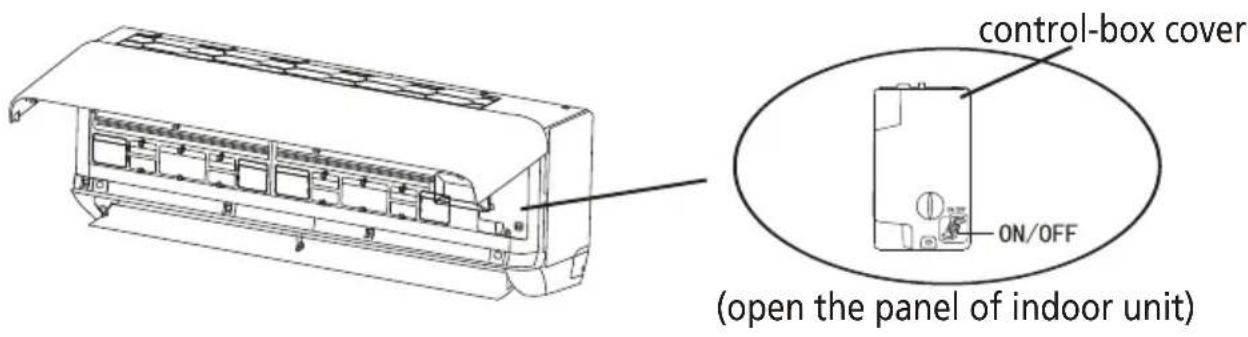
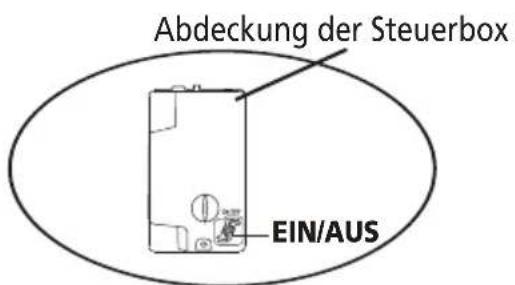
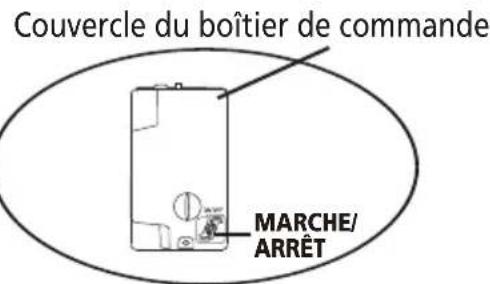
Emergency button:
Open the panel and locate the emergency button on the electronic control box if the remote controller fails (always press the emergency button with insulating material).
| Current status Operation | Respond Enter mode | | |
| Standby | Press the emergency button once | It beeps briefly once. | Cooling mode |
| Current status Operation Respond Enter mode |
| Standby(Only for heating pump) | Press the emergency button twice in 3 seconds | It beeps briefly twice. | Heating mode |
| Running | Press the emergency button once | It keeps beeping for a while | Off mode |
D INSTRUCTIONS FOR SERVICING (R32)
Important Considerations
- The appliance must be installed by professional personnel and the installation manual is used only for the professional installation personnel! The installation specifications should be subject to our after-sale service regulations.
- When filling the combustible refrigerant, any of your rude operations may cause serious injury or injuries to human body and objects.
- A leak test must be done after the installation completed.
- It is a must to do the safety inspection before maintaining or repairing an appliance using combustible refrigerant in order to ensure that the fire risk is reduced to minimum.
- It is necessary to operate the appliance under a controlled procedure in order to ensure that any risk arising from the combustible gas or vapor during the operation is reduced to minimum.
- Requirements for the total weight of filled refrigerant and the area of a room to be equipped with an appliance (are shown as in the following Tables GG.1 and GG.2)
The maximum charge and the required minimum floor area
m _ 1 = (4 m ^ 3) × LFL, m _ 2 = (2 6 m ^ 3)) × LFL, m _ 3 = (1 3 0 m ^ 3) × LFL
Where LFL is the lower flammable limit in kg/ m 3 , R32 LFL is 0.306kg/m 3 .
For the appliances with a charge amount m1<M=m2 :
The maximum charge in a room shall be in accordance with the following:
m _ = 2. 5 × (LFL) ^ (5 / 4) × h _ 0 × (A) ^ 1 / 2
The required minimum floor area Amin to install an appliance with refrigerant charge M (kg) shall be in accordance with following:
A _ = (M / (2. 5 × (LFL) ^ (5 / 4) × h _ 0)) ^ 2
Where: Table GG.1 - Maximum charge (kg)
| Category | LFL (kg/m 3 ) | h0(m) | Floor area ( m2 ) |
| 4 7 | 10 15 2 | 20 30 50 | | | | |
| R32 0.306 | | 1 1.1 | 14 1.51 | 1.8 2.2 | 2.54 3 | .12 4.02 | | | |
| 1.8 2. | 05 2.7 | 1 3.24 | 3.97 4. | 58 5.61 | 7.254 | | |
| 2.2 2. | 5 3.31 | 3.96 4. | 85 5.6 | 6.86 8. | 85 | | |
Table GG.2 - Minimum room area (m²)
| Category | LFL (kg/m3) | h0(m) | Charge amount (M) (kg) Minimum room area (m2) |
| R32 0.306 | | | 1.224kg | 1.836kg | 2.448kg | 3.672kg | 4.896kg | 6.12kg | 7.956kg |
| 0.6 | | 29 | 51 | 116 | 206 | 321 | 543 |
| 1 | | 10 | 19 | 42 | 74 | 116 | 196 |
| 1.8 | | 3 | 6 | 13 | 23 | 36 | 60 |
| 2.2 | | 2 | 4 | 9 | 15 | 24 | 40 |
Installation Safety Principles
1. Site Safety
Open Flames Prohibited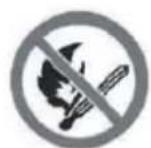
Ventilation Necessary
2. Operation Safety
Mind Static Electricity

Must wear protective clothing and anti-static gloves
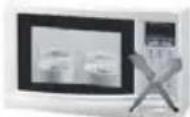
Don't use mobile phone
3. Installation Safety
• Refrigerant Leak Detector • Appropriate Installation Location
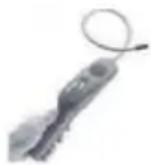
The left picture is the schematic diagram of a refrigerant leak detector.
Please note that:
1) The installation site should be well-ventilated. 2) The sites for installing and maintaining an appliance using Refrigerant R32 should be free from open fire or welding, smoking, drying oven or any other heat source higher than 548°C which easily produces open fire. 3) When installing an appliance, it is necessary to take appropriate anti-static measures such as wearing anti-static clothing and/or gloves. 4) It is necessary to choose the site convenient for installation or maintenance wherein the air inlets and outlets of the indoor and outdoor units should not be surrounded by obstacles or close to any heat source or combustible and/or explosive environment. 5) If the indoor unit suffers refrigerant leak during the installation, it is necessary to immediately turn off the valve of the outdoor unit and all the personnel should go out until the refrigerant leaks completely for 15 minutes. If the product is damaged, it is a must to carry such damaged product back to the maintenance station and it is prohibited to weld the refrigerant pipe or conduct other operations on the user's site. 6) It is necessary to choose the place where the inlet and outlet air of the indoor unit is even. 7) It is necessary to avoid the places where there are other electrical products, power switch plugs and sockets, kitchen cabinet, bed, sofa and other valuables right under the lines on two sides of the indoor unit.
Suggested Tools
| Tool Picture Tool Picture Tool Picture | | | |
| Standard Wrench |  | Pipe Cutter |  | Vacuum Pump |  |
| Adjustable/ Crescent Wrench |  | Screw drivers (Phillips & Flat blade) |  | Safety Glasses |  |
| Torque Wrench |  | Manifold and Gauges |  | Work Gloves |  |
| Hex Keys or Allen Wrenches |  | Level |  | Refrigerant Scale | 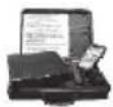 |
| Drill & Drill Bits |  | Flaring tool | 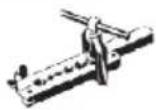 | Micron Gauge | 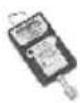 |
| Hole Saw |  | Clamp on Amp Meter |  | | |
E INSTALLATION PRECAUTIONS
Torque Parameters
| PIPE Size | Newton meter [N x m] | Pound-force foot (1bf-ft) | Kilogram-force meter (kgf-m) |
| 1/4" (∅ 6.35) 1 | 5 - 20 11.1 - 14.8 1. | 5 - 2.0 | |
| 3/8"( ∅ 9.52) 3 | 1 - 35 22.9 - 25.8 3. | 2 - 3.6 | |
| 1/2" (∅ 12) 4 | 5 - 50 33.2 - 36.9 4. | 6 - 5.1 | |
| 5/8"( ∅ 15.88) 6 | 0 - 65 44.3 - 48.0 6. | 1 - 6.6 | |
Dedicated Distribution Device and Wire for Single models
| INVERTER TYPE MODEL capacity (Btu/h) | 9k 12k 18k | |
| | sectional area |
| Power supply cable | N 1.5mm2 | 1.5mm2 | 1.5mm2 | 1.5mm2 |
| L 1.5mm2 | 1.5mm2 | 1.5mm2 | 1.5mm2 |
| [ZKS2] | 1.5mm2 | 1.5mm2 | 1.5mm2 |
| Connection cable | N 0.75mm2 | 0.75mm2 | 0.75mm2 | 0.75mm2 |
| L or (L) 0.75mm2 | 0.75mm2 | 0.75mm2 | 0.75mm2 |
| 1 0.75mm2 | 0.75mm2 | 0.75mm2 | 0.75mm2 |
 | 0.75mm2 | 0.75mm2 | 0.75mm2 |
Dedicated Distribution Device and Wire for Multi models
| INVERTER TYPE MODEL capacity (Btu/h) | 9k indoor 12k indoor | 18k outdoor | 24k outdoor |
| Sectional area for Multi models |
| Power supply cable (on outdoor) | N | | | 1.5mm2 | 2.5mm2 |
| L | | | 1.5mm2 | 2.5mm2 |
| ⊕ | | | 1.5mm2 | 2.5mm2 |
| INVERTER TYPE MODEL capacity (Btu/h) | 9k indoor 1 | 2k indoor | 18k outdoor | 24k outdoor |
| Sectional area for Multi models |
| Connection cable | N 0.75mm 2 | 0.75mm 2 | 0.75mm 2 | 0.75mm 2 | 0.75mm 2 |
| L or (L) 0.75mm 2 | 0.75mm 2 | 0.75mm 2 | 0.75mm 2 | 0.75mm 2 |
| 1 0.75mm 2 | 0.75mm 2 | 0.75mm 2 | 0.75mm 2 | 0.75mm 2 |
| [SY2K] | 0.75mm 2 | 0.75mm 2 | 0.75mm 2 | 0.75mm 2 |

Note: This table is only for reference, the installation shall meet the requirements of local laws and regulations.
Step 1: Select Installation location
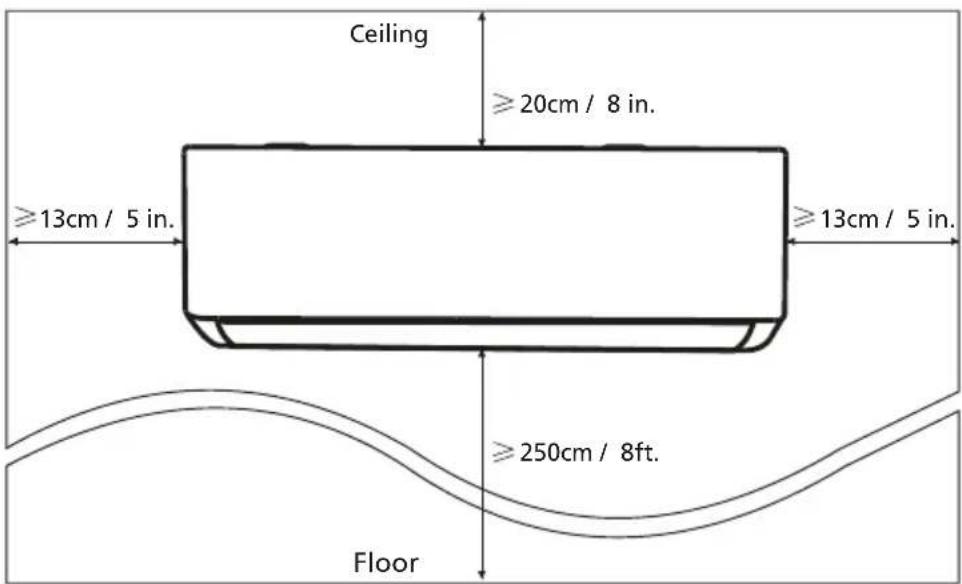
1.1 Ensure the installation complies with the installation minimum dimensions (defined below) and meets the minimum and maximum connecting piping length and maximum change in elevation as defined in the System Requirements section. 1.2 Air inlet and outlet will be clear of obstructions, ensuring proper airflow throughout the room. 1.3 Condensate can be easily and safely drained. 1.4 All connections can be easily made to outdoor unit. 1.5 Indoor unit is out of reach of children. 1.6 A mounting wall strong enough to withstand four times the full weight and vibration of the unit. 1.7 Filter can be easily accessed for cleaning. 1.8 Leave enough free space to allow access for routine maintenance. 1.9 Install at least 10 ft. (3 m) away from the antenna of TV set or radio. Operation of the appliance may interfere with radio or TV reception in areas where reception is weak. An amplifier may be required for the affected device. 1.10 Do not install in a laundry room or by a swimming pool due to the corrosive environment. 1.11 For ETL certification area, Caution: Mount with the lowest moving parts at least 8 ft. (2.4 m) above floor or grade level.
Minimum Indoor Clearances
Step 2: Install Mounting Plate
2.1 Take the mounting plate from the back of indoor unit. 2.2 Ensure to meet the minimum installation dimension requirements as step 1, according to the size of mounting plate, determine the position and stick the mounting plate close to the wall. 2.3 Adjust the mounting plate to a horizontal state with a spirit level, then mark out the screw hole positions on the wall. 2.4 Put down the mounting plate and drill holes in the marked positions with drill. 2.5 Insert expansion rubber plugs into the holes, then hang the mounting plate and fix it with screws.
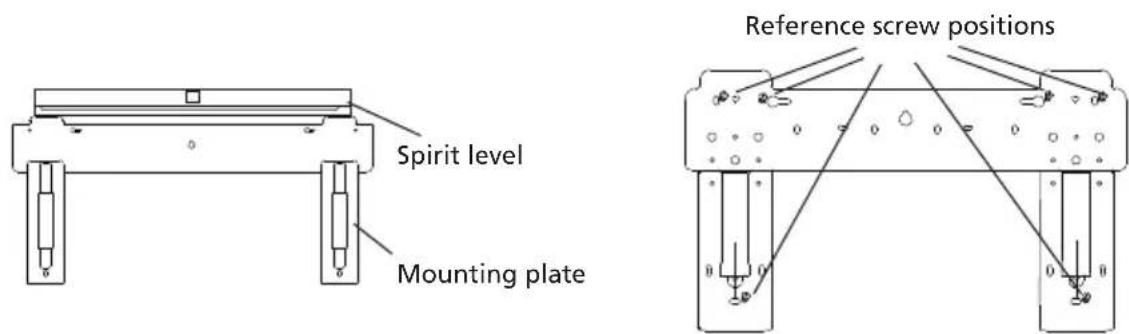
Note:
- Make sure the mounting plate is firm enough and flat against the wall after installation.
- This figure shown may be different from the actual object, please take the latter as the standard.
Step 3: Drill Wall Hole
A hole in the wall should be drilled for refrigerant piping, the drainage pipe, and connecting cables.
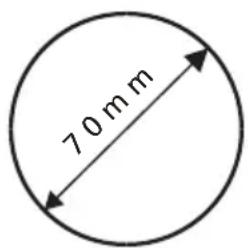
3.1 Determine the location of the wall hole based on the position of the mounting plate. 3.2 The hole should have a diameter of at least 70mm and a small oblique angle to facilitate drainage. 3.3 Drill the wall hole with a 70mm core drill and with a small oblique angle, lower than the indoor end by about 5mm to 10mm. 3.4 Place the wall sleeve and wall sleeve cover (both are optional parts) to protect the connection parts.
Caution:
When drilling the wall hole, make sure to avoid wires, plumbing, and other sensitive components.
Wall sleeve Cover (Optional) Indoor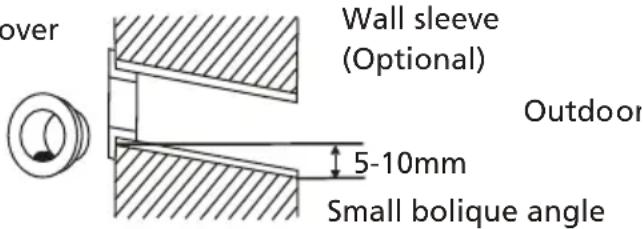
Step 4: Connecting Refrigerant Pipe
4.1 According to the wall hole position, select the appropriate piping mode.
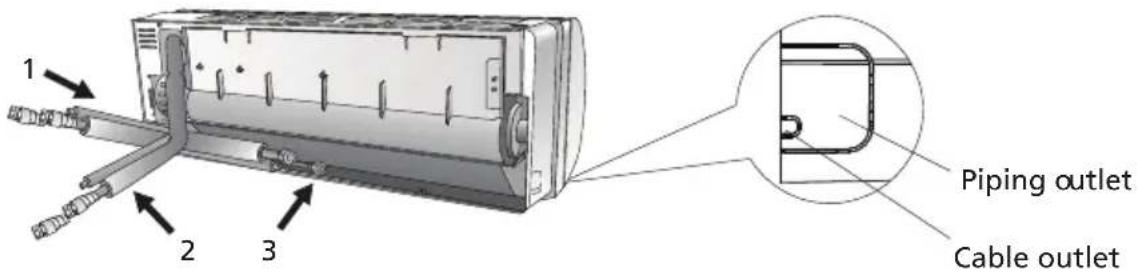
There are three optional piping modes for indoor units as shown in the figure below:
In Piping Mode 1 or Piping Mode 3, a notch should be made by using scissors to cut the plastic sheet of the piping outlet and cable outlet on the corresponding side of the indoor unit.
Note: When cutting off the plastic sheet at the outlet, the cut should be trimmed to smooth.
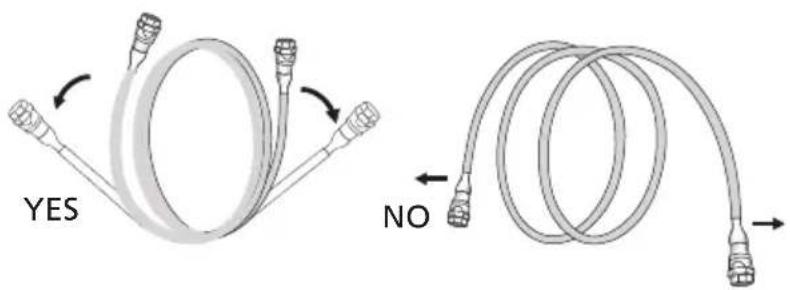
4.2 Bend the connecting pipes with the port facing up as shown in the figure.
4.3 Take off the plastic cover in the pipe ports and take off the protective cover on the end of the piping connectors.
4.4 Check whether there is any sundry on the port of the connecting pipe and make sure the port is clean.
4.5 After aligning the center, rotate the nut of the connecting pipe to tighten the nut as tightly as possible by hand.
4.6 Use a torque wrench to tighten it according to the torque values in the torque requirements table; (Refer to the torque requirements table in the INSTALLATION PRECAUTIONS section)
4.7 Wrap the joint with the insulation pipe.
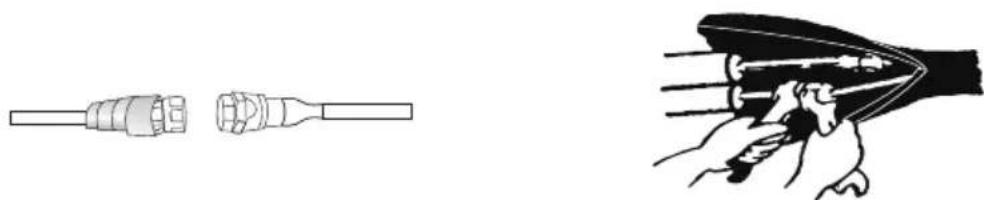
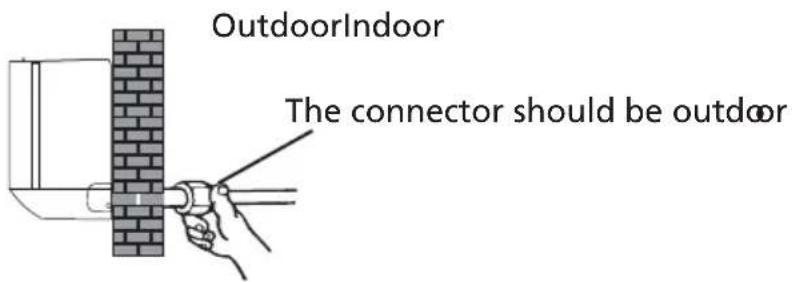
Note: For R32 refrigerant, the connector should be placed outdoors.
Step 5: Connect Drainage Hose
5.1 Adjust the drainage hose (if applicable)
With some models, both sides of the indoor unit are provided with drainage ports. You can choose one of them to attach the drainage hose, and plug the unused drain port with the rubber attached in one of the ports.
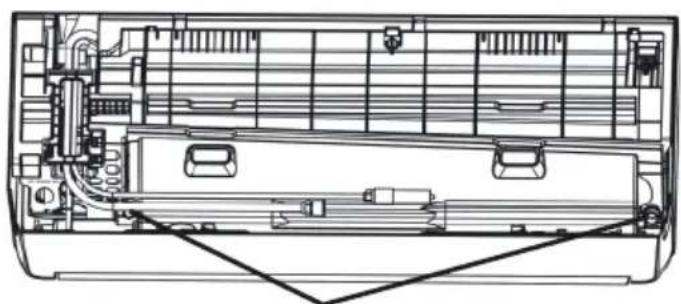
Drainage ports
5.2 Connect the drainage hose to the drainage port, ensuring the joint is firm and the sealing effect is good. 5.3 Wrap the joint firmly with Teflon tape to ensure no leaks.
Note: Make sure there are no twists or dents, and the pipes should be placed obliquely downward to avoid blockage and ensure proper drainage.
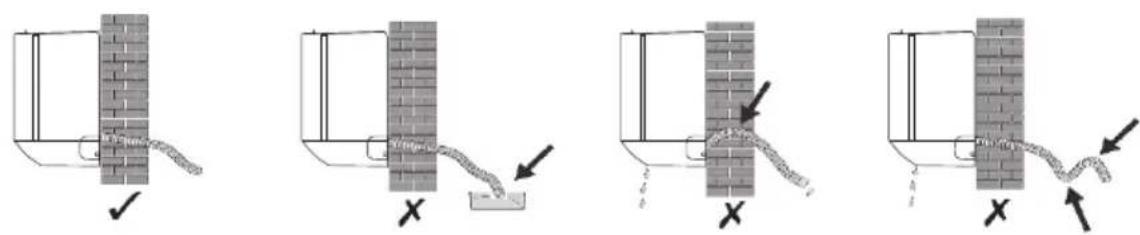
Step 6: Wrap Piping and Cable
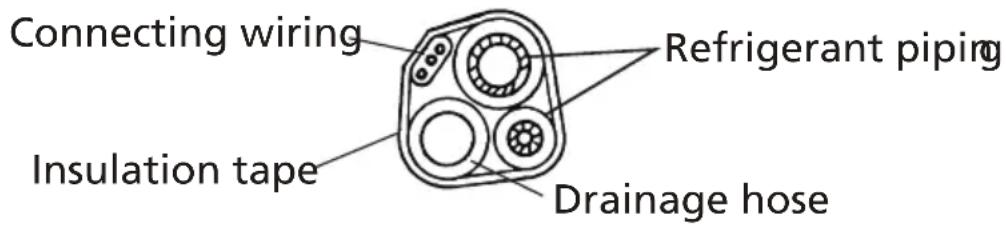
After the refrigerant pipes, connecting wires, and drainage hose are all installed, in order to save space, protect, and insulate them, they must be bundled with insulating tape before passing them through the wall hole.
6.1 Arrange the pipes, cables, and drainage hose well as shown in the following picture.
Note:
a) Make sure the drainage hose is at the bottom. b) Avoid crossing and bending of parts.
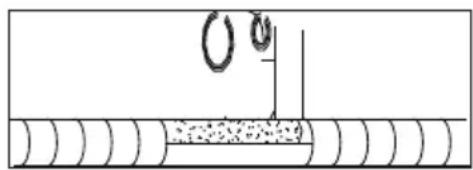
6.2 Using the insulating tape, wrap the refrigerant pipes, connecting wires, and drainage hose together tightly.
Step 7: Mount Indoor Unit
7.1 Slowly pass the refrigerant pipes, connecting wires and drainage hose wrapped bundle through the wall hole. 7.2 Hook the top of indoor unit on the mounting plate. 7.3 Apply slight pressure to the left and right sides of the indoor unit, make sure the indoor unit is hooked firmly. 7.4 Push down the bottom of indoor unit to let the snaps onto the hooks of the mounting plate, and make sure it is hooked firmly.
Sometimes, if the refrigerant pipes were already embedded in the wall, or if you want to connect the pipes and wires on the wall, do as below:
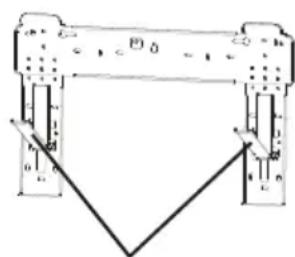
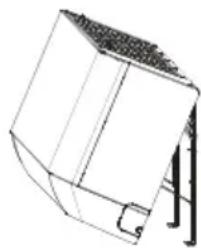
(I) Grab both ends of the bottom plate, apply a little outward force to take off the bottom plate. (II) Hook the top of the indoor unit on the mounting plate without piping and wiring. (III) Lift the indoor unit opposite the wall, unfold the bracket on the mounting plate, and use this bracket to prop up the indoor unit,
there will be a big space for operation.
(IV) Do the refrigerant piping, wiring, connect drainage hose, and wrap them as Step 4 to 7. (V) Replace the bracket of mounting plate. (VI) Push down the bottom of indoor unit to let the snaps onto the bottom hooks of the mounting plate, and make sure it is hooked firmly. (VII) Replace the bottom plate of the indoor unit.
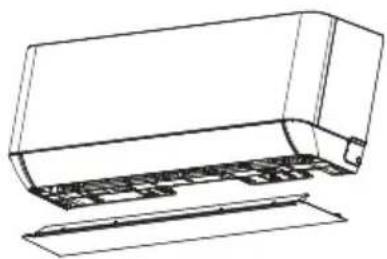
Take off the bottom plate

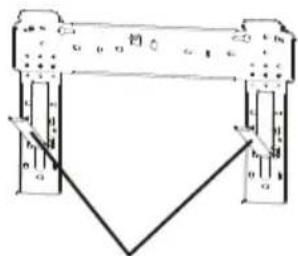

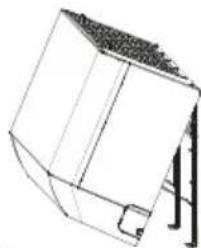
Unfold the bracket on the mounting plate
G OUTDOOR UNIT INSTALLATION
Step 1: Select Installation Location
Select a site that allows for the following:
1.1 Do not install the outdoor unit near sources of heat, steam or flammable gas. 1.2 Do not install the unit in too windy or dusty places. 1.3 Do not install the unit where people often pass. Select a place where the air discharge and operating sound will not disturb the neighbors. 1.4 Avoid installing the unit where it will be exposed to direct sunlight (otherwise use a protection, if necessary, that should not interfere with the air flow). 1.5 Reserve the spaces as shown in the picture for the air to circulate freely. 1.6 Install the outdoor unit in a safe and solid place. 1.7 If the outdoor unit is subject to vibration, place rubber blankets onto the feet of the unit.
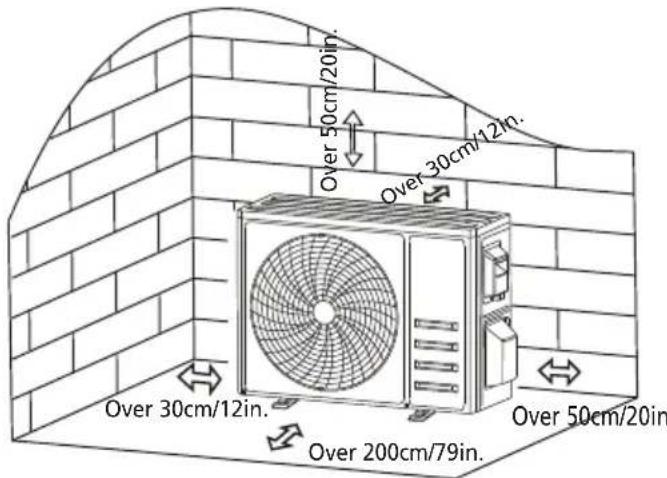
Step 2: Install Drainage Hose
2.1 This step only for heating pump models. 2.2 Insert the drainage joint to the hole at the bottom of the outdoor unit. 2.3 Connect the drainage hose to the joint and make the connection well enough.
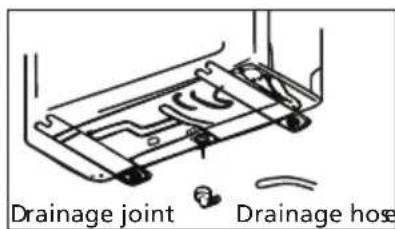
Step 3: Fix Outdoor Unit
3.1 According to the outdoor unit installation dimensions, mark the installation position for expansion bolts. 3.2 Drill holes, clean the concrete dust, and place the bolts. 3.3 If applicable, install 4 rubber blankets on the hole before placing the outdoor unit (optional). This will reduce vibrations and noise. 3.4 Place the outdoor unit base on the bolts and pre-drilled holes. 3.5 Use a wrench to fix the outdoor unit firmly with bolts.
Note: The outdoor unit can be fixed on a wall-mounting bracket. Follow the instructions of the wall-mounting bracket to fix the wall-mounting bracket on the wall, and then fasten the outdoor unit on it and keep it horizontal.
The wall-mounting bracket must be able to support at least 4 times the weight of the outdoor unit.
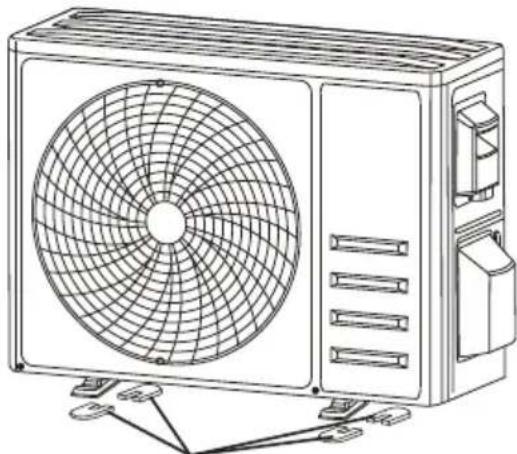
Install 4 rubber blankets (optional)
Step 4: Install Wiring
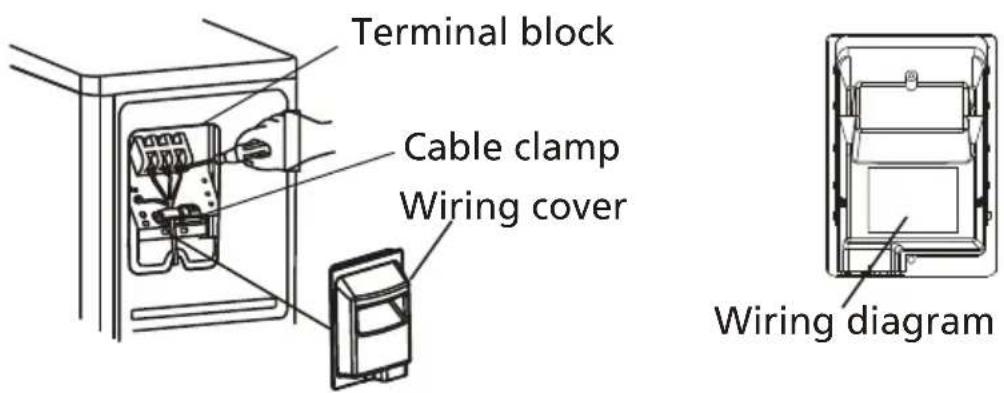
4.1 Use a Phillips screwdriver to unscrew the wiring cover, grasp and press it down gently to take it down. 4.2 Unscrew the cable clamp and take it down. 4.3 According to the wiring diagram pasted inside the wiring cover, connect the connecting wires to the corresponding terminals, and ensure all connections are firm and secure. 4.4 Reinstall the cable clamp and wiring cover.
Note: When connecting the wires of indoor and outdoor units, the power should be cut off.
Single split:
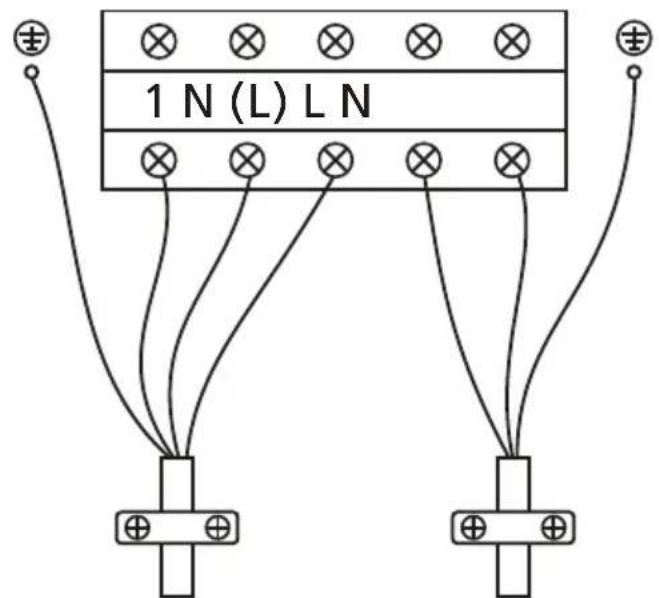
To the indoor unit: 1 - Signal line, N - Null line, (L) - Live line
Power supply
For Multi models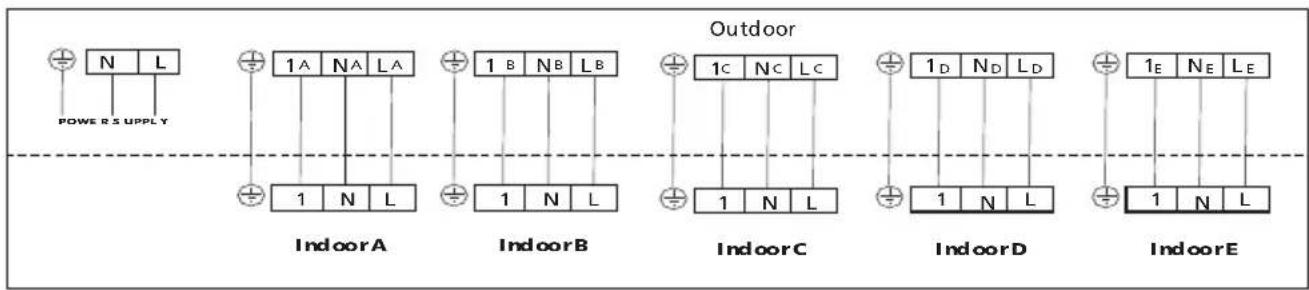
A and B: 2 indoor units; A, B and C: 3 indoor units; A, B, C and D: 4 indoor units; A, B, C, D and E: 5 indoor units
Step 5: Connecting Refrigerant Pipe
5.1 Unscrew the valve cover, grasp and press it down gently to take it down (if the valve cover is applicable). 5.2 Remove the protective caps from the end of valves
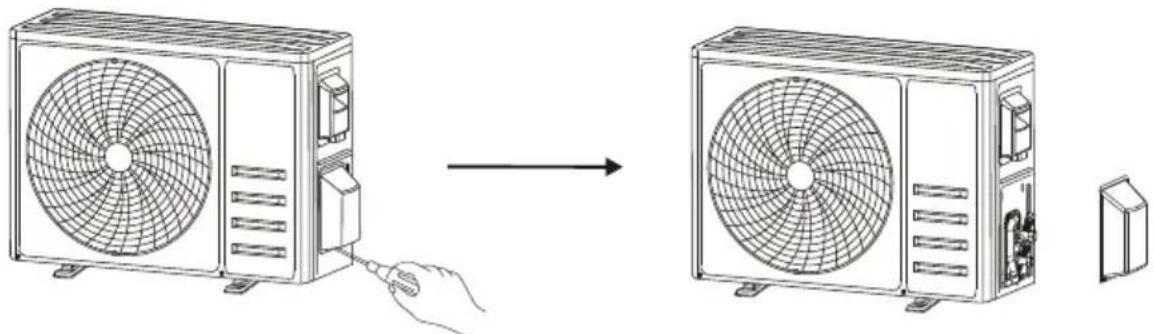
Take down the valve cover
5.3 Remove the plastic cover from the pipe ports and check whether there is any debris on the port of the connecting pipe. Ensure the port is clean.
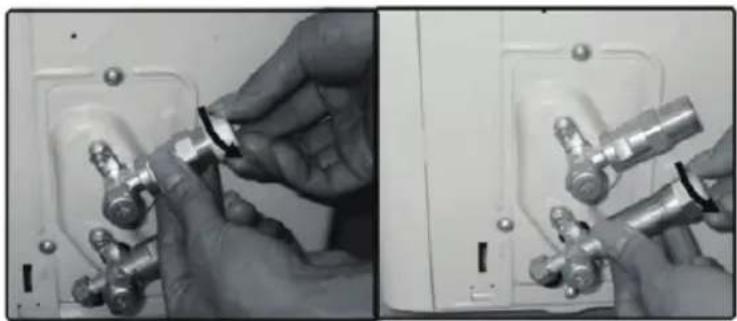
5.4 After aligning the center, rotate the flare nut of the connecting pipe to tighten the nut as tightly as possible by hand.
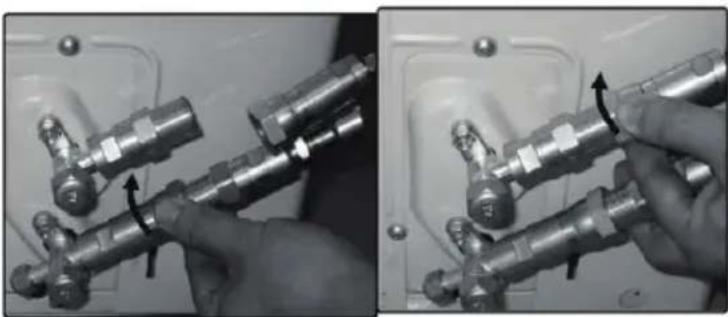
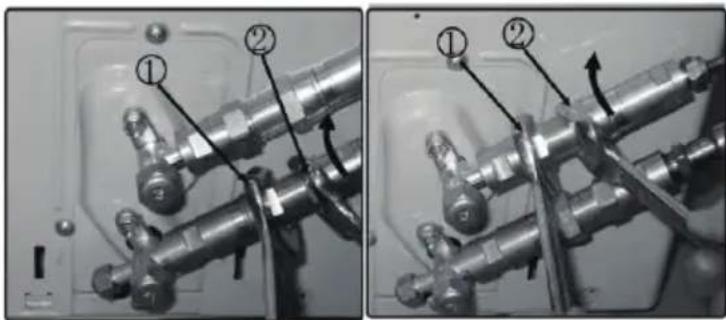
5.5 At the gas valve, turn the nut at position 1 with a fixed wrench to position 2. Repeat this step for the liquid valve. Please use the torque values in the torque requirements table. (Refer to the torque
requirements table in the INSTALLATION PRECAUTIONS section.)
Remark: Follow steps 5.1 to 5.5 to connect all of the pipes for multi models.
Step 6: Check for leaks and open the valve
6.1 Check that all connections are sealed correctly by using a leak detector or soap suds. 6.2 Remove the cover on the valve with a fixed wrench, and open the valve with a 5mm Allen key.
Make sure the valve is opened fully to avoid malfunction and damage.
Screw the cover back and tighten it well to ensure that it is properly sealed.
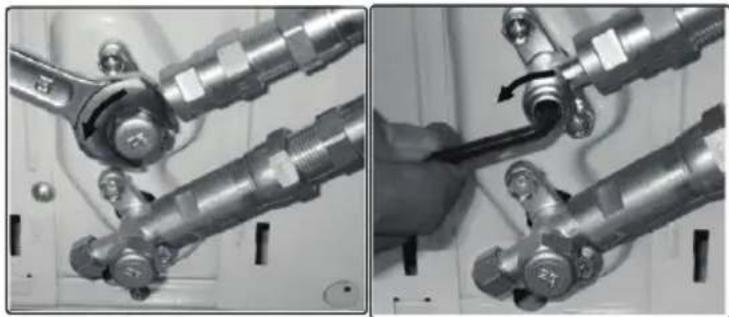
Remark: All of the connectors of multi models should be opened.
Inspections Before Test Run
Do the following checks before test run.
| Description Inspection method |
| Electrical safety inspection | Check whether the power supply voltage complies with specification.Check whether there is any wrong or missing connection between the power lines, signal line and earth wires.Check whether the earth resistance and insulation resistance comply with requirements. |
| Installation safety inspection | Confirm the direction and smoothness of drainage pipe. Confirm that the joint of refrigerant pipe is installed completely.Confirm the safety of outdoor unit, mounting plate and indoor unit installation.Confirm that the valves are fully open.Confirm that there are no foreign objects or tools left inside the unit.Complete installation of indoor unit air inlet grille and panel. |
| Refrigerant leakage detection | The piping joint, the connector of the two valves of the outdoor unit, the valve spool, the welding port, etc., where leakage may occur.Foam detection method:Apply soapy water or foam evenly on the parts where leakage may occur, and observe whether bubbles appear or not, if not, it indicates that the leakage detection result is safe.Leak detector method:Use a professional leak detector and read the instruction of operation, detect at the position where leakage may occur.The duration of leak detection for each position should last for 3 minutes or more;If the test result shows that there is leakage, the nut should be tightened and tested again until there is no leakage;After the leak detection is completed, wrap the exposed pipe connector of indoor unit with thermal insulation material and wrap with insulation tape. |
Test Run Instruction
- Turn on the power supply.
- Press the ON/OFF button on the remote controller to turn on the appliance.
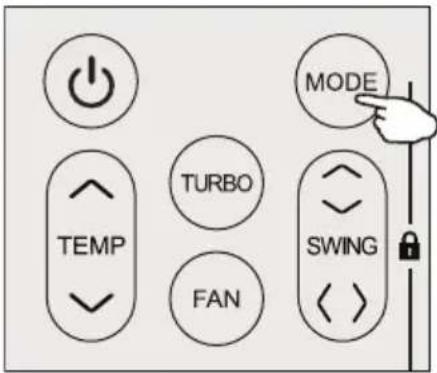
- Press the Mode button to switch between COOL and HEAT modes.
In each mode, set as follows:
COOL - Set the lowest temperature
HEAT - Set the highest temperature
- Run for about 8 minutes in each mode and check that all functions operate properly and respond to the remote controller. Functions check as recommended:
4.1 If the outlet air temperature responds to the cool and heat mode
4.2 If the water drains properly from the drainage hose
4.3 If the louver and deflectors (optional) rotate properly
- Observe the test run state of the appliance for at least 30 minutes.
- After a successful test run, return to the normal setting and press the ON/OFF button on the remote controller to turn off the unit.
- Inform the user to read this manual carefully before use, and demonstrate to the user how to use the appliance, the necessary knowledge for service and maintenance, and the reminder for storage of accessories.
Note: If the ambient temperature exceeds the range specified in the OPERATION INSTRUCTIONS section, and the unit cannot run in COOL or HEAT mode, lift the front panel and refer to the emergency button operation to run the COOL and HEAT mode.
| Warning | When cleaning, you must shut down the machine and cut off the power supply for more than 5 minutes.Under no circumstances should the appliance be flushed with water.Volatile liquid (e.g. thinner or gasoline) will damage the appliance, so only use soft dry cloth or wet cloth dipped with neutral detergent to clean the appliance.Pay attention to cleaning the filter screen regularly to avoid dust covering which will affect the filter screen effect. When the operating environment is dusty, the cleaning frequency should be increased appropriately.After removing the filter screen, do not touch the fins of the indoor unit to avoid scratching. |
| Clean the appliance | 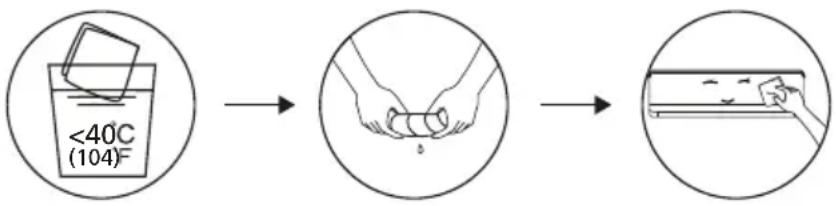 Wring it dry Gentle wipe the unit surfaceTip: Wipe frequently to keep appliance clean and good appearance . Wring it dry Gentle wipe the unit surfaceTip: Wipe frequently to keep appliance clean and good appearance . |
| Disassembly and assembly of filter | Grasp the raised handle on the filter by hand, and then pull the filter out in the direction deviating from the unit, so that the upper edge of the filter is separated from the unit. The filter can be removed by lifting the filter upwards.When installing the filter, first insert the lower end of the filter screen into the corresponding position of the unit, and then squeeze the upper end of the filter into the corresponding buckling position of the unit body.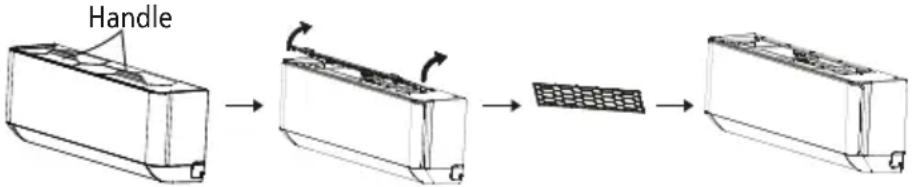 |
| Clean the filter | 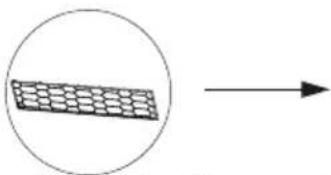 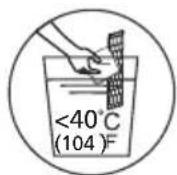 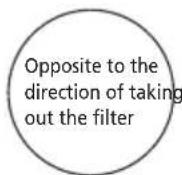 Take out the filter from the unit Clean the filter with soapy water and air dry it Replace the filteTip: When you find accumulated dust in the filter, please clean the filter in time to ensure the clean, healthy and efficient operation inside the appliance. Take out the filter from the unit Clean the filter with soapy water and air dry it Replace the filteTip: When you find accumulated dust in the filter, please clean the filter in time to ensure the clean, healthy and efficient operation inside the appliance. |
| Cleaning of inner air duct | First, loosen the knob on the middle of louver and bend the louver outwards to take it out.Then, grasp both sides of bottom plate push downwards to take down the bottom plate.Finally, loosen the buckle of deflector assembly with your thumb and take it out. Wipe the air duct and fan assembly with a clean and wrung wet rag.Clean the removed parts with soapy water and air dry it.After cleaning, restore the removed parts in turn.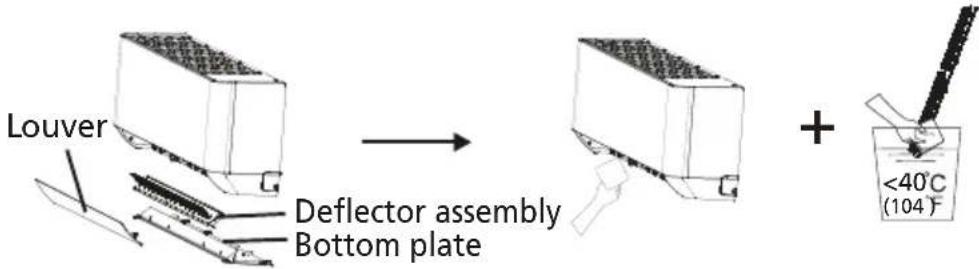 |
| Service and maintenance | When the appliance is not in use for a long time, do the following work:Take out the batteries of the remote controller and disconnect the power supply of the appliance.When starting to use after long-term shutdown:1. Clean the unit and filter screen;2. Check whether there are obstacles at the air inlet and outlet of indoor and outdoor units;3. Check whether the drain pipe is unobstructed;Install the batteries of the remote controller and check whether the power is on. |
J TROUBLESHOOTING
| MALFUNCTION POSSIBLE CAUSES | |
| The appliance does not operate | Power failure/plug pulled out. |
| Damaged indoor/outdoor unit fan motor. |
| Faulty compressor thermomagnetic circuit breaker. |
| Faulty protective device or fuses. |
| Loose connections or plug pulled out. |
| It sometimes stops operating to protect the appliance. |
| Voltage higher or lower than the voltage range. |
| Active TIMER-ON function. |
| Damaged electronic control board. |
| Strange odor Dirty air filter. | |
| Noise of running water | Back flow of liquid in the refrigerant circulation. |
| A fine mist comes from the air outlet | This occurs when the air in the room becomes very cold, for example in the “COOLING” or “DEHUMIDIFYING/DRY” modes. |
| A strange noise can be heard | This noise is made by the expansion or contraction of the front panel due to variations in temperature and does not indicate a problem. |
| Insufficient airflow, eitherhot or cold | Unsuitable temperature setting. |
| Obstructed appliance intakes and outlets. |
| Dirty air filter. |
| Fan speed set at minimum. |
| Other sources of heat in the room. |
| No refrigerant. |
| The appliance does not respond to commands | Remote control is not close enough to indoor unit. |
| The batteries of remote control need to be replaced. |
| There are Obstacles between remote control and signal receiver in indoor unit. |
| The display is off | Active DISPLAY function. |
| Power failure. |
| Switch off the appliance immediately and cut off the power supply in the event of | Strange noises during operation. |
| Faulty electronic control board. |
| Faulty fuses or switches. |
| Spraying water or objects inside the appliance. |
| Overheated cables or plugs. |
| Very strong smells coming from the appliance. |
ERROR CODE ON THE DISPLAY (For Mono-Split Models)
In case of error, the display on the indoor unit shows the following error codes:
| Display Description of the trouble |
| E1 | Indoor room temperature sensor fault |
| E2 | Indoor pipe temperature sensor fault |
| E3 | Outdoor pipe temperature sensor fault |
| E4 | Refrigerant system leakage or fault |
| E6 | Malfunction of indoor fan motor |
| E7 | Outdoor ambient temperature sensor fault |
| EO | Indoor and outdoor communication fault |
| E8 | Outdoor discharge temperature sensor fault |
| E9 | Outdoor IPM module fault |
| ER | Outdoor current detect fault |
| EE | Outdoor PCB EEPROM fault |
| EF | Outdoor fan motor fault |
| EH | Outdoor suction temperature sensor fault |
ERROR CODE ON THE DISPLAY (For Multi Models)
| Display The definition of failure or protection |
| E0 Indoor and outdoor Communication fault |
| E1 Indoor room temperature sensor fault |
| E2 Indoor pipe temperature sensor fault |
| E3 Outdoor pipe temperature sensor fault |
| E4 System unnormal |
| E5 Model allocation error |
| E6 Indoor fan motor fault |
| E7 Outdoor environment temperature sensor fault |
| E8 Exhaust temperature sensor fault |
| E9 Frequency conversion module fault |
| EA Current sensor fault |
| EC Outdoor Communication fault |
| EE Outdoor or Indoor EEPROM fault |
| EH Outdoor suction temperature sensor fault |
| EF Outdoor fan motor fault |
| EP Compressor top temperature switch fault |
| EU Voltage sensor fault |
| Ed Indoor EEPROM fault |
| En Outdoor gas pipe temperature sensor fault |
| Ey Outdoor liquid pipe temperature sensor fault |
| PA Indoor run mode conflict |
| P0 Module protection |
| P1 Lower voltage protection |
| P2 High current protection |
| P4 Discharge over temperature protection |
| P5 Exhaust low temperature protection when cooling |
| P6 Exhaust high temperature protection when cooling |
| P7 Exhaust high temperature protection when heating |
| P8 Too high or too low protection for outdoor temperature |
| P9 Driver board protection |
DISPOSAL GUIDELINE (European)
This appliance contains refrigerant and other potentially hazardous materials. When disposing of this appliance, the law requires special collection and treatment. DO NOT dispose of this product as household waste or unsorted municipal waste.
When disposing of this appliance, you have the following options:
- Dispose of the appliance at a designated municipal electronic waste collection facility.
- When buying a new appliance, the retailer will take back the old appliance free of charge.
- The manufacturer will also take back the old appliance free of charge.
- Sell the appliance to certified scrap metal dealers.
- Disposing of this appliance in the forest or other natural surroundings endangers your health and is bad for the environment. Hazardous substances may leak into the ground water and enter the food chain.
K REMOTE CONTROL
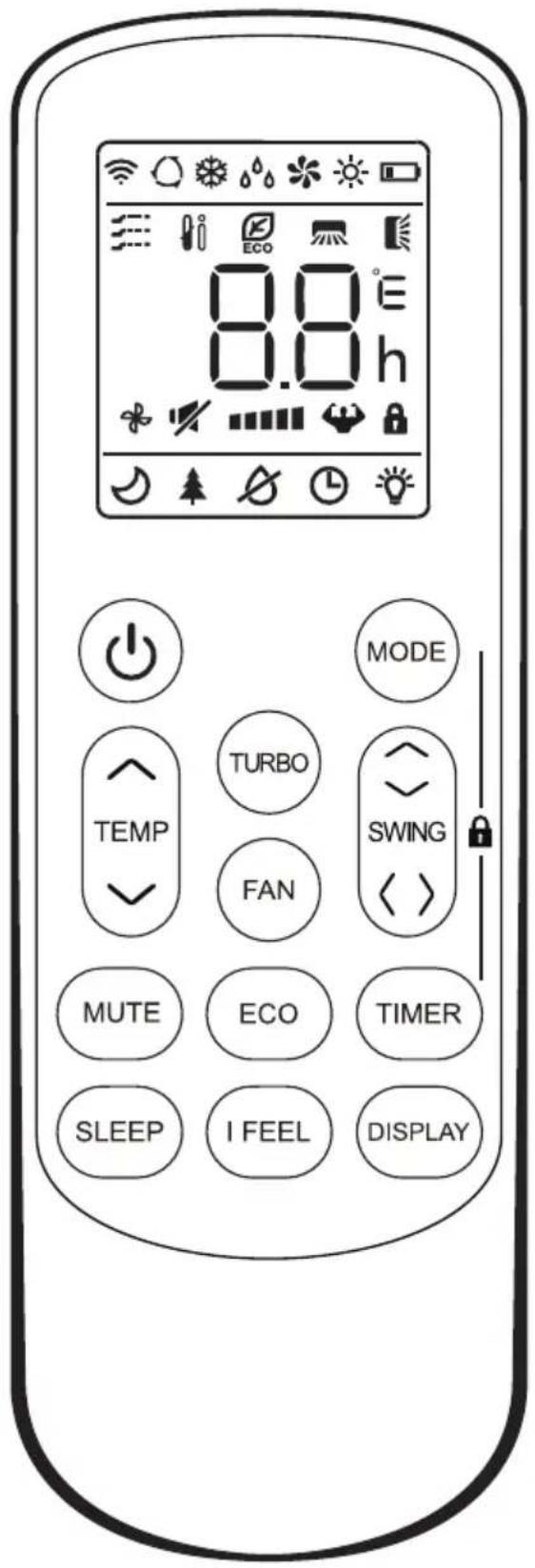
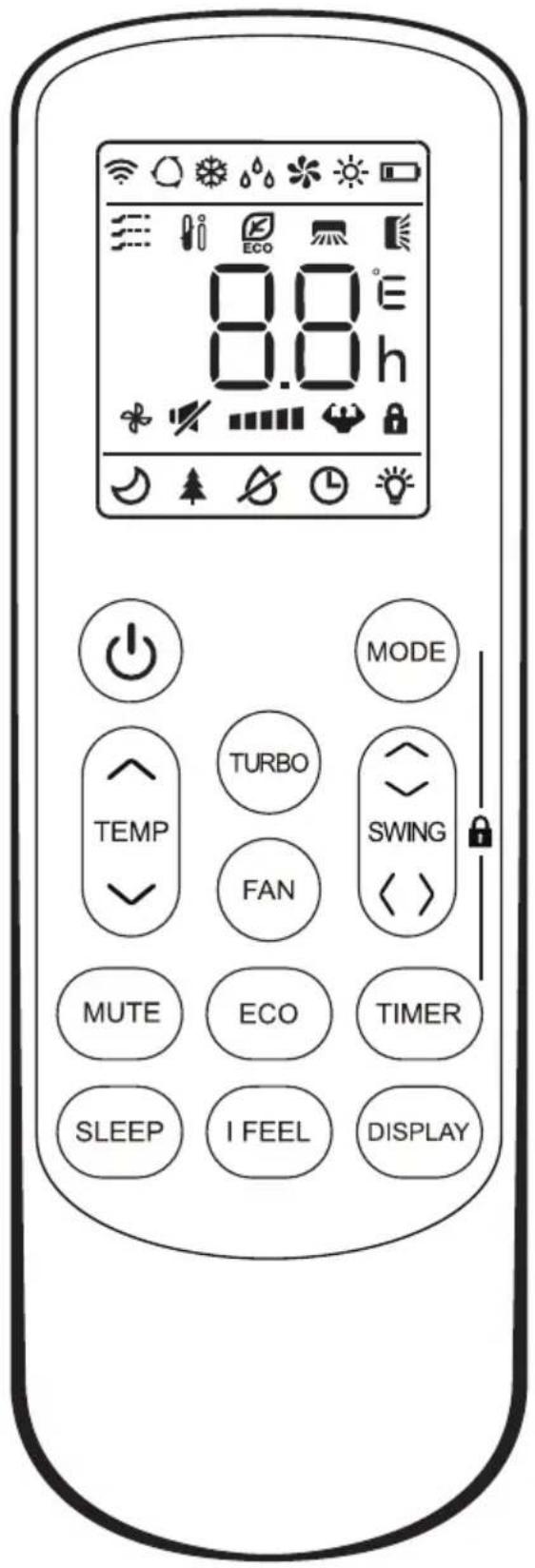
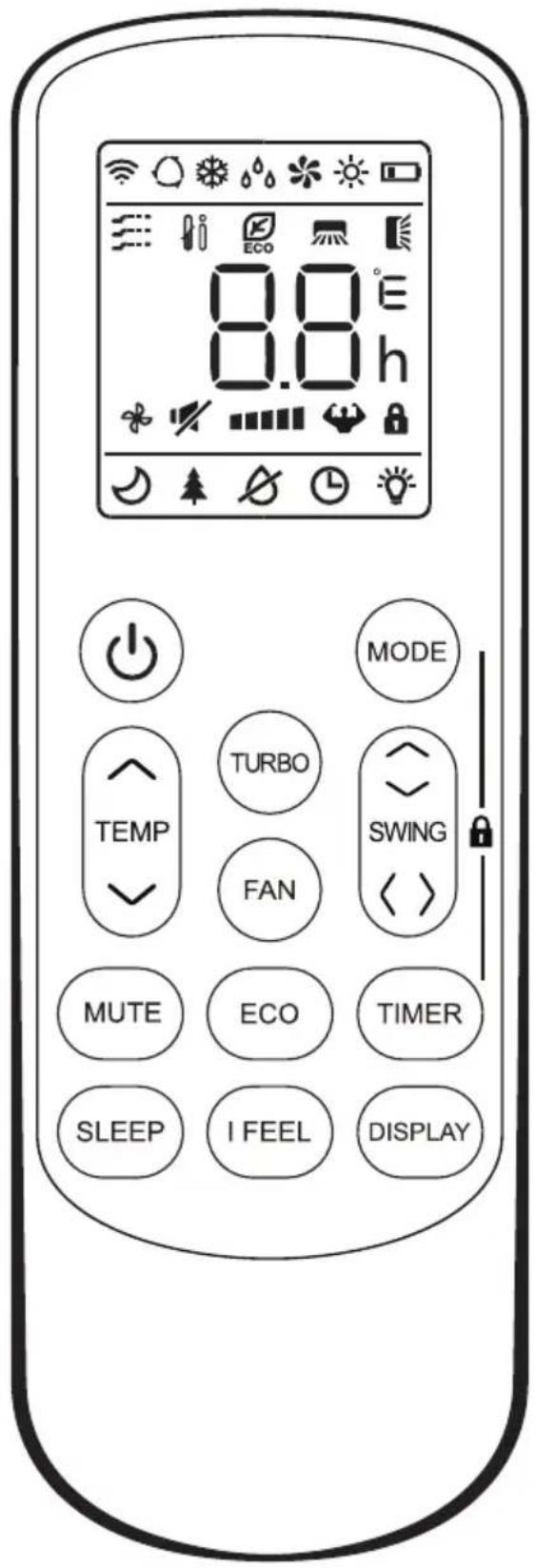
Remote controller buttons
| NO. Button Function | |
| 1 to turn on/off the appliance | |
| 2 MODE | To select the operation mode: AUTO, COOL, DRY, FAN, HEAT. |
| 3 | ^(TEMP UP) | To increase temperature, or Timer setting hours. |
| 4 | (TEMP DN) | To decrease temperature, or Timer setting hours. |
| 5 TURBO | 1) To activate the TURBO function.2) Long press "TURBO" for 5 seconds to switch between °C and °F display. |
| 6 FAN | To select the fan speeds of auto/mute/low/mid-low/mid-high/high/turbo |
| 7 | SWING | To stop or to start the horizontal flaps louver movement of set the desired left/right air flow direction |
| 8 | SWING <> | To stop or to start the vertical flaps louver movement of set the desired left/right air flow direction |
| 9 MUTE To switch-on/off the MUTE function. |
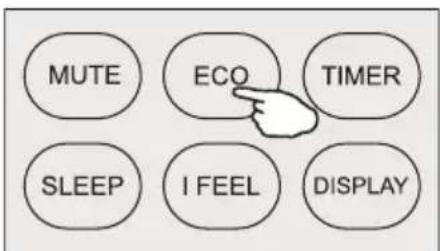
| 10 ECO | 1) To activate/deactivate the ECO function.2) Long press to activate/deactivate the 8°C heating function (depending on models) |
| 11 TIMER To set the time for timer on/off. |
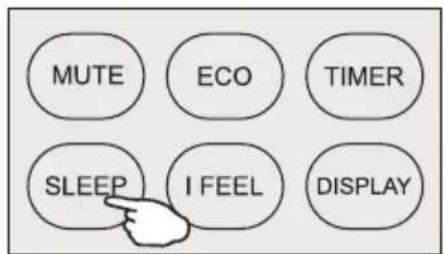
| 12 SLEEP To switch-on/off the function SLEEP. |
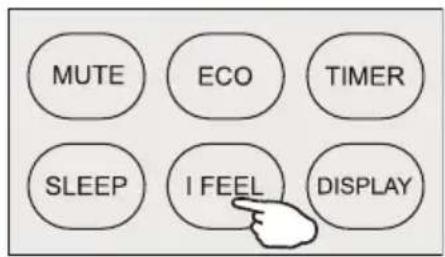
| 13 I FEEL To activate the function of I FEEL. |
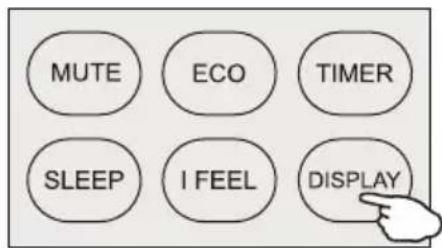
| 14 DISPLAY To switch-on/off the LED display. |
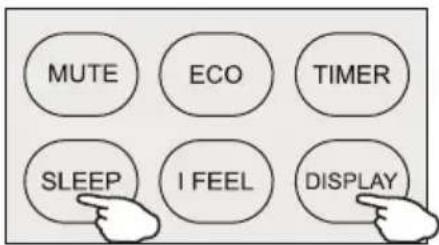
| 15 | SLEEP+DISPLAY | While the appliance is on, press and hold both the "Sleep" and "Display" buttons simultaneously for 3 seconds to activate/deactivate the HEALTH function |
| 16 | MODE+^(TEMP) | Press and hold both the "MODE" and "(TEMP)" buttons simultaneously for 3 seconds to reset WIFI function. |
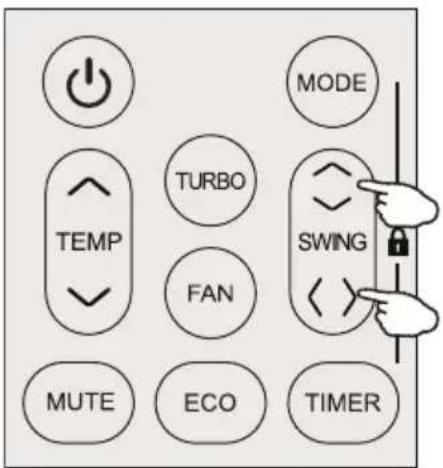
| 17 | SWING ⬇+SWING <> | While the appliance is off, press and hold both the "SWING ⬇" and "SWING <> buttons simultaneously for 3 seconds to activate/deactivate the SELF-CLEAN function. |
| 18 | MODE+ √(TEMP) | Press and hold both the "MODE" and " √(TEMP)" buttons simultaneously for 3 seconds to activate/deactivate Voice function. |
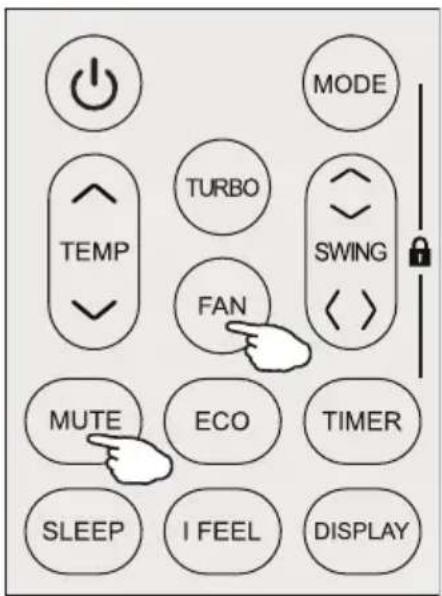
| 19 FAN + MUTE | While the appliance is on, in COOLING mode, press and hold both the "FAN" and "MUTE" buttons simultaneously for 3 seconds to activate/deactivate the GENTLE WIND function. |
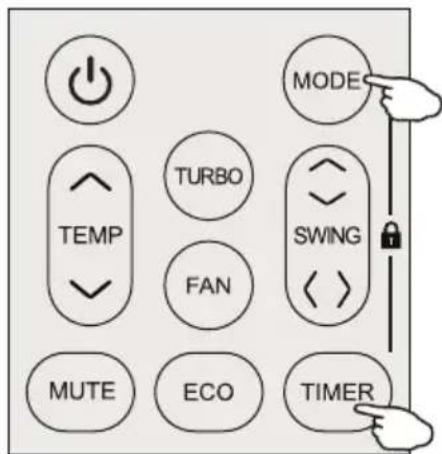
| 20 MODE + TIMER | Press and hold both the "MODE" and "TIMER" buttons to activate/deactivate CHILD LOCK function. |
⚠️ The display and some functions of the remote control may vary according to the model. ⚠️ The shape and position of buttons and indicators may differ according to the model, but their function is the same. ⚠️ The appliance confirms the correct reception of each press of a button with a beep. There might be some functions that do not work for this appliance. You will hear a beep when you press these buttons.
Remote controller DISPLAY, meaning of symbols on the liquid crystal display
| NO. Symbols Meaning | |
| 1 AUTO MODE indicator | |
| 2 COOLING MODE indicator | |
| 3 DRY MODE indicator | |
| 4 FAN MODE indicator | |
| 5 HEATING MODE indicator | |
| 6 BATTERY indicator | |
| 7 GENTLE WIND indicator | |
| 8 I FEEL indicator | |
| 9 ECO indicator | |
| 10 TEMPERATURE/CLOCK indicator | |
| 11 FLAP SWIN(Air flow) indicator | |
| 12 MUTE indicator | |
| 13 FAN/GREED indicator | |
| 14 AUTO FAN indicator | |
| 15 TURBO indicator | |
| 16 CHILD LOCK indicator | |
| 17 SLEEP MODE indicator | |
| 18 HEALTH indicator | |
| 19 Anti-Mildew indicator | |
| 20 TIMER indicator | |
| 21 DISPLAY LIGHT Indicator | |
Replacement of Batteries
Remove the battery cover plate from the rear of the remote control, by sliding it in the direction of the arrow.
Install the batteries according to the direction (+ and -) shown on the Remote Control.
Reinstall the battery cover by sliding it into place.
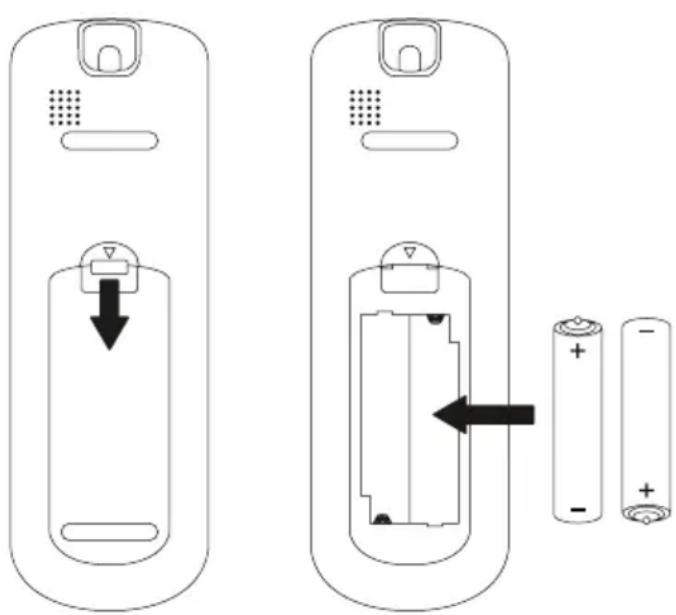
The image is for reference only; please refer to the actual product.
Battery Disposal
Do not dispose of batteries as unsorted municipal waste. Refer to local laws for proper disposal of batteries.
Batteries may have a chemical symbol at the bottom of the disposal icon.
This chemical symbol means that the battery contains a heavy metal that exceeds a certain concentration. Appliances and used batteries must be treated in a specialized facility for reuse, recycling and recovery.
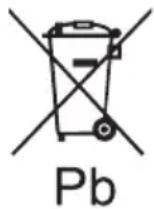
By ensuring correct disposal, you will help avoid possible negative consequences for the environment and human health.

- Use 2 LRO 3 AAA (1.5V) batteries (these are not included).
- Do not use rechargeable batteries.
- Replace the old batteries with new ones of the same type when the display is no longer legible.
- Do not dispose batteries as unsorted municipal waste.
- Collection of such waste separately for special treatment is necessary.
Recommendations for locating and using the remote controller holder (if present).
The remote controller be kept in a wall-mounted holder.
Note:
- Direct the remote control toward the appliance.
- Check that there are no objects between the remote control and the signal receptor in the indoor unit.
- Never leave the remote control exposed to the rays of the sun.
- Keep the remote control at a distance of at least 1m from the television or other electrical appliances.
OPERATING INSTRUCTIONS
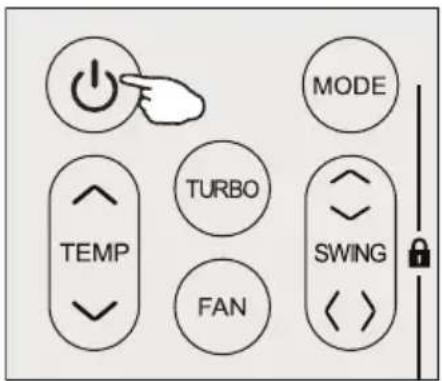
Turn ON / Turn OFF the appliance
Press the button ⏻ to turn on or turn off the appliance.
COOLING MODE

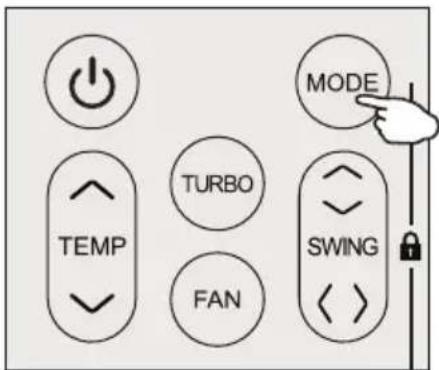
The cooling function allows the appliance to cool the room and at the same time reduces air humidity.
To activate the cooling function (COOL), press the MODE button until the symbol appears on the display. With the button √ or √ set a temperature lower than that of the room.
DRY MODE

This function reduces the humidity of the air to make the room more comfortable. To set the DRY mode, press MODE until the symbol appears in the display. An automatic function of presetting is activated.
HEATING MODE
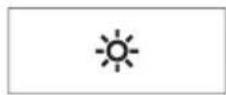
The heating function allows the appliance to heat the room.
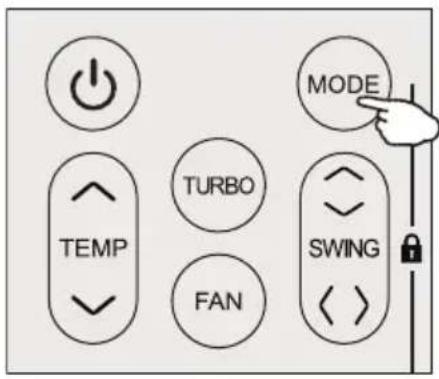
To activate the heating function (HEAT), press the MODE button until the symbol appears on the display. Use the ∨ or ∧ button to set a temperature higher than that of the room.
In HEATING operation, the appliance can automatically activate a defrost cycle, which is essential to clean the frost on the condenser so as to recover its heat exchange function. This procedure usually lasts for 2-10 minutes. During defrosting, the indoor unit fan stops operation. After defrosting, it resumes to HEATING mode automatically.
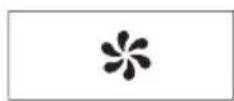
Fan mode: air ventilation only.
To set the FAN mode, press MODE until it appears on the display.
AUTO MODE
Automatic mode.
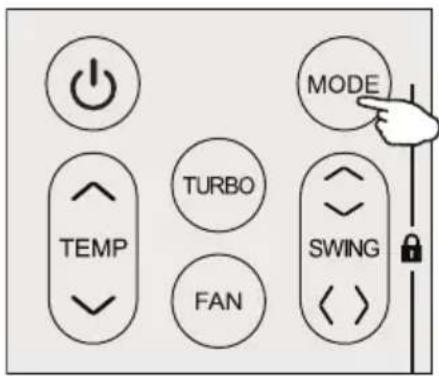
To set the AUTO mode, press MODE until it appears on the display.
In AUTO mode, the run mode will be set automatically according to the room temperature.
Turbo function
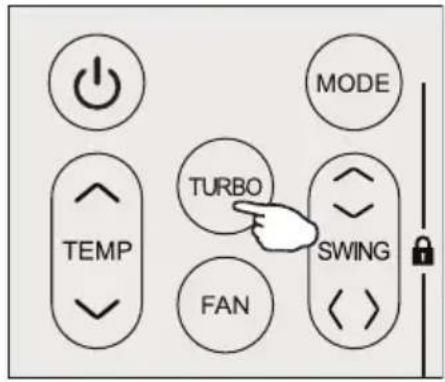
To activate the turbo function, press the button, and the turbo symbol will appear on the display. Press again to cancel this function. In COOL/HEAT mode, when you select the TURBO feature, the appliance will operate with fast cooling/fast heating at the highest fan speed.
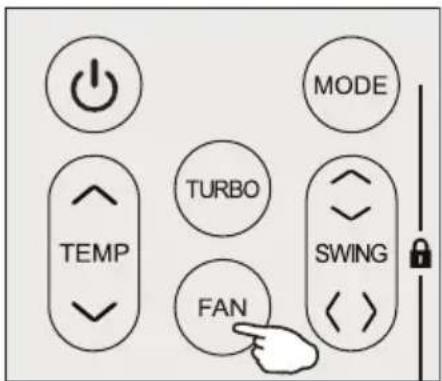
Press the FAN button to set the running fan speed. It can be set to AUTO, MUTE, LOW, MID-LOW, MID, MID-HIGH, HIGH, or TURBO speed.
![graph LR A["Start"] --> B{Flash} B --> C["End"] C --> D["Continue"] D --> E["Next Step"] E --> F["Next Step"] F --> G["Next Step"] G --> H["Next Step"] H --> I["Next Step"]](/content/2026/05/755956/images/4eccfc9d1abfc64d7d32fabc9c0ecf519756f7e0bd1e219da032472332d3b479.jpg)
SWING function
- Press the SWING button to activate the louver.
a) Press SWING to activate the horizontal flaps to swing from up to down; the swing symbol will appear on the remote display. Press again to stop the swing movement at the current angle.
b) Press SWING <> to activate the vertical deflectors to swing from left to right; the 📄 icon will appear on the remote display. Press again to stop the swing movement at the current angle.
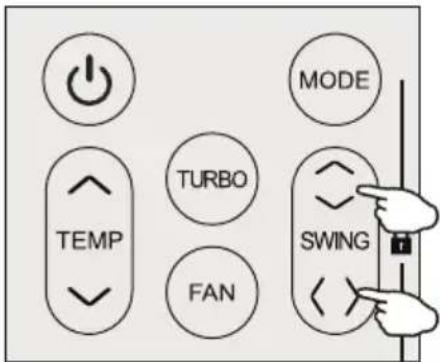
- If the vertical deflectors are positioned manually, which are placed under the flaps, they allow the air flow to be directed rightward or leftward.
- For some inverter heating models, press the horizontal SWING and vertical SWING buttons together at the same time to activate the SelfClean function.
⚠ This adjustment must be done while the appliance is switched off.
⚠️ Never position the "Flaps" manually; the delicate mechanism might get seriously damaged!
⚠️ Never put fingers, sticks, or other objects into the air inlet or outlet vents. Such accidental contact with live parts might cause unforeseeable damage or injury.
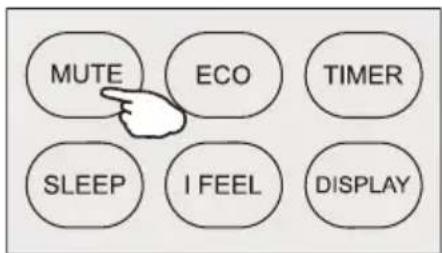
MUTE function
- Press the button to activate this function, and the icon will appear on the remote display. Press it again to deactivate this function.
- When the MUTE function runs, the indoor unit will operate at the lowest fan speed to help provide a quiet feeling.
- When the FAN / TURB button is pressed, the MUTE function will be canceled. The MUTE function cannot be activated under dry mode.
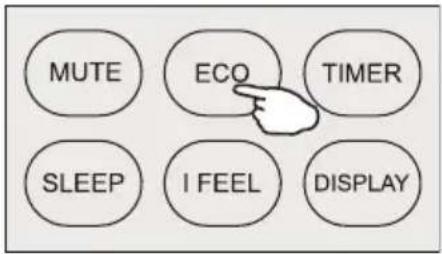
ECO MODE

In this mode, the appliance automatically adjusts its operation to save energy.
Press the ECO button; the word "Eco" appears on the display, and the appliance runs in ECO mode. Press it again to cancel.
Note: The ECO function is available in both COOLING and HEATING modes.
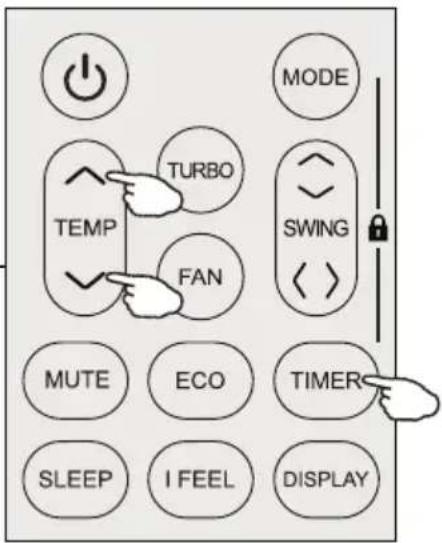
TIMER function ---- TIMER ON
TIMER
To automatically switch on the appliance. When the unit is off, you can set TIMER ON. To set the automatic switch-on time, do the following:
- Press the TIMER button the first time to set the switch-on time; the icon will appear on the remote display and flash.
- Press the ^ or \ button to set the desired timer-on time. Each press increases or decreases the time by half an hour between 0 and 10 hours, and by one hour between 10 and 24 hours.
- Press the TIMER button a second time to confirm.
- After setting the timer-on, set the desired mode (Cool/Heat/Auto/Fan/Dry) by pressing the MODE button. Then set the desired fan speed by pressing the FAN button, and press ∧ or ∨ to set the desired operating temperature.
To cancel, press the TIMER button.
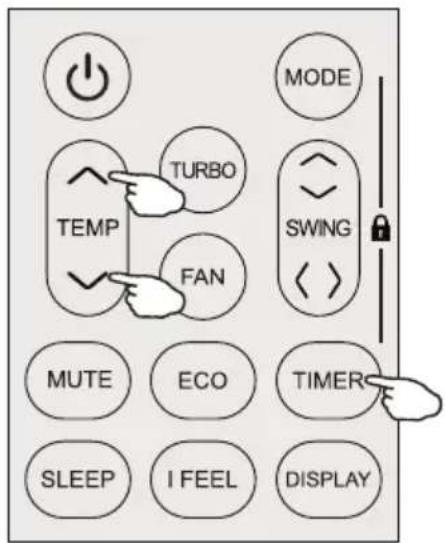
TIMER function --- TIMER OFF
TIMER
To automatically switch off the appliance. When the unit is on, you can set TIMER OFF. To set the automatic switch-off time, do the following:
- Confirm the appliance is ON.
- Press the TIMER button once to set the switch-off time. Press ∧ or ∪ to set the desired timer.
- Press the TIMER button a second time to confirm.
Cancel it by pressing the TIMER button.
Note: All programming should be operated within 5 seconds, otherwise the setting will be cancelled.
SLEEP MODE

Pre-setting automatic operating program. Press the SLEEP button to activate the SLEEP function and 🌐 appears on the display. Press again to cancel this function. After 10 hours running in sleep mode, the appliance will change to the previous setting mode.
I FEEL function (Optional)

Press the button to activate the function, the icon will appear on the remote display. Press again to deactivate this function.
This function enables the remote control to measure the temperature at its current location, and send this signal to the appliance to optimize the temperature around you and ensure comfort.
It will automatically deactivate 8 hours later.
LED display light ON/OFF
Press the DISPLAY button to switch off the LED display on the panel. Press again to switch on the LED display.
Child-Lock function
- Long press MODE and TIME together to activate this function, and do it again to deactivate this function.
- Under this function, no single button will activate
SELF-CLEAN function (Optional)
Only optional for some heating pump inverter appliance.
To activate this function, turn off the indoor unit at first, then press SWING ◇ and SWING <> buttons at the same time for 3 seconds, until you hear a beep, and "AC" will appear on the remote controller display and the indoor LED display.
- This function helps carry away the accumulated dirt, bacteria, etc. from the evaporator.
- This function will run for about 30 minutes, and it will return to the pre-setting mode. You can press the ⏻ button to cancel this function during the process. You will hear 2 beeps when it's finished or cancelled.
⚠ It's normal if there are some noises during this function process, as plastic materials expand with heat and contract with cold. ⚠ We suggest operating this function under the following ambient conditions to avoid certain safety hazards.
| Indoor unit Temp < 86°F (30°C) |
| Outdoor unit 41°F (5°C) < Temp < 86°F (30°C) |
⚠️ We suggest operating this function once every 3 months.
8°C heating function
- Long press the ECO button for over 3 seconds to activate this function, and "8°C" ("46°F") will appear on the remote display. Do it again to deactivate this function.
- This function will auto start the heating mode when the room temperature is
lower than 8°C (46°F), and it will return to standby if the temperature reaches 9°C (48°F).
- If the room temperature is higher than 18°C (64°F), the appliance will cancel this function automatically.
HEALTH function (Optional)
- Turn on the indoor unit first, then long press the SLEEP and DISPLAY buttons together for 3 seconds to activate this function. The icon will appear on the display. Press the buttons again to deactivate it.
- When the "HEALTH" function is initiated, the Ionizer/Plasma/Bipolar Ionizer/UVC Lights (depending on models) will be energized and running.
Gentle Wind function (Optional)
- Turn on the indoor unit and switch to COOL mode, then long press the FAN and MUTE buttons together for 3 seconds to activate this function. The icon will appear on the display. Press the buttons again to deactivate it.
- This function will automatically close the vertical flaps, giving you a comfortable gentle wind feeling.
WARRANTY CONDITIONS
This section of the manual outlines the terms and conditions of the

guarantee for the appliance you have purchased. Scan the QR code below to access the full information and your rights regarding the product warranty. Please read the information on the weblink carefully. If there is no warranty support for your country, please contact your local dealer.
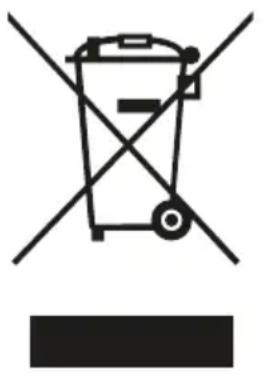
Do not dispose of electrical appliances as unsorted municipal waste; use separate collection facilities. Contact your local government for information regarding available collection systems. If electrical appliances are disposed of in landfills or dumps, hazardous substances can leak into groundwater and enter the food chain, damaging your health and well-being. When replacing old appliances
with new ones, the retailer is legally obligated to take back your old appliance for disposal at least free of charge. Do not throw batteries into fire, where they can explode or release dangerous liquids. If you replace or destroy the remote control, remove the batteries and dispose of them in accordance with applicable regulations because they are harmful to the environment.
Environmental information: This equipment contains fluorinated greenhouse gases covered by the Kyoto Protocol. It should only be serviced or dismantled by professionally trained personnel.
This equipment contains R32 refrigerant in the amount as stated in the table above. Do not vent R32 into the atmosphere: R32 is a fluorinated greenhouse gas with a Global Warming Potential (GWP) of 675.
Internet:
For your convenience, you can download the latest version of the user, installation, and/or service manual on www.Qlima.com.
TABLE OF CONTENTS
COOLING MODE

DRYING MODE

TURBO function
SWING function
PRODUCT DISPOSAL
Drainage holes
Remove the bottom plate +
→
Install 4 rubber mats (optional)
REMOTE CONTROL
COOLING MODE

DRY MODE

FAN MODE (FAN button not activated)

AUTO MODE
SWING function
MUTE function

J TROUBLESHOOTING 254
K REMOTE CONTROL 259
L WARRANTY CONDITIONS 276