5K UN Mechanical - Tablet TCL - Free user manual and instructions
Find the device manual for free 5K UN Mechanical TCL in PDF.


| Product Type | Window Air Conditioner |
| Brand | TCL |
| Model | 5K UN Mechanical |
| Power Supply | 115 V, 60 Hz, 8 A max (103-127 V) |
| Recommended Fuse | 10 A time-delay fuse or circuit breaker |
| Cooling Capacity | 5,000 BTU/h |
| Refrigerant | R32 (flammable) |
| Compatible Window | Double hung, width 58-91 cm |
| Minimum Vertical Clearance Height | 36.8 cm minimum |
| Operating Modes | Cooling, fan only |
| Thermostat | 7 positions, from 1 to Max Cool |
| Fan Speeds | High and Low (depending on mode) |
| Air Filter | Washable, monthly cleaning recommended |
| Electrical Safety | Grounding required (3-prong plug) |
| Protection Device | GFCI on power cord (Reset) |
| Warranty (non-commercial use) | 12 months parts and labor |
| Customer Service | 1-800-825-6747 |
| Product Registration | Online at register.tcl.com |
| Box Contents | Air conditioner, top mounting rail, accordion panels, locking frame, screws, seals |
Frequently Asked Questions - 5K UN Mechanical TCL
User questions about 5K UN Mechanical TCL
0 question about this device. Answer the ones you know or ask your own.
Ask a new question about this device
Download the instructions for your Tablet in PDF format for free! Find your manual 5K UN Mechanical - TCL and take your electronic device back in hand. On this page are published all the documents necessary for the use of your device. 5K UN Mechanical by TCL.
USER MANUAL 5K UN Mechanical TCL
Hi! Let's Get Started.
natural_image
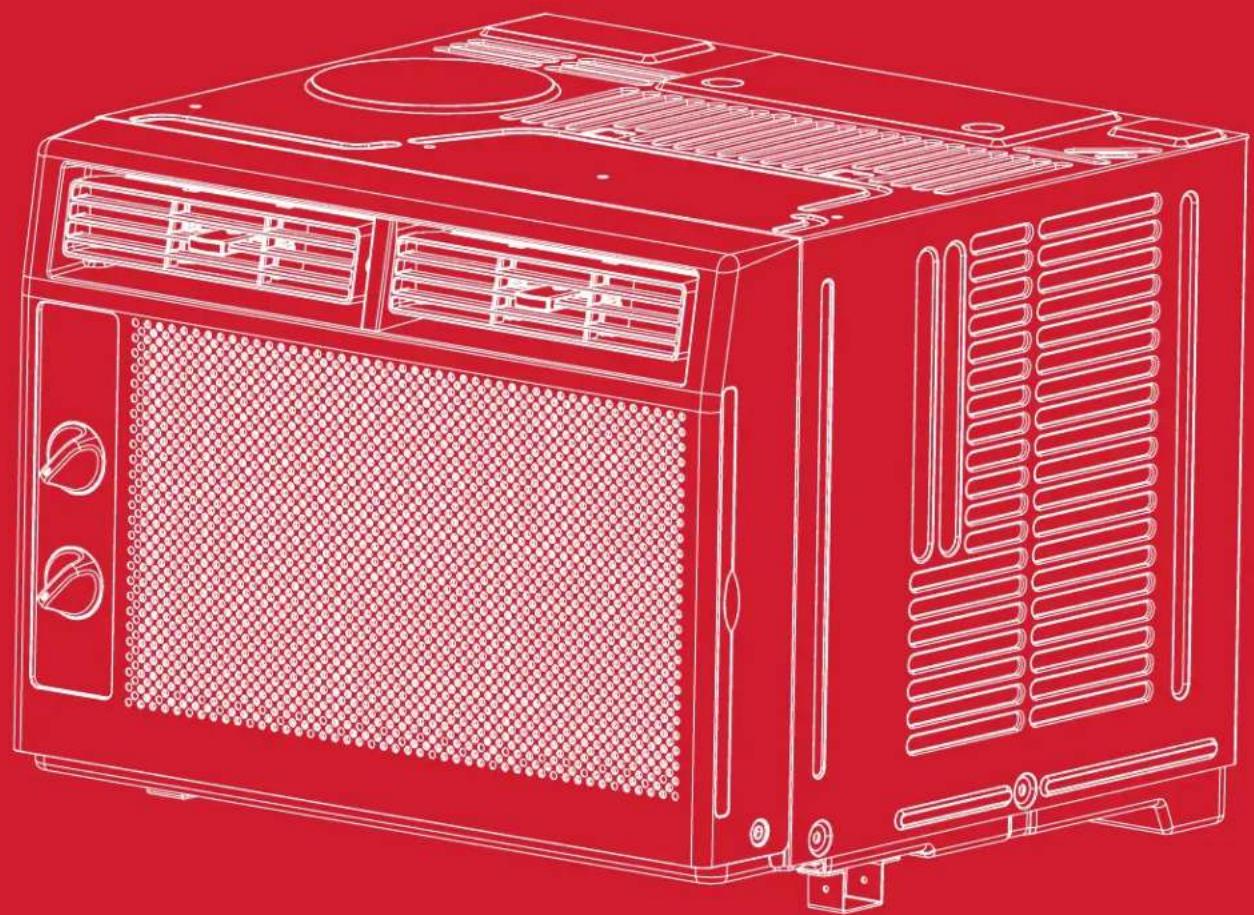
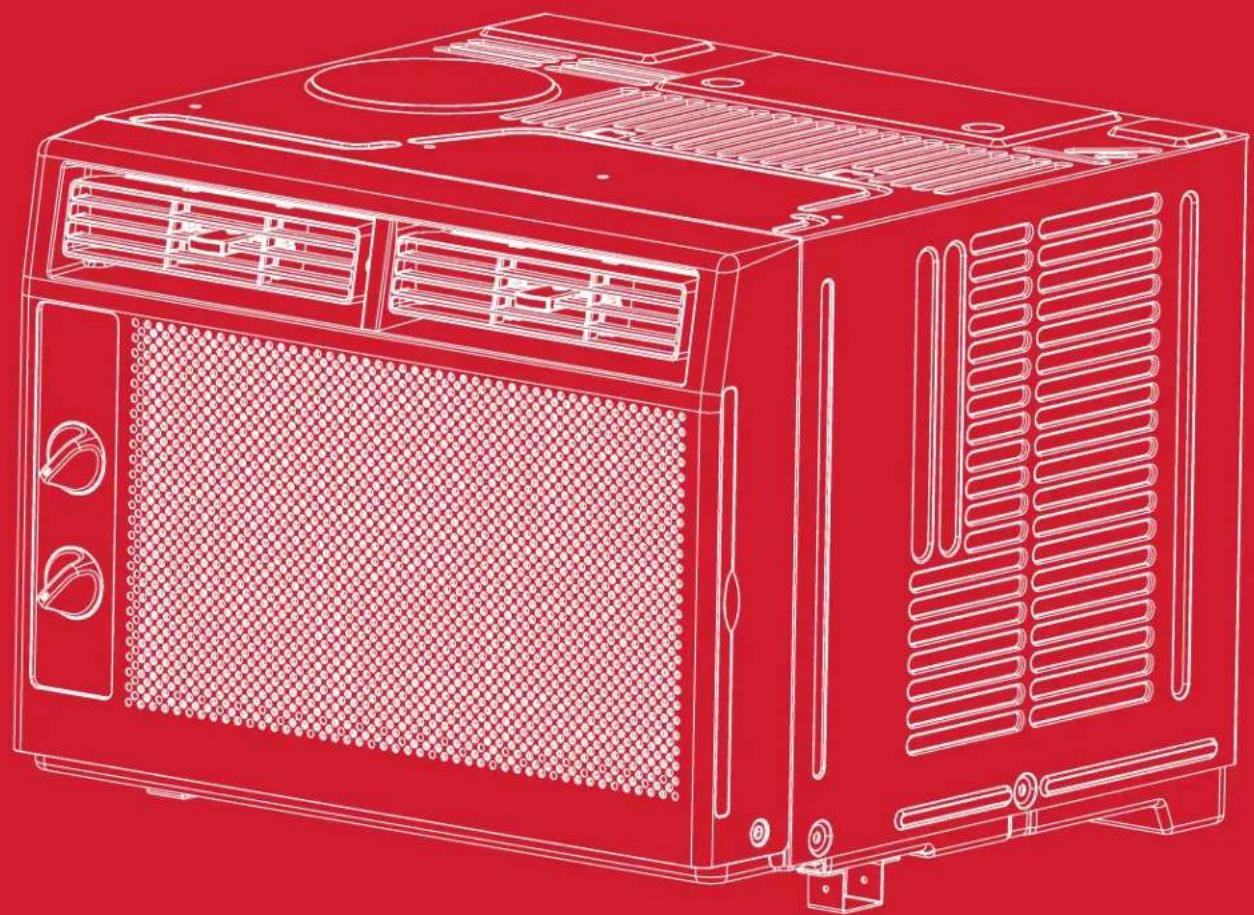
Line drawing of a red industrial air purifier unit with ventilation grilles and control panel (no text or symbols)5K UN Mechanical Window AC
English / Spanish / French
Table of Contents
English
Register and Protect Your Purchase 3
Important Safety Instructions....4
What's in the Box....7
Let's Get Started! 8
Assembly and Installation 8
How to Control Your AC....10
Troubleshooting 11
Warranty Information....12
Spanish
Registre y proteja su compra....14
Register and protect your purchase
Register easily with your smartphone
Scan or text a photo of the camera icon to 71403
Or register online at register.tcl.com
Need help? Visit photoregister.com/help or text HELP to 71403
Add a TCL Protection Plan when you register your product and be covered from life's mishaps
Thank you for choosing TCL. We want your ownership experience to bring you as much joy as the product you purchased does, so we're offering you a special price on TCL Protection Plans when you purchase during registration. Add a TCL Protection Plan within your first 30 days of ownership to receive the best value and we'll make sure nothing gets in the way of you enjoying your new product.
Benefits & Description
| Extended Manufacturer CoverageExtended parts & labor coverage for manufacturer defects. | Up To 4 Years | Up To 4 Years |
| Priority ServiceFree shipping and rapid turn-around time. | 3-5 Days | 3-5 Days |
| Product ReplacementFree 1-time replacement if product cannot be fixed. | ⊕ | ⊕ |
| TCL Parts & ServiceGenuine TCL parts & factory certified service. | ⊕ | ⊕ |
| No Deductible$0 out of pocket expense. | ⊕ | ⊕ |
| Accidental Damage ProtectionCoverage for drops, breaks and spills starts after 30 days. | ⊕ |
*Extended service plans (i.e., “Protect” and “Plus” plans) are only offered in the United States (US). All TCL products continue to offer a limited consumer warranty in both the US and Canada. Please refer to the warranty section in this guide for additional details on warranty information.
IMPORTANT SAFETY INSTRUCTIONS
Before installing and using your air conditioner, please read this owner's manual carefully. Store this manual in a safe place for future reference. Your safety and the safety of others is very important to us. Please pay attention to all safety messages outlined in this owner's manual.
WARNING: To reduce the risk of fire, electrical shock or injury when using your air conditioner, follow the following basic precautions:
ELECTRICAL REQUIREMENTS
The electrical ratings for your air conditioner are listed on the model and serial number label located on the front left side of the unit (when facing the front).
REGISTER YOUR APPLIANCE
You can register your appliance online by going to register.tcl.com
Be sure to retain your original sales receipt. A valid proof of purchase is required for all warranty claims.
BATTERY WARNING STATEMENT
Do not mix old and new batteries and do not mix alkaline, standard (carbon-zinc) or rechargeable (ni-cad, ni-mh, etc.) batteries
Document your model and serial numbers here:
Model #
Serial #
You can locate your 20 digit serial number underneath the bar code (On the left hand side of the AC).
WARNING
Electrical Shock Hazard
Plug into a grounded 3 prong outlet.
Do not remove the ground prong.
Do not use an adapter
Do not use an extension cord.
Failure to follow these instructions can result in
death, fire, or electrical shock
Specific electrical requirements are shown in the diagram below. Follow the requirements below for the type of plug on the power supply cord.
Wiring Requirements Power Supply Cord
• 115 Volt
(103 min - 127 max)
• (0-8 amps)
• (10 amp time-delay fuse
or circuit breaker)
- Use on single outlet circuit only
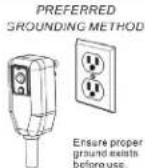
RECOMMENDED GROUND METHOD
For your personal safety, this air conditioner must be grounded. This air conditioner is equipped with a 3 prong power supply cord with a grounded plug. To minimize the possibility of electrical shock, the cord must be plugged into a 3 prong outlet and grounded in accordance with all local codes and ordinances. If a 3 prong outlet is not available, it is the customer's responsibility to have a properly grounded 3 prong outlet installed by a qualified electrician.
FCC CAUTION
This device complies with part 15 of the FCC Rules. Operation is subject to the following two conditions: (1) This device may not cause harmful interference, and (2) this device must accept any interference received, including interference that may cause undesired operation. Any Changes or modifications not expressly approved by the party responsible for compliance could void the user's authority to operate the equipment.
Note: This equipment has been tested and found to comply with the limits for a Class B digital device, pursuant to part 15 of the FCC Rules. These limits are designed to provide reasonable protection against harmful interference in a residential installation. This equipment generates uses and can radiate radio frequency energy and, if not installed and used in accordance with the instructions, may cause harmful interference to radio communications. However, there is no guarantee that interference will not occur in a particular installation. If this equipment does cause harmful interference to radio or television reception, which can be determined by turning the equipment off and on, the user is encouraged to try to correct the interference by one or more of the following measures:
-Reorient or relocate the receiving antenna.
-Increase the separation between the equipment and receiver.
-Connect the equipment into an outlet on a circuit different from that to which the receiver is connected.
-Consult the dealer or an experienced radio/TV technician for help.
The distance between user and device should be no less than 20cm.
DO NOT RETURN TO STORE
WE ARE READY TO
HELP contact us first with any questions

TCL SUPPORT:
www.tclusa.com/support
1-800-825-6747

TAKE CARE WHEN REMOVING
THE AIR CONDITIONING UNIT
INSTALLATION MANUAL---Important considerations
When compared with other refrigerants, R32 is more environmentally friendly. Please use this product as instructed. This refrigerant is flammable and may combust under certain conditions, however when this product is used as directed these risks are significantly reduced. Always consult with a trained professional when maintaining or repairing an air conditioner.
Warning
- Please read the manual before installing, using, or conducting maintenance.
- Do not use means to accelerate the defrosting process or to clean, other than those recommended by the manufacturer.
- Be aware that refrigerants may not contain an odor.
- Do not pierce or burn the appliance.
- The appliance shall be stored in a room without continuously operating sources (for example: open flames, an operating ignition gas appliance or an operating electric heater).
- Please contact the nearest after-sale service center when maintenance is necessary. At the time of maintenance, the maintenance personnel must strictly comply with the Operation
- Manual provided by the corresponding manufacturer and any non-professional is prohibited to maintain the air conditioner.
- It is necessary to comply with the provisions of gas-related federal, state, and local laws and regulations.
- It is necessary to clear away the refrigerant in the system when maintaining or recycling an air conditioner by a trained professional.

Warning: flammable & Dangerous

Read the user manual Read the installation manual


Read the service manual
Important Considerations
- The air conditioner you buy must be installed by professional personnel and the "Installation manual" is used only for the professional installation personnel!
- The installation specifications should be subject to our after-sale service regulations.
- When filling the flammable refrigerant, please use caution to avoid serious injury.
- A leak test must be done after the installation is completed.
- It is a must to perform the safety inspection before maintaining or repairing an air conditioner using flammable refrigerant in order to ensure that the fire risk is reduced to a minimum.
- Requirements for the total weight of filled refrigerant and the area of a room to be equipped with an air conditioner (are shown as in the following Tables GG.1 and GG.2)

The maximum charge and the required minimum floor area
m1 = (4 m3) × LFL, m2 = (26 m3)) × LFL, m3 = (130 m3) × LFL
Where LFL is the lower flammable limit in kg/ m3,R290 LFL is 0.038 kg/ m3,R32 LFL is 0.038 kg/ m3.
For the appliances with a charge amount m1 < M = m2:
The maximum charge in a room shall be in accordance with the following: mmax = 2.5 × (LFL)(5/4) × h0 × (A)1/2
The required minimum floor area Amin to install an appliance with refrigerant charge M (kg) shall be in accordance with following: A_min = (M / (2.5 × (LFL)(5/4) × h0)) 2
Where:
mmax is the allowable maximum charge in a room, in kg;
M is the refrigerant charge amount in appliance, in kg;
Amin is the required minimum room area, in m2;
A is the room area, in m2;
LFL is the lower flammable limit, in kg/m3;
h0 is the installation height of the appliance, in meters for calculating mmax or Amin, 1.8 m for wall mounted;
Table GG.1 - Maximum charge (kg)
| Category | LFL(kg/m3) | h_o (m) | Floor area ( m_2 ) | ||||||
| 4 7 10 | 5 20 30 50 | ||||||||
| R32 0,306 | 0,6 0,68 | 0,9 1,08 0,32 | 1,53 1,87 2,41 | ||||||
| 1 1,14 1,51 | 1,8 | 2,2 2,54 3,12 | 4,02 | ||||||
| 1,8 | 2,05 | 2,71 | 3,24 | 3,97 | 4,58 | 5,61 | 7,254 | ||
| 2,2 | 2,5 | 3,31 | 3,96 | 4,85 | 5,6 | 6,86 | 8,85 | ||
Table GG.2 - Minimum room area (m2)
| Category | LFL(kg/m3) | h 0(m) | Charge amount (M) (kg)Minimum room area (m2) | ||||||
| 1,224 kg | 1,836 kg | 2,448 kg | 3,672 kg | 4,896 kg | 6,12 kg | 7,956 kg | |||
| R32 0,306 | 0,6 | 29 | 51 | 116 | 206 | 321 | 543 | ||
| 1 | 10 | 19 | 42 | 74 | 116 | 196 | |||
| 1,8 | 3 6 13 | 23 | 36 60 | ||||||
| 2,2 | 2 | 4 | 0 | 15 | 24 | 40 | |||
Installation Safety Principles
1. Site Safety
Open Flames Prohibited

Ventilation Necessary

2. Operation Safety
Mind Static Electricity

Open Flames Prohibited
Must wear protective clothing and anti-static gloves

Don't use mobile phone
3. Installation Safety
• Refrigerant Leak Detector
- Appropriate Installation Location
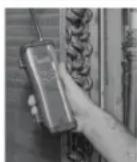
The left picture is the schematic diagram of a refrigerant leak detector.
Please note that:
- The installation site should be in a well-ventilated area.
- The sites for installing and maintaining an air conditioner using Refrigerant R32 should be free from open fire or welding, smoking, drying oven or any other heat source higher than 548°C which easily produces open fire.
- When installing an air conditioner, it is necessary to take appropriate anti-static measures such as wear anti-static clothing and/or gloves.
- Installation or maintenance location should not be surrounded by obstacles or close to any heat source, flammable, and/or explosive areas or objects.
- If the product suers refrigerant leak during the installation, all personnel should go out till the refrigerant leaks completely for 15 minutes. If the product is damaged, a professional must carry such damages product back to the maintenance station. It is prohibited to weld the refrigerant pipe or conduct other operations on the contaminated site.
- The air conditioner unit needs to sit on a flat even surface.
- It is necessary to avoid the places where there are other electrical products, power switch plugs and sockets, kitchen cabinet, bed, sofa and other valuables directly under the lines on two sides of the indoor unit.
- Any ventilation openings of unit should be free from obstructions.
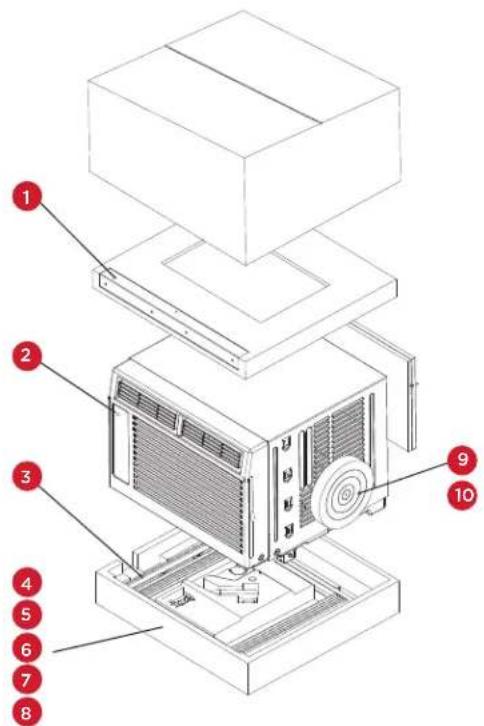
What's in the Box
| NO. APPEARANCE PART NAME QUANTITY | |||
| 1 | 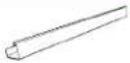 | Top Rail 1 | |
| 2 | 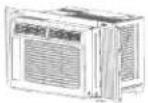 | AC Unit 1 | |
| 3 | 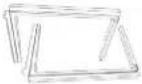 | Filler Panels (with “Left” & “Right” remark) | 2 |
| 4 |  | Sash Lock 1 | |
| 5 | 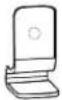 | Lock Frame 2 | |
| 6 | 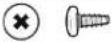 | 3/8” Screws 4 | |
| 7 | 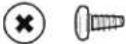 | 1/2” Screws 3 | |
| 8 | 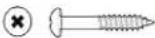 | 3/4” Screws 4 | |
| 9 |  | Window Sash Seal 1 | |
| 10 | 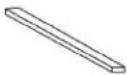 | Foam Top Window Gasket 1 | |
Tip! Before unboxing, cut the tape along the top of the box to loosen contents inside. Once you lift and remove the box, check the inside of the box as some parts may be stuck at the top. You can find the screws and other parts located in the tray beneath the AC unit.
Let's Get Started!
Step 1: Testing
Before installing your AC, let's test it to make sure it works properly and your outlet has the proper power level. First, place it on a flat surface, plug it directly into a wall outlet (never use a power strip or other device), and turn it on. Next, put the mode to High Cool ✝ and set the temperature to Max Cool 7. After 3 minutes, the AC should be blowing cool air. If so, please continue on to the next step. If not, please go to the Troubleshooting tips at the back of this guide or visit support.tcl.com/us for additional help.
Step 2: Installation
A few quick notes before installing:
- This unit is made to fit inside a standard double-hung window between the sizes of 23" and 36".
- Check the size of your window before installing. The air conditioner can be installed without the accordion panels to fit in a narrower window opening.
- The Lower Sash (the lower part of the window that moves up and down) must allow for 14.5" of vertical clearance when open.
-
The electrical outlet must be within reach of the power cord.
-
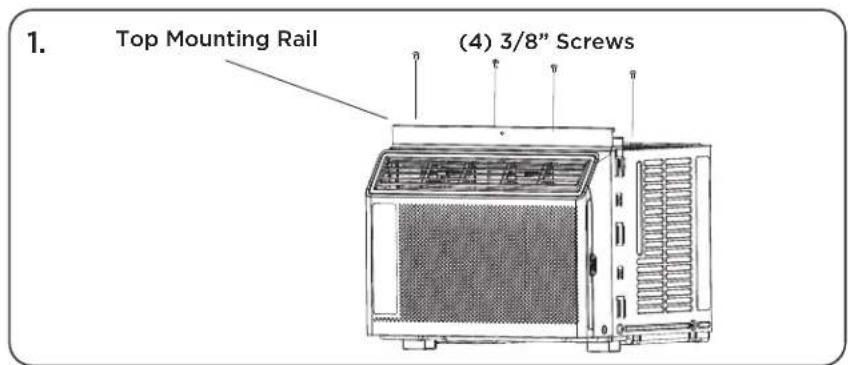
Use the included (4) 3/8" screws to fasten the top mounting rail to the unit.
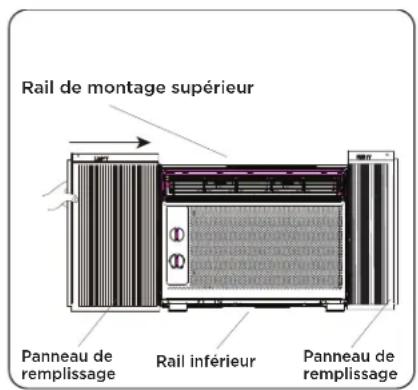
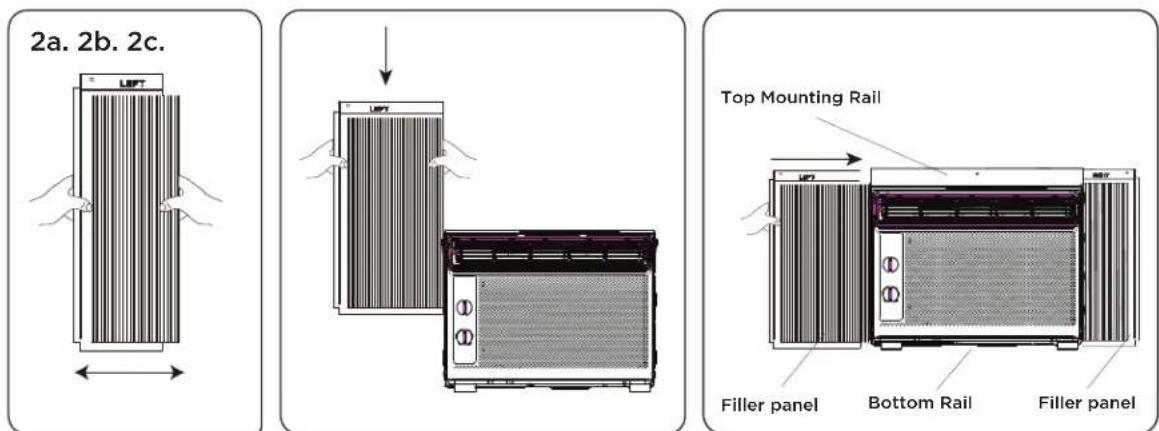
- Fasten the accordion style window panel expander pieces to the unit. They are marked "Right" and "Left". Pull the leading edge of them to its maximum width (Fig 2a). Then slide the panel expanders into the grooved notches (slide downward) on the sides of the unit (Fig 2b), and make sure they are inserted into the metal rails tightly (Fig 2c).
- Carefully place the window air conditioner into the window where it is to be installed (2 people are recommended for this step). Close the window securely. The AC unit should be slightly tilted to the outside area to allow water to drain out from the unit.
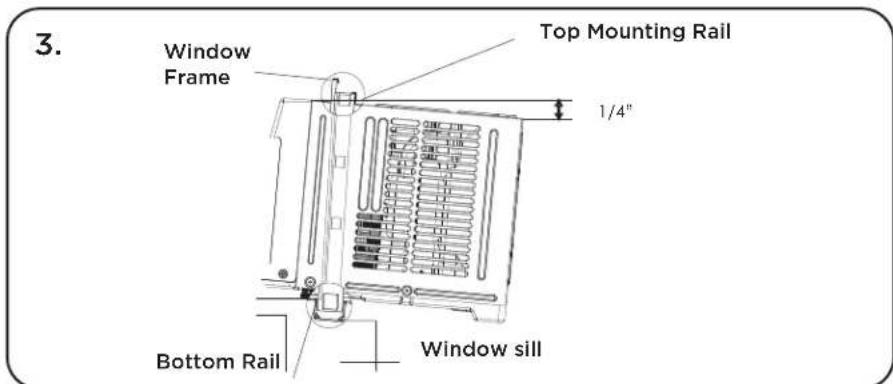
4a. Fasten the air conditioner to the window frame, using the included 12 " screws. Fasten each of the panel extenders (Left and Right). You may have to drill a pilot hole in the window frame to fasten these screws to the window sash.
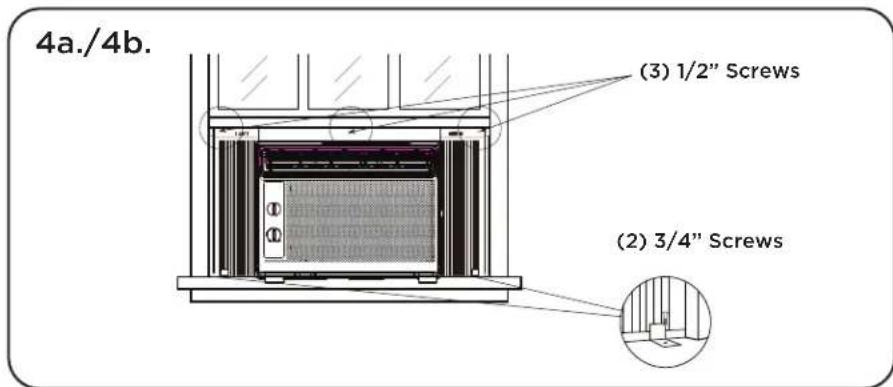
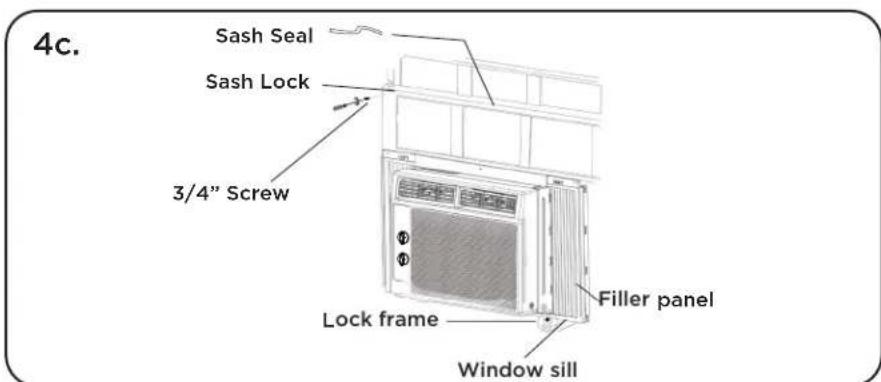
4b. Attach the lock frame between the panel extender and the window sill and fasten them together with the included 34 " locking screw. Repeat for each side.
4c. Attach the sash lock between the top of the sliding window and window frame, using 1 of the included 34 " screw to secure the window closed.
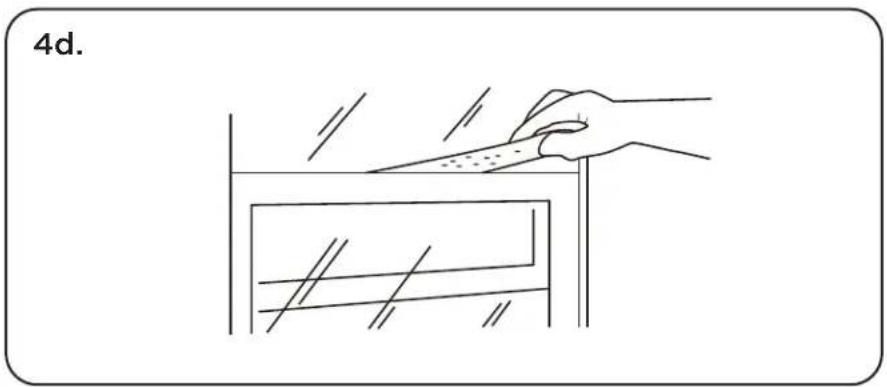
4d. To prevent outside air from entering the room, insert the foam top window gasket, cut to the width of the window.
- Plug the unit into the electrical outlet as specified above in the electrical requirements. Move the control to the COOL mode.
How to Control Your AC
All the basics you need to know to stay cool!
-
Power - Turn on the unit by rotating the MODE dial to the desired setting.
-
Cooling Mode - For maximum cooling, set the MODE dial to ⚙. In HIGH COOL mode, the fan will automatically go to high. This will circulate the air throughout the room.
-
Fan Mode - For fan only modes choose either 🎥, or 🌘 The air conditioner will not cool the room in fan mode.
-
Thermostat - Turn the TEMP dial to set the desired room temperature. For maximum cooling, turn the TEMP dial to "7" (Max Cool).
-
Directional Vents - To direct the air flow, use the horizontal lever to control the horizontal (sideways) motion, and move the air deflector to control the vertical (up/down) direction.
-
Minimize Wear and Tear - To minimize wear and tear, wait at least 3 minutes before changing MODES. This will prevent the compressor from overheating and the circuit breaker from tripping.
-
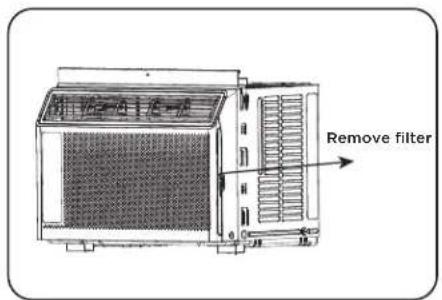
Filter - It is recommended you clean your filter monthly. Remove the filter by sliding it out of the front right side of the air conditioner. Gently wash it with a mild dish washing detergent and let dry completely before reinstalling it into the AC.
Normal Operating Sounds
You may hear a pinging noise, caused by the water hitting the condenser on rainy days, or when the humidity is high. This design feature helps remove moisture and increase efficiency.
You may hear the thermostat click when the compressor cycles on and off. Water will collect in the base pan on rainy days, or high humidity days. The water may overflow and drip from the unit on the outside. The fan may run, even when the compressor is not on.
Troubleshooting
Having trouble completing installation? Don't worry, it's usually an easy fix.
| PROBLEM POSSIBLE CAUSES SOLUTIONS | ||
| Air Conditioner will not start | Air conditioner is unplugged | Make sure the air conditioner plug is pushed completely into the outlet |
| Fuse is blown/circuit breaker is tripped | Check the house fuse/circuit breaker box and replace the fuse or reset the breaker | |
| Power Failure | The unit will automatically re-start when power is restoredThere is a protective time delay (approx. 3 minutes) to prevent damage to the compressor. For this reason, the unit may not start normal cooling for 3 minutes after it is turned back on. | |
| Current interrupter device is tripped | Press the RESET button located on the power cord plugIf the RESET button will not stay engaged, discontinue use of the air conditioner and contact a qualified service technician | |
| Air Conditioner does not cool as it should | Airflow is restricted | Make sure there are no curtains, blinds, or furniture blocking the front of the air conditioner |
| Temperature control may not be set correctly | Lower the set thermostat tempera ture | |
| Air filter is dirty | Clean the filter. See the Cleaning and Care Section of the manual | |
| Room may be too warm | Please allow time for the room to cool down after turning on the air conditioner | |
| Cold air is escaping | Check for open furnace registers and cold air returns | |
| Cooling Coils are frozen • See “Air Conditioner Freezing Up” below | ||
| Air Conditioner is freezing up | Ice blocks the air flow and stops the air conditioner from cooling the room | Set the MODE to HIGH FAN or HIGH COOL and set the thermostat to a higher temperature |
| Water is dripping outside Hot and humid weather • This is normal | ||
| Water is dripping inside the room | Air conditioner is not correctly tilted outside | For proper water drainage, make sure the air conditioner is slightly tilted downward from the front of the unit to the rear |
| Water collects in the base pan | Moisture removed from the air is draining into the base pan | This is normal for a short period in areas with low humidity and nor mal for a longer period in areas with high humidity |
TCL NORTH AMERICA
LIMITED PRODUCT WARRANTY
What your warranty covers: Defects in materials or workmanship to the original owner of this TCL product when purchased as new from an Authorized Dealer of TCL brand products and packaged with this warranty statement.
WARRANTY PERIOD (NON-COMMERCIAL USE):
Labor: Twelve (12) Months from the original date of purchase. Parts: Twelve (12) Months from the original date of purchase.
WARRANTY PERIOD (COMMERCIAL USE):
Labor: Six (6) Months from the original date of purchase. Parts: Six (6) Months from the original date of purchase.
Commercial Use includes, but is not limited to, the use of this product in a commercial or business environment, the use of this product in an institution or for institutional purposes, or for other commercial purposes including rental purposes.
Should your TCL device prove to be defective in material or workmanship under normal use during the warranty period listed above, effective from the date of original consumer purchase of the product, TCL North America at its sole discretion will, (1) pay an Authorized TCL Service Center for both labor charges and parts to repair your device, or (2) replace your device with a new or refurbished/recertified equivalent product. If repaired at an Authorized TCL Service Center, TCL is not responsible for the transportation costs to the Authorized TCL Service Center. However, TCL will pay for the return shipping. TCL will provide instructions for the packaging and shipping of the unit. Units that are improperly packed and damaged during shipping are not covered under this limited product warranty. This limited product warranty is good only to the original purchaser of the product and effective only when used in North America. You must have your original purchase receipt or proof of purchase (bill of sale or received invoice) which states the condition of the unit (new, used), the unit's date of purchase, place of purchase, and model/serial number.
HOW SERVICE IS HANDLED: Call 1-800-825-6747 and choose the appropriate prompt. Please have product type, model number, serial number, and ZIP code ready. Troubleshooting and prior approval from a TCL representative MUST occur before sending in your product for repair.
Product Registration Information
You can find the model number and serial number on a label on the back or side of the product. Register your product online at register.tcl.com.
NO OTHER WARRANTY IS APPLICABLE TO THIS PRODUCT. THIS LIMITED WARRANTY IS IN LIEU OF ANY OTHER WARRANTY, EXPRESS OR IMPLIED, INCLUDING WITHOUT LIMITATION, ANY WARRANTY OF MERCHANTABILITY OR FITNESS FOR A PARTICULAR PURPOSE. TO THE EXTENT ANY IMPLIED WARRANTY IS REQUIRED BY LAW, IT IS LIMITED IN DURATION TO THE EXPRESS WARRANTY PERIOD ABOVE. NEITHER THE MANUFACTURER NOR ITS DISTRIBUTOR SHALL BE LIABLE FOR ANY INCIDENTAL, CONSEQUENTIAL, INDIRECT, SPECIAL, OR PUNITIVE DAMAGES OF ANY NATURE, INCLUDING WITHOUT LIMITATION, LOST REVENUES OR PROFITS, OR ANY OTHER DAMAGE WHETHER BASED IN CONTRACT, TORT, OR OTHERWISE. SOME STATES AND/OR TERRITORIES DO NOT ALLOW THE EXCLUSION OR LIMITATION OF INCIDENTAL OR CONSEQUENTIAL DAMAGES OR LIMITATIONS ON THE LENGTH OF TIME AN IMPLIED WARRANTY LASTS, SO THE ABOVE EXCLUSION OR LIMITATION MAY NOT APPLY TO YOU. THIS LIMITED WARRANTY GIVES YOU, THE ORIGINAL PURCHASER, SPECIFIC LEGAL RIGHTS AND YOU MAY ALSO HAVE OTHER RIGHTS THAT VARY FROM STATE TO STATE OR TERRITORY TO TERRITORY. THIS WARRANTY IS SUBJECT TO CHANGE WITHOUT NOTICE. PLEASE VISIT WWW.TCL.COM/US TO VIEW THE MOST CURRENT VERSION.
THIS LIMITED PRODUCT WARRANTY DOES NOT APPLY TO:
- Service calls to your home for delivery or pick-up, installation, instruction, replacement of house fuses, connection of house wiring or plumbing, or to correct unauthorized repairs.
- Failure of the product to perform due to wireless signal reception problems not caused by your unit, or due to power failures or interruptions or inadequate electrical service.
- Damage caused by transportation or handling, including damage during shipment from a Retailer (please contact your Retailer for assistance).
- Damage caused to the product by accident, vermin, lightning, wind(s), fire, flood(s), or act(s) of God.
- Damage caused by operating the product in a corrosive or wet atmosphere.
- Repairs when your TCL product is used in other-than-normal, single-family household use, or contrary to the instructions described in the product User's Guide.
- Damage resulting from accident, alteration, misuse, abuse, neglect, insects, normal wear-and-tear, cosmetic damage, mishandling, power line
surges, improper or faulty installation, or improper repair or maintenance. Improper repair includes the use of parts not approved or specified by TCL.
- Markings or images on the product's display panel.
- Normal maintenance as described in the User's Guide (including but not limited to cleaning or replacing filters, cleaning coils, or other normal maintenance).
- Use of accessories or components that are not compatible with this product.
- Products with altered, missing, defaced, unreadable, or removed serial numbers.
- Changes in the appearance of the product that do not affect product performance.
- Increases in utility costs and/or additional utility expenses.
- Products purchased from non-authorized TCL resellers.
- Products sold in any condition other than new from the original manufacturer or sold outside of North America.
The cost of repair or replacement under these excluded circumstances shall be borne by the consumer.
CONTACT INFORMATION:
TCL North America
1860 Compton Ave
Corona, California 92881
1-800-825-6747
www.tcl.com/us
TCL
¡Hola! Comencemos.
natural_image
Line drawing of a red industrial air purifier unit with ventilation grilles and control panel (no text or symbols)www.tclusa.com/support
1-800-825-6747

¡Comencemos!
Paso 1: Pruebas
natural_image
Line drawing of a hand using a tool to cut or mark a rectangular object, no text or symbols presentnatural_image
Line drawing of a red industrial air purifier unit with ventilation grilles and control panel (no text or symbols)Text a photo of the camera icon to 71403
Or register online at register.tcl.com Need help? Visit photoregister.com/help or text HELP to 71403
Enjoy exclusive benefits with registration:

Expedited support and service Insider tips on your appliance

Exclusive offers and promotions Verification of ownership
*All TCL products continue to offer a limited consumer warranty in both the US and Canada. Please refer to the warranty section in this guide for additional details on warranty information.
C'est parti !
natural_image
Diagram showing a device being placed on top of a rack, with hands indicating the process (no text or symbols present)