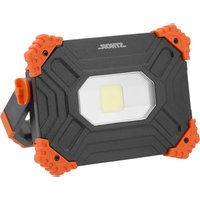
82871 - Rechargeable LED spotlight Sthor - Free user manual and instructions
Find the device manual for free 82871 Sthor in PDF.


User questions about 82871 Sthor
0 question about this device. Answer the ones you know or ask your own.
Ask a new question about this device
Download the instructions for your Rechargeable LED spotlight in PDF format for free! Find your manual 82871 - Sthor and take your electronic device back in hand. On this page are published all the documents necessary for the use of your device. 82871 by Sthor.
USER MANUAL 82871 Sthor
natural_image
Coiled black cable with connector, labeled with number 12 pointing to its end (no other text or symbols visible)PL
- handle
- CoB LED
- hanger
- housing
- power switch
- inlet socket
- outlet socket
- locking knob
- charge status button
- battery charge indicator
- socket cover
- charging cable
DE
This symbol indicates that waste electrical and electronic equipment (including batteries and storage cells) cannot be disposed of with other types of waste. Waste equipment should be collected and handed over separately to a collection point for recycling and recovery, in order to reduce the amount of waste and the use of natural resources. Uncontrolled release of hazardous components contained in electrical and electronic equipment may pose a risk to human health and have adverse effects for the environment. The household plays an important role in contributing to reuse and recovery, including recycling of waste equipment. For more information about the appropriate recycling methods, contact your local authority or retailer.
WYPOSAŻENIE PRODUKTU
The worklight is designed to illuminate the workplace. The battery power supply makes the worklight a highly mobile device. The worklight is equipped with a powerbank function as well as a carrying handle and a hanger. The light source is a powerful COB LED. Proper, reliable and safe operation of the product requires its correct use, that is why you should:
Read this entire manual before the first use of the device and keep it for future reference.
The supplier shall not be held liable for any damage or injury resulting from improper use of the device, or failure to observe the safety regulations and recommendations of this manual. Using the device not for its intended purpose, introducing changes to the electrical structure and making other modifications will void the user's warranty and statutory warranty rights.
PRODUCT ACCESSORIES
The product is supplied with a charging cable. There is no charger included.
TECHNICAL DATA
| Parameter Unit Value | |||
| Catalogue No. 82870 82871 | |||
| Rated voltage [V DC] 5 5 | |||
| Rated current [A] 2 2 | |||
| Battery type Li-ION Li-ION | |||
| Rated battery voltage | [V DC] | 3.7 | 3.7 |
| Battery capacity | [mAh] | 4400 | 6600 |
| Battery energy | [Wh] | 16.28 | 24.42 |
| Luminous flux, 25% / 50% / 100% mode | [lm] | 500 / 1000 | 500 / 1000 / 2000 |
| Rated power | [W] | 10 | 20 |
| Continuous operating time, 25% / 50% / 100% mode | [h] | 4 / 2 | 8 / 4 / 2 |
| Colour temperature | [K] 6500 | 6500 | |
| Protection rating | IP65 | IP65 | |
| Weight | [kg] | 0.56 | 0.61 |
| Battery charging time | [h] | 3-4 | 5-6 |
*operating mode only available for model No. 82871
SAFETY INSTRUCTIONS
Do not leave the device connected to the power supply unattended. Do not immerse the device in water or any other liquid. Do not allow water or other liquid to enter the worklight housing. Do not cover the device while it is operating. This might cause the device to overheat and damage, as well as cause fire. Never use a worklight with clear mechanical damage, broken worklight glass, or other visible damage. Do not point the light beam towards people or animals. Do not stare into the light beam. Do not allow children to use the product, do not allow children to use the product as a toy. If you pass the product on to other people, make sure to give them
EN
the instructions as well. It is forbidden to disassemble, repair and modify the product on one's own. Repairs should only be carried out at an authorised service point using original spare parts. Do not expose the product to high temperatures, do not expose to direct sunlight. Do not touch the worklight housing, as it becomes hot during operation and may cause burns.
TOOL OPERATION
Charging the battery
The built-in battery must be charged before using the product. To do this, use the charging cable supplied with the product. Insert the USB Type C cable plug into the USB Type C input socket located under the socket cover, then install the USB cable in the charger and plug the charger into a mains socket. As the product is being charged, the LEDs will light up in succession to show the approximate progress of the charging process. First with a pulsating light, then with a steady light. The end of the charging process will be signalled by lighting up of all LEDs. Disconnect the charger from the power supply socket and then unplug the charger lead from the socket in the product. Close the socket cover when charging is complete. The product is now ready for use.
Caution! Any USB port that the plug of the cable supplied with the device will fit into can be used for charging. However, make sure that the current capacity of the socket is at least equal to the charging current listed in the technical data table.
Battery charge indicator
The approximate battery charge status can be checked before switching the worklight on. To do this, press the battery charge status button located under the socket cover. LEDs will light up on the battery charge indicator. The more LEDs light up, the higher the battery charge.
Worklight operation
Warning! Do not look directly at the light source when switching the worklight on or during its operation. A strong luminous fl ux can cause temporary or permanent eye damage.
Press the power switch to activate the worklight. Pressing the switch again changes the illumination mode, and the next press turns the worklight off.
82870
The worklight has 2 light modes: 100% with a luminous flux of 1000 lm and 50% with a luminous flux of 500 lm.
82871
The worklight has 3 light modes: 100% with a luminous flux of 2000 lm, 50% with a luminous flux of 1000 lm and 25% with a luminous flux of 500 lm.
The worklight is equipped with a handle that can be used to carry the worklight, as a base element allowing the worklight to be positioned at the desired angle and as a surface mount. Loosen both locking knobs by slightly unscrewing them to adjust the position of the handle relative to the worklight. Set the worklight in a selected position then lock it by tightening both knobs. The handle has a built-in magnet, allowing the worklight to be attached to ferromagnetic surfaces.
Powerbank function
The worklight can function as a powerbank, e.g. for charging mobile devices. Insert one of the cable plugs into the charging socket in the mobile device to be charged. Insert the other cable plug into the USB Type A output socket located under the socket cover. The device will start charging automatically. The battery charge indicator will show the approximate battery charge status. Whilst in power bank mode, other worklight functions are available.
EN
MAINTENANCE AND STORAGE
Before performing maintenance of the product, turn it off with the switch and wait until it has cooled down completely. The product requires no special maintenance. Clean it with a soft cloth lightly soaked in water. Dry thoroughly after cleaning. Do not clean the product by immersing it in water. Do not use solvents, petrol, abrasives, acids for cleaning. Store the product in a dry, shaded and well ventilated place. The storage area should be inaccessible to members of the public, especially children. Store the product in the unit packaging provided with the product.
Safety instructions for battery charging
Li-ion (lithium-ion) batteries do not have the so-called “memory effect”, which allows them to be recharged at any time. However, it is recommended to discharge the battery during normal operation and then charge it to full capacity. If, due to the nature of work, it is not possible to use the battery in such a manner every time, it should be done at least every several work cycles. Never discharge any batteries by short-circuiting the battery plates, as this will cause irreparable damage! In addition, do not check the battery charge status by short-circuiting the electrodes and checking their sparking.
Storing the battery
Ensure proper storage conditions to extend the battery's life. The battery can last for approximately 500 charge-discharge cycles. Store the battery at a temperature ranging from 0^ to 30^ at a relative air humidity of 50% . Charge the battery to approx. 70% of its total capacity to store it for a longer period of time. In case of prolonged storage, the battery should be periodically charged once a year. Do not over-discharge the battery as this will shorten its life and may cause irreparable damage. During storage, the battery will gradually discharge due to leakage. The self-discharge process depends on the storage temperature – the higher the temperature, the faster the discharge process. If the batteries are stored incorrectly, the electrolyte may leak. In case of leakage, secure the leak with a neutralising agent. In the event of electrolyte contact with eyes, rinse eyes thoroughly with water, and immediately seek medical attention. It is not allowed to use the device with a damaged battery. If the battery is completely used, return it to a specialist waste disposal centre.
Transporting the batteries
Lithium-ion batteries are treated as hazardous goods according to legal regulations. The user can transport the device together with the battery and the batteries alone, by land. In that case, no additional conditions have to be met. If you entrust transport to third parties (e.g. a courier company), follow the regulations regarding the transport of hazardous goods. Before shipping, please contact a properly qualified person. It is not allowed to transport damaged batteries. National regulations for the transport of hazardous materials must also be observed.
DE
PRODUKTBESCHREIBUNG
CARACTÉRISTIQUES DU PRODUIT
Transport van accu's
فعال. يعت demands الت “[ش,”ال Fiscal والمؤوق والامن لل م “[ت,” على ال “[م,” بال تال,” COB و “[م,” م “[ب,” ص “[م,” و “[م,” ص “[م,” و “[م,” ص “[م,” ف “[ب,” د,” ال “[م,” م “[م,” ا “[م,” ل “[م,” ل “[م,” ل “[م,” ل “[م,” ل “[م,” ل “[م,” ل “[م,” ل “[م,” ل “[م,” ل “[م,” ل “[م,” ل “[م,” ل “[م,” ل “[م,” ل “[م,” ل “[م,” ل “[م,” ل “[م,” ل “[م,” ل “[م,” ل “[م,” ل “[م,” ل “[م,” ل “[م,” ل “[م,” л “[م,” ل “[م,” ل “[م,” ل “[م,” ل “[م,” ل “[م,” ل “[م,” ل “[م,” ل “[م,” ل “[م,” ل “[م,” ل “[م,” ل “[م,” ل “[م,” ل “[م,” ل “[م,” ل “[م,” ل “[م,” ل “[م,” ل “[م,” ل “[م,” ل “[م,” ل “[م,” ل “[م,” ل “[م,”
معدات المنتج