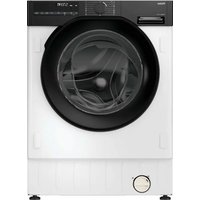
USER MANUAL BHA6SD696M6DB9-S HAIER
Built-in Washer Dryer
go.he.services/haier-um
IT 3
DE 11
EN 19
ES 27
FR 35
NL 43
PT 51
BG 59
HR 67
HU 75
SL 83
SR 91
CS 99
PL 107
RO 115
SK 123
UKR 131
EL 139
Haier
- Control panel
Buttons
Built-in washer dryer
Download the hOn App



Before using the appliance, carefully read the safety instructions.
Before using the machine, it is absolutely necessary to remove the screws and transport lock spacers.
For detailed instructions on the removal procedure, see the Installation Instructions.
Download and read the complete User Manual online for more details.
1. Installation
1.1 - Transportation bolts removal
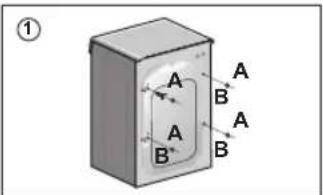
- Remove the 2 or 4 transportation screws (A) and the flat washers, rubber bungs and plastic spacer tubes (B) as shown in figure 1.
- If spacer tubes fall inside the machine, tilt it forward to retrieve them from the floor or the base. Cover the screw holes with the 2 or 4 plastic caps provided.

Keep packaging materials away from children.
1.2 - Hydraulic connections
- The machine should be connected to the water mains via the new tube supplied with the appliance (inside the drum). Do not use the old tube for this purpose.
- Connect one end of the water inlet pipe with the elbow bend to the electrovalve (top rear part of the machine) and the other end to a tap or a plumbed-in 3/4" gas threaded connection (fig. 2).
- Place the appliance close to the wall, ensuring that there are no bends or kinks anywhere in the tube.
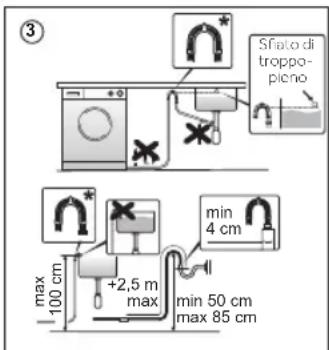
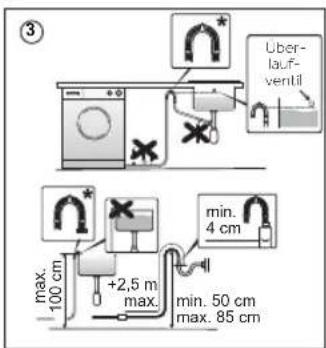
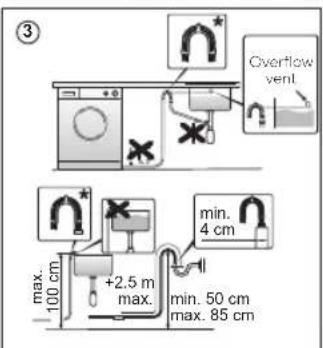
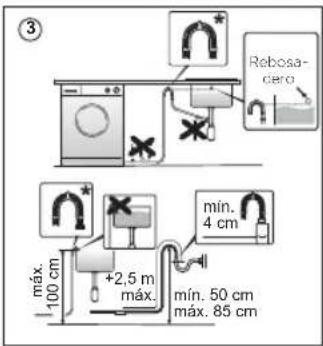
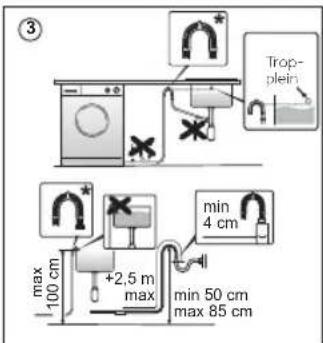
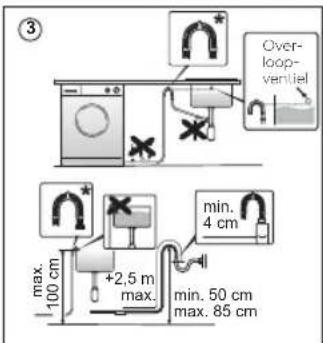
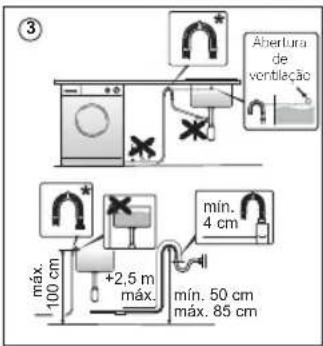
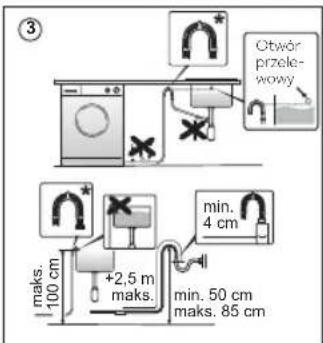
- Hook the outlet pipe to the edge of the sink or preferably to a fixed drainage outlet of a diameter greater than that of the outlet pipe and at a height of min. 50 cm and a maximum of 85 cm from the floor (fig. 3).
- If necessary, use the curved* accessory to attach and support the outlet pipe more securely. Some models may include one or more of the following features:
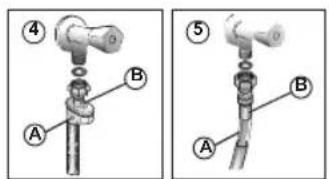
- AQUASTOP (fig. 4): a device located on the supply tube that stops water flow if the tube deteriorates; in this case, a red mark will appear in the window "A" and the tube must be replaced. To unscrew the nut, press the one-way lock device "B".
- AQUAPROTECT - SUPPLY TUBE WITH GUARD (fig. 5): should water leak from the primary internal tube "C", the transparent containment sheath "D" will contain water to permit the washing cycle to complete. At the end of the cycle, contact the Customer Service Centre to replace the supply tube.
* Accessory sold separately
Download and read the complete User Manual online for more details:
go.he.services/haier-um
1.3 - Aligning the appliance
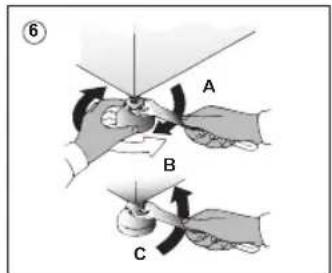
• Level the machine by adjusting the feet (fig. 6). a) Turn the nut clockwise to release the screw on the foot. b) Raise or lower the foot by rotating it until it stands firmly on the floor. c) Lock the foot in position by turning the nut anticlockwise until it comes up against the bottom of the washing machine. - Check that the appliance is properly levelled.
1.4 - Mounting the furniture door
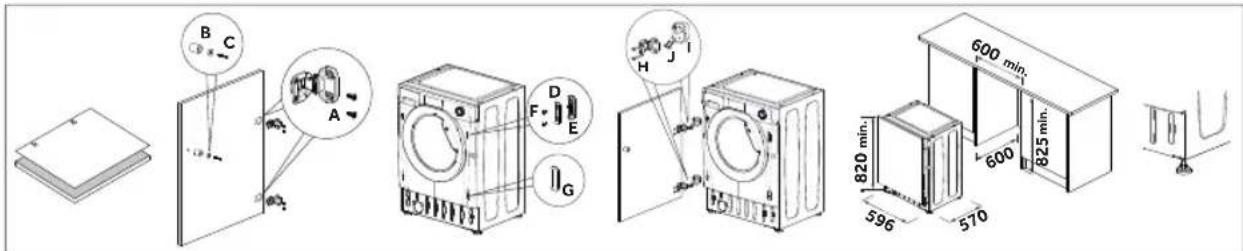
- Position the template on the back of the door and mark the holes for the hinges and magnet (left or right side). Drill the holes and secure the hinges with the screws (A) provided.
- Fix the magnet (B) in place using screw (C) then mount the plate (D) with the plastic support (E) under it and fix them in position with screw (F).
- Snap mount cap (G) in the lower position.
- Mount the furniture door to the front of the washer using the hinges. Fix the spacers (I) in place with the 2 screws (J) and then fix the hinges with 2 screws (H).
- Adjust the washer height (820-840 mm) using the 4 adjustable feet and secure them with the nuts.
- Slide the washer into place, adjusting the furniture plinth to the new height.
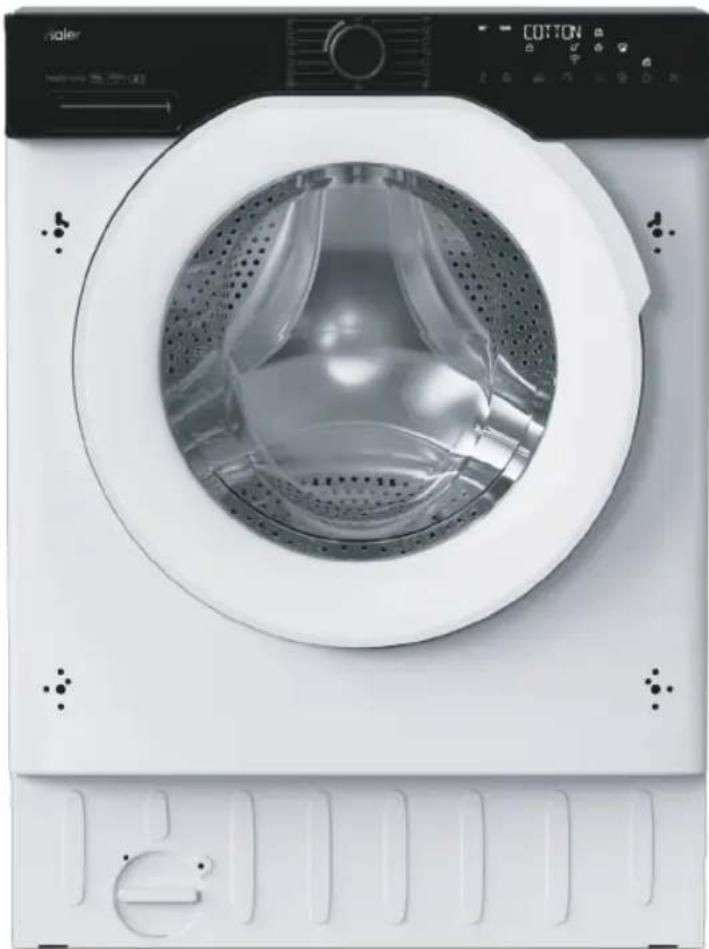
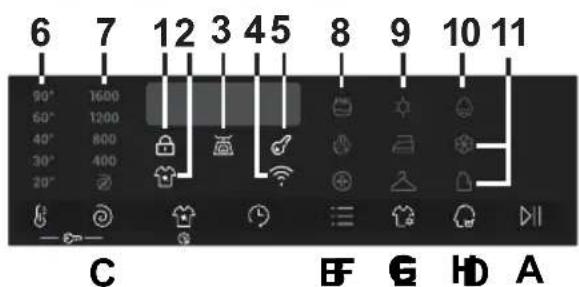
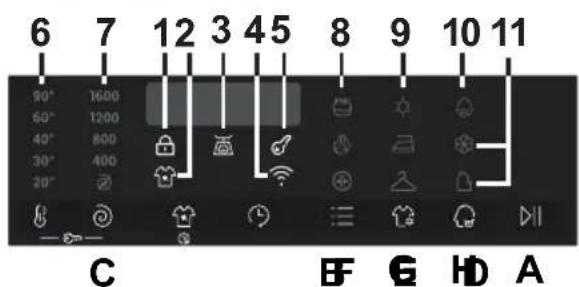
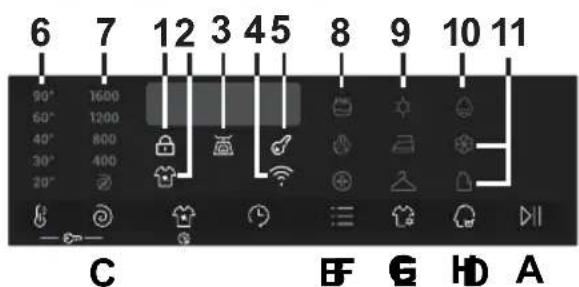
- Control panel
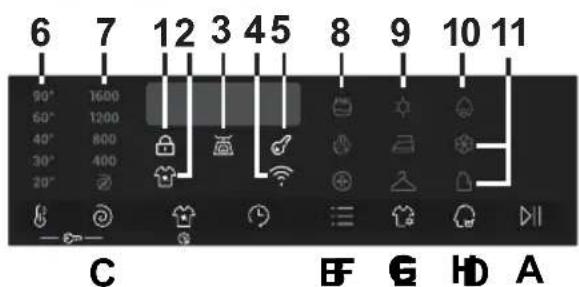
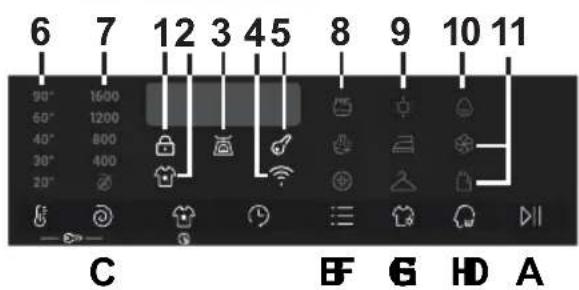
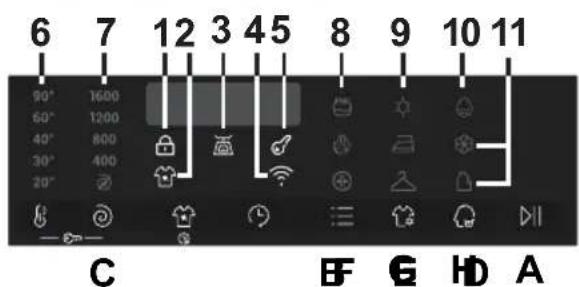
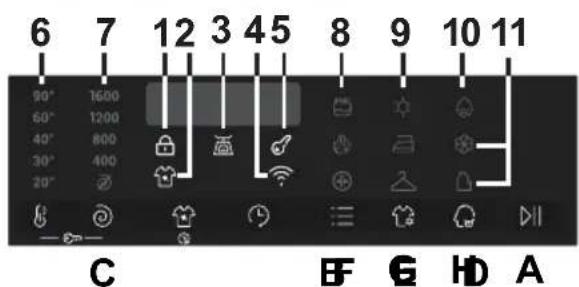
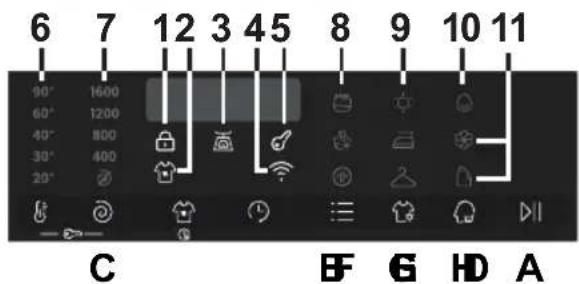
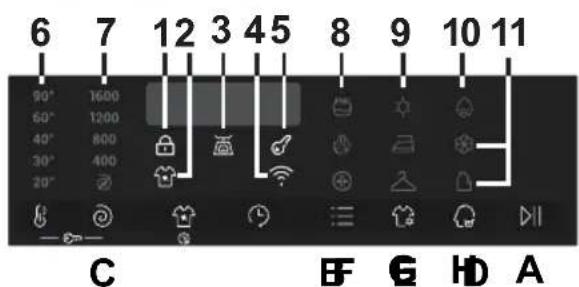
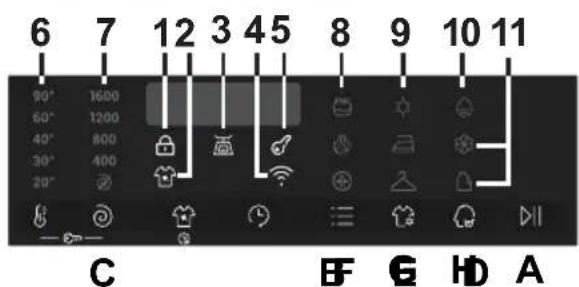
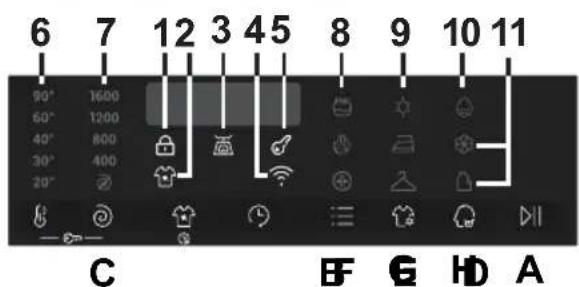
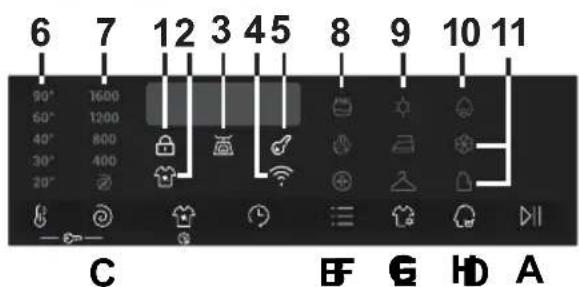
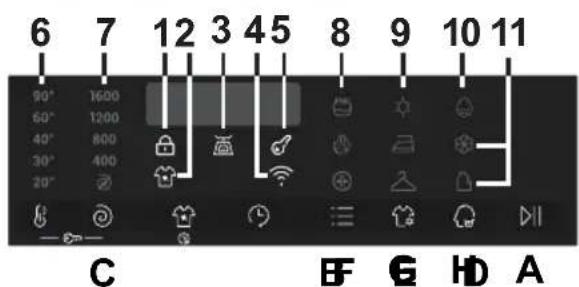
A Start/Pause B Temperature selection C Spin selection D Stain level/Rapid E Delay start F Options G Drying selection H Smart Dose (autodose system) B+C Child lock
Indicator lights
1 Door locked indicator 2 Stain level indicator 3 "AI Weight Sense" indicator* 4 Wi-Fi indicator
5 Child lock indicator 6 Wash temperature indicators 7 Spin speed indicators 8 Options indicators
9 Drying selection indicators 10 Water hardness setting indicator 11 Smart Dose indicators
* Weight detector indicator
2.1 - First starting
Language setting
- Press the "TEMPERATURE SELECTION" or "SPIN SELECTION" to display the available languages.
- Press the START/PAUSE button to confirm the choice.
Water Hardness setting
Water Hardness level: L1 = LOW L2 = MEDIUM L3 = HIGH
• To confirm the standard water hardness level set by the factory, press the START/PAUSE button. - If you want to change the standard water hardness setting (and consequently the amount of detergent dispensed), press the "TEMPERATURE SELECTION" or "SPIN SELECTION" button. - Press the START/PAUSE button to confirm the choice.
The setting affects the amount of detergent dispensed: the higher the water hardness, the more detergent will be dispensed.
To change these two settings later, refer to the online manual.

Close the door BEFORE selecting the button START/PAUSE. To start the selected cycle with the preset parameters, press START/PAUSE. When the programme is running, the display will show the time to elapse.

This button allows you to change the temperature of the wash cycles. It is not possible to raise the temperature over the maximum allowed for the programme, in order to protect the fabrics. If you want carry out a cold wash all the indicators must be off.

By pressing this button, it is possible to reduce the maximum speed, and if you wish, the spin cycle can be cancelled.


This button allows you to choose between different options (depending on the selected programme):

Stain level (D) - This option allows you to choose between 3 levels of wash intensity modifying the length of the programme, depending on how much the fabrics are soiled (can only be used on some programmes as shown in the table of programmes).

Rapid (D) - The button becomes active when you select the RAPID (14'/30'/44') programme on the knob and allows you to select one of three durations indicated, depending on the type of fabric.

This button allows you to pre-programme the wash cycle to delay the start of the cycle for up to 24 hours.

This button allows you to choose between different options (depending on the selected programme):

Prewash (F) - This option allows you to make a prewash and it is particularly useful for heavily soiled loads (can be used only on some programmes). When activated, the indicator icon (E) lights up

Extra rinse (F) - This option allows you to add one rinse at the end of the washing cycle and is useful for people with delicate and sensitive skin. When activated, the indicator icon (F) lights up

Hygiene + (F) - This option allows deep cleaning of your clothes by maintaining the same temperature for the whole wash.

- Automatic washing/drying cycle: after the selection of washing programme according to laundry type, select a degree of dryness by pressing this button. At the end of the washing programme, the selected drying cycle will start automatically. If a washing programme that is not compatible with automatic drying is selected, this function will not be activated.
If you exceed the maximum dryable load of laundry indicated in the programme table, the laundry may not be dried satisfactorily.
- To only perform a drying cycle: select the desired drying programme in conjunction with your fabrics, by pressing this button it is possible to select a degree of dryness that is different to the default one (except for the wool drying programme). • To cancel the cycle during the drying phase, press the button for about 3 seconds.
- "END" will appear in the display at the end of the programme and the DOOR LOCKED light will go off, it is now possible to open the door.

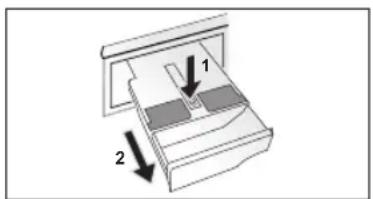
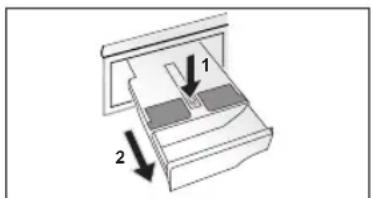
The drawer is divided into three compartments, as shown in the figure.
A = for LIQUID washing detergent
B = for fabric softener
C = NO AUTOMATIC DOSING: for powder detergent or liquid detergent with the specific tray provided.
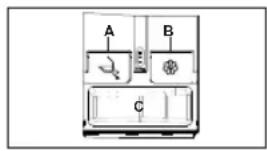
Pressing the "SMART DOSE" button you will be able to set the autodose function, according to your needs (the corresponding indicator lights will illuminate).

Only LIQUID fabric softeners and detergents can be used. The drawer must be cleaned every time it is refilled or when the type of detergent and fabric softener is changed.
For further details on the autodose system, refer to the online manual.

Child lock (B+C)
- Pressing simultaneously the "TEMPERATURE SELECTION" and "SPIN SELECTION" buttons for about 3 seconds locks the keys. This prevents accidental or unwanted changes if a button on the display is pressed accidentally during a cycle.
- The key lock can be cancelled by pressing the two buttons simultaneously again or by turning off the appliance.
2.3 - Indicator lights

Door lock indicator (1)
For safety reasons, the door is locked partially during the washing cycle. It is only possible to open the door at the end of the program or after the program was cancelled correctly. In case of high water level, high water temperature, and during spinning, it is not possible to open the door.

Stain level indicator light (2)
The indicator light shows the selection of the relevant option.

"AI Weight Sense" indicator light (3): (active only on certain programmes).
Through every wash phase, "AI Weight Sense" allows monitoring information on the wash load in the drum, and in the first minutes of the wash it:
- adjusts the amount of water required; • determines the length of the wash cycle; • controls rinsing according to the type of fabric selected to be washed;
- adjusts the rhythm of drum rotation for the type of fabric being washed; • recognises the presence of too much soap suds, and if necessary, adjusts the amount of rinse water.
- adjusts the spin speed according to the load, thus avoiding any imbalance.

Wi-Fi indicator light (4): On models equipped with Wi-Fi, it indicates the status of the connection.

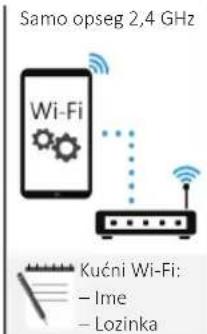
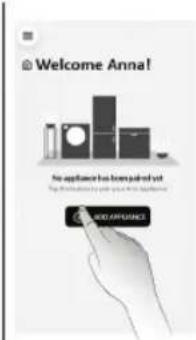
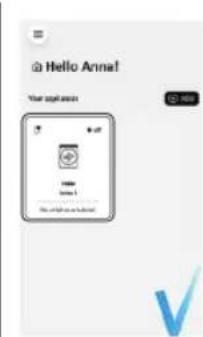
APPLIANCE PAIRING (ON APP)
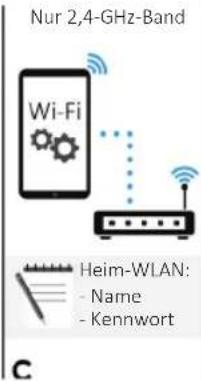
NOTE: The frequency of the home Wi-Fi network has to be set on the 2.4 GHz band. (5 GHz band not allowed).
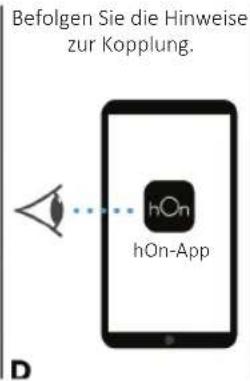
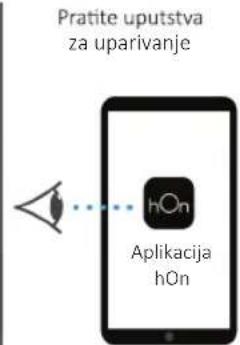
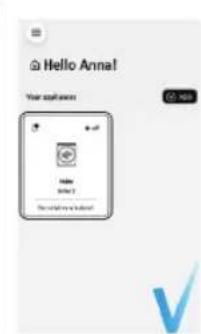
- Download the hOn App on your device by scanning the following QR code or by using the link: go.haier-europe.com/download-app
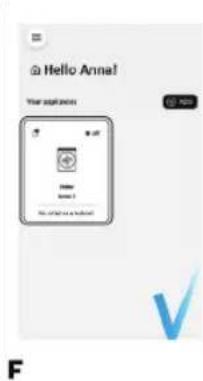
- Create the user profile (or log in) and pair the appliance following the instructions on the device display.
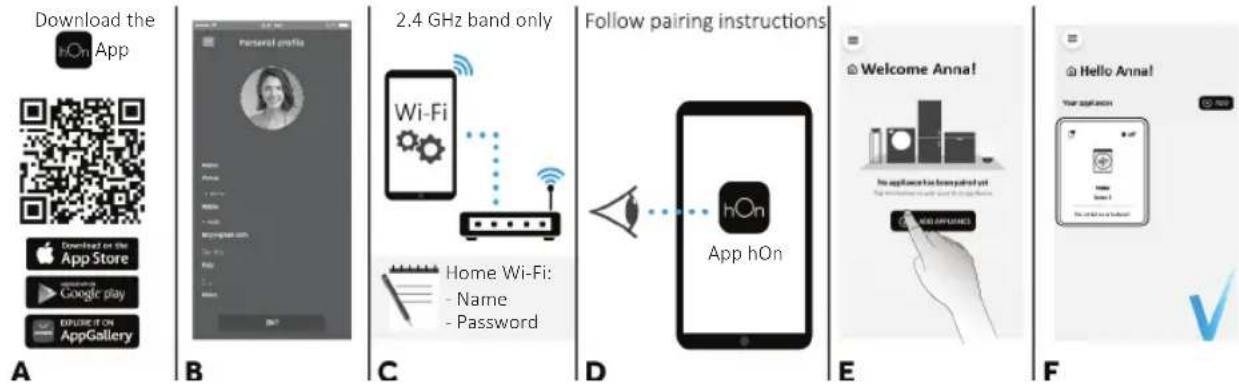
TO ENABLE REMOTE CONTROL
- Close the door and turn the knob to the REMOTE CONTROL (Wi-Fi) position.
- You can now manage your product from the app.
TO DISABLE REMOTE CONTROL
Turn the knob to any position other than REMOTE CONTROL (Wi-Fi), without going through OFF.
If there is a cycle underway, it will continue. From the app it is possible to view the status.

Key lock indicator light (5): The indicator light shows that the keys are locked.

Wash temperature indicator lights (6)
The indicator lights show the washing temperature of the selected programme, which can be changed (where allowed) by the relevant button. If you want to carry out a cold wash, all the indicators must be off.

Spin speed indicator lights (7)
The indicator lights show the spin speed of the selected programme; you can reduce or omit it by the relevant button.


Options indicator lights (8)
The indicator lights show the options that can be selected by the relevant button.


Drying selection indicator lights (9)
The indicators display the degrees of dryness that can be selected by the relevant button:
Automatic drying programmes
EXTRA DRY (suitable for towels, bathrobes and bulky loads).

• IRON DRY (that leaves the laundry ready for ironing).
• CUPBOARD DRY (for items that will be put away without ironing).

Water hardness setting indicator (10)
It lights up during the water hardness setting


Smart Dose indicators (11)
They indicate the activation of the detergent and/or softener autodose.
If the detergent and/or softener have reached the minimum level in the tank, the corresponding lights will flash. It will however still be possible to complete a number of washing cycles.
3. Programmes
- Yes ■ Programmes with PREWASH option available
○ Optionals
/ No
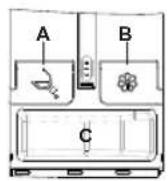
Detergent compartment:
A = for LIQUID washing detergent, B = for softener, C = NO AUTOMATIC DOSING: for
powder detergent or liquid detergent with the specific tray provided.
| PROGRAMME | (MAX.)(depending on model) | °C | DETERGENT | STAIN LEVEL | DELAY START | PREWASH | EXTRA RINSE | HYGIENE+ |
| 8+5kg | 8+6kg | 9+5kg | 9+6kg | (MAX.) | | |
| ECO40-60 | ECO 40-60* | 88 | 9960° | | | | ● | ●/○ | /○ | / | | | |
EC40- | WASH AND DRY* | 5656- | | | | ● | ●/○ | / | | ○ | / | |
 | 20°C* | 88 | 9920° | | | | ● | ●○ | ○ | /○ | / | | |
 | COTTONS* | 88 | 9990° | | | | ● | ●○ | ○ | ○ | ○ | ○ | ○ |
 | MIXED & COLOURED 59* | 88 | 9940° | | | | ● | ●/○ | /○ | / | | | |
 | SYNTHETICS* | 44 | 4.54.5 | 60° | | | ● | ●○ | ○ | ○ | ○ | ○ | ○ |
 | DRAIN & SPIN | - | - | - | -- | | | | /○ | // | / | | |
 | RINSE | - | - | - | -- | | | ● | /○ | // | / | | |
 | RAPID* | 1.5 | 1.51.5 | 1.5 | 40° | | ● | ●○ | ○ | /○ | / | | |
| 2.5 | 2.52.5 | 2.5 | 40° | | ● | ●○ | ○ | /○ | / | | |
| 3.5 | 3.53.5 | 3.5 | 40° | | ● | ●○ | ○ | /○ | / | | |
 | WOOL & HAND WASH* | 22 | 2230° | | | | ● | ●/○ | // | / | | | |
 | STEAM HYGIENE PLUS* | 44 | 4.54.5 | 60° | | | ● | ●/○ | /○ | / | | | |
 | SMART WASH* | 5.5 | 5.55.5 | 5.5 | 30° | | ● | ●○ | ○ | /○ | / | | |
 | DRYING | DRY WOOL | 11 | 11- | - | - | | | | /○ | // | / | | |
 | LOW HEAT | 44 | 4.54.5 | - | - | - | | | /○ | // | / | | |
 | HIGH HEAT | 56 | 56- | - | - | | | | /○ | // | / | | |
 | REMOTE CONTROL (Wi-Fi)Position that you have to select when you want to enable remote control through the App (via Wi-Fi). |
* Programmes enabled for automatic drying.
3.1 - Programmes description
WASHING
| ECO 40-60 | ECO 40-60 | The ECO 40-60 programme is able to clean normally soiled cotton laundry declared to be washable at 40°C or 60°C, together in the same cycle. This programme is used to assess the compliance with the EU Ecodesign legislation (environmentally friendly products design). |
 | WASH AND DRY | The WASH AND DRY cycle is able to clean normally soiled cotton laundry declared to be washable at 40°C or 60°C, together in the same cycle, and to dry it in such a way that it can be immediately stored in a cupboard. This programme is used to assess the compliance with the EU Ecodesign legislation (environmentally friendly products design). |
 | 20°C | This innovative programme, allows you to wash different fabrics and colours together, such as cottons, synthetics and mixed fabrics at only 20°C and provides an excellent cleaning performance. Consumption on this program is about 40% of a conventional 40°C cottons wash. |
 | COTTONS | This programme is suitable for washing coloured cotton garments at 40°C or for ensuring the highest degree of cleanliness for cotton resistant laundry washing at 60°C or 90°C. The final spin is at maximum speed that ensures excellent water removal. The steam function following this program provides an effective hygienic sanitizing, reducing creasing, while making ironing easier. |
 | MIXED & COLOURED 59' | This programme offers you the freedom to wash all kinds of fabrics and non-fading colours together, with a full load, obtaining excellent results in only 59 minutes. With washing at medium temperature, this programme is recommended for laundry that is not particularly dirty. |
 | SYNTHETICS | This programme allows you to wash different type's fabrics and different colours all together. The rotation movement of the drum and the water levels are optimized, both during the washing the rinsing phase. The accurate spin action, ensures a reduced formation of creases in the fabrics. |
 | DRAIN & SPIN | The program completes the drain and a maximum spin. It is possible to delete or reduce the spin through the SPIN SELECTION button. |
 | RINSE | This program performs 3 rinses with an intermediate spin (which can be reduced or excluded by using the appropriate button). It is used for rinsing any type of fabric, for example after a wash carried out by hand. |
 | RAPID | Saving without compromising! This new programme may be used to obtain excellent results while saving water, energy, detergent and time. This option washes at a medium temperature suitable for any kind of fabric. Recommended for small loads and lightly soiled items. |
 | WOOL & HAND WASH | This programme performs a wash cycle dedicated to the wool fabrics that can be washed in a washing machine, the articles to be washed by hand or laundry items made from silk or specified as "Wash as Silk" on the fabric label. If the detergent loaded in the automatic dosing system is not specific for WOOL, it is recommended, for optimal performance and garment protection, to disable the automatic dosing and load a dose of specific detergent directly into the tray. |
 | STEAM HYGIENE PLUS | This washing programme is capable of reaching a temperature of 60°C for an extended period of time, combining the steam action with a powerful rinsing action for thoroughly clean and hygienic clothing. Recommended for cotton fabrics. |
| [YZ38] | SMART WASH | This innovative programme is capable to adapt automatically the cleaning action to the capacity and typology of the load for the best results without any worries. The new InstantMix technology, through a perfect mix of water and detergent, guarantees excellent results at a 30°C. The action of the steam at the end of the cycle helps to deeply relax the fibers of your clothes and makes ironing easier. |
| DRYING |
 | DRY WOOL | Low temperature drying programme, ideal to dry woollen clothes with maximum care and softness, reducing rubbing of fabrics and avoid possible felting. It's suggested to reverse clothing before drying. Timing is related to the amount of the washing and the spin speed selected for the wash. The cycle is suitable for small loads up to 1 kg (3 sweaters). |
 | LOW HEAT | Low temperature drying programme recommended for synthetics and mixed fibres (always refer to the laundry care label). |
 | HIGH HEAT | High temperature drying programme recommended for cottons and linen items (always refer to the laundry care label). |
DRYING
4. Daily use
- Connect the machine to a power supply and water connection (see installation chapter on user manual).
- Prepare the laundry: Sort out clothes according to fabric (cotton, synthetics, wool or silk etc.) and how dirty they are. Check the labels on your garment. Separate white clothes from colored ones. Empty pockets from objects like keys, coins, etc. and remove harder decorative objects.
- Put in the laundry piece by piece avoiding overloads (check the different maximum loadability according to program). Close the door carefully. Make sure that no pieces of laundry are pinched.
- If detergent and/or fabric softener are empty, refill the appropriate compartments of the dispenser as indicated in the section related to the "SMART DOSE" button.
- Select a program by turning the knob, choosing the one that fits the most according to the loaded garments. The display will show the program name, the main options and the duration estimation.
- Add or remove options and change the parameters according to your specific needs.
- Press Start/Pause button to start the program.
- When the cycle is finished, "END" is shown on the display. Switch off the appliance by turning the selector to "OFF". Remove your laundry as soon as possible in order to prevent wrinkles, bad odors and bacteria to proliferate.
5. Care and maintenance
5.1 - General machine cleaning
- Unplug the machine during cleaning and maintenance.
- Use a soft cloth with soap liquid to clean the machine case and rubber components.
- Do not use organic chemicals or corrosive solvents.
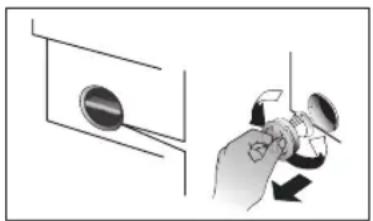
5.2 - Pump filter cleaning
We recommend checking and cleaning the filter 5 or 6 times a year.
- Turn off and unplug the machine. Prepare a flat container to catch leach water.
Unscrew and remove counter-clockwise the pump filter and clean it carefully.
Put the filter back in the machine and close it carefully.
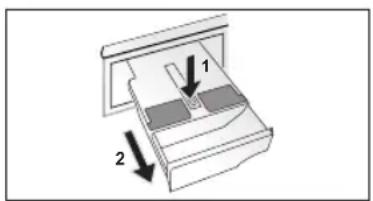
5.3 - Drawer cleaning
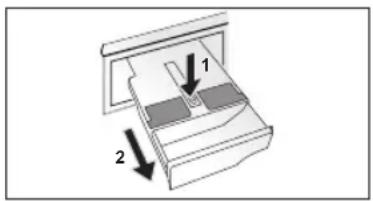
The drawer must be cleaned every time it is refilled or when the type of detergent and fabric softener is changed.
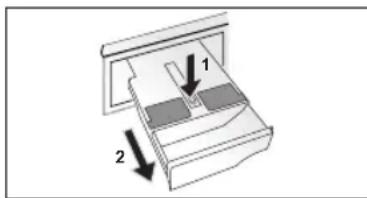
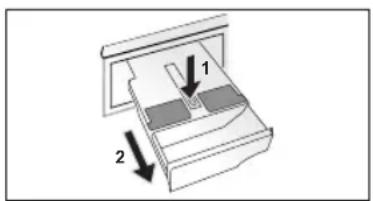
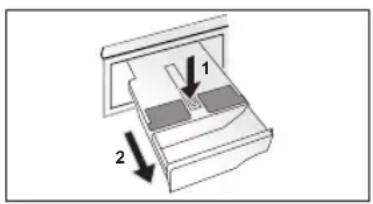
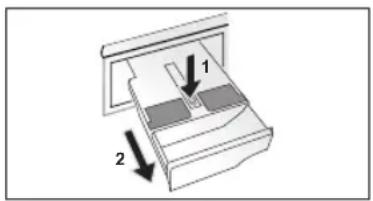
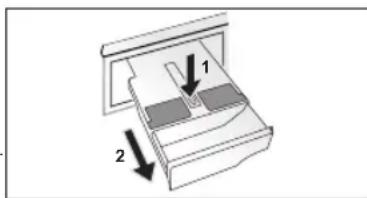
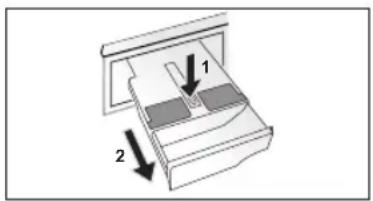
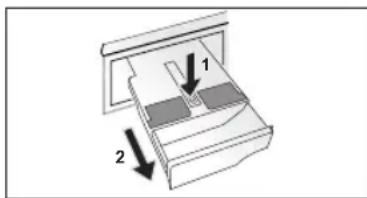
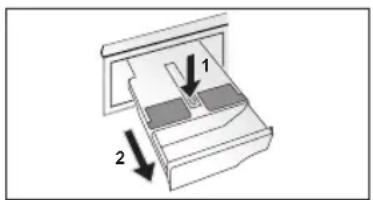
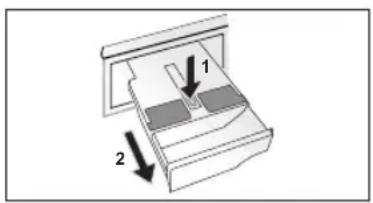
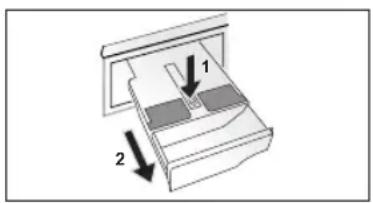
- Pull out the drawer completely as shown in the figure.
- Fill the drawer with hot water and shake it in order to let the water flow in all the compartments.
- Empty the drawer from excess water and reinsert it completely.
DO NOT use acid products (for example vinegar) or aggressive detergents to clean the drawer, in order to avoid damaging the seals and/or internal parts of the appliance.
5.4 - Cleaning the drum
- Remove accidentally washed items, especially metal parts such as pins, coins, etc. from the drum and the groove of the door gasket (rubber ring) because they cause rust stains and damage.
- Use a non-chloride cleaner for removing rust stains. Observe the warning hints of the cleaning agent manufacturer.
- Do not use any hard objects or steel wool for cleaning.
- After the procedure, open the door, use a towel to clean the stains and foam around the gasket, and keep the inside and outside of the gasket clean.
6. Care label
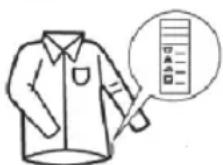
Please check the care labels on your garments, especially if you want to dry them.
Below are the most commonly used drying care symbols:
May be tumble dried. Tumbledry - high heat. Do not tumble dry.
Tumbledry - low heat.
For more information please refer to www.haier-europe.com
Haier
ES
Haier
- Control panel
Buttons
- Control panel
Keys
Water hardness: L1 = LOW L2 = MEDIUM HIGH L3 = HIGH
APPLIANCE PAIRING (IN THE APP)
5.4 - Cleaning the drum
- Control panel
Buttons
APPLIANCE PAIRING (IN THE APP)
5.4 - Drum cleaning
- Control panel
Gumbi
A Start/Pause B Temperature selection button C Centrifuge speed selection D Soil level selection/Quick program selection E Delayed start F Options G Drying selection H Smart Dose (automatic dosing) B+C Safety lock
Temperature selection button (B)
- Control panel
Buttons
- Control panel
Buttons
Start/Pause button (A)
Temperature selection button (B)
- Control panel
Buttons
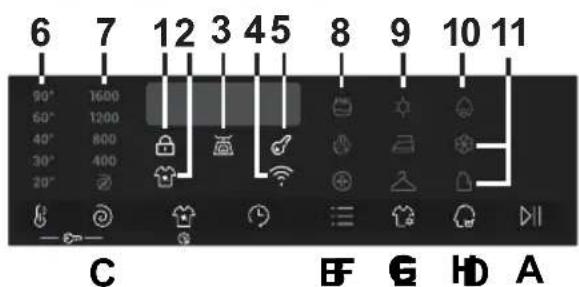
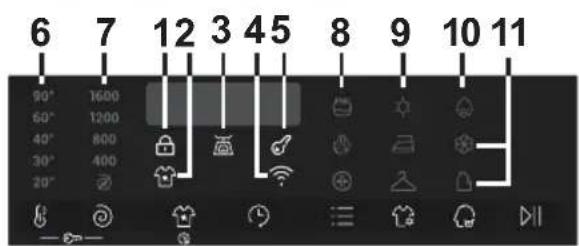
A Start/Pause B Temperature selection C Centrifuge selection D Soil level/Quick programs E Delayed start F Options G Drying selection button H Smart Dose (automatic dosing system) B+C Control lock
Indicator lights
1 Door lock indicator 2 Soil level indicator 3 "AI Weight Sense"* indicator 4 Wi-Fi network indicator
5 Control lock indicator 6 Wash temperature indicators 7 Centrifuge speed indicators 8 Option indicators
9 Drying selection indicators 10 Water hardness setting indicator 11 Smart Dose indicators
B
C
D
E
F
ACTIVATING WIRELESS CONTROL
- Close the door and turn the rotary knob to the WIRELESS CONTROL (Wi-Fi) position. You can now control the product from the app.

DEACTIVATING WIRELESS CONTROL
- Turn the rotary knob to any position other than WIRELESS CONTROL (Wi-Fi), without passing through "OFF". If a cycle was in progress, it will continue. From the app, you can view the product status, but not control it.

Control lock indicator light (5): The indicator light shows that the buttons are locked.

Wash temperature indicator lights (6)
- Control panel
Buttons
5.4 - Drum cleaning
2. Control panel
Buttons
- Control panel
Buttons
- Control panel
Buttons
E
F
ENABLE REMOTE CONTROL
5.4 - Cleaning the drum
- Control panel
Buttons
2. Control panel
C BF 6 HD A
Buttons