H-6439 - Fan Uline - Free user manual and instructions
Find the device manual for free H-6439 Uline in PDF.


User questions about H-6439 Uline
0 question about this device. Answer the ones you know or ask your own.
Ask a new question about this device
Download the instructions for your Fan in PDF format for free! Find your manual H-6439 - Uline and take your electronic device back in hand. On this page are published all the documents necessary for the use of your device. H-6439 by Uline.
USER MANUAL H-6439 Uline
ULINE H-6438, H-6439 HEAVY-DUTY STATIONARY PEDESTAL FAN
1-800-295-5510 uline.com
TOOLS NEEDED
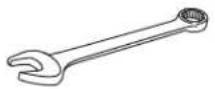
13 mm Wrench
7/16" Wrench
9/16" Wrench
natural_image
Line drawing of a spherical object with radial lines and a central stem, mounted on a circular base (no text or symbols)PARTS
text_image
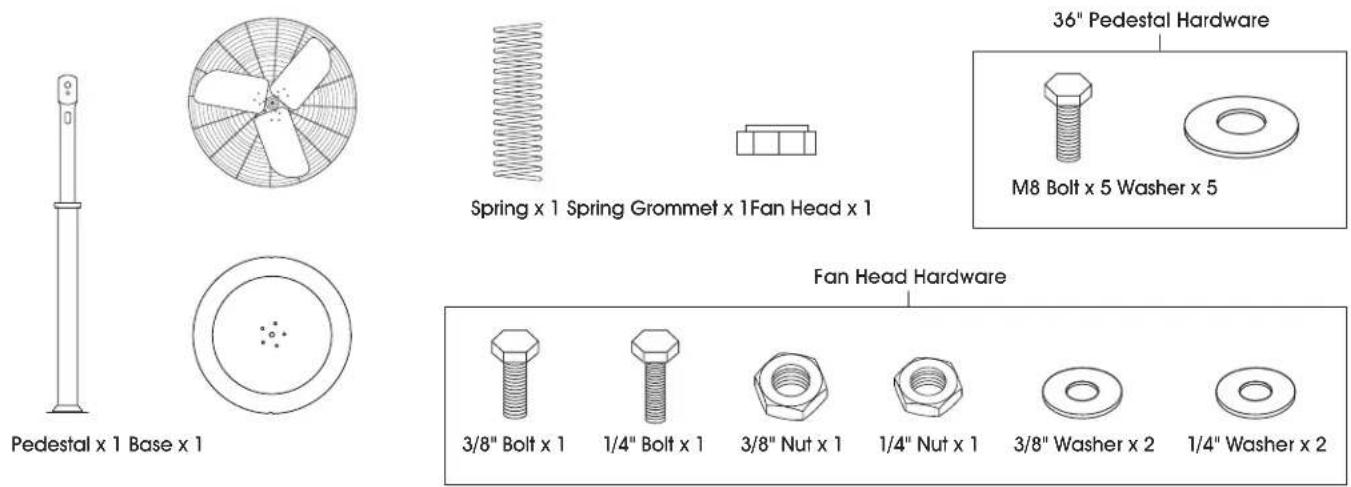
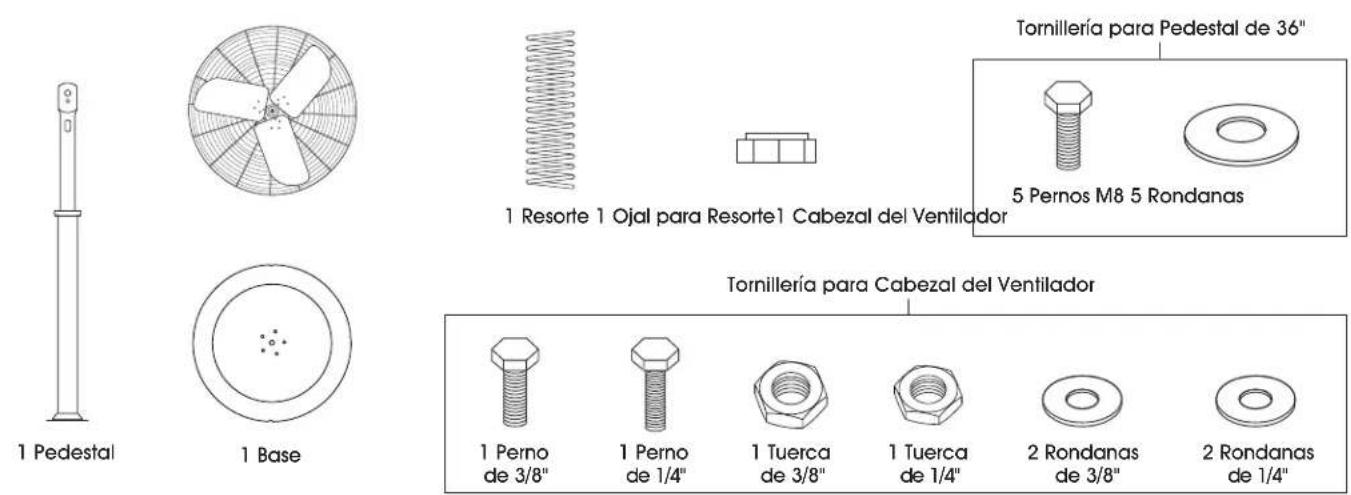
36" Pedestal Hardware M8 Bolt x 5 Washer x 5 Spring x 1 Spring Grommet x 1 Fan Head x 1 Pedestal x 1 Base x 1 Fan Head Hardware 3/8" Bolt x 1 1/4" Bolt x 1 3/8" Nut x 1 1/4" Nut x 1 3/8" Washer x 2 1/4" Washer x 2SAFETY

CAUTION! Read all instructions carefully before attempting to assemble, install, operate or service the product. Failure to comply with instructions could result in personal injury and/or property damage. Using this product for any other purpose than it was intended, or not within the operating specifications in these instructions will void the warranty and may cause damage to the fan or serious injury to personnel.

WARNING! To reduce risk of fire, electric shock or personal injury:
- Do not expose fan to water or rain.
- Do not use this fan with any speed control device.
- The power source must conform to the electrical requirements of the fan.
-
The power cord has a three-prong grounded plug that must be plugged into a GFCI (Ground Fault Circuit Interrupter) protected circuit.
-
Do not alter the plug to remove the grounding prong and never use a two-prong adapter.
- Replace damaged or worn power cords immediately.
- Where possible, avoid using extension cords. If one must be used, the cord must be UL listed, be the proper size (Amp rating) and have three-prong grounded connections.
- Before operating this fan, check for worn, damaged or missing parts and replace or repair as needed.
- Disconnect from power source before servicing.
SAFETY CONTINUED
- This fan is intended for general use only. Do not use near hazardous or explosive materials or vapors.
- Never insert fingers or any other objects through the guards when fan is in operation.
- Never operate fan without guards in place.
- Unplug the fan before moving from one location to another.
- All warning and caution labels must be kept in good condition and be replaced if not clearly readable.
- Carefully read all safety messages in these instructions and on equipment safety labels.
- Follow recommended precautions and safe operating practices.
- Certain fans have guards that are not OSHA compliant. These units are designed to be intrinsically safe; however, never allow children near fan when in operation. It is recommended these fans be installed greater than 7' from the ground.
- Fan must be located in an area that allows for adequate air flow around the fan.
- Starving the fan of air may cause the motor to overheat and trigger the unit to shut off.
- Fan motor is thermally protected and will shut off if overheated. Turn unit off and allow motor to cool before restarting.
- Before operating, always check fan for loose or damaged parts. Inspect power cord for damage. Never use fan without safety guards attached.
- Operate only on 120 volt 60 Hz (cycle) current with a minimum 15 amp circuit.
- When used with an extension cord, use a UL-listed, 14 AWG cord equipped with a receptacle to accept the three-prong grounded plug on the fan's power cord and a 3-prong grounded plug for the power source. If extension cord is longer than 50', consult with cord manufacturer for proper cord AWG rating. Always keep power cord and extension cords away from heat, oil and sharp edges. Inspect cords periodically and replace if damaged.
- For general ventilating use only. Do not use to exhaust hazardous or explosive materials and vapors. Never use the fan in spaces which contain products such as gasoline, solvents, paint thinners, dust particles, volatile or airborne combustibles, or any unknown chemicals.
STOP
WARNING! To reduce the risk of fire, electric shock or injury to persons, do not use replacement parts that have not been recommended by the manufacturer (e.g. parts made at home using a 3D printer).
- To reduce the risk of electric shock and injury to persons, do not use in a window.
- Do not move the fan while operating. Moving fan during operation can cause blade damage.
- To guard against electric shock while operating, do not allow fan to come in contact with other grounded objects such as pipes, radiators, etc. Risk of fire, electric shock or personal injury when performing service or maintenance. Unplug or disconnect the fan from the power supply before servicing.
!
CAUTION! Automatically operated device. To reduce the risk of injury, disconnect from power source before servicing.

WARNING: This product can expose you to chemicals, including lead and lead compounds, which are known to the State of California to cause cancer and birth defects or other reproductive harm. For more information go to www.P65Warnings.ca.gov.
ASSEMBLY
PEDESTAL ASSEMBLY
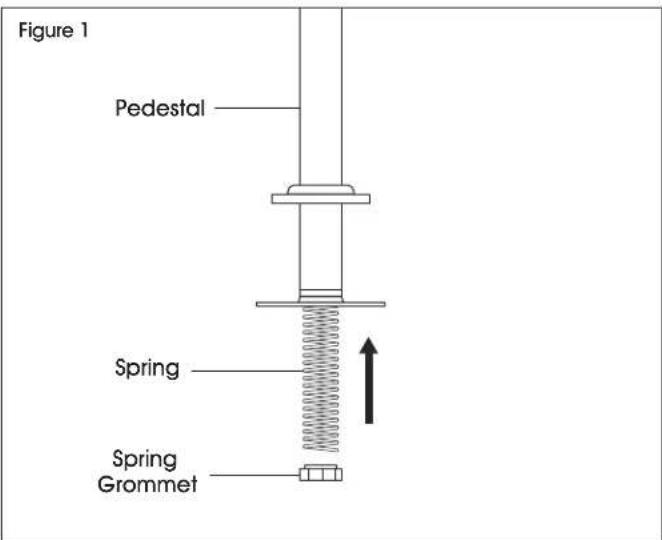
- Insert the spring and spring grommet into the bottom of the pedestal. (See Figure 1)
text_image
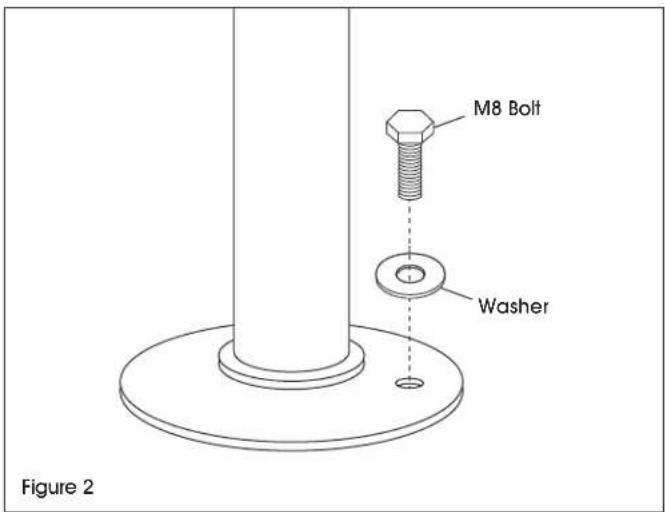
Figure 1 Pedestal Spring Spring Grommet- Align the five holes on the bottom of the pedestal with the center of the pedestal base. Insert five M8 bolts and flat washers through the pedestal base. Secure using a 13 mm wrench. (See Figure 2)
text_image
M8 Bolt Washer Figure 2ATTACHING FAN TO PEDESTAL
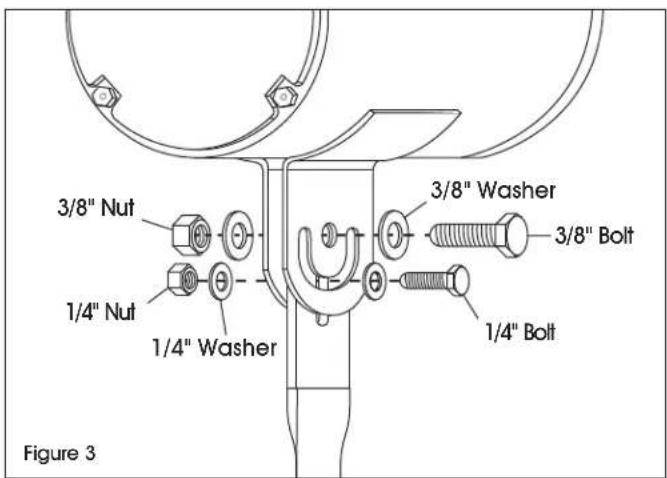
- Place the pedestal mount between the fan head mounting brackets. (See Figure 3)
- Insert the 3/8" bolt and 3/8" washer through the top pedestal mount hole and center fan head mounting bracket hole. Then insert a 3/8" washer and 3/8" locknut and secure using a 9/16" wrench.
- Insert the 1/4" bolt and 1/4" washer through the slot feature of the pedestal mount and fan head mounting bracket. Then insert a 1/4" washer and 1/4" locknut and secure using a 7/16" wrench.

CAUTION! Nuts may loosen over time. It is important to check and tighten fasteners frequently.

CAUTION! Inspect fan components and fasteners frequently for corrosion. Replace any corroded fasteners or parts.
text_image
3/8" Nut 1/4" Nut 1/4" Washer 3/8" Washer 3/8" Bolt 1/4" Bolt Figure 3ASSEMBLY CONTINUED
REMOVING MOTOR DRAIN PLUGS
After installing the fan, remove the motor drain plug located at the lowest point of the motor. (See Figure 4)

NOTE: Failure to remove the drain plug may allow condensation to build up inside the motor, reducing motor life, and will void the warranty. Do not remove drain plugs on top side of the motor.

text_image
Figure 4 Drain PlugPULL CHAIN SWITCH REPLACEMENT
TOOLS NEEDED

natural_image
Illustration of three different types of pliers and a screwdriver tool (no text or symbols present)Flathead Screwdriver Pliers Wire Cutter
PARTS

natural_image
Line drawings of four different mechanical components: a chain, a coiled spring, a cylindrical component with textured handle, and a conical tool (no text or symbols)3-Port Electrical Chain Switch x 1 Rope Pull Chain Extension x 1 Knurled Screw x 1 Wire Nut x 1
INSTRUCTIONS
REMOVAL OF BAD CHAIN SWITCH
- Unplug fan from power source.
-
Remove electrical box cover on motor with a 1/4" nut driver or flathead screwdriver.
-
Remove chain switch nut with fingers or pliers by softly turning. Save the knurled screw knob, as it may be used during installation of new switch.
- Using a wire cutter, cut the existing wires connected to the bad chain switch close to the switch. This ensures the wires are still long enough to connect the new switch.
INSTRUCTIONS CONTINUED
CONNECTING NEW CHAIN SWITCH
- Strip about 1/4" of insulation off of wire ends for a clean connection to new switch.
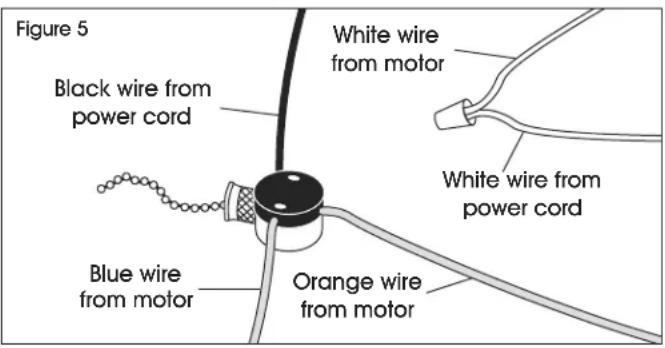
- Connect white wire from the motor and white wire from power cord together with a wire nut. If the existing motor already has white wires connected, skip this step and leave white wires connected. (See Figure 5)
text_image
Figure 5 Black wire from power cord White wire from motor White wire from power cord Blue wire from motor Orange wire from motor- Push orange wire from motor into port number one (high speed). It should lock into place
- Push blue wire from motor into port number two (low speed). It should lock into place.
- Push black wire from power cord to port "L" (line). It should lock into place.
- Reassemble fan by reversing steps 1-4 of the removal instructions.

NOTE: Lines to ports one and two are interchangeable. Ports one and two control speeds and the above instructions explain how to wire the replacement switch to factory specifications, but can be changed as needed.
MAINTENANCE

WARNING! Disconnect power before cleaning or maintaining fan in order to prevent serious injury or death.
- Some maintenance procedures may require removal of fan guarding.
• After servicing, guards and other safety devices must be reinstalled to their original condition. -
Excessive dust and debris may cause overheating and reduced fan performance.
-
Keep guards, motor and blades clean by vacuuming or wiping with a damp cloth.
- Do not use harsh chemicals or cleaners to clean any part of the fan.
- Pressure washing the unit will void the warranty.
- Sealed motor bearings are pre-lubricated and do not require servicing.
TROUBLESHOOTING
| OPERATING ISSUE CAUSES RECOMMENDATIONS | ||
| Fan does not operate. | Fan is not plugged in. Blown fuse or tripped circuit breaker. Defective on/off switch. Defective motor. Fan blade contacting housing. | Check power cord connection. Replace fuse or reset circuit breaker. Repair or replace switch. Repair or replace motor. Realign fan blade in fan housing. |
| Insufficient airflow. | Guards excessively dirty. Blade and motor excessively dirty. | Clean inlet and outlet guards. Clean blade and motor. |
| Excessive noise. | Fan blade contacting housing. Defective motor bearings. Loose guards. | Realign fan blade in fan housing. Repair or replace motor. Tighten guard fasteners. |
| Excessive vibration. | Damaged fan blade. Motor shaft is bent. Motor is loose. | Replace fan blade. Repair or replace motor. Realign if necessary and tighten fasteners. |
ULINE H-6438, H-6439
VENTILADOR DE PEDESTAL FIJO DE USO PESADO
800-295-5510
uline.mx
natural_image
Diagram of a spherical object with radial lines and a central rod, mounted on a circular base (no text or symbols)PARTS
natural_image
Line drawings of three different types of pliers and a screwdriver (no text or symbols)natural_image
Simple line drawing of a mechanical component emitting a chain of wires (no text or symbols)natural_image
Simple line drawing of a coiled snake with a bandage (no text or symbols)natural_image
Diagram of a spherical object with radial lines and a central stem, mounted on a circular base (no text or symbols)PIÈCES

Pied x 1
Base x 1