DO2625CG - Microwave Oven DOMO - Free user manual and instructions
Find the device manual for free DO2625CG DOMO in PDF.


User questions about DO2625CG DOMO
0 question about this device. Answer the ones you know or ask your own.
Ask a new question about this device
Download the instructions for your Microwave Oven in PDF format for free! Find your manual DO2625CG - DOMO and take your electronic device back in hand. On this page are published all the documents necessary for the use of your device. DO2625CG by DOMO.
USER MANUAL DO2625CG DOMO
natural_image
Front view of a white microwave oven with control panel and digital display (no visible text or symbols)GARANTIEVOORWAARDEN
CONDITIONS DE GARANTIE
This appliance has a two year warranty period. During this period the manufacturer is responsible for any failures which are the direct result of construction failure. When these failures occur the appliance will be repaired or replaced if necessary. The warranty will not be valid when the damage to the appliance is caused by wrong use, not following the instructions or repairs executed by a third party. The warranty will only be valid if the warranty application has been completed by the dealer at the time of purchase. All parts, which are subject to wear, are excluded from the warranty.
Type nr. Apparaat
RECYCLING INFORMATIONEN
RECYCLING INFORMATION
The symbol ☒ on the product or on its packaging indicates that this product may not be treated as household waste. Instead it shall be brought to the applicable collection point for recycling of electrical and electronic equipment. By ensuring this product is disposed of correctly, you will help prevent potential negative consequences for the environment and human health, which could otherwise be caused by inappropriate waste handling of this product. For more detailed information about recycling of this product, please contact your local city office, your household waste disposal service or the shop where you purchased the product.
If the supply cord is damaged, it must be replaced by manufacturer of its service agent or a similarly qualified person in order to avoid a hazard.
ZÁRUČNÍ LIST
text_image
A F R R G E D C BINSTALLATIE VAN HET DRAAIPLATEAU
VOLUME DU FOUR : 25 L
DIAMETRE PLATEAU TOURNANT : 31,5 CM
DIMENSIONS EXTERIEURES (L X P X H) : 511 x 410 x 285 MM
POIDS NET : 17,3 KG
MESURES DE SECURITE IMPORTANTES
text_image
A F R D R G E D C BINSTALLATION DU PLATEAU TOURNANT
FASSUNGSVERMÖGEN OFEN : 25 L
text_image
A F D E D C B GINSTALLATION DES DREHTELLERS
Do not attempt to operate this oven with the door open since this can result in harmful exposure to microwave energy. It is important not to break or tamper with the safety interlocks.
Do not place any object between the oven front face and the door or allow soil or cleaner residue to accumulate on sealing surfaces.
WARNING: If the door or door seals are damaged, the oven must not be operated until it has been repaired by a competent person.
If the apparatus is not maintained in a good state of cleanliness, its surface could be degraded and affect the lifespan of the apparatus and lead to a dangerous situation.
SPECIFICATIONS
Model: DO2625CG
Rated Voltage: 240V – 50Hz
Rated Input Power(Microwave): 1450W
Rated Output Power(Microwave): 900W
Rated Input Power(Grill): 1000W
Rated Input Power(Convection): 2000W
Oven Capacity: 25L
Turntable Diameter: 31,5 CM
External Dimensions(LxWxH): 511 X 410 X 285 MM
Net Weight: Approx. 13.4 kg
IMPORTANT SAFETY INSTRUCTIONS
To reduce the risk of fire, electric shock, injury to persons or exposure to excessive microwave oven energy when using your appliance, follow basic precautions, including the following:
- Warning: Liquids and other foods must not be heated in sealed containers since they are liable to explode.
- Warning: It is hazardous for anyone other than a competent person to remove a cover wich gives protection against exposure to microwave energy.
- Warning: Only allow children to use the oven without supervision when adequate instructions have been given so that the child is able to use the oven in a safe way and understand the hazards of improper use.
- Warning: When the appliance is operated in the combination mode, children should only use the oven under adult supervision due to the temperatures generated.
• (only for series) - Only use utensils suitable for use in microwave ovens.
- The oven should be cleaned regularly and any food deposits should be removed.
- Read and follow the specific: „PRECAUTIONS TO AVOID POSSIBLE
EXPOSURE TO EXCESSIVE MICROWAVE ENERGY".
- When heating food in plastic or paper containers, keep an eye on the oven due to the possibility of ignition.
- If smoke is observed, switch off or unplug the appliance and keep the door closed in order to stifle any flames.
- Do not overcook food.
- Do not use the oven cavity for storage purposes. Do not store items, such as bread, cookies, etc. inside the oven.
- Remove wire twist-ties and metal handles from paper or plastic containers/bags before placing them in the oven.
- Install or locate this oven only in accordance with the installation instructions provided.
- Eggs in the shell and whole hard-boiled eggs should not be heated in microwave ovens since they may explode, even after microwave heating has ended.
- Use this appliance only for its intended uses as described in manual. Do not use corrosive chemicals or vapors in this appliance. This oven is especially designed to heat. It is not designed for industrial or laboratory use.
- If the supply cord is damaged, it must be replaced by the manufacturer, its service agent or similarly qualified persons in order to avoid a hazard.
- Do not store or use this appliance outdoors.
- Do not use this oven near water, in a wet basement or near a swimming pool.
- The temperature of accessible surfaces may be high wne the appliance is operating. The surfaces are liable to get hot during use. Keep cord away from heated surface, and do not cover any evnets o nthe oven.
- Do not let cord hang over edge of table or counter.
- Failure to maintain the oven in a clean condition could lead to deterioration of the surface that could adversely affect the life of the appliance and possibly result in a hazardous situation.
- The contents of feeding bottles and balby food jars shall be stirred or shaken and the temparture checked before consumption, in order to avoid burns.
- Microwave hetaing of beverages can result in delayed eruptive boiling, therefore take care when handling the container.
- The appliance is not intended for use by persons (including children) with reduced physical, sensory or mental capabilities, or lack of experience and knowledge, unless they have been given supervision or instructions concerning the use of the appliance by a person responsible for their safety.
- Children should be supervised to ensure that they do not play with the appliance.
- the appliances are not intended to be operated by means of an external timer or separate remote-control system.
- Warnin : ensure that the appliance is switched off before replacing the lamp to avoid the possibility of electric shock.
- Accessible parts may become hot during use. Young children should be kept away. A steam cleaner is not to be used.
• Surface of a storage drawer can get hot.
- Do not use harsh abrasive cleaners or sharp metal scrapers to clean the oven door glass since they caon scratch the surface, which may result in shattering of the glass.
- During use the appliance becomes hot. Care should be taken to avoid touching heating elements inside the oven.
- The door ort he outer surface may get hot when the appliance is operating.
HOUSEHOLD USE ONLY
TO REDUCE THE RISK OF INJURY TO PERSONS
- Touching some of the internal components can cause serious personal injury or death. Do not disassemble this appliance.
- Improper use of the grounding can reslut i electric shock. Do not plug into an outlet until applause is properly installed and grounded.
- Be sure to unplug the appliance from the power supply.
- Clean the inside of the oven after using with a slightly damp cloth.
- Clena the accessories in the usual way in soapy water
- The door frame and seal and neighbouring parts must be lceaned carefully with a damp cloth when they are dirty.
- This appliance must be grounded. In the event of an electrical short circuit, grounding reduces the risk of electric shock by providing an escape wire for the electric current. This appliance is equipped with a cord having a grounding wire with a grounding plug. The plug must be plugged into an outlet that is properly installed and grounded. Consult a qualified electrician or serviceman if the grounding instructions are not completely understood or if doubt exists as to whether the appliance is properly grounded. I fit is necessary to use an extension cord, use only a 3-wire extension cord.
- A short power-supply cord is provided to reduce the risks resulting from becoming entangled in or tripping over a longer cord.
- If a long cord set or extension cord is used, the marked electrical rating of the cord set or extension cord should be at least as great as the electrical rating of the appliance. The extension cord must be agroundingtype 3-wire cord.
Teh long cord should be arranged so that it will not drape over the counter top or tabletop where it can be pulled on by children or tripped over unitentionally.
UTENSILS
Caution : it is hazardous for anyone other than a competent person to carry out any service or repair operation that involves the removal of a cover which gives protection agains exposure to microwave energy.
There may be certain non-metaallic utensils that are not safe to use for microwaving. If in doubt, you can test the utensil in question following the procedure below :
fill a microwave-safe container with 1 cup of cold water (250 ml) along with the utensil in question.
Cook on maximum power for 1 minute.
Carfeully feel the utensil. If the empty utensil is warm, do not use it for microwave cooking.
Do not exceed 1 minute cooking time.
Materials you can use in microwave oven :
- Aluminum foil : Shielding only. Small smooth pieces can be used to cover thin parts of meat or poultry to prevent overcooking. Arcing can occur if foil is too close to oven walls. The foil should be at least 2,5 cm away from the oven walls.
- Browning dish : follow manufacturer's instructions. The bottom of browning dish must be at least 5 mm above the turntable. Incorrect usage may cause the turntable to break.
- Dinnerware: microwave-safe only. Follow manufacturer's instructions. Do not use cracked or chipped dishes.
- Glass jars : always remove lid. Use only to heat food until just warm. Most glass jars are not heat resistant and may break.
- Glassware : heat-resistant oven glass ware only. Make sure there is no metallic trim. Do no use cracked or chipped dishes.
- Oven cooking bags: follow manufacturer's instructions. Do not close with metal tie. Make slits to allow steam to escape.
- Plastic : microwave-safe only. Follow the manufacturer's instructions. Should be labeled „microwave safe“. Some plastic containers soften, as the food insdie gets hot. „boiling bags“ and tightly colsed plastic bags should be slit, pierced or vented as directed by package.
- Plastic wrap : microwave-safe only. Use to cover food during cooking to retain moisture. Do not allow plastic wrap to touch food.
- Themrometers: microwave-safe only.
Materials to be avoided in microwave oven
- Aluminum tray : may cause arcing. Transfer food into a microwave-safe dish.
- Food carton with metal handle : may cause arcing. Transfer food into microwave-safe dish.
- Metal or meatl-trimmed utensils : metal shields the food from microwave energy. Metal trim may cause arcing.
- Metal twist ties: may cause arcing and could cause a fire in the oven.
• Paper bags : may cause a fire in the oven.
- Plastic foam : plastic foam may melt or cotaminate the liquid inside when exposed to high temperature.
- Wood : wood will dry out when used in the microwave oven and may split or crack.
SETTING UP YOUR OVEN
Remove the oven and all materials from the carton and oven cavity. Your oven comes with the following accessories :
- Glass tray
- Turntable ring assembly
- Instruction manual
- Grill rack
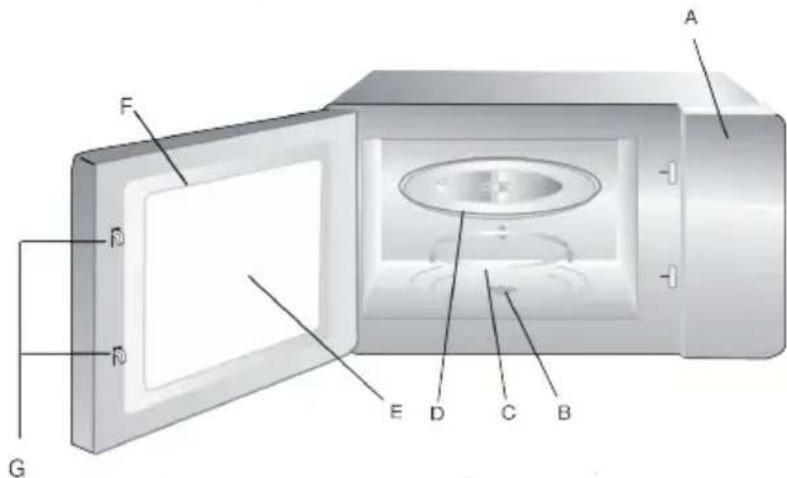
PARTS
A. Control panel
B. Turntable shaft
C. Turntable ring assembly
D. Glass tray
E. Observation window
F. Door assembly
G. Safety interlock system
text_image
A F D R G E D C BTURNTABLE INSTALLATION
Never place the glass tray upside down. The glass tray should never be restricted. Both glass tray and turntable ring assembly must always be used during cooking.
If glass tray or turntable ring assembly cracks or breaks, contact your nearest authorized service center.
COUNTERTOP INSTALLATION
Remove all packing materials and accessories. Examinet he oven for any damage such as dents or broken door. Do not install if oven is damaged.
Cabinet : remove any protective film found on the microwave oven cabinet surface.
Do not remove the light brown mica cover that is attached to the oven cavity to protect the magnetron.
INSTALLATION
Select a level surface that provides enough open space fort he intake and/or outlet vents.
A minimum clearance of 7,5 cm is required between the oven and any adjacent walls. One side must be open.
Leave a minimum of 30 cm clearance above the oven.
Do not remove the legs from the bottom of the oven.
Blocking the intake and/or outlet openings can damage the oven.
Place the oven as far away from radios and TV as possible. Operation of microwave oven may cause interference to your radio or TV reception.
Plug your oven into a standard household outlet. Be sure the voltage and the frequency is the same as the vlotage and the frequency on the rating label.
Warning : Do not install oven over a range cooktop or other heat-producing appliance. If installed near or over a heat source, the oven could be damaged and the warranty would be void.
The accessible surface may be hot during operation.
This microwave once applies modern electronic control to adjust cooking parameters to meet your needs better for cooking.
1. Clock setting
When the microwave oven is electrified, the oven will display ,,0:00“, buzzer will ring once.
- Press „Clock/Pre-Set “ to choose 12-hour or 24-hour
- Turn the larger round knob to adjust the hour figures, the input time should be within 0--23(24-hour) or 1--12(12-hour).
- Press “Clock/Pre-Set”, the minute figures will flash.
- Turn the large round knob to adjust the minute figures, the input time should be within 0--59.
- Press “Clock/Pre-Set “ to finish clock setting. “:” will flash.
Note:
- If the clock is not set, it would not function when powered.
- During the process of clock setting, if you press “Stop/Clear”, the oven will go back to the previous status automatically.
2. Microwave Cooking
Press “ Microwave “several times to select the function you want. Turn the large round knob to adjust the cooking time. Press “ Start/+30Sec./Confirm “ to start cooking.
Example: If you want to use 80% microwave power to cook for 20 minutes, you can operate the oven as the following steps.
1) Press “ Microwave “ once, the LED will display “P100”, “ “ indicator will be lighted.
2) Press “Microwave” once again to choose 80% power, the LED will display “P80”.
3) Turn the large round knob to adjust the cooking time until the oven display"20:00"(The maximum setting time is 95 minutes.)
4) Press “ Start/+30Sec./Confirm “ to start cooking, “:” will light and the “ “ indicator will flash.
| Press instructions Display Microwave power | |
| 1 P100 100 % | |
| 2 P80 80 % | |
| 3 P50 50 % | |
| 4 P30 30 % | |
| 5 P10 10 % | |
NOTE: the step quantities for the adjustment time of the coding switch are as follow:
0---1 minute : 5 seconds
1---5 minutes : 10 seconds
5---10 minutes : 30 seconds
10---30 minutes : 1 minute
30---95 minutes : 5 minutes
3. Pre-set Function
1) Set the clock first. (Consult the instruction of clock setting.)
2) Input the cooking program. Three stages can be set at most. Defrosting should not be set here. Auto menu and memory cooking cannot be set as one of multi-section in delay cooking function.
Example: If you want to use 80% microwave power to cook for 15 minutes, you can operate the oven as the following steps.
- Press “Microwave” twice to choose 80% microwave power.
-.Turn the large round knob to select 15 minutes.
- Be careful! Please do not press “Start/+30Sec./Confirm” to start cooking.
- Press “Clock/Pre-Set” to display the current time, and hour figures will flash.
- Turn the large round knob to adjust the hour figures, the input time should be within 0--23(24-hour) or 1--12(12-hour).
- Press “Clock/Pre-Set”, the minute figures will flash.
- Turn the large round knob to adjust the minute figures, the input time should be within 0--59.
- Press “Start/+30Sec./Confirm “ to finish setting. “:” will stop flashing, buzzer will ring twice when the time arrives, then cooking will start automatically.
4.Grill Cooking
- Press the “Grill/Conv./Combi. “key once to select grill function, the LED will display “G-1”, at the same time ““ will be lighted.
- Press the “Start/+30Sec./Confirm” key to confirm.
- Turn the large round knob to adjust the cooking time. (The maximum setting time is 95 minutes.)
- Press the “Start/+30Sec./Confirm” key to start cooking. The “will flash,”:” will be lighted.
Note: If half the grill time passes, the oven sounds twice to tell you to input the time.
You can just leave it continue cooking. But in order to have a better effect of grilling food, you should turn the food over, close the door, and then press
“Start/+30Sec./Confirm” to continue cooking.
5. Convection Cooking(with preheating)
The convection cooking can let you to cook the food as a traditional oven. Microwave is not used. It is recommended that you should preheat the oven to the appropriate temperature before placing the food in the oven.
- Press the “Grill/Conv./Combi.” key once, and turn the large round knob to select convection function, the LED will display “140”. The temperature can be changed by turning. The convection temperature is from 140 degrees to 230 degrees.
- Press the “Start/+30Sec./Confirm” key to confirm the temperature you need.
- Press the “Start/+30Sec./Confirm” key to start preheating. The temperature figure will flash when reach the preset temperature, five minutes later, the buzzer will ring twice to remind you to put the food into the oven.
- Turn the large round knob to adjust the cooking time. (The maximum setting time is 95 minutes.)
- Press the “Start/+30Sec./Confirm” key to start cooking.
6. Convection Cooking(without preheating)
- Press the “Grill/Conv./Combi. “key once, and turn the large round knob to select convection function and temperature, the convection temperature is from 140 degrees to 230 degrees.
- Press the “Start/+30Sec./Confirm” key to confirm the temperature.
- Turn the large round knob to adjust the cooking time. (The maximum setting time is 95 minutes.)
- Press the “Start/+30Sec./Confirm” key to start cooking.
7. Combination Cooking
- Press the “Grill/Conv./Combi.” key once, and turn “” to select the combination function, the LED will display “C-1”, “C-2”, “C-3” or “C-4”. At the same time, the related indicator will light.
- Press the “Start/+30Sec./Confirm” key to confirm the way of combination.
- Turn “ “ to adjust the cooking time. (The maximum setting time is 95 minutes.)
- Press the “Start/+30Sec./Confirm” key to start cooking.
8. Defrost by weight
- Press “Defrost” pad 1 time, the LED will display “def-1”.
- Turn the large round knob to select the weight of food. The weight input should be 100-2000g.
- Press “Start/+30Sec./Confirm” key to start defrosting and the surplus cooking time will be displayed.
9. Defrost by Time
- Press “Defrost “key twice, “def-2” will flash. (Press”Defrost” several times to select the weight defrosting function.)
- Turn the large round knob to select the cooking time. The maximum setting time is 95 minutes.
- Press “Start/+30Sec./Confirm” key to start defrosting and the surplus cooking time will be displayed.
10. Auto Menu
Example: If you want to use “Auto Menu” to cook fish of 250g.
- Turn large round knob right, the oven display “A2”.
- Press “Start/+30Sec./Confirm” key to select the function you want.
- Turn “” to select the weight of fish.
- Press “Start/+30Sec./Confirm” key to start.
appendix of the automatic menu procedure
Note: Cake menu is under convection cooking with 160 -warm-up function, and you should preheat first following the auto menu operation, when the oven reaches the temperature, it will stop working and sound to remind opening the door to put cake in, then press “Start/+30Sec./Confirm” to start cooking.
| Menu order | weight Display | ||
| A1 vegetables 1 | 150g | 350g | 150 |
| 500g | 350 | ||
| 500 | |||
| A2 fish 2 | 150g | 250g | 150 |
| 350g | 250 | ||
| 450g | 350 | ||
| 650g | 450 | ||
| 650 | |||
| A3 meat 3 | 150g | 300g | 150 |
| 450g | 300 | ||
| 600g | 450 | ||
| 600 | |||
| A4 pasta 4 50 (+ water 450g) | 100 (+ water 800g)150(+water 1200g) | 50100150 | |
| A5 soup 5 200 ml | 400 ml600 ml | 200400600 | |
| A6 chicken 6 500g | 750g1000g1200g | 50075010001200 | |
| A7 bread 7 50g | 100g150g | 50100150 | |
| A8 Cake 8 475g 475 | |||
| A9 pizza 9 200g | 300g400g | 200300400 | |
| A10 potato 10 200g | 400g600g | 123 |
11. Speedy Microwave Cooking
- In waiting state, turn the large round knob left to select the cooking time, press “Start/+30Sec./Confirm” key to cook in 100% power level.
Note: this cannot be set as one of the multi-stage.
12. Auto Reheat
- Press “Auto Reheat “key ,the oven display “h-1”.
(press"Auto Reheat " repeatedly to select the variety of reheating function) - Turn the big round knob to select the weight.
- Press “Start/+30Sec/Confirm” key to start.
| Functie Display gewicht | ||
| h-1 (auto-reheat) 150 | 250 | 150g |
| 350 | 250g | |
| 450 | 350g | |
| 600 | 450g | |
| h-2 (plate) 250 | 350 | 250g |
| 450 | 350g | |
| h-3 (beverage) 1 | 2 | 450g |
| 3 | 240g | |
| h-4 (roll/muffin) 1 | 2 | 480g |
| 3 | 720g | |
| 2 | 70g | |
| 3 | 140g | |
| 3 | 210g | |
13. Speedy Cooking
When the oven is in the waiting states, Press “Start/+30Sec./Confirm” key to start cooking food with full microwave power for 30 seconds. The cooking time will add 30 seconds by every press “Start/+30Sec./Confirm” key, and the maximum setting time is 95 minutes.
When the oven is in microwave/grill/convection/combination cooking states, press “Start/+30Sec./Confirm” key to add 30 seconds.
Note: Be invalidation under the situation of Defrost/Auto menu/Multi-stage cooking.
14.Multi-Stage Cooking
Three stages of cooking can maximum be set. If one of the stages is defrosting, it should be put in the first stage. The buzzer will ring once after each stage and the next stage will begin.
Note: Auto menu cannot be set as one of multi-stage cooking
Example: If you want to cook the food with 100% microwave power for 10 minutes+80% microwave power for 15 minutes. Do it as following:
- Press “Microwave” once to choose 100% microwave power;
- Turn the large round knob to adjust the cooking time of 10 minutes;
- Press “Microwave” twice to choose 80% microwave power;
- Turn “” to adjust the cooking time of 15 minutes;
- Press "Start/+30Sec./Confirm" to start cooking.
15. Inquiring Function
- During cooking state, press “Grill/Conv./Combi. “,” Microwave”, the current power will be displayed for 3 seconds. After three seconds, the oven will turn back to the former state;
- In pre-set state, press “Clock/Pre-Set” to inquire the time for delay start cooking. The pre-set time will flash for 2-3 seconds, then the oven will turn back to the clock display.
- In cooking state, press “Clock/Pre-Set” to inquire the current time. The time will flash for 2-3 seconds, then the oven will turn back to the clock display.
16. Lock-out Function for Children
Lock: In waiting state, press “Stop/Clear” for 3 seconds, there will be a long “beep” denoting entering to the children-lock state and LED displays 0:00 or the current time, Lock quitting: In locked state, press “Stop/Clear” for 3 seconds, there will be a long “beep” denoting that the lock is released, and the locked indicator will disappear.
17. Cooking End Reminding Function
When cooking ends, there will be 5 “beep” which is reminding the completion of cooking.
18. Display Specification
- The buzzer will sound once when turning the coding switch at the beginning;
- “Start/+30Sec./Confirm” must be pressed to continue cooking if the door is opened during cooking;
- The buzzer sounds once by efficient press and no response by inefficient press.
- Once the cooking state has been set and the “Start/+30Sec./Confirm” key is not pressed in 5 minutes, the screen will display clock and the setting will be cancelled.