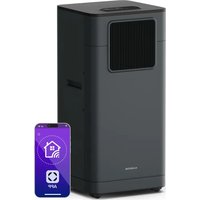
Breeze Box Smart - Air Conditioning Klarstein - Free user manual and instructions
Find the device manual for free Breeze Box Smart Klarstein in PDF.


| Brand | Klarstein |
| Model | Breeze Box Smart |
| Category | Air Conditioning |
| Product Type | Mobile monoblock air conditioner |
| Dimensions (LxWxH) | 315 x 330 x 770 mm |
| Net Weight | 20.5 kg (7000 BTU/h), 21.5 kg (9000 BTU/h), 24 kg (11000 BTU/h) |
| Power Supply | 220-240 V ~ 50 Hz |
| Power Consumption | 765 W (7000 BTU/h), 950 W (9000 BTU/h), 1270 W (11000 BTU/h) |
| Cooling Capacity | 2.0 kW (7000 BTU/h), 2.6 kW (9000 BTU/h), 3.2 kW (11000 BTU/h) |
| Refrigerant | R290 (propane, flammable) |
| Compressor | Rotary |
| Fan Speeds | 3 (low, medium, high) |
| Timer | 1 to 24 hours |
| Operating Temperature | 18 °C to 32 °C (cooling) |
| Exhaust Duct | ∅ 150 x 1500 mm |
| Built-in WiFi | Yes, 802.11 b/g/n standard, 2.4 GHz band |
| Smartphone Control | Yes, via Klarstein app |
| Remote Control | Yes (CR2032 battery not included) |
| Main Functions | Air conditioning, heating, ventilation, dehumidification, auto mode, sleep, timer |
| Maintenance and Cleaning | Clean the filter regularly (vacuum or water at max 40°C); clean the casing with a soft damp cloth |
| Spare Parts and Repairability | Spare parts available (exhaust hose, drainage tube, remote control, etc.); repairs reserved for manufacturer or authorized specialist |
| Safety | Flammable refrigerant R290; use in a room larger than 9 m²; do not pierce the circuit; follow safety instructions; fuse T10AL250V |
| General Information | Article numbers: 10046093, 10046094, 10047036, 10048071, 10048072; indoor use only |
Frequently Asked Questions - Breeze Box Smart Klarstein
User questions about Breeze Box Smart Klarstein
0 question about this device. Answer the ones you know or ask your own.
Ask a new question about this device
Download the instructions for your Air Conditioning in PDF format for free! Find your manual Breeze Box Smart - Klarstein and take your electronic device back in hand. On this page are published all the documents necessary for the use of your device. Breeze Box Smart by Klarstein.
USER MANUAL Breeze Box Smart Klarstein
INHALT
natural_image
Diagram of a server unit with internal components and a green arrow indicating direction (no text or symbols)natural_image
Illustration of a hand holding a ruler and measuring a vertical object (no text or symbols present)natural_image
Illustration of a closed notebook and a perforated circular component (no text or symbols)Montageschritte
1. Band vorbereiten
natural_image
Illustration of a hand holding a pipe with arrows indicating direction (no text or symbols)natural_image
Technical line drawing of a window assembly with a 50cm dimension label (no text or symbols beyond the dimension)natural_image
Technical line drawing of a mechanical assembly with no visible text or symbolsKORREKT
natural_image
Technical line drawing of a mechanical assembly with no visible text or symbolsKORREKT
natural_image
Technical line drawing of a mechanical assembly with no visible text or symbolsFALSCH
natural_image
Pure technical line drawing of a mechanical assembly without any text, numbers, or symbolsFALSCH
natural_image
Line drawing of a remote control device with buttons and a plus button (no text or symbols)Hinweise
natural_image
Symbol of a trash bin with crossed x and y axes, no text or labels presentCongratulations on purchasing this device. Please read the following instructions carefully and follow them to prevent possible damages. We assume no liability for damage caused by disregard of the instructions and improper use. Scan the QR code to get access to the latest user manual and more product information.

CONTENTS
Technical Data 28
Safety Instructions 29
Notes on Refrigerant R290 31
Device Description 33
Installation 35
Operation 39
Device Control by Smartphone 42
Drainage 44
Cleaning and Care 46
Troubleshooting 47
Disposal Considerations 48
Declaration of Conformity 48
TECHNICAL DATA
| Item number 10046093 10046094, 10047036 10048071, 10048072 | |||
| Power supply 220-240 V ~50 Hz | |||
| Power consumption 765 W 950 W 1270 W | |||
| Cooling capacity 7000 BTU/h; 2.0 kW 9000 BTU/h; 2.6 kW 11.000 BTU/h; 3.2 kW | |||
| Compressor rotary | |||
| Refrigerant R290 | |||
| Fan speed 3 | |||
| Timer 1~24 hours | |||
| Working temperature 18 °C-32 °C (Cooling) | |||
| Exhaust pipe | ∅ 150 x 1500 mm | ||
| Netto weight | 20.5 kg | 21.5 kg | 24 kg |
| Product size (WxDxH) | 315x330x770 mm | ||
| WiFi standard | 802.11 b/g/n | ||
| WiFi frequency | 2.4 GHz | ||
| WiFi radio-frequency power (max.) | 20 dBm | ||
Note:
• The measuring conditions for the above are as per EN 14511.
Cooling: DB = 35 °C, WB = 24 °C.
DB = dry bulb temperature = room temperature
WB = wet bulb temperature = relative humidity.
- The test conditions for the data on our rating label are as per the safety regulations. EN 60335-2-40.
• Current and fuse: F10AL250V or T10AL250V.
| Symbol | Explanation |
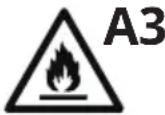 | This symbol indicates that this appliance uses a flammable refrigerant. If the refrigerant leaks and is exposed to an external ignition source, there is a risk of fire. |
 | This symbol indicates that this manual should be read carefully. |
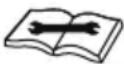 | This symbol indicates that the equipment should be handled by service personnel with reference to the installation manual. |
 | This symbol shows that information is available such as the operating manual or installation manual. |
SAFETY INSTRUCTIONS
Special notes
- Only use agents recommended by the manufacturer for defrosting or cleaning.
- Never store the appliance in a room in which there are permanent sources of ignition (e.g. open flames, a switched-on gas appliance or a switched-on electric heater).
- Do not puncture or burn the appliance.
• Note that coolant may be odourless.
Note: Only use the unit in rooms larger than X m ^2 (see table):
| Model X ( m^2 ) | |
| 7000 BTU/h 4 m^2 | |
| 9000 BTU/H 9 m^2 | |
| 11.000 BTU/h 9 m^2 |
General safety instructions
- The device is only suitable for indoor use.
- Do not use the product if it needs to be repaired or if it has not been installed properly.
-
Do not use the product in the following areas:
-
near heat sources,
- in areas where oil can splash,
- in areas exposed to direct sunlight,
- in areas where splash water can occur,
-
near bathtubs, in washrooms, near showers or swimming pools.
-
Never insert your fingers or other objects into the ventilation openings. In particular, warn children of the dangers this may cause.
- Ensure that the unit is held vertically during transport and storage so that the compressor is correctly positioned.
- Always turn off the appliance before cleaning and unplug it from the wall outlet.
-
Switch off the appliance before moving it and unplug it from the wall outlet. Move the appliance slowly and carefully.
-
To avoid the risk of fire, do not cover the unit.
- All fan connections must comply with local electrical safety regulations. If necessary, refer to these regulations.
- Supervise children so that they do not play with the unit.
- If the power cord is damaged, it must be replaced by the manufacturer, customer service or a similarly qualified person to avoid danger.
- This equipment may be used by children over the age of 8 and by persons (including children) with limited physical, sensory or mental capabilities and/or lack of experience and knowledge, provided they have been instructed in the use of this equipment by a person responsible for their safety and understand the hazards associated with the use of this equipment. Cleaning and maintenance of the appliance may only be carried out by children under supervision.
- The appliance must be installed in accordance with national wiring regulations.
- Type and voltage of fuses: T, 250 V AC, 2 A or higher.
- Contact customer service for cleaning and maintenance.
- Do not pull the power cord, deform or modify it, or immerse it in water. Incorrect handling of the power cord may result in damage to the equipment and/or electric shock.
• National gas regulations must be observed. - Do not block the ventilation openings.
- Do not operate the appliance solely by inserting or removing the power plug, as this may result in electric shock or fire due to heat.
- Immediately unplug the appliance from the wall outlet if it emits strange noises, odours or smoke.
Instructions for handling damage
- In case of damage to the device, contact the manufacturer, customer service or a similarly qualified person.
- If damage occurs, turn off the power, unplug the power cord, and contact the manufacturer, the service representative, or a similarly qualified person.
- The power cord must be securely earthed.
- If the power cord is damaged, turn off the power to avoid danger and unplug the power cord from the wall outlet. The power cord must be replaced by the manufacturer, customer service or a similarly qualified person.

WARNING
Risk of injury! Repairs to the coolant circuit may only be carried out by trained specialist personnel. Never attempt to repair the unit yourself!
NOTES ON REFRIGERANT R290
Safety Advise
- This appliance contains propane gas (R290). Follow the manufacturer's instructions regarding use and repairs strictly!
- Read the entire instruction manual carefully before using the machine.
- Do not install, operate or store the device in a room smaller than 9m^2 .
- This appliance contains the refrigerant R290. R290 is a refrigerant that complies with the relevant European Directives. Never perforate the refrigerant circuit. R290 is flammable (GWP 3)!
- Do not use any means other than those recommended by the manufacturer to accelerate the defrosting process or for cleaning.
- Store the appliance in a room without continuous ignition sources, such as open flames, operating gas appliances or electric heaters.
- Do not pierce or burn any components of the unit's cooling circuit. Do not set light to the unit.
- The appliance should be stored in a way that prevents mechanical damage. The appliance should be installed, operated and stored in a room with a floor area larger than that mentioned on the product's rating label.
- Note that refrigerants may be odourless, meaning you cannot smell leaks.
• National gas regulations must be observed. - Keep ventilation openings clear of obstruction.
- Warning: the appliance must be stored in a well-ventilated area, with a room size corresponding to that specified for operation.
- Anyone working on or breaking into a refrigerant circuit must hold a current, valid certificate from an industry-accredited assessment authority, demonstrating their competence in handling refrigerants safely in accordance with an industry-recognised assessment specification.
- Servicing shall only be performed as recommended by the equipment manufacturer. Any maintenance or repairs requiring the assistance of other skilled personnel must be carried out under the supervision of someone competent in the use of flammable refrigerants.
- All possible ignition sources, including cigarette smoking, should be kept far enough away from the installation, repair, removal and disposal site to ensure that refrigerant cannot be released into the surrounding space during these activities.
- Prior to work commencing, the area around the equipment must be surveyed to ensure there are no flammable hazards or ignition risks. "No Smoking" signs should be displayed.
Warning
- The air conditioning system must be kept and transported upright. Otherwise, irreparable compressor damage may occur. Leave the unit for at least 24 hours before putting it into operation.
- Switch off the device and disconnect it from the power supply before cleaning.
- Make sure that the product creates a steady stream of air. Ensure the air inlets and outlets are not blocked.
- To prevent leaks, operate this unit on a horizontal surface.
- Any person performing work on a refrigerant circuit should have a current certificate from an industry-accredited assessment body. This ensures competence for the safe handling of refrigerants according to an industry-recognised assessment specification.
- If the device stops working, dispose of it properly.
- Store the device in a well-ventilated place when not in use.
- Store the device so that it is not damaged.
- Repairs may only be carried out by the manufacturer or an authorised specialist company.
- The cables connected to the device may contain potential ignition sources.
- Do not damage any components of the refrigerant circuit. Escaping refrigerant may not be noticed because it is odourless.
- Maintenance and repairs must be carried out under the supervision of specialists in the use of flammable refrigerants.
Information for rooms with refrigerant pipes
- Limit the piping to a minimum.
- Be careful not to damage the piping.
- Appliances with flammable refrigerants may only be installed in a well-ventilated room.
- Comply with national gas regulations.
- All mechanical connections must be freely accessible for maintenance purposes.
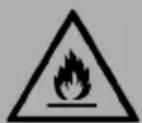
CAUTION
Risk of fire!
This device contains the flammable refrigerant R290. If the refrigerant escapes and is exposed to an external ignition source, there is a risk of fire.
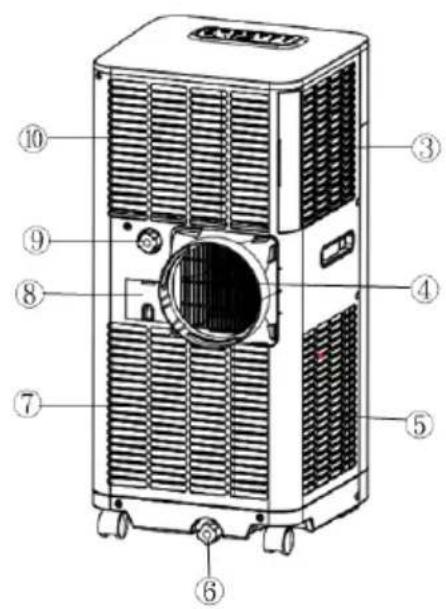
Front Back
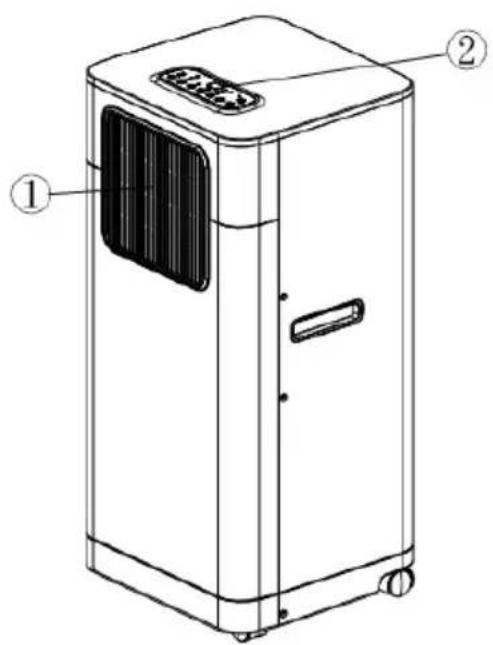
1 Air outlet
2 Control panel
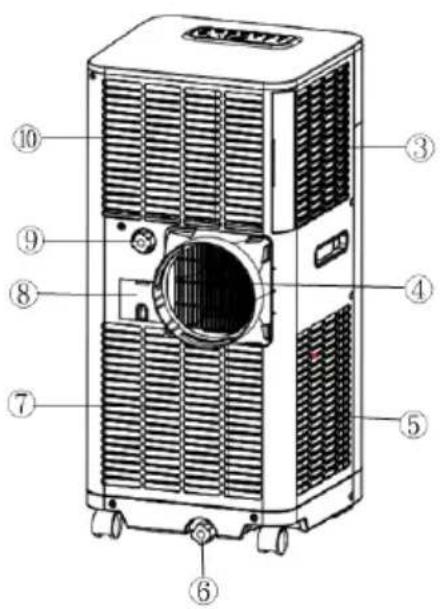
3 Air inlet
4 Exhaust air outlet
5 Air inlet
6 Water stopper/drainage point 1
7 Air inlet
8 Cord storage
9 Water stopper/drainage point 2
10 Air inlet
Accessories
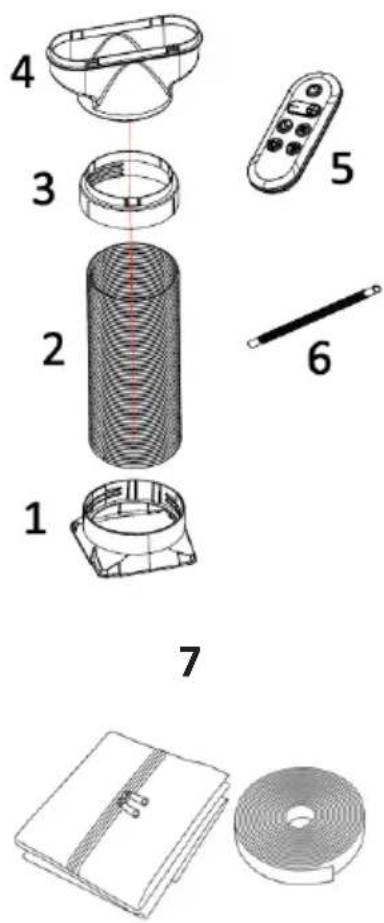
1 Inward adaptor - connects unit with exhaust pipe
2 Exhaust pipe
3 Round adapter - connects the FLAT type adaptor & exhaust pipe
4 Flat Type adaptor - connect pipe to window spacer
5 Remote control
6 Drain tube for continuous drainage
7 Windows cover
INSTALLATION
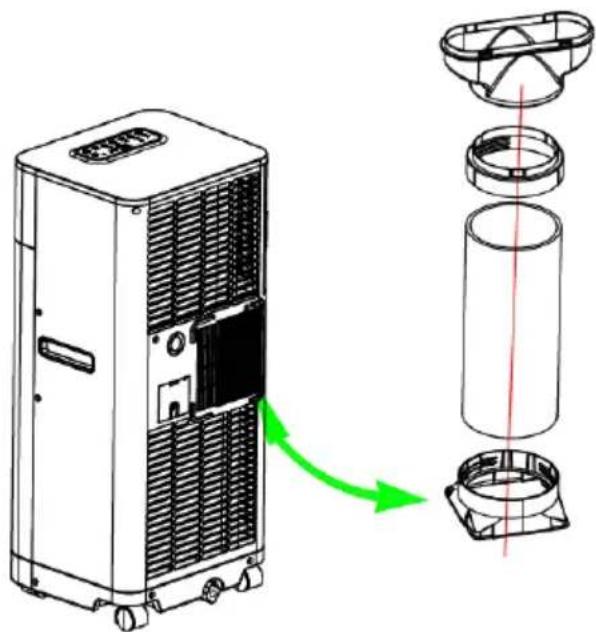
- This is a portable air conditioning unit designed to be moved from room to room.
- Before operating the air conditioner, the exhaust pipe must be installed in order to release the heat generated by the appliance into an open area outside.
- To do this, insert the end of the exhaust pipe through a suitable window and secure it in place using the supplied adapter. Make sure that there is at least 50 cm of space between the unit and the window.
Installing the adaptors and the hose to the unit
natural_image
Diagram of a refrigerant air conditioner unit with internal components and airflow direction (no text or symbols)Installation of the window cover
This window cover is simple to install. It works with side-opening and roof windows. The example below shows a side-opening window.
| Before starting, please clean and try the window frame in order for the tape to stick better. | 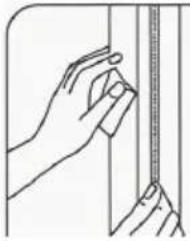 |
Necessary items:
| Plastic seal with zipper (400cm long) x 1Velcro tape (820cm roll) x 1Scissors x1 | 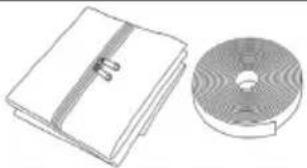 |
Installation steps
| 1. Prepare the tapeMeasure the length of each side of the window frame, as well as the inner edges of the window. Then, cut the Velcro tape into strips to match the length of each side. | 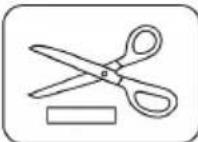 |
| 2. Apply to framePeel off the backing. Then attach one strip to the left side of the frame, one to the top, and one to the bottom. Do the same on the inner edges of the window. | 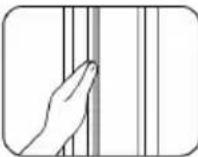 |
| 3. Fix the sealPress the plastic seal firmly onto the tape around the frame and window. Begin at the top and work downwards, pressing firmly along the sides and bottom until secure. | 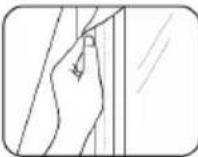 |
| 4. Insert the hose.Feed the exhaust hose through the opening in the seal. Then adjust the zipper so that the plastic seal fits snugly around the hose. | 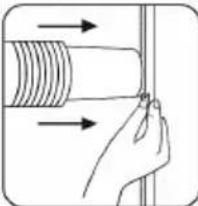 |
Note: As soon as the above steps have been done your air conditioner is now ready to use with a properly sealed window. Always make sure that the window remains secure to maintain protection against intruders.
Installation of the exhaust pipe from wall/window.
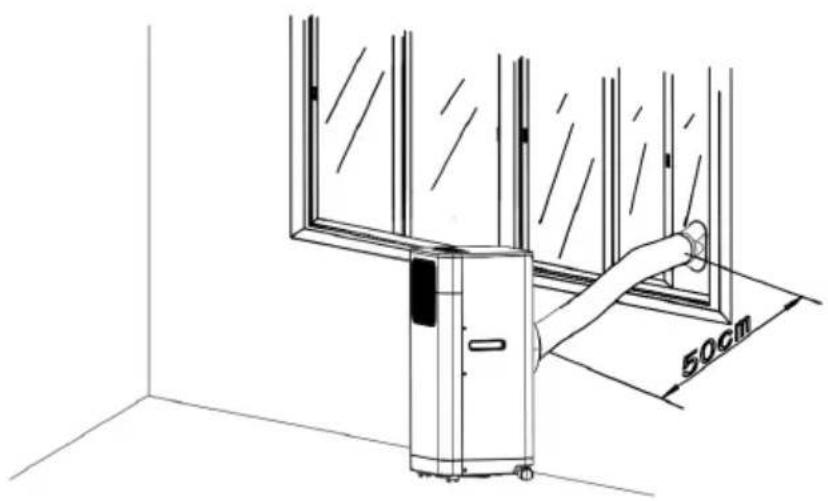
natural_image
Technical line drawing of a window assembly with a 50cm dimension label (no text or symbols beyond the dimension)Feed exhaust hose through the window and slide window across so that spacer is held securely. This technique may also be used for sash windows.
Note: Take care to maintain protection against intruders.
Installation of the exhaust pipe from the unit

Mounting of the exhaust pipe
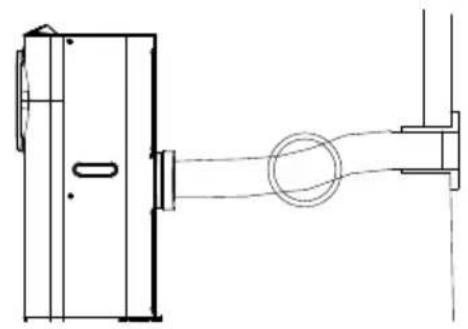
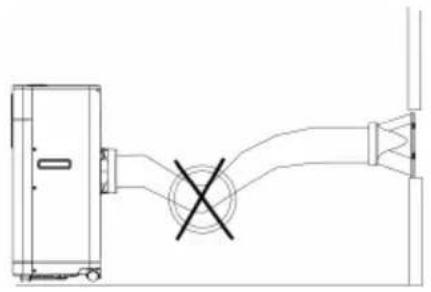
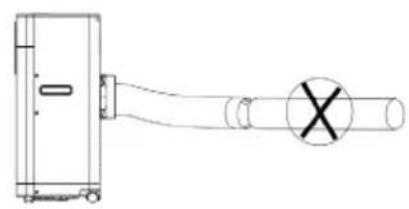
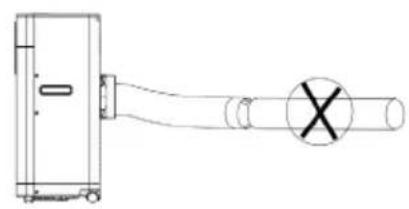
Use only the hose provided and clip exhaust hose to the back of the air conditioner.
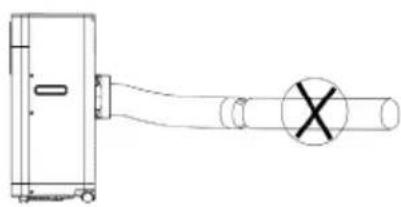
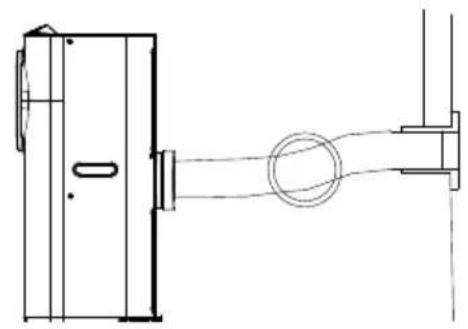
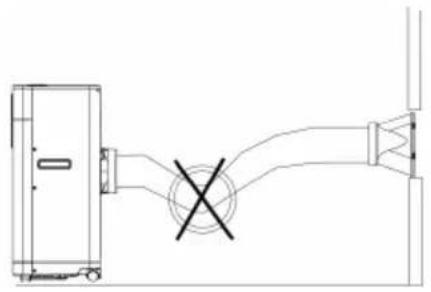
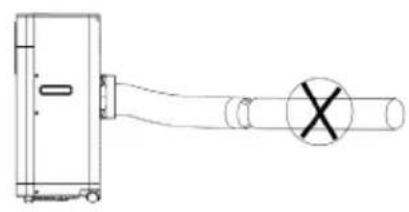
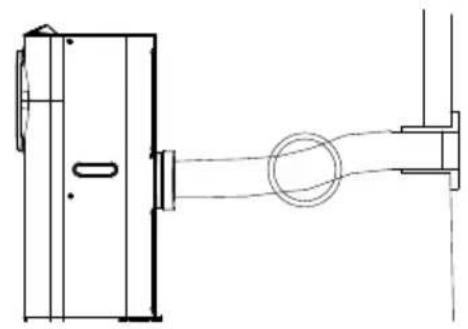
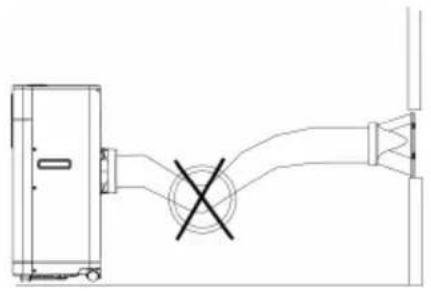
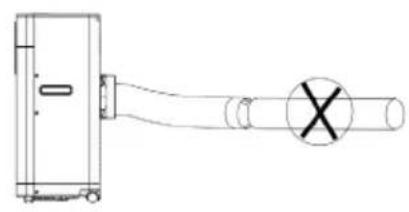
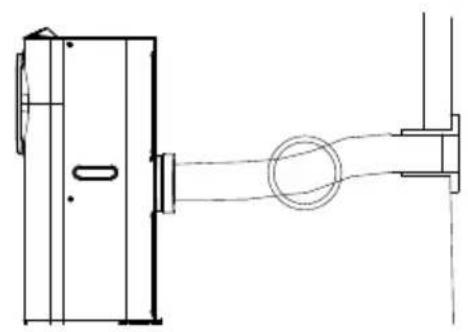
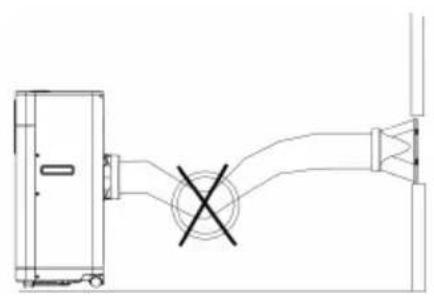
Avoid kinks and bends in the exhaust hose as this will cause expelled moist air to build up causing the unit to overheat and shut down. See the figures below for the correct position
The hose may be extended from 300 mm to 1500 mm but for maximum efficiency use the shortest length possible.

natural_image
Technical line drawing of a mechanical assembly with no visible text or symbolsRIGHT
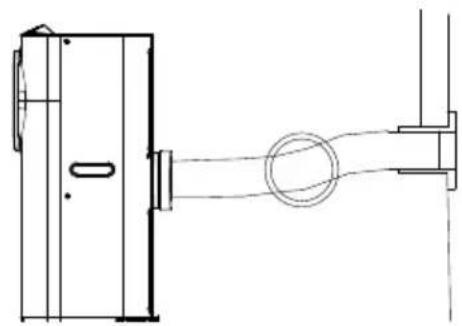
natural_image
Technical line drawing of a mechanical assembly with no visible text or symbolsRIGHT
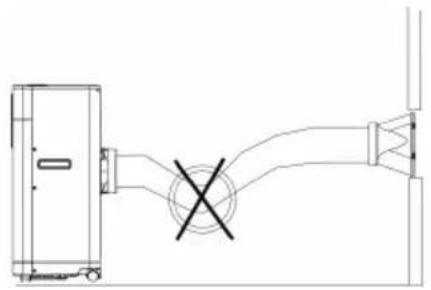
natural_image
Technical line drawing of a mechanical assembly with no visible text or symbolsWRONG
natural_image
Pure technical line drawing of a mechanical assembly without any text, numbers, or symbolsWRONG
ATTENTION: The length of the exhaust pipe is specially designed according to the specification of this product. Do not replace or prolong it with your own private hose as this could cause the unit to malfunction!
OPERATION
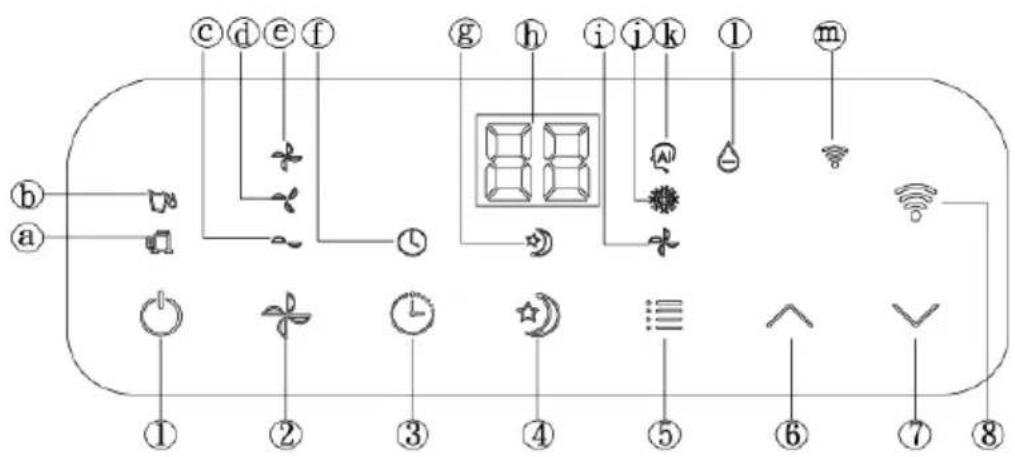
Control panel
flowchart
graph TD
    a --> b
    b --> c
    c --> d
    d --> e
    e --> f
    f --> g
    g --> h
    h --> i
    i --> j
    j --> k
    k --> l
    l --> m
    m --> n
    n --> w
    w --> 8
    8 --> 7
    7 --> 6
    6 --> 5
    5 --> 4
    4 --> 3
    3 --> 2
    2 --> 1
    1 --> 0
    0 --> 1
    1 --> 2
    2 --> 3
    3 --> 4
    4 --> 5
    5 --> 6
    6 --> 7
    7 --> 8
1 ON/OFF soft touch button
2 FAN SPEED soft touch button
3 TIMER soft touch button
4 SLEEP soft soft touch button
5 MODE selection button
6 TEMPERATURE UP soft touch button
7 TEMPERATURE DOWN soft touch button
8 WIFI mode button
a. Compressor operation indicator
b. "Water Full" indicator
c. Low ventilation indicator
d. Middle ventilation indicator
e. High ventilation indicator
f. "Timer" indicator
g. "Sleep" indicator
h. Display window
i. "Fan" mode indicator
j. "Cooling" mode indicator
k. "Automatic" mode indicator
I. DEHUMIDIFY (DRY) indicator
m. WiFi mode indicator
Turning ON/OFF
- When you press the ON/OFF button, the unit will start automatically and the default temperature will be set to 24^ C. Operation is as follows:
For cooling-only models:
- If the room temperature (R.T.) is greater than or equal to 24 °C, the unit will work in COOL mode.
- If R.T. is less than 24 °C, the unit will work in FAN (ventilation) mode (the fan speed is fixed at LOW and cannot be adjusted).
For the cooling and heat model:
- R.T. (room temperature) ≥ 24°C: the unit will operate in COOL mode. 20°C < R.T. < 24°C: the unit will operate in FAN (ventilation) mode (fan speed fixed at LOW, not adjustable).
- If R.T. is less than 20^ , the unit will work in HEAT mode.
- The indicators for the functions in progress come on at the same time.
Note: The display shows the ambient room temperature from 0°C to 50°C.
- To turn the unit off, press the ON/OFF button again.
Setting mode/function
Press the MODE button to select required working mode: automatic, cooling, fan, heat or dehumidify (dry). The indicator of your selected mode will be on.
Setting temperature
- Press the "Temperature up" or "Temperature down" button to regulate the temperature you desired.
- The display window will show the temperature you set as you press 'Temperature up' or 'Temperature down' button. Otherwise, it will always show the ambient temperature.
- The pre-setting temperature of this machine is: 24 °C for cooling, 20 °C for heating.
Setting ventilation speed
- Press the SPEED button to choose the ventilation speed you need, high, medium or low. The indicator of high, medium or low ventilation will light on at the same time.
- If the unit is in AUTO mode, it will choose the ventilation speed automatically according to the ambient temperature (the related indicators will light on), at this time, the SPEED and TEMPERATURE UP & DOWN buttons are invalid.
Setting timer
- Press TIMER button to set the operating hours you desired (1 to 24 hours, the timer indicator will go on). When the set time has been reached, the machine will turn off automatically. The display window will show the hour(s) you set as you press TIMER button. If the timer button is not pressed, the unit will work continuously.
- By pressing the timer but without turning on the other functions, you can PRE-SET the time for the machine to work. For example, if you press the timer to '2', the unit will work automatically after 2 hours.
Sleep function
- In cooling mode, by pressing the SLEEP button, the set temperature will increase 1 °C in the 1st hour, another 1 °C in the second hour and then stay at that temperature.
- In heat mode, pressing the SLEEP button will cause the set temperature to decrease by 1^ C in the first hour, by a further 1^ C in the second hour, after which it will remain at that temperature.
-
In sleep mode, the ventilation speed will remain low. Pressing the SLEEP button again will return the set temperature and ventilation speed to the pre-selected settings.
-
The unit will shut down automatically after 12 hours of the sleep function being active.
- Please note that the sleep function is not available when the machine is operating in AUTO, FAN or DEHUMIDIFICATION mode.
- When the machine is in sleep mode, the fan speed will be set to low.
Dehumidify (DRY) mode
In dehumidify (DRY) mode, the temperature cannot be adjusted and the ventilation speed is fixed. When operating in dehumidify mode, humidity is extracted from the air and collected in an internal tank. Once the tank is full, the compressor and motor will cut out automatically. At the same time, the 'Water Full' indicator will turn on. An alarm will also sound. When the tank is full, drain the water as shown in the section about 'Drainage'. You can also use the unit without having to empty the tank so often by using the continuous drainage function; please refer to the drainage page for more information.
Notes
- To prolong the compressor's life, after switch-off of the unit, please wait for 3 minutes (at least) before re-switch.
- The cooling system will switch off if the ambient temperature is lower than the set one. The ventilation, however, keeps working on the set level. If the ambient temperature rises above the selected level, the cooling will return to work.
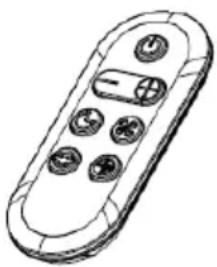
All the above functions can also be performed with the supplied remote control. This remote control requires battery CR2032 x 1pc to operate (not included).
natural_image
Line drawing of a remote control device with buttons and a central display (no text or symbols)DEVICE CONTROL BY SMARTPHONE
If you integrate the device into your home WiFi, you can conveniently operate it via the associated Klarstein app. The app not only allows you to remotely control the device via your smartphone, but also gives you access to recipes and additional information.
Follow these steps to connect your smartphone to your Klarstein device:
1 Download the Klarstein app first by scanning the QR code with your smartphone (see below), or download it directly from App Store or Google Play.
2 Make sure your smartphone is connected to the same WiFi network that your Klarstein device is to be connected to.
3 Open the Klarstein app.
4 Sign in to your account. If you do not have an account, sign up in the Klarstein app.
5 Follow the instructions from the app.
App Download
Use the scan function of your smartphone to scan the QR code and save the app on your smartphone.
Note: The app provides further information on how to use the app and help on how to connect to your device as soon as you open it for the first time.
| iOS Android | |
 |  |
Troubleshooting connection problems
If your Klarstein device cannot be found in the WiFi, check the following:
1 The device is not plugged in. Make sure that your device is plugged into an electric socket.
2 The device is not in pairing mode. Make sure that the WiFi indicator (LED) on the smart device control panel is blinking as described in the 'Reset WiFi settings' instruction of your smart device (instructions are usually available on device connection process).
3 The WiFi access point does not operate on 5 GHz. Make sure that your access point operates on 2.4 GHz band and you have a separate SSID on 2.4 GHz band. If you are not sure about the operating band of your access point, please contact your internet provider company.
Important: please note that if your WiFi router is dual band - operating on both 2.4 GHz and 5 GHz band - you need to separate the SSIDs for each band and use the 2.4 GHz SSID for connection.
4 Firewall settings of your WiFi network; the firewall setting of your WiFi network may not allow the Klarstein app to configure the WiFi settings on your smart device. Please make sure that you are not using a public WiFi network, e.g. airports, dormitories, companies, etc.
5 Different credentials used in smartphone and the app. Make sure that the WiFi credentials entered in the Klarstein app are the same as the ones that your smartphone is connected to.
Following the above mentioned points, if your smart device still fails to connect to the app, please contact us via email for support: appsupport@klarstein.com
DRAINAGE
During the cooling process, some water will be extracted from the air and collected in the unit. If the reservoir is full, the compressor and motor will both stop and the unit will buzz. You can press any button to stop the buzz. The Water Full indicator will flash to alert you to this. To resume cooling, please empty the water via drain point 1, located at the bottom of the unit.
To make the cooling work again, please empty the water by one of the following ways:
- Turn off the air conditioner and avoid moving it when full.
- Position a container (a water tray for example) underneath the drain hole.
- Remove the drain knob & rubber plug from the drain hole and allow the water to drain out.
- When the container is almost full, replace the rubber plug in the drain hole and empty the water tray.
- Repeat until the unit is emptied.
- Replace the rubber plug and tighten the drain knob firmly.
- Switch on the unit - the full water or compressor operating indicator should not be flashing.
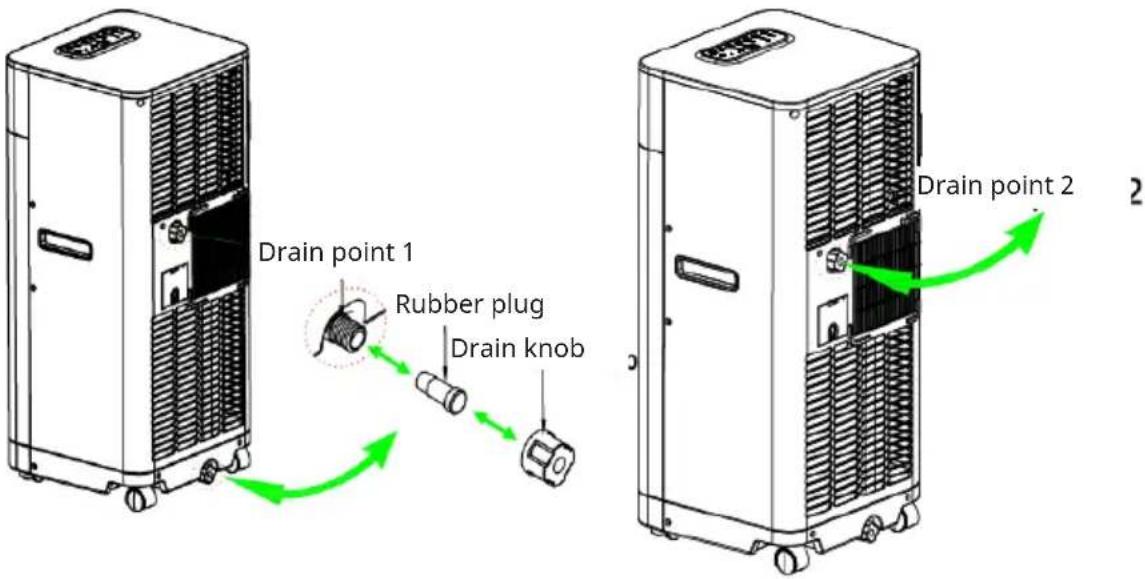
For user convenience, this machine has been designed with two drain points. Drain point 2 is positioned higher up for easier access.
The installation process is the same as for drain point However, please note that in heating mode, continuous drainage must be configured ONLY through drain point 1 due to a system operational requirement.
Continuous drainage
In specific damp conditions, or when operating in dehumidify or heat mode, you can configure the unit for continuous drainage, which minimises the need for frequent tank emptying. Follow these steps:
If you wish to operate the unit without the need to empty the water tank, please:
- Switch of th unit.
- Remove the drain knob and rubber plug and retain for future use.
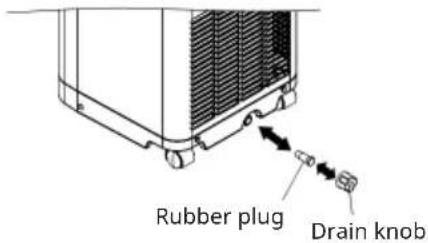
- Connect the drain tube supplied to the water outlet as shown and locate the other end into a drain.
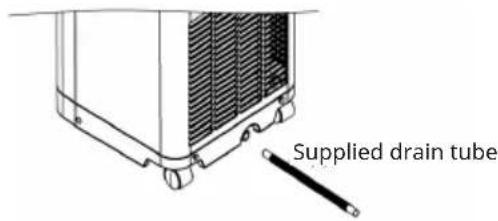
- The supplied drain tube may be extended by adding an extension tube and using a suitable connector.
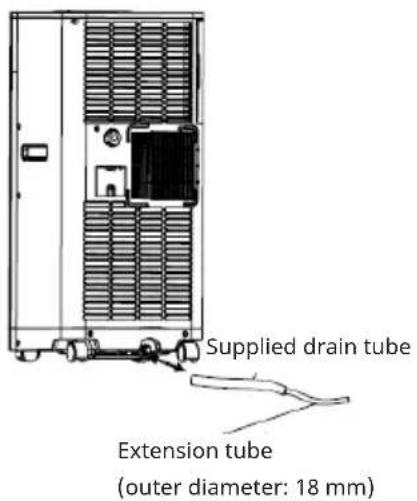
Note:
The drain must be at or below the outlet level.
Flashing 'full water' indicator will not function in this mode of drainage.
In heat mode, please only set up the continuous drainage through drain point 1.
CLEANING AND CARE
Always unplug the air conditioner from the mains before cleaning. To maximize the efficiency of the air conditioner, clean regularly.
Cleaning the housing
Use a soft, damp cloth to wipe the body clean.
Never use aggressive chemicals, gasoline, detergents, chemically treated cloths, or other cleansing solutions. These all could possibly hurt the cabinet.
Cleaning the filter
Use a vacuum cleaner or tap the filter lightly to remove loose dust and dirt from the filters and then rinse thoroughly under running water (no hotter than 40 °C ). Dry thoroughly before replacing.
Note: Never operate the unit without the filters.
End of season storage
- Drain any water in the unit before completely operating the unit on ventilation only mode for a few hours, to thoroughly dry the inside.
- Clean or change the filter.
- Unplug and store the power cord.
- Replace in the original carton or cover for storage.
TROUBLESHOOTING
| Problem Check these issues | |
| The air conditioner does not run. | Is the air conditioner plugged in? |
| Is there a power failure? | |
| Is the comp / ‘full water’ indicator flashing? | |
| Is the room temperature below the set temperature? | |
| The machine seems to do little. | Is there direct sunshine? (Please put down the curtain.) |
| Are too many windows or doors open? | |
| Are there too many people in the room? | |
| Is there something in the room producing lots of heat? | |
| The machine seems to do nothing. | Is the filter dusty, contaminated? |
| Is the air intake or output blocked up? | |
| Is the room temperature below your selected temperature? | |
| Too noisy. | Is the machine positioned unevenly so as to create vibration? |
| Is the floor underneath the machine uneven? | |
| The compressor does not operate. | It is possible the overheat protection of the compressor is on. Just wait for the temperature to drop? |
Error codes for the electrician
| Code Cause |
| E1 Temperature sensor error |
| E2 Coil sensor error |
Self-diagnosis
This machine is equipped with self-diagnosis function. If something is wrong with the appliance, an error message will occur. In this case please call thee service centre.
DISPOSAL CONSIDERATIONS

natural_image
Symbol of a trash bin with crossed x and y axes, no text or labels presentIf there is a legal regulation for the disposal of electrical and electronic devices in your country, this symbol on the product or on the packaging indicates that this product must not be disposed of with household waste. Instead, it must be taken to a collection point for the recycling of electrical and electronic equipment. By disposing of it in accordance with the rules, you are protecting the environment and the health of your fellow human beings from negative consequences. For information about the recycling and disposal of this product, please contact your local authority or your household waste disposal service.
This product contains batteries. If there is a legal regulation for the disposal of batteries in your country, the batteries must not be disposed of with household waste. Find out about local regulations for disposing of batteries. By disposing of them in accordance with the rules, you are protecting the environment and the health of your fellow human beings from negative consequences.
DECLARATION OF CONFORMITY

Manufacturer & Importer for Great Britain:
Chal-Tec GmbH, Mühlenstraße 25, 10243 Berlin, Germany.
Contact: info@electronic-star.de
Hereby, Chal-Tec GmbH declares that the radio equipment type Breeze Box is in compliance with Directive 2014/53/EU. The full text of the EU declaration of conformity is available at the following internet address: use.berlin/10046093
For Great Britain: Hereby, Chal-Tec GmbH declares that the radio equipment type Breeze Box is in compliance with the relevant statutory requirements. The full text of the declaration of conformity is available at the following internet address: use.berlin/10046093
Estimado cliente:
ÍNDICE
Datos técnicos 50
1 Salida de aire
2 Panel de control
natural_image
Technical line drawing of a mechanical component with a cylindrical coil and a flat plate (no text or symbols)natural_image
Diagram of a server unit with internal components and a green arrow indicating direction (no text or symbols)natural_image
Illustration of a closed notebook and a circular mechanical component (no text or symbols)natural_image
Technical line drawing of a window assembly with a 50cm dimension label (no text or symbols beyond the dimension)natural_image
Technical line drawing of a mechanical assembly with no visible text or symbolsCORRECTO
natural_image
Technical line drawing of a mechanical assembly with no visible text or symbolsCORRECTO
natural_image
Technical line drawing of a mechanical assembly with no visible text or symbolsINCORRECTO
natural_image
Pure technical line drawing of a mechanical component without any text, numbers, or symbolsINCORRECTO
natural_image
Line drawing of a remote control device with buttons and a plus button (no text or symbols)Notas
natural_image
Symbol of a trash bin with crossed x and y axes, no text or labels presentSOMMAIRE
Fiche technique 72
natural_image
Diagram of a server unit with internal components and a green arrow indicating direction (no text or symbols)natural_image
Line drawing of a hand holding a ruler and measuring a vertical object (no text or symbols)natural_image
Illustration of a closed notebook and a circular mechanical component (no text or symbols)natural_image
Illustration of a hand holding a pipe fitting with arrows indicating direction (no text or symbols)natural_image
Technical line drawing of a window assembly with a 50cm dimension label (no text or symbols beyond the dimension)natural_image
Technical line drawing of a mechanical assembly with no visible text or symbolsCORRECT
natural_image
Technical line drawing of a mechanical assembly with no visible text or symbolsCORRECT
natural_image
Technical line drawing of a mechanical assembly with no visible text or symbolsINCORRECT
natural_image
Pure technical line drawing of a mechanical component without any text, numbers, or symbolsINCORRECT
natural_image
Line drawing of a remote control device with buttons and a plus button (no text or symbols)natural_image
Symbol of a trash bin with crossed x and y axes, no text or labels presentDÉCLARATION DE CONFORMITÉ

Fabricant :
INDICE
Dati tecnici 94
natural_image
Diagram of a server unit with internal components and a green arrow indicating direction (no text or symbols)natural_image
Illustration of a hand holding a ruler measuring a vertical scale (no text or symbols present)Articoli necessari:
natural_image
Illustration of a closed notebook and a perforated circular object (no text or symbols)natural_image
Illustration of a hand holding a cylindrical object with arrows indicating direction (no text or symbols)natural_image
Technical line drawing of a window assembly with a 50cm dimension label (no text or symbols beyond the dimension)natural_image
Technical line drawing of a mechanical assembly with no visible text or symbolsGIUSTO
natural_image
Technical line drawing of a mechanical assembly with no visible text or symbolsGIUSTO
natural_image
Pure technical line drawing of a mechanical or electrical component with no text, numbers, or symbolsSBAGLIATO
natural_image
Pure mechanical diagram showing a lever and shaft assembly without any text, numbers, or symbolsSBAGLIATO
natural_image
Line drawing of a remote control device with buttons and a central display (no text or symbols)Note
natural_image
Symbol of a trash bin with crossed x and y axes, no text or labels present
- INHALT
- Montageschritte
- Band vorbereiten
- Hinweise
- CONTENTS
- Note:
- SAFETY INSTRUCTIONS
- Special notes
- General safety instructions
- Instructions for handling damage
- WARNING
- NOTES ON REFRIGERANT R290
- Safety Advise
- Information for rooms with refrigerant pipes
- CAUTION
- Risk of fire!
- Accessories
- INSTALLATION
- Installation of the window cover
- Necessary items:
- Installation steps
- Installation of the exhaust pipe from the unit
- Mounting of the exhaust pipe
- OPERATION
- Control panel
- Turning ON/OFF
- For cooling-only models:
- For the cooling and heat model:
- Setting mode/function
- Setting temperature
- Setting ventilation speed
- Setting timer
- Sleep function
- Dehumidify (DRY) mode
- Notes
- DEVICE CONTROL BY SMARTPHONE
- Follow these steps to connect your smartphone to your Klarstein device:
- App Download
- Troubleshooting connection problems
- DRAINAGE
- Continuous drainage
- CLEANING AND CARE
- Cleaning the housing
- Cleaning the filter
- End of season storage
- TROUBLESHOOTING
- Self-diagnosis
- DISPOSAL CONSIDERATIONS
- DECLARATION OF CONFORMITY
- Estimado cliente:
- ÍNDICE
- Notas
- SOMMAIRE
- DÉCLARATION DE CONFORMITÉ
- Fabricant :
- INDICE
- Articoli necessari:
- Note
Brand : Klarstein
Model : Breeze Box Smart
Category : Air Conditioning