
H-1114 - Scale Uline - Free user manual and instructions
Find the device manual for free H-1114 Uline in PDF.


User questions about H-1114 Uline
0 question about this device. Answer the ones you know or ask your own.
Ask a new question about this device
Download the instructions for your Scale in PDF format for free! Find your manual H-1114 - Uline and take your electronic device back in hand. On this page are published all the documents necessary for the use of your device. H-1114 by Uline.
USER MANUAL H-1114 Uline
text_image
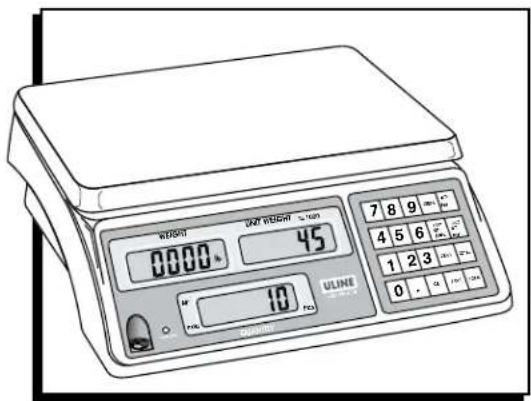
WEIGHT 00000 % 45 7 8 9 4 5 6 1 2 3 0 - 0.5 ULINE U-ONE 0.5 10 TBDBEFORE USING THE COUNTING SCALE
For best performance, the scale should be located in a cool, dry place that is free from excessive air currents, corrosives, vibration and temperature or humidity extremes.

WARNING! DO NOT place the scale:
- Next to open windows or doors.
- Near air-conditioning or heating vents.
- Near vibrating, rotating or reciprocating equipment.
- Near magnetic fields or equipment generating magnetic fields.
• On an unstable work surface.
• In dusty locations.
• In direct sunlight.
PREPARING TO USE THE SCALE
-
Put the scale on a firm, level surface to obtain accurate weight readings.
-
Adjust the four leveling feet so scale platform is level.
- Avoid placing scale in direct sunlight or near the ventilating system exhaust port.
- Before turning scale on, remove any weight on the scale platform.
- Once scale is turned on, it goes through an LCD test and re-zeros.
- Please allow scale to warm up 15-20 minutes before use.
- When 📄 appears on screen, scale needs recharging.
- Place items being weighed in center of the platform for accurate weighing. Overall dimensions of the item should not exceed the platform dimensions.
RECHARGEABLE BATTERY
Powered by 115 VAC or rechargeable battery.
Scale operates up to 120 hours on a fully charged battery. Recharge the battery when the 📄 appears or every three months when the scale is not being used for long periods of time.
ACTIVATE SCALE
LEVEL THE SCALE
- Place the scale on a flat, level surface.
-
Using the leveling bubble on the left front panel, adjust the legs under scale until bubble is centered.
-
TURN SCALE ON
• Nothing should be on the scale. - Press ON/OFF located under the left side of the scale.
- Scale counts down to zero and displays the version on the WEIGHT display.
- Allow scale to warm up for 15 to 20 minutes before use.
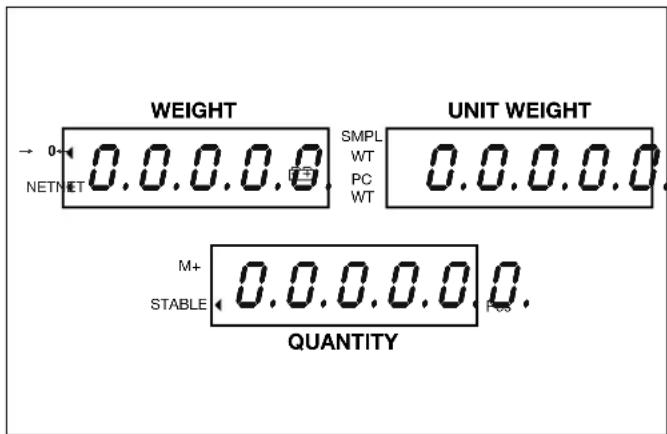
DIGITAL DISPLAYS
text_image
WEIGHT NET NET 0.0.0.0.0 SMPL WT PC WT UNIT WEIGHT 0.0.0.0.0 M+ STABLE 0.0.0.0.0 0. PE3 QUANTITYWEIGHT
Weight of all the objects placed on the weighing platform or the totalized weight.
UNIT WEIGHT
Weight of each of the objects placed on the weighing pan or the number of weighings totaled.
QUANTITY
Number of objects (count) on the weighing platform or the total number of objects being totaled.
INDICATORS
- "◀" – Indicator shows what is being displayed: →0←, NET, SMPL WT, PC WT, M+, STABLE.
- kg - displays weight in kilograms.
- lb - displays weight in pounds.
-
- "Low Battery" indicator. Battery needs recharging.
BUTTONPAD
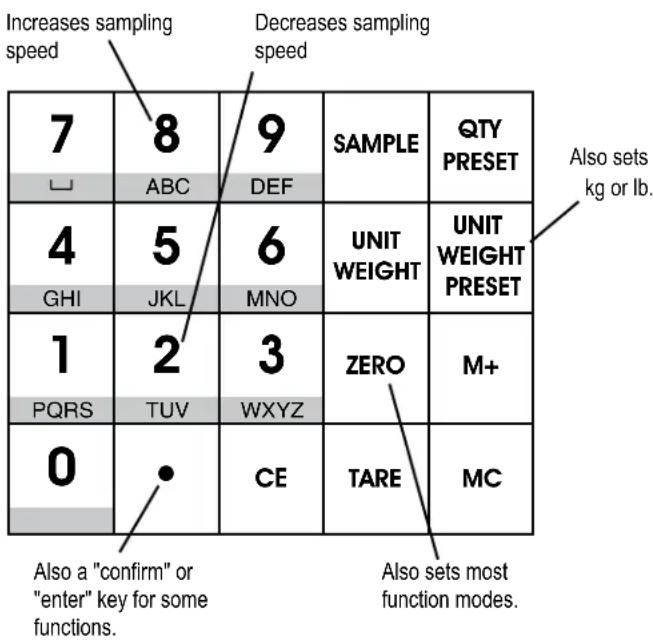
1.0-9 - Numeric buttons set numeric data for tare weight, sample number and sample weight.
2.SAMPLE - Used to set the quantity and weight of the items being counted.
3. QTY PRESET – Preset the quantity limits.
4. UNIT WEIGHT – Preset the high weight limits.
5. UNIT WEIGHT PRESET – Store up to 10 different piece weights. Also set scale to read in kg or lb.
6. ZERO - Re-zeros the weight. Also used to set functions.
7. M+ - Accumulation button adds the display value into memory.
8. - Sets decimal point position. Also a confirm or enter button to complete some functions.
9. CE – Clears or deletes existing accumulated values.
10. TARE - Deducts container weight from pieces weight.
11. MC - Clears accumulated total from memory.
Some buttons on the buttonpad serve dual functions.
other
| Position | Value | |---|---| | 1 | 7 | | 2 | 8 | | 3 | 9 | | 4 | 4 | | 5 | 5 | | 6 | 6 | | 7 | SAMPLE | | 8 | ABC | | 9 | DEF | | 10 | UNIT WEIGHT | | 11 | UNIT WEIGHT PRESET | | 12 | ZERO | | 13 | M+ | | 14 | TARE | | 15 | MC | | 16 | Also sets most function modes. | | 17 | Also sets "confirm" or "enter" key for some functions. |SETTING FUNCTION MODES
SETTING "LBS" OR "KG"
- For lb., press UNIT WEIGHT PRESET, then 1.
- For kg., press UNIT WEIGHT PRESET, then 2.
- Scale displays weight in "kg" or "lb" until you change it.

NOTE: If UNIT WEIGHT PRESET is set to select unit weight as a secondary function, hold button for about 3 seconds.
ZERO DISPLAY MASK (BACK ZERO MODE)
Auto zero tracking (default) ensures that the "0" remains stable despite changes in temperature or power. In drafty and other unstable conditions, the Zero Display Mask is useful. You can set the scale to not show the first division of weight. It will show "0," as long as the weight is less than two display divisions.
$$ 0 = \text { Normal Mode (1st Division displayed) } $$
$$ 1 = \text { Zero Display Mask (1st Division displayed as 0) } $$
- Press ZERO, then 8.

text_image
WEIGHT UNIT WEIGHT QUANTITY - 04 NETNET ≡ 1 GM/PL WT PC WT SPEED M+ STABLE - 08 Pos- Press 4 to select 0, or 6 to select 1.
- Press QTY PRESET to exit and save the settings.
DISPLAY BACKLIGHT
Turn Backlight On:
Press ZERO, then 5. Backlight turns on automatically when any button is pressed or the weight is over 10 divisions. When weight is removed, backlight switches off after 5 seconds.
Backlight On Continuously:
Press ZERO, then 4. Backlight will now stay on all the time.
Backlight Off:
Press ZERO, then 6. Turns backlight off.
SET SAMPLING SPEED
The slower the sampling speed, the more accurate the count will be. The faster the sampling speed, the less accurate the count may be.
$$ 0 1 \text { to } 1 5 (0 1 = \text { slow, } 1 5 = \text { very fast) } $$
- Press ZERO, then 8.

text_image
WEIGHT UNIT WEIGHT QUANTITY - 0- NETNET 31 SIMPLE WT PC WT SPEED M+ STABLE - 08 Pcs- Press 8 to increase or 2 to decrease the sampling speed.
- Press QTY PRESET to exit and save the settings.
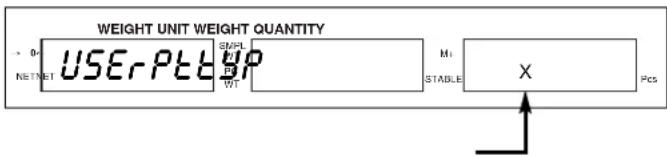
PRESET TARE
You can set the preset tare (used to enter the weight of a container when its weight is known) one of two ways:
$$ \begin{array}{l} 0 = \text { Preset tare function is not available when an } \ \text { object is on the scale. } \end{array} $$
$$ \begin{array}{l} 1 = \text { Preset tare function is available when an } \ \text { object is on the scale. } \end{array} $$
- Press ZERO, then 1, 2.
text_image
WEIGHT UNIT WEIGHT QUANTITY USERPTB WT M1 STABLE X Pcs- Press 0 or 1 to select the desired mode.
- Press • to exit and save the settings.
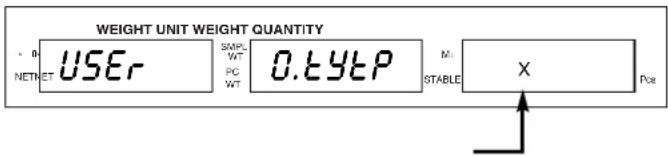
PRESET QUANTITY
You can set the way the scale will accept preset quantities.
$$ \begin{array}{l} 0 = \text { Scale accepts quantity only when weight is } \ \text { stable. } \end{array} $$
$$ \begin{array}{l} 1 = \text { Scale accepts quantity even when weight is } \ \text { unstable. } \end{array} $$
- Press ZERO, then 1, 3.
text_image
WEIGHT UNIT WEIGHT QUANTITY NET NET USER SAMPLE WT PC WT 0.elytP M: STABLE X Pos- Press 0 or 1 to select the desired mode.
- Press • to exit and save the settings.
SETTING FUNCTION MODES CONTINUED
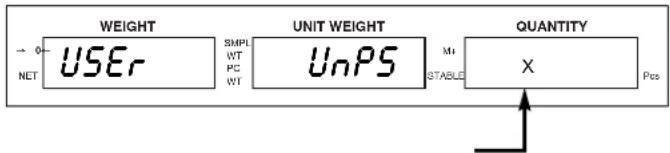
UNIT WEIGHT PRESET DUAL FUNCTION PRIORITY
You can set the UNIT WEIGHT PRESET button to treat either of its functions (unit weight presets or switch from lb to kg) to operate as the default function.
0 = Quick press of UNIT WEIGHT PRESET button operates "kg/lb" (default). Press and hold UNIT WEIGHT PRESET for three seconds to operate the unit weight presets function.
1 = Quick press of UNIT WEIGHT PRESET button operates unit weight presets function (default). Press and hold UNIT WEIGHT PRESET for three seconds to operate "kg/lb."
1. Press ZERO, then 1, 6.
text_image
WEIGHT USEr SIMPL WT PC WT UNIT WEIGHT UnPS M1 STABLE QUANTITY X Pos NET- Press 0 or 1 to select the desired mode.
- Press • to exit and save the settings.
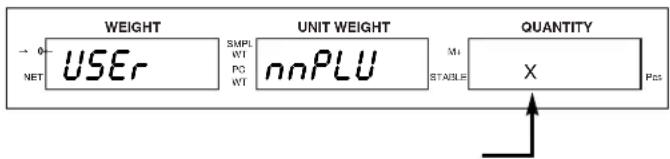
ACCUMULATION SETUP
Set the way the scale shows or indicates totalized values.
0 = After pressing M_+ , display shows totalized value. After three seconds, scale counts back to zero.
1 = After pressing M_+ , display shows totalized value. Press CE, scale counts back to zero.
2 = After pressing M_+ , beeper sounds, display does not show totalized value.
1. Press ZERO, then 1, 1.
flowchart
graph LR
    A["NET"] --> B["USER"]
    B --> C["UNIT WEIGHT"]
    C --> D["NNPLU"]
    D --> E["Quantity"]
    E --> F["X"]
    style A fill:#f9f,stroke:#333
    style B fill:#ccf,stroke:#333
    style C fill:#cfc,stroke:#333
    style D fill:#fcc,stroke:#333
    style E fill:#cff,stroke:#333
    style F fill:#ffc,stroke:#333
- Press 0, 1 or 2 to select the desired mode.
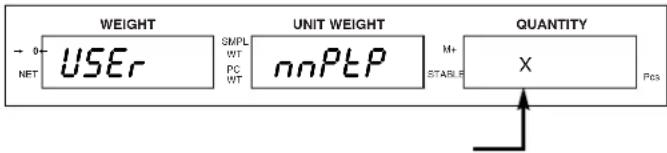
- You can set the way the M+ operates.
$$ \boldsymbol {0} = \boldsymbol {M} + \text { works only when weight is stable. } $$
$$ 1 = M + \text { works even when weight is unstable. } $$
1. Press ZERO, then 1, 4.
text_image
WEIGHT USEr SIMPL WT PC WT UNIT WEIGHT nnPtP M+ STABLE QUANTITY X Pos NET- Press 0 or 1 to select the desired mode.
- Press • to exit and save the settings.
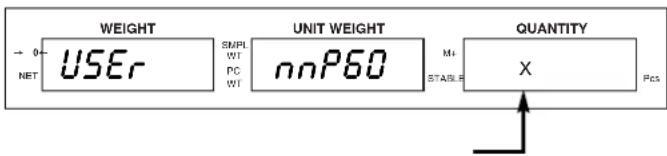
Continuous/Zero
You can set M_+ to operate continuously or only after the scale returns to zero.
$$ \begin{array}{l} \boldsymbol {0} = \text { After pressing } \boldsymbol {M} +, \text { scale must return to zero } \ \text { before } \boldsymbol {M} + \text { works again. } \end{array} $$
$$ \begin{array}{l} 1 = \text { After pressing } M _ {+}, \text { it's ready to go again } \ \text { immediately. } \end{array} $$
1. Press ZERO, then 1, 5.
text_image
WEIGHT USER SIMPL WIT PC WIT UNIT WEIGHT nnP60 M1 STABLE QUANTITY X Fcs- Press 0 or 1 to select the desired mode.
- Press • to exit and save the settings.
CALIBRATION
AUTO CALIBRATION
You must use calibration weights to accurately calibrate the scale. Calibration weights totaling at least 10% of scale's capacity must be used for accurate calibration.

NOTE: Calibration weights are sold separately. See uline.com for details.
- With the scale displaying "0," press and release • and UNIT WEIGHT PRESET buttons simultaneously. After approximately five seconds, the WEIGHT display flashes the scale capacity.

text_image
WEIGHT UNIT WEIGHT QUANTITY NET NET S M P L WT PC WT 5011500.0 M+ ABLE Pos- Place weights on the scale equal to the full load capacity. When scale stabilizes, press the MC button.
-
While the scale counts down to 0, remove the weights from the scale. The calibration is complete.
-
Press CE to exit from the calibration mode.

NOTE: If weights equalling the full load are not available, you can enter a weight that is less than the full load.
- With the scale displaying "0," press and hold •, then press UNIT WEIGHT PRESET until the WEIGHT display flashes the scale capacity. Release the buttons.
- Enter the weight to be used, then place the weight on the scale. When the scale stabilizes, press the MC button.
- While the scale counts down to 0, remove the weights from the scale. The calibration is complete.
- Press CE to exit from the calibration mode.
Press and hold CE, then press UNIT WEIGHT PRESET until the scale counts down to 0. Release the buttons. The scale will revert to the original factory calibration values.
USING THE SCALE
In addition to weighing and counting, these scales also perform check counting, check weighing, accumulation and store weights for up to 10 items.
COUNTING
Set the piece weight of the items being weighed before doing any counting operations.
UNKNOWN ITEM PIECE WEIGHT
- Place a sample quantity of items on the scale.

text_image
WEIGHT UNIT WEIGHT QUANTITY NET NET 118.30 SMPL 0 M1 WT WT PC STABLE Pos- Use the number buttons (0-9) to enter the number of items placed on the scale

text_image
WEIGHT UNIT WEIGHT QUANTITY ~ 0- NETTET 118.3 SMPL WT WT 100 M+ PC WT STABLE ↑ 永 Pos
NOTE: While the QUANTITY display flashes for 3 seconds, press the SAMPLE button. (Otherwise, the number entered will be used as the piece weight when the display stops flashing.)
- While the QUANTITY display is flashing, press the SAMPLE button.

text_image
WEIGHT UNIT WEIGHT QUANTITY → 0- NETTSET 118.3 SMPL WT PC WT SAnnP Mt STASLE --- --- --- Pcs- The count appears on the QUANTITY display when the scale stabilizes.

text_image
WEIGHT UNIT WEIGHT QUANTITY · 0 118.3 SMPL NET NET WT 1.1833 Mt WT STABLE → 100 PosKNOWN ITEM PIECE WEIGHT
- Use the number buttons to enter the known weight of the item.

text_image
WEIGHT UNIT WEIGHT QUANTITY - 0- NET NET 0.0 SMPI WT 1.833 Ms WT PC WT STABLE ↑ 0 PcsUSING THE SCALE CONTINUED
- Press the UNIT WEIGHT button. The count appears on the QUANTITY display.

text_image
WEIGHT UNIT WEIGHT QUANTITY 0 NETSET 0.0 SMPL WT PC WT 1.833 Mt STABLE 0 Pcs
NOTE: The larger the sample weight is, the more accurate the count will be.

NOTE: With both the UNIT WEIGHT and QUANTITY displays showing zero, pressing either UNIT WEIGHT or SAMPLE button will recall the latest P piece weight value.
ZERO FUNCTION
Press the ZERO button to re-zero the display. Nothing should be on the platform. "◀" appears next to →0← P _n symbol on the WEIGHT display.
The zero setting range is ±2% of the capacity of the scale.
TARE
TARE allows the scale to automatically deduct the weight of the container used to hold item samples.
WHEN THE WEIGHT OF THE CONTAINER IS UNKNOWN
- Place the empty container on the scale.

text_image
WEIGHT UNIT WEIGHT QUANTITY 0 NETSET 6.8 GMPL WT PC WT 0 Mt STABLE 0 Pos- Press TARE button.

text_image
WEIGHT UNIT WEIGHT QUANTITY → 0- NET IET SWPL WT PC WT tArE M+ STABLE Pcs- When scale stabilizes, net weight appears in the WEIGHT display and "◀" appears next to the NET symbol.

text_image
WEIGHT UNIT WEIGHT QUANTITY 0.0 NET NET SMPL WT PC WT 0 M+ STABL4 0 PosCLEAR TARE
- Remove container from the scale.
- Press TARE button to clear the tare value. WEIGHT display resets to zero.
TARE CONTINUED
WHEN THE WEIGHT OF THE CONTAINER IS KNOWN (PRESET TARE)

NOTE: When the user mode function for preset tare (see page 3) is set to "0," preset tare will not work with a weight on the scale.
- With nothing on the scale, Press TARE.

text_image
WEIGHT UNIT WEIGHT QUANTITY R° 0.0 ---- GMPL WT PC WT ⇌ M+ STABLE Pcs- Enter the weight of the container.

text_image
WEIGHT UNIT WEIGHT QUANTITY R° 6.8 SMPL NETSET WT PC WT M+ STABLE Pcs- Press TARE.

text_image
WEIGHT UNIT WEIGHT QUANTITY 0 NET NET 6.8 SMPL WT WT PC WT 0 Mt STABLE - - - - - - PcsII. When the user mode function for preset tare (see page 3) is set to "1," preset tare will work with a weight on the scale.
- Place an object on the scale.

text_image
WEIGHT UNIT WEIGHT QUANTITY → 0← 177.5 SMPL 177.52 Ms 100 NET/WT WT PC WT STABLE Pcs- Enter the weight of the container.

text_image
WEIGHT UNIT WEIGHT QUANTITY NET NET 177.5 GMPL WT 1.0 Mt STABLE ≈177% Pos- Press TARE.

text_image
WEIGHT UNIT WEIGHT QUANTITY → 0=176.5 SMPL 177.52 M+ NET NET WT PC WT STABLE 99 PcsCLEAR PRE-TARE
- Remove container from the scale.
- PressTARE button to clear the tare value, WEIGHT display resets to zero. The "◀" next to NET will go off.
USING THE SCALE CONTINUED
ACCUMULATION
Use the M+ up to 99 times before it must be reset. The totalizing display is limited to a maximum of six digits.
QUANTITY TOTALIZING
- Place the object on the scale.

text_image
WEIGHT UNIT WEIGHT QUANTITY → 0π NRTNET 118.3 SMPL WT 1.1833 M1 PC WT STABLE 100 Pcs- Press M+.

text_image
WEIGHT UNIT WEIGHT QUANTITY 0 NET NET SMPL WT PC WT Add M1 STABLE P28- When scale stabilizes, UNIT WEIGHT displays total number of additions.

text_image
WEIGHT UNIT WEIGHT QUANTITY → 0=118.3 SMPL WT PC WT M+ STABLE 1001 Pos- After 3 seconds, scale returns to counting mode.

text_image
WEIGHT UNIT WEIGHT QUANTITY 0- NET NET 118.3 SMPL WT 1.1833 Mt 100 PcsRECALL QUANTITY TOTALIZED
Both the WEIGHT and the UNIT WEIGHT should display 0.
- Press M+ to recall the totalized amount.

text_image
WEIGHT UNIT WEIGHT QUANTITY → 0- NET NET 118.3 SMPL WT PC WT 水 M+ STABLE 100 PcsWEIGHT TOTALIZING
- With UNIT WEIGHT displaying 0, place an object on scale.

text_image
WEIGHT UNIT WEIGHT QUANTITY 0- NET NET 118.300 SMPL WT PC WT M+ STABLE Pcs- Press M+.

text_image
WEIGHT UNIT WEIGHT QUANTITY → 0+ - NETNET - - - - - - SMLP WT PC WT Add M+ STABLE - - - - - - PosWEIGHT TOTALIZING CONTINUED
- When scale stabilizes, UNIT WEIGHT displays the total number of additions.

text_image
WEIGHT UNIT WEIGHT QUANTITY NET NET 118.301 SMPL WT PC WT M1 STABLE Pos- After 3 seconds, scale returns to weighing mode.

text_image
WEIGHT UNIT WEIGHT QUANTITY → 0 NETSET 118.300 SMPL WT PC WTI M+ STABLE PcsCLEAR ALL TOTALIZED VALUES
Press MC to clear all of the totalized values. "◀" next to M+ icon on QUANTITY display switches off. Totals for weight, number of additions and quantity reset to zero.

NOTE: All totals will be lost if the scale is switched off.
UNIT WEIGHT PRESET MEMORY
The scale can store 10 sets of unit weight presets in the number buttons (0-9). Once saved, pressing a particular number button will display the unit weight saved in that memory.

text_image
WEIGHT UNIT WEIGHT QUANTITY 0.0=1500.0= NET NET SAMPL WT PC WT 501 M+ STABLE Pcs
NOTE: The UNIT WEIGHT PRESET button is a dual function button. Determine if unit weight preset is set as the main function or the secondary function of this button. If unit weight preset is the secondary function, hold the UNIT WEIGHT PRESET button down for three seconds to activate the feature.
SETTING A UNIT WEIGHT PRESET
- Use the number buttons (0-9) to enter the unit weight value you wish to save.

text_image
WEIGHT UNIT WEIGHT QUANTITY → 0.0 NET NET SMPL WT PC WT 100 ← Mt STABLE 0 Pos- Press UNIT WEIGHT PRESET.

text_image
WEIGHT UNIT WEIGHT QUANTITY NET NET Pr SET SMPL WT PC WT M1 STABLE PcsUSING THE SCALE CONTINUED
1. Press UNIT WEIGHT PRESET again.

text_image
WEIGHT UNIT WEIGHT QUANTITY 0 P=SET GMPL M+ NET SET WT PC SET STABLE Pcs- Press any number button (0-9) to save the weight in that button's memory.

text_image
WEIGHT UNIT WEIGHT QUANTITY → 0 NET NET 0.00100 SMPL WT PC WT M1 STABLE PosRECALL A UNIT WEIGHT PRESET CONTINUED
- Press and hold UNIT WEIGHT PRESET.
- Press any number button (0-9) to recall the unit weight saved in that button's memory.
QUANTITY AND WEIGHT LIMIT PRESETS
100
SET A HIGH LIMIT VALUE FOR QUANTITY PRESET
The scale can store a high limit unit quantity value. If the quantity on the scale exceeds the limit value set, the scale beeps and UNIT WEIGHT displays a blinking: Q.E.Y.
- Press QTY PRESET with or without a weight on the scale.
- Enter the high limit value you wish to set. Use CE to correct the number if necessary.
- Press SAMPLE. Use CE to correct the number if necessary.
- Press QTY PRESET to return to counting mode.
TO CLEAR HIGH LIMIT QUANTITY PRESETS
- Press QTY PRESET with or without a weight on the scale.

text_image
WEIGHT UNIT WEIGHT QUANTITY → 0← P→SET SMPL NETSET WT PC WT M+ STABLE Pos
text_image
WEIGHT UNIT WEIGHT QUANTITY → 0.00100 SMPL NET NET WT PC WT STABLE 100 Pcs- Enter 0.
- Press SAMPLE.
- Press QTY PRESET to return to counting mode.
SET A HIGH LIMIT VALUE FOR UNIT WEIGHT
The scale can store a high limit unit weight value. If the weight on the scale exceeds the limit value set, the scale beeps and UNIT WEIGHT displays a blinking: 'WPSE'.
- Press QTY PRESET with or without a weight on the scale.

text_image
WEIGHT UNIT WEIGHT QUANTITY NET NET ----3000 spring spring wet M1 STABLE Pos- Enter the high limit value you wish to set. Use CE to correct the number if necessary.

text_image
WEIGHT UNIT WEIGHT QUANTITY NFT/NET ----300Ω RMP1 WT PC WT M+ STABLE Pcs- Press UNIT WEIGHT. Use CE to correct the number if necessary.

text_image
WEIGHT UNIT WEIGHT QUANTITY NET NET GMPL WT PC WT M+ STABLE 100100 Pcs- Press QTY PRESET to return to counting mode.

text_image
WEIGHT UNIT WEIGHT QUANTITY → 0.0 NET/NET SMPL WT PC WT 0 Ma STABLE 0 PcsTO CLEAR HIGH LIMIT UNIT WEIGHT PRESETS
- Press QTY PRESET with or without a weight on the scale.
- Enter 0.
- Press UNIT WEIGHT PRESET.
- Press QTY PRESET to return to counting mode.

text_image
WEIGHT UNIT WEIGHT QUANTITY NET NET ----3000 SMPL MT STABLE Pos
text_image
WEIGHT UNIT WEIGHT QUANTITY NET NET ----300 MPL M+ PT PC WT STABLE Pos
text_image
WEIGHT UNIT WEIGHT QUANTITY 0 NET NET SMPL WT PC WT M1 STABLE 100100 POS
text_image
WEIGHT UNIT WEIGHT QUANTITY 0.0 SMPL 0 Mt 0 NETSET WT PC WT STABLE PcsUSING THE SCALE CONTINUED
AUTO POWER-OFF
When auto power-off time is enabled, the scale will automatically turn off when no load is on platform and scale is stable at zero position for a specified period of time (in minutes). At start-up, auto power-off is turned off.
- Turn on the scale.
- Once the scale returns to zero, press the ZERO button.
"----" will be shown in the WEIGHT display.

text_image
WEIGHT UNIT WEIGHT QUANTITY NETNET SMPL WT PC WT M1 STABLE Pos- Press the • button. OI FnC will be shown in the WEIGHT display.

text_image
WEIGHT UNIT WEIGHT QUANTITY ~ NT NET NET 01 FnC SMPL WT PC WT M+ STABLE Pos- Press the MC button. FnC 00 will be shown in the WEIGHT display. The first 0 will flash.

text_image
WEIGHT UNIT WEIGHT QUANTITY Fnc 00 SMPL WT PC WT M+ STABL Pos- Enter 02 using the numeric buttons.
- Press the MC button. FnC 02 will be shown in the WEIGHT display and 00 will be shown in the UNIT WEIGHT display. The first 0 will flash.

text_image
WEIGHT UNIT WEIGHT QUANTITY → 0- NETTNET FnC 02 SMPL WT PC WT 00 Ma STABLE Pcs-
Enter the two-digit setting using the numeric buttons.
-
00 – Auto power-off is off.
- 01-10 – Auto power-off from 1 to 10 minutes.

text_image
WEIGHT UNIT WEIGHT QUANTITY → 0- NRTNFT FnC 02 SMPI WT PC WT 05 Ms STABLE Pos- Press the MC button to select the setting.
- Press the • button twice to exit the setup menu.
TROUBLESHOOTING
| OPERATING ISSUE RECOMMENDATIONS | |
| For best performance: Allow scale to warm to room temperature before use. | |
| Do not place scale: Next to open windows or doors. | Near air conditioning or heating vents.Near vibrating, rotating or reciprocating equipment.Near magnetic fields or equipment.On an unstable work surface.In dusty locations.In direct sunlight. |
| If scale is not displaying accurate weights: Make sure all shipping material has been removed (foam, screws, etc.).Make sure there is nothing on the platform when the scale is turned on. | |
| If scale is indicating insufficient sample: Make sure sample and piece weight meet the scales minimum requirements. | |
| Scale shuts off or will not turn on: Remove battery and plug the scale in. If the scale works, you will need to replace the battery. | |
text_image
WEIGHT 0000 45 10 LINE 7 8 9 4 5 6 1 2 3 0 .ANTES DE USAR LA BÁSCULA CONTADORA
ESTABLEZCA "LBS" O "KG"
flowchart
graph LR
    A["NETNET"] --> B["SAMPL WT PC WT"]
    B --> C["M+ STABILE"]
    C --> D["Pcs"]


