H-3478 - Scale Uline - Free user manual and instructions
Find the device manual for free H-3478 Uline in PDF.


User questions about H-3478 Uline
0 question about this device. Answer the ones you know or ask your own.
Ask a new question about this device
Download the instructions for your Scale in PDF format for free! Find your manual H-3478 - Uline and take your electronic device back in hand. On this page are published all the documents necessary for the use of your device. H-3478 by Uline.
USER MANUAL H-3478 Uline
natural_image
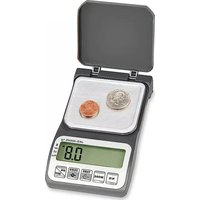
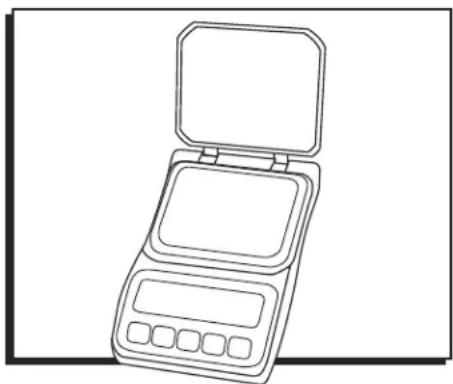
Line drawing of a compact electronic device with open lid and control buttons (no text or symbols)OVERVIEW OF CONTROLS
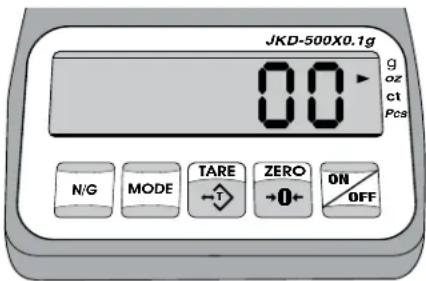
CONTROL PANEL
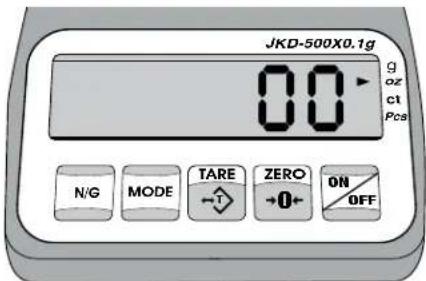
text_image
JKD-500X0.1g 00 g oz ct Pcs N/G MODE TARE ZERO +0+ ON OFFCONTROL FUNCTIONS
| BUTTON |  |  |  |  |  |
| FUNCTION | N/GDisplays net and gross weight. | MODEChanges weigh units. Release on desired unit. | TARETares the weight of the container. | ZEROSets display to zero. | ON/OFFTurns the scale on/off. |
SETUP

WARNING! Place the scale on a flat and stable surface. Avoid sudden temperature changes. Do not immerse the scale in water or other liquids.

NOTE: Recommended operating temperatures are between 32°F and 140°F (0°-40°C).
REMOVING THE SHIPPING SCREW
- Remove the battery cover (A) on the bottom of the scale. (See Figure 1)
- Unscrew the shipping screw (B).
INSTALLING THE BATTERIES
Insert three AAA batteries into the battery chamber (C) on the bottom of the scale.

NOTE: Ensure the negative battery terminals face the spring contacts.
Figure 1
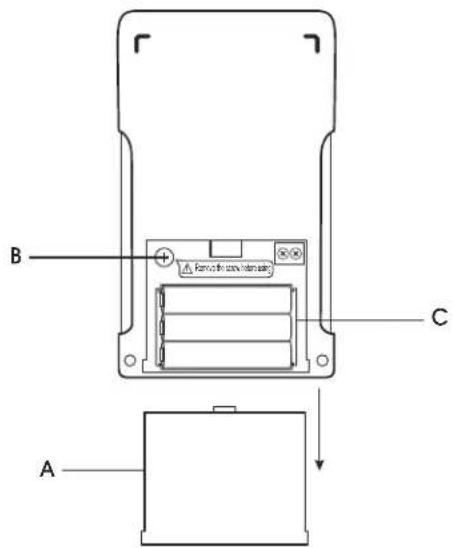
text_image
B C AOPERATION
TURNING THE SCALE ON/OFF
- To turn the scale on, press the ON/OFF button.
- To turn the scale off, press the ON/OFF button.
CHANGING UNIT OF MEASURE
- Press the MODE button repeatedly until the desired unit of measure is displayed and release.
CALIBRATION
- Press and hold ZERO while turning on the scale. Do not release ZERO until the offset value, a random numeric value, is displayed.
- Press ZERO again. After "Zero" is displayed, the required calibration weight of 400g is displayed.
- Place the corresponding calibration weight on the pan.
- Press ZERO to calibrate. CRL will be displayed on the screen.
- The calibration procedure is completed when PASS is displayed on the screen. Remove the weights.
- Press TARE to return to normal weighing mode.
WEIGHING
- Place item to be weighed on the scale platform.
- Weight will be shown in the display.
COUNTING
- Press MODE to select "PCS."
- Press N/G to choose the sampling amount:
| S=10 | 10 pieces |
| S=20 | 20 pieces |
| S=50 | 50 pieces |
| S=100 | 100 pieces |
-
Place a sample on the weighing pan and press MODE. CRL is displayed momentarily before the display reverts to the sample size.
-
Remove the samples. Place additional items on the platform. The scale will begin to count.

NOTE: The sampling result is retained when the unit is turned on.
TARE
- Place container on the scale.
- Press the TARE button. Scale will zero.
- Add items to be weighed or counted into the container.
SETUP MENU
SETUP MENU NAVIGATION
- To enter the menu, press and hold ZERO while turning on the scale. Do not release ZERO until the offset value is displayed.
- Press MODE, the screen displays Rd.
- Press N/G to step through all the settings.
- Press MODE to initial the displayed setting, and then press N/G to step through internal parameters.
- Press MODE to save the setting. Press TARE to exit without saving.
- Press ZERO to return to weighing mode.
BACKLIGHT
LIGHT: Activation of the backlight.
| Auto | Auto on with items greater than 0.9g placed on the weighing pan |
| ON Backlight on | |
| OFF Backlight off | |
AUTO POWER OFF
RU_oFF : Set the period of inactivity before the scale automatically powers off.
| NO | Do not power-off |
| 5 | 5 minutes |
| 10 | 10 minutes |
| 15 | 15 minutes |
TROUBLESHOOTING
| OPERATING ISSUE RECOMMENDATION | |
| OUTP | Confirm nothing is on the weighing platform and reboot the scale.Load cell failure. |
| HHHH or LLLLL | Confirm the shipping screw has been removed from the scale. (See Figure 1[B])Defective load cell.Defective mainboard. |
| ErrE | Reboot the scale. If LCD continues to display error, recalibrate the scale. |
| UnSE | Confirm nothing is on the weighing platform and reboot the scale.Batteries are weak and must be replaced. |
| EEEE | Overload condition or the total count value is more than 65,535. |
| ErrC | Incorrect calibration weights. Recalibrate the scale. |
If troubleshooting section does not resolve your problem, contact Uline Customer Service at 1-800-295-5510.
TECHNICAL DATA
| Capacity/Accuracy (g) 500×0.1 | |
| Precision (g) ±0.1 | |
| Weighing Modes g, ct, oz | |
| Operating Temp 32°-140°F (0°-40°C) | |
| Display 5 1/2 Digits x 15mm | |
| Power Three AAA batteries | |
| Scale Dimensions 5.3 x 3.2 x 0.9" | |
| Weight 0.33 lb. | |
natural_image
Line drawing of a dual stacked device with open lid and control buttons (no text or symbols)text_image
JKD-500X0.1g 00 g oz ct Pcs N/G MODE TARE ZERO +0+ ON OFFnatural_image
Line drawing of a compact digital counter with open lid and control buttons (no text or symbols)APERÇU DES COMMANDES
PANNEAU DE COMMANDE