MYB-N450-EU - Portable lamp HOMEDICS - Free user manual and instructions
Find the device manual for free MYB-N450-EU HOMEDICS in PDF.


User questions about MYB-N450-EU HOMEDICS
0 question about this device. Answer the ones you know or ask your own.
Ask a new question about this device
Download the instructions for your Portable lamp in PDF format for free! Find your manual MYB-N450-EU - HOMEDICS and take your electronic device back in hand. On this page are published all the documents necessary for the use of your device. MYB-N450-EU by HOMEDICS.
USER MANUAL MYB-N450-EU HOMEDICS
Register your product today at
www.homedics.co.uk/product-registration
natural_image
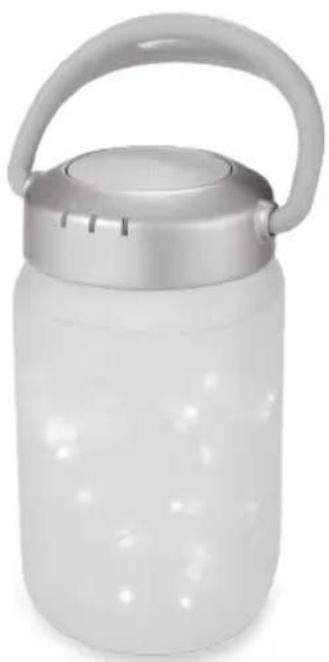
White cylindrical water jar with a metallic handle and lid, no visible text or symbolswalkaboutlantern
instruction manual
3YEARguarantee
MYB-N450-EU
CREATE THE PERFECT ENVIRONMENT FOR YOUR BABY
Thank you for purchasing the MyBaby by HoMedics Walkabout Lantern. MyBaby by HoMedics Walkabout Lantern will create the ideal environment to comfort your child's fear of the dark.
text_image
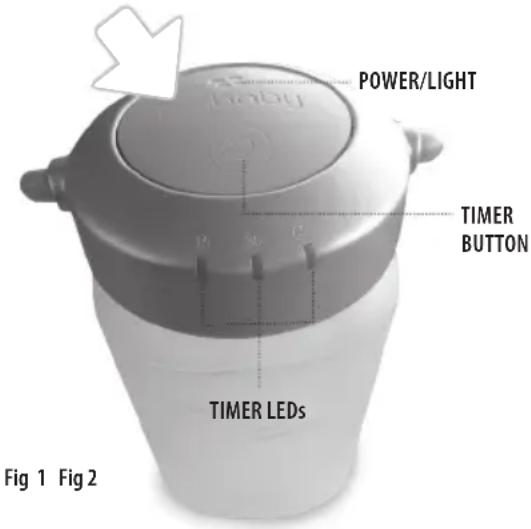
POWER/LIGHT TIMER BUTTON TIMER LEDs Fig 1 Fig 2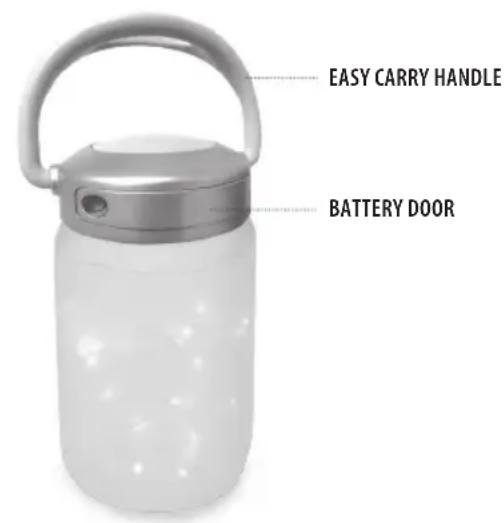
text_image
EASY CARRY HANDLE BATTERY DOORPRODUCT FEATURES:
- 2 light settings lets you choose constant glow or gentle blinking.
- Auto-Timer lets you choose how long you have the light on - 15, 30, 60 minutes or continuously.
- Uses 4 AAA batteries (included).
- Easy carry handle for portable use.
INSTRUCTIONS FOR USE:
How to install batteries:
- Locate the battery cover (Fig. 2). Use a flat head screw driver to loosen the screw.
- Open the battery compartment door and the exhausted batteries (if applicable).
- Install 4 new "AAA" batteries following the diagram inside the battery compartment.
Note: We recommend using Alkaline batteries for longer battery life. - Replace the battery compartment door and tighten the screw to secure.
Note: It is time to change the batteries when the light becomes faint or stops.
Turning On Light
- Unpack the product.
- Make sure batteries are properly installed.
- Press the POWER button located on top of the unit, in the centre of the MyBaby logo (Fig. 1). This will turn on the constant light option.
- Press the centre of the MyBaby logo again and the light mode moves to a soft blinking light (replicating fireflies in a jar).
- Pressing the power button again, turns off the unit.
Using The Auto-Timer
- When the power is on and unit is glowing you may set a timer so the unit will automatically turn off.
- Toggle through the TIMER button (Fig. 1) until the corresponding LED illuminates next to the time of your choice, 15, 30, or 60 minutes. The unit will automatically shut off after the selected time and the Power LED (Fig. 1) will turn off as well.
- Once the timer is set if you choose to use a different light option, you may do so by pressing the Power button (located in the center of the MyBaby logo) (Fig. 1)
Note: If you are on the soft blinking light option pressing the power, button again will turn off the unit and turn off the timer. Pressing the power button again will start the lantern with no timer active. - If you choose to use the light continuously again, toggle through the TIMER button until the green LED light is not illuminated on any of the time choices.
Note: Do not select the TIMER button if you wish to have the lantern glowing continuously.
MAINTENANCE:
To Store
You may leave the unit on display, or you can store it in its box or a cool, dry place. Batteries should be removed prior to storage.
To Clean
Wipe off dust with a damp cloth. NEVER use liquids or abrasive cleaner to clean. Do not immerse in water.
CRÉEZ L'ENVIRONNEMENT PARFAIT POUR VOTRE ENFANT :
text_image
mybaby by HOMEDICS
FKA Brands Ltd
Somerhill Business Park, Tonbridge, Kent TN11 0GP, UK
Customer Support: +44(0) 1732 378557 | support@homedics.co.uk
IB-MYB-N450-EU-0218-01