MYB-S115A-EU - Baby monitor HOMEDICS - Free user manual and instructions
Find the device manual for free MYB-S115A-EU HOMEDICS in PDF.


User questions about MYB-S115A-EU HOMEDICS
0 question about this device. Answer the ones you know or ask your own.
Ask a new question about this device
Download the instructions for your Baby monitor in PDF format for free! Find your manual MYB-S115A-EU - HOMEDICS and take your electronic device back in hand. On this page are published all the documents necessary for the use of your device. MYB-S115A-EU by HOMEDICS.
USER MANUAL MYB-S115A-EU HOMEDICS
text_image
mybaby HYEMEDICSRegister your product today at www.homedics.co.uk/product-registration
natural_image
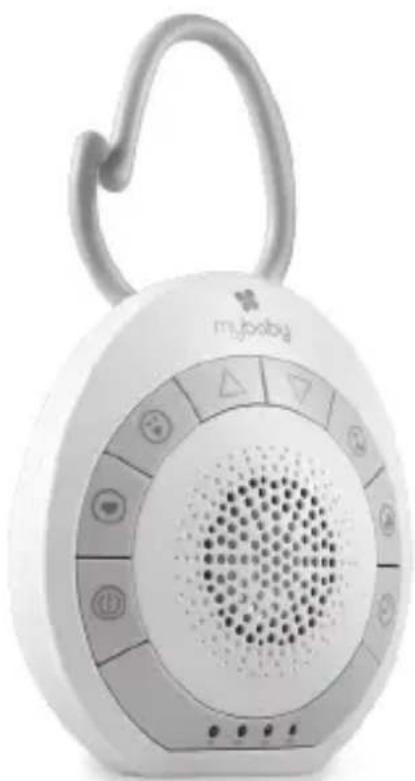
White baby phone with circular display and handle, no visible text or symbols on device bodysoundspa'on-the-go
instruction manual
MYB-S115A-EU
3YEARguarantee
CREATE THE PERFECT ENVIRONMENT FOR YOUR BABY
Thank you for purchasing the MyBaby by HoMedics SoundSpa On-The-Go. The SoundSpa On-The-Go will help your baby wind down and relax.
text_image
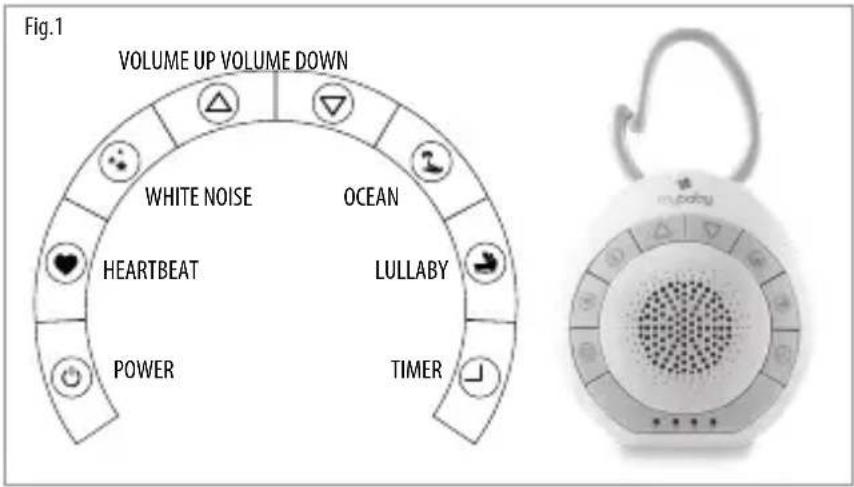
Fig.1 VOLUME UP VOLUME DOWN WHITE NOISE OCEAN HEARTBEAT LULLABY POWER TIMERPRODUCT FEATURES:
- Soothing Sounds: White Noise, Ocean, Heartbeat, and Lullaby.
• Auto-Timer lets you choose how long you listen – 15, 30, 45 minutes or continuously
• Digital volume control allows you to adjust the volume of the sounds - Compact and lightweight for travel.
• Uses 3 AAA batteries (included).
INSTRUCTIONS FOR USE:
How To Install Batteries:
- Make sure the unit is turned OFF.
- Locate the battery cover. Use a coin to loosen the screw.
- Remove the battery compartment door and the exhausted batteries (if applicable).
- Install 3 new "AAA" batteries following the diagram inside the battery compartment.
Note: We recommend using alkaline batteries for longer battery life. - Replace the battery compartment door and tighten the screw to secure.
Note: When sounds become faint or stop, it is time for an adult to change the batteries.
Listening to the Sounds:
-
Press and hold the POWER button for 2 seconds to turn ON. The red LED power indicator will illuminate.
-
Select the sound you wish to listen to and press the corresponding button. (See Fig.1)
Note: When the unit is turned on, it will always default to the last sound used. - To adjust the volume, press the △ button or ▽ button to your desired level. (See Fig.1)
- Press and hold the POWER button for 2 seconds to turn OFF.
Using the Auto-Timer:
When the power is on and you are listening to a sound, you may set a timer so the unit will automatically turn off after 15, 30, or 45 minutes.
- Press timer button Ⓐ. The green LED timer indicator under the specified timer setting will illuminate. (See Fig.1)
- Keep Pressing the timer button Ⓐ to move through different timer options. The timer feature has been turned off when green LEDs are off.
MAINTENANCE:
To Store
You may leave the unit on display, or you can store it in its box or a cool, dry place. Batteries should be removed prior to storage.
To Clean
Wipe off dust with a damp cloth. NEVER use liquids or abrasive cleaner to clean. Do not immerse in water.
CRÉEZ L'ENVIRONNEMENT PARFAIT POUR VOTRE ENFANT :
natural_image
White baby phone with circular keypad and speaker grille (no visible text or symbols)Écouter les sons :
natural_image
White portable electronic device with circular speaker grille and attached handle (no visible text or symbols)natural_image
White portable electronic device with circular speaker grille and handle (no visible text or symbols)natural_image
White portable electronic device with circular speaker grille and handle (no visible text or symbols)Ascolto dei suoni:
natural_image
White portable electronic device with circular speaker grille and handle (no visible text or symbols)Ouvir os sons:
natural_image
White baby phone with circular keypad and speaker grille (no visible text or symbols)text_image
Fig.1 VOLUM OPP VOLUM NED WHITE NOISEAV OCEAN HEARTIBLATG VUCULBANY POWER TIDSINNSTIMANSPRODUKTEGENSKAPER:
natural_image
White baby phone with circular keypad and speaker grille (no visible text or symbols)natural_image
White portable electronic device with circular speaker grille and handle (no visible text or symbols)natural_image
White portable phone with circular keypad and speaker grille (no visible text or symbols)Hangok lejátszása:
natural_image
White portable electronic device with circular speaker grille and handle (no visible text or symbols)Poslech zvuků:
natural_image
White portable phone with circular keypad and speaker grille (no visible text or symbols)natural_image
Close-up of a white Mybaby brand phone with a circular grille and handle (no visible text or symbols on the device body)Počúvanie zvukov:
text_image
mybaby by HEMEDICS
FKA Brands Ltd
Somerhill Business Park, Tonbridge, Kent TN11 0GP, UK
Customer Support: +44(0) 1732 378557 | support@homedics.co.uk
IB-MYB-S115A-EU-0218-01