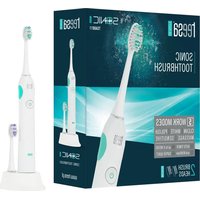
Sonic Pro TSA8011 - Toothbrush Teesa - Free user manual and instructions
Find the device manual for free Sonic Pro TSA8011 Teesa in PDF.


| Product Type | Sonic toothbrush |
| Brand | Teesa |
| Model | Sonic Pro TSA8011 |
| Power supply | 100-240 V, 50/60 Hz (induction charger) |
| Battery | 700 mAh |
| Battery life | Up to 6 weeks or 180 minutes of continuous operation |
| Full charge time | Approximately 24 hours |
| Brushing modes | 5 modes: Clean (31,000 mpm), White (41,000 mpm), Polish (48,000 mpm), Massage (31,000 mpm), Sensitive (31,000 mpm) |
| Built-in timer | Auto shut-off after 2 minutes, reminder every 30 seconds |
| Protection rating | IPX7 (waterproof, usable in shower) |
| Number of brush heads included | 2 replacement heads |
| Bristle type | Medium bristles |
| Noise level | ≤ 65 dB |
| Charge indicator | Yes |
| Memory function | Remembers the last mode used |
| Maintenance and cleaning | Rinse the head after use, clean the handle with a damp cloth, do not immerse the charger |
| Safety | Do not use in bathtub, unplug before cleaning, do not attempt to repair yourself |
| Usage | Household use only |
Frequently Asked Questions - Sonic Pro TSA8011 Teesa
User questions about Sonic Pro TSA8011 Teesa
0 question about this device. Answer the ones you know or ask your own.
Ask a new question about this device
Download the instructions for your Toothbrush in PDF format for free! Find your manual Sonic Pro TSA8011 - Teesa and take your electronic device back in hand. On this page are published all the documents necessary for the use of your device. Sonic Pro TSA8011 by Teesa.
USER MANUAL Sonic Pro TSA8011 Teesa
Thank you for purchasing TEESA appliance. Please read this operation instruction carefully before use, and keep it for future use. Producer does not take responsibility for damages caused by inappropriate handling and use of the product.
SAFETY INSTRUCTIONS:
In order to reduce the risk of any injury, follow basic safety precautions applied when using any electrical device, including the following:
- Read this instruction manual carefully, even if you are familiar with the appliance.
-
Before connecting the device to power supply socket, make sure the voltage indicated on the appliance corresponds to the voltage in the power supply socket.
-
ALWAYS turn off the device and disconnect it from the mains supply:
-
if it's not operating correctly
- if there's an uncommon voice when using
• before disassembling the device - before cleaning
-
before servicing
-
When you disconnect the power cord, grasp and pull the plug, not the cord/cable.
-
This appliance may be used by children who are above 8 years old and by persons with reduced physical, sensory or mental capabilities, or lack of experience and knowledge, if they are supervised and guided by a person who is responsible for their safety in a cautious manner, and all the safety precautions are understood and followed. Children should not play with this device. Children should not perform cleaning and servicing of the device unsupervised.
-
Fixed power cable may only be replaced in an authorized service point.
-
Do not use this appliance if it's not operating properly or has been dropped into water. Do not attempt to repair this appliance yourself, only authorized and qualified personnel may repair this device. This product has no user serviceable parts. In case of damage, contact an authorized service point for check-up/repair.
-
Keep the device and its cord/cable away from heat, water, moisture, sharp edges and any other factor which may damage the appliance or its cord.
-
Do not use the product for purposes/uses different from what displayed in this operating manual.
-
Producer of this product is not responsible for damages caused by inappropriate handling and using of the device.
-
Use only original/authorizes accessories.
-
DO NOT USE while bathing!
-
Do not place or store product where it can fall or be pulled onto a tub or sink.
-
Do not reach for a product that has fallen into water. Unplug from power supply socket immediately.
-
Do not handle plug or the appliance with wet hands.
-
Product for household use only. Not for commercial use.
NOTE: This device has a waterproof handle. It is electrically safe and is designed for use in the bathroom. But it's not meant to be used underneath the water.
CHARGING
- Make sure the battery is fully charged before first use.
- Plug the charging unit into a power supply socket and put the toothbrush handle onto the charging unit.
- A full charge takes about 24 hours and enables approximately up to 6 weeks brushing. Once fully charged, the charging indicator shows the battery is full, as long as you keep the toothbrush on the charging unit.
- Pull charger unit plug out of power supply socket to save energy, or leave it in and keep the brush on the charging unit (there is no risk of overcharging of battery).
OPERATION
- Once the battery is fully charged, attach a brush head to the handle and apply toothbrush.
Note: there will be about 0,5 mm space between the brush head and the handle. - To avoid splashing, guide the brush-head to your teeth before switching the appliance on.
- Place the bristles against the teeth at a slight angle towards the gum line.
- Press the power button to turn it on. If you keep pressing the power button, the device will enter next mode (the sequence is: power on in clean mode, white mode, polish mode, massage mode, sensitive mode, power off).
Please note: this toothbrush has a memory function; it powers on in the last selected source. However, when powered on for the first time, by default it boots in clean mode. Later on, the device boots in mode it has been used lately.
TIMER
- This device has been equipped with 2 minutes auto switch off function. This features helps the user to maintain proper oral health care habits. Once the 2 minutes are up, the toothbrush turns off automatically.
- The toothbrush stops shortly every 30 seconds to remind user the passing time.
Tip: Use this feature to measure equal time for each tooth quadrant. This way you'll spend 30 seconds on each part.
MODE
This device offers different brushing modes for varying oral care needs:
- Clean – Exceptional teeth cleaning; up to 31 000 strokes/minute
- White – removes surface stains, microscopic plaque and bacteria; up to 41 000 strokes/minute
- Polish – removes 2x more plaque; up to 48 000 strokes/minute
- Massage – Gentle stimulation of gums, repetitive cycles of strong to weak strokes; up to 31 000 strokes/minute
- Sensitive – Gentle, yet thorough cleaning for sensitive areas; up to 31 000 weak strokes/minute
To turn the toothbrush on, press the power button once. If you keep pressing the power button, the device will enter next mode. The sequence is:
• power on in clean mode
- white mode
- polish mode
- massage mode
- sensitive mode
- power off
Please note, you will only be able to change mode within 5 seconds from the last time you pressed the button. Once the 5 seconds are up, the device stays in the chosen mode.
Please note, the device enters Clean mode automatically when powered on for the first time.
According to selected work mode, one of the mode indicator will stay lit.
BRUSHING TECHNIQUE
- Guide the brush head slowly from tooth to tooth.
- Hold the brush head in place for a few seconds before moving on to the next tooth.
- Brush the gums as well as the teeth. Start with the outside of the teeth, then the insides, ending with the chewing surfaces.
- Do not scrub or press hard, simply let the brush do all the work.
CLEANING
- After brushing, rinse you brush head thoroughly under running water.
- Remove the brush head from the handle and clean both parts separately under running water. Then wipe them dry completely before you put the handle onto the charging unit.
- Before cleaning your charging unit, make sure you unplug the adaptor. Only use a dry or damp-dry cloth to wipe the surface of the charging unit.
Important: Do not clean the charging unit by immersing it under running or still water.
- Place the charging unit onto a dry and safe place.
- Do not plug in the charging unit unit it is completely dry.
SPECIFICATION
- 5 work modes:
• Clean: 31 000 strokes/min.
• White: 41 000 strokes/min.
• Polish: 48 000 strokes/min.
• Massage: 31 000 strokes/min.
• Sensitive: 31 000 strokes/min. - IPX7
• 2 min. auto-off, 30 sec.timer
• Medium bristles
• 2 brush heads in set
• Noise level: ≤ 65 dB
• Power indicator - Inductive charger
• Usage on one charge: up to 6 weeks or 180 min. of continuous use
• Battery: 700 mAh
• Power supply: 100-240 V; 50/60 Hz
English
Correct Disposal of This Product
(Waste Electrical & Electronic Equipment)

(Applicable in the European Union and other European countries with separate collection systems) This marking shown on the product or Its literature, indicates that It should not be disposed with other household wastes at the end of its working life. To prevent possible harm to the environment or human health from uncontrolled waste disposal, please separate this from other types of wastes and recycle it responsibly to promote the sustainable reuse of material resources. Household users should contact either the retailer where they purchased this product, or their local government office, for details of where and how they can take this item for environmentally safe recycling. Business users should contact their supplier and check the terms and conditions of the purchase contract This product should not be mixed with other commercial wastes for disposal.
Made in China for Lechpol Electronics Leszek Sp.k., ul. Garwolińska 1, 08-400 Miętne.


Brand : Teesa
Model : Sonic Pro TSA8011
Category : Toothbrush