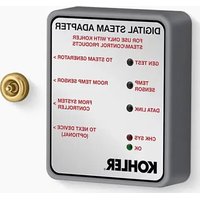
Invigoration K-32311 - Steam cleaner KOHLER - Free user manual and instructions
Find the device manual for free Invigoration K-32311 KOHLER in PDF.


| Product type | Digital steam adapter for steam generator |
| Brand | Kohler |
| Model | Invigoration K-32311 |
| Use | Steam bath control, compatible with Kohler steam generators |
| Power supply | Via steam generator (120-240 V, depending on model) |
| Dimensions (L x W x H) | Approximately 10 x 8 x 3 cm (estimate) |
| Weight | Approximately 200 g (estimate) |
| Connections | Data cables, temperature sensor, coupler for two steam heads |
| Main functions | Activation/deactivation of steam generator, session management, self-cleaning |
| Temperature sensor | Wire with probe, to be placed 127 mm from ceiling on the wall opposite the steam head |
| Self-cleaning | Reminder every 600 min of use; lock after 3 reminders |
| LED indicators | GEN TEST (normal blinking green), TEMP SENSOR, DATA LINK |
| Generator identification | Button to switch from ID 01 to 02 (dual head configurations) |
| Warranty | 5-year limited warranty (see kohler.com/warranty) |
| Maintenance and cleaning | See kohler.com/clean; use dielectric grease and 100% silicone |
| Spare parts | Available at kohler.com/serviceparts |
| Safety | Disconnect power before installation; do not use by children without supervision; risk of scalding |
| Compatibility | Requires a system control module (DTV+ or Anthem+) |
| Customer service | USA/Canada: 1-800-4KOHLER, Mexico: 001-800-456-4537 |
Frequently Asked Questions - Invigoration K-32311 KOHLER
User questions about Invigoration K-32311 KOHLER
0 question about this device. Answer the ones you know or ask your own.
Ask a new question about this device
Download the instructions for your Steam cleaner in PDF format for free! Find your manual Invigoration K-32311 - KOHLER and take your electronic device back in hand. On this page are published all the documents necessary for the use of your device. Invigoration K-32311 by KOHLER.
USER MANUAL Invigoration K-32311 KOHLER
Installation Instructions
Digital Steam Adapter
Record your model number:
Need help? Contact our Customer Care Center.
- USA/Canada: 1-800-4KOHLER (1-800-456-4537) Mexico: 001-800-456-4537 Hours of Operation: Monday-Friday 8:00 AM -5:00 PM (CT) Languages Spoken: English, Spanish, and translation services are available.
• Service parts: kohler.com/serviceparts
- Care and cleaning: kohler.com/clean
• Patents: kohlercompany.com/patents
Warranty
This product is covered under the KOHLER® Electronic Faucets, Valves, and Controls Five-Year Limited Warranty, found at kohler.com/warranty. For a hardcopy of warranty terms, contact the Customer Care Center.
IMPORTANT SAFEGUARDS
When using electrical products, especially when children are present, basic safety precautions should always be followed, including the following:

DANGER: Risk of electric shock. Disconnect the electricity to the working area at the main breaker panel before performing these installation steps.

WARNING: Risk of personal injury. If you become uncomfortable while taking a steambath, you should turn off the unit. Cool off with the shower, open the door, or exit the unit.

WARNING: Risk of allergic reaction. Before adding any oils, aromatic therapies, or skin care products to the aromatherapy well, verify that they will not cause an allergic reaction to the user.

WARNING: Risk of personal injury. This steambath may not be suitable for use if you are pregnant, have a heart condition, have high blood pressure, have circulatory problems, are under the influence of alcohol, are taking drugs or are under the care of a physician. A steambath can cause undue stress on the body, as does any hot bath, shower, or sauna.

WARNING: Risk of personal injury. DO NOT consume alcoholic beverages or take medications/drugs before or when using the steambath. Alcohol and drugs affect mental judgment, greatly increase the risk of hyperthermia, and inhibit bodily functions such as heartbeat and respiration, resulting in potentially dangerous effects.

WARNING: Risk of injury to children. Do not allow children to use this unit unless they are closely supervised at all times. The steam generator is not designed to be used by children.

WARNING: Risk of scalding or burning. Stay away from the steam head during operation. The steam head is hot during operation.

WARNING: Risk of personal injury or property damage. Avoid coming in contact with the water tank and/or steam discharge line while the steam generator is operating or shortly after shutdown. Wear eye protection and protective clothing when servicing the steam generator. The steam generator operates at high temperatures.
Use this product only for its intended use as described in this manual. Only use attachments recommended by Kohler Co.
Follow all local plumbing, building, and electrical codes.
Operation With a System Controller
To connect the steam adapter to a digital showering system, a system controller is required.
A 25' (7.6 m) data cable is provided to connect the steam adapter to the system controller. If the steam generator is not within 25' (7.6 m) of the system controller, add an extension cable and coupler.
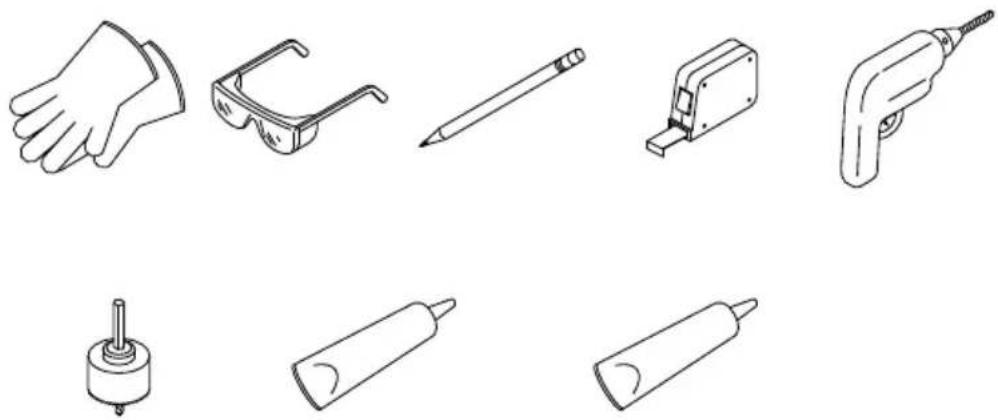
Required Tools and Materials
natural_image
Line drawings of various electronic components including a hand, eyeglasses, pencil, and power tool (no text or labels)7/16" Hole Saw Dielectric Grease 100% Silicone Sealant
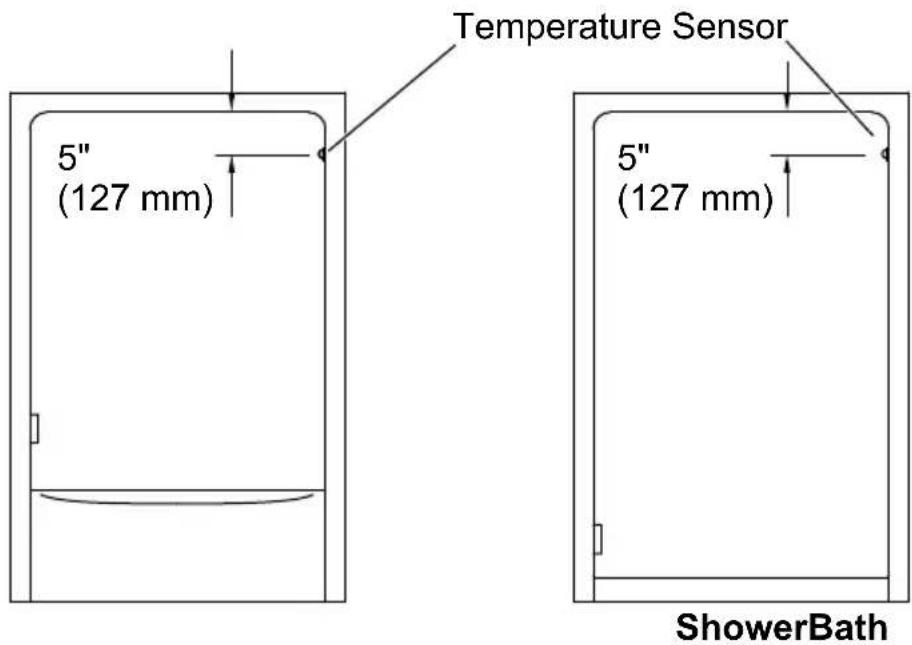
NOTICE: Do not locate the digital control on the same wall as the steam head(s).
NOTICE: Locate the temperature sensor on the wall opposite the steam head(s).
If possible, install the steam generator(s) and the system controller before beginning this installation.
Locate the temperature sensor 5" (127 mm) down from the ceiling, on the wall opposite the steam head.
Provide adequate clearance between the steam lines and any surrounding surfaces, or apply appropriate insulation to the steam lines.
1. Install the Temperature Sensor
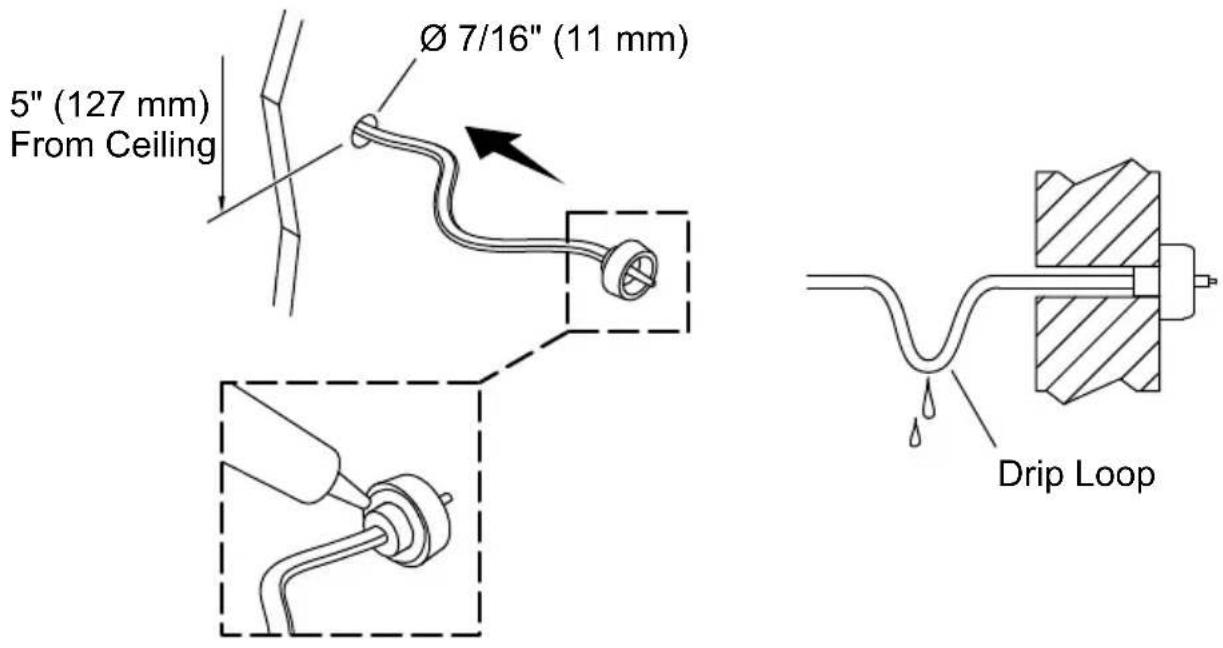

CAUTION: Risk of product damage. Do not pinch, nail, wedge, or use undue force when handling wires and cables. Any damage may result in product failure.
IMPORTANT! Make a drip loop in the temperature sensor wire to prevent water damage to the steam generator.
NOTICE: The temperature sensor must be located on the wall opposite the steam head(s).
☐ Locate the temperature sensor 5" (127 mm) down from the ceiling, on the wall opposite the steam head.
□ Drill a 7/16" (11 mm) hole at the selected location.
☐ Insert the temperature sensor wire through the drilled hole.
☐ Route the wire behind the wall to the steam generator location.
□ Apply a small bead of 100% silicone sealant to the back of the sensor housing. Do not allow the 100% silicone sealant to contact the sensor probe.
□ Press the sensor firmly onto the wall.
□ Temporarily secure the sensor in place with tape.
□ Allow the 100% silicone sealant to cure before use.
2. Install the Digital Steam Adapter - Single Steam Head
Steam Generator
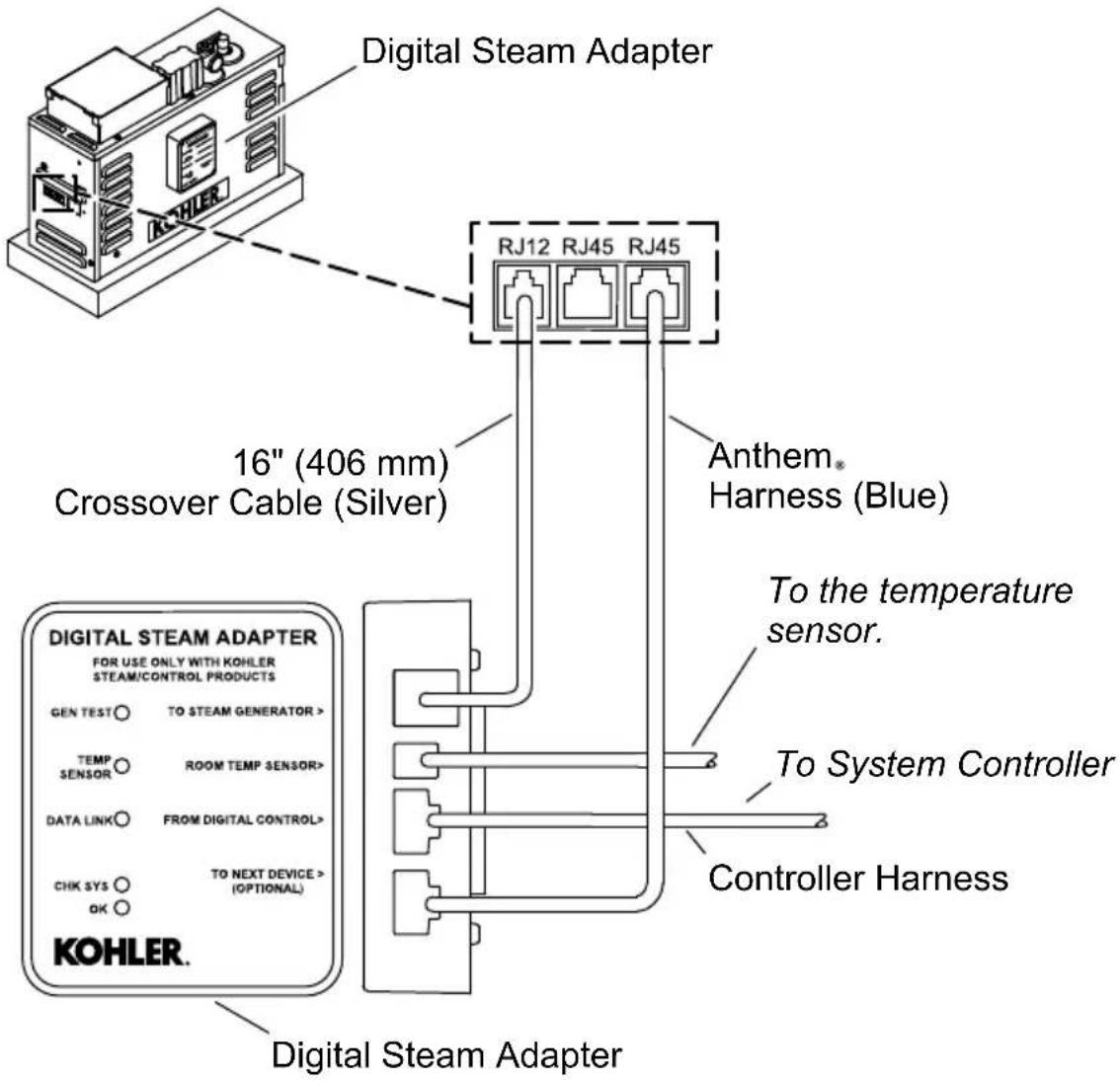

CAUTION: Risk of product damage. Do not pinch, nail, wedge, or use undue force when handling wires and cables. Any damage may result in product failure.
NOTE: Apply dielectric grease to all connectors.
☐ Remove the adhesive backing from the new digital steam adapter.
☐ Press the digital steam adapter firmly to the side of the steam generator.
☐ Connect the 16" (406 mm) crossover cable (silver) to the steam generator.
☐ Anthem+™ Installations: Connect the Anthem harness (blue) from the steam generator to the digital steam adapter.
□ Connect the controller harness from the digital steam adapter to the system controller.
□ Connect the temperature sensor wire to the digital steam adapter.
3. Install the Digital Steam Adapter - Dual Steam Heads
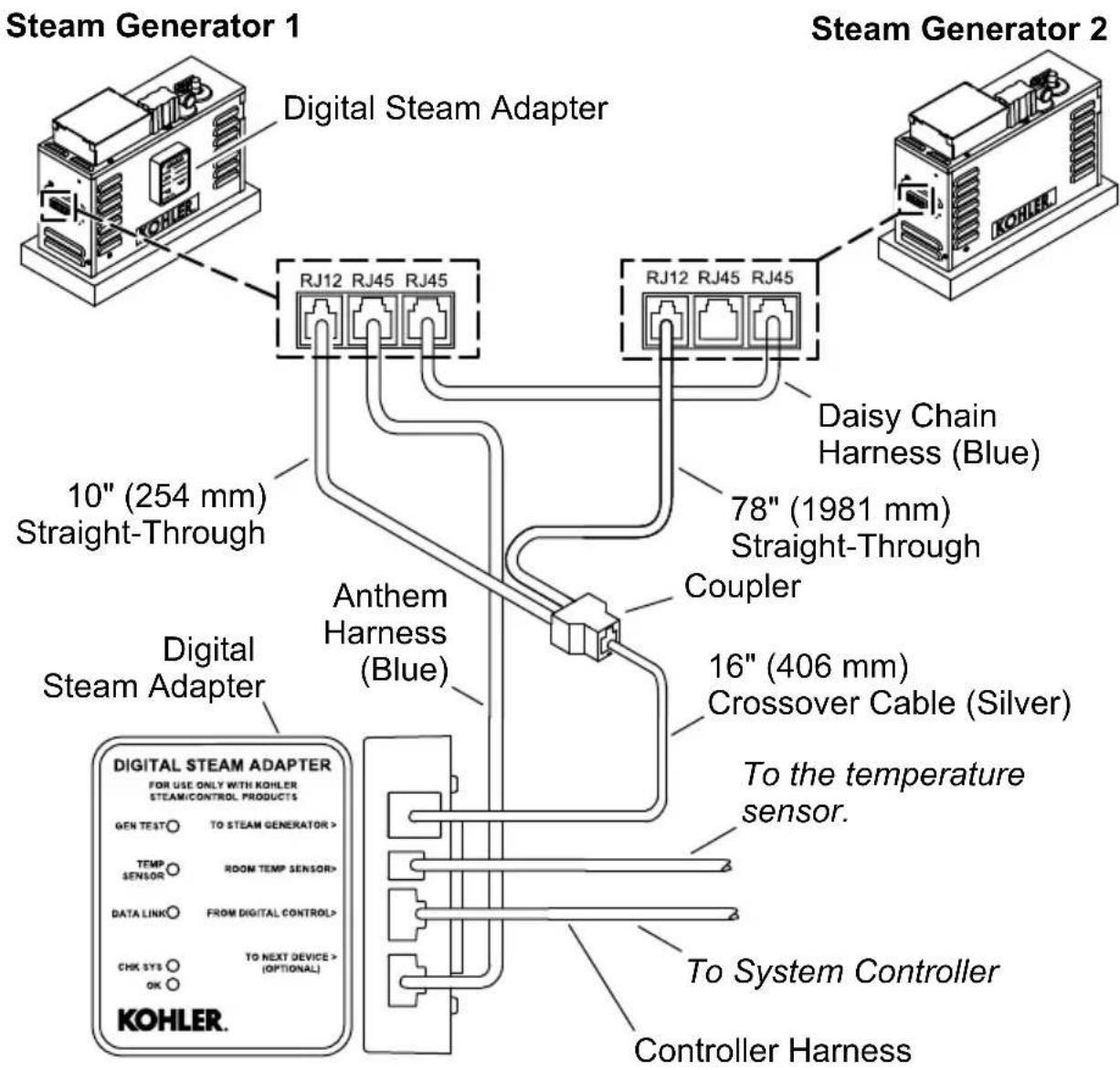

CAUTION: Risk of product damage. Do not pinch, nail, wedge, or use undue force when handling wires and cables. Any damage may result in product failure.
NOTE: Apply dielectric grease to all connectors.
☐ Remove the adhesive backing from the new digital steam adapter.
☐ Press the digital steam adapter firmly to the side of the steam generator 1.
☐ Connect the 16" (406 mm) crossover cable (silver) from the single port on the coupler to the digital steam adapter.
☐ Connect the 10" (254 mm) and the 78" (1981 mm) straight-through cables to the coupler. Attach the other end of each cable to steam generator 1.
☐ Anthem+ Installations: Connect the daisy chain harness (blue) from steam generator 1 to Steam Generator 2.
☐ Anthem+ Installations: Connect the Anthem harness (blue) from steam generator 1 to the digital steam adapter.
☐ Connect the controller harness from the digital steam adapter to the system controller.
□ Connect the temperature sensor wire to the digital steam adapter.
4. Complete the Installation
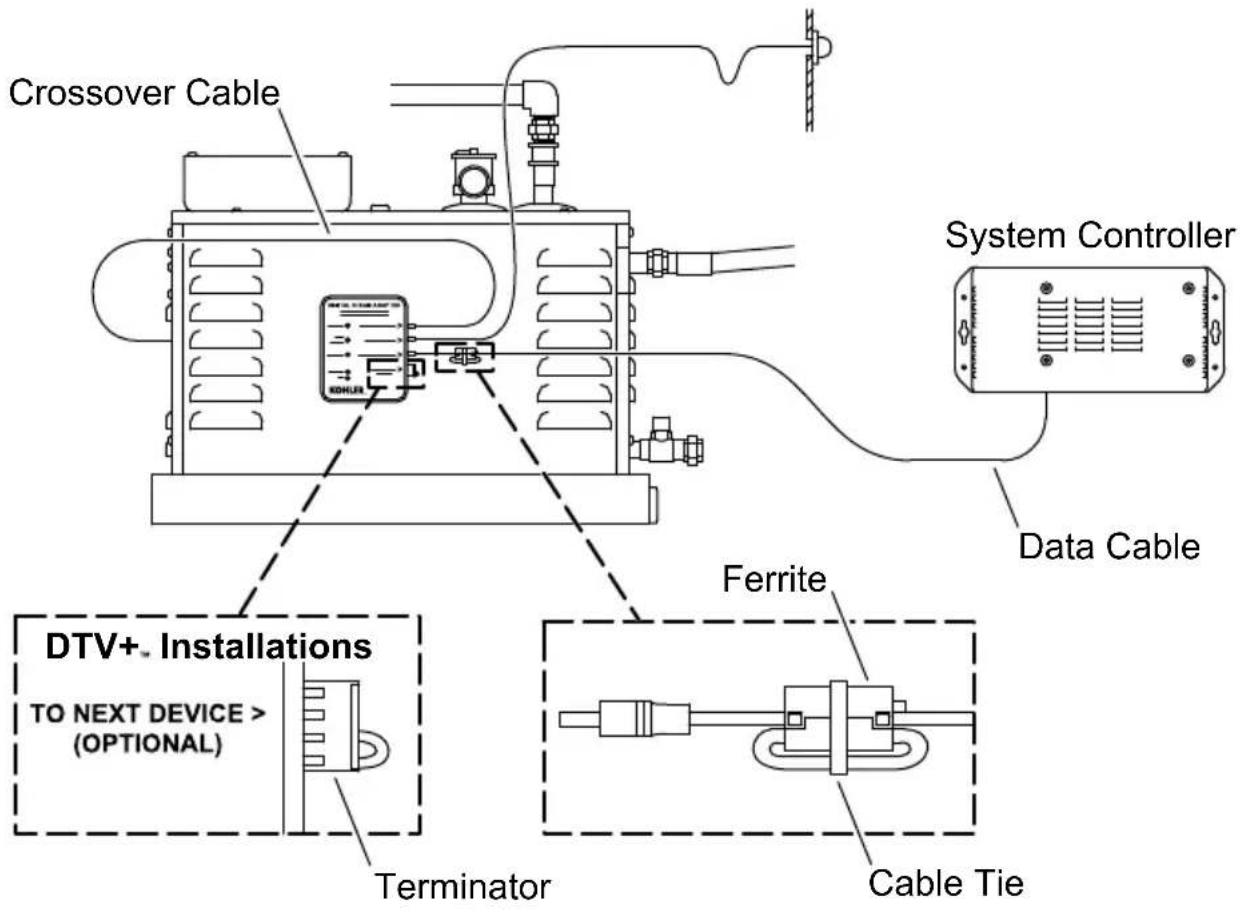
NOTE: The terminator should be installed if no additional components will be added to this device.
☐ Position a ferrite toward the digital steam adapter-end of the data cable.
☐ Loop the cable through the ferrite and snap the ferrite closed.
□ Use a cable tie to gently secure the ferrite in place.
□ Apply dielectric grease to the connector on the ferrite end of the cables and connect to the correct ports on the digital steam adapter.
☐ Route the data cable to the system controller installation location.
☐ DTV+ Installations: Install the terminator to the digital steam adapter.
☐ If not already installed, install the system controller according to the instructions packed with the product.
□ Apply dielectric grease to the data cable connector and connect to one of the component ports on the system controller.
☐ Turn ON the water supply.
☐ Turn ON the electrical power to the steam generator.
☐ For information on system setup and operation, refer to the Homeowners Guide on the system controller product page at kohler.com.
Before Operating the System Controller for the First Time
Download and install the latest software for connected components. This may take an hour or more to complete based on system configuration and internet connection speed. Do not disconnect the power from any component during software download and installation.
Changing the Steam Generator Identification Number
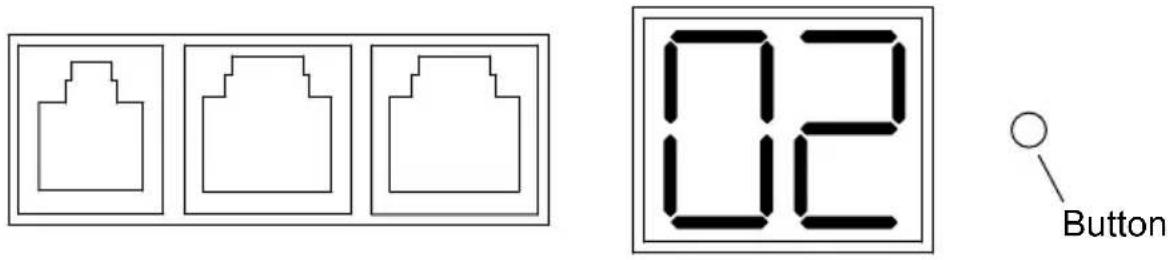
NOTICE: Changing the steam generator identification number is only applicable to dual steam head configurations when paired with the Anthem+ controller.
☐ Press and hold the button for three (3) seconds to change the identification number from "01" (default) to "02."
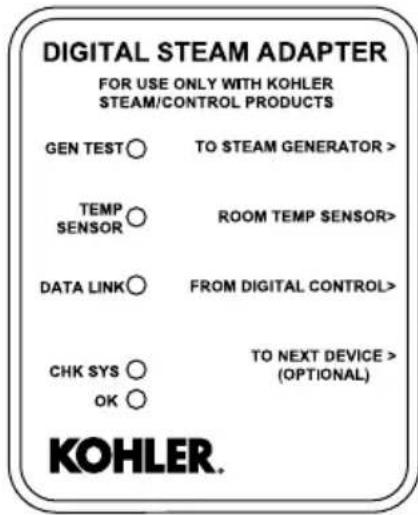
Status LED Lights
☐ "GEN TEST" = steam generator connection/function.
☐ "TEMP SENSOR" = temperature sensor connection/function.
☐ "DATA LINK" = data cable connection/function.
☐ Normal Function: Each LED continuously blinks green every second.
☐ Improper Function: One or more LEDs are solid green, solid red, flashing red, or not illuminated. Refer to the “Troubleshooting” section for more information.
Power Clean Function

WARNING: Risk of personal injury. Steam room temperature will be extremely high when the power clean function is activated. Do not enter the steam room while the power clean function is in progress.
NOTICE: Users will be automatically reminded to use power clean after 600 minutes of steam generator use. The steam generator may be run three more times before the power clean function must be run. Failure to initiate power clean after the third reminder will result in the system locking. Power clean must be run to resume steam operation.
NOTE: When the power clean function is activated, water will discharge from the steam head.
NOTE: For system controller troubleshooting, refer to the Homeowners Guide found on the system controller product page at kohler.com.
This troubleshooting guide is for general aid only. For service and installation issues or concerns, call 1-800-4KOHLER.
| Symptoms Probable Cause Recommended | Action | |
| 1. The lights on the adapter are OFF. | A. Inadequate power is supplied to the steam generator (the green status light on the steam generator is OFF).B. The adapter is not receiving power from the steam generator (the green status light on the steam generator is ON).C. The adapter is not functioning (the green status light on the steam generator is ON). | A. Provide proper power to the steam generator. If necessary, use the provided test kit to verify that the steam generator is working properly.B. Use the provided test kit and instructions to identify the source of the problem.C. Call the Customer Care Center using the information provided in the front of this manual. |
| 2. The “GEN TEST” light is blinking red. | A. An error has occurred with the steam generator. | A. Check the error code on the digital control. Refer to the guide found on the digital control product page at kohler.com. |
| 3. The “TEMP SENSOR” light is blinking red. | A. The temperature sensor is not connected.B. The temperature sensor is not functioning. | A. Connect the temperature sensor.B. Call the Customer Care Center using the information provided in the front of this manual. |
| 4. “DATA LINK” light is blinking red. | A. A connection to the controller has not yet been established.B. A connection to the controller cannot be established.C. An error has occurred. | A. Wait for the connection to be made.B. Remove and reattach the cable that connects the adapter to the controller. Inspect the cable for damage and replace if necessary.C1. Check the error code on the digital control. Refer to the guide found on the digital control product page at kohler.com.C2. Reset power to the steam generator and the system controller.C3. Perform a system reset on the digital control. |
| 5. The steam menu disappears after requesting steam. | A. The cables between the steam generator(s) and the adapter are installed incorrectly. | A1. Reinstall the cable(s) between the steam generator(s) and the adapter according to the installation instructions.A2. Call the Customer Care Center using the information provided in the front of this manual. |
| 6. The display does not show steam function. | A. Inadequate power is supplied to the steam generator (the green status light on the steam generator is OFF).B. The adapter is not functioning (the green status light on the steam generator is ON). | A1. Provide proper power to the steam generator. If necessary, use the provided test kit to verify that the steam generator is working properly.A2. Call the Customer Care Center using the information provided in the front of this manual.B1. Reinstall the cable(s) between the steam generator(s) and the adapter according to the installation instructions.B2. Call the Customer Care Center using the information provided in the front of this manual. |
| 7. Water is discharged from the steam head. | A. Normal operation.B. Water supply lines are not connected correctly.C. Internal steam generator components are not functioning properly. | |
| A. A small amount of water is normally discharged from the steam head just before, during, and after steam generator use, as well as when the power clean function is activated.B. Review the steam generator installation guide and reinstall the lines at the proper locations.C1. Turn OFF the water supply to the steam generator. If possible, drain the tank. Slowly open the water supply valve to refill the steam generator.C2. Call the Customer Care Center using the information provided in the front of this manual. | ||
| Symptoms Probable Cause Recommended | Action | |
| 8. No steam after 5 minutes of activating the steam generator. | A. An error has occurred.B. The temperature setpoint was reached.C. Inadequate power is supplied to the steam generator (the green status light on the steam generator is OFF).D. The cables between the steam generator(s) and the adapter are installed incorrectly.E. Steam line or steam head is blocked.F. The steam generator is not functioning. | A. Check the error code on the digital control. Refer to the guide found on the digital control product page at kohler.com.B. Verify that the temperature setpoint is greater than the current steam room temperature. Increase the temperature setpoint if desired.C. Provide proper power to the steam generator. If necessary, use the provided test kit to verify that the steam generator is working properly.D. Reinstall the cable(s) between the steam generator(s) and the adapter according to the installation instructions.E. Check the steam line and steam head for blockage. Repair as necessary.F1. Use the provided test kit and instructions to identify the source of the problem.F2. Call the Customer Care Center using the information provided in the front of this manual. |
| 9. The steam stopped. | A. An error has occurred.B. The session time limit was met or the temperature setpoint was reached. | A. Check the error code on the digital control. Refer to the guide found on the digital control product page at kohler.com.B. Restart the session timer or increase the temperature setpoint. |
natural_image
Line drawings of various electronic components including a hand, eyeglasses, a pencil, a tool, and a power tool (no text or labels)natural_image
Illustration of various electronic components including gloves, glasses, a pencil, and a power tool (no text or symbols)
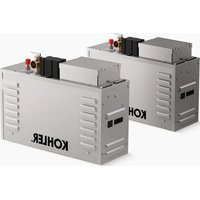
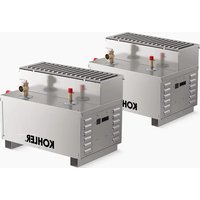
- Installation Instructions
- Digital Steam Adapter
- Warranty
- IMPORTANT SAFEGUARDS
- Operation With a System Controller
- Required Tools and Materials
- Install the Temperature Sensor
- Install the Digital Steam Adapter - Single Steam Head
- Install the Digital Steam Adapter - Dual Steam Heads
- Complete the Installation
- Before Operating the System Controller for the First Time
- Changing the Steam Generator Identification Number
- Status LED Lights
- Power Clean Function
Brand : KOHLER
Model : Invigoration K-32311
Category : Steam cleaner