OB09201 - Massage device SILVER STYLE - Free user manual and instructions
Find the device manual for free OB09201 SILVER STYLE in PDF.


User questions about OB09201 SILVER STYLE
0 question about this device. Answer the ones you know or ask your own.
Ask a new question about this device
Download the instructions for your Massage device in PDF format for free! Find your manual OB09201 - SILVER STYLE and take your electronic device back in hand. On this page are published all the documents necessary for the use of your device. OB09201 by SILVER STYLE.
USER MANUAL OB09201 SILVER STYLE
natural_image
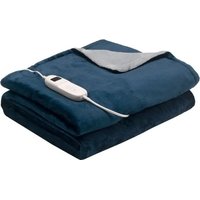
Folded-up of a white fabric or towel with a small electronic device attached (no visible text or symbols)Modèle : OB09201
Référence : 003205
Photo non contractuelle/ Foto is niet bindend / Imagen no contractual / Non contractual photo / Nicht-vertragliches Foto

text_image
Auto shut-off setting button Power button Temperature setting buttonREAD ALL THE INSTRUCTIONS IN THIS MANUAL CAREFULLY, OBSERVING THE OPERATING AND SAFETY INSTRUCTIONS. IMPORTANT INSTRUCTIONS: KEEP THESE INSTRUCTIONS FOR FUTURE USE AND ATTACH THEM TO THE APPLIANCE IF ANOTHER PERSON IS TO USE IT.
SAFETY INSTRUCTIONS
This appliance may be used by children of at least 8 years of age and by persons with reduced physical, sensory or mental capabilities or lacking experience or knowledge, if they are properly supervised or if they have been given instructions on how to use the appliance safely and if the risks involved have been understood. Children must not play with the appliance. Cleaning and maintenance by the user must not be carried out by unsupervised children.
Children under the age of three should not use this appliance because of their inability to react in the event of overheating. The appliance can be used by children aged between 3 and 8 under supervision, with the control always set to the minimum temperature value.
This appliance is intended for use in domestic and similar applications such as :
- kitchen areas reserved for staff in shops, offices and other professional environments,
- farms and use by guests of hotels, motels and other residential environments,
- bed and breakfast environments.
If the power cable is damaged, it must be replaced by the manufacturer, its after-sales service or similarly qualified persons in order to avoid a hazard.
The cable and control unit of the appliance may cause entanglement, strangulation, tripping or crushing hazards if they are not laid out correctly. The user must ensure that any protruding electrical cables and connections are arranged safely.
Always disconnect the appliance from the power supply if it is left unattended and before assembly, disassembly or cleaning.
WARNING: there is a risk of injury if the appliance is used incorrectly.
Users risk skin burns or thermal shock if they fall asleep with the appliance set to a high temperature.
Do not use the appliance if it is damaged.
Do not route the power cable around sharp corners or edges or over very hot objects.
Do not lift or pull the appliance by the cable.
Keep the appliance out of the reach of children.
Caution! Never immerse the appliance in water or any other liquid.
For information on cleaning, maintenance and disposal of the appliance, please refer to the following sections of the manual.
WARNING: Do not use this appliance near baths, showers, washbasins or other receptacles containing water.
This electric heater is not intended for use in hospitals.
The electric and magnetic fields of this electric blanket may interfere with the operation of pacemakers. Please consult your doctor and the manufacturer of your pacemaker before using this blanket.
Make sure the blanket has cooled down before folding and storing it. Do not place any objects on the blanket during storage.
When the electric blanket is used for several hours, we recommend that you set the switch
to the lowest temperature level to prevent it from overheating.
Inspect the appliance frequently for signs of wear or damage. If any such signs are found, if the appliance has been used abnormally or if it does not work, return it to the supplier before using it again.
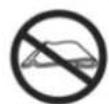
Do not use the electric plaid when folded.
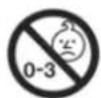
Not suitable for children under 3.

Do not pierce the heating pad.
PRODUCT DESCRIPTION
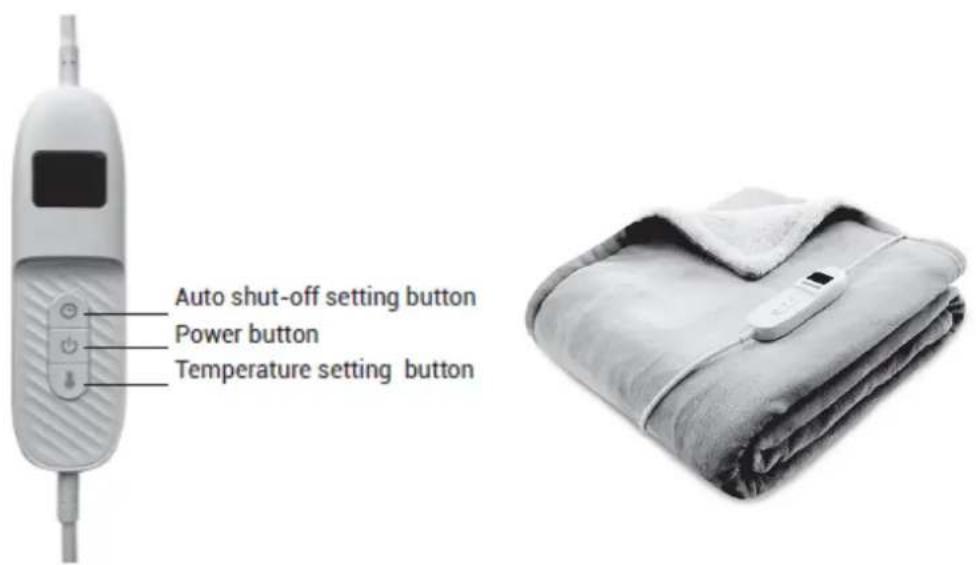
text_image
Auto shut-off setting button Power button Temperature setting buttonBefore using for the first time :
- Unpack the appliance and its various components and check that each part is in good condition.
- Read all the instructions in this manual carefully, observing the instructions for use and safety. Keep these instructions and inform potential users of them.
USE
- Connect the remote control to the socket at the bottom of the heated blanket and plug the other end into the power supply. Make sure that the power cable is not in a position where the user could trip over it.
- Switch on the blanket by pressing the power button on the remote control, then press the temperature setting button. There are 9 levels of warmth, the default setting being 1. If you want a higher temperature, set the temperature between 2 and 9 by pressing the temperature setting button. The temperature increases in increments of one. Once you have reached 9, pressing the temperature setting button again returns you to level 1. The levels are displayed on the indicator panel.
- To preheat the blanket, select the third level by pressing the temperature setting button. The preheating stage takes about 15 minutes. The temperature gradually increases.
-
After pre-heating, set the temperature setting button to the desired temperature.
-
Levels 2 and 3 of the temperature settings are intended for preheating, for continuous operation please use level 1.
- If you find that the temperature is too high, reduce the heating setting to level 2 or 1 by pressing the temperature setting button.
- To switch off the blanket, press the power button.
- To switch off your heated blanket, press the power button and the indicator panel on the remote control will display blank. Unplug the blanket from the mains.
Note: The electric blanket is equipped with an overheating protection and is set to run continuously for 180 minutes. If you wish to extend this time, we recommend that you allow the blanket to cool for 5 minutes before using it again.
Automatic shut-off
The heated blanket has 9 automatic switch-off settings and, depending on the setting chosen, the blanket will automatically switch off after a certain amount of time. At level 1, the blanket switches off automatically after 20 minutes of use and at level 9, it switches off after 3 hours of use. The default setting is 20 minutes (level 1).
Please refer to the table below :
| Levels | Minutes |
| 1 | 20 |
| 2 | 40 |
| 3 | 60 |
| 4 | 80 |
| 5 | 100 |
| 6 | 120 |
| 7 | 140 |
| 8 | 160 |
| 9 | 180 |
If you wish to adjust the auto shut-off setting, once the temperature has been set, press the auto shut-off setting button to select a setting between 1 and 9. Each setting increases by 20 minutes.
When Auto shut-off has been selected, a dot will appear on the indicator panel after the number.
CLEANING AND MAINTENANCE
- Make sure the blanket is switched off by pressing the power button.
- Disconnect the power supply.
- Disconnect the remote control from the blanket.
- Make sure the blanket has cooled down before cleaning and storing it.
Cleaning :
Small stains can be removed with a damp cloth or sponge and, if necessary, a little liquid detergent for delicate fabrics.
Warning: the heated blanket must not be dry-cleaned, tumble-dried, machine-pressed or ironed.
If the heated blanket is very dirty, it can be hand washed or machine washed only on a very delicate cycle at a maximum temperature of 30^ C.
To avoid excessive wear, do not wash the blanket too often.
When drying the blanket, do not hang it on clothes pegs or similar means.
Do not expose the blanket to sources of heat such as the sun, radiators, etc.
Do not reconnect the power cable to the electric blanket until the plug and the fabric are completely dry.
Never turn on the electric blanket to dry it.
Storage :
If you are not going to be using the heated blanket for a long time, it is advisable to store it in its original packaging, in a dry place, and not to place any objects on top of it.
TECHNICAL SPECIFICATIONS
Voltage: 220-240V\~ 50/60Hz
Power rating : 160W
| Power consumption in off mode | <0.3W |
| Power consumption in standby | N/A |
| The maximum time needed to automatically reach the applicable low power mode or condition | N/A |
| Power consumption in network standby if all wired network ports are connected and all wireless network ports are activated | N/A |
GUARANTEE
This product is guaranteed for a period agreed with the distributor from the date of purchase against any defect resulting from faulty workmanship or materials. This guarantee does not cover defects or damage resulting from incorrect installation, incorrect use or abnormal wear and tear of the product.
The appliance must be returned in its original packaging and accompanied by the receipt, provided it has been handled correctly. Please follow the instructions for use and safety instructions set out above. Furthermore, we cannot guarantee your appliance if you or a third party have carried out modifications or repairs to it.
SELECTIVE COLLECTION OF ELECTRICAL AND ELECTRONIC WASTE
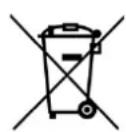
Electrical products must not be disposed of with household waste. In accordance with the European Directive 2012/19/EU on the disposal of electrical and electronic equipment and its implementation in national
law, used electrical products must be collected separately and disposed of at the collection points provided for this purpose. Contact your local authority or dealer for advice on recycling.
LEES ALLE INSTRUCTIES IN DEZE HANDLEIDING ZORGVULDIG DOOR EN LET OP DE BEDIENINGS- EN VEILIGHEIDSINSTRUCTIES. BELANGRIJKE INSTRUCTIES: BEWAAR DEZE INSTRUCTIES VOOR TOEKOMSTIG GEBRUIK EN BEVESTIG ZE AAN HET APPARAAT ALS IEMAND ANDERS HET MOET GEBRUIKEN.
VEILIGHEIDSINSTRUCTIES
text_image
Auto shut-off setting button Power button Temperature setting buttontext_image
Auto shut-off setting button Power button Temperature setting buttonAuto shut-off setting button = Botón de parada automática Power button = Botón de encendido Temperature setting button = Mando de control de la temperatura