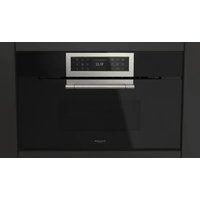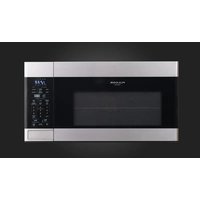
F4OTR30S1 - Microwave Oven Fulgor Milano - Free user manual and instructions
Find the device manual for free F4OTR30S1 Fulgor Milano in PDF.


| Product Type | Built-in microwave oven with integrated hood |
| Brand | Fulgor Milano |
| Model | F4OTR30S1 |
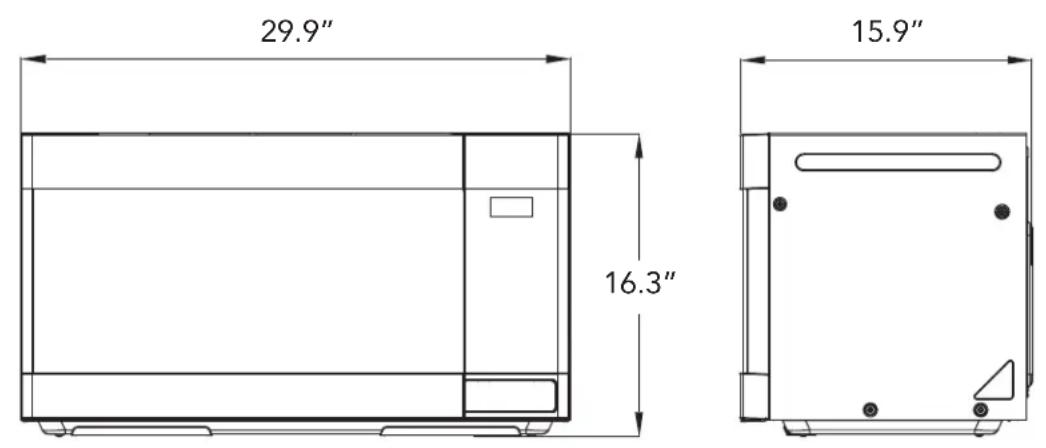
| External dimensions (W x H x D) | 76.0 x 41.4 x 40.4 cm (29.9 x 16.3 x 15.9 in) |
| Interior volume | 51 L (1.8 ft³) |
| Net weight | 22.8 kg (50.3 lb) |
| Power supply | 120 V ~ 60 Hz, 15 A, single phase with grounding |
| Input power | 1500 W |
| Microwave output power | 950 W |
| Microwave frequency | 2450 MHz |
| Maximum timer | 99 min 99 s |
| Power levels | 10 (0% to 100%) |
| Main functions | Manual cooking, sensor cooking (potatoes, frozen vegetables, frozen dish, reheating), timed/weight defrost, melt/soften, keep warm, express cooking 1-6 min, +30 s, two-stage cooking, popcorn, beverage |
| Ventilation | 3-speed fan (Turbo, High, Low) + stop, extraction or recirculation (optional charcoal filter) |
| Lighting | LED hood lamp (1.0 W) and LED interior lamp (0.4 W) |
| Turntable | Glass, diameter compatible with tray and guide ring, enable/disable |
| Metal rack | Included, for multi-level cooking |
| Safety | Child lock, automatic stop when door opens, overheating detection, microwave protection (seals and mesh) |
| Maintenance | Interior cleaning after each use, washable grease filters monthly, charcoal filter to be replaced every 6 months (if recirculation) |
| Spare parts and repairability | Grease filters, charcoal filter, LED bulbs, turntable, guide ring, metal rack – available from Fulgor Milano |
| Warranty | 1 year parts and labor (cosmetic parts 30 days), detailed conditions in the manual |
Frequently Asked Questions - F4OTR30S1 Fulgor Milano
User questions about F4OTR30S1 Fulgor Milano
0 question about this device. Answer the ones you know or ask your own.
Ask a new question about this device
Download the instructions for your Microwave Oven in PDF format for free! Find your manual F4OTR30S1 - Fulgor Milano and take your electronic device back in hand. On this page are published all the documents necessary for the use of your device. F4OTR30S1 by Fulgor Milano.
USER MANUAL F4OTR30S1 Fulgor Milano
Thank you for purchasing a Fulgor Milano product. Fulgor Milano is committed to excellence and our signature technologies provide you with professional tools for your kitchen. One of our central philosophies is continuous investment in research that is rooted in developing life enhancing technology. Our goal is to deliver products that are worthy of your family recipes and that will breathe life into your kitchen, the heart of your home. We invite you to enjoy your new Fulgor Milano product with same amount of care and attention that we have put into creating it.
Your Life | Our Passion
Gianni Muneghetti
TABLE OF CONTENTS PAGE
1 - Important Safety Instructions 4
PRECAUTIONS TO AVOID POSSIBLE EXPOSURE TO EXCESSIVE MICROWAVE ENERGY 4
2 - Installation Guide 6
Examine the Oven After Unpacking 6
Check the Parts 6
Location 6
Power Supply 6
Critical Usage Warnings 7
3 - Specifications 8
4 - Features Diagram 9
5 - Operation Procedure 12
To Set Power Level 12
6 - Controls 13
Setting the Clock 13
Kitchen Timer Mode 13
Time Defrosting 14
Weight Defrosting 14
Melt/Soften 14
Keep Warm 14
Time Cook 14
Cooking in Two Stages 15
+30 Sec 16
Express Cook 16
One Touch Cook (Preset) 16
Sensor Operations 16
Sensor Cook 17
Turntable On-Off 18
Vent Fan 18
Cooktop Light 18
Mute 19
Filter Reset 19
To Set Power Save Mode 19
Child Safety Lock 19
To Stop the Oven While the Oven
is Operating 19
Metal Rack 19
TABLE OF CONTENTS PAGE
7 - Care and Cleaning 21
Microwave Oven Interior 21
Oven Bottom 21
Glass Tray/Turntable 21
Metal Rack 21
Roller Guide 21
Oven Exterior 21
Light Compartment 21
Control Panel 21
Waveguide Cover 21
The Exhaust Feature 21
Reusable Grease Filters 22
To Remove Grease Filter 22
To Clean Grease Filter 22
To Replace Grease Filter 22
Light Replacement 22
Install/Replace Charcoal Filter 23
8 - Before You Call 24
9 - Questions and Answers 25
10 - Cooking Instructions 26
Utensil Guide 26
Use Your Microwave Oven Safely 27
Food 27
Arcing 27
Microwaving Principles 27
How Microwaves Cook Food 27
Cooking Techniques 28
Defrosting Guide 29
Cooking 31
Reheating 32
Vegetable 33
Recipes 34
11 - Fulgor Milano WARRANTY for Home Appliances 37
PRECAUTIONS TO AVOID POSSIBLE
EXPOSURE TO EXCESSIVE MICROWAVE ENERGY
(a) Do not attempt to operate this microwave oven with the door open since open-door operation can result in harmful exposure to microwave energy. It is important not to defeat or tamper with the safety interlocks.
(b) Do not place any object between the microwave oven front face and the door or allow soil or cleaner residue to accumulate on sealing surfaces.
(c) Do not operate the microwave oven if it is damaged. It is particularly important that the microwave oven door close properly and that there is no damage to the: (1) door (bent), (2) hinges and latches (broken or loosened), (3) door seals and sealing surfaces.
(d) The microwave oven should not be adjusted or repaired by anyone except properly qualified service personnel.
WARNING:
This equipment generates and uses ISM frequency energy and if not installed and used properly, that is in strict accordance with the manufacturer's instructions, may cause interference to radio and television reception.
It has been type-tested and found to comply with limits for an ISM Equipment pursuant to part 18 of FCC Rules, which are designed to provide reasonable protection against such interference in a residential installation.
However, there is no guarantee that interference will not occur in a particular installation.
If this equipment does cause interference to radio or television reception, which can be determined by turning the equipment off and on, the user is encouraged to try to correct the interference by one or more of the following:
• Reorient the receiving antenna of radio or television.
- Relocate the Microwave oven with respect to the receiver.
- Move the microwave oven away from the receiver.
- Plug the microwave oven into a different outlet so that microwave oven and receiver are on different branch circuits.
THE MANUFACTURER is not responsible for any radio or TV interference caused by UNAUTHORIZED MODIFICATION to this microwave oven. It is the responsibility of the user to correct such interference.
GROUNDING INSTRUCTIONS
This appliance must be grounded. In the event of an electrical short circuit, the grounding plug reduces the risk of electric shock by providing an escape wire for electric current. This appliance is equipped with a cord having a grounding wire with a grounding plug. The plug must be plugged into an outlet that is properly installed and grounded.
WARNING:
Improper use of the grounding can result in a risk of electric shock.
Consult a qualified electrician or serviceman if the grounding instructions are not completely understood, or if doubt exists as to whether the appliance is properly grounded. And if it is necessary to use an extension cord, use only a 3-wire extension cord that has a 3-blade grounding plug, and a 3-slot receptacle that will accept the plug on the appliance. The marked rating of the extension cord shall be equal to or greater than the electrical rating of the appliance.
WARNING:
Do not cut or remove the third (ground) prong from the power cord under any circumstances.
When using electrical appliances, basic safety precautions should be followed, including the following:
WARNING - To reduce the risk of burns, electric shock, fire, injury to persons or exposure to excessive microwave energy:
- Read all instructions before using the appliance.
- Read and follow the specific "PRECAUTIONS TO AVOID POSSIBLE EXPOSURE TO EXCESSIVE MICROWAVE ENERGY" on page 4.
- This appliance must be grounded. Connect only to properly grounded outlet. See "GROUNDING INSTRUCTIONS" on page 4.
- Install or locate this appliance only in accordance with the provided installation instructions.
- Some products such as whole eggs and sealed containers—for example, closed glass jars are able to explode and should not be heated in this oven.
- Use this appliance only for its intended use as described in this manual. Do not use corrosive chemicals or vapors in this appliance. This type of oven is specifically designed to heat, cook or dry food. It is not designed for industrial or laboratory use.
- HOT CONTENTS CAN CAUSE SEVERE BURNS. DO NOT ALLOW CHILDREN TO USE THE MICROWAVE. Use caution when removing hot items.
- Do not operate this appliance if it has a damaged cord or plug, if it is not working properly, or if it has been damaged or dropped.
- This appliance should be serviced only by qualified service personnel. Contact nearest Authorized Servicer for examination, repair or adjustment.
- Do not cover or block any openings on the appliance.
- Do not store this appliance outdoors. Do not use this product near water—for example, near a kitchen sink, in a wet basement, near a swimming pool, or similar locations.
- Do not immerse cord or plug in water.
- Keep cord away from heated surfaces.
- Do not let cord hang over edge of table or counter.
- When cleaning surfaces of door and oven that come together upon closing the door, use only mild, non-abrasive soaps or detergents applied with a sponge or soft cloth.
- To reduce the risk of fire in the microwave oven cavity:
a. Do not overcook food. Carefully attend to appliance when paper, plastic or other combustible materials are placed inside the microwave oven to facilitate cooking.
b. Remove wire twist-ties from paper or plastic bags before placing bag in microwave oven.
c. If materials inside the microwave oven should ignite, keep microwave oven door closed, turn
microwave oven off and disconnect the power cord or shut off power at the fuse or circuit breaker panel.
d. Do not use the cavity for storage purposes. Do not leave paper products, cooking utensils or food in the cavity when not in use.
- Liquids, such as water, coffee or tea are able to be overheated beyond the boiling point without appearing to be boiling due to surface tension of the liquid. Visible bubbling or boiling when the container is removed from the microwave oven is not always present. THIS COULD RESULT IN VERY HOT LIQUIDS SUDDENLY BOILING OVER WHEN A SPOON OR OTHER UTENSIL IS INSERTED INTO THE LIQUID.
To reduce the risk of injury to persons:
a. Do not overheat the liquid.
b. Stir the liquid both before and halfway through heating it.
c. Do not use straight-sided containers with narrow necks. Use a wide-mouthed container.
d. After heating, allow the container to stand in the microwave oven at least for 20 seconds before removing the container.
e. Use extreme care when inserting a spoon or other utensil into the container.
-
Do not use this microwave oven to heat corrosive chemicals (for example, sulfides and chlorides). Vapors from such corrosive chemicals may interact with the contact and springs of the safety interlock switches thereby rendering them inoperable.
-
Never heat oil or fat for deep frying as you cannot control the temperature and doing so may lead to overheating and fire.
-
Do not operate the oven without the glass tray in place. Be sure it is properly sitting on the rotating base.
-
Use care when cleaning the vent hood filters. Corrosive cleaning agents such as lye-based oven cleaners may damage the filters.
-
Clean the ventilating hood frequently. Do not allow grease to accumulate on the hood or the filters.
-
Suitable for use above both gas and electric cooking equipment up to 30 inches wide.
-
Do not use this oven for commercial purposes. It is designed for household use only.
-
When flaming foods under the hood, turn the fan on. Keep the area under the hood properly ventilated at all times. Turn off cooking equipment if you see flames or a fire occurs.
Examine the Oven After Unpacking
Unpack the oven, remove all packaging material and examine the oven for any damage such as dents on the interior or exterior of the oven, broken door latches, cracks in the door, or a door that is not lined up correctly. If there is any damage, do not operate the oven and notify your dealer immediately.
Check the Parts
Carefully unpack your microwave oven, and make sure you've received all the parts shown below. If your microwave oven was damaged during shipping, or if you do not have all the parts, contact Fulgor Milano.
| IMAGE PART & DESCRIPTION QTY. | ||
 | Hardware Kit (Screws) 1 | |
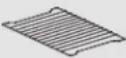 | Metal Rack 1 | |
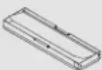 | Damper(Exhaust Adapter) | 1 |
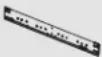 | Mounting Plate 1 | |
 | Top Cabinet Template 1 | |
 | Rear Wall Template 1 | |
 | Installation Manual 1 | |
 | Use and Care Manual 1 | |
 | Guide Roller Ring 1 | |
 | Grease Filters 2 | |
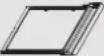 | Grease Filter Holders | 2 |
 | Glass Turntable | 1 |
Location
- The installation of this appliance must be performed by a qualified technician or service company.
Failing to have a qualified technician install the oven may result in electric shock, fire, an explosion, problems with the product, or injury.
- Do not install this appliance in a humid, oily, or dusty location, or in a location exposed to direct sunlight or water (rain drops).
- Plug the power plug into the wall socket firmly. Do not use a damaged power plug, damaged power cord, or loose wall socket.
- Do not mount over a sink.
- Do not stand on top of the microwave or place objects (such as laundry, oven covers, lighted candles, lighted cigarettes, dishes, chemicals, metal objects, etc.) on the appliance.
This may result in electric shock, fire, problems with the product, or injury.
Power Supply
- Check your local power source.
This microwave oven requires a current of approximately 15 amperes, 120Volts, 60Hz and a grounded outlet.
a. A short power-supply cord is provided to reduce the risks of the user becoming entangled in or tripping over a longer cord.
b. Longer cord sets or extension cords are available and may be used if care is exercised in their use.
c. If a long cord or extension cord is used:
- The marked electrical rating of the cord set or extension cord should be at least as great as the electrical rating of the oven.
- The extension cord must be a grounding type 3-wire cord.
- The longer cord should be arranged so that it will not drape the table top or counter where it can be pulled on by children or tripped over unintentionally.
- Check power cord and outlet.
- Remove all foreign substances such as dust or water from the power plug terminals and contact points using a dry cloth on a regular basis.
- Unplug the power plug and clean it with a dry cloth.
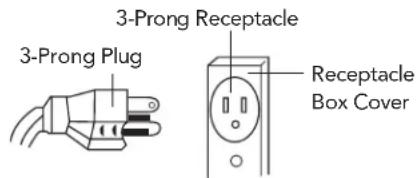
- Plug the power cord into a properly grounded 3-pronged outlet. Your oven should be the only appliance connected to this circuit.
-
Sharing a wall socket with other appliances, using a power strip, or extending the power cord may result in electric shock or fire.
-
Do not use an electric transformer. It may result in electric shock or fire.
- Ensure that the voltage, frequency and current provided match the product's specifications.
When using 3-pronged plug
When using grounding adapter, make sure the receptacle box is fully grounded.
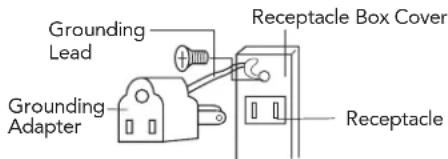
THE CANADIAN ELECTRICAL CODE DOES NOT ALLOW THE USE OF THE GROUNDING ADAPTOR.
Critical Usage Warnings
If the microwave appliance is flooded, please contact your nearest service center. Failing to do so may result in electric shock or fire.
Read and follow the specific "Precautions to Avoid Possible Exposure to Excessive Microwave Energy" found on page 4.
If the microwave generates a strange noise, a burning smell or smoke, unplug it immediately and contact your nearest service center.
- In the event of a gas leak (propane gas, LP gas, etc.), ventilate the room immediately. Do not touch the microwave, power cord, or plug.
- Do not use a ventilating fan.
- A spark may result in an explosion or fire.
Take care that the door or any of the other parts do not come into contact with your body while cooking or just after cooking.
- In the event of a grease fire on the surface units below the oven, smother the flaming pan on the surface unit by covering the pan completely with a lid, a cookie sheet or a flat tray.
Never leave surface units beneath your oven unattended at high heat settings. Boilovers cause smoking and greasy spills that may ignite and spread if the vent fan is operating. To minimize automatic fan operation, use adequate sized cookware. Use high heat on surface units only when necessary.
If materials inside the oven should ignite, keep the oven door closed, turn the oven off and disconnect the power cord, or shut off power at the fuse or circuit breaker panel. If the door is opened, the fire may spread.
- Always observe Safety Precautions when using your oven. Never try to repair the oven on your own. There is dangerous voltage inside. If the oven needs to be repaired, contact an authorized service center near you.
| Power Supply 120V AC, 60Hz single phase with grounding | ||
| Microwave | Input Power 1500 W | |
| Energy Output 950 W | ||
| Frequency 2450 MHz | ||
| Outside Dimensions (W x H x D) 29.9" x 16.3" x 15.9" | ||
| Cavity Dimensions (W x H x D) 20.6" x 10" x 14.9" | ||
| Cavity Volume 1.8 cu. ft. | ||
| Net Weight Approx. 50.3 LBS | ||
| Timer 99 min. 99 sec. | ||
| Power Selections 10 levels | ||
* Specifications are subject to change without notice.
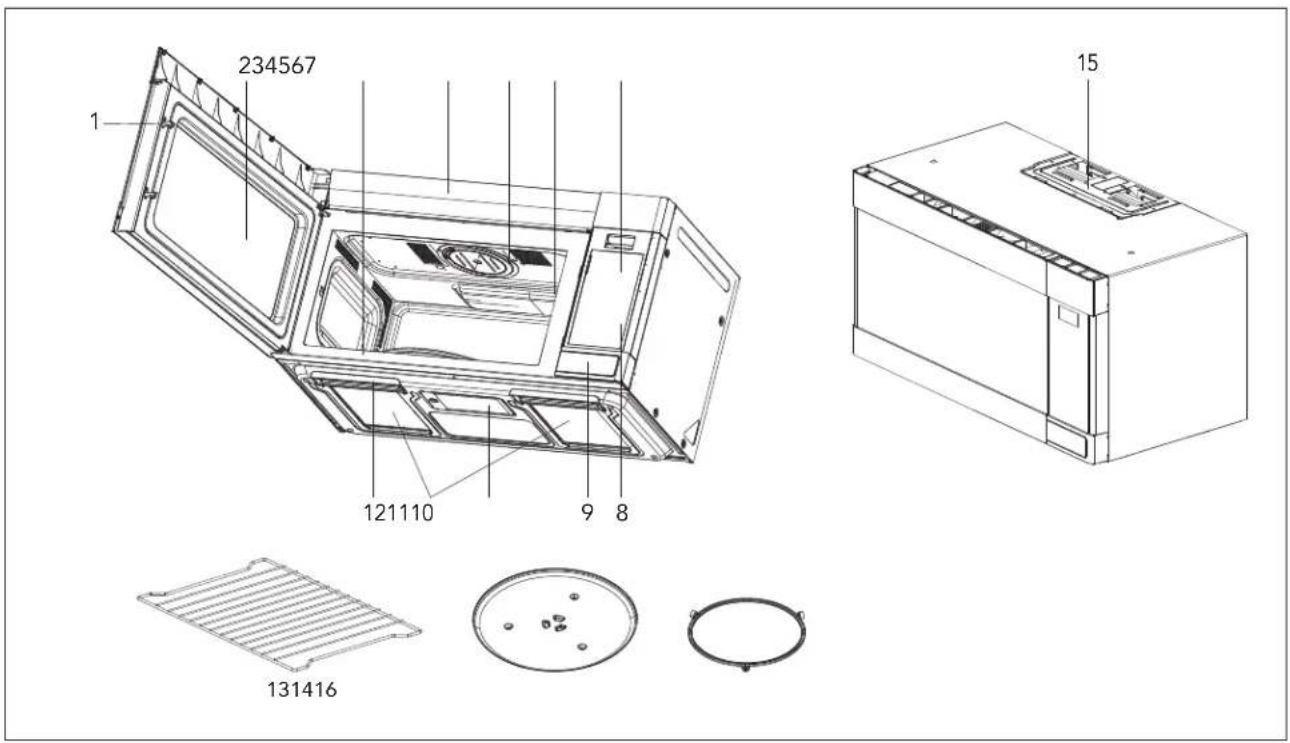
- DOOR LATCHES
- WINDOW with METAL SHIELD
Screen allows cooking to be viewed while keeping microwaves confined in oven.
- MODEL NUMBER PLATE
Located on the front wall of the microwave oven. - CHARCOAL FILTER
Behind Vent Grille
Protects the microwave outlet from splashes of cooking foods.
- TOUCH CONTROL PANEL and DIGITAL DISPLAY
For detailed information on each feature, see Features Diagram section, pages 10, 11.
- HOOD CONTROLS
Vent Fan - Press Turbo, High, Low or Off.
Light - Press On or Off.
- DOOR BUTTON
Use to insert Grease Filters.
13. METAL RACK
Use for extra space when cooking with more than one container at the same time.
14. TURNTABLE / GLASS TRAY
Composed of glass tray and roller guide. The roller guide is placed first in the bottom of the microwave and supports the glass tray. Both parts must be in place when using the microwave oven.
15. VENTILATION MOTOR
Your microwave oven is designed for adaptation to the following three types of ventilation.
(Recirculation ventilation system, Vertical ventilation system, Horizontal ventilation system)
See installation manual to select the type of ventilation required for your installation.
16. GUIDE ROLLER RING
The Touch Control Panel allows you to set the oven controls with the press of a finger.
It's designed to be easy to use and understand.
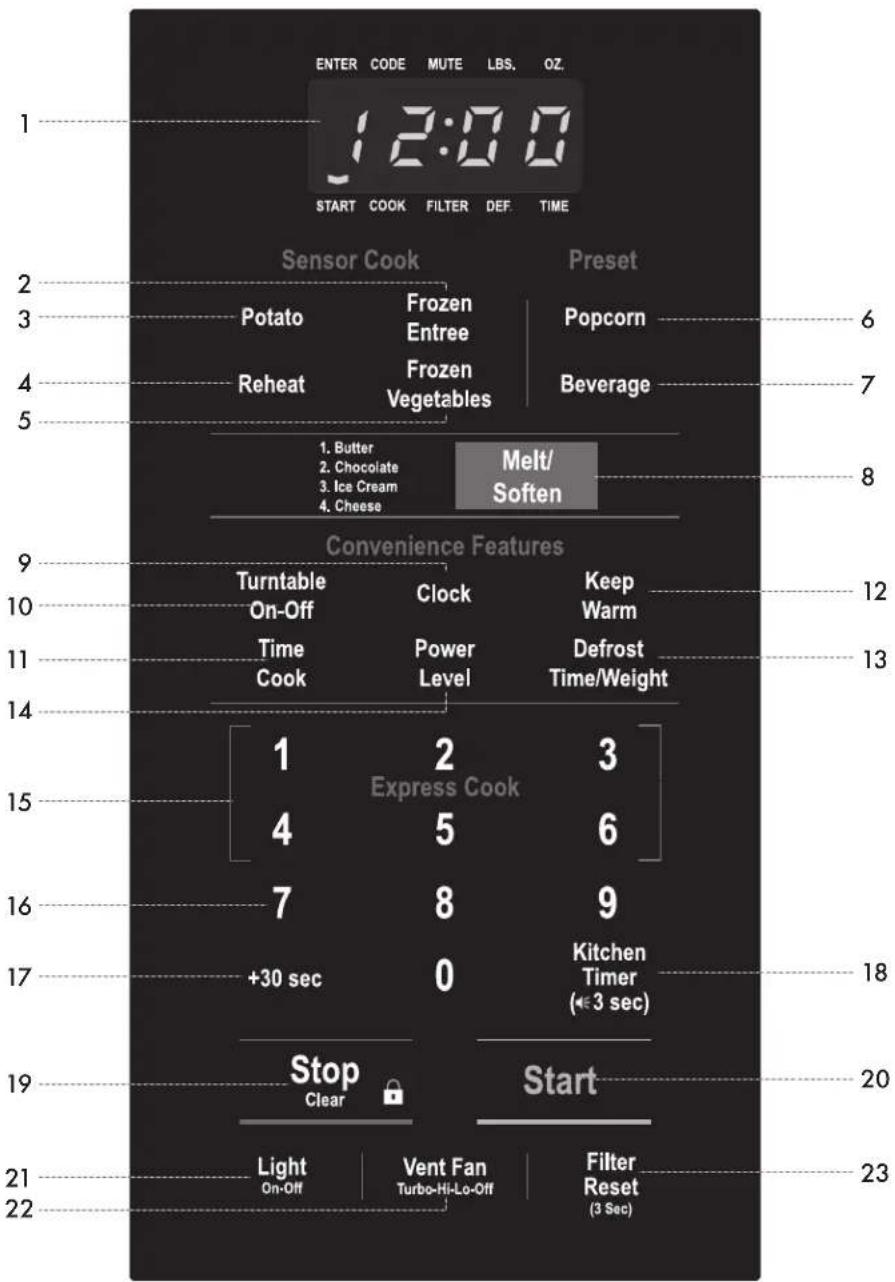
• Each time a pad is pressed, a beep will sound.
- When STOP/CLEAR Pad is pressed during oven operation, the oven will stop; however, all programmed information is retained. To clear all information, press the STOP/CLEAR Pad again.
- DISPLAY - Displays time of day, time or power level being used, cooking mode and instructions.
- FROZEN ENTREE - Press this pad to cook Frozen Entrees. The microwave oven sensor will automatically adjust the cooking time to the type and amount of food.
- POTATO - Press this pad to cook a potato. The microwave oven sensor will automatically adjust the cooking time to the type and amount of food.
- REHEAT - Press this pad to reheat food. The microwave oven sensor will automatically adjust the cooking time to the type and amount of food.
- FROZEN VEGETABLES - Press this pad to cook Frozen Vegetables. The microwave oven sensor will automatically adjust the cooking time to the type and amount of food.
- POPCORN - Press this pad to cook prepackaged microwave Popcorn weight 3.5/3.0/1.75 ounces.
- BEVERAGE - Press this pad to reheat a beverage.
- MELT/SOFTEN - Press this pad to melt or soften Butter, Chocolate, Ice Cream and Cheese.
- CLOCK - Press this pad to enter time of day.
Also press and hold this pad for 3 seconds to set power save mode. For detailed information on this feature, see Controls section, page 19.
- TURNTABLE ON-OFF - Press this pad to turn turntable on or off.
- TIME COOK - Press this pad to set the Microwave cooking time.
- Power Level 10 (High) is automatic but lower heat levels may be programmed.
- KEEP WARM - Press this pad and safely keep food warm for up to 30 minutes.
-
DEFROST - Press this pad to set defrosting time or defrosting weight.
-
POWER LEVEL - Press this pad if you want to change from automatic Power Level 10 (High) for cooking.
- EXPRESS COOK - Press these pads to set 1-6 minutes preset cooking time at 100% power level.
- NUMBER PADS - Press these pads to enter cooking time, defrosting time or weight, time of day, power level.
- +30 SEC - Press this pad for 30 seconds instant "ON" cooking time or to add 30 seconds of cooking time as the timer is counting down.
- KITCHEN TIMER - Press this pad to use as a minute timer, delay cooking, hold setting after cooking.
Also press and hold this pad for 3 seconds to set sound on/off. For detailed information on this feature, see Controls section, page 19.
- STOP/CLEAR - When pressed once, it pauses the oven operation. When pressed twice, it resets the oven and erases all settings (except time of day).
Also press and hold this pad for 3 seconds to set child safety lock function. For detailed information on this feature, see Controls section, page 19.
-
START - After all selections are made, press this pad to start the oven or timer.
-
LIGHT - Press this pad to turn on or off the cooktop light.
-
VENT FAN - Press this pad to turn the fan on turbo, high, low or off.
-
FILTER RESET - Press and hold this pad for 3 seconds to reset time after replacing the filter.
Charcoal filters must be replaced every 6 months.
This section includes useful information about oven operation.
- Plug power supply cord into a standard 3-pronged 15 Amp 120V AC 60Hz power outlet.
- After placing the food in a suitable container, open the oven door and put it on the glass tray.
The glass tray and roller guide must always be in place during cooking. - Close the door. Make sure that it is firmly closed.
- The oven light is on when the microwave oven is operating.
- The oven door can be opened at any time during operation by pushing the door open button of the control panel. The oven will automatically stop.
- Each time a pad is pressed, a beep will sound to acknowledge the press.
- The oven automatically cooks on full power unless set to a lower power level.
- The display will show " : 0" when the oven CLOCK is not set.
- Time clock returns to the present time when the cooking time ends.
- When the STOP/CLEAR pad is pressed during oven operation, the oven stops cooking and all information is retained. To erase all information (except the present time), press the STOP/CLEAR pad once more. If the oven door is opened during oven operation, all information is retained.
- If the START pad is pressed and the oven does not operate, check the area between the door and door seal for obstructions and make sure the door is closed securely. The oven will not start cooking until the door is completely closed or the program has been reset.
Make sure the oven is properly installed and plugged into the electrical outlet.
To Set Power Level
The power level is set by pressing the POWER LEVEL pad and number pad. If you wish to use a different power level, press the POWER LEVEL pad before pressing START pad. Enter the power level desired by pressing the appropriate number pad. The chart shows the display, the power level and the percentage of power.
| PRESS POWER LEVEL PAD AND NUMBER | POWER LEVEL (DISPLAY) | APPROXIMATE PERCENTAGE OF POWER |
| Power Level + 1 + 0 PL10 100% | ||
| Power Level + 9 PL-9 90% | ||
| Power Level + 8 PL-8 80% | ||
| Power Level + 7 PL-7 70% | ||
| Power Level + 6 PL-6 60% | ||
| Power Level + 5 PL-5 50% | ||
| Power Level + 4 PL-4 40% | ||
| Power Level + 3 PL-3 30% | ||
| Power Level + 2 PL-2 20% | ||
| Power Level + 1 PL-1 | 10% | |
| Power Level + 0 PL-0 | 0% |
NOTE: If "PL-O" is selected, the oven will work with the fan but no power. You can use this level to remove odors.
Setting the Clock
When the oven is first plugged in, the display will show " : 0" and a tone will sound. If the AC power ever goes off, the display shows " : 0" when the power comes back on.
| Clock | 1. Press the CLOCK pad.This is a 12 hour clock system. |
| 2. Press the CLOCK pad once more.This is a 24 hour clock system. | |
| 3. Enter the correct time of day by pressing the number pads in sequence. | |
| 4. Press the CLOCK pad. | |
| The ENTER, TIME indicators blink and "12H" is displayed.NOTE: This oven has multiple clock systems. If you want a 12 hour clock system, omit this step.The display stops blinking, and the colon starts blinking. If you selected a 12 hour clock system, this digital clock allows you to set from 1:00 to 12:59. If you selected a 24 hour clock system, this digital clock allows you to set from 0:00 to 23:59. | |
NOTE:
- If you attempt to enter an incorrect time, the time will not be set and an error signal tone will sound. Press the CLOCK pad and re-enter the time.
- If you want to set power save mode, press and hold the CLOCK pad for 3 seconds. For detailed information on this feature, see Controls section, page 19.
Kitchen Timer Mode
Timer operates as a minute timer. Timer operates without microwave energy.
How to Use as a Minute Timer
 | 1. Press KITCHEN TIMER pad. |
| 2. Press the amount of time you want to count down. | |
 | 3. Press START pad. |
| The ENTER, TIME indicators blink and “: 0” is displayed.The display will show what you pressed. | |
| The TIME indicator starts blinking and the display counts down the time remaining in KITCHEN TIMER mode. When KITCHEN TIMER mode ends, you will hear 3 beeps. | |
NOTE: If you want to turn sound on or off, press and hold KITCHEN TIMER pad for 3 seconds. For detailed information on this feature, see Controls section, page 19.
How to Use to Delay the Start of Cooking
 | 1. Press KITCHEN TIMER pad. |
| 2. Press the amount of time you want to delay. | |
 | 3. Press TIME COOK pad to program the desired cooking time for food to be cooked. |
 | 4. Press START pad. |
| The ENTER, TIME indicators blink and " : 0" is displayed.The display will show what you pressed. | |
| When you press the START pad, the TIME indicator starts blinking and the display counts down the time remaining in KITCHEN TIMER mode. When KITCHEN TIMER mode ends, the oven will beep. The TIME indicator goes off and COOK indicator starts blinking. The display counts down the time remaining in MICROWAVE mode. When MICROWAVE cook ends, you will hear 3 beeps. | |
How to Use to Set a Holding Time
 | 1. Press TIME COOK pad to program the desired cooking time for food to be cooked. |
 | 2. Press KITCHEN TIMER pad. |
| 3. Press the amount of time you want the oven to hold. | |
 | 4. Press START pad. |
| The ENTER, TIME indicators blink and " : 0" is displayed.The display will show what you pressed. | |
| The COOK indicator starts blinking and the display counts down the time remaining in MICROWAVE mode. When the MICROWAVE cook ends, the oven will beep. The COOK indicator goes off and TIME indicator starts blinking. The display counts down the time remaining in KITCHEN TIMER mode. When the KITCHEN TIMER mode ends, you will hear 3 beeps. | |
NOTE: Your oven can be programmed for 99 minutes 99 seconds. (99:99)
Time Defrosting
When TIME DEFROST is selected, the automatic cycle divides the defrosting time into periods of alternating defrost and stand times by cycling on and off.
 | 1. Press DEFROST pad once. |
| 2. Press number pads for the desired defrosting time. | |
 | 3. Press START pad. |
| The DEF indicator lights and ENTER, TIME indicators blink, “:0” is displayed.The display will show what you pressed. | |
| When you press the START pad, the DEF indicator starts blinking to show the oven is in the TIME DEFROST mode. The display counts down the time to show you how much defrosting time is left in the TIME DEFROST mode. The oven beeps during the defrosting cycle to signal that the food needs to be turned or rearranged. When the defrosting time ends, you will hear 3 beeps. | |
NOTE: Your oven can be programmed for 99 minutes 99 seconds. 99:99)
Weight Defrosting
WEIGHT DEFROST lets you easily defrost food by eliminating guesswork in determining defrosting time.
Follow the steps below for easy defrosting.
| [IMAGE] | 1. Press DEFROST pad twice. |
| 2. Press number pads for the desired defrosting weight. | |
 | 3. Press START pad. |
| The DEF indicator lights and ENTER, LBS indicators blink, "0.0" is displayed.The display will show what you pressed. | |
| The defrosting time is automatically determined by the weight selected.When you press the START pad, the DEF indicator starts blinking and the defrosting time counts down in the display window. The oven beeps during the defrosting cycle to signal that the food needs to be turned or rearranged. When the defrosting time ends, you will hear 3 beeps. | |
NOTE: Your oven can be programmed for 0.2 to 6.0 lbs.
Melt/Soften
The MELT/SOFTEN feature can be used to melt or soften butter, chocolate, ice cream and cheese.
See the chart for specific settings to use.
 | 1. Press MELT/SOFTEN pad once for butter, twice for chocolate, three times for ice cream, four times for cheese. |
 | 2. Press START pad. |
| The display will show what you pressed. | |
| Melt/Soften Item Chart | |||
| PRESS PAD DISPLAY SOFTEN ITEM WEIGHT | |||
| Once S-1 | Butter | 1/2 cup | |
| Twice S-2 | Chocolate 8 oz | ||
| Three Times S-3 | Ice Cream | 1/2 gallon | |
| Four Times S-4 | Cheese 1 plate | ||
Keep Warm
KEEP WARM feature maintains food at a warm temperature for 30 minutes.
 | 1. Press KEEP WARM pad. |
 | 2. Press START pad. |
| When pressing KEEP WARM pad, the display shows "30:00". | |
| When the cooking time ends, you will hear 3 beeps. | |
Time Cook
| Time Cook | 1. Press TIME COOK pad. |
| 2. Press number pads for the cooking time. | |
| Power Level | 3. Press POWER LEVEL pad. |
| 4. Press number pads for power level (0~10). | |
| Start | 5. Press START pad. |
The COOK indicator lights and ENTER, TIME indicators blink., " : 0" is displayed.
The display will show what you pressed.
The display will show PL10 for 100% power.
The display will show PL-0 \~ PL10.
If you skip steps 3 and 4, 100% power is automatic.
When you press START pad, the COOK indicator starts blinking to show the oven is cooking.
The display counts down the time to show how much cooking time is left. When the cooking time ends, you will hear 3 beeps.
NOTE:
- Your oven can be programmed for 99 minutes 99 seconds. (99:99)
- Using lower power levels increases the cooking time which is recommended for foods such as cheese, milk and slow cooking of meats.
Cooking in Two Stages
This feature lets you program two sequential operations such as defrosting and cooking or cooking using two different power levels. It automatically changes power settings and cooking time.
Defrosting + Cooking
| Defrost Time/Weight | 1. Press DEFROST pad once. |
| 2. Press number pads for the desired defrosting time. | |
| Time Cook | 3. Press TIME COOK pad. |
| 4. Press number pads for the cooking time. | |
| Power Level | 5. Press POWER LEVEL pad. |
| 6. Press number pads for power level (0~10). | |
| Start | 7. Press START pad. |
| The DEF indicator lights and ENTER, TIME indicators blink, “: 0” is displayed.The display will show what you pressed.The COOK indicator lights and ENTER, TIME indicators blink., “: 0” is displayed.The display will show what you pressed.The display will show PL10 for 100% power.The display will show PL-0 ~ PL10.If you skip steps 5 and 6, 100% power is automatic. | |
When you press the START pad, the DEF and COOK indicators come on to confirm the power levels selected. The DEF indicator starts blinking to show you that the oven is in TIME DEFROST mode.
The display counts down the time remaining in TIME DEFROST mode. When the oven beeps, turn over, break apart and/or redistribute the food. At the end of TIME DEFROST mode, the oven will beep and start MICROWAVE cook.
The DEF indicator goes off and the COOK indicator starts blinking. The display counts down the time remaining in MICROWAVE mode. When MICROWAVE cook ends, you will hear 3 beeps.
NOTE: Your oven can be programmed for 99 minutes 99 seconds. (99:99)
Cooking + Cooking
| Time Cook | 1. Press TIME COOK pad. |
| 2. Press number pads for the cooking time. | |
| Time Cook | 3. Press TIME COOK pad. |
| 4. Press number pads for the cooking time. | |
| Power Level | 5. Press POWER LEVEL pad. |
| 6. Press number pads for power level (0~10). | |
| Start | 7. Press START pad. |
| COOK indicator lights and ENTER, TIME indicators blink. “: 0” is displayed.The display will show what you pressed.The COOK indicator lights and ENTER, TIME indicators blink., “: 0” is displayed.The display will show what you pressed.The display will show PL10 for 100% power.The display will show PL-0 ~ PL10.If you skip steps 5 and 6, 100% power is automatic. | |
| When you press the START pad, the COOK indicator starts blinking to show the oven is in cook mode for stage 1.At the end of stage 1, the oven will beep and start stage 2. The display counts down the time remaining in stage 2 mode. When stage 2 ends, you will hear 3 beeps. | |
| Time Cook | 1. Press TIME COOK pad. |
| 2. Press number pads for the cooking time. | |
| Time Cook | 3. Press TIME COOK pad. |
| 4. Press number pads for the cooking time. | |
| Power Level | 5. Press POWER LEVEL pad. |
| 6. Press number pads for power level (0~10). | |
| Start | 7. Press START pad. |
| COOK indicator lights and ENTER, TIME indicators blink. “: 0” is displayed.The display will show what you pressed.The COOK indicator lights and ENTER, TIME indicators blink., “: 0” is displayed.The display will show what you pressed.The display will show PL10 for 100% power.The display will show PL-0 ~ PL10.If you skip steps 5 and 6, 100% power is automatic. | |
| When you press the START pad, the COOK indicator starts blinking to show the oven is in cook mode for stage 1.At the end of stage 1, the oven will beep and start stage 2. The display counts down the time remaining in stage 2 mode. When stage 2 ends, you will hear 3 beeps. | |
NOTE: Your oven can be programmed for 99 minutes 99 seconds. (99:99)
+30 Sec
+30 SEC allows you to reheat for 30 seconds at 100% (full power) by simply pressing the +30 sec pad. By repeatedly pressing the +30 sec pad, you can also extend reheating time to 99 minutes 99 seconds by 30 second increments.
| +30 sec | Press the +30 SEC pad. |
| When you press the +30 SEC pad, “:30” is displayed and the oven starts reheating. | |
NOTE: +30 SEC cannot be used while the sensor is detecting the vapor emitted from the food during sensor cooking such as Potato, Frozen Entree, Frozen Vegetables or Sensor Reheat.
Express Cook
EXPRESS COOK is a quick way to set cooking time from 1-6 minutes at 100% (full power).
 | Press one of the EXPRESS COOK pads (from 1-6) for 1-6 minutes of cooking at 100% (full power). |
| The display will show what you pressed.After 1.5 seconds, the display is changed into cooking time and the oven starts cooking. | |
One Touch Cook (Preset)
ONE TOUCH cooking allows you to cook or reheat many of your favorite foods by pressing just one pad.
To increase quantity, press the chosen pad until the number in the display is the same as desired quantity to cook.
 | 1. Press POPCORN pad once for 3.5 oz bag, twice for 3.0 oz bag or three times for 1.75 oz bag. |
 | 2. Press START pad. |
| When you press POPCORN pad once, “ 3.5 ” is displayed. | |
NOTE:
- Use prepackaged room-temperature microwave popcorn.
- Place bag in oven according to manufacturer's directions.
- Pop only one bag at a time.
- After popping, open bag carefully: popcorn and steam are extremely hot.
- Do not reheat unpopped kernels or reuse bag.
- Do not leave oven unattended while popping popcorn.
CAUTION: If prepackaged popcorn is of a different weight than the recommended weight, do not use the popcorn pad. Follow the manufacturer's instruction.
CAUTION:
DO NOT leave the microwave oven unattended while popping corn.
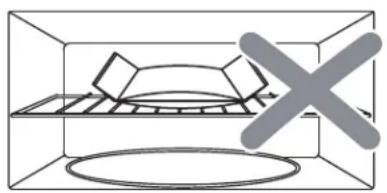
When popping commercially packaged popcorn, remove the rack from the oven.
Do not place the bag of microwave popcorn on the rack or under the rack.
natural_image
Diagram of a container with a tray and a cross symbol, no text or labels present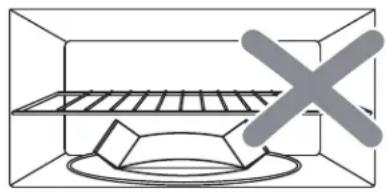
natural_image
Simple line drawing of a container with a tray and a cross mark, no text or symbols present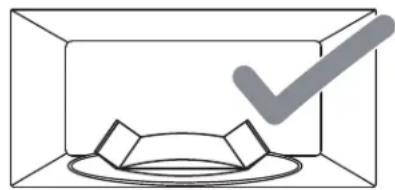
natural_image
Simple line drawing of a box with a checkmark overlay (no text or symbols)| Beverage | 1. Press BEVERAGE pad once for 1 cup, twice for 2 cups or three times for 3 cups. |
| Start | 2. Press START pad. |
| When you press BEVERAGE pad once, “1” is displayed. | |
BEVERAGE: 7 oz/cup (mug)
• 1 cup (7 oz total volume): Press BEVERAGE once.
• 2 cups (14 oz total volume): Press BEVERAGE twice.
• 3 cups (20 oz total volume): Press BEVERAGE three times.
Sensor Operations
The Sensor Cook categories are designed to detect the increasing humidity released by the food during the cooking process. The microwave oven sensor will automatically adjust the cooking time to the type and amount of food.
Using Sensor Settings
- After the oven is plugged in, wait 2 minutes before using Sensor Cook.
- Be sure the exterior of the cooking container and the interior of the oven are dry. Wipe off any moisture with a dry cloth or paper towel.
- The oven works with foods at normal storage temperature.
- More or less food than the quantity listed in the chart should be cooked following the guidelines in any microwave cookbook.
- Do not open the oven door or press STOP/CLEAR pad until cooking time appears on the display window. The measurement of vapor will be interrupted. If this occurs, an error message "Er01" will appear. To continue cooking, press the STOP/CLEAR pad and cook manually.
When the sensor detects the vapor emitted from the food, the remainder of cooking time will appear.
The door may be opened when remaining cooking time appears on the display. At this time, you may stir or season food, as desired.
- Always use microwave-safe containers and cover them with loose fitting lids or vented plastic wrap. Never use tight sealing plastic containers. They will prevent steam from escaping and this will mislead the sensor, usually causing the food to overcook.
- Check food for temperature or doneness after cooking. If food is not completely cooked, enter additional cooking time manually. Do not use one of the Sensor Cook categories twice in succession on the same food portion. This may result in severely overcooked or burnt food.
Covering Foods
Some foods work best when covered. Use the cover recommended in the Sensor Cook Chart for these foods.
- Casserole lid.
- Plastic wrap: Use plastic wrap recommended for microwave cooking. Cover dish loosely; allow approximately 1/2 inch to remain uncovered to allow steam to escape. Plastic wrap should not touch food.
- Wax paper: Cover dish completely; fold excess wrap under dish to secure. If dish is wider than paper, overlap two pieces at least one inch to cover.
Be careful when removing any covering to allow steam to escape away from you.
Sensor Cook
Sensor is semi-conductor device that detects the vapor emitted from the food as it heats. The sensor adjusts the cooking time and power level for various food and quantities and you don't need to enter the weight or quantity of the food.
| Potato | 1. Press POTATO pad. |
| Start | 2. Press START pad. |
| When you press POTATO pad, "SCPO" is displayed.When the sensor detects the vapor emitted from the food, the remainder of cooking time will appear. | |
| Frozen Entree | 1. Press FROZEN ENTREE pad. |
| Start | 2. Press START pad. |
| When you press FROZEN ENTREE pad, "SCFE" is displayed.When the sensor detects the vapor emitted from the food, the remainder of cooking time will appear. | |
| Frozen Vegetables | 1. Press FROZEN VEGETABLES pad. |
| Start | 2. Press START pad. |
| When you press FROZEN VEGETABLES pad, "SCFU" is displayed.When the sensor detects the vapor emitted from the food, the remainder of cooking time will appear. | |
| Reheat | 1. Press REHEAT pad. |
| Start | 2. Press START pad. |
| When you press REHEAT pad, "SrH" is displayed.When the sensor detects the vapor emitted from the food, the remainder of cooking time will appear. | |
| Sensor Cook Chart | |||
| PRESS PAD DISPLAY WEIGHT COMMENTS | |||
| Potato | SCPO 8 | -24 oz Before cooking, pierce potato skin with fork 5-6 times. Place potatoes on the turntable. | |
| Frozen Entree | SCFE 8 | -24 oz Follow the directions that are specific for the microwave oven that are printed on the packaging. | |
| Frozen Vegetables | SCFU 6 | -16 oz 2-4 tbsp water per serving. Cover with lid or vented plastic wrap. | |
| Reheat | SrH 4 | -36 oz For casseroles, add 2-3 tbsp water, cover with lid or vented plastic wrap.The food type to avoid: beverage, frozen pizza or frozen food, raw food, biscuits and cake. | |
NOTE:
Do not use the SENSOR COOK twice in succession on the same food portion.
This may result in severely over-cooked or burnt food.
If additional time is needed after previous cooking, use one of the +30 SEC pad or TIME COOK pad.
- Use proper container and cover for best sensor cooking result.
- Always use microwave-safe containers and cover them with lid or vented plastic wrap. Never use tight sealing plastic containers—they can be prevent steam from escaping and cause food to overcook.
- Be sure the outside of the cooking containers and the inside of the microwave oven are dry before placing food in the oven.
Turntable On-Off
For best cooking results, the turntable should be on. However, the turntable can be turned off so that it does not rotate when extra large dishes are used.
| TurntableOn-Off | Press TURNTABLE ON-OFF pad. |
| The options are displayed for 2 seconds. | |
NOTE:
- This option is not available in sensor cook, one touch cook, defrost and melt/soften modes.
- Sometimes the turntable can become too hot to touch. Be careful touching the turntable during and after cooking.
- Do not run the oven empty.
Vent Fan
The vent fan removes steam and other vapors from surface cooking. You can control the 3-speed fan by pressing the VENT FAN pad.
| Vent FanTurbo-Hi-Lo-Off | Press VENT FAN pad once for turbo fan speed, twice for high fan speed, three times for low fan speed or four times to turn the fan off. |
| The options are displayed for 2 seconds. | |
NOTE:
- Turbo and High fan speed cannot be used together with microwave cooking.
- An automatic fan feature protects the microwave from too much heat rising from the cooktop below it. It automatically turns on for low speed if it senses too much heat. If you have turned the fan on you may find that you cannot turn it off. The fan will automatically turn off when the internal parts are cool.
- If there is no user input for 10 hours, cooktop light and vent fan will turn off automatically to save energy.
Cooktop Light
You can control the light by pressing the LIGHT pad.
| LightOn-Off | Press LIGHT pad once to turn the light on or twice to turn the light off. |
| The options are displayed for 2 seconds. | |
NOTE: If there is no user input for 10 hours, cooktop light and vent fan will turn off automatically to save energy.
Mute
 | Audible signals are available to guide you when setting and using your oven.To mute, press KITCHEN TIMER pad for 3 seconds. The MUTE indicator lights. To turn sound on, press KITCHEN TIMER pad for 3 seconds. A beep sounds and the MUTE indicator will be turned off. |
Filter Reset
 | If your oven is vented to the inside, the charcoal filter should be replaced approximately every 6 months. The charcoal filter cannot be cleaned.The FILTER RESET pad will light up when it is time to replace the charcoal filter.Press and hold FILTER RESET pad for 3 seconds after replacing the filter. See page 23. |
To Set Power Save Mode
| StopClear | 1. Press the STOP/CLEAR pad." :0" or clock appears in the display. |
| Clock | 2. Press and hold the CLOCK pad for 3 seconds.The display will turn off and a beep sounds.To operate the oven in power save mode, press any key.Then " :0" or clock will be shown and the operation of all function keys will be same as in the normal mode.But if there is no operation within 10 seconds in clear mode, all the contents of display will disappear. |
| 3. To cancel power save mode simply repeat setting procedure when the display is on.The power save mode will be canceled and a beep sounds.The oven is again available for normal use. |
Child Safety Lock
 | Child safety lock feature may lock the control panel to prevent the oven from being accidentally started or used by children. To lock, press and hold STOP/CLEAR pad for 3 seconds.A beep sounds and "Loc" will be displayed for 3 seconds.To unlock, press and hold STOP/CLEAR pad for 3 seconds. A beep sounds. |
NOTE:
- While the Child Lock is active, only the STOP/CLEAR pad works to unlock it.
- Microwave oven cannot be used while Child Lock is activated.
To Stop the Oven While the Oven is Operating
 | 1. Press the STOP/CLEAR pad.You can restart the oven by pressing the START pad.Press the STOP/CLEAR pad once more to erase all instructions.You must enter in new instructions. |
| 2. Open the door.You can restart the oven by closing the door and pressing the START pad. |
NOTE: Oven stops operating when door is opened.
Metal Rack
The metal rack gives you extra space when cooking in more than one container at the same time.
The rack allows several foods to be cooked or reheated at one time.
However, for the best cooking and reheating, use TURNTABLE ON function and cook with SENSOR COOK modes without the rack. When the rack is used, set time and power level manually.
The oven is again available for normal use.
To avoid risk of property damage:
- Do not use rack to pop popcorn.
- Rack must be on the four plastic supports when used.
- Use the rack only when cooking food on rack position.
- Do not cook with rack on floor of the oven.
To use metal rack:
- Place rack securely on the four plastic supports.
Rack MUST NOT touch metal walls or back of microwave oven.
Allow plenty of space around and between the dishes. Pay close attention to the cooking and reheating progress.
- Place equal amounts of food both ABOVE AND BELOW rack.
Amount of food must be approximately the same to balance out cooking energy.
- Reposition the foods and reverse them from the rack to turntable and stir them at least once during any cooking or reheating time.
After cooking or reheating, stir if possible. Using a lower power level will assist in better cooking and reheating uniformity.
IMPORTANT:
To avoid oven damage, DO NOT store or use the metal rack in this oven unless more than one item is being cooked or a recipe calls for it.
Recommended Usage
- Soups
- Casseroles
- Dinner Plates
WARNING:
The oven should be cleaned regularly and any food deposits removed.
Failure to maintain the oven in a clean condition could lead to deterioration of the surface that could adversely affect the life of the appliance and possibly result in a hazardous situation.
Microwave Oven Interior
Disconnect the power cord before cleaning or leave the door open to inactivate the oven during cleaning.
The oven interior should be cleaned after each use with a damp cloth to keep it free from grease and soil buildup. Stubborn soils can be removed with a plastic scrub pad. When cleaning interior surfaces and surfaces of door and oven that come together when the door is closed, use only mild, non-abrasive soaps or detergents applied with a sponge or soft cloth.
Odors can be eliminated from the inside of the oven by boiling a solution of one cup of water and several tablespoons of lemon juice in the oven for 5-7 minutes. This also helps loosen any dried soil in the oven. Wipe off excess moisture after use.
NOTE:
- Do not spray or pour liquid cleansers directly onto a surface. Spray or pour cleanser onto a cloth or sponge and then clean.
- Do not use abrasive cleaners, oven cleaners, abrasive cleaning pads or steel wool, as they can scratch or dull oven surfaces.
- Do not remove or insert knife around the stirrer cover to clean, it may damage the cover or affect the cooking performance of your oven.
Oven Bottom
Wash oven bottom with hot sudsy water, rinse and dry. Do not use excessive amounts of water when cleaning the oven, especially around the turntable. Do not allow water or cleaning agents to seep into turntable gears located underneath.
Glass Tray/Turntable
Allow to cool before removing and cleaning. Wash in soapy water or dishwasher.
Metal Rack
Wash the metal rack with a mild soap and a soft or nylon scrub brush.
Dry completely.
Do not use abrasive scrubbers or cleaners to clean rack.
Roller Guide
Clean frequently to prevent excessive noise. Wash in soapy water or dishwasher.
Oven Exterior
Wipe the outside of your oven with a soapy cloth, rinse and dry. Do not use abrasive cleaners. They may scratch the surface.
Light Compartment
Clean off the grease and dust on the light compartment cover on the bottom side of the microwave oven often with warm water and detergent.
Control Panel
Wipe with a damp cloth. Dry. Do not spray cleaners directly on panel. Spray cleaners on cloth and then wipe.
Waveguide Cover
The waveguide cover is located on the right side wall of the oven cavity. It is made from mica so it requires special care. Keep the waveguide cover clean to assure good oven performance. Carefully wipe with a damp cloth any food spatters from the surface of the cover immediately after they occur. Built-up splashes may overheat and cause smoke or possibly catch fire. DO NOT REMOVE THE WAVEGUIDE COVER.
The Exhaust Feature
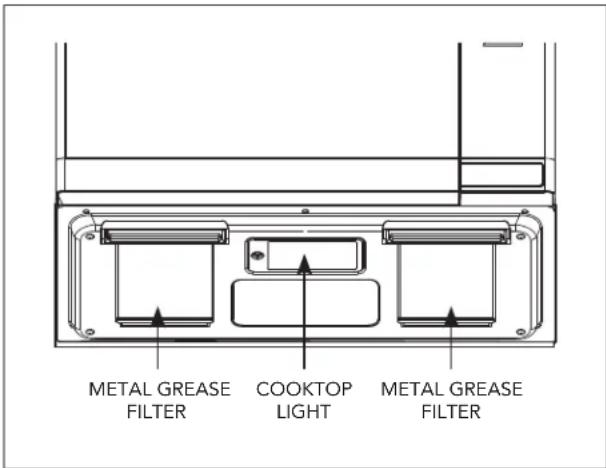
The exhaust hood feature on your microwave oven is equipped with two metal filters which collect grease. When the fan is being operated, air is drawn up through the filters and is then discharged through the venting to the outside or through the charcoal filters if not vented to the outside.
Reusable Grease Filters
The reusable grease filters should be cleaned at least once a month. Never operate the microwave without the filters in place. In situations where flaming might occur on surfaces below the hood, filters will stop the entry of flames into the unit.
To Remove Grease Filter
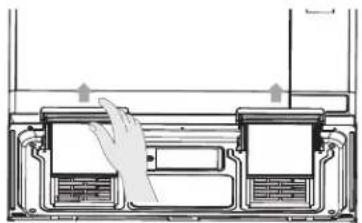
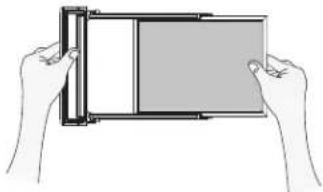
To remove the grease filter holder, pull the tab toward the front of the oven. Repeat for the other grease filter holder.
To remove the grease filter from the holder, pull using the "finger hold" to assist as shown in below image.
natural_image
Diagram of a hand pressing down on a device panel with arrows indicating motion (no text or symbols)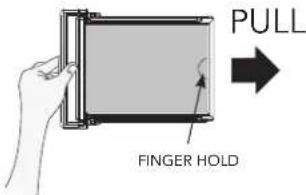
natural_image
Illustration of two hands holding a rectangular device with a grid and screen (no text or symbols)To Clean Grease Filter
To clean grease filters, soak and then agitate filter in solution of hot water and detergent. Do not use ammonia or ammonia products because they will darken the metal. Light brushing can be used to remove embedded dirt. Rinse, shake and remove moisture before replacing.
To Replace Grease Filter
To replace the grease filter, slide the grease filter into the grease filter holder. Insert the grease filter holder into the designated area of the bottom of the oven. Repeat for the other grease filter.
Light Replacement
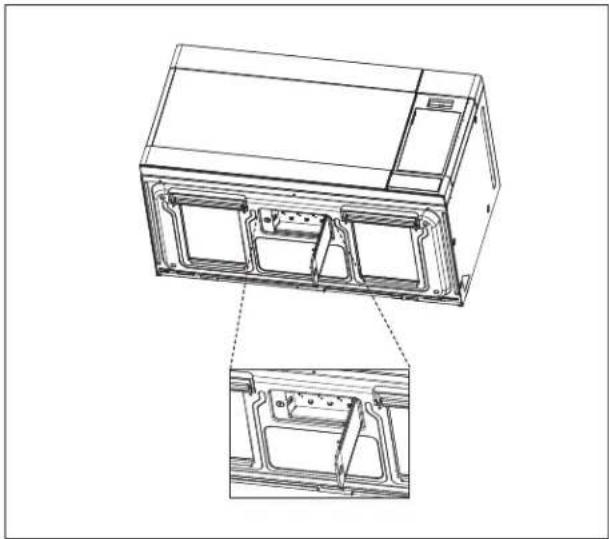
Cooktop Light
When replacing the cooktop light, make sure that you are wearing gloves to avoid injury from the heat of the lamp.
- Unplug the oven or turn off the power at the main power supply.
- Remove the screw from the light cover and lower the cover until it stops.
- Remove the screw on center of the LED Light secured to the cover and pull out terminal.
- Replace with 1.0-watt LED light available from your authorized dealer and secure with screw.
- Replace the light cover and mounting screw.
- Turn the power back on at the main power supply.
natural_image
Technical line drawing of a mechanical device with internal components and a close-up inset showing a bracket detail (no text or symbols)Oven Light
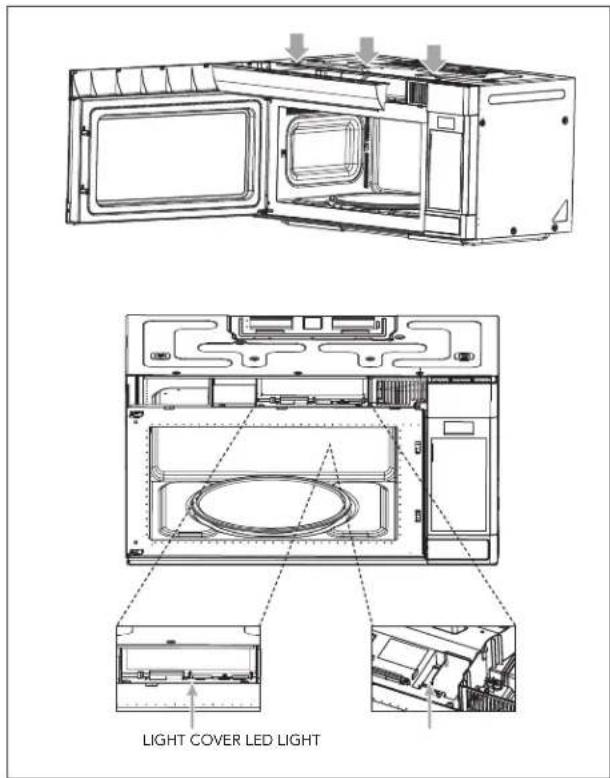
When replacing the oven light, make sure that you are wearing gloves to avoid injury from the heat of the lamp.
- Unplug the oven or turn off the power at the main power supply.
- Remove the vent grille mounting 3 screws and open the door.
- Slide the grille air to the left, then pull it straight out.
- Remove the charcoal filter, if present.
- Pull the hook a little and remove light cover.
- Push the right hook holding the oven light to the right side and remove the LED light.
- Replace with 0.4-watt LED light available from your authorized dealer.
- Replace the light cover.
- Replace the grille air and 3 screws and close the door.
- Plug the oven in or turn on the power at the main power supply.
Install/Replace Charcoal Filter
Charcoal Filter
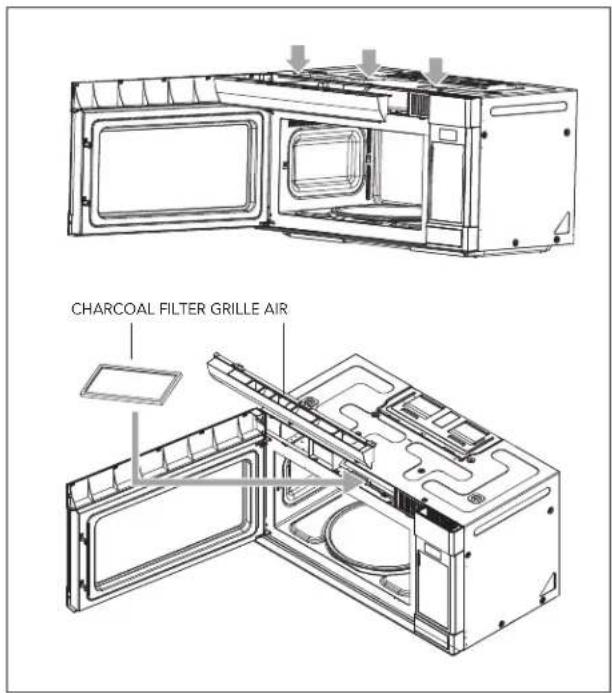
If your oven is vented to the inside, the charcoal filter should be replaced if it is used for approximately 6 months.
You can purchase Charcoal Filter from Fulgor Milano.
- Unplug the oven or turn off the power at the main power supply.
- Remove the grille air mounting 3 screws and open the door.
- Slide the grille air to the left, then pull it straight out.
-
Push the charcoal filter backward and remove it.
-
Slide a new charcoal filter into place. The filter should rest at the angle.
-
Replace the grille air and 3 screws and close the door.
-
Plug the oven in or turn on the power at the main power supply.
Check the following to be sure a service call is necessary:
If nothing on the oven operates:
- Check for a blown circuit fuse or a tripped main circuit breaker.
- Check if oven is properly connected to electric circuit in house.
- Check that controls are set properly.
- Check that the cooking time is set.
If the oven interior light does not work:
- The LED light may be loose or defective. See page 22 or call a qualified servicer.
If oven will not cook:
- Check that control panel was programmed correctly.
- Check that door is firmly closed.
- Check that START pad was pressed.
• Auto Start may have been set.
• The Control Lockout may have been set. - Check the area between the door and seal for obstructions.
If oven takes longer than normal to cook or cooks too rapidly:
- Be sure the Power Level is programmed properly.
- Check instructions on food density, etc.
- Verify that voltage to the microwave oven is not low.
If the time-of-day clock does not always keep correct time:
- Check that the power cord is fully inserted into the outlet receptacle.
- Check that the oven is properly grounded.
- Try plugging the oven into an outlet on a separate electrical circuit.
If oven floor or glass tray are hot:
- This is normal. The floor is absorbing heat from the food.
If the interior of oven collects moisture:
- This is normal. Food gives off moisture when cooking and the steam collects on the door and the oven surface. Wipe off excess moisture from oven after each use.
If food cooks unevenly:
• Refer to your recipe for proper cooking procedures.
- Be sure food is evenly shaped.
- Be sure food is completely defrosted before cooking.
- Check placement of aluminum strips used to prevent overcooking.
If food is undercooked:
- Check recipe to be sure all directions (amount, time and power levels) were correctly followed.
- Check household voltage.
- Try plugging the oven into an outlet on a separate electrical circuit.
- Be sure food was completely defrosted before cooking.
If food is overcooked:
- Check recipe to be sure all directions (amount, time and power levels) were correctly followed.
- The initial temperature of food may have been higher than normal.
If arcing (sparks) occur:
- Be sure microwave-safe dishes were used.
- Be sure wire twist-ties were not used.
- Be sure oven was not operated when empty.
If the display shows a time counting down but the oven is not cooking:
- Check that door is firmly closed.
Q : I accidentally ran my microwave oven without any food in it. Is it damaged?
A : Running the oven empty for a short time will not damage the oven. However, it is not recommended.
Q : Can the oven be used with the glass tray or roller guide removed?
A : No. Both the glass tray and roller guide must always be used in the oven before cooking.
Q : Can I open the door when the oven is operating?
A : The door can be opened anytime during the cooking operation. Then microwave energy will be instantly switched off and the time setting will maintain until the door is closed.
Q : What does "Er01" message mean?
A : "Er01" means SENSOR ERROR and will appear if you open the oven door or press STOP/CLEAR pad while cooking time is displayed. To continue cooking, press the STOP/CLEAR pad and cook manually.
Q : Why do I have moisture in my microwave oven after cooking?
A : The moisture on the side of your microwave oven is normal. It is caused by steam from cooking food hitting the cool oven surface.
Q : Will the microwave oven be damaged if it operates while empty?
A : Yes. Never run it empty.
Q : Why do eggs sometimes pop?
A : When baking or poaching eggs, the yolk may pop due to steam buildup inside the yolk membrane. To prevent this, simply pierce the yolk with a toothpick before cooking. Never cook eggs without piercing their shells.
Q : Why is this standing time recommended after the cooking operation has been completed?
A : Standing time is very important.
With microwave cooking, the heat is in the food, not in the oven. Many foods build up enough internal heat to allow the cooking process to continue, even after the food is removed from the oven. Standing time for joints of meat, large vegetables and cakes is to allow the inside to cook completely, without overcooking the outside.
Q : What does "standing time" mean?
A : "Standing time" means that food should be removed from the oven and covered for additional time to allow it to finish cooking. This frees the oven for other cooking.
Q: Why does my oven not always cook as fast as the microwave cooking guide says?
A : Check your cooking guide again, to make sure you've followed directions exactly, and to see what might cause variations in cooking time. Cooking guide times and heat settings are suggestions to help prevent over-cooking, the most common problem in getting accustomed to a microwave oven.
Variations in the size, shape, weights and dimensions could require longer cooking time. Use your own judgement along with the cooking guide suggestions to check whether the food has been properly cooked just as you would do with a conventional cooker.
Q : Does microwave energy pass through the viewing screen in the door?
A : No. The metal screen bounces back the energy to the oven cavity. The holes are made to allow light to pass through. They do not let microwave energy pass through.
Q : Can I operate my microwave oven without the turntable or turn the turntable over to hold a large dish?
A : No. If you remove or turn over the turntable, you will get poor cooking results. Dishes used in your oven must fit on the turntable.
Q : Is it normal for the turntable to turn in either direction?
A : Yes. The turntable rotates clockwise or counterclockwise, depending on the rotation of the motor when the cooking cycle begins.
Q : Can I pop popcorn in my microwave oven? How do I get the best results?
A : Yes. Pop packaged microwave popcorn following manufacturer's guidelines. Do not use regular paper bags. Use the "listening test" by stopping the oven as soon as the popping slows to a "pop" every 1 or 2 seconds. Do not repop unpopped kernels. Do not pop popcorn in glass cookware.
Utensil Guide
Only use utensils that are suitable for use in microwave ovens.
To cook food in the microwave oven, the microwaves must be able to penetrate the food, without being reflected or absorbed by the dish used. Care must therefore be taken choosing the utensil. If the utensil is marked microwave-safe, you do not need to worry. The following table lists various utensils and indicates whether and how they should be used in a microwave oven.
| UTENSIL SAFE COMMENTS | ||
| Aluminum foil Can be used in small quantities to protect areas against overcooking. Arcing can occur if the foil is too close to the oven wall or if too much foil is used. | ||
| Crisp plate | ● | Do not preheat for more than 8 minutes. |
| China and earthenware | ● | Porcelain, pottery, glazed earthenware and bone china are usually suitable, unless decorated with a metal trim. |
| Disposable polyester cardboard dishes | ● | Some frozen foods are packaged in these dishes. |
| Fast-food packaging | ||
| Polystyrene cup containers | ● | Can be used to warm food. Overheating may cause the polystyrene to melt. |
| Paper bags or newspaper | × | May catch fire. |
| Recycled paper or metal trims | × | May cause arcing. |
| Glassware | ||
| Oven-to-table ware | ● | Can be used, unless decorated with a metal trim. |
| Fine glassware | ● | Can be used to warm foods or liquids.Delicate glass may break or crack if heated suddenly. |
| Glass jars | ● | Must remove the lid. Suitable for warming only. |
| Metal | ||
| Dishes | × | May cause arcing or fire. |
| Freezer bag twist-ties | × | May cause arcing or fire. |
| Paper | ||
| Plates, cups, napkins and kitchen paper | ● | For short cooking times and warming. Also to absorb excess moisture. |
| Recycled paper | × | May cause arcing. |
| Plastic | ||
| Containers | ● | Particularly if heat-resistant thermoplastic. Some other plastics may warp or discolor at high temperatures. Do not use Melamine plastic. |
| Cling film | ● | Can be used to retain moisture. Should not touch the food.Take care when removing the film as hot steam will escape. |
| Freezer bags | ▲ | Only if boilable or oven-proof. Should not be airtight. Prick with a fork, if necessary. |
| Wax or grease-proof paper | ● | Can be used to retain moisture and prevent spattering. |
- Recommended use
Limited Use
✗ Not Recommended
Use Your Microwave Oven Safely
General Use
- Do not attempt to defeat or tamper with safety interlocks.
- Do not place any object between the oven front frame and the door or allow residue to build up on sealing surfaces. Wipe with a mild detergent, rinse and dry. Never use abrasive powders or pads.
- Do not subject the oven door to strain or weight such as a child hanging on an open door. This could cause the oven to fall forward resulting in injury to you and damage to the oven.
- Do not operate the oven if door seals or sealing surfaces are damaged; or if door is bent; or if hinges are loose or broken.
- Do not operate the oven empty. This will damage the oven.
- Do not attempt to dry clothes, newspapers or other materials in the oven. They may catch on fire.
- Do not use recycled paper products as they may contain impurities which may cause sparks or fires.
- Do not hit or strike the control panel with hard objects. This can damage the oven.
Food
- Never use your microwave oven for home canning. The oven is not designed for proper home canning. Improperly canned food may spoil and be dangerous to consume.
- Always use the minimum recipe cooking time. It is better to undercook rather than overcook foods.
- Undercooked foods can be returned to the oven for more cooking. If food is overcooked, nothing can be done.
- Heat small quantities of food or foods with low moisture carefully. These can quickly dry out, burn or catch on fire.
- Do not heat eggs in the shell. Pressure may build up and eggs can explode.
Potatoes, apples, egg yolks and sausages are examples of food with non-porous skins.
These must be pierced before cooking to prevent bursting.
- Do not attempt to deep fat fry in your microwave oven.
- Always allow a standing time of at least 20 seconds after the oven has been switched off to allow the temperature to even out. Stir during heating, if necessary, and ALWAYS stir after heating. To prevent eruptive boiling and possible scalding, you should put a spoon or glass stick into the beverages and stir before, during and after heating.
- Do not leave the oven unattended while popping corn.
Do not pop corn in a paper bag unless it is the commercially prepared Microwave Popcorn product. The kernels can overheat and ignite a brown paper bag.
Do not exceed the Microwave Popcorn manufacturer's suggested popping time.
Longer popping does not yield more popcorn but it can result in scorch, burn or fire. Remember, the popcorn bag and tray can be too hot to handle. Remove with caution and use pot holders.
Arcing
If you see arcing, open the door and correct the problem.
Arcing is the microwave term for sparks in the oven.
Arcing is caused by:
• Metal or foil touching the side of the oven.
- Foil not molded to food (upturned edges act like antennas).
- Metal, such as twist-ties, poultry pins, or gold rimmed dishes, in the microwave.
• Recycled paper towels containing small metal pieces being used in the microwave.
- Dirt or grease on waveguide cover.
Microwaving Principles
Microwave energy has been used in this country to cook and reheat food since early experiments with RADAR in World War II. Microwaves are present in the atmosphere all the time, both naturally and from manmade sources. Manmade sources include radar, radio, television, telecommunication links and car phones.
How Microwaves Cook Food
In a microwave oven, electricity is converted into microwave by the MAGNETRON.
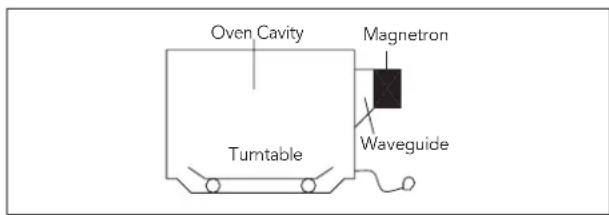
Reflection
The microwaves bounce off the metal walls and the metal door screen.
Transmission
Then they pass through the cooking containers to be absorbed by the water molecules in the food, all foods contain water to a more or lesser extent.
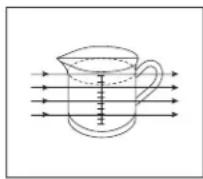
Absorption
The microwaves cause the water molecules to vibrate which causes FRICTION, i.e., HEAT. This heat then cooks the food. Microwaves are also attracted to fat and sugar particles, and foods high in these will cook more quickly. Microwaves can only penetrate to a depth of 1½-2 inches (4-5cm) and as heat spreads through the food by conduction, just as in a traditional oven, the food cooks from the outside inward.
Conversion Chart
| WEIGHT MEASUREMENTS | |
| 15 g | 1/2 oz |
| 25 g 1 oz | |
| 50 g 2 oz | |
| 100 g 4 oz | |
| 175 g6 oz | |
| 225 g 8 oz | |
| 450 g 1 lb | |
| VOLUME MEASUREMENTS | |
| 30 ml 1 fl oz | |
| 100 ml 3 fl oz | |
| 150 ml 5 fl oz ( | 14 pt) |
| 300 ml 10 fl oz ( | 12 pt) |
| 600 ml 20 fl oz (1 pt) | |
| SPOON MEASUREMENTS | |
| 1.25 ml | 14 tsp |
| 2.5 ml | 12 tsp |
| 5 ml 1 tsp | |
| 15 ml 1 tbsp | |
| FLUID MEASUREMENTS | ||
| 1 c | 8 fl oz | 240 ml |
| 1 pt | 16 fl oz (UK 20 fl oz) | 480 ml (UK 560 ml) |
| 1 q | 32 fl oz (UK 40 fl oz) | 960 ml (UK 1120 ml) |
| 1 g | 128 fl oz (UK 160 fl oz) | 3840 ml (UK 4500 ml) |
Cooking Techniques
Standing Time
Dense foods e.g., meat, jacket potatoes and cakes, require standing time (inside or outside of the oven) after cooking, to allow heat to finish conducting to cook the center completely. Wrap meat joints and jacket potatoes in aluminum foil while standing. Meat joints need approx. 10-15 minutes, jacket potatoes 5 minutes. Other foods such as plated meals, vegetables, fish, etc. require 2-5 minutes standing. After defrosting food, standing time should also be allowed. If food is not cooked after standing time, return to the oven and cook for additional time.
Moisture Content
Many fresh foods e.g., vegetables and fruit, vary in their moisture content throughout the season, particularly jacket potatoes. For this reason, cooking times may have to be adjusted. Dry ingredients e.g., rice and pasta, can dry out during storage so cooking times may differ.
Density
Porous airy foods heat more quickly than dense heavy foods.
Cling Film
Cling film helps keep the food moist and the trapped steam assists in speeding up cooking times. Pierce before cooking to allow excess steam to escape. Always take care when removing cling film from a dish as the buildup of steam will be very hot.
Shape
Even shapes cook evenly. Food cooks better by microwave when in a round container rather than square.
Spacing
Foods cook more quickly and evenly if spaced apart. NEVER pile foods on top of each other.
Starting Temperature
The colder the food, the longer it takes to heat up. Food from a fridge takes longer to reheat than food at room temperature.
Liquids
All liquids must be stirred before and during heating. Water especially must be stirred before and during heating, to avoid eruption. Do not heat liquids that have previously been boiled. DO NOT OVERHEAT.
Turning & Stirring
Some foods require stirring during cooking. Meat and poultry should be turned after half the cooking time.
Arranging
Individual foods e.g., chicken portions or chops, should be placed on a dish so that the thicker parts are toward the outside.
Quantity
Small quantities cook faster than large quantities, also small meals will reheat more quickly than large portions.
Piercing
The skin or membrane on some foods will cause steam to build up during cooking. These foods must be pierced or a strip of skin should be peeled off before cooking to allow the steam to escape. Eggs, potatoes, apples, sausages, etc., will all need to be pierced before cooking. DO NOT ATTEMPT TO BOIL EGGS IN THEIR SHELLS.
Covering
Cover foods with microwave cling film or a lid. Cover fish, vegetables, casseroles and soups. Do not cover cakes, sauces, jacket potatoes or pastry items.
Defrosting Guide
- Do not defrost covered meat. Covering might allow cooking to take place. Always remove outer wrap and tray. Use only containers that are microwave-safe.
- Begin defrosting whole poultry breast-side-down. Begin defrosting roasts fat-side-down.
- The shape of the package alters the defrosting time. Shallow rectangular shapes defrost more quickly than a deep block.
- After 1/3 of the defrost time has elapsed, check the food. You may wish to turn over, break apart, rearrange or remove thawed portions of the food.
- During defrost, the oven will prompt you to turn the food over. At this point, open oven door and check the food. Follow the techniques listed below for optimum defrost results.
Then, close oven door, press the START pad to complete defrosting.
- When defrosted, food should be cool, but softened in all areas. If still slightly icy, return to microwave oven very briefly, or let stand a few minutes. After defrosting, allow food to stand 5-60 minutes if there are any icy areas.
Poultry and fish may be placed under running cool water until defrosted.
- Turn over: Roast, ribs, whole poultry, turkey breasts, hot dogs, sausages, steaks or chops.
- Rearrange: Break apart or separate steaks, chops, hamburger patties, ground meat, chicken or seafood pieces and chunks of meat such as stew beef.
- Shield: Use small strips of aluminum foil to protect thin areas or edges of unevenly shaped foods such as chicken wings. To prevent arcing, do not allow foil to come within 1-inch of oven walls or door.
- Remove: To prevent cooking, thawed portions should be removed from the oven at this point. This may shorten defrost time for food weighing less than 3 lbs (1350 g).
Defrosting Chart (By Time Defrost)
| ITEM WEIGHT | DEFROSTING TIME | STANDING TIME | SPECIAL INSTRUCTIONS | |
| BEEF | ||||
| Minced Beef 1 lb / 450 g | 8 - 10 min. 15 - 20 min. | Break apart and remove thawed portions with fork. | ||
| Stew Meat 1 | ^1/_2 lb / 675 g 12 - | 14 min. 25 - 30 min. | Separate and rearrange once. | |
| Patties | 4 (4 oz / 110 g) | 6 - 8 min. | 15 - 20 min. | Turn over after half the time. |
| PORK | ||||
| Spareribs | 1 lb / 450 g | 6 - 8 min. | 25 - 30 min. | Separate and rearrange once. |
| Chops | 4 (5 oz / 125 g) | 6 - 8 min. | 25 - 30 min. | Separate and turn over once. |
| Minced Pork | 1 lb / 450 g | 7 - 8 min. | 15 - 20 min. | Break apart and remove thawed portions with fork. |
| POULTRY | ||||
| Whole Chicken | 21/2 lb / 1125 g | 22 - 24 min. | 45 - 90 min. | Break side down. Turn over after half the time.Shield as needed. |
| Chicken Breasts | 1 lb / 450 g | 8 - 10 min. | 15 - 30 min. | Separate and rearrange once. |
| Fryer Chicken (cut up) | 2 lb / 900 g | 17 - 19 min. | 25 - 30 min. | Separate and rearrange once. |
| Chicken Thighs | ^11/_2 lb / 675 g 12 - | 14 min. 15 - 30 min. | Separate and rearrange once. | |
| FISH & SEAFOOD | ||||
| Whole Fish | 1 lb / 450 g | 6 - 8 min. | 15 - 20 min. | Turn over after half the time.Shield as needed. |
| Fish Fillets | ^11/_2 lb / 675 g 8 - 10 min. 15 - 20 min. | Turn over after half the time.Shield as needed. | ||
| Shrimp | ^1/_2 lb / 225 g | 2 - 3 min. | 15 - 20 min. | Turn over after half the time.Shield as needed. |
Cooking
| Cooking Chart | |||
| ITEM POWER LEVEL | COOKING TIME PER LB/450G | SPECIAL INSTRUCTIONS | |
| MEAT | - Chilled meat and poultry should be removed from the refrigerator at least 30 minutes before cooking.- Always let the meat and poultry stand, covered, after cooking. | ||
| Beef Joint - Rare PL-8 6 - 8 min. | |||
| - Medium PL-8 7 - 10 min. | |||
| - Well Done PL-8 9 - 11 min. | |||
| Pork Joint PL10 9 - 12 min. | |||
| Bacon Joint | PL10 5 - 7 min. | ||
| POULTRY | |||
| Whole Chicken | PL10 4 - 9 min. | ||
| Portions of Chicken | PL-8 5 - 7 min. | ||
| Breast (boned) | PL-8 6 - 8 min. | ||
| FISH & SEAFOOD | - Brush a little oil or melted butter over the fish, or add 1-2 tbsp (15-30 ml) lemon juice, wine, stock, milk or water.- Always let the fish stand, covered, after cooking. | ||
| Fish Fillets | PL10 3 - 5 min. | ||
| Whole Mackerel, cleaned and prepared | PL10 3 - 5 min. | ||
| Whole Trout, cleaned and prepared | PL10 4 - 6 min. | ||
| Salmon Steaks | PL10 4 - 6 min. | ||
NOTE: The above times should be regarded only as a guide. Allow for differences in individual tastes and preferences.
The times may vary due to the shape, cut and composition of the food. Frozen meat, poultry and fish must be thoroughly thawed before cooking.
Reheating
- Baby food particularly needs to be checked carefully before serving to prevent burns.
- When heating pre-packaged ready-cooked foods, always follow the package instructions carefully.
- If you freeze foods which were bought from the fresh or chilled counters, remember that they should be thoroughly thawed before following the heating instructions on the package. It's worth putting a note on them so that other members of the household will remember too.
- Remember to remove metal ties and transfer food from foil containers before reheating.
- Chilled (refrigerated) food takes longer to reheat than food at room temperature (such as just-cooled food or food from the store shelves).
- All foods should be reheated using full microwave power.
Reheating Chart
| ITEM AMOUNT | REHEATING TIME | SPECIAL INSTRUCTIONS | |
| Baby Food | 4.5 oz | 20 sec. | Empty into a small serving bowl. Stir well once or twice during heating.Before serving, check the temperature carefully. |
| Baby Milk 4 fl oz / 100 ml 20 - 30 sec. Stir or shake well and pour into a sterilized bottle. | |||
| Sandwich Roll or Bun | 1 roll 20 - 30 sec. Wrap in paper towel and place on glass microwaveable rack. | ||
| Lasagna 1 serving | 10 1/2 oz / 300 g | 4 - 6 min. Place | lasagna on microwaveable plate. Cover with plastic wrap and vent. |
| Casserole 1 c 1 | 1/2 - 3 min. | Cook covered, in microwaveable casserole. Stir once halfway through cooking. | |
| 4 c 5 - 7 min. | |||
| Mashed Potatoes | 1 c | 2 - 3 min. | Cook covered, in microwaveable casserole. Stir once halfway through cooking. |
| 4 c 6 - 8 min. | |||
| Baked Beans | 1 c | 2 - 3 min. | Cook covered, in microwaveable casserole. Stir once halfway through cooking. |
| Ravioli or Pasta in Sauce | 1 c 2 - 3 min. Cook covered, in microwaveable casserole. Stir once halfway through cooking. | ||
| 4 c 6 - 9 min. | |||
Vegetable
Use a suitable glass Pyrex® bowl with lid. Add 2-3 tbsp (30-45 ml) cold water for every 1/2 lb (250 g) unless another water quantity is recommended - see chart. Cook covered for the minimum time - see chart.
Continue cooking to get the result you prefer. Stir once during and once after cooking. Add salt, herbs or butter after cooking. Cover during a standing time of 3 minutes.
Hint: Cut the fresh vegetables into evenly sized pieces. The smaller they are cut, the more quickly they will cook.
All vegetables should be cooked using full microwave power.
Cooking chart for fresh vegetables
| VEGETABLES WEIGHT TIME SPECIAL INSTRUCTIONS | |||
| Broccoli | 1/2 lb / 250 g 3 - 5 min. | Prepare evenly sized florets. Arrange the stems to the center. | |
| 1 lb / 500 g 6 - 8 min. | |||
| Brussels Sprouts | 1/2 lb / 250 g 3 - 5 min. | Add 4-5 tbsp (60-75 ml) water. | |
| Carrots | 1/2 lb / 250 g 3 - 5 min. | Cut carrots into evenly sized slices. | |
| Cauliflower | 1/2 lb / 250 g 3 - 5 min. | Prepare evenly sized florets. Cut big florets into halves.Arrange stems to the center. | |
| 1 lb / 500 g 6 - 8 min. | |||
| Zucchini | 1/2 lb / 250 g | 3 - 4 min. | Cut zucchini into slices. Add 2 tbsp (30 ml) water or a knob of butter.Cook until just tender. |
| Eggplant | 1/2 lb / 250 g 3 - 4 min. | Cut eggplant into small slices and sprinkle with 1 tbsp lemon juice. | |
| Leeks | 1/2 lb / 250 g 3 - 4 min. | Cut leeks into thick slices. | |
| Mushrooms | 0.3 lb / 125 g | 2 - 3 min. | Prepare small whole or sliced mushrooms. Do not add any water.Sprinkle with lemon juice. Spice with salt and pepper. Drain before serving. |
| 1/2 lb / 250 g 3 - 4 min. | |||
| Onions | 1/2 lb / 250 g 2 - 3 min. | Cut onions into slices or halves. Add only 1 tbsp (15 ml) water. | |
| Pepper | 1/2 lb / 250 g 2 - 4 min. | Cut pepper into small slices. | |
| Potatoes | 1/2 lb / 250 g | 4 - 5 min. | Weigh the peeled potatoes and cut them into similarly sized halves or quarters. |
| 1 lb / 500 g 6 - 8 min. | |||
| Turnip Cabbage | 1/2 lb / 250 g 4 - 6 min. | Cut turnip cabbage into small cubes. | |
Cooking chart for frozen vegetables
| ITEM WEIGHT TIME SPECIAL INSTRUCTIONS | |||
| Spinach | 0.3 lb / 125 g | 2 - 3 min. | Add 1 tbsp (15 ml) water. |
| Broccoli | 12 lb / 250 g | 4 - 5 min. | Add 2 tbsp (30 ml) water. |
| Peas | 12 lb / 250 g | 4 - 5 min. | Add 1 tbsp (15 ml) water. |
| Green Beans | 12 lb / 250 g | 4 - 5 12 min. | Add 2 tbsp (30 ml) water. |
| Mixed Vegetables (carrots/peas/corn) | 12 lb / 250 g | 4 - 5 min. | Add 1 tbsp (15 ml) water. |
| Mixed Vegetables (Chinese style) | 12 lb / 250 g | 4 - 6 min. | Add 1 tbsp (15 ml) water. |
Recipes
TOMATO & ORANGE SOUP
| 1 oz (25 g) butter |
| 1 medium onion, chopped |
| 1 large carrot & 1 large potato, chopped 1^3/_4 lb (800 g) canned, chopped tomatoes |
| 1 small orange (juice and grated rind) 1^1/_2 pt (900 ml) hot vegetable stocksalt and pepper to taste |
-
Melt the butter in a large bowl on PL10 for 30 seconds.
-
Add the onion, carrot and potato and cook on PL10 for 4 minutes. Stir halfway through cooking.
-
Add the tomatoes, orange juice, orange rind and stock. Mix thoroughly. Season with salt and pepper to taste. Cover the bowl and cook on PL10 for 15 minutes. Stir 2-3 times during cooking, until the vegetables are tender.
-
Blend and serve immediately.
FRENCH ONION SOUP
| 1 large onion, sliced |
| 1 tbsp (15 ml) corn oil |
| 2 oz (50 g) plain flour |
| 2 pt (1.2 liters) hot meat or vegetable stock salt and pepper to taste |
| 2 tbsp (30 ml) parsley, chopped |
| 4 thick slices French bread |
| 2 oz (50 g) cheese, grated |
-
Place the onion and oil a bowl, mix well and cook on PL10 for 1 minute.
-
Stir in the flour to make a paste and gradually add stock. Season and add the parsley.
-
Cover the bowl and cook on PL-7 for 16 minutes.
-
Pour the soup into serving bowls, submerge bread and sprinkle generously with cheese.
-
Cook on PL-7 for 2 minutes, until the cheese has melted.
STIR FRIED VEGETABLES
| 1 | tbsp (15 ml) sunflower oil |
| 2 | tbsp (30 ml) soy sauce |
| 1 | tbsp (15 ml) sherry |
| 1 | in (2.5 cm) ginger root, peeled and finely grated |
| 2 | medium carrots, cut into fine strips |
| 4 | oz (100 g) button mushrooms, chopped |
| 2 | oz (50 g) bean sprouts |
| 4 | oz (100 g) snow pea |
| 1 | red pepper, seeded and thinly sliced |
| 4 | spring onions, chopped |
| 4 | oz (100 g) canned water chestnuts, sliced 1/4 head of Chinese leaves, thinly slice |
-
Place the oil, soy sauce, sherry, ginger, garlic and carrots in a large bowl, mix thoroughly.
-
Cover and cook on PL10 for 3-5 minutes, stirring once.
-
Add the button mushrooms, bean sprouts, snow pea, red pepper, spring onions, water chestnuts and Chinese leaves. Mix thoroughly.
-
Cook on PL10 for 5-6 minutes, until the vegetables are tender. Stir 2-3 times during cooking.
Stir fried vegetables are ideally served with meat or fish.
Recipes
HONEYED CHICKEN
| 4 | boneless chicken breasts |
| 2 | tbsp (30 ml) clear honey |
| 1 | tbsp (15 ml) whole grain mustard 1/2 tsp (2.5 ml) dried tarragon |
| 1 | tbsp (15 ml) tomato puree 1/4 pt (150 ml) chicken stock |
- Place the chicken breasts in a casserole dish.
- Mix all remaining ingredients together and pour over the chicken. Salt and pepper to taste.
- Cook on PL10 for 13-14 minutes. Rearrange and coat the chicken with the sauce twice during cooking.
BLUE CHEESE & CHIVE JACKETS
| 2 | baking potatoes, approx. 9 oz (250 g) each |
| 2 | oz (50 g) butter |
| 4 | oz (100 g) blue cheese, chopped |
| 1 | tbsp (15 ml) fresh chives, chopped |
| 2 | oz (50g) mushrooms, sliced |
| salt and pepper to taste |
- Prick each potato in several places. Cook on PL10 for 7-9 minutes. Halve and scoop the flesh into a bowl, add the butter, cheese, chives, mushrooms, salt and pepper, mix thoroughly.
- Pile mixture into the potato skins and place in a flan dish.
- Cook on PL-5 for 10 minutes.
WHITE SAUCE
| 1 oz (25 g) butter |
| 1 oz (25 g) plain flour |
| 12 pt (300 ml) milk |
| salt and pepper to taste |
- Place the butter in a bowl and cook on PL10 for 30 seconds, until melted.
- Stir in the flour and whisk in the milk. Cook on PL10 for 3-4 minutes, stirring every 2 minutes until thick and smooth. Season with salt and pepper to taste.
STRAWBERRY JAM
| 11/2 lb (675 g) strawberries, hulled |
| 3 tbsp (45 ml) lemon juice |
| 11/2 lb (675 g) caster sugar |
- Place strawberries and lemon juice in a very large bowl, heat on PL10 for 4 minutes, or until the fruit has softened. Add sugar, mix well, uncovered.
- Cook on PL-7 for 20-25 minutes, until setting point* is reached, stir every 4-5 minutes.
- Pour into hot, clean jars. Cover, seal and label.
* Setting Point: To determine setting point, place 1 tsp (5 ml) jam onto chilled saucer. Allow to stand for 1 minute. Move surface of jam gently with your finger, if the surface wrinkles setting point has been reached.
Recipes
| PLAIN MICROWAVE CAKE | |
| 4 oz (100 g) margarine | 1. Line the base of 8" (20.4 cm) cake dish with grease-proof paper. |
| 4 oz (100 g) sugar | 2. Cream the margarine and sugar together until light and fluffy. Beat in the eggs and fold in the sifted flour alternately with the milk. |
| 1 egg | 3. Pour into prepared container. Cook on PL10 for 4-5 minutes, until a skewer comes out cleanly. |
| 4 oz (100 g) self rising flour, sifted | 4. Leave the cake to stand for 5 minutes before turning out. |
| 2-3 tbsp (30-45 ml) milk |
OMELETTE
| ^1/_2 oz (15 g) butter4 eggs6 tbsp (90 ml) milksalt and pepper | 1. Whisk together eggs and milk.2. Place butter in 10" (26 cm) flan dish. Cook on PL10 for 30 seconds, until melted. Coat the dish with the melted butter.3. Pour omelette mixture into flan dish. Cook on PL10 for 2 minutes. Whisk mixture and cook again on PL10 for 1 minute. |
SCRAMBLED EGG
| ^1/_2 oz (15 g) butter2 eggs2 tbsp (30 ml) milksalt and pepper | 1. Melt the butter in a bowl on PL10 for 30 seconds.2. Add the eggs, milk and seasoning and mix well.3. Cook on PL10 for 3 minutes, stirring every 30 seconds. |
SAVORY MINCE
| 1 small onion, diced | 1. Place onion, garlic and oil in casserole, and cook on PL10 for 2 minutes or until soft. |
| 1 clove garlic, crushed | 2. Place all other ingredients in casserole. Stir well. |
| 1 tsp (5 ml) oil | 3. Cover and cook on PL10 for 5 minutes then PL-5 for 8-13 minutes or until the meat is cooked. |
| 7 oz (200 g) can chopped tomatoes | |
| 1 tbsp (15 ml) tomato puree | |
| 1 tsp (5 ml) mixed herbs | |
| 8 oz (225 g) minced beef | |
| salt and pepper |
| Warranty Class | Description of warranty coverage |
| 0 | Doors, handles, glass, product frames, racking, interior and exterior surfaces are covered by a limited 30-day parts-only warranty for cosmetic defects proven to have originated from the factory. It is the responsibility of the owner to inspect the product and report any such claims within this 30 day period. |
| 1 1 year parts and labor | |
| 2 2 years parts and labor | |
| 5 | 5 years parts and labor on the following sealed system components only: compressor, condenser, evaporator, dryer and connective tubing |
| 5P | 5 years parts only on the following sealed system components only: compressor, condenser evaporator, dryer and connective tubing |
| 12p | 12 years parts only on the following sealed system components only: compressor, condenser evaporator, dryer and connective tubing |
Register your product online
| Product Class | Applicable warranties | ||
| F4 Series | F6 Series | F7 Series | |
| Drop-in Cooktops 0,2 | |||
| Built-in Ovens (including Speed and Steam), Coffee Machines and Warming Drawers | 0,2 | ||
| Range Tops 0,2 | |||
| Microwaves 0,1 0,2 | |||
| Freestanding Ranges | 0,2 | ||
| Dishwashers (Cleaning) | 0,1 0,2 | ||
| Refrigeration and Wine Coolers | 0,1 | 0,2,5p | 0,2,5,12p |
| Ventilation Hoods | 0,2 | ||
TERMS APPLICABLE TO THESE WARRANTIES
All applicable warranties for each class run concurrently. In accordance to the applicable warranty class, Fulgor Milano warranty covers all parts and / or labor to repair or replace, under normal residential use, any part of the product proving to be defective in material or workmanship as a result of the original manufacturing process.
These warranties is valid only in the contiguous states of the U.S.A. including the District of Columbia and Alaska and the country of Canada. The warranties apply to the original purchaser only and are non-transferable. All service provided by Fulgor Milano under the applicable warranty must be performed by a Fulgor Milano authorized servicer unless otherwise specified in writing by Fulgor Milano. Service will be provided during the regular business hours of each specific region.
These warranties apply only to products purchased from an authorized dealer through an approved distribution chain and which are installed for normal residential use and do not apply to commercial use or use on yachts. These warranties only cover service performed at the location of product installation and will not cover costs associated with repairing off-site unless expressly authorized by Fulgor Milano nor does it cover the travel costs associated with providing service to remote locations. Remote locations are defined as being outside of a 50 mile (80 kilometre) radius from any authorized 'brick and mortar' dealer. These warranties do not cover any parts or labor needed to correct any defect caused by negligence, transport, delivery, improper voltage or accident or improper use, maintenance, installation, service or repair, including but not limited to improper removal and reinstallation of any component of the product (ie. removing handles to fit through doors) prior to or during product delivery / installation. The remedies described herein are the only ones which Fulgor Milano will provide, either under these warranties or under any warranty arising by operation of law. Fulgor Milano will not be responsible for content loss due to spoilage, freezing or burning nor for consequential damages to surrounding cabinetry, construction materials or finishing materials such as but not limited to flooring. Fulgor Milano will not
For proof of warranty, please retain the original purchase invoice and the delivery slip.
To obtain service under these warranties you must:
- Contact Fulgor-Milano Authorized Service for North America:
Online at https://www.fulgor-milano.com/us/en/assistance By toll free number at 1-855-4-FULGOR (1-855-438-5467)
- Provide a copy of your original sales receipt along with model number and serial number information for the product.
- Provide Fulgor Milano reasonable opportunity to investigate the claim before the Product or any component of the Product has been modified or removed.
be responsible for any consequential or incidental damages arising from the breach of these warranties or any other warranties, whether express, implied or statutory.
The warranty will be valid and effective only upon presentation of the document stating the purchase date of the appliance, and more specifically of the relevant invoice, proof of purchase or equivalent document showing the name of the seller, the delivery date and the identification data of the appliance (such as; model number and serial number). In the case of new product being included in the purchase of new residential construction; these warranties apply to the original resident of the location containing the Fulgor Milano product and warranty coverage will begin on the date of occupancy of the residence (proof of occupancy required) to a maximum additional six months from the date of delivery of the product by the development company from the distributor or dealer. This extension does not apply to the Class 0 cosmetic warranty.
These warranties are only valid where the difference between the purchase date and the production date of the product is less than eighteen months. Any product which has been warehoused for more than this period will only be covered by Fulgor Milano's B-Stock warranty.
During the warranty period Fulgor Milano reserves the right to evaluate the opportunity to repair the appliance or, at their discretion, offer to replace it with a Fulgor Milano product of equivalent features and functionality but cannot guarantee that the exact model will still be available. Fulgor Milano reserves the right to revise these warranties at any time.
Some states do not allow the exclusion or limitation of incidental or consequential damages so the above limitation or exclusion may not apply to you. These warranties give you specific legal rights and you may also have other rights which vary from state to state.
*Replacement light bulbs / LEDs are only covered under the terms of the Class 0, 30 day cosmetic warranty.
TABLE DES MATIÈRES
PAGE
natural_image
Technical line drawing of a server rack unit with internal compartments and mounting brackets (no text or symbols)Lampe du four
natural_image
Technical line drawing of a microwave oven with open doors and ventilation ducts (no text or symbols)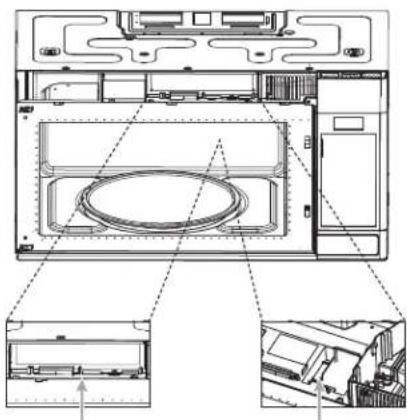
natural_image
Technical line drawing of a microwave oven internal structure with no visible text or symbolsnatural_image
Line drawing of a microwave oven with doors and vent, showing internal components and airflow direction (no text or labels)FILTRE AU CHARBON GRILLE D'AÉRATION
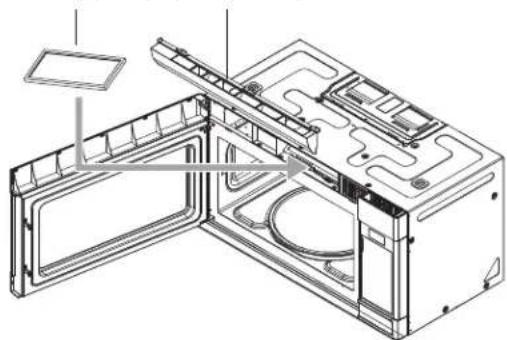
natural_image
Technical line drawing of a microwave oven with open door and internal compartments (no text or labels)YOUR LIFE | OUR PASSION
www.fulgor-milano.com/us
TINSKB286MRR1
Jun 22, 2022